AWS Database Blog
How Channel Corporation modernized their architecture with Amazon DynamoDB, Part 3: User and Badge
This post is co-written with Haibin Lee and Jinyoung Park from Channel Corporation.
In Part 1 of this series, you learned about Channel’s motivation and how we handled transactions on Amazon DynamoDB. In Part 2, you learned about how Channel used two types of DynamoDB streams to implement event-driven architecture.
In this post, through the Badge example, we share our experience of solving the problem by separating the DynamoDB User table, which had been playing an all-purpose role, into role-specific tables.
Background: Badge
At Channel Talk, a Badge is a visual indicator that shows a user they have unread messages or new notifications.

Figure 1: A Badge in Channel Talk that indicates unread messages
Channel Talk has three types of users.
- User: A general customer who leaves an inquiry through Channel Talk (the customer of the customer company).
- Team Member: An employee at the customer company in charge of consultations.
- Account: The customer company account that subscribes to Channel Talk (1 Account : N Team Members).
Among these, the User table on DynamoDB held about 1.68 billion items and a total size of approximately 1.8 TB. However, as Badge update requests began to spike multiple times a day, the entire User service started to be adversely affected. When the User table experiences latency, the “Boot” feature, which links customer information to Channel Talk when a customer visits a website or app where Channel Talk is installed, stops working. A non-functioning Boot means Channel Talk cannot be used on the customer company’s homepage.
“We only updated the Badge count. Why is the entire User service getting impacted?”
User table throttling: two root causes
First, the User table was responsible for many roles, including managing profiles, tags, badges, status, and more. Badge updates, however, spike sharply. When sending one-time messages (OTM) to many users at once, traffic surges. For example, a single OTM to 10,000 users triggers 10,000 simultaneous writes. A Badge update modifies only the Badge-related attributes (alert, unread) of a single item. In DynamoDB, Write Capacity Units (WCU) are consumed per item, so even when only some attributes are modified, WCU is consumed based on the entire item size. As introduced in Part 1, when sending a message at Channel Talk, the chat session information (ChatSession) and Badge are processed transactionally through the TransactWriteItems API. A single Badge update updates two items, which consumes 4 WCUs (2 items × 2 WCUs per transactional write). But the real problem is transaction conflicts. In DynamoDB transactions, if a conflict is detected at commit time the entire transaction is rolled back and our client retries. When message sending happens concurrently, conflicts occur frequently and each retry consumes additional WCU. Because the User table used provisioned capacity mode, this retry amplification quickly exhausted the table’s provisioned WCU budget. Once the provisioned throughput was exceeded, DynamoDB throttled all write requests to the table. Not just Badge updates but also normal User updates (profile changes, tag changes, and so on) were rejected with ProvisionedThroughputExceededException.
Second, at Channel Talk there are read patterns, such as “look up all users belonging to a specific channel,” that differ from the base table’s partition key. For such cases, Channel Talk uses Global Secondary Indexes (GSIs), and all three GSIs on the User table use channelId as their partition key. When you write to a DynamoDB table, any GSIs on that table are updated asynchronously. If you send an OTM to 50,000 users in Channel A, 50,000 Badge updates occur at the same time. These updates concentrate on a single “Channel A” partition across all three GSIs. Even with well-distributed base table access, these GSI hot spots could trigger GSI back pressure, which in turn throttles writes to the User table.
The following tables illustrate the User table and its GSI structure with sample data.
| Partition Key (userId) | profile | badge (alert/unread) | tags | status | channelId |
| user-001 | {name: Alice, email: …} | {alert: 3, unread: 5} | [vip, new] | active | channel-A |
| user-002 | {name: Bob, email: …} | {alert: 0, unread: 12} | [returning] | active | channel-A |
| user-003 | {name: Carol, email: …} | {alert: 1, unread: 2} | [vip] | inactive | channel-A |
GSI example (Partition Key: channelId)
| Partition Key (channelId) | Sort Key (userId) | status |
| channel-A | user-001 | active |
| channel-A | user-002 | active |
| channel-A | user-003 | inactive |
Item separation vs. table separation
We considered two approaches to solve these problems: item separation and table separation. With item separation, you organize the User table using a composite key as follows.
- Partition Key: userId.
- Sort Key.
- PROFILE → user profile information.
- BADGE → Badge-related information.
This approach has the advantage of co-locating all user-related data under a single partition key, which simplifies per-user queries and keeps the data model compact. However, item separation could not fundamentally solve either root cause. Because all items still reside in the same base table, the GSIs remain attached to that table and propagate updates for every write, regardless of sort key. Transaction conflicts also persist, since TransactWriteItems still operates within the same table and contention on the same partition key remains. Therefore, we decided to extract the Badge functionality from the existing User table and create a new UserBadge table, as shown in the following tables.
User Table (after separation)
| Partition Key (userId) | profile | tags | status | channelId |
| user-001 | {name: Alice, email: …} | [vip, new] | active | channel-A |
| user-002 | {name: Bob, email: …} | [returning] | active | channel-A |
| user-003 | {name: Carol, email: …} | [vip] | inactive | channel-A |
UserBadge Table (after separation)
| Partition Key (userId) | alert | unread | version |
| user-001 | 3 | 5 | 12 |
| user-002 | 0 | 12 | 8 |
| user-003 | 1 | 2 | 5 |
We chose table separation for three technical reasons, each aligned with a broader principle of separating concerns in distributed systems:
- Write access patterns are completely different.
- The User table’s typical write traffic was distributed relatively evenly, whereas Badge updates spike at the moment a message is sent or an OTM occurs. In other words, traffic was almost nonexistent most of the time, but at certain event moments a large volume of write requests would surge in a short window, a spike-shaped pattern. We judged there was no reason to handle write patterns of such fundamentally different characters in a single table.
- GSI requirements are different.
- The User table was using three GSIs because lookups by
channelIdwere frequent. In contrast, Badge data was always queried only byuserId, and no other query patterns existed. We judged that by separating Badge data into a UserBadge table, we could create a structure that needs no GSI, fundamentally eliminating the GSI back pressure problem.
- The User table was using three GSIs because lookups by
- Independent capacity management.
- Badge traffic had relatively low predictability. When sending OTMs, WCU sometimes spiked more than 10× over normal levels. By separating the table, we believed we could optimize cost in a way that fits each access pattern. We could apply on-demand capacity mode to the UserBadge table while applying provisioned capacity mode with auto scaling to the User table.
This approach aligns with a well-established principle in distributed systems: separating responsibilities by function to reduce complexity and failure propagation. Amazon Simple Storage Service (Amazon S3), for instance, is composed of over 300 microservices, each with a focused responsibility. Our DynamoDB table separation follows the same philosophy. By giving Badge its own table, we isolate its unique traffic patterns and eliminate cross-contamination with the User table’s operations.
How do we migrate online?
Previously, we mainly used an approach where the application performed dual writes to the two tables, while a separate application performed a Scan operation on the existing table and transformed the data into the new table. At Channel Talk, we call this approach java-migration.
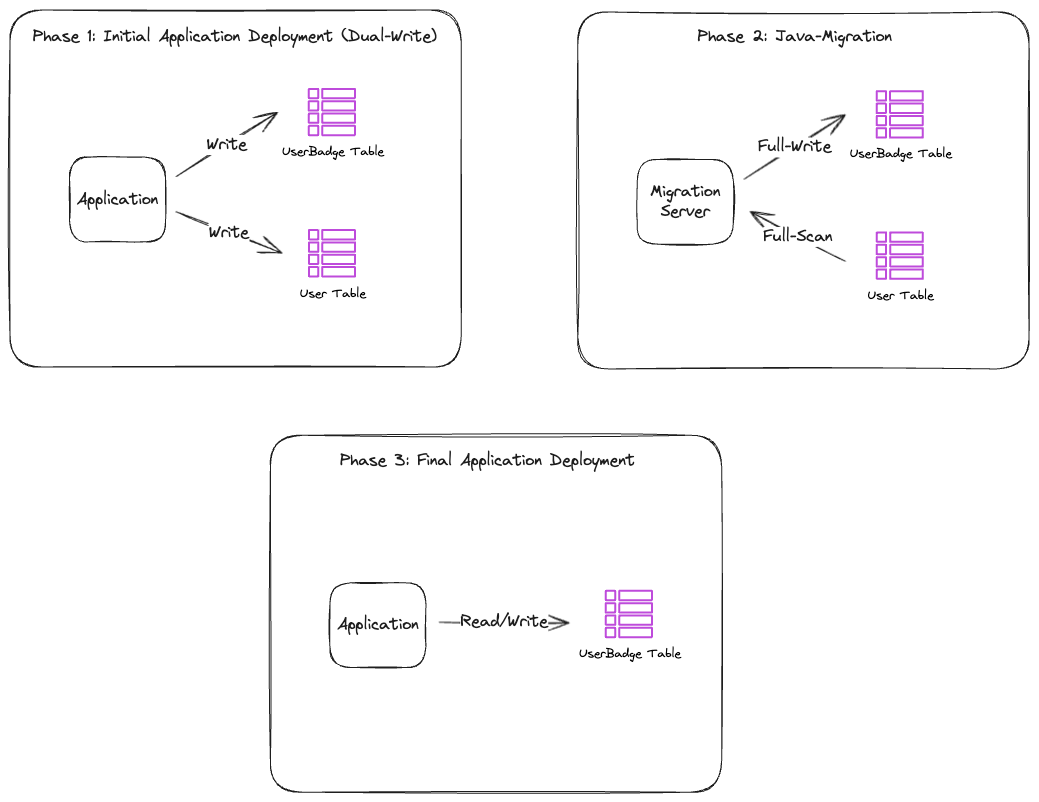
Figure 2: The java-migration approach, using application dual-writes and a full-table scan
Performing a Scan of the User table consumes a large amount of RCU, so scanning quickly could trigger read throttling on the running User table. Therefore we considered scanning safely at around 500 RCU. Reading 1.8 TB of data with Eventually Consistent Reads in 4 KB units required about 230 million RCU. At 500 RCU, the calculation came out to 128 hours, or about 5.3 days. On top of that, if a problem occurred midway, the cycle of a single iteration was 5.3 days, which was too long.
This was why, in this migration, we adopted DynamoDB Export to S3 and Import from S3 features, and AWS Glue service for the first time inside Channel Talk. DynamoDB Export to S3 and Import from S3 are features that export a full or incremental snapshot to S3 and create a new table from the S3 data. The key point was that they consume no RCU/WCU from the table at all, so they have no impact on the production table’s performance. Also, among the various AWS ETL options, we chose Glue because it is serverless and has the lowest operational cost.
Designing the online migration pipeline
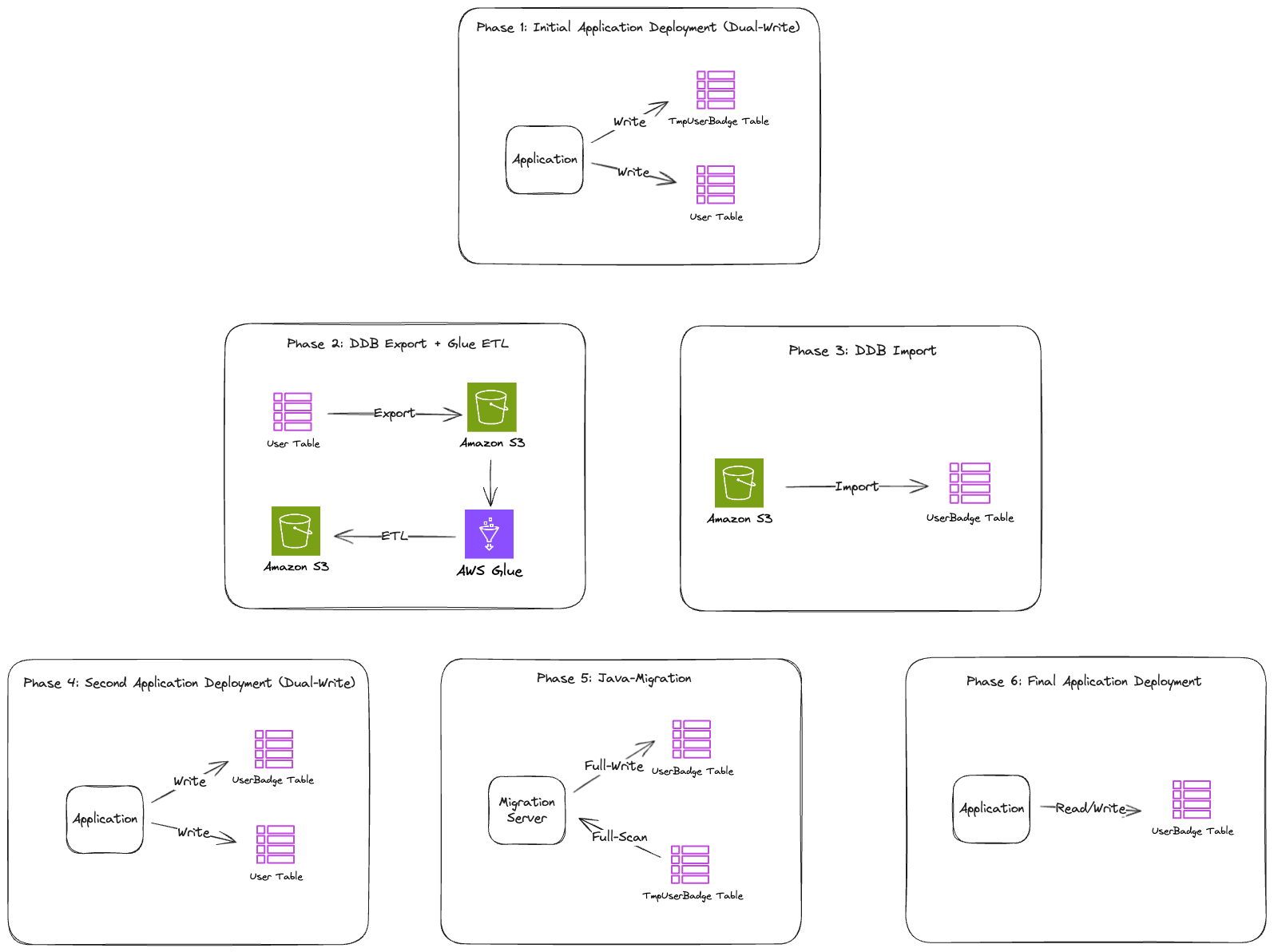
Figure 3: The online migration pipeline, from Export to S3 through Glue ETL and Import from S3
- (1st application deployment) When the
User#Badgefield changes, write logic that simultaneously writes to TmpUserBadge. - (1st migration) Export the existing User table to S3 with DynamoDB Export, and use AWS Glue ETL to transform it into data to be loaded into the UserBadge table.
- (2nd migration) Based on the
User#Badgedata uploaded to S3, use the DynamoDB Import feature from S3 to create the UserBadge table. - (2nd application deployment) When the
User#Badgefield changes, write logic that simultaneously writes to UserBadge. - (3rd migration) Full Scan the records that were in TmpUserBadge and apply the changes to UserBadge.
- (3rd application deployment) Modify the logic that was looking at the User table to look at the UserBadge table (reads and writes).
Even while Export → ETL → Import is in progress, Badge change traffic continues to occur in the production environment, and we needed a buffer that could absorb these changes without any loss. For this reason, we chose a structure where we created a separate temporary table called TmpUserBadge to temporarily store the real-time Badge changes that occur during the migration.
Synchronizing existing/new tables using transactional dual-write
Because the service keeps running during the migration, the User table’s Badge data changes in real time. If we migrate without dual-write, changes made after the migration begins are not reflected in the UserBadge table, causing data inconsistency. In the end we chose transactional dual-write between the existing and new tables. Once the migration is complete, the application’s Badge write logic must be changed to operate against the UserBadge table rather than the User table. By applying synchronous dual-write, we can include and verify the new table write logic in the application code in advance during the migration phase. After the migration is complete, the cutover is possible simply by removing the existing-table write. In other words, the decisive reason was that the dual-write phase could be used not merely as a temporary synchronization mechanism but as a rehearsal phase for transitioning to the final structure.
Results of the new migration pipeline
Infrastructure cost (USD)
| Item |
AS-IS (java-migration) |
TO-BE (Export/Glue/Import) |
Difference |
| DDB scan/write | $366.71 | $0 | -$366.71 |
| EC2 | $27.42 | $0 | -$27.42 |
| DDB Export | $0 | $183.55 | $183.55 |
| Glue ETL | $0 | $19.93 | $19.93 |
| DDB Import | $0 | $41.93 | $41.93 |
| TmpUserBadge table merge | $0 | $8.33 | $8.33 |
| Total | $394.13 | $253.74 | -$140.40 (36%) |
Time
| Step |
AS-IS (java-migration) |
TO-BE (Export/Glue/Import) |
| Base table scan and write | 5.3 days (128 hours) | – |
| DDB Export | – | 30 minutes |
| Glue ETL transform | – | 30 minutes |
| DDB Import | – | 4 hours 30 minutes |
| TmpUserBadge table merge | – | ~30 minutes |
| Total time | 5.3 days (128 hours) | 5.5–6 hours |
| Reduction | – | 96% |
Stability
- Impact on production table WCU/RCU: Zero.
- Throttling risk: None.
- Human error: Minimized.
Why we can now withstand 100× message traffic and beyond
After separating the UserBadge table, the reliability of the User table improved significantly. Even if message-sending traffic exceeds 100×, we now have a structure where the UserBadge table can absorb the traffic spike through on-demand scaling.
The original User table had many modification paths besides Badge, such as Profile, Type, and tags. Because Badge update transactions touched the same items, conflicts occurred up to 10,000 times per minute, as shown in the following graph.
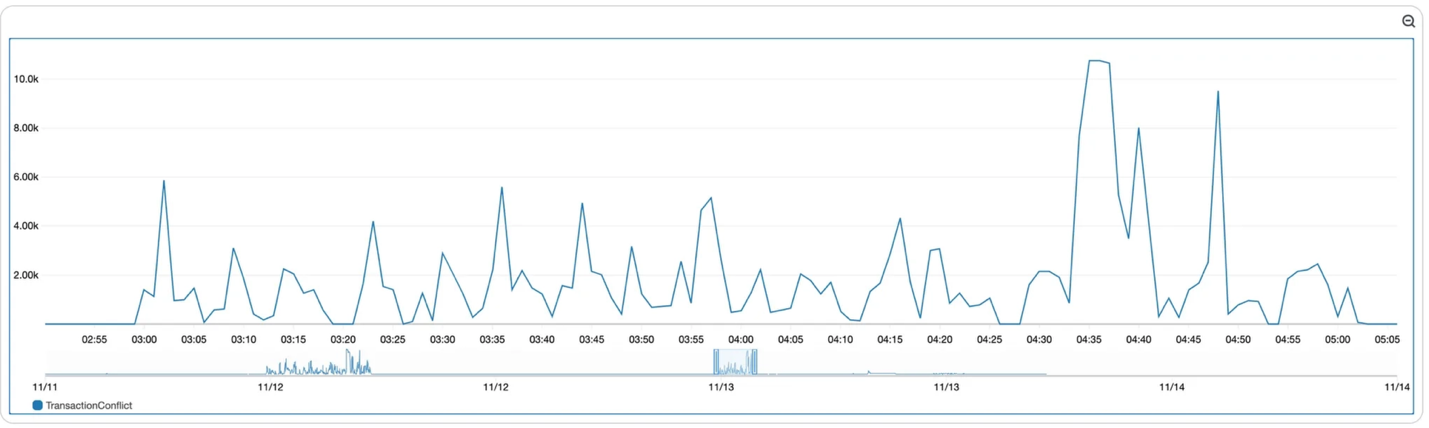
Figure 4: Transaction conflicts on the User table before separation, peaking around 10,000 per minute
By separating into UserBadge, the Badge-related transaction logic disappeared from the User table, and it became free from conflicts. The following graph shows that conflicts between Badge updates within the UserBadge table still exist but have decreased to around 80 per minute.
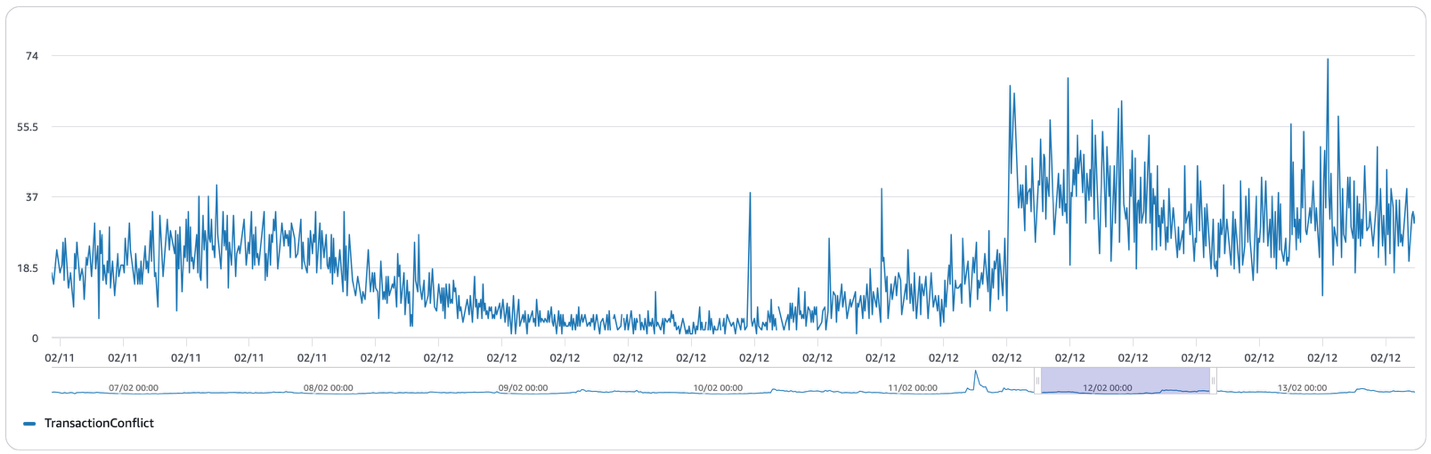
Figure 5: Conflicts on the UserBadge table after separation, around 80 per minute
In addition, the User table’s WCU usage was also reduced by about 25% compared to before, and because the UserBadge table was newly added, the actual net savings amount to roughly 12–13%. But more important than the usage savings is the fact that Badge traffic no longer affects the User table. Even if Badge updates increase 100× because of message-sending traffic, we can respond immediately by raising the provisioned capacity of the UserBadge table.
Also, throttling caused by Badge updates no longer occurs on either the User table or the UserBadge table. Because the UserBadge table has no GSI, GSI back pressure does not occur even when Badge updates concentrate on a single channel.
Putting it all together: through this separation of the User and UserBadge tables, we achieved an overall reduction in WCU usage, resolved the throttling problem, and made the two different features able to operate independently without any load propagation between them.
Future improvements
UserProfile separation
The User table has a Profile attribute that customer companies manage directly. Because it is a high-flexibility attribute, item size varies widely. Even if you update a subset of the item’s attributes, UpdateItem will still consume the full amount of provisioned throughput (the larger of the “before” and “after” item sizes). As with UserBadge, we plan to separate it into its own table.
Resolving the root cause of GSI back pressure
Back pressure caused by Badge has been resolved, but the User table’s GSIs still use channelId as the partition key. If a large volume of User updates occurs on a single channel, the same problem can recur.
We are preparing a structure that separates the GSI into its own table and replicates asynchronously through Amazon Kinesis Data Streams. This way, even if there is a delay on the table that plays the role of the GSI, the base table is not affected.
Switching from batch-query-based deletion to event-based deletion
To delete expired UserChats, a daily batch job had been querying a GSI. Beyond the cost of maintaining the GSI, there was also a delay since deletions were processed only at batch run time. Using DynamoDB TTL and Amazon Kinesis Data Streams, we plan to switch to event-based processing at the moment of TTL expiration. Afterward, we can also remove the batch-query GSI.
Removing the Badge transaction
ChatBadge and TeamMemberBadge updates are bundled through TransactWriteItems. Optimistic concurrency control is not suited for situations with frequent conflicts, and every time a conflict occurs, WCU is wasted. We are reviewing an approach that implements a distributed lock using the DynamoDB Lock Client.
Conclusion
As we close this blog post, let’s wrap up by organizing a few things we realized while doing this migration.
Write patterns can determine table design
Until now, while using DynamoDB, we mainly used patterns that use the Sort Key and queried through item separation rather than separating tables. But the User table’s problem was not reads but writes. In the end, we came to understand that in DynamoDB table design, write patterns must be analyzed alongside read patterns.
The familiar way is not always the best
At first, a custom Java application that performs full-scan migration (internally called java-migration) looked safer. It was an approach the team had used many times, and it seemed there would be fewer unexpected variables. But in front of the scale of 1.6 billion records, the familiar way was not the best. AWS managed services consumed no RCU/WCU, minimized human error, and saved both time and cost. Of course, writing the Glue ETL script took some time, but once we built it, we can reuse it whenever a similar migration is needed in the future. Looking at it from a team perspective, it was a long-term win.
Numbers persuade
Concretely calculating the cost and time of the existing and new approaches was a great help. “Let’s learn a new service” was much slower at building team consensus than “We can cut 128 hours down to 5.5 hours and save $140.” Quantitative evidence improved both the speed and the quality of decision-making.