AWS Database Blog
Introducing Amazon Aurora powers for Kiro
Successful development demands lightning-fast transformation from concept to production-ready applications and their supporting databases. Vibe coding has emerged as a game changer. You can rapidly transform your ideas into functional applications through intuitive, flow-state development. Kiro helps enhance this experience by introducing spec-driven development that bridges the gap between concept and execution. You can define your infrastructure specifications through Kiro and watch as their ideas materialize into production-ready code. As part of Kiro’s expanding capabilities, we explore how a new innovation, Kiro powers, can help you use Amazon Aurora best practices built into your development workflow, automatically implementing configurations and optimizations that make sure your database layer is production-ready from day one.
Developer productivity challenges
As a developer building modern applications, you might need to navigate numerous database configuration options and advanced features specific to your use cases. Setting up new database environments or implementing specific optimizations requires understanding key concepts, such as connection pooling strategies, replica usage patterns, and feature selection. The process of implementing these best practices becomes particularly important when multiple stakeholders are involved in different aspects of your database configuration:
- Database administrators must architect data models and implement schema best practices while facilitating optimal performance
- Network specialists need to configure network access patterns, and may have to facilitate other security best practices
- Solution architects must make critical decisions about cluster deployment type (serverless or provisioned), disaster recovery configurations, and backup strategies
Amazon Aurora offers advanced features for building open source relational databases at scale. While setting up an Aurora database cluster, making sure you follow the best practices involves familiarizing yourself with the architecture of Aurora and best practices guide. For teams wanting to quickly set up production-ready databases, researching some of these best practices through documentation and other guides might take dedicated time and experimentation to get the configuration exactly right. Kiro helps accelerate this process through its new capability, Kiro powers. It provides comprehensive lifecycle coverage by packaging best practices into your development workflow alleviating the need for constant context switching between documentation and integrated development environment (IDE), as we describe next.
What is Kiro powers
We launched Kiro, an AI-powered development environment that helps developers build and ship production-ready applications faster through natural language interactions with AI agents. Kiro powers builds on that momentum by providing a repository of curated and prepackaged capabilities validated by Kiro partners. These powers are available using one-click addition in Kiro to accelerate specialized software development and deployment use cases. Think of powers as expertise modules that give the Kiro agent instant knowledge of specific technologies and frameworks to effectively navigate through a multitude of development scenarios.
Each power typically combines three components working together:
- Model Context Protocol (MCP) servers provide direct connectivity between your Kiro agent and development tools, enabling real-time interactions with services
- Steering files contain framework-specific best practices curated by the technology experts, making sure your agent recommends solutions aligned with current industry standards
- Optional validation hooks can help automatically verify your code against these best practices, providing immediate feedback on compliance and optimization opportunities
What makes powers transformative is their dynamic nature. Rather than overwhelming Kiro agent with all possible context, powers load precisely the guidance needed for your current task. This focused approach maintains Kiro agent’s performance while delivering expert-level assistance. For example, when a development team adopts a new technology stack, a Kiro power can remove weeks of documentation review and trial-and-error based learning. Enterprise teams can use powers to facilitate consistent implementation standards across projects, and startups can use them to build production-ready applications faster.
Aurora powers for Kiro
The Amazon Aurora PostgreSQL-Compatible Edition power packages the Aurora PostgreSQL MCP server with targeted database development guidance, giving your Kiro agent instant expertise in Aurora PostgreSQL-Compatible operations and schema design. Developers can use this power to build Aurora PostgreSQL backed applications faster through Kiro agent-assisted development while maintaining AWS best practices throughout the development lifecycle.
For data plane operations, the power enables your Kiro agent to execute SQL queries, manage database objects, and monitor query performance with expert guidance. You can create and modify tables, manage schemas, and optimize database configurations through natural language interactions. The power also supports control plane operations, so you can create Aurora PostgreSQL clusters and configure cluster parameters and AWS Identity and Access Management (IAM) authentication, following AWS best practices.
When working with Aurora PostgreSQL, the power dynamically loads relevant guidance based on your current task. Some potential use cases include:
- A gaming company building a new player statistics system can use the power to design and implement their schema through straightforward natural language prompts, completing in minutes what typically takes days
- An ecommerce retailer can use the power to optimize their query patterns during their holiday season preparation, with the Kiro agent automatically suggesting and implementing performance improvements
- Development teams at a financial services company can use the power to maintain consistent database practices across multiple projects, facilitating standardization through automated guidance rather than manual reviews
Whether creating new Aurora clusters, designing schemas, or optimizing queries, the Kiro power for Aurora PostgreSQL makes sure your Kiro agent receives precisely the context needed for the specific task at hand. By integrating this power into your development workflow, you’re adding database expertise that’s available on demand, following current AWS best practices and helping build production-ready database implementations from day one.
Getting started with Aurora powers
You can get started with Kiro powers through a single click in the Kiro IDE. The power’s components (MCP servers, steering files, and hooks) become available in your Kiro IDE, with visual indicators showing active powers in your editor.
Before starting a new Aurora project in Kiro, such as creating a new application, follow these steps to enable Kiro powers for Aurora:
- Select the sidebar in Kiro IDE and then click on the Powers
- In the RECOMMENDED panel, scroll down to Amazon Aurora PostgreSQL
- Choose Amazon Aurora PostgreSQL and then choose Install
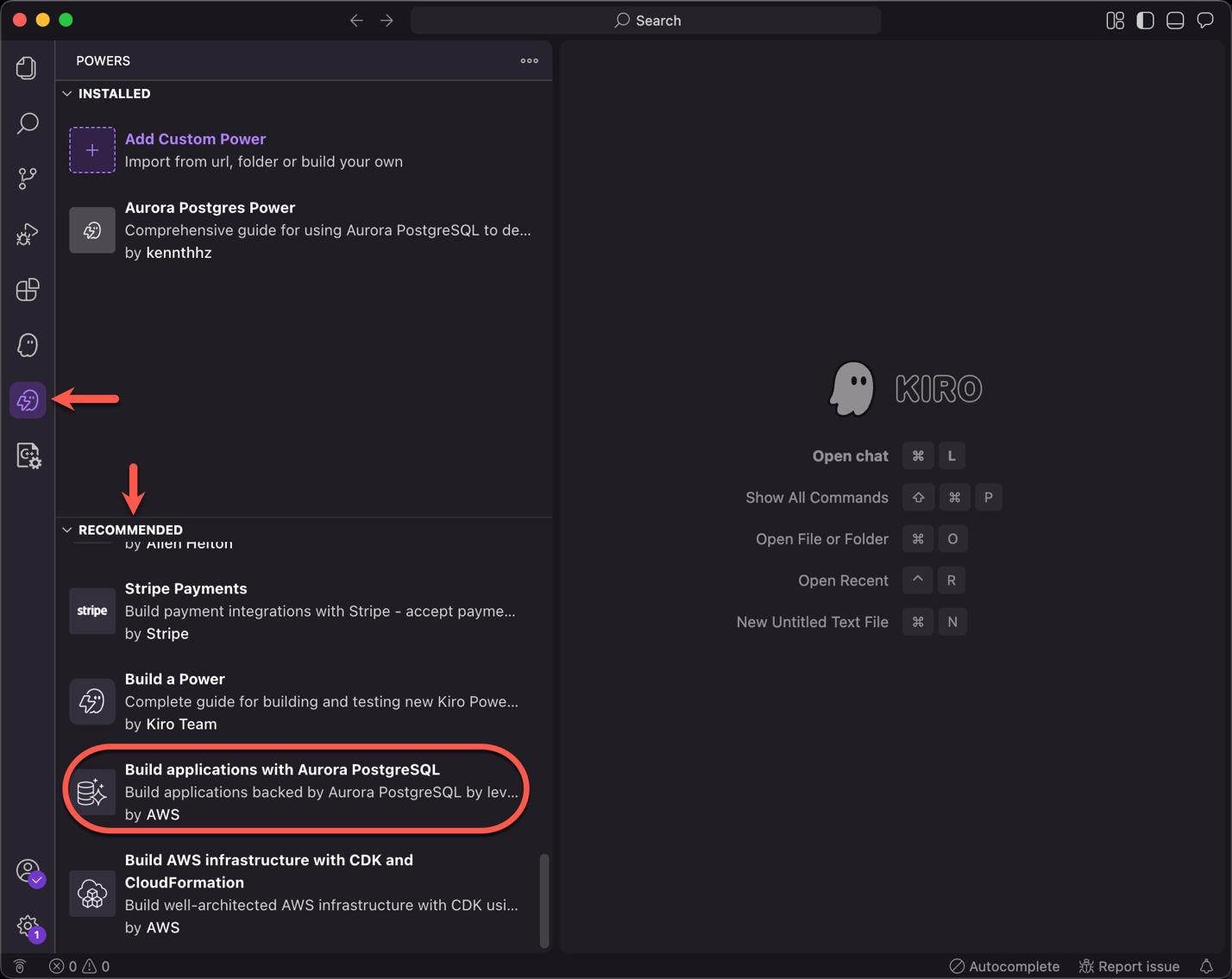
Aurora PostgreSQL power can create and manage Aurora PostgreSQL clusters in the AWS Regions. To learn more about Aurora PostgreSQL MCP Server, visit our documentation.
Alternatively, you can also install Kiro powers by visiting the Kiro Powers marketplace. Under Browse powers, find Amazon Aurora power and choose Add to Kiro +.
Aurora PostgreSQL power in action
The following demo video shows how you can use a few lines of prompt to build a full-stack meal planner app using Kiro Aurora powers. The first section demonstrates the prompt processing in Kiro, showing how it automatically sets up the application layers and Aurora PostgreSQL database with sample data, then generates a URL for the frontend access. The React frontend of the Meal Planner application features three tabs: Recipes, Meal Plan, and Shopping List. Through the Aurora query editor in the Amazon RDS console, we can query various tables in the schema, specifically the meals and meal_plan tables. Finally, we see how changes made in the frontend application are reflected in the backend Aurora PostgreSQL database.
In addition to configuring the Kiro power for Aurora as called out in the previous section, you also need to place the tech.md file in the the .kiro/steering folder in your workspace, as shown in the demo video.
Conclusion
In this post, we showed how you can turn your ideas into full-stack applications with Kiro powers for Aurora. Use the new Kiro power for Aurora to build applications with Aurora, using security and configuration best practices.
Experience Kiro powers yourself by starting to build using Kiro today!