AWS Database Blog
Migrate Oracle Materialized Views with AWS DMS and Fast Refresh
Migrating Oracle Materialized Views to AWS using Change Data Capture (CDC) and Fast Refresh presents a unique challenge. When you replicate a materialized view (MV) using AWS Database Migration Service (AWS DMS) with CDC, DMS tries to replicate changes to the Materialized View data, but the results might not be ideal. Specifically, if the Materialized View is completely refreshed, DMS replicates individual deletes for all the rows, followed by individual inserts for all the rows. This is a resource-intensive exercise that performs poorly for materialized views with large numbers of rows. Because standard materialized views lack incremental change tracking, DMS treats every refresh as a complete data reload rather than capturing only the rows that changed since the last cycle.
This creates significant overhead on the source database and the DMS replication instance, especially for views built on large datasets with 20 million or more rows. Organizations relying on Oracle MVs for reporting and analytics face performance degradation, increased costs, and unacceptable replication lag during cloud migrations. The full-reload behavior means that even a minor data change triggers a complete re-transfer of the entire Materialized View, making near real-time replication impractical at scale.
In this post, you learn how to configure Oracle Materialized Views with the Fast Refresh option and materialized view logs to enable efficient, incremental CDC replication using AWS DMS. We walk through the end-to-end process, covering base table setup, DMS task creation, CDC validation, and performance tuning. In testing with a 20-million-row dataset, this approach reduced MV refresh replication time by over 90%. It cut CDC latency from minutes to seconds while eliminating full-reload overhead on the DMS replication instance.
Solution overview
The solution combines Oracle’s native Fast Refresh mechanism with AWS DMS CDC to replicate only incremental changes from Materialized Views. Instead of recomputing the entire view on each refresh cycle, DMS captures only the delta changes processed by the scheduled MV refresh job. This approach is supported for both the LogMiner and Binary Reader Oracle source endpoint modes.
Architecture and flow
The following list illustrates the end-to-end workflow for this solution:
- Create base tables with primary keys and sample data.
- Create materialized view logs on all base tables to track row-level changes.
- Create the materialized view with
REFRESH FASToption using traditional (non-ANSI) join syntax. - Schedule incremental MV refresh using Oracle
DBMS_SCHEDULER. - Create an AWS DMS replication instance and configure source/target endpoints.
- Configure a DMS task with Full Load + CDC migration type and table mapping rules.
- Validate CDC by updating base tables and confirming only incremental changes replicate.
Prerequisites
Before you begin, verify that your environment meets the following requirements. These are mandatory for Fast Refresh to function correctly with AWS DMS CDC.
Source database requirements
Your Oracle source database must support materialized view Fast Refresh. You can verify this by confirming that the COMPATIBLE parameter is set to 9.2.0 or higher. The materialized view must be created with the Fast Refresh option. Without this, DMS cannot perform incremental replication and will default to full data reloads.
Materialized View Log requirement
You must create materialized view logs on all base tables referenced in the MV. These logs track row-level changes (inserts, updates, deletes) that the Fast Refresh mechanism uses to apply only delta changes. The WITH ROWID clause and INCLUDING NEW VALUES option are required.
Refresh scheduler requirement
You must configure a trigger or scheduler job (using DBMS_SCHEDULER) to refresh the MV at a defined interval. This reduces the overhead of delta changes and makes the change data easier to process for replication.
Join syntax requirement
Important: Fast Refresh does not support ANSI join syntax. The MV SELECT statement must be written in traditional Oracle join format. Using ANSI syntax will cause the Fast Refresh to fail.
Prerequisites summary
| Requirement | Details | Mandatory |
| Fast Refresh option | MV must use REFRESH FAST clause |
Yes |
| MV Logs on all base tables | WITH ROWID INCLUDING NEW VALUES. Only supported for Log refresh option. |
Yes |
DBMS_SCHEDULER job |
Triggers incremental refresh at defined intervals | Yes |
| Traditional Oracle join syntax | No ANSI JOIN syntax in MV SELECT statement |
Yes |
Oracle COMPATIBLE >= 9.2.0 |
Source database version requirement | Yes |
Technical implementation
Complete the following steps to implement the solution.
Create base tables
Begin by establishing the base tables that will serve as the foundation for the Materialized View. The customer table contains 20 million rows to simulate a production-scale dataset.
Create Materialized View Logs for Fast Refresh
For Fast Refresh, create materialized view logs on all base tables.
These logs use the WITH ROWID clause to track changes at the row level, and INCLUDING NEW VALUES to capture both before and after images of modified rows.
Create the Materialized View
Next, define the customer_order_summary materialized view with REFRESH FAST. Note the use of traditional Oracle join syntax (not ANSI) and the inclusion of ROWID columns from all base tables. Both are required for Fast Refresh to function correctly.
Verify the row count: After the MV is created, confirm the expected row count:
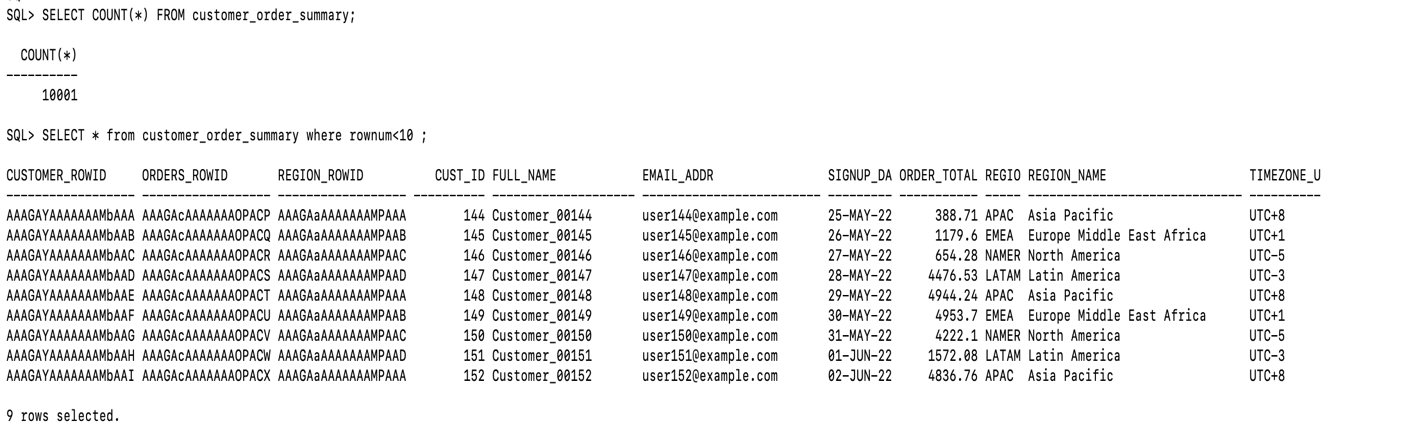
Figure 1: Row count and sample rows returned by the materialized view
Note: The MV performs a full initial population when first created. Subsequent refreshes via the scheduled job are incremental only.
Schedule Materialized View refresh
Create an Oracle job named MV_ORDER_SUMMARY_REFRESH that refreshes the MV incrementally every hour. You can adjust the frequency to every minute or any other interval based on your replication latency requirements.
An incremental refresh processes only the changes recorded in the materialized view logs on the underlying base tables. It does not recompute the entire view. This significantly reduces refresh time and computational cost, especially for large datasets and frequent updates.
Configure AWS DMS task (Full Load + CDC)
To replicate the materialized view using AWS DMS, complete the following steps to set up a Full Load + CDC migration task:
- Create a replication instance — Choose an instance class appropriate for your data volume.
- Create source endpoint — Configure the Oracle source endpoint pointing to your Oracle database (on-premises or Amazon Relational Database Service (Amazon RDS)). Specify the schema containing the MV.
- Create target endpoint — Configure the target endpoint (Amazon RDS, Amazon Aurora, Amazon Simple Storage Service (Amazon S3), or Amazon Redshift).
- Create a migration task — Select Full Load + CDC as the migration type. This performs an initial bulk load of all existing MV data, then switches to ongoing CDC replication.
Validate CDC replication
To confirm that CDC is working incrementally and not performing full reloads, update a row in a base table:
After the next scheduled MV refresh runs, check the DMS task statistics. You should observe the following:
- Inserts/Updates applied: A small number that reflects only the changed rows, not a full reload.
- Full load rows: 0, which confirms that no full reload was triggered during the CDC phase.
- CDC latency: Minimal, based on your configured refresh interval.

Figure 2: AWS DMS table statistics showing incremental inserts, deletes, and updates applied during CDC

Figure 3: AWS DMS table statistics confirming the full load and total row counts
Enhance performance of Materialized View refresh
For production workloads with large datasets, the following three optimizations significantly improve Fast Refresh performance. These are especially important when your MV contains millions of rows and you require sub-minute refresh intervals.
Optimization 1: Create indexes on ROWID columns
The Fast Refresh mechanism uses ROWID values to locate changed rows in the MV. Creating indexes on the ROWID columns allows Oracle to perform index lookups instead of full table scans during refresh, significantly reducing refresh execution time.
Optimization 2: Gather and lock MV log statistics
Gather statistics on the materialized view logs while they are empty, then lock them. This prevents the Oracle optimizer from choosing inefficient execution plans when the logs temporarily accumulate rows between refreshes.
Optimization 3: Set _mv_refresh_use_stats parameter
Set the _mv_refresh_use_stats parameter to true to force Oracle to use the locked statistics during MV refresh operations, ensuring consistent and predictable performance.
| Environment | Command / Setting |
| On-premises Oracle | ALTER SYSTEM SET "_mv_refresh_use_stats" = TRUE; |
| Amazon RDS for Oracle | Set _mv_refresh_use_stats = true in the RDS parameter group. This is a dynamic parameter and does not require a database restart. |
Clean up resources
To avoid ongoing charges, remove the resources you created during this walkthrough.
Oracle database cleanup
Run the following SQL statements to drop the scheduled job, Materialized View, MV logs, and base tables:
AWS Management Console cleanup
On the AWS Management Console, complete the following steps:
- Stop and delete the DMS migration task.
- Delete the source and target DMS endpoints.
- Delete the DMS replication instance.
Conclusion
In this post, you learned how to configure Oracle Materialized Views with Fast Refresh and scheduled incremental refresh jobs for efficient AWS DMS CDC replication. This approach eliminates the costly overhead of full data reloads, achieving near real-time migration of complex multi-table joined views to AWS.
| Benefit | Description |
| Reduced source overhead | Only delta changes are processed, with no full MV reloads during CDC |
| Near real-time replication | Configurable refresh intervals from hourly to sub-minute |
| Scalable for large datasets | Validated with 20M+ row datasets |
| Minimal DMS resource usage | Smaller CDC payloads reduce replication instance workload |
| No additional software required | Uses native Oracle features: Fast Refresh, MV logs, DBMS_SCHEDULER |
Next steps
- Test this approach with your own Materialized Views and data volumes.
- Explore sub-minute refresh intervals for lower-latency requirements.
- Monitor DMS task performance using Amazon CloudWatch metrics.
For more information, see the AWS DMS documentation and Oracle materialized view documentation.
Your feedback is greatly appreciated. Should you have any questions or recommendations, share them in the comments section.