AWS Database Blog
Oracle Machine Learning for SQL on Amazon RDS: Build machine learning models entirely in SQL
In this post, we show you how to build and deploy a credit risk scoring model entirely in SQL using Oracle Machine Learning for SQL (OML4SQL) on Amazon Relational Database Service (Amazon RDS) for Oracle. OML4SQL was previously known as Oracle Data Mining. It includes an AutoML feature (automatic algorithm selection) that evaluates multiple algorithms and picks the best one for your data. This approach requires no data movement, no external machine learning (ML) platforms, and no additional pipelines.
Organizations that run Oracle on Amazon RDS often extract data to external ML platforms for model training, which creates data redundancy, adds latency, and introduces operational complexity. OML4SQL eliminates this by training and scoring models inside the database where the data already lives.
We walk through the complete workflow on both Oracle Database 26ai (Container Database architecture) and Oracle Database 19c (non-CDB architecture) using Amazon RDS for Oracle. For secure access, we use a private Amazon Virtual Private Cloud (Amazon VPC) with Amazon Elastic Compute Cloud (Amazon EC2) and AWS Systems Manager Session Manager.
In this post, you will:
- Set up Oracle RDS instances in a private VPC with no public internet access.
- Configure database users with the grants that Amazon RDS requires for OML4SQL.
- Train an AutoML classification model using the DBMS_DATA_MINING package.
- Score new data using standard SQL prediction functions.
Solution overview
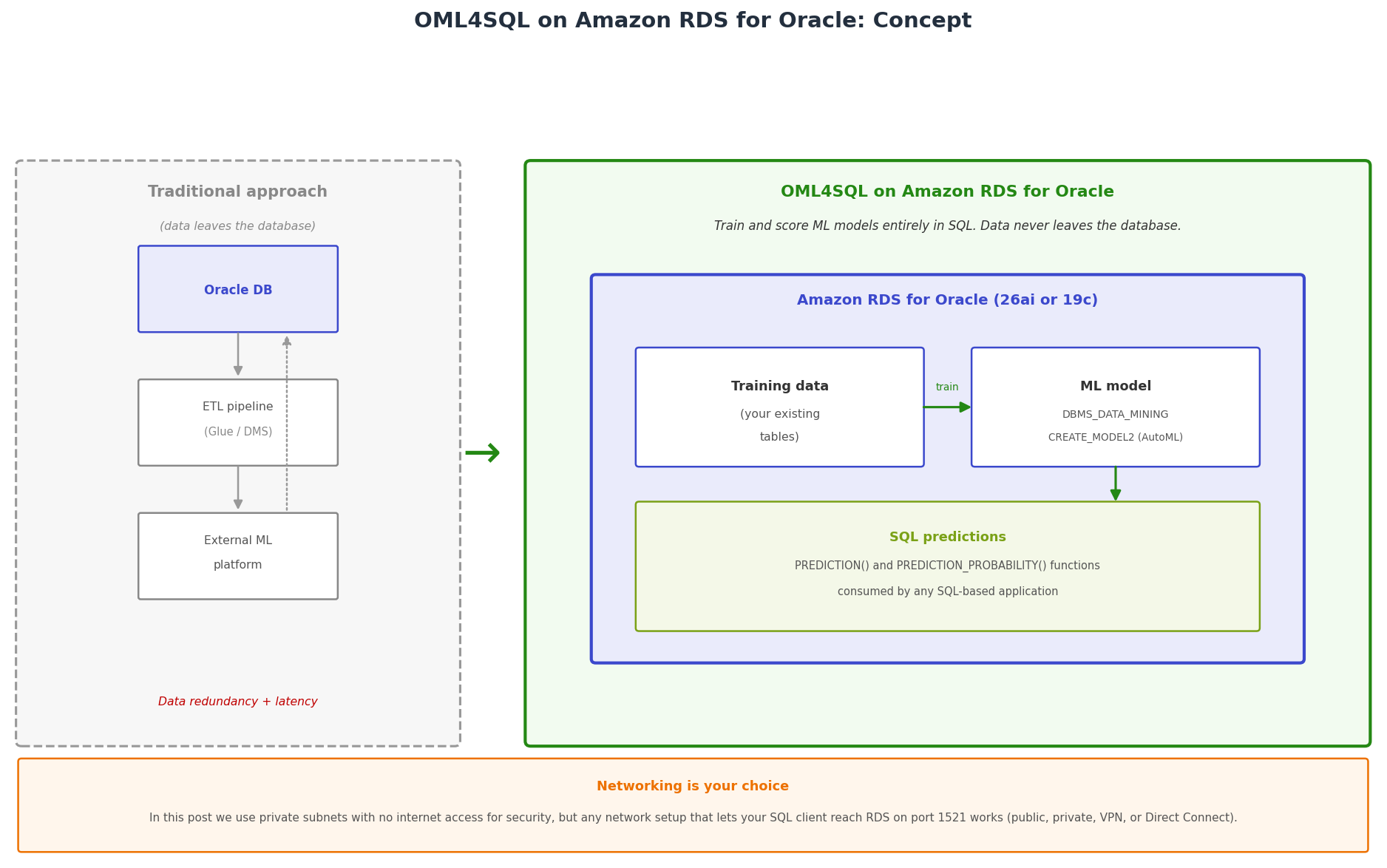
In-database machine learning with OML4SQL on Amazon RDS for Oracle compared to the traditional external ML approach
OML4SQL operates directly on data stored in the database. There is no data export, no CSV files, and no external notebooks. The engine reads your training data through a SQL query, builds the model in memory, and persists it in the data dictionary. At a high level, the workflow is:
- You pass a SQL query that defines your training data. Oracle reads this data directly with no intermediate staging.
- When you set PREP_AUTO to ON, Oracle automatically normalizes numerical columns, encodes categorical variables, and handles missing values.
- When you omit the algorithm name (AutoML behavior), Oracle evaluates multiple classification algorithms and selects the best performer for your data. You can also explicitly specify an algorithm such as Random Forest, Naive Bayes, Decision Tree, Support Vector Machine, Generalized Linear Model, or Neural Network.
- Oracle stores the trained model as a database object. You query it using the PREDICTION() and PREDICTION_PROBABILITY() functions directly in SQL. Any application that can run a SELECT statement can consume predictions.
Key concepts
Classification is a type of machine learning task. The model learns to assign a category (such as “will default” or “will not default”) to new data based on patterns in historical data.
AutoML (Automated Machine Learning) is the process of automatically selecting the best algorithm and configuration for your data without manual experimentation. In OML4SQL, you trigger AutoML by omitting the ALGO_NAME setting when calling CREATE_MODEL2.
A training dataset is the historical data the model learns from. Each row includes both the input features (like credit score and income) and the known outcome (like whether the customer defaulted).
DBMS_DATA_MINING is the PL/SQL package that provides the OML4SQL API for creating, managing, and scoring machine learning models.
PREP_AUTO (Automatic Data Preparation) is an Oracle setting that tells the engine to automatically normalize numbers, encode text categories, and handle missing values before training.
Differences between Oracle Database 26ai and 19c on RDS
The machine learning API itself is identical across both versions: the same DBMS_DATA_MINING package, the same CREATE_MODEL2 procedure, and the same scoring functions. The differences are architectural.
Oracle Database 26ai on RDS uses the Container Database (CDB) architecture. The RDS engine is oracle-ee-cdb, and your data lives in a Pluggable Database (PDB) named ORCL. When you connect as the admin user, you run ALTER SESSION SET CONTAINER = ORCL before creating users or objects in the PDB.
Oracle Database 19c on RDS uses the traditional non-CDB architecture. The engine is oracle-ee, and you connect directly to the database with no container switching needed.
Note: When using AutoML (omitting ALGO_NAME), Oracle selects from its internal candidate pool. You can also explicitly specify any supported algorithm, including Random Forest, by setting ALGO_NAME in the settings list. Random Forest is supported on both Oracle Database 26ai and Oracle Database 19c when explicitly specified.
Prerequisites
Before you start, you need the following:
- An AWS account with permissions to create and manage Amazon RDS for Oracle instances.
- A SQL client that can connect to the Oracle RDS instance on port 1521. This can be Oracle SQL*Plus on an EC2 instance, Oracle SQL Developer on your local machine, or any other Oracle-compatible client. The connection method (VPN, AWS Direct Connect, Systems Manager Session Manager, or SSH tunneling) depends on your network setup.
- Basic familiarity with SQL and PL/SQL.
Edition and version requirements
OML4SQL is available out of the box on Amazon RDS for Oracle. You do not need to enable any option group settings, modify parameter groups, or install additional components. Availability depends on your Oracle version and edition:
- On Oracle Database 26ai, OML4SQL works on Enterprise Edition (oracle-ee-cdb). Oracle Database 26ai is not available in Standard Edition 2 on Amazon RDS.
- On Oracle Database 19c, OML4SQL works only on Enterprise Edition (oracle-ee). It is not available on 19c Standard Edition 2 (oracle-se2).
Note: Both Oracle Database 26ai and Oracle Database 19c Enterprise Edition require the Bring Your Own License (BYOL) model on Amazon RDS, meaning you must have valid Oracle Database Enterprise Edition licenses. For Oracle Database 21c (which is approaching end of support on July 31, 2027), OML4SQL also works on Standard Edition 2 with License Included pricing.
For more details, see Oracle licensing on Amazon RDS.
Set up the infrastructure
For this walkthrough, the RDS instances have no exposure to the public internet. The instances sit in private subnets with a route table that contains only local routes and an Amazon Simple Storage Service (Amazon S3) VPC endpoint. There is no internet gateway route.
Complete the following high-level steps:
- Create two private subnets in your VPC in different Availability Zones (required for the RDS subnet group).
- Create a route table with no internet gateway route and associate it with those subnets.
- Create a security group for RDS that allows port 1521 only from your SQL client.
- Create an RDS subnet group using the two private subnets.
- Launch the Oracle RDS instance with PubliclyAccessible set to false.
Create the Oracle Database 26ai RDS instance
The following command creates an Oracle Database 26ai Enterprise Edition instance using the CDB architecture with BYOL licensing.
The instance takes about 10 to 15 minutes to become available.
Create the Oracle Database 19c RDS instance
The following command creates an Oracle Database 19c Enterprise Edition instance using the traditional non-CDB architecture with BYOL licensing.
The engine is oracle-ee instead of oracle-ee-cdb, and the engine version points to a 19c release. Everything else stays the same.
Configure the database user
After the instance is available, connect as the admin user and create a dedicated ML user. You create a user, assign it a tablespace with sufficient quota, and grant connection and resource privileges. You then grant the CREATE MINING MODEL privilege and use the RDS admin procedure to grant EXECUTE permission on the SYS-owned DBMS_DATA_MINING package.
Oracle Database 26ai (CDB architecture)
On Oracle Database 26ai, you first switch to the Pluggable Database (PDB) named ORCL before creating the user. The following commands create a user called ML_USER under the USERS tablespace, grant the necessary permissions, and call rdsadmin.rdsadmin_util.grant_sys_object to grant EXECUTE on DBMS_DATA_MINING.
Oracle Database 19c (non-CDB architecture)
On Oracle Database 19c, you are already connected directly to the database, so skip the ALTER SESSION line. The remaining commands are identical.
Note: On Amazon RDS, you cannot directly run GRANT EXECUTE on packages owned by SYS. The rdsadmin.rdsadmin_util.grant_sys_object procedure is the supported way to do this. A direct GRANT returns ORA-01031: insufficient privileges. This applies to both Oracle Database 26ai and Oracle Database 19c.
Create the training dataset
For this walkthrough, we use a loan default prediction dataset. Each row represents a past loan applicant with their credit score, income, loan amount, employment status, and whether they defaulted. In production you would have thousands or millions of rows, but six rows is enough to demonstrate the workflow.
Connect as ML_USER and run the following. The SQL is identical on both Oracle Database 26ai and Oracle Database 19c. These commands create the LOAN_TRAINING_DATA table with five columns (four features plus one target label) and insert six sample records.
The dataset has four features: CREDIT_SCORE, INCOME, and LOAN_AMOUNT (numerical), and EMPLOYED (categorical). The target column DEFAULT_LABEL indicates whether the customer defaulted (1) or paid back the loan (0).
Train the AutoML model
The following PL/SQL block trains a classification model using OML4SQL AutoML. It sets PREP_AUTO to ON (which turns on automatic data preparation) and deliberately omits the ALGO_NAME setting, which tells Oracle to evaluate multiple algorithms and select the best performer. This code is identical on both Oracle Database 26ai and Oracle Database 19c.
No hyperparameter tuning, no cross-validation code, no train/test split logic. Oracle handles all of that internally. The model is now a database object you can query.
Check which algorithm Oracle chose
After training completes, query the data dictionary to see which algorithm Oracle selected. The following query returns the model name and the algorithm that AutoML determined was the best fit for your data.
The following is the output (identical on both Oracle Database 26ai and Oracle Database 19c):
Oracle selected Naive Bayes as the best algorithm for this dataset. With a larger dataset or different feature distributions, you might see different selections.
You can also inspect the full model settings to see what Oracle applied during training:
The following is the output:
Make predictions with SQL
After the model exists, you score new data using standard SQL. There is no deployment step, no API call, and no model server. The PREDICTION() function returns the predicted class (1 for default, 0 for no default). The PREDICTION_PROBABILITY() function returns a confidence score between 0 and 1, where values closer to 1 indicate higher confidence. A score of 0.5 means the model is uncertain, and a score of 1.0 means maximum confidence.
The following query scores a high-risk customer profile: low credit score (600), low income (40,000), relatively high loan amount (20,000), and unemployed.
The following is the output:
The model predicts this customer will default (PREDICTED_DEFAULT = 1) with 100% confidence (RISK_PROBABILITY = 1.0). In a production credit risk system, this would flag the application for additional review or automatic rejection based on your business rules.
The following query scores a low-risk customer profile: high credit score (800), high income (120,000), small loan amount (5,000), and employed.
The following is the output:
The model predicts this customer will likely pay back the loan (PREDICTED_DEFAULT = 0) with 100% confidence. This customer would pass the automated risk check.
You can also score an entire table in a single query. The following statement runs the trained model against every row in the LOAN_TRAINING_DATA table and returns a prediction and confidence score for each customer. This is how you would score thousands of loan applications at once without any loop or external processing.
In a production environment, you would run this against your pending loan applications table, your Customer Relationship Management (CRM) system records, or any other table containing customer data. The table columns must match the feature columns the model was trained on.
When to use this approach
This approach is a good fit when your data already lives in Oracle and your predictions need to be consumed by SQL-based applications. Examples include credit risk scoring during loan origination, real-time fraud flags on transactions, or customer churn scores embedded in CRM queries. Keeping the model inside the database eliminates unnecessary complexity and keeps scoring close to the source of truth.
It is less ideal if you need deep learning, computer vision, natural language processing, or if your data science team needs the flexibility of Python libraries like scikit-learn or TensorFlow. OML4SQL covers classical ML algorithms well, but it is not a replacement for a full ML platform.
Note: Oracle Database 26ai includes additional in-database inference capabilities beyond the scope of this post.
Performance considerations
Model training with CREATE_MODEL2 is CPU-intensive. The larger your dataset, the more CPU and memory Oracle consumes during training. With six rows, training completed in under a second, but with millions of rows it can take minutes to hours. Monitor your CPU utilization and memory during training, and consider scheduling it during off-peak hours to avoid impacting application workloads.
Scoring is lightweight. The PREDICTION() function adds minimal overhead to a query, typically single-digit milliseconds per row. You can score in real time within transactional queries without noticeable performance impact.
Training competes for resources with your running application. Choose an instance class that gives you enough headroom for both your normal workload and the training job, or run training during maintenance windows when application load is low.
Things to watch out for
AutoML does not give you control over which algorithm is selected. If you need a specific algorithm for regulatory or interpretability reasons (for example, a decision tree for explainability), specify ALGO_NAME explicitly in the settings list rather than relying on AutoML.
Oracle does not natively version models. To keep old models for comparison or audit purposes, use a naming convention like LOAN_MODEL_V1 and LOAN_MODEL_V2, or store metadata in a separate tracking table.
The training data query runs in the context of the model owner. Make sure ML_USER has SELECT privileges on all tables referenced in the data_query parameter.
On Oracle Database 26ai, remember to connect to the PDB (ALTER SESSION SET CONTAINER = ORCL) when working as the admin user. Otherwise you create objects in the CDB root. On Oracle Database 19c this is not an issue because there is no container architecture.
Clean up
When you are done, clean up to avoid ongoing charges. The following commands drop the model, the training table, and the ML user.
Then delete both RDS instances:
Also clean up the networking resources (subnets, security groups, route tables, and VPC endpoints) through the console or AWS CLI.
Conclusion
In this post, you learned how to build and deploy a credit risk scoring model entirely within Amazon RDS for Oracle using Oracle Machine Learning for SQL (OML4SQL). By training and scoring inside the database, you eliminate data redundancy and latency, and you avoid building separate extract, transform, and load (ETL) pipelines with services like AWS Glue or AWS Database Migration Service (AWS DMS).
If your use case is classical ML (classification, regression, or clustering) and your data already lives in Oracle on RDS, this approach removes an entire layer of infrastructure and delivers predictions at database speed. To get started, try the walkthrough in your own environment.