AWS Database Blog
Set up and troubleshoot IAM database authentication in AWS DMS
In this post, we demonstrate how to configure IAM database authentication in AWS Database Migration Service (AWS DMS). You’ll also learn the structured troubleshooting approach you follow to address the errors when configuring IAM database authentication with AWS DMS
When configuring DMS endpoint, you either provide username-password or AWS Secrets Manager secrets in your source and target endpoint to authenticate with your source or target data store. Additionally, AWS DMS supports IAM database authentication for Amazon Relational Database Service (Amazon RDS) for MySQL, Amazon RDS for MariaDB and Amazon RDS for PostgreSQL databases. You need an AWS DMS replication instance (version 3.6.1 or later), to use this feature.
Solution overview
AWS Identity and Access Management (IAM) database authentication solves these challenges of managing static database passwords and credential rotation overhead by using temporary, automatically-rotating authentication tokens instead of static passwords. This approach integrates database access with your existing IAM policies and provides centralized access management.
With IAM Database authentication, network traffic to and from the database is encrypted using Secure Socket Layer (SSL) or Transport Layer Security (TLS) and you use IAM to centrally manage access to your database resources, instead of managing access individually on each database endpoint.
Prerequisites
To follow the instructions detailed in this post, you need the following resources:
- An AWS DMS replication instance with version 3.6.1 or higher.
- RDS for MySQL or RDS for PostgreSQL.
Note: This solution also works with Amazon Aurora MySQL-Compatible Edition and Amazon Aurora PostgreSQL-Compatible Edition.
Limitations when using IAM authentication with AWS DMS
Before implementing this solution, you should be aware of some important limitations
- Change Data Capture (CDC) is not supported when configuring Amazon RDS for PostgreSQL and Amazon Aurora PostgreSQL-Compatible Edition as source or target endpoint with IAM authentication. CDC is supported when using Amazon RDS for MySQL and Amazon Aurora MySQL-Compatible Edition as source and/or target endpoints with IAM authentication enabled.
- IAM DB authentication requires compute resources on the database instance. You must have between 300 and 1000 MiB extra memory on your database for reliable connectivity.
- CloudWatch and CloudTrail don’t log IAM authentication. These services do not track
generate-db-auth-tokenAPI calls that authorize the IAM role to enable database connection. - There are a few other limitations which are specific to IAM database authentication in RDS, verify that you aren’t hitting any of those limitations.
Configure AWS DMS endpoint with IAM authentication
In the following steps, you create a AWS DMS task which is using Amazon RDS for MySQL as source and RDS for PostgreSQL as target. Both source and target endpoints are using IAM authentication. You’ll complete the following steps to configure both the AWS DMS endpoints with IAM authentication:
- Run the following AWS CLI command to confirm that IAM authentication is enabled on your RDS Instance.
For Aurora clusters, you can use the following CLI command:
If IAM DB authentication is disabled, enable it on your RDS instance. IAM authentication for PostgreSQL database instances requires
rds.force_sslparameter to be set to 1. - Create an IAM database user in Amazon RDS for MySQL or Amazon RDS for PostgreSQL needed for IAM DB authentication. Steps 2-8 focus on configuring the RDS MySQL as source endpoint for DMS. Step 9 will guide you to repeat these steps for the PostgreSQL target endpoint.
- Create an IAM policy with following permissions.
In the preceding permissions, replace the following,
YOUR_REGIONis the AWS region where your RDS instance.
YOUR_ACCOUNT_IDis AWS account number where your RDS instance is configured.
YOUR_DBI_RESOURCE_IDis the resource ID for the database instance. To find the database instance resource ID, choose your instance from RDS console and select Configuration tab. The Resource ID is available in the Configuration section.
Alternatively, you use the AWS CLI to list the identifiers and resource IDs for all of your database instance in the current AWS Region, as shown following.YOUR_DB_USER_NAMEis the name of the IAM database account created in step 2. - Create an IAM role for AWS DMS service and attach the policy created in step 3 to this IAM role. Confirm that the trust policy of the role is similar to the following:
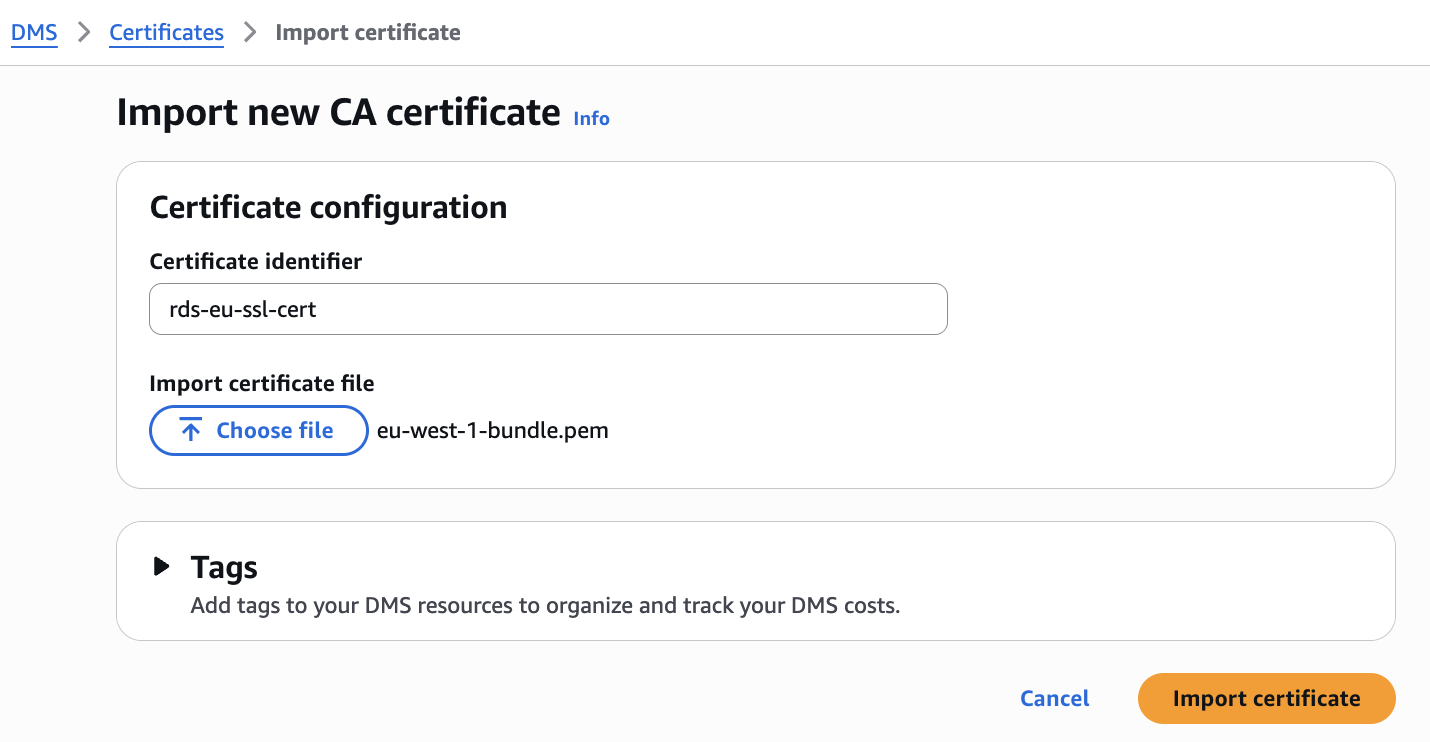
- By default network traffic between AWS DMS and source or target endpoint is encrypted with SSL/TLS when using IAM DB authentication. To configure SSL connection with AWS DMS endpoint, you need to import the SSL/TLS certificate to AWS DMS. You can download the certificate bundles for RDS.AWS provides two types of certificate bundles for RDS: a global bundle that works across all regions, and regional bundles specific to individual regions like eu-west-1-bundle.pem. Choose the global bundle for multi-region deployments or the regional bundle for single-region setups. You can download these certificate bundles from the RDS documentation, then import it to AWS DMS.
- Open the AWS DMS console, choose Endpoints in the Migrate and Replicate section and create a new endpoint. During the endpoint configuration, navigate to Access to endpoint database section and select IAM authentication. Choose the Source engine as MySQL or PostgreSQL, depending on when you are creating endpoint for RDS for MySQL or RDS for PostgreSQL
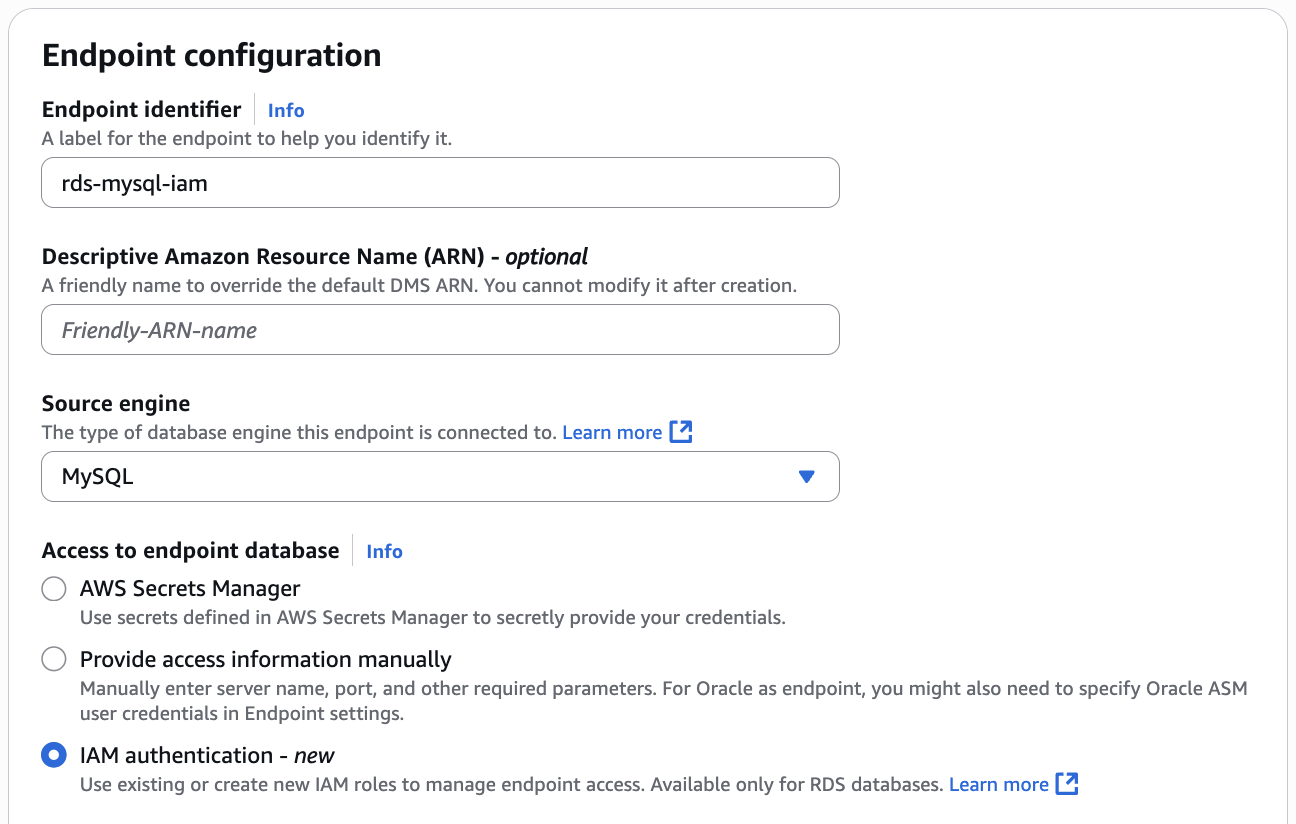
- In the IAM role for RDS database authentication drop down menu, select the IAM role created in step 4. For Secure Socket Layer (SSL) mode choose the supported SSL mode and select the Certificate Authority (CA) certificate imported in step 5. Validate the details provided and create the endpoint.
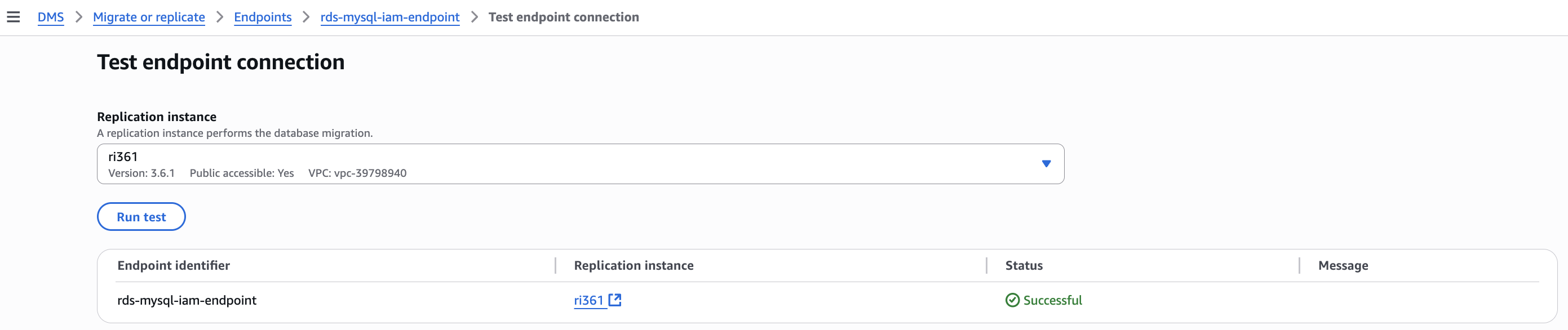
- Once the endpoint creation is complete, test the endpoint connection.
- Repeat the steps 2-8 to create target endpoint for RDS for PostgreSQL database.
- Once the test connection to both the endpoints are successful, you can create the AWS DMS task as needed for your migration.
If you encounter issues during setup, use the following structured approach to identify and resolve problems.
Troubleshooting endpoint connectivity errors with IAM authentication
Start by examining the specific error message you’re receiving. Connection failures typically fall into two categories:
- Network connectivity issues (DNS resolution, security groups, routing)
- IAM authentication problems (permissions, user configuration, role setup)
If you’re seeing network-related errors, focus on troubleshooting connectivity and DNS resolution using the steps detailed in this article before proceeding with IAM authentication diagnostics.
For IAM authentication related failures, validate the following:
- Verify your IAM database user is configured correctly by running these queries:For MySQL/MariaDB, run the following queries and verify that your user has the
AWSAuthenticationPluginenabled and SSL configured.For RDS for PostgreSQL, run the following psql command and check if your IAM user is member of
rds_iam - Before troubleshooting DMS-specific issues, validate that IAM authentication works independently:
Test IAM authentication by connecting from an EC2 instance to your RDS for MySQL or RDS for PostgreSQL database and verify that the specified IAM user can authenticate successfully.If direct connection fails, resolve the IAM authentication issues first using AWS documentation for MySQL IAM authentication troubleshooting or PostgreSQL IAM authentication troubleshooting. - If IAM authentication works directly but fails through DMS, examine your DMS endpoint IAM role:
- Confirm the trust policy allows DMS to assume the role
- YOUR_DBI_RESOURCE_ID in the policy refers to Resource ID ( not instance identifier) of correct RDS Instance. The Resource ID is a unique identifier that looks like db-ABCDEFGHIJKLMNOP1234567890 and can be found in the RDS console under the “Configuration” tab.
- YOUR_DB_USER_NAME mentioned in the policy is an IAM user and it has proper permissions detailed in step 1.
- If you use permissions boundaries for IAM entities, then modify permission boundaries to allow the rds-db:connect action for your IAM user or role.
- If the account is part of an organization, then add rds-db:connect action to the service control policy (SCP) of the organization that the account belongs to.
Common errors with IAM authentication on AWS DMS endpoint are as follows:
For RDS for PostgreSQL databases, you might get one of the following errors,
password authentication failed for user “your endpoint iam user”
This error indicates that the user doesn’t haverds_iamgrant on RDS for PostgreSQL database. Connect to your RDS for PostgreSQL database, run the following grant and test the endpoint connection again.PAM authentication failed for user “<your endpoint iam user>”
For this error, follow the IAM authentication related troubleshooting steps and verify whether the AWS DMS IAM role has necessary permissions and trust policy. This error is commonly associated with IAM role permissions and trust policy.
For RDS for MySQL or MariaDB databases, you might get the following error,
For this error, follow the IAM authentication related troubleshooting steps to validate and confirm IAM user is configured properly and the IAM role assigned to AWS DMS endpoint has all the necessary privileges.
Clean up
To revert the changes and avoid ongoing charges, delete the resources you created for this post:
- Delete the RDS for MySQL or PostgreSQL instances that are no longer required and are created for testing this solution.
- Delete the AWS DMS tasks if you have created any for testing this solution.
- Delete the AWS DMS source and target endpoints
- Delete the AWS DMS replication instance.
Summary
In this post, we discussed how to configure AWS DMS endpoint with IAM authentication for RDS for MySQL and RDS for Postgres instance and how to troubleshoot the endpoint connection failures related to IAM authentication.
Try out the solution for your own use case, and let us know your feedback and questions in the comments.