AWS Database Blog
Stream live data from Amazon Keyspaces to S3 vector for real time AI applications
The data freshness challenge in artificial intelligence applications
Large language models (LLMs) are trained over extended periods using expensive compute resources, resulting in knowledge that becomes stale over time. This creates a significant gap between current information and what AI systems can access. This limitation becomes critical when organizations need AI applications that understand and respond to real-time business events, current industry conditions, or recent data changes.
You can solve this data freshness challenge by augmenting your AI applications with real-time data through change data capture (CDC) streams. Streams provide an ordered record of changes on tables, including keys, before/after images, and metadata such as TTL, with events retained for up to 24 hours. You can consume these rich change events in parallel by Amazon Kinesis Client Library (KCL) applications, which offer checkpointing, fault tolerance, and horizontal scalability.
Amazon Keyspaces (for Apache Cassandra) provides a fully managed, scalable Apache Cassandra-compatible database service that helps reduce the operational overhead of managing Cassandra clusters. Amazon Keyspaces change data capture streams capture and deliver data changes in real time with millisecond latency so that AI applications can access near real-time data. With open source Apache Cassandra, change data capture typically requires building and maintaining custom solutions. Amazon Keyspaces change data capture streams offer a fully managed experience that helps reduce the need to configure and maintain additional components.
Vector search and artificial intelligence-powered applications
Vector search performs similarity-based retrieval of information by converting data into numerical representations of data (or embeddings) and organizes them for rapid nearest-neighbor searches in high-dimensional space. Vector search technology empowers AI systems to comprehend meaning and context beyond keyword matching. By combining change data capture streams with vector search capabilities, you can build AI applications that respond intelligently to changing data conditions. This integration unlocks multiple opportunities:
- Generative AI applications that use vector search for deep contextual understanding
- Real-time AI applications that dynamically evolve with changing data
- Event-driven architectures help maintain data consistency across distributed environments
- Data backups in other data stores such as Amazon Simple Storage Service (Amazon S3)
- Intelligent automation responding to business events in milliseconds
This helps your applications to understand data semantically and react instantly to changes, creating a foundation for truly intelligent, event-driven systems.
Tutorial: Movie recommendation system with real-time updates
This section walks through a real-world example using a movie database. You will work with movie data that includes title, overview, original language, release date, popularity, vote count, and vote average. Think of it as building a movie recommendation system where near real-time content, updated ratings, and trending movies must show up instantly in your AI-powered search and recommendations.
You will use Keyspaces change data capture streams to capture these movie data changes, store them in Amazon S3, and use Amazon S3 Vector buckets and indexes to make the changes available to your LLMs instantly. Optionally, you can use Amazon OpenSearch Service for sophisticated data processing through ingestion pipelines. In this post, we use Amazon S3 Vectors as a cost-effective choice for storing and querying vector embeddings directly within Amazon S3. This combination showcases how streaming technologies and vector search capabilities can power the next generation of artificial intelligence-driven solutions with near real-time data.
Enabling Keyspaces Change Data Capture Streams
We start by creating a keyspace and a table with CDC enabled. With this configuration, actions like inserts, updates, and deletes produce a change record in Keyspaces change data capture streams. You can create a new keyspace and table by using AWS CloudShell to access Amazon Keyspaces.
You can use change data capture streams in Keyspaces to consume the new and earlier image for every change event. The new and earlier image represents versions of the row before and after the mutation. This capability is built in to Amazon Keyspaces and helps modernize your Cassandra workloads.
Create Amazon S3 Vector Index
To create an Amazon S3 vector index, you must first create an Amazon S3 vector bucket. Amazon S3 vector buckets are a type of Amazon S3 bucket that’s purpose-built to store and query vectors. S3 Vectors offers low storage and retrieval costs and less overhead management compared to other vector databases. You can control access to your vector data with access control mechanisms like AWS Identity and Access Management (IAM) identity-based policies and resource-based policies.
Create a vector bucket with the following AWS Command Line Interface (AWS CLI) command:
Now that you have an Amazon S3 bucket, you can create a vector index in that bucket to store and organize vector data for efficient similarity search. When you create a vector index, you define the characteristics that all vectors in that index must share. These characteristics include the dimension, the distance metric used for similarity calculations, and optionally non-filterable metadata keys.
Create the vector index with the following specifications:
The example defines the vector index with a dimension of 256, data-type of ‘float32’ (maintaining higher numerical precision for accurate vector search), and distance metric of ‘cosine’. These parameters will be used later when we call Amazon Bedrock to create embeddings to store.
Get started with the Keyspaces Connector Library
The Keyspaces Connector Library provides an example of how to process change data capture records from Keyspaces. With Keyspaces configured to deliver CDC events to an Amazon Kinesis Data Stream, the library consumes these messages and inserts them into an S3 Vector store. This post shows you how to use this library to write to Amazon S3 vector index. The sample code is packaged as a Docker container and can be run from the command line or deployed on Amazon Elastic Container Services (Amazon ECS).
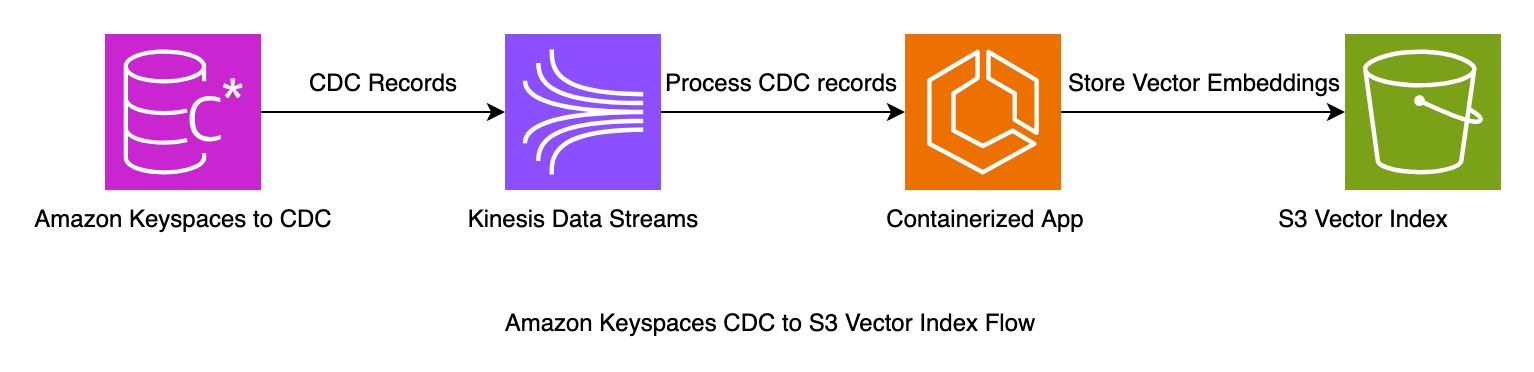
Configure the Kinesis Client Library Connector Library
Start by cloning the Keyspaces connector sample repository to your local file system.
To configure the connector library, modify the streams-application.conf with the resources created in this tutorial. You will find the sample file in the vector connector example directory. vi s3-vector-connector/example/streams-vector-application.confThis sample file should have bucket-id, index-name, keyspace, and table name already set to the previously mentioned resources. If you modified the names when creating the resources, you must modify the configuration file to reflect those names. The configuration is also set to the us-east-1 AWS Region.
Build the container
In this step, you will build a Docker image to run the stream consumer application in a container on your local environment. You will need Docker installed and 2 GB of open disk space. Build the container with the following command:
Run the container
After you build the container, run it with the following command. The container uses the local AWS CLI profile. You can modify the stream application name using environment variables. Use this method to modify any property in the application config with environment variables at runtime such as AWS_REGION.
Insert records into the table
The repository also includes a Python script in an example folder. This script populates your table with sample data. Insert records into the Keyspaces table using the Keyspaces console or cqlsh-expansion. The script uses the AWS credentials profile and default Region. python s3-vector-connector/example/data_loader.py
Query the Amazon S3 Vector Index
Query the Amazon S3 vector index to test the setup:
Ingestion to OpenSearch using pipelines
This section demonstrates the Amazon S3 vector index approach for processing Keyspaces change data capture data. You can also use an alternative approach with Amazon OpenSearch Ingestion. This approach provides additional options for handling your change data capture data, particularly for use cases requiring advanced search capabilities.
OpenSearch Ingestion provides a flexible and efficient way to process data by using Amazon S3 as a source repository. In this workflow, change data capture information from Keyspaces is first written to Amazon S3, creating a reliable data lake foundation. This stored change data captures data then serves as the input for OpenSearch Ingestion pipelines, which can process, transform, and enrich the data before forwarding it to its final destination.This architecture creates a robust and scalable data processing pattern, allowing for more efficient handling of data changes while maintaining the ability to perform complex transformations through the ingestion pipeline. The approach particularly shines in scenarios requiring both historical data access and real-time processing capabilities, as Amazon S3 acts as a durable intermediate storage layer between Keyspaces and OpenSearch.
Clean up
To clean up the resources, delete the S3 vector index, S3 vector bucket and Keyspaces table, and keyspace. The following commands will delete the resources created in this post.
Conclusion
This post explores the powerful combination of Amazon Keyspaces change data capture streams and Amazon S3 to build a robust, scalable data pipeline tailored for generative AI applications. By using Keyspaces Streams, we demonstrated how to capture real-time data changes and efficiently store them in Amazon S3. This approach creates a durable foundation for further processing.
The optional integration with OpenSearch Service, facilitated through its ingestion pipelines, allows for sophisticated data transformations and vector creation, enabling advanced search capabilities crucial for modern AI applications. This architecture showcases the synergy between real-time data streaming, cloud storage, and vector search technologies. It provides a comprehensive solution for organizations looking to harness the full potential of their data in the era of generative AI.
As AI-driven decision-making evolves, this tutorial provides a blueprint for building flexible, responsive, and intelligent data systems that adapt to the changing analytics and AI landscape. You can also explore the connector library for additional connectors that support real-time materialized view updates or Amazon SQS queues with configurable delays for deferred processing.