AWS Database Blog
Streamline Amazon RDS management with consolidation techniques – Part 2
This post is the second in a series of two dedicated to Amazon RDS consolidation. In the first post, we discussed the challenges, opportunities, and solution patterns for Amazon Relational Database Service (Amazon RDS) consolidation. In this post, we introduce RDS Consolidator, a practical tool designed to optimize Amazon RDS database consolidation.
Introduction to RDS Consolidator
RDS Consolidator is an open source tool designed to help DBAs and solution architects in their Amazon RDS database consolidation efforts. RDS Consolidator is experimental, not officially supported by Amazon Web Services (AWS), and is provided as-is.
You can use RDS Consolidator to create database cohorts and calculate the amount of CPU, memory, IOPS and storage resources needed to run a stacked environment.
Implementation considerations
RDS Consolidator is based on two components: a data collection script and an Amazon Quick Sight dashboard that runs entirely in your account. The script collects RDS instances configuration and usage statistics from Amazon CloudWatch and generates a static CSV file. This CSV file is used as a source dataset to feed a Quick Sight dashboard you create using the AWS CloudFormation template provided in the GitHub repo.
Prerequisites for RDS Consolidator deployment include AWS Command Line Interface (AWS CLI) access to the account running your databases, an Amazon Simple Storage Service (Amazon S3) bucket, and permissions to provision a Quick Sight dashboard using CloudFormation. The deployment of RDS Consolidator is out of the scope of this post, though you can find detailed deployment instructions in the GitHub repo.
RDS Consolidator is open source and free to use. The only expenses incurred are the cost of the S3 bucket for storing your CSV report file and the QuickSight author access.
Using RDS Consolidator
To illustrate how RDS Consolidator works, consider an example involving multiple database engines and versions all sourced from a single AWS account.
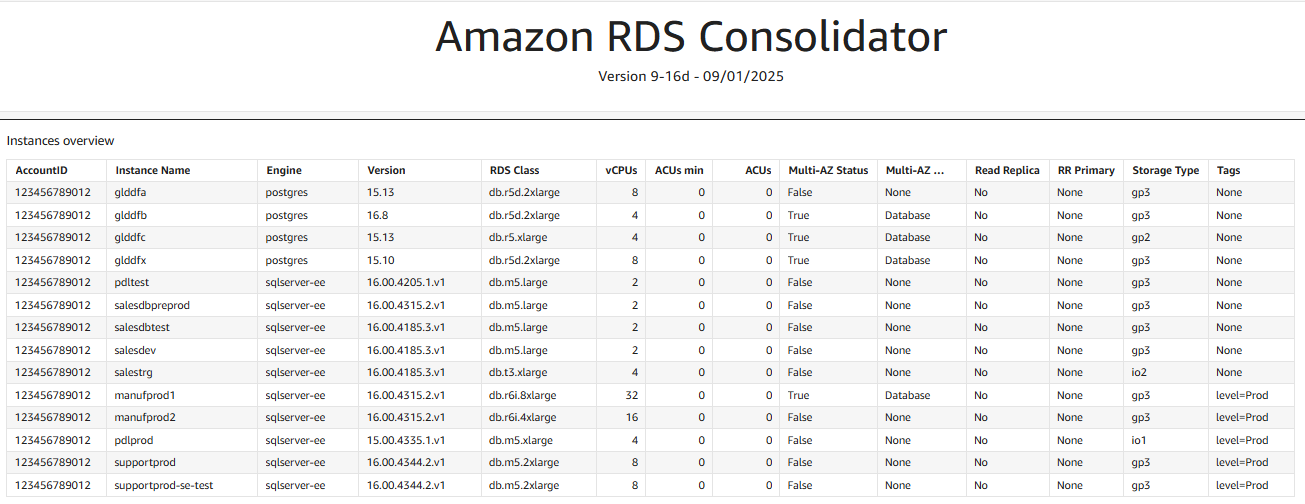
At the top of the RDS Consolidator dashboard, a single table lists the key information requested for building scenarios, as shown in the following figure. Among other information, you can find the engine, the version, the RDS class (including Amazon Aurora Serverless), the number of vCPUs, if multi-Availability Zone (AZ) is enabled, read replicas, the storage type, and tags.
You can use the filter controls to focus the consolidation on PostgreSQL. Note the filter at the top of the following screenshot: Engine equals postgres.
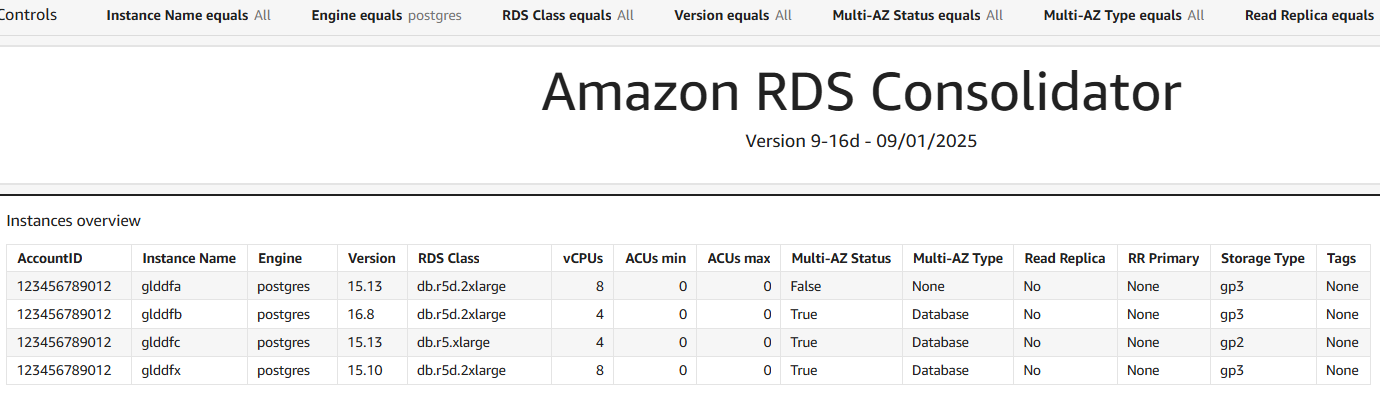
You can already identify useful indications. For example, out of the four instances shown in the preceding screenshots, one hasn’t enabled the multi-AZ replication. Also, the database engine versions are different. When consolidating databases, it’s highly recommended to align at least the major version (16 in this case). You can also see that one instance is still using gp2 as storage. AWS recommends using gp3 instead because it offers a better price-performance ratio and the migration is straightforward.
Another finding is the RDS class. The first instance isn’t AWS Graviton based. Switching from r5 to r8g would provide a superior price-performance ratio.
But what would be the right size for hosting these four instances into one? Let’s explore the CPU & ACU page of the RDS Consolidator report to answer this question.
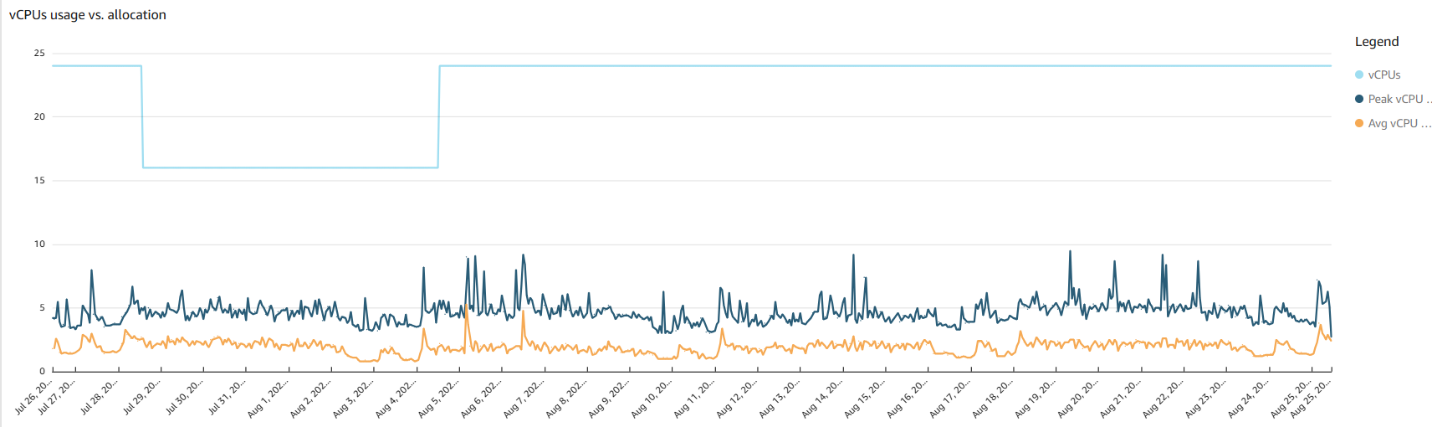
During the explored period (30 days in this example; this parameter can be customized during the data collection from 1 day to 15 months), you can see that the vCPUs allocated varies between 16–24, as shown in the following figure. This means that some instances are stopped during a period. You can also see that the peak vCPU usage is 10, whereas the provisioned usage is 24. At this point, you can conclude that vCPUs are over-provisioned.
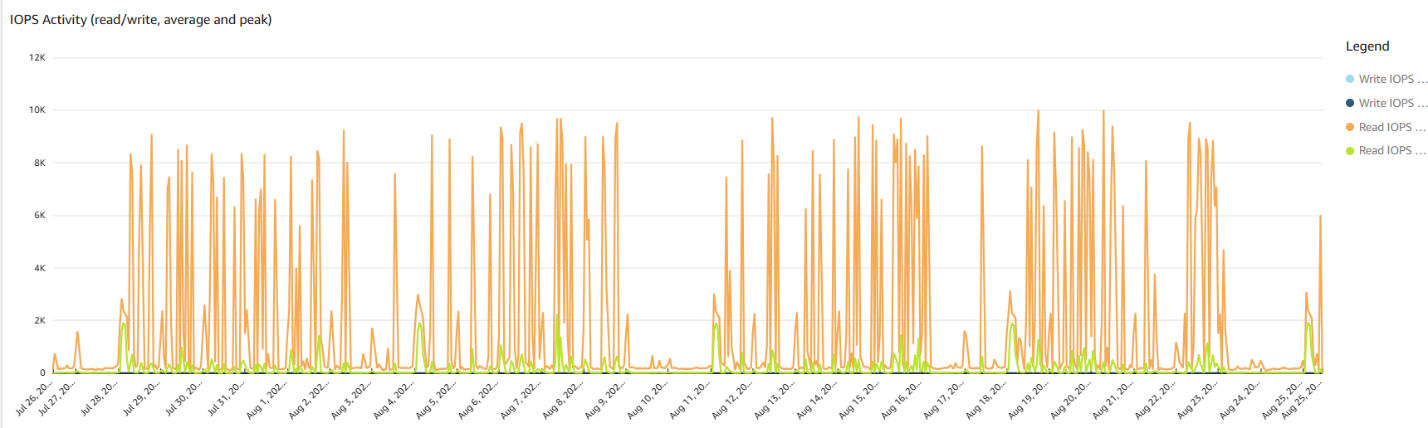
As shown in the following figures, IOPS activity reports the average and peak read and write values. It shows the total requirements for the four databases if running all together. In this example the summed I/O activity is mostly read.
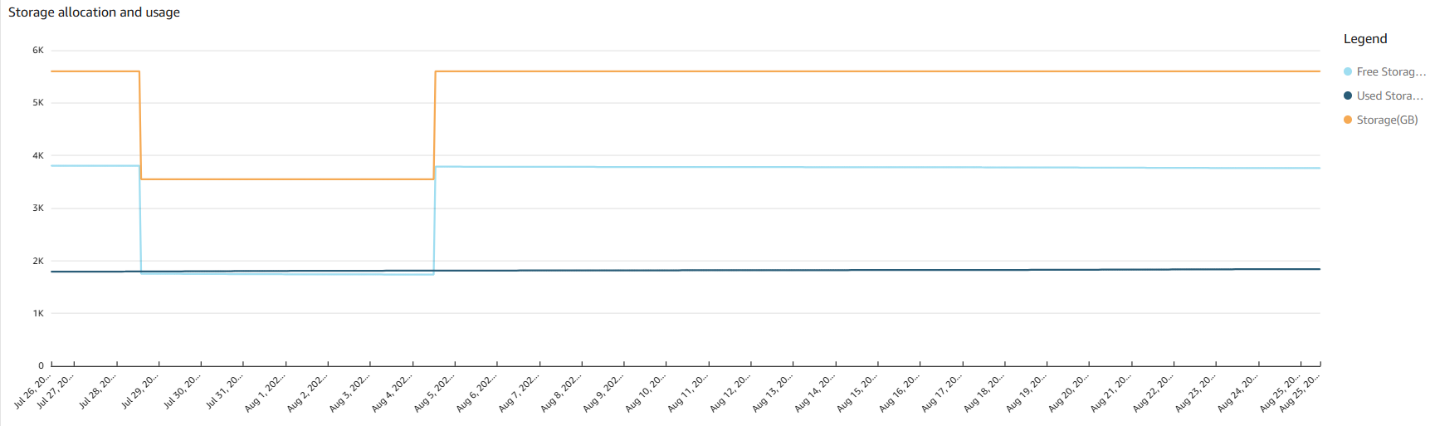
The storage allocation, shown in the following figure, is also interesting. Out of the 5,600 GB of disk space allocated, 3,800 GB are free. This is another significant savings opportunity and a good indication of the storage requirements of the target environment.
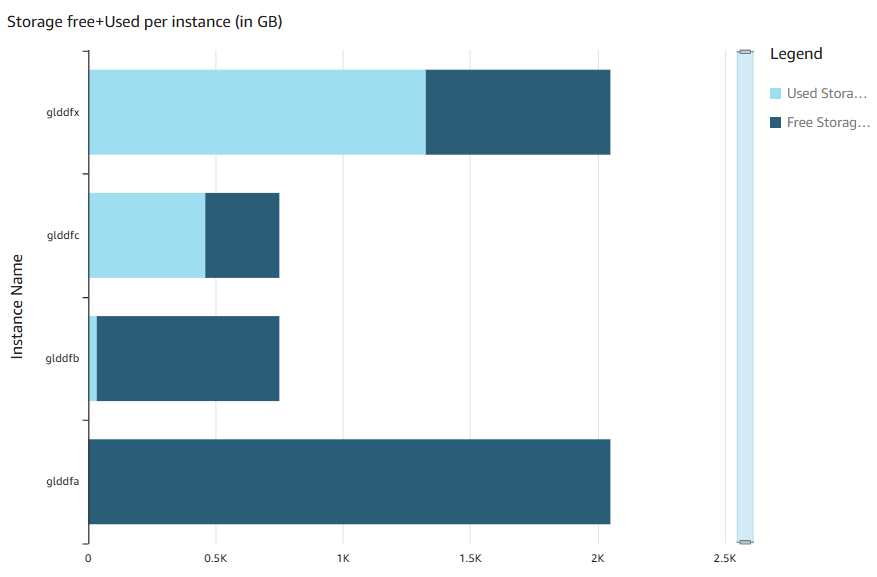
The dashboard examines every instance to provide the used compared to free storage, as shown in the following figure.
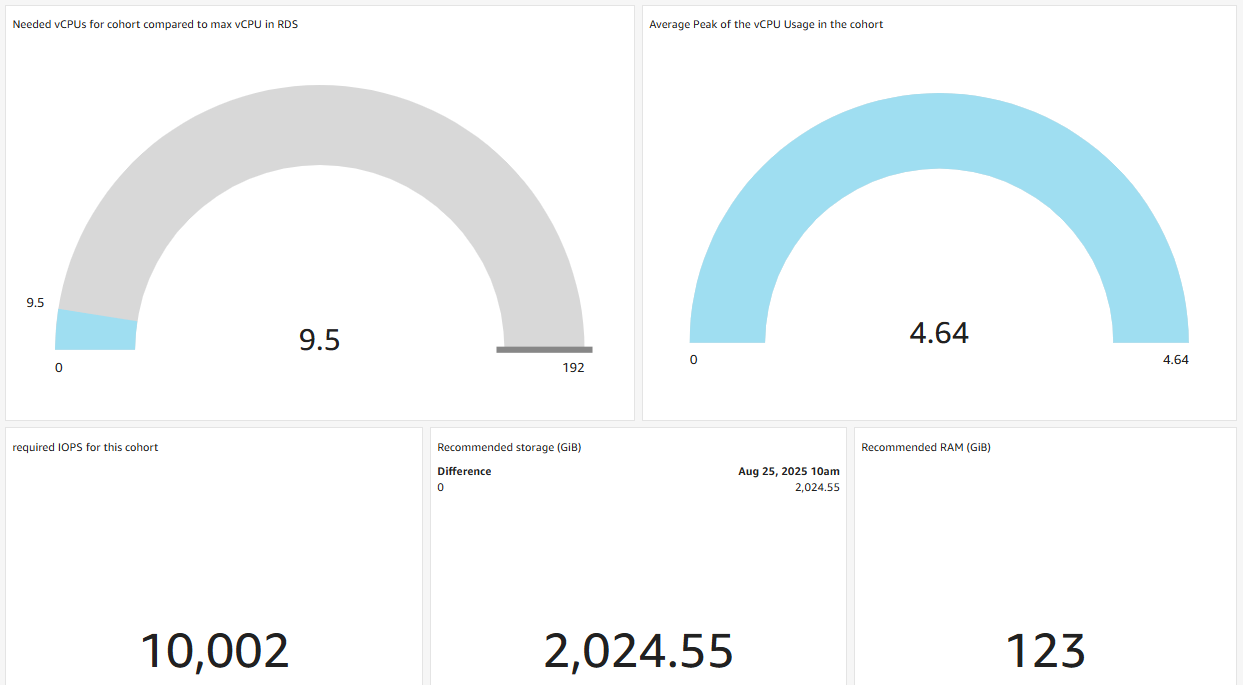
Finally, RDS Consolidator summarizes the resources required to run this consolidated environment, as shown in the following figure. In detail, this section provides:
- Peak vCPU – Highest vCPUs peak value of the cohort at a point in time during the period.
- Average Peak vCPU – Average value of the peaks observed over the period. This gives an indication of the vCPUs usage variability.
- Required IOPS – Highest number of IOPS for the cohort at a point in time during the period.
- Recommended storage – Last sum of used storage (in GB) of the cohort plus a 10% buffer.
- Recommended RAM – Amount of used RAM (in GB) for the cohort.
With RDS Consolidator, you can identify potential cost savings that are straightforward to implement, such as the adoption of Graviton, the replacement of gp2 by gp3 for the block storage backend, or the reduction of allocated storage space.
You also can determine resource requirements to consolidate multiple databases into one instance. In the current example, a r8g.4xlarge (to meet the allocated vCPUs and memory) with 2 TiB of gp3 storage would meet the workloads requirements. Replacing the four existing instances with a r8g.4xlarge can lead to a 44.9% cost savings.
Stack cleanup
If you decide that you no longer want to keep RDS Consolidator, you can navigate to CloudFormation in the AWS Management Console, choose the stack (you will have named it when you deployed it), and choose Delete. All the resources will be deleted except the S3 bucket and the CSV file, which you have to delete manually.
Conclusion
In this post, we tackled the complexities of database consolidation and delivered practical, actionable solutions. Meet RDS Consolidator, a purpose-built tool that visualizes consolidation scenarios in AWS, quantifies savings, and maps efficiency gains so you can make confident, data-driven decisions. We also laid out the operational considerations you need: backup and recovery strategies, resource sizing and allocation, high-availability design, access controls, and cost governance—all framed to help you capture consolidation benefits while avoiding risks like resource contention and security exposure.
Overall, the post provides practical insights and strategies to optimize and operationalize database consolidation in complex environments.
Start now—explore RDS Consolidator GitHub page and test it on your own data to reveal consolidation opportunities, validate savings, and craft a safe migration plan. Your consolidated, cost-optimized database landscape starts with this first test.