AWS Database Blog
Troubleshoot AWS Advanced JDBC Wrapper configuration for Aurora Global Database write forwarding
Configuring the AWS Advanced JDBC Wrapper for Amazon Aurora Global Database with write forwarding requires Region-specific settings. Misconfiguration causes latency spikes and connection failures. A primary Region hosts the writer and readers, while secondary Regions contain read-only replicas. With write forwarding, applications in a secondary Region can issue DML statements against local readers, which Aurora transparently forwards to the primary-Region writer.
This post covers Aurora MySQL-compatible Global Database. The core Global Database settings (dialect, plugin chain, host patterns, and home Region) apply to Aurora PostgreSQL-compatible Global Database with the global-aurora-pg dialect. The write forwarding parameters and consistency behavior described here are specific to Aurora MySQL. Aurora PostgreSQL implements write forwarding with its own settings, so do not carry those sections across.
The AWS Advanced JDBC Wrapper enhances standard JDBC drivers with Aurora-aware capabilities, including multi-Region topology discovery and cross-Region failover. The key difference from single-Region Aurora is that the wrapper must be told it is operating in a Global Database context. A secondary-Region reader endpoint does not expose enough cluster metadata for the wrapper to distinguish a standalone regional cluster from a member of a Global Database, so the dialect has to be set explicitly. Without it, the wrapper applies single-Region topology logic in the secondary Region while the primary Region continues working normally.
In this post, we walk through the correct configuration of the AWS Advanced JDBC Wrapper for Aurora Global Database with write forwarding active. We describe a real-world scenario where misconfiguration caused approximately 5-second delays per plugin, topology resolution failures, and health check failures exclusively in the secondary Region. We explain the three root causes, the two Aurora-side settings that are commonly missed, and provide tested configurations for both primary and secondary Regions.
The configuration in this post applies to a specific deployment pattern. Applications in the primary Region connect as a writer. Applications in the secondary Region connect as a reader with write forwarding active for DML operations.
We cover two configuration layers. First, the core Aurora Global Database settings required for any multi-Region JDBC Wrapper deployment (dialect, plugins, host patterns, and failover home Region). Second, the write-forwarding-specific parameters that allow DML routing from secondary Regions to the primary writer. If your Global Database does not use write forwarding, the core settings still apply. You can omit the write forwarding parameters identified in the following configuration section.
We also introduce the JDBC Wrapper Configuration Assistant as a reference tool for validating your setup.
Prerequisites
To follow along with this post, you need:
- An Amazon Aurora Global Database on Aurora MySQL-compatible Edition with at least one secondary Region. Write forwarding requires Aurora MySQL 2.08.1 or higher.
- Write forwarding turned on for the secondary cluster. If it is not already on, use the AWS CLI:
Confirm it took effect by checking for "GlobalWriteForwardingStatus": "enabled":
- AWS Advanced JDBC Wrapper version 3.0.0 or later. Version 3.2.0 introduced the
gdbFailoverplugin with home-Region awareness and per-Region failover settings. Version 4.1.0 or later is required for deployments without virtual private cloud (VPC) peering between Regions (accessible regions configuration). - The Aurora MySQL version you are running. Several parameter and metric names differ between Aurora MySQL 2 and 3 (
aurora_fwd_master_*versusaurora_fwd_writer_*, andForwardingMasterDMLLatencyversusForwardingWriterDMLLatency). This post uses the version 3 names. - A connection pool. The examples use a Spring Boot application with HikariCP, but every parameter shown is a driver-level property. The YAML is how Spring Boot expresses them. The same values apply to other JDBC applications.
- Network connectivity between your application and the Aurora cluster endpoint in its deployment Region.
Solution overview
The following diagram illustrates the Aurora Global Database architecture with write forwarding between the primary and secondary Regions.
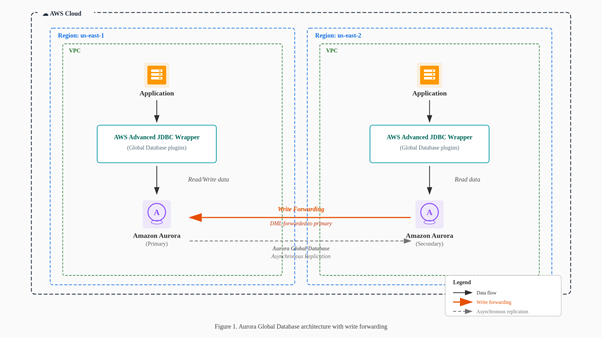
Figure 1: Aurora Global Database architecture with write forwarding between the primary and secondary Regions
As shown in the diagram, the primary Region (for example, us-east-1) contains the Aurora writer instance and reader replicas. The secondary Region (for example, us-east-2) contains read-only replicas. When an application in the secondary Region issues a write operation, the request flows from the local reader through the Aurora write forwarding mechanism to the writer in the primary Region. The AWS Advanced JDBC Wrapper handles topology discovery across both Regions, plugin chain execution, and connection routing based on the configured failover mode.
Common symptoms of Global Database misconfiguration
The application was deployed in both the US East (N. Virginia) Region (us-east-1) and the US East (Ohio) Region (us-east-2). In us-east-1, load testing passed, services were stable, and the wrapper functioned as expected.
In us-east-2, three symptoms appeared simultaneously:
- Approximately 5-second delay per plugin: Each plugin in the wrapper’s chain added roughly 5 seconds of latency before the actual query executed. With multiple plugins configured, total delay reached 10 or more seconds per request.
- Topology cache returning null with repeated monitoring retries: JDBC Wrapper driver logs (software.amazon.jdbc at TRACE level) showed ClusterTopologyMonitorImpl returning cached hosts as . Because topology could not be resolved, the monitor retried monitoring connections at intervals of 60 to 70 milliseconds. This behavior is by design. The monitor prioritizes rapid reconnection to maintain up-to-date topology metadata, which is essential for the driver’s routing logic. However, when the underlying misconfiguration prevents topology from ever resolving, these retries persist without success and add to the overall delay.
- Application health check failures: In containerized deployments, health checks that included database interaction timed out, preventing the application from receiving traffic. Removing the database dependency from the health check allowed it to pass, confirming the issue was in the wrapper’s connection path, not the database itself.
The database was healthy in all cases. Once a query reached Aurora, it executed in milliseconds. The delays were entirely in the wrapper’s initialization path.
This is the detail that made diagnosis difficult. The primary Region’s writer endpoint resolves correctly regardless of dialect configuration. The wrapper connects, discovers topology from the writer, and operates normally. In the secondary Region, the wrapper connects to a regional reader endpoint that does not carry Global Database topology information. Without the correct Global Database dialect, the wrapper applies single-Region logic, the topology cache stays empty, and each plugin times out waiting for cluster state that never arrives.
The following log excerpts (captured at software.amazon.jdbc FINEST level) illustrate the broken and fixed states.
Broken state – wrong dialect loaded:
Broken state – topology cache returning null:
Broken state – 5-second delay visible in timestamps:
Each plugin stalls approximately 5 seconds waiting for topology resolution that cannot succeed.
Fixed state – correct dialect with topology resolving:
With the correct global-aurora-mysql dialect, the topology cache resolves immediately with full cluster state including host roles, availability, CPU utilization, and replication lag.
Three critical configuration requirements
After analyzing the wrapper logs and tracing the initialization sequence, we identified three issues that combined to produce the failure.
1. Wrong dialect: aurora-mysql instead of global-aurora-mysql
This was the primary cause. The configuration specified:
With this dialect, the wrapper initializes a single-Region host list provider. In the secondary Region, this provider cannot interpret Global Database topology. The globalClusterInstanceHostPatterns parameter is never consumed, the topology cache remains null, and each plugin stalls on its timeout before falling through.
The fix:
We verified this by enabling trace logging (wrapperLoggerLevel: FINEST) and confirming the dialect resolved to global-aurora-mysql in the logs. With the wrong dialect, we observed aurora-mysql, which explained why the Global Database code path never engaged.
2. Cluster endpoint format instead of instance endpoint format in host patterns
The host patterns used cluster endpoint format:
The wrapper uses these patterns to enumerate individual instances across Regions. The ? is a placeholder that the wrapper replaces with each instance identifier. This substitution only works with instance endpoint patterns:
Note: No cluster- or cluster-ro- prefix, and no -ro suffix. Include patterns for every Region in the Global Database.
Instance names must be unique across all Regions in the Global Database. The plugin does not support duplicate instance names across Regions, so a naming scheme that repeats the same instance identifiers in each Region will not resolve correctly.
3. failover2 plugin instead of gdbFailover
The configuration used failover2, which is designed for single-Region Aurora clusters:
For Global Database, gdbFailover provides home-Region-aware failover logic:
These two plugins are mutually exclusive. Never include both. There is no built-in compatibility check between the two plugins, and their interaction when combined has not been tested. Use exactly one: gdbFailover for Global Database, failover2 for single-Region clusters.
Two Aurora-side settings that are commonly missed
The JDBC Wrapper configuration controls how your application discovers and connects to instances. Two Aurora settings control whether write forwarding actually engages, and neither is a wrapper parameter.
Set aurora_replica_read_consistency in every forwarding session
Write forwarding is enabled per session, not per connection pool. Aurora forwards writes only when aurora_replica_read_consistency is set to EVENTUAL, SESSION, or GLOBAL. The default value is empty, and with an empty value Aurora does not enable write forwarding for that session regardless of the cluster-level setting.
With HikariCP, set it as a connection initialization statement so every pooled connection carries it:
For Aurora MySQL 3.04 and higher you can instead set aurora_replica_read_consistency as a DB cluster parameter, which removes the per-session requirement.
Choose the level against your consistency requirement:
EVENTUAL: queries do not wait. Results of your own writes may not be visible in the same session yet.SESSION: queries wait until the results of your session’s forwarded writes are replicated back. This is the right default for most applications, because read-after-write within a session is what application code usually assumes.GLOBAL: queries additionally wait for all committed changes from the primary Region and other secondary Regions. Highest consistency, highest and most variable latency.
If you front Aurora with RDS Proxy, note that RDS Proxy does not support the SESSION value and setting it can cause unexpected behavior.
Write forwarding sessions also support only the REPEATABLE READ isolation level. READ COMMITTED works against read-only secondary clusters but not with write forwarding.
Size your connection pool against the forwarded-connection ceiling
Forwarded sessions are capped on the primary writer by aurora_fwd_writer_max_connections_pct, which defaults to 10. That is 10 percent of the writer’s max_connections, shared across every secondary cluster using write forwarding. If max_connections is 800, all secondary Regions together get a maximum of 80 simultaneous forwarded sessions.
Size the total HikariCP maximum-pool-size across your secondary-Region fleet under that ceiling, or raise the parameter on the primary cluster. When the ceiling is reached, forwarded write operations fail with ER_CON_COUNT_ERROR and the message Not enough connections on writer to handle your request. If the parameter is set to zero, forwarded writes fail.
The correct configuration
This section covers the plugin chain, the two configuration layers, and the complete YAML for both Regions.
Plugin selection
Each plugin serves a specific purpose in the Global Database context:
- auroraConnectionTracker: Invalidates stale pooled connections after failover. Required with external connection pools like HikariCP.
- initialConnection: Resolves cluster endpoints to specific instances. Handles stale DNS scenarios in Global Database.
- gdbFailover: Global Database-aware failover with home-Region support. Understands multi-Region topology and cross-Region failover.
- efm2: Enhanced failure monitoring. Detects node failures during long-running queries without waiting for a socket timeout.
Understanding the two configuration layers
The YAML configurations that follow include parameters for both Aurora Global Database and write forwarding. Here is how they break down.
Core Global Database parameters (required for all Aurora Global Database deployments):
wrapperDialect: global-aurora-mysql, which tells the wrapper it is operating in a Global Database context.wrapperPlugins: auroraConnectionTracker,initialConnection,gdbFailover,efm2, the Global Database-aware plugin chain.globalClusterInstanceHostPatterns, instance endpoint format for every Region in the Global Database.failoverHomeRegion, which matches the application’s deployment Region.clusterId, which must be the same value on writer and reader connections.failureDetectionTime, time in ms before failure detection begins (default 30,000 ms).failureDetectionInterval, interval in ms between health check probes (default 5,000 ms).failureDetectionCount, number of failed probes before declaring a host unhealthy (default 3).clusterTopologyRefreshRateMs, how often topology is refreshed in ms (default 30,000 ms).clusterTopologyHighRefreshRateMs, accelerated refresh rate after failover detection (default 100 ms).
The write forwarding and connection routing parameters shown in the configuration control how the wrapper routes connections and handles failover across Regions:
For failover behavior across Regions (failoverHomeRegion, activeHomeFailoverMode, inactiveHomeFailoverMode), see Using the GDB Failover Plugin.
For initial connection routing (inactiveClusterWriterEndpointSubstitutionRole, verifyInactiveClusterWriterEndpointConnectionType), see Using the Aurora Initial Connection Strategy Plugin.
For restricting connections to specific Regions (gdbAccessibleRegions, gdbRwHomeRegion, gdbRwRestrictWriterToHomeRegion, gdbRwRestrictReaderToHomeRegion), see Restricting Aurora Global Database Access by Region.
For monitoring connection priority (gdbMonitoringConnectionPriority), see Using Monitoring Connection Priority.
For the overall Aurora Global Database configuration guide, see Global Databases.
Primary Region configuration (us-east-1)
The write forwarding parameters appear in the primary Region configuration as well, even though an application connecting as a writer in the primary Region does not forward writes. Keeping them identical means the configuration remains correct after a failover that promotes us-east-2 and makes us-east-1 a secondary Region. This is why the two Region configurations differ only in the home Region values.
Secondary Region configuration (us-east-2)
Although the application in the secondary Region operates as a reader with write forwarding, it issues both reads and DML through the same connection. The endpoint does not determine the connection’s read/write role. The wrapper inactiveHomeFailoverMode: strict-home-reader parameter controls that behavior, and Aurora transparently forwards DML statements to the primary-Region writer.
The only differences between Regions are that gdbRwHomeRegion and failoverHomeRegion match the application’s deployment Region. Everything else stays identical.
Cross-Region networking
The wrapper’s cross-Region monitoring behavior depends on whether the two Regions can reach each other over the network. The two scenarios that follow require different settings.
Deployments without VPC peering between Regions
The wrapper’s topology monitor defaults to connecting to the primary-Region writer for cluster state updates. If your deployment cannot reach the peer Region’s network (no VPC peering or AWS Transit Gateway between Regions), this connection times out repeatedly.
This configuration requires AWS Advanced JDBC Wrapper version 4.1.0 or later. That version introduces logic to support deployments where Regions are not mutually reachable.
Add these two parameters to restrict monitoring connections. The gdbAccessibleRegions parameter limits which Regions the wrapper can reach, following the same pattern as failoverHomeRegion and gdbRwHomeRegion. The gdbMonitoringConnectionPriority value uses cluster roles (primary and secondary) rather than Region names, so it remains identical in both Regions.
Deployments with VPC peering between Regions
If your Regions are mutually reachable (VPC peering or Transit Gateway in place), the wrapper can connect directly to the primary-Region writer for topology state updates. This provides more accurate and more current cluster topology, because the primary-Region writer has the complete view of instances across the Regions.
In this case, omit the two parameters listed earlier (gdbAccessibleRegions and gdbMonitoringConnectionPriority) and leave the wrapper at its default monitoring behavior. The minimum required version for this configuration is AWS Advanced JDBC Wrapper version 3.2.0 or later.
For more details on monitoring connection priority configuration, see Monitoring Connection Priority.
Switchover and failover behavior
The gdbFailover plugin detects failover through connection errors. When the underlying connection encounters issues sending or receiving data, the plugin catches the corresponding exception and triggers failover logic. There is no difference in behavior between a planned switchover and an unplanned failover, because the detection mechanism is the same in both cases: a connection error.
When failover is triggered, the plugin follows this sequence:
- Wait for the topology to stabilize and for the new primary Region to become known.
- Determine whether the new primary Region is the application’s home Region.
- Select the corresponding failover mode parameter. If the new primary Region is the home Region, use
activeHomeFailoverMode. If it is not, useinactiveHomeFailoverMode. - Use the failover mode value to calculate requirements for the new connection.
- Connect to a node that satisfies those requirements. If the connection fails, retry another possible node until timeout.
With the configuration in this post, activeHomeFailoverMode: strict-writer and inactiveHomeFailoverMode: strict-home-reader. When the new primary Region matches the application’s home Region, the wrapper connects to the writer. Otherwise, it connects to a reader in the home Region and write forwarding handles DML operations.
Application considerations during failover
Applications should expect that connections can be lost during a switchover or failover event. The driver retries different nodes internally, but it may reach timeout. Transient errors are possible, and it is the application’s responsibility to decide how to handle the current business transaction. Implement retry logic at the application layer for critical operations.
Write forwarding introduces two additional conditions that produce transient errors, both worth handling explicitly:
- Idle forwarded transactions are canceled. A forwarded transaction that issues no statement for longer than
aurora_fwd_writer_idle_timeout(default 60 seconds, configurable up to one day) is canceled by the primary cluster. The next statement receives a timeout error and Aurora rolls back the transaction. - Write forwarding can become unavailable mid-transaction. Aurora cancels transactions using write forwarding if the primary cluster restarts or if the write forwarding setting is turned off.
Write forwarding constraints to check before you migrate
Write forwarding does not support every statement. Check your application against these restrictions before turning it on, because several of them interact with Spring and Hibernate defaults:
- Isolation level. Only
REPEATABLE READis supported in forwarding sessions.@Transactional(isolation = READ_COMMITTED)will not work. - Savepoints.
SAVEPOINT,ROLLBACK TO SAVEPOINT, andRELEASE SAVEPOINTare unavailable when write forwarding is on in the session.@Transactional(propagation = NESTED)depends on savepoints. - XA transactions. All
XAstatements are unavailable in forwarding sessions, which affects applications using the Java Transaction API (JTA). - DDL. Run DDL against the primary cluster. This means schema migration tools such as Flyway and Liquibase, and Hibernate
ddl-auto, must target the primary Region. - LOAD statements.
LOAD DATA INFILEandLOAD XML LOCAL INFILEcannot target permanent tables on a secondary cluster. - Temporary tables. You can create them, but a DML statement modifying a permanent table cannot reference a temporary table, because the temporary table does not exist on the primary cluster where the statement runs.
Statements blocked by these restrictions fail with ERROR 1235 (42000): This version of MySQL doesn't yet support 'operation with write forwarding', which does not identify which restriction was hit. If you see this error, check the preceding list.
Verifying the fix
- Enable wrapper trace logging:
Note: This parameter works well for basic setups. Applications using a mix of different logging systems may require more complex logging configuration. Refer to the logging documentation for details.
- Confirm the dialect resolves correctly:
If you see aurora-mysql instead of global-aurora-mysql in the secondary Region, the configuration has not taken effect.
- Verify topology discovery shows hosts across both Regions:
Once topology populates, the 5-second delays disappear and readiness probes pass immediately.
- Confirm that write forwarding is engaged for your sessions. Check that
aurora_replica_read_consistencyis set on a pooled connection, and confirm theForwardingReplicaOpenSessionsAmazon CloudWatch metric on the secondary cluster is non-zero once your application issues writes. - Confirm that your application health probes pass. If you use Spring Boot Actuator, verify that the
/actuator/healthendpoint returns status UP after applying the corrected configuration. A successful response confirms that the wrapper connects without the timeout delays described earlier.
Write forwarding latency consideration
After applying the correct configuration, you should still expect additional latency on write operations from the secondary Region. This is inherent to the architecture. Each forwarded DML statement incurs a cross-Region network round trip. In our testing between us-east-1 and us-east-2, this added 12 to 15 ms per statement. Applications that execute multiple sequential DML statements per API call will see this latency compound. For example, an API call with 10 sequential DML operations adds approximately 120 to 150 ms compared to direct writes in the primary Region. Results were validated using Amazon CloudWatch metrics (ForwardingReplicaDMLLatency and ForwardingWriterDMLLatency) and confirmed by network-level round-trip measurements between us-east-1 and us-east-2.
Your consistency setting also affects read latency. With aurora_replica_read_consistency set to SESSION or GLOBAL, queries wait for replication to catch up. Monitor ForwardingReplicaReadWaitLatency to see how much time your reads spend waiting, and use it to decide whether a lower consistency level is acceptable for specific read paths.
Write forwarding is designed for secondary-Region workloads that are read-dominant with incidental writes. For a write-heavy path, the round trip is paid on every statement, so plan where that path runs. Batch DML within explicit transactions to amortize the round trip, and place genuinely write-intensive services in the primary Region. That is a workload placement decision rather than a limitation of the feature.
Quick decision guide
When configuring the wrapper for Aurora Global Database, verify these areas in order:
- Dialect. Set
wrapperDialectexplicitly toglobal-aurora-mysql. A secondary-Region reader endpoint does not carry the metadata needed to detect Global Database membership, so explicit configuration is required rather than optional. - Plugins. Use
gdbFailover, notfailover2. IncludeauroraConnectionTrackerwith external pools,initialConnectionfor endpoint resolution, andefm2for failure monitoring. - Host patterns. Instance endpoint format for every Region. No
cluster-prefix, no-rosuffix, and unique instance names across Regions. - Home Region. Set both
failoverHomeRegionandgdbRwHomeRegionto the application’s deployment Region. Each Region’s deployment uses its own value. - Session consistency. Set
aurora_replica_read_consistencyin every session that forwards writes, or as a cluster parameter on Aurora MySQL 3.04 and higher. Without it, Aurora does not forward writes. - Pool size. Keep total secondary-Region pool size under
aurora_fwd_writer_max_connections_pctof the primary writer’smax_connections, which defaults to 10 percent. - Cross-Region networking. If no VPC peering exists, set
gdbAccessibleRegionsandgdbMonitoringConnectionPriorityto restrict monitoring to the local Region.
Using the Configuration Assistant
The AWS Advanced JDBC Wrapper repository includes a Configuration Assistant. It asks about your deployment (Region count, VPC peering availability, write forwarding requirements, authentication method, and connection pool). Then it generates the matching dialect, plugin chain, host patterns, and Region-specific parameters. It also covers scenarios beyond this post, including read/write splitting with gdbReadWriteSplitting, AWS Identity and Access Management (IAM) authentication in Global Database contexts, and internal connection pool configuration.
To use it, point Kiro or Amazon Q Developer at the skill file. For example:
“Use skill at https://github.com/aws/aws-advanced-jdbc-wrapper/blob/main/docs/JDBC-WRAPPER-CONFIGURATION-ASSISTANT.md and help me configure my application for Aurora Global Database with write forwarding.”
You can choose from three entry modes: describe your deployment goal and answer follow-up questions, paste your current configuration for an audit, or request a quick default configuration.
Conclusion
In this post, you learned how to identify and resolve the most common AWS Advanced JDBC Wrapper misconfigurations for Aurora Global Database with write forwarding: incorrect dialect, wrong host pattern format, and incompatible failover plugin. You also saw the two Aurora-side settings that determine whether write forwarding engages at all, and the SQL restrictions to check before you migrate.
Use the preceding Quick decision guide as a checklist, and the Configuration Assistant to generate the configuration for your specific deployment. For questions about the AWS Advanced JDBC Wrapper, open an issue on the GitHub repository or contact AWS Support.