AWS Database Blog
User authentication and session management with Amazon Aurora DSQL
User authentication and session management are foundational to most backend applications. They demand strong data consistency, low-latency reads, high availability, and secure credential handling. When you build these services on traditional relational databases, you often need to provision instances, configure read replicas, schedule maintenance windows, manage database credentials, and plan capacity for unpredictable login surges. Authentication flows can also be sensitive to replication lag: a user registers and immediately tries to log in, but the account isn’t available yet because the write hasn’t propagated.
Amazon Aurora DSQL, a serverless, PostgreSQL-compatible distributed SQL database, addresses these challenges with strong read-after-write consistency, automatic scaling, and no infrastructure to manage. It also uses AWS Identity and Access Management (AWS IAM)-based authentication for database connections, which streamlines authentication and eliminates security risks associated with traditional user-generated passwords.
In this post, you learn how to design and implement a user authentication service with session management on Amazon Aurora DSQL. You see the full request flow from client to database and back, explore the design considerations specific to Amazon Aurora DSQL, and discover practical lessons from building and testing against a live cluster.
Architecture overview
The following diagram illustrates the architecture of the authentication service.
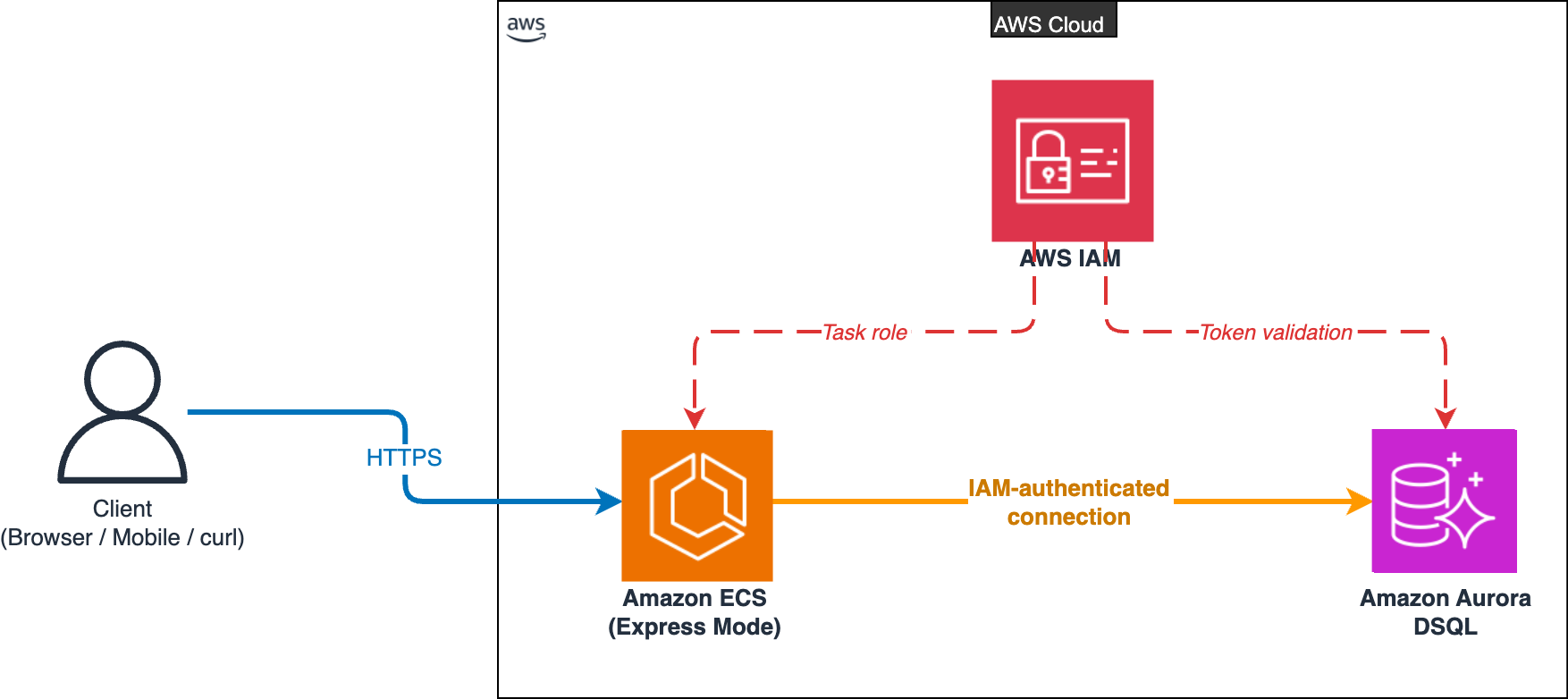
Architecture diagram of the authentication service on AWS. A client sends HTTPS requests to Amazon ECS Express Mode running in the AWS Cloud. Amazon ECS connects to Amazon Aurora DSQL through an IAM-authenticated connection. AWS IAM provides the task role to Amazon ECS and validates the token presented to Amazon Aurora DSQL.
The service runs on Amazon Elastic Container Service (Amazon ECS) using Express Mode deployment. Express Mode is a deployment mode for Amazon ECS that provisions a production-ready AWS Fargate service with automatic scaling, built-in load balancing, and networking through simplified APIs. Amazon ECS Express Mode works well with Amazon Aurora DSQL because both are serverless: you don’t manage instances for either.
The architecture uses three AWS services, each chosen for a specific reason:
- Amazon ECS Express Mode handles the compute layer. It deploys your containerized Node.js application on AWS Fargate with automatic scaling, built-in load balancing, and zero server management.
- Amazon Aurora DSQL handles the data layer. It stores user credentials and session records with strong read-after-write consistency, scales automatically, and authenticates connections through IAM rather than database passwords.
- AWS IAM handles the security layer. It controls which compute resources can connect to the database using short-lived tokens. The Amazon Aurora DSQL connector generates these tokens automatically from the Amazon ECS task role, so no credentials are stored in code or configuration.
Inside the AWS Fargate task, the Express.js application is structured in layers. Routes handle HTTP requests, middleware validates input and authenticates sessions, services contain business logic (password hashing, token generation), and repositories interact with Amazon Aurora DSQL through parameterized queries. All write paths go through an Optimistic Concurrency Control (OCC) retry wrapper, and all connections go through the Amazon Aurora DSQL connector, which handles IAM token generation and refresh.
The full request flow:
- Client sends an HTTPS request (register, login, or authenticated API call).
- Amazon ECS Express Mode routes the request through its load balancer to the Express.js application running on AWS Fargate.
- Application validates the request, processes business logic (password hashing, session token generation).
- Amazon Aurora DSQL stores and retrieves data with strong consistency via a connection authenticated through IAM.
- Response returns to the client immediately, with no replication lag or eventual consistency delay.
How Amazon Aurora DSQL simplifies authentication workloads
With Amazon Aurora DSQL, you get several capabilities that simplify building an authentication service:
Zero database infrastructure
There is no need to size instances, provision storage volumes, or configure read replicas. To get started, create a cluster in the Amazon Aurora DSQL console, get an endpoint, and start writing SQL. The database scales automatically based on your workload. For authentication services that start small and grow unpredictably, this removes capacity planning.
Strong consistency by default
When a user registers, their account is immediately available for login. A new session is valid for the very next request. And a revoked session is rejected right away. There’s no eventual consistency window and no replication lag between writes and reads. For authentication flows where timing matters, this is critical. Amazon Aurora DSQL provides this by default with no configuration needed. For more information, see What is Amazon Aurora DSQL?
PostgreSQL compatibility
You can use familiar tools like psql, popular drivers like node-postgres, and existing SQL knowledge with Amazon Aurora DSQL, which supports the PostgreSQL wire protocol. You use familiar SQL. There isn’t a new query language to learn. The official @aws/aurora-dsql-node-postgres-connector extends node-postgres with automatic IAM token handling, so connecting takes minimal setup.
IAM-based authentication
With Amazon Aurora DSQL, you use short-lived IAM authentication tokens instead of traditional database passwords. There aren’t database credentials to store or rotate. The Amazon Aurora DSQL connector generates and refreshes tokens automatically. When running on Amazon ECS Express Mode with a task role, your application connects to the database without secrets in environment variables or configuration files.
Here’s how the IAM chain works in this architecture:
- First, create an IAM role with
dsql:DbConnectpermission on your Amazon Aurora DSQL cluster. - Assign that role to the Amazon ECS Express Mode service as its task role.
- At runtime, the Amazon Aurora DSQL connector automatically uses the Amazon ECS task role credentials to generate short-lived auth tokens.
- Amazon Aurora DSQL validates the token against IAM before accepting the connection.
The IAM role handles access control for both the compute layer (Amazon ECS Express Mode) and the database layer (Amazon Aurora DSQL), so there’s no database password anywhere in this flow. See Production deployment for the full configuration, including the custom database role the runtime connects as.
No maintenance windows
Schema changes run asynchronously in the background. CREATE INDEX ASYNC builds indexes without blocking reads or writes. There’s no need to schedule downtime for database maintenance. For an authentication service that needs to be highly available, this is a significant operational benefit.
Designing the data model
The authentication service needs two tables: users and sessions. The distributed architecture of Amazon Aurora DSQL introduces a few design considerations that differ from standard PostgreSQL.
Users table
Sessions table
The PRIMARY KEY and UNIQUE constraints in the two preceding CREATE TABLE statements each create a backing index automatically, for example, sessions_token_hash_key for token_hash. These inline indexes are part of CREATE TABLE itself and are immediately valid. They do not go through the async job manager described later. The async behavior described in the No maintenance windows section applies only to standalone CREATE INDEX ASYNC statements, including the case where you add a UNIQUE constraint to an existing populated table later via ALTER TABLE … ADD CONSTRAINT.
Design considerations for Amazon Aurora DSQL
Universally Unique Identifiers (UUIDs) as primary keys. This implementation uses UUIDs generated in the application layer using crypto.randomUUID(). Random UUIDs distribute writes evenly across the storage partitions in Amazon Aurora DSQL, which helps performance at scale. Amazon Aurora DSQL also supports sequences and identity columns if you prefer monotonically increasing keys. For more information, see Working with primary keys in Amazon Aurora DSQL.
Application-level referential integrity. Amazon Aurora DSQL doesn’t support foreign keys. You enforce the relationship between sessions.user_id and users.id in application code within the same transaction. This is a common pattern in distributed databases and gives you full control over error messages and behavior.
Token hashing. The token_hash column stores a SHA-256 hash of the session token. Your application returns the plaintext token to the client exactly once at creation time and doesn’t persist it. Even if the database is subject to unintended access, the stored hashes provide a layer of protection against impersonation.
Indexes
Amazon Aurora DSQL creates secondary indexes asynchronously, which means they build in the background without blocking reads or writes:
The sessions.token_hash column already has a UNIQUE constraint declared in the preceding CREATE TABLE statement, which produces a backing unique index named sessions_token_hash_key. Adding an explicit CREATE INDEX ASYNC on the same column would create a second index, doubling the write cost on every INSERT INTO sessions and consuming an entry from the table’s index quota for no benefit. Use the constraint and skip the explicit index.
Inline indexes from UNIQUE and PRIMARY KEY constraints are created as part of CREATE TABLE itself and are immediately valid. They don’t go through the async job manager. Only standalone CREATE INDEX ASYNC statements do. This matters when you add a UNIQUE constraint to an existing populated table later (ALTER TABLE … ADD CONSTRAINT), where the latency profile is different from CREATE INDEX ASYNC.
Database migrations
Each Data Definition Language (DDL) statement runs in its own transaction. This is an Amazon Aurora DSQL requirement, and it means your migration code runs each CREATE TABLE and CREATE INDEX separately. For more information, see DDL and distributed transactions in Amazon Aurora DSQL.
CREATE INDEX ASYNC returns a job_id synchronously while the index continues building in the background. If your migration script finishes and the application starts serving traffic before the index becomes valid, the affected lookups (sessions.user_id here) fall back to a sequential scan for a few seconds to a few minutes. To make migrations deterministic (useful in continuous integration (CI) pipelines or when migrating large existing tables), wait for the job to finish before returning:
See Asynchronous indexes for the sys.jobs and sys.wait_for_job(job_id) reference.
Connecting to Amazon Aurora DSQL
The official Amazon Aurora DSQL connector simplifies connecting. It handles IAM token generation and refresh automatically, extracts the AWS Region from the cluster hostname, and configures the PostgreSQL driver with verify-full Transport Layer Security (TLS) by default, so the application validates the server certificate against the public Amazon root certificate authority (CA) without any extra setup.
That’s the entire connection setup. No password, no TLS certificate management, no credential rotation logic. The connector handles it. Amazon Aurora DSQL distinguishes admin and non-admin connections through separate IAM actions (dsql:DbConnectAdmin and dsql:DbConnect). The preceding example connects as app_runtime, the non-admin runtime role you create in the Production deployment section. Use admin only for one-off setup steps such as creating tables, creating the runtime role, and granting privileges. Amazon Aurora DSQL caps any single connection at one hour. Setting maxLifetimeSeconds to 3,300 (55 minutes) lets the pool retire connections proactively, so a request never lands on a connection that the cluster is about to close. See Amazon Aurora DSQL Connector for node-postgres for the full connection options.
Full authentication flow
This section walks through each stage of the authentication flow, from registration to session revocation, with the application code for each step.
Registration
A user registers with an email and password. Your application hashes the password with bcrypt in the application layer (Amazon Aurora DSQL doesn’t support the pgcrypto extension), generates a UUID, and inserts the user record:
With strong consistency from Amazon Aurora DSQL, the user is immediately available for login after registration. The data is available immediately. There’s no replication delay.
Login and session creation
Your application looks up the user by email, verifies the password, generates a cryptographically secure session token, and stores its SHA-256 hash:
Your application returns the plaintext token to the client once. Your application stores only the hash.
Session validation
On each authenticated request, your application hashes the incoming token and looks it up:
The strong consistency feature of Amazon Aurora DSQL means a session created during login is immediately available for validation on the very next request.
Session revocation
Revoking a session sets a revoked_at timestamp. Subsequent validation checks reject it:
For bulk revocation (“log out everywhere”), your application batches updates to stay within the 3,000-row transaction limit in Amazon Aurora DSQL. A naive UPDATE sessions SET revoked_at = NOW() WHERE user_id = $1 works fine for typical users with a handful of sessions, but a power user with thousands of active sessions hits the 3,000-row cap and the whole transaction aborts. Filter inside a LIMIT and loop until you stop revoking rows. The revoked_at IS NULL predicate makes each iteration naturally idempotent and resumable, so a partial completion picks up where it left off:
Handling concurrent writes without locks
You get high throughput and no deadlocks with Amazon Aurora DSQL, which uses Optimistic Concurrency Control instead of traditional locking. OCC lets transactions proceed without acquiring locks, and Amazon Aurora DSQL detects conflicts at commit time.
When a conflict occurs, the database returns a serialization error (SQLSTATE 40001). Amazon Aurora DSQL distinguishes two flavors under that SQLSTATE: OC000 for data conflicts (two transactions wrote the same row) and OC001 for schema conflicts (a concurrent DDL change, for example an async index becoming valid mid-transaction). For application code the handling is identical (both are transient and both should be retried), and the connector’s built-in retry helper covers both.
Rather than write your own retry loop, use the OCC retry helper that ships with the @aws/aurora-dsql-node-postgres-connector. AuroraDSQLPool.transaction(callback) runs the callback inside a transaction and retries on serialization errors with exponential backoff and jitter. The callback must be idempotent, it may be invoked multiple times if a conflict is detected at commit time.
Under the hood the helper does what you’d expect, catches 40001, sleeps with exponential backoff, and re-runs the callback up to a configurable maximum:
For authentication workloads, OC000 data conflicts are rare because different users write to different rows. OC001 schema conflicts can fire transiently across a multi-task ECS deployment whenever a background async index finishes promoting. In both cases the retry wrapper provides a fallback, not a frequent code path.
Security considerations
The service implements several security best practices:
- User enumeration prevention. Login returns the same generic error for both “email not found” and “wrong password.”
- Token hashing. The service stores session tokens as SHA-256 hashes. The stored hashes don’t reveal usable tokens in an unintended access event.
- bcrypt with unique salts. Each password hash uses a unique random salt.
- No internal error details. The API returns generic error messages for unhandled exceptions.
- IAM database authentication. No database passwords in configuration files or environment variables.
Try it yourself
You can deploy a working proof-of-concept implementing everything described in this post. The source code is available on GitHub.
API endpoints
| Method | Endpoint | Description |
| POST | /api/auth/register | Register a new user |
| POST | /api/auth/login | Authenticate and receive a session token |
| GET | /api/auth/me | Retrieve the authenticated user’s profile |
| GET | /api/sessions | List active sessions |
| DELETE | /api/sessions/:sessionId | Revoke a specific session |
| DELETE | /api/sessions | Revoke sessions (optionally exclude current) |
Prerequisites
- An AWS account with the AmazonAuroraDSQLConsoleFullAccess managed policy.
- Node.js 20+ and npm.
- AWS Command Line Interface (AWS CLI) configured with valid credentials.
Setting up
Create an Amazon Aurora DSQL cluster following the Getting started with Amazon Aurora DSQL guide, then:
You don’t need to set AWS_REGION separately for the connector, the Amazon Aurora DSQL connector parses the Region out of the cluster hostname (the us-east-1 in the preceding example). If you do set AWS_REGION or pass an explicit region field to the pool, that value takes precedence.
Testing
Register a user:
Log in to receive a session token:
Retrieve the authenticated user’s profile (use the token from the login response):
List active sessions:
Revoke a session (use the session ID from the list response), then verify the token is immediately rejected. This demonstrates the strong consistency of Amazon Aurora DSQL: the revocation is visible on the very next request with no replication delay.
You can verify the data in the Amazon Aurora DSQL Query Editor:
Production deployment
For production, deploy the Express.js application on Amazon ECS Express Mode and connect to Amazon Aurora DSQL as a dedicated, least-privilege database role, not the cluster’s admin role. The admin role is unmodifiable, exists for cluster bootstrapping (creating other roles, granting AWS IAM access, schema management), and gives the runtime far more authority than an authentication service needs. The Amazon Aurora DSQL Database roles and IAM authentication docs recommend a custom database role for any production application.
Create a runtime database role once and grant it only the privileges this service uses on users and sessions. Run these statements as admin from a one-off setup script, they are not part of the application’s regular DDL migration:
Run these statements after the application has run its DDL migrations once (so users and sessions exist), since GRANT … ON <table> requires the table to exist.
Then connect the application as app_runtime instead of admin, and attach a task-role IAM policy that grants only dsql:DbConnect (not dsql:DbConnectAdmin):
Continue using admin (and dsql:DbConnectAdmin) for the one-off setup steps in this post, creating tables, creating the app_runtime role, granting privileges. The runtime path stays narrow.
To roll the role back, revoke its table privileges and the IAM mapping before dropping it. Otherwise DROP ROLE fails with 2BP01 cannot be dropped because some objects depend on it. The table grants and the IAM mapping are independent dependencies. Both must be removed:
Housekeeping for revoked and expired sessions
Nothing in this post deletes expired or long-revoked rows. If you leave it that way, sessions grows unboundedly and every token_hash lookup pays for the larger index. For a production auth service you need a periodic purge job. Because Amazon Aurora DSQL caps a single transaction at 3,000 rows, the cleanup is a batched, idempotent loop:
Run this on a schedule (a cron job, an Amazon EventBridge-triggered AWS Lambda function, or an Amazon ECS scheduled task). The 30-day grace window lets you debug auth issues against recently revoked tokens without leaking active access. Adjust the threshold to match your retention policy.
Cleaning up
Warning: These cleanup steps permanently delete all user data, sessions, and database resources. This action cannot be undone. Make sure you have backed up any data you need to retain before proceeding.
To avoid incurring charges, delete the resources you created:
- Stop the application.
- Drop the tables in the Amazon Aurora DSQL Query Editor:
- If you deployed to Amazon ECS Express Mode for production, delete the Amazon ECS service in the Amazon ECS console to avoid ongoing charges.
- In the IAM console, open the role attached to your Amazon ECS task (or local development credentials).
- Detach the inline or managed policy that grants
dsql:DbConnectfrom the role (ordsql:DbConnectAdminif you only used the setup admin role). - Delete the role to avoid leaving orphaned permissions.
- In the Amazon Aurora DSQL console, disable deletion protection for your cluster.
- Delete the Amazon Aurora DSQL cluster.
For more information, see Managing Amazon Aurora DSQL clusters.
Conclusion
In this post, we showed how you can simplify building an authentication service with session management using Amazon Aurora DSQL. The strong consistency feature reduces timing issues in registration and login flows. The serverless architecture removes capacity planning and maintenance overhead. Authentication based on IAM removes database passwords from the system. And PostgreSQL compatibility means you can use familiar SQL, drivers, and tools without learning a new query language.
The design considerations specific to Amazon Aurora DSQL, including application-level referential integrity, async index creation, and OCC retry logic, are practical to implement and apply to transactional workloads on Amazon Aurora DSQL.
The full source code for this implementation is available on GitHub. To get started with Amazon Aurora DSQL, visit the Amazon Aurora DSQL overview page or refer to the user guide.