AWS Database Blog
Validate Neo4j Cypher queries for Amazon Neptune migration
When migrating from Neo4j to Amazon Neptune, you should ensure Cypher query compatibility is maintained. The Amazon Neptune openCypher implementation generally supports the clauses, operators, expressions, and functions defined in the openCypher specification, but with important limitations and differences that require careful attention. The migration process requires you to systematically analyze existing queries to identify Neo4j-specific syntax, functions, and patterns that you need to transform to comply with Neptune’s specifications so that your graph database applications function correctly in the Amazon Web Services (AWS) environment.
For detailed guidance on migrating a Neo4j graph database to a Neptune database, see Automate your Neo4j to Amazon Neptune migration using the neo4j-to-neptune utility, which helps you streamline you migration process by providing flexible options for both fully automated and step-by-step approaches.
In this post, we show you how to validate Neo4j Cypher queries before migrating to Neptune using the openCypher Compatibility Checker tool. You can use this tool to identify compatibility issues early in your migration process, reducing migration time and effort.
Solution overview
The openCypher Compatibility Checker tool provides detailed reports highlighting specific areas of concern, such as unsupported functions, syntax variations, and Neo4j-specific features that need alternative implementations in Neptune. The tool can detect common conversion challenges, including differences in string matching functions, aggregation methods, and pattern matching syntax, offering suggestions alternatives that are compatible with Neptune.
When you encounter Neo4j-specific functions such as APOC procedures or custom plugins, the tool flags these instances and can recommend equivalent Neptune functions or alternative approaches to achieve the same functionality. It generates comprehensive reports that detail which parts of your queries can be directly converted, which require modification, and which might need complete restructuring. Through this systematic approach, you can prioritize your conversion efforts and estimate the work required for a successful migration.The solution architecture is straightforward. It doesn’t require an AWS environment; the tool can be downloaded from GitHub and used on your client machine or desktop. The following diagram shows the workflow of the process of using the openCypher Compatibility Checker tool.
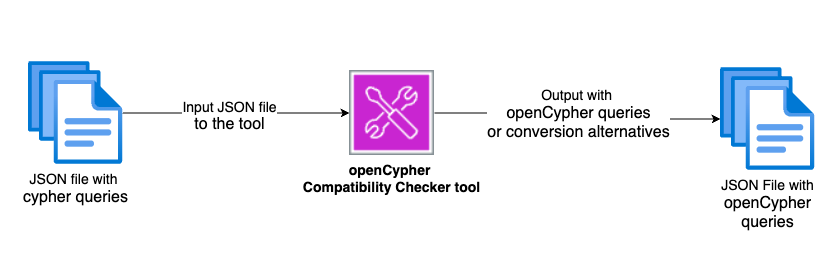
The openCypher Compatibility Checker tool processes a JSON file of Cypher queries, evaluates their compatibility with the openCypher specification, and generates a JSON output containing either automatically converted openCypher queries or recommended alternatives for queries that require manual adjustment.
Prerequisites
To implement the solution, you need to have the following prerequisites in place:
- Java version 17 (jdk-17.0.12) or later. For information on how to install, see the JDK Installation Guide.
- Your Neo4j Cypher queries exported in JSON format.
- Download the openCypher Compatibility Checker tool.
How to use the tool
The openCypher Compatibility Checker expects a JSON input file with a specific structure:
The JSON object has two main fields. The targetSystem field specifies the target database system na(Neptune Analytics) or ndb (Neptune database), while the queries array contains multiple query objects to be processed in a single batch. Each query object includes an id field, a unique numeric identifier that distinguishes each query, and a query field containing the actual Cypher query text to be analyzed and converted. You can include as many queries as needed in the array, with each requiring a unique ID to track results and identify which queries need attention. The tool processes all queries in the batch and returns results mapped to their corresponding IDs, so you can analyze multiple queries efficiently in a single execution.
The following example JSON structure defines a batch of Cypher queries for compatibility checking. The tool processes two queries: one retrieving Person nodes (id: 1) and another finding User-FOLLOWS relationships (id: 2), returning compatibility analysis and any necessary transformations for each.
Example input: Sample Cypher queries for compatibility
To demonstrate the working of the openCypher Compatibility Checker tool, I’ll use the following example file, which contains a few cypher queries:
The example contains six queries with varying compatibility levels for the Neptune openCypher format.
Query ID 1 uses the none() predicate function to filter paths. This query is supported but requires minor modification as explained in the Neptune documentation on rewriting None, All, and Any predicate functions.
Query ID 2 uses the reduce() function to calculate total distance across relationships. This query is supported but needs minor modification as detailed in the Neptune documentation on rewriting the Cypher reduce() function in openCypher.
Query IDs 3 and 4 use the FOREACH clause to update node properties along a path. These queries aren’t supported and require a complete rewrite using the UNWIND clause combined with appropriate pattern matching, as explained in the Neptune documentation on rewriting the Cypher FOREACH clause.
Query ID 5 uses the Neo4j APOC procedure apoc.do.when() for conditional logic. This query isn’t supported because APOC procedures are Neo4j-specific. It requires a rewrite using the alternatives built into Neptune, such as list comprehension capabilities with the UNWIND clause, as explained in the Neptune documentation on rewriting Neo4j APOC procedures.
Query ID 6 uses the APOC procedure apoc.case() for case-based logic. This query isn’t supported in the Neptune openCypher implementation and requires rewriting using the native capabilities Neptune. While the tool identifies this incompatibility, it doesn’t provide a specific replacement suggestion for this APOC function. See the Neptune compatibility documentation with Neo4j to find guidance on converting unsupported APOC functions into Neptune-supported openCypher queries or equivalent Neptune functions.
Executing the compatibility check and interpreting results
This section demonstrates how to use the openCypher Compatibility Checker to analyze the input file. The tool accepts two parameters: --input to specify the source file containing queries to process (for example, --input queries.json), and --output to define where the migration results should be saved (for example, --output results.json). When executed, the application reads queries from the input file, applies compatibility analysis and transformation logic, and writes the results to the output file. This migration helper streamlines the process of converting queries from Neo4j’s Cypher dialect to openCypher-compliant syntax compatible with Neptune.
After running the preceding command, the compatibility tool analysis results are written to the results.jsonfile. You can view the output by opening this file in any text editor or JSON viewer. The results file contains a structured JSON response with a results array, where each element corresponds to one of your input queries, matched by its unique id. For each query, the output indicates whether it’s supported (true or false) and provides an errorDefinitions array that details any compatibility issues found. When a query is unsupported, the error definitions include the exact position of the problematic syntax, the name of the unsupported feature, a potential replacement suggestion (if available), and a description explaining why the feature isn’t supported and how you might address it. This structured format simplifies identifying which queries need modification and understanding exactly what changes are required for Neptune compatibility. The following JSON shows the results.json file:
The tool generates a detailed report showing:
- Whether each query is supported
- The position of unsupported elements in the cypher query
- Names of unsupported functions and clauses
- Suggested replacements (if available)
- Detailed error descriptions
Common migration scenarios
This guide outlines key adaptations and technical considerations for a successful migration.
Predicate functions
NONE(): Can be implemented using list comprehensionALL(): Can be rewritten using list comprehensionANY(): Achievable through list comprehension patterns
Aggregation and processing
reduce(): Can be implemented using a combination of:- List comprehension
UNWINDclause- Appropriate aggregation functions
Control flow modifications
FOREACHclause:- Replace with
UNWINDoperations - Combine with appropriate pattern matching
- Use multiple
MATCHorCREATEstatements as needed
- Replace with
Procedure adaptations
- Neo4j APOC procedures:
- Use the built-in Neptune alternatives where available
- Implement custom solutions for unsupported functionalities
- Use the built-in graph operations available in Neptune
For more information, see Rewriting Cypher queries to run in openCypher on Neptune.
Conclusion
The openCypher Compatibility Checker streamlines Neo4j to Neptune migrations by identifying compatibility issues early and providing clear guidance on necessary changes. While the tool automates incompatibility detection, you should carefully evaluate each case and thoroughly test rewritten queries to verify that they maintain the intended functionality in a Neptune openCypher implementation.