AWS Database Blog
Well-Architected design for resiliency with Oracle Database@AWS
Oracle Database@AWS delivers enterprise-grade database capabilities through database services that use Oracle Exadata infrastructure managed by Oracle Cloud Infrastructure (OCI) within Amazon Web Services (AWS) data centers. You can use Oracle Database@AWS to migrate your Oracle Exadata workloads to AWS while maintaining the same performance and features as your on-premises Oracle Exadata deployments. You can benefit from reduced application latency by establishing low-latency connectivity between Oracle Exadata and your applications running on AWS. Additionally, you can integrate Oracle Database@AWS with other AWS services for various capabilities, including observability, analytics, artificial intelligence and machine learning (AI/ML), and building generative AI applications. By providing automated management, optimized performance, and built-in security features across multiple Availability Zones, Oracle Database@AWS helps you reduce operational overhead while maintaining the highest levels of database reliability and performance.
High availability (HA) and disaster recovery (DR) options are important aspects to consider when migrating or deploying your critical database in Oracle Database@AWS to help make sure the architecture can meet the service level agreement (SLA) of the application. When your databases experience downtime—whether from hardware failures, regional outages, or other disruptions—you can face significant revenue loss, damaged customer relationships, and potential compliance violations, making robust availability solutions essential for your business. To address these challenges, you can implement comprehensive protection strategies using the multi-layered approach of Oracle Database@AWS to resilience. By using Oracle Data Guard with both cross-AZ configurations for high availability and cross-Region setups for disaster recovery, you can create defense-in-depth protection that spans from local hardware failures to AWS Region-wide outages.
This post will help you implement and maintain Data Guard configurations that follow Oracle’s Maximum Availability Architecture (MAA) best practices and the AWS Well-Architected Framework. We will show how to select the right network architecture and configure Data Guard associations for both cross-AZ and cross-Region deployments, making sure your applications maintain seamless connectivity during role transitions.
HA and DR for Oracle Database@AWS with Data Guard
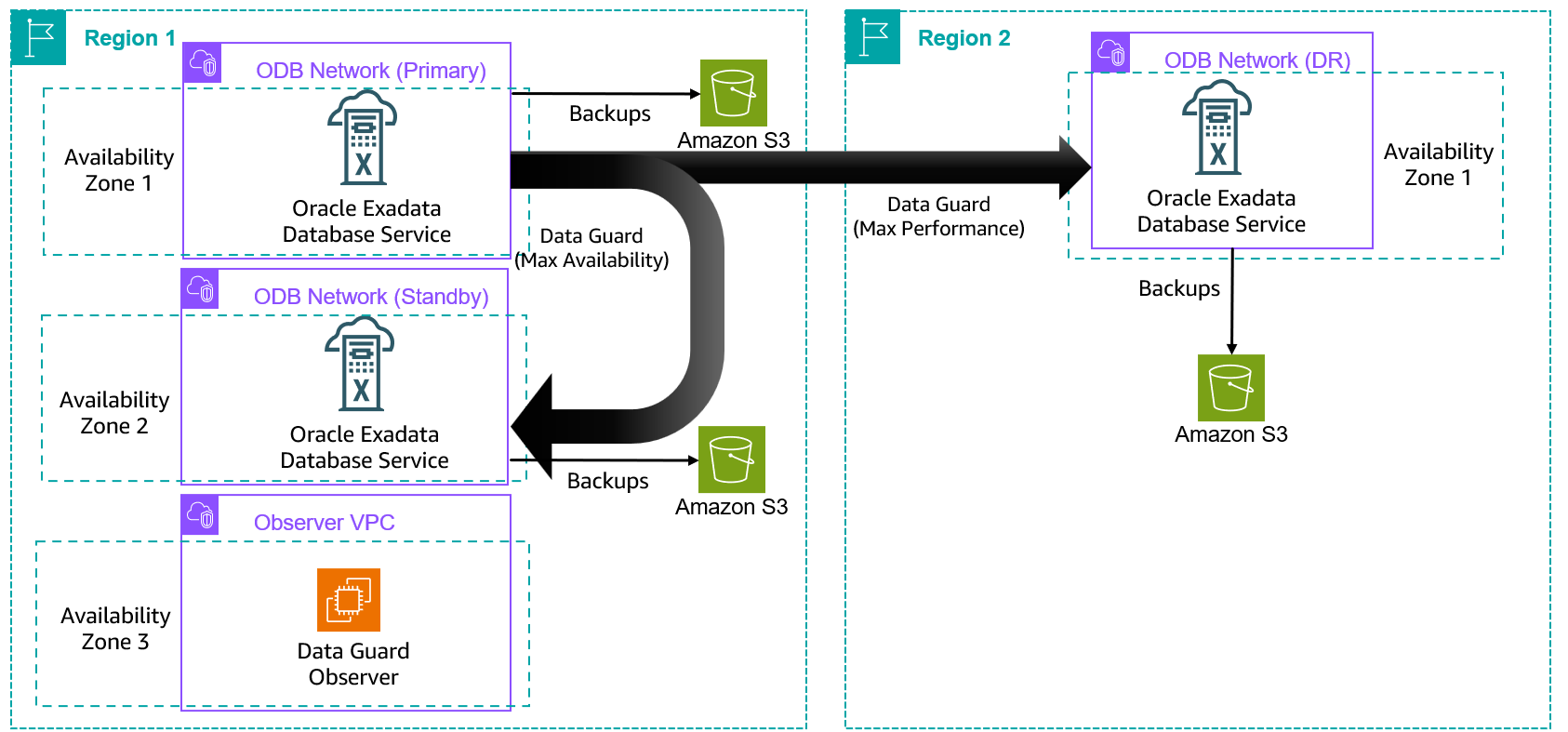
Exadata Database Service on Dedicated Infrastructure (ExaDB-D) and Autonomous Database Dedicated (ADB-D) services offered under Oracle Database@AWS provide a managed experience to create and maintain Data Guard configurations. You can use the OCI console or command line interface (CLI) to build Data Guard configurations between primary and standby sites after the required connectivity is established between primary and standby virtual machine (VM) clusters. The following diagram shows the reference architecture of an HA/DR configuration for ExaDB-D using a Data Guard association between two Availability Zones in the same Region and across Regions.
The following table shows a comparison of Data Guard association features available for ExaDB-D and ADB-D services.
| Feature | ExaDB-D | ADB-D |
| Managed experience to create and manage Data Guard | Yes | Yes |
| Automated failover for cross-AZ deployment | Yes: Customer managed Data Guard Observer (FSFO) | Yes |
| Automated failover for cross-Region deployment | Yes: Customer managed Data Guard Observer (FSFO) | Yes |
| Number of standby databases supported(including local and remote) | 6 | 2 |
| Recommended configuration | Maximum availability for cross-AZ and maximum performance for cross-Region | Maximum availability for cross-AZ and maximum performance for cross-Region |
To establish the network connectivity for Data Guard association, you can choose from two options:
- Use AWS Transit Gateway to connect two ODB networks in two Availability Zones or two Regions.
- Establish peering at the OCI Virtual Cloud Network (VCN) level using local peering gateways for cross-AZ deployments or using remote VCN peering and a dynamic routing gateway (DRG) for cross-Region Data Guard deployments.
In the following sections, we dive into the networking details, benefits, and cost implications of the various connectivity options for Data Guard association for Oracle Database@AWS.
Cross-AZ deployment in the same Region
The foundation of a resilient database architecture on AWS begins with protecting critical databases from primary Availability Zone disruptions. Let’s explore the networking options for cross-AZ Data Guard deployment available for both ExaDB-D and ADB-D services.
Use Transit Gateway to connect two ODB networks for Data Guard connectivity
You can route the traffic between two ODB networks in two Availability Zones in a Region within the AWS network using Transit Gateway. The following diagram shows details of the configuration between two Exadata VM clusters hosted in two Availability Zones (az1 and az2) and ODB networks using a transit gateway with connections routed through a transit virtual private cloud (VPC) that is peered with each ODB network.
In this example, b.b.b.b/b is the client subnet CIDR range for the ODB network in az1, a.a.a.a/a is the CIDR range for the transit VPC that is peered with ODB network in az1, y.y.y.y/y is the client subnet CIDR range for the ODB network in az2, and x.x.x.x/x is the CIDR range for the transit VPC that is ODB peered with the ODB network in az2.
| Network | CIDR |
| Primary transit VPC | a.a.a.a/a |
| Primary ODB network client subnet | b.b.b.b/b |
| Standby transit VPC | x.x.x.x/x |
| Standby ODB network client subnet | y.y.y.y/y |
Refer to ODB peering to learn about the networking architecture of Oracle Database@AWS and the concept of ODB peering.
The following diagram illustrates how to set up connectivity for Data Guard traffic using Transit Gateway between two Availability Zones in a Region.
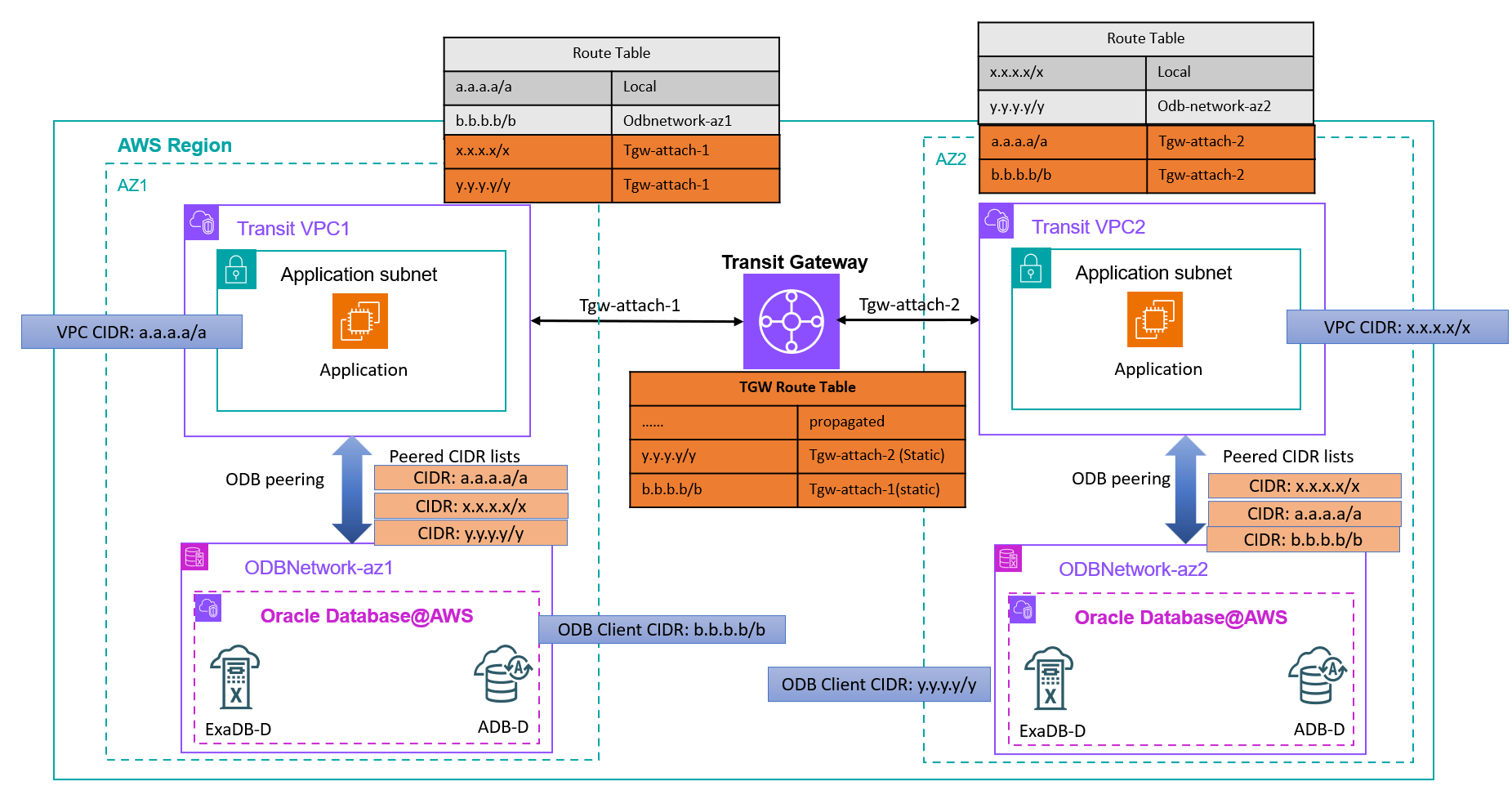
To implement this architecture, you must follow these steps:
- Peer transit VPC1 (with CIDR a.a.a.a/a) with
ODBNetwork-az1(with client CIDR b.b.b.b/b) and transit VPC2 (with CIDR x.x.x.x/x) withODBNetwork-az2(with client CIDR y.y.y.y/y) using the ODB peering method. - Provision a transit gateway or use an existing transit gateway and attach it to both transit VPC1 and transit VPC2 to the subnets that are mapped to the Availability Zone where the ODB network is deployed. The Transit Gateway attachment to the transit VPCs should cover only the subnets mapped to the Availability Zone where the ODB network is provisioned.
- Modify the route table for transit VPC1 (used by the subnet for the Transit Gateway attachment) to route the traffic targeted to the transit VPC2 CIDR (x.x.x.x/x) and
ODBNetwork-az2CIDR (y.y.y.y/y) through its Transit Gateway attachment. - Modify the route table for transit VPC2 (used by the subnet for the Transit Gateway attachment) to route the traffic targeted to the transit VPC1 CIDR (a.a.a.a/a) and
ODBNetwork-az1CIDR (b.b.b.b/b) through its Transit Gateway attachment. - The routes from the route tables attached to those subnets will be auto-populated to the route table of Transit Gateway.
- Add two static routes on Transit Gateway for the ODB network client CIDRs at both Availability Zones that aren’t directly connected to Transit Gateway. The static route for the CIDRs b.b.b.b/b and y.y.y.y/y must be pointed to the corresponding Transit Gateway attachment of the transit VPC.
- Modify the ODB peering connections to add peered CIDR ranges for the other ODB network and its transit VPC:
- Modify the ODB peering connection for
ODBNetwork-az1to add x.x.x.x/x and y.y.y.y/y to its peered CIDR list. - Modify ODB peering connection for
ODBNetwork-az2to add a.a.a.a/a and b.b.b.b/b to its peered CIDR list.
By modifying the ODB peering connection peered CIDR list, the network security group of the corresponding OCI VCN will be automatically updated to allow required traffic. You can review the network security group rules to verify connectivity on the database listener port, SSH (22), and ICMP.
- Modify the ODB peering connection for
- Test the connectivity to confirm the solution is properly implemented.
If you’re using AWS Cloud WAN to manage global connectivity, you can use the same for Data Guard traffic, as discussed in Connecting AWS Cloud WAN to Oracle Database@AWS (ODB@AWS).
Use local peering gateways with OCI VCNs for Data Guard connectivity
The second option to establish connectivity between VM clusters is to route the traffic between two OCI VCNs associated with the ODB networks using local peering gateways.
In the following diagram, ODBNetwork-az1 is the name of the ODB network in AZ1 with client CIDR b.b.b.b/b and ODBNetwork-az2 is the name of the ODB network in AZ2 with client CIDR y.y.y.y/y.
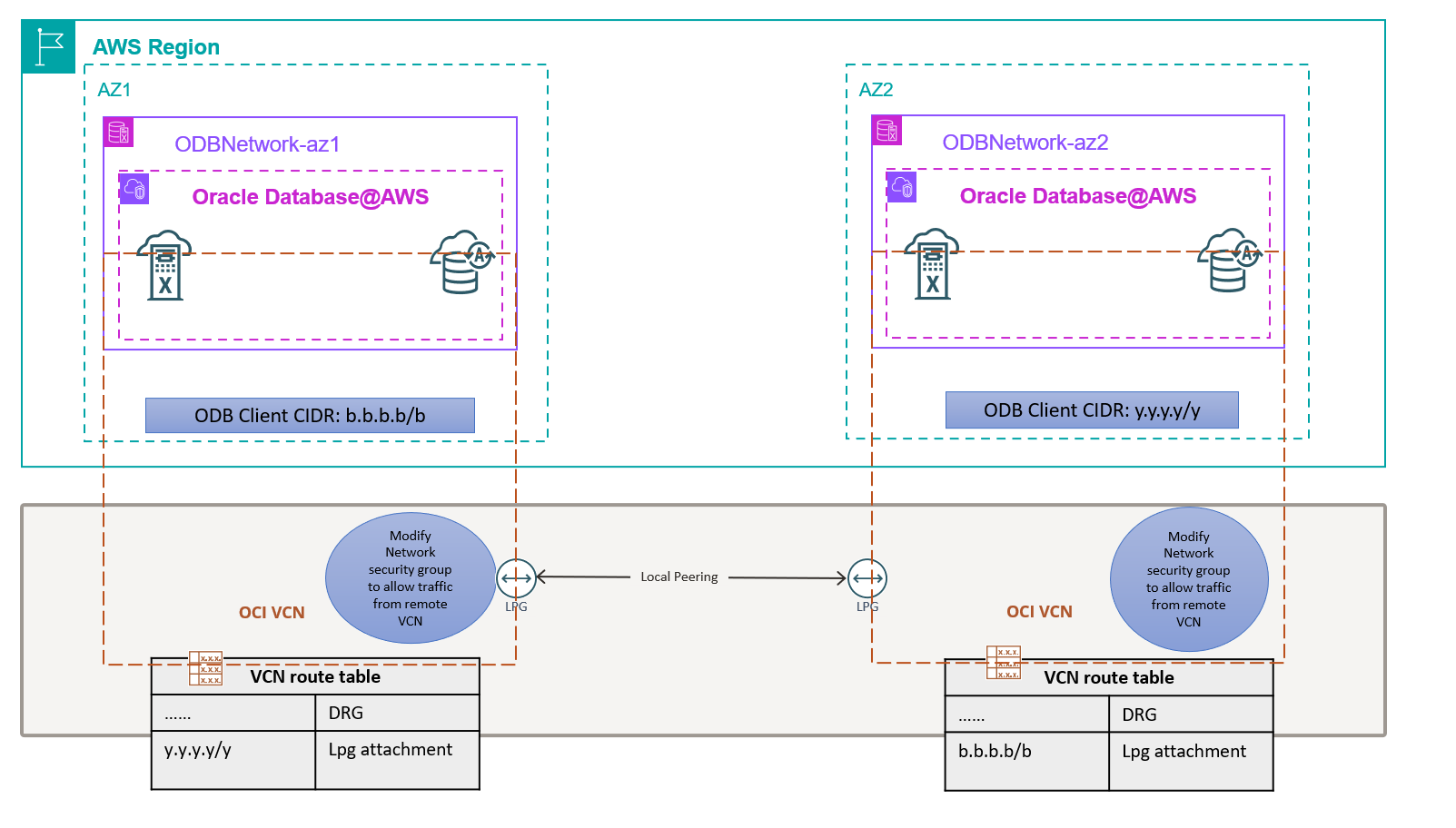
To implement connectivity by peering OCI VCNs, you must follow these steps:
- Identify the OCI VCNs associated with the ODB networks from the OCI console and note the CIDR ranges for the client networks.
- Add one local peering gateway to each VCN.
- Peer the two local peering gateways.
- Modify the default route table of the OCI VCN corresponding to
ODBNetwork-az1to route the traffic for the CIDR ofODBNetwork-az2through the local peering gateway. - Modify the default route table of the OCI VCN corresponding to
ODBNetwork-az2to route the traffic for the CIDR ofODBNetwork-az1through the local peering gateway. - Modify the network security group (the one with name adjustable) for each OCI VCN to allow traffic from the other ODB network client CIDR.
- Test the connectivity to confirm the solution is properly implemented.
Refer to About Implementing Disaster Recovery with Cross-Zone Data Guard on Oracle Database@AWS for more details about this configuration.
Comparing connectivity options for cross-AZ Data Guard association
The following table compares the two options for routing Data Guard traffic between Availability Zones using Transit Gateway and OCI VCN peering.
| Feature | Transit Gateway | OCI VCN peering |
| Traffic isolation | AWS network | OCI network |
| Latency | Low single-digit milliseconds | Low single-digit milliseconds |
| Cost | Transit Gateway and cross-AZ charges | No data transfer charges |
| Data residency and compliance requirement | Meets the requirement if traffic must remain in AWS network | Doesn’t meet data residency requirements because data is physically stored in AWS and Data Guard traffic is routed through the OCI network |
| Ownership for troubleshooting | AWS | OCI |
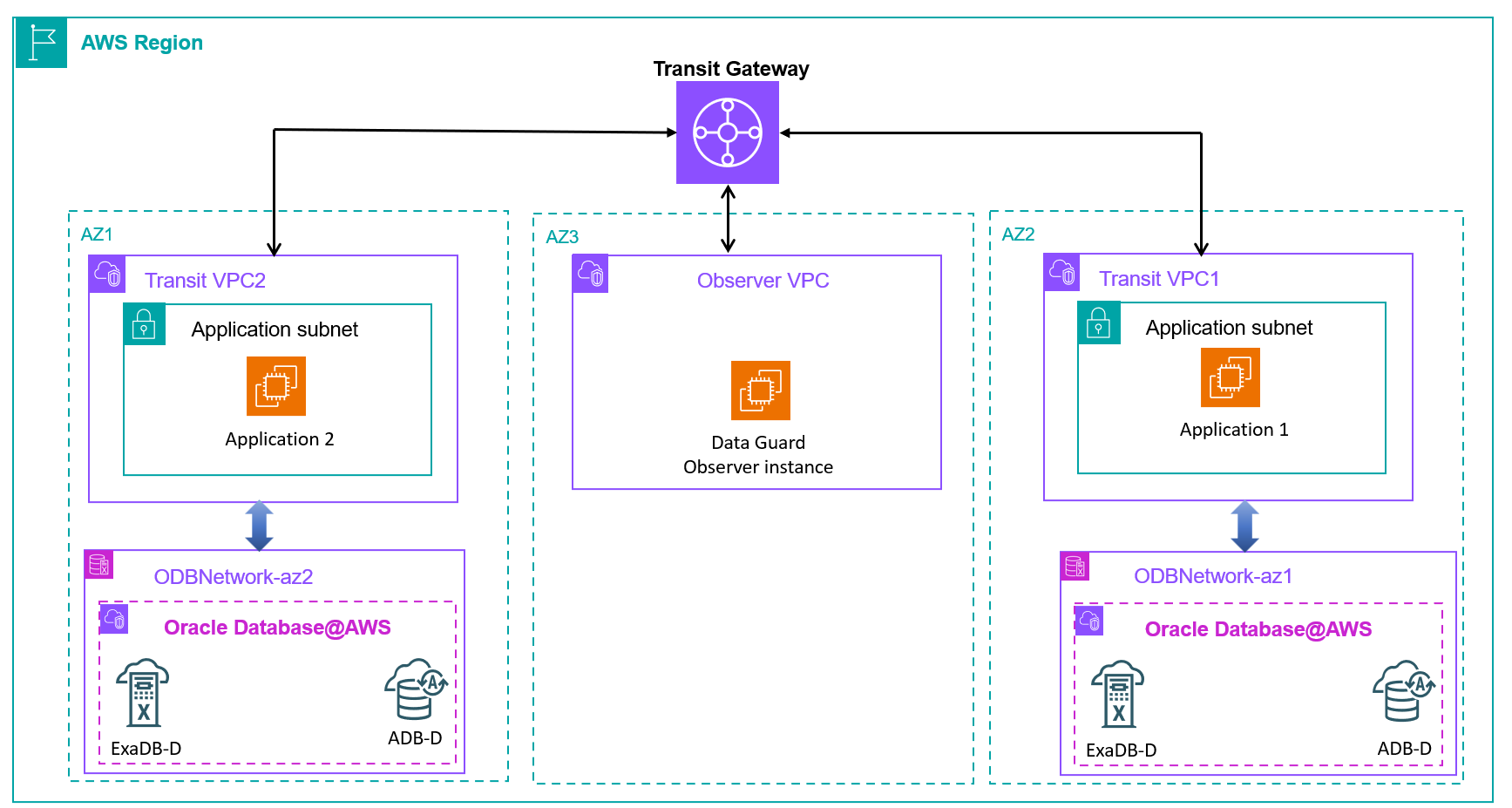
ExaDB-D doesn’t automatically configure Data Guard Observer for automated failover when adding a Data Guard association. However, you can build an observer configuration manually. It’s recommended to host the Data Guard Observer instance on the AWS network where your application stack is primarily residing to trigger failovers when application to database connectivity is impacted. The following diagram shows a reference architecture of a Data Guard association across two Availability Zones with an observer configuration deployed in a third Availability Zone for Fast-Start Failover (FSFO). For ADB-D, you can enable automatic failover for cross-AZ deployments without having to manually configure an observer process.
Cross-Region disaster recovery using Data Guard association
After you establish your HA configuration across Availability Zones, the next step is to implement DR protection. If your DR requirements go beyond what cross-AZ deployment can provide, implement Data Guard across Regions. Let’s examine the available connectivity options and compare their effectiveness for cross-Region Data Guard deployments.
Use Transit Gateway to connect two ODB networks across Regions
You can route the traffic between two ODB networks in two Regions within the AWS network using a Transit Gateway configuration, as shown in the following diagram.
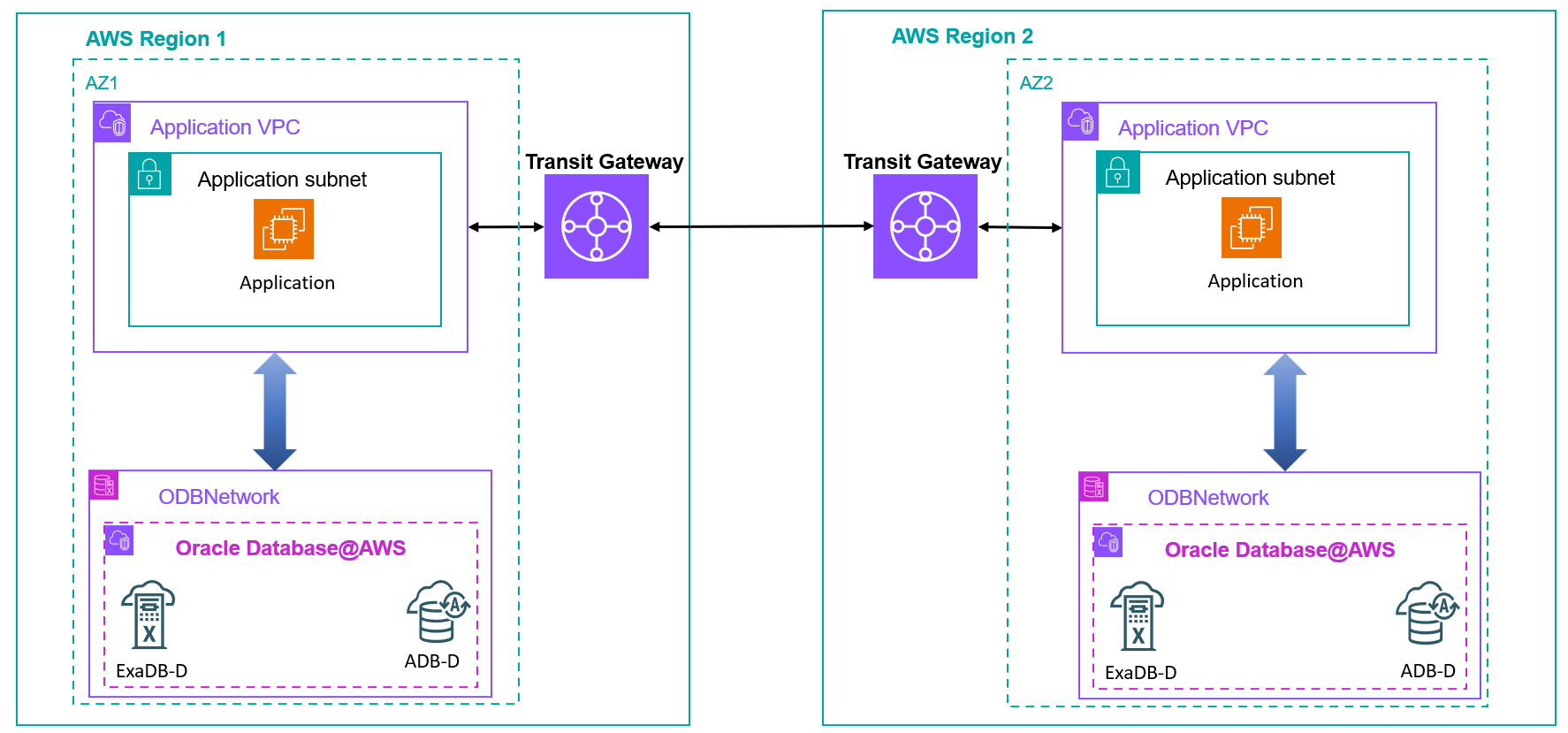
The high-level steps for this configuration include:
- Provision two transit gateways, one for each Region. You can also use existing transit gateways.
- Attach the transit gateways to the ODB peered VPC in each Region to the subnet mapped to the Availability Zone where the ODB network exists.
- Create a peering attachment and accept the peering request to establish connectivity between the transit gateways, as discussed in Transit gateway peering attachments in AWS Transit Gateway.
- Update the routing rules according to the instructions mentioned earlier for the transit gateway configuration for cross-AZ traffic.
- Update the peered CIDR list of the ODB network to allow traffic from the remote ODB network by modifying the ODB network configuration.
- Test the connectivity to confirm the solution is properly implemented.
If you’re using Cloud WAN to manage global connectivity, you can use the same procedure for Data Guard traffic, as discussed in Connecting AWS Cloud WAN to Oracle Database@AWS (ODB@AWS).
Use remote VCN peering with OCI VCNs
The second option of peering the backend OCI VCNs to establish connectivity for cross-Region Data Guard configuration needs additional HUB VCNs to be configured on each side. This is because an OCI VCN can only be attached to one DRG, and the VCN mapped to the ODB network is already attached to a DRG for AWS-OCI network integration. Therefore, we introduce a HUB VCN and establish local peering gateway connectivity between the ODB network OCI VCN and the HUB VCN, which you can then attach to a DRG for cross-Region connectivity, as shown in the following diagram.
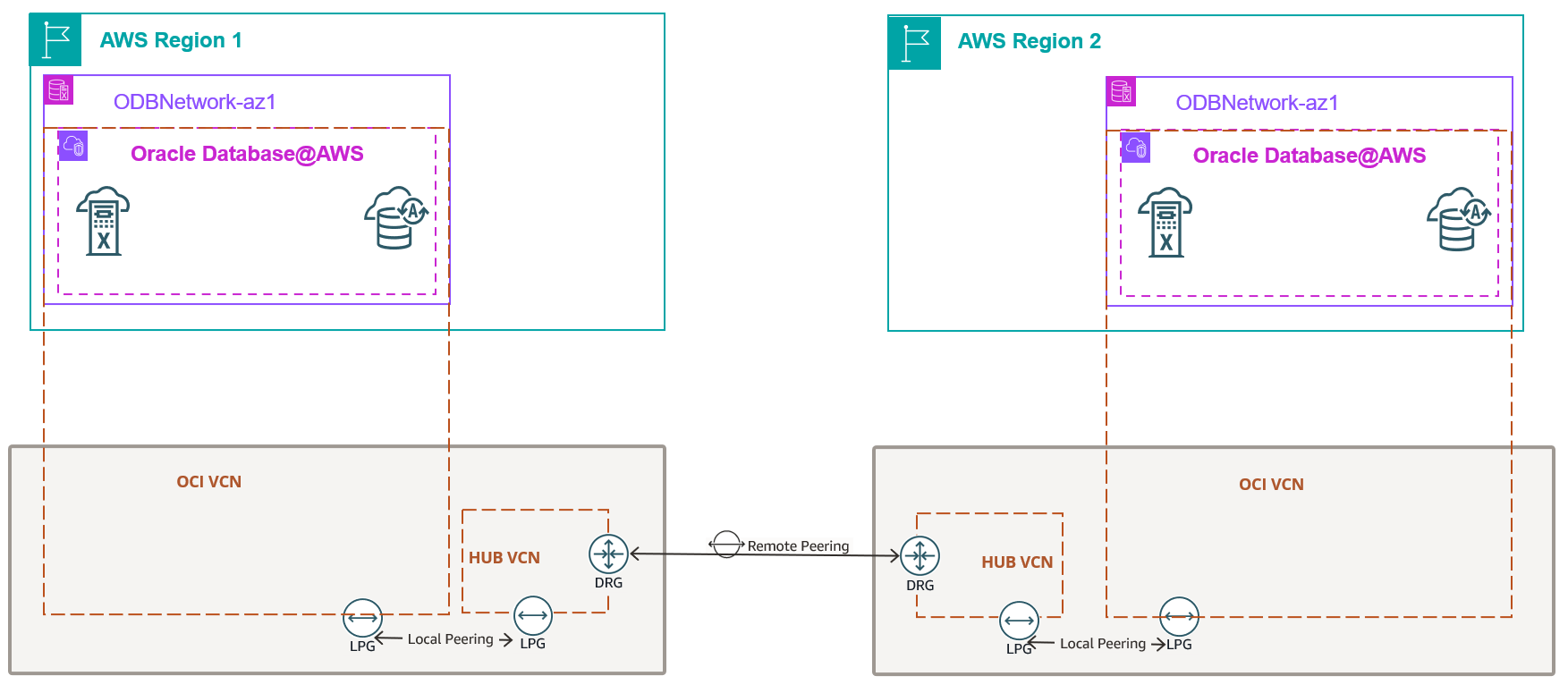
For detailed configuration steps, refer to About Implementing Disaster Recovery with Cross-Regional Active Data Guard on Oracle Database@AWS.
Comparing connectivity options for cross-Region Data Guard association
The following table compares the connectivity options for Data Guard traffic across Regions using Transit Gateway and OCI VCN peering.
| Feature | Transit Gateway | OCI VCN peering |
| Traffic isolation | AWS network | OCI network |
| Latency | Milliseconds | Milliseconds |
| Cost | Transit Gateway charges and cross-Region data transfer charges | Cross-Region data transfer charges |
| Data residency and compliance requirement | Meets the requirement if traffic must remain in AWS network | Doesn’t meet data residency requirements because data is physically stored in AWS and Data Guard traffic is routed through the OCI network |
| Ownership for troubleshooting | AWS | OCI |
Configure Data Guard association for ExaDB-D and ADB-D
Both ExaDB-D and ADB-D provide a managed experience for setting up a Data Guard association using the console or API and CLI without having to manually execute the backup, restore, and Data Guard configuration steps.For ExaDB-D, complete the following steps:
- Log in to your OCI tenancy using the OCI console.
- Choose Oracle Exadata Database Service on Dedicated Infrastructure in the Oracle AI Database section.
- Select your VMC for the primary database.
- Select the primary database.
- Select Data Guard associations.
- Configure using the add standby option by choosing the appropriate target AD, infrastructure, and VMC for the standby instance.
- Test switchover after the build is complete.

For ADB-D, complete the following steps:
- Log in to your OCI tenancy using the OCI console.
- Choose Autonomous Database on Dedicated Infrastructure in the Oracle AI Database section.
- Choose your Autonomous Container Database (ACD).
- Select Data guard associations.
- Configure using the add standby option by choosing the appropriate target AD, infrastructure, and AVMC for the standby.
- Test switchover after the build is complete.
Application connectivity for cross-AZ Data Guard failover and switchover
Application connectivity to databases requires careful consideration when planning Data Guard switchover and failover scenarios for both ADB-D and ExaDB-D. In this section, we discuss well-architected and recommended models for connectivity from the application stack to database to enable applications to transparently establish connectivity to the database across role transition scenarios without reconfiguration by using the appropriate TNS configurations.
In most cases, customers deploy their application stack in a VPC across subnets mapped to different Availability Zones for high availability. Because a VPC can be simultaneously peered with the ODB networks in the primary Availability Zone and the standby Availability Zone, applications running in that VPC can facilitate transparent connectivity to the database across Data Guard switchover and failover scenarios, as shown in the following diagram.
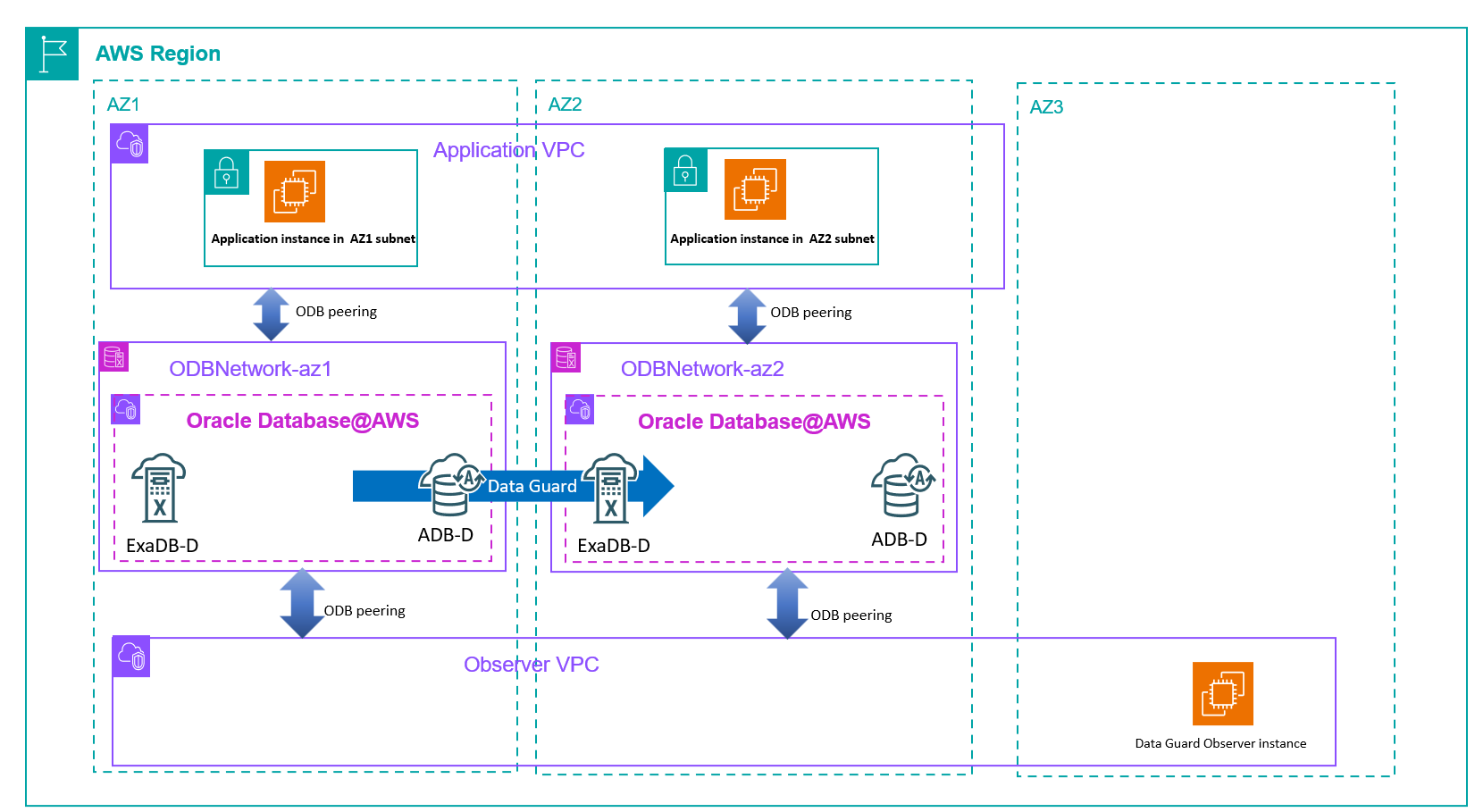
If your application is connected to the database in the ODB network over a transit gateway, you can attach the transit VPCs peered to the ODB networks in the primary and standby Availability Zones to the transit gateway to establish transparent connectivity across switchover and failover scenarios.As illustrated in the following diagram, applications connect through the transit gateway to the ODB network, and the ODB peered VPC serves solely as a transit path.
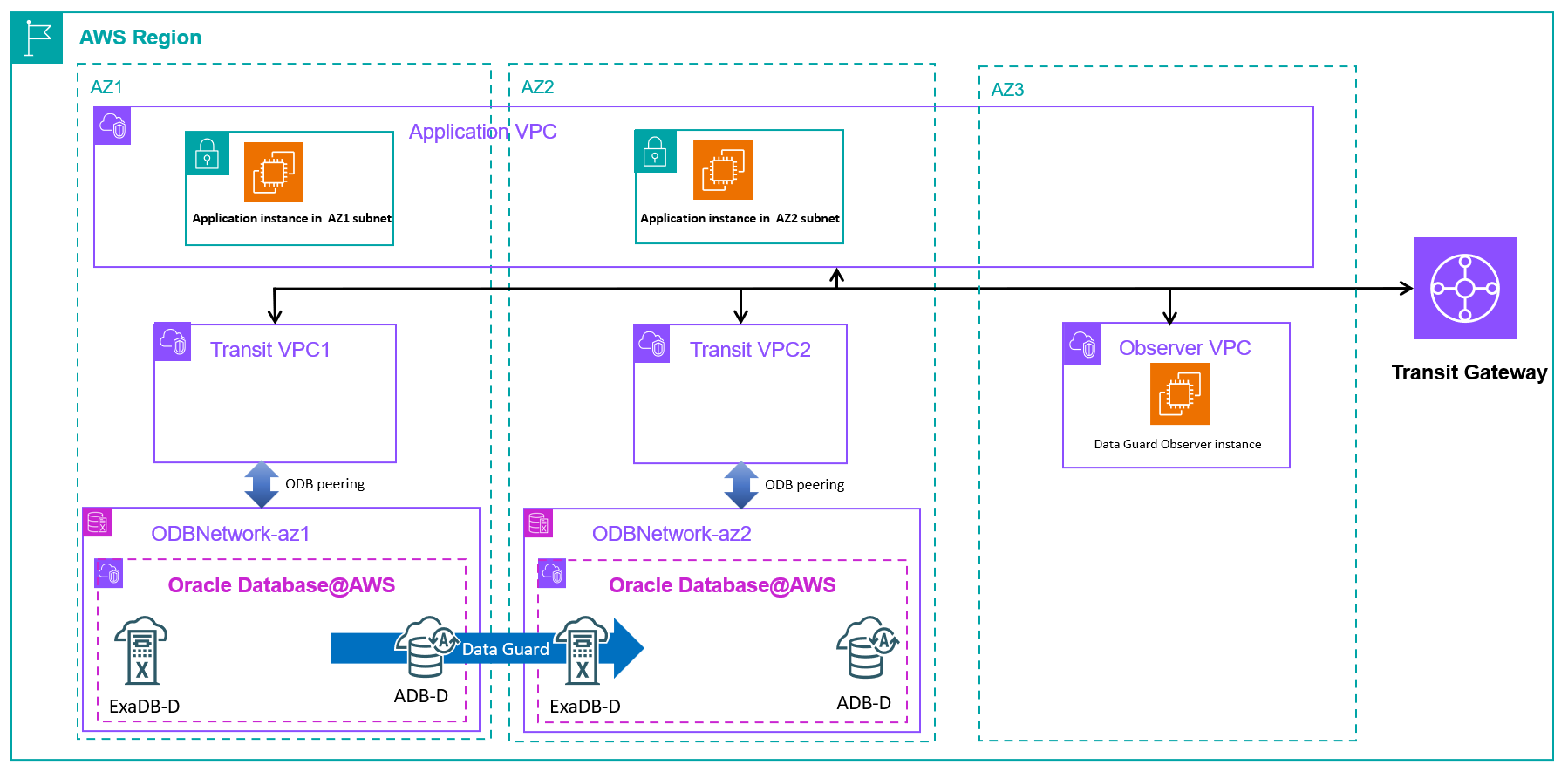
In this architecture, the transit VPC doesn’t host application components, and applications use Transit Gateway to connect to the database layer.
Conclusion
In this post, we showed how to use Data Guard to meet HA and DR requirements for your critical databases running in Oracle Database@AWS, discussed connectivity options for routing Data Guard traffic, and shared best practices for application connectivity to the database. By thoughtfully implementing multiple layers of protection—such as RAC’s rack-level resilience, Data Guard Multi-AZ replication, and cross-Region disaster recovery—you can achieve the desired protection level and availability for your databases deployed in Oracle Database@AWS. Start your journey toward comprehensive database resilience today by evaluating your current availability requirements, selecting the appropriate Data Guard configurations, and implementing the networking architecture that best supports your business needs. The detailed configuration steps and architectural patterns in this post can help you build and maintain a robust Oracle Database@AWS environment that provides business continuity for your applications.
Refer to the Oracle Database@AWS User Guide to learn more about Oracle Database@AWS features and capabilities.