AWS Developer Tools Blog
Automate Custom CI/CD Pipelines for Landing Zone Accelerator on AWS
Managing infrastructure deployments across multiple AWS accounts and maintaining governance controls present a significant challenge for organizations. Manual deployment processes create bottlenecks that slow delivery, introduce human error, and make it difficult to maintain consistent security and compliance standards across environments. Landing Zone Accelerator on AWS (LZA) provides foundational governance and baseline infrastructure across your AWS environment, but organizations often need to deploy workload-specific resources—such as Amazon Virtual Private Cloud (Amazon VPC) resources, AWS Lambda functions, or AWS Glue jobs—that fall outside LZA’s core scope. When you’re using LZA for provisioning workload infrastructure, deployments can typically take 45–90 minutes.
This blog post shows you how to extend LZA with continuous integration and continuous deployment (CI/CD) pipelines that maintain your governance controls and accelerate workload deployments, offering rapid deployment of both Terraform and AWS CloudFormation across multiple accounts. You’ll build automated infrastructure deployment workflows that run in parallel with LZA’s baseline orchestration to help maintain your enterprise governance and compliance control requirements. You will implement built-in validation, security scanning, and cross-account deployment capabilities to help address Public Sector use cases that demand strict compliance and security requirements.
In this post, you’ll learn how to configure cross-account deployment workflows that integrate seamlessly with your existing LZA environment through customizations, implement security controls including automated validation and scanning, and maintain centralized governance as teams deploy workload-specific infrastructure independently across multiple accounts.
Prerequisites
Before implementing this automated deployment solution, verify that your environment meets requirements across three key areas:
LZA Requirements
You need an LZA environment version 1.14.2 or later with AWS Organizations enabled and Organizational Units (OUs) such as Root, Security, and Infrastructure configured.
AWS Account Requirements
You’ll need appropriate AWS Identity and Access Management (IAM) permissions to create and manage AWS CodePipeline, AWS CodeBuild, Amazon Simple Storage Service (Amazon S3), AWS Key Management Service (KMS), Amazon DynamoDB (DynamoDB), IAM roles, and AWS Systems Manager (SSM) Parameter Store across multiple accounts.
Source Code and Repository Access
You’ll also need access to a GitHub repository with your infrastructure code and authorization to create AWS CodeConnections for secure source integration.
You can access complete implementation code, including CloudFormation templates and LZA configurations, in the aws-samples/sample-aws-lza-cicd-customizations repository on the GitHub website.
With these prerequisites in place, let’s examine how the solution components work together to deliver automated CI/CD capabilities.
Solution overview
You’ll extend LZA with automated deployment workflows by combining several AWS services. CodePipeline orchestrates your CI/CD workflow with automated triggers from GitHub. CodeBuild executes validation, security scanning, and deployment tasks. CodeConnections integrates your workflows with GitHub repositories, and cross-account IAM roles provide secure multi-account deployments. S3 and KMS provide encrypted artifact storage, and DynamoDB manages Terraform state locking.
Your architecture supports both CloudFormation and Terraform deployments, with automated validation using cfn-lint, cfn-nag, tflint, and tfsec. Manual approval gates help control production changes, and centralized audit logging provides visibility into deployment activities.
Note: Third-party open-source tools (cfn-lint, cfn-nag, tflint, and tfsec) are subject to their respective licenses. AWS does not endorse or support these third-party tools. Verify license compliance and evaluate tool capabilities for your specific use case.
Now that you understand the solution, let’s walk through the architecture that enables this automation.
Architecture
The solution spans three AWS accounts across three Organizational Units: Management (Root OU) manages the LZA control plane, SharedServices (Infrastructure OU) hosts the CI/CD pipelines, and Sandbox (Sandbox OU) serves as the deployment target for workloads. As shown in Figure 1, your SharedServices account acts as the CI/CD hub, while the Sandbox account serves as the deployment target with appropriate IAM roles for cross-account access. This hub-and-spoke approach offers three key benefits: centralized governance with consistent security controls, simplified maintenance that reduces operational overhead, and clear separation of duties that maintains security boundaries between accounts.
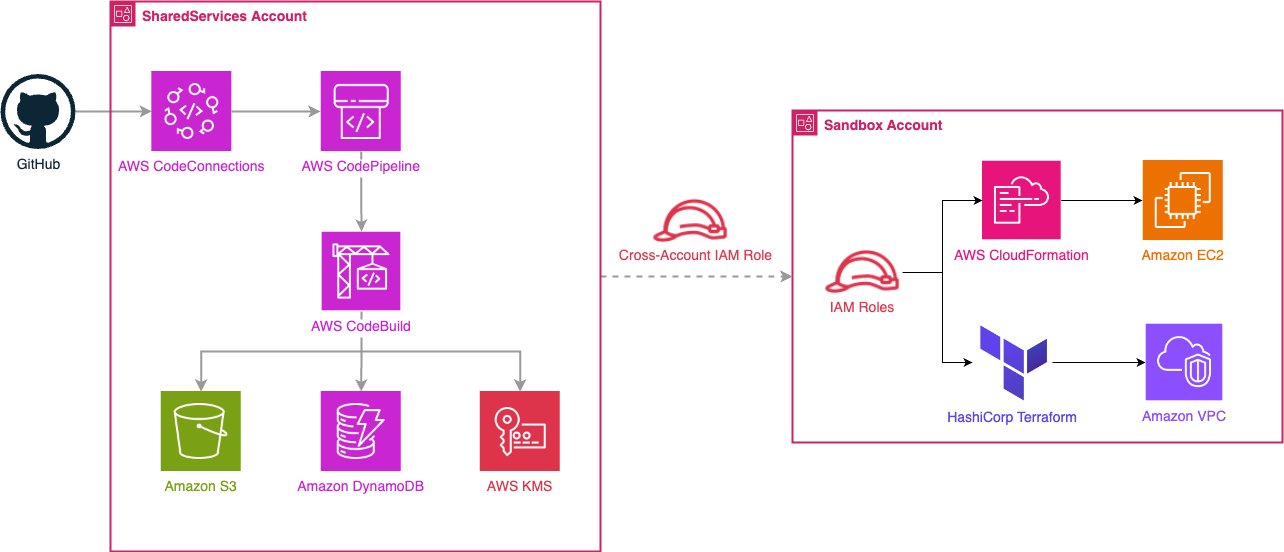
Figure 1: hub-and-spoke CI/CD architecture with cross-account deployment
With the hub-and-spoke architecture established, let’s understand how infrastructure changes flow through the deployment pipelines.
CI/CD Pipeline Flow
The CloudFormation pipeline begins with the Source stage, pulling from GitHub when changes occur to a CloudFormation template. The Validate stage runs CodeBuild to execute cfn-lint for syntax checking and cfn-nag for security analysis. Next, the CreateChangeSet stage creates a ChangeSet in the Sandbox account. The Manual Approval stage pauses execution for your review. Finally, the ExecuteChangeSet stage deploys the infrastructure.
For Terraform deployments, the pipeline follows a similar pattern with different validation tools. The Source stage is configured to pull from GitHub when changes are detected in the Terraform directory. The Plan stage runs CodeBuild to execute Terraform fmt, validate, tflint, and tfsec, then generates a Terraform plan. The Manual Approval stage pauses for your review. The Apply stage executes Terraform apply to deploy infrastructure to the Sandbox account.
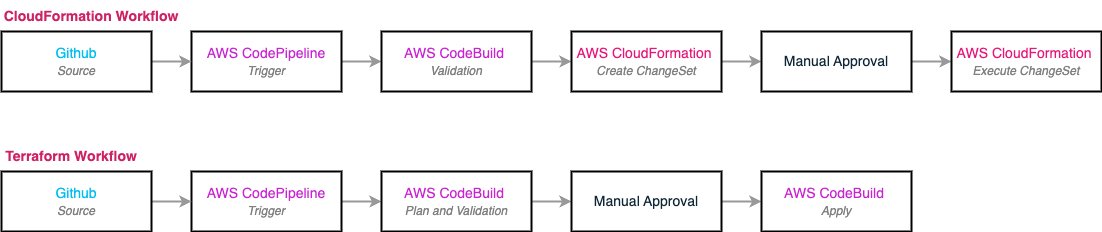
Figure 2: CloudFormation and Terraform pipeline deployment flows
Both workflows shown in Figure 2 provide automated validation and manual approval for infrastructure changes before reaching target accounts. These workflows maintain governance and compliance controls throughout the deployment lifecycle.
Key Security Features
Security remains critical when automating infrastructure deployments across multiple AWS accounts. Your CI/CD extension to LZA implements a security framework that protects your infrastructure through multiple defensive layers. This approach verifies that automated deployments maintain the same security standards as manual processes while reducing the risk of human error. The security model centers on three core principles: least-privilege access through carefully scoped IAM roles, defense-in-depth controls that protect data and operations at multiple layers, and automated validation that catches security issues before they reach production environments.
Cross-Account IAM Architecture
Your secure cross-account deployment capability start with a carefully designed IAM architecture. The solution implements a three-tier IAM security model where each component has precisely the permissions it needs and no more. You’ll deploy specialized roles for Terraform operations that manage infrastructure state and execute plans, CloudFormation deployment roles that handle stack operations and resource management, and cross-account orchestration roles that are used to coordinate activities between your SharedServices and target accounts.
Each role receives permissions scoped only to the specific AWS services and operations required for their deployment tasks. For example, your Terraform role can access S3 for state management and DynamoDB for locking, but cannot create IAM users or modify AWS Organizations settings. This granular approach is designed to reduce your attack surface, enhancing operational functionality. The complete IAM configuration details are available in LZA’s iam-config.yaml for your review and customization.
Security Controls
Your deployment workflow implements defense-in-depth security across multiple layers to protect infrastructure deployments and maintain compliance standards. Rather than relying on a single security control, this approach creates overlapping protections that guard against various threat vectors.
Data Protection and Encryption The solution encrypts data at rest and in transit. S3 buckets use KMS customer-managed keys that you control. Terraform state files are encrypted to protect sensitive infrastructure details. Transport Layer Security (TLS) 1.2 or higher protects data transmission. Cross-account KMS key policies confirm that only authorized roles in specific accounts can decrypt build artifacts and deployment packages.
Compliance and Audit Controls Automated governance and audit trails provide continuous oversight throughout the deployment lifecycle. Resource tagging adds custom markers for identifying and managing data processing activities. AWS CloudTrail tracks all deployment actions, creating an immutable record of operations.
Automated Security Validation Your pipelines include multiple automated security checks that identify misconfigurations before they reach production environments. CloudFormation templates undergo validation for syntax and best practices compliance, plus security analysis that identifies potential security issues in your resource configurations. Terraform configurations receive similar treatment through syntax verification, best practices enforcement, and security scanning that identifies common misconfigurations.
Governance and Oversight Manual approval gates provide human oversight for critical deployment decisions to maintain automated efficiency for routine operations. These approval points integrate with CloudTrail logging to create accountability records showing who approved which deployments. Your team can review Terraform plans and CloudFormation ChangeSets before execution, ensuring that automated systems implement exactly the changes you expect.
Solution Walkthrough
Now that you understand the architecture components, let’s walk through how you’ll implement this automated CI/CD solution. The deployment follows a foundation-first approach: you’ll start with Stage 1 to establish your shared infrastructure, then deploy Stages 2 and 3 to create your specific deployment pipelines. After completing the foundation stage, you can deploy the CloudFormation and Terraform pipelines in either order since they operate independently.
Stage 1: Foundation Resources
You’ll begin by deploying the CICD-Pipeline-Foundation stack to your SharedServices account. This stage creates the shared infrastructure that both CloudFormation and Terraform pipelines depend on for secure, cross-account operations.
The foundation stage establishes your artifact storage with S3 buckets for build artifacts and Terraform state storage. You’ll also get a KMS customer-managed key for encryption that includes cross-account access policies, supporting secure operations across your account boundaries. For source code integration, the stack creates CodeConnections that provide secure, token-based access to your repositories. Additionally, you’ll deploy a DynamoDB table for Terraform state locking to prevent concurrent modifications, plus SSM Parameter Store values that enable cross-stack references between your pipeline components.
Deployment Time: Estimated 10-15 minutes
Stage 2: CloudFormation Pipeline
Once your foundation is ready, you’ll deploy the CloudFormation-Workload-Deployment-Pipeline stack to your SharedServices account. This creates a complete CI/CD pipeline specifically designed for CloudFormation-based infrastructure deployments across multiple accounts.Your CloudFormation pipeline includes a CodePipeline that integrates with GitHub for source code management, performs automated validation to catch issues early, includes manual approval gates for governance compliance, and handles cross-account deployment stages. The pipeline uses a CodeBuild project configured with cfn-lint for syntax validation and cfn-nag for security analysis, ensuring your templates meet both technical and security standards before deployment. The cross-account deployment configuration targets your Sandbox account with appropriate IAM role assumptions, providing secure access without permanent credentials.
Deployment Time: Estimated 5-10 minutes
Stage 3: Terraform Pipeline
Your final deployment creates the Terraform-Pipeline stack, also in the SharedServices account. This pipeline facilitates Terraform-based infrastructure deployments with integrated planning, approval, and deployment workflows. The Terraform workflow includes a CodePipeline with GitHub source integration for version control, Terraform planning stages that show you exactly what changes will be made, manual approval workflows that maintain governance oversight, and automated apply stages for consistent deployments. You’ll get CodeBuild projects specifically optimized for Terraform plan generation and infrastructure deployment, plus integrated validation, formatting and security scanning tools for Terraform. Like the CloudFormation pipeline, this includes cross-account role assumption capabilities for secure deployments to your Sandbox account.
Deployment Time: Estimated 5-10 minutes

Figure 3: CodePipeline dashboard showing deployed CI/CD pipelines
Cost considerations
Operating costs for this CI/CD solution depend on deployment frequency, build duration, and artifact storage requirements.
Small applications (20 deployments/month): $5–7/month
- CodePipeline: $2.00 (two active pipelines)
- CodeBuild: $1.50
- S3 storage: $0.23
- DynamoDB: $0.37
- KMS: $1.30
- CloudWatch Logs: $0.50
Production environments (100+ deployments/month): $30–40/month
The increase is driven primarily by additional build minutes and artifact storage requirements.
Cost disclaimer: These estimates are examples based on January 19, 2025 AWS pricing in US East (N. Virginia). Actual costs vary by usage patterns and region.
Best Practices
Following these recommendations will help you optimize your CI/CD pipeline operations, reduce costs, and maintain security compliance.
Environment Management and Security
Implement proper environment separation using distinct AWS accounts for development, staging, and production deployments. This approach maintains isolation and prevents accidental changes to production infrastructure. Complement this with regular IAM policy reviews, restricting permissions following least-privilege principles to reduce security risks and maintain compliance requirements.
Monitoring and Troubleshooting
Configure monitoring by enabling CloudWatch logging for CodeBuild across regions and setting up alarms for pipeline failures. This visibility into deployment issues supports rapid troubleshooting when problems occur. Additionally, run validation tools locally before pushing to GitHub—this practice catches issues early, reduces feedback time compared to pipeline-based validation, and conserves CodeBuild minutes.
State and Artifact Management
Use DynamoDB for Terraform state locking to prevent concurrent modifications. Without proper locking, simultaneous Terraform apply operations can corrupt state files, causing infrastructure drift and deployment failures.
Security Validation
Make security scanning a priority by reviewing security findings before approval. Automated scanning catches misconfigurations early, reducing security vulnerabilities in production environments and enhancing your overall security posture.
Clean Up
To avoid ongoing charges, remove the deployed resources when you no longer need them. Follow these steps in order to prevent deletion conflicts:
Remove Deployed Infrastructure
Begin by removing workload infrastructure deployed through the pipelines in the Sandbox account. Use the AWS Management Console or AWS CLI to erase these resources, ensuring no dependencies remain before proceeding to the next step.
Delete CI/CD Pipeline Stacks
Remove the CI/CD pipeline stacks from the SharedServices account in reverse order of their creation. Start with the Terraform-Pipeline stack, followed by the CloudFormation-Workload-Deployment-Pipeline stack, and finally the CICD-Pipeline-Foundation stack. This sequence prevents dependency conflicts during deletion.
Clear S3 Storage
Before deleting the foundation stack, manually empty the S3 buckets containing artifacts and Terraform state files. CloudFormation cannot delete non-empty buckets, so this step prevents stack deletion failures.
Confirm Resource Removal
Check that resources have been successfully removed by reviewing CloudFormation stacks, S3 buckets, DynamoDB tables, and CodePipeline pipelines in the AWS Management Console. This verification step helps identify remaining resources that could generate ongoing charges.
Conclusion
In this post, we demonstrated how to extend AWS Landing Zone Accelerator with automated CI/CD pipelines supporting both Terraform and CloudFormation deployments across multiple accounts. By using LZA’s customizations feature alongside AWS native services like CodePipeline and CodeBuild, you can achieve consistent infrastructure deployment while preserving the security, governance, and compliance controls your organization requires.The hub-and-spoke architecture centralizes CI/CD operations in the SharedServices account, which standardizes deployment workflows, provides audit trails, and maintains security boundaries between target accounts. With automated validation, security scanning capabilities, and manual approval gates, this solution provides controls suitable for production environments managing complex multi-account AWS infrastructures.
Getting Started
Deploy the solution using the provided LZA configuration files:
- Clone the Repository: Access the complete implementation from the aws-samples/sample-aws-lza-cicd-customizations GitHub repository
- Configure LZA: Update the customizations-config.yaml file with your GitHub repository details
- Deploy configuration: Commit and push changes to your LZA configuration repository
- Activate GitHub connection: Manually authorize the CodeConnections integration in the AWS Management Console
- Verify deployment: Check AWS CloudFormation stacks, CodePipeline creation, and SSM Parameter Store values
You can find complete deployment instructions, configuration examples, and troubleshooting guides in the repository README.
Additional Resources
AWS Documentation:
- Landing Zone Accelerator on AWS Developer Guide
- AWS CodePipeline Documentation
- AWS CodeBuild Documentation
- AWS CI/CD best practices
Need help? Contact your AWS Solutions Architect or visit AWS Support to discuss implementation strategies for your specific multi-account requirements.
Ready to automate your multi-account infrastructure deployments? Access the complete solution code and extend your Landing Zone Accelerator on AWS with custom CI/CD pipelines today!