AWS DevOps & Developer Productivity Blog
Ensure Code Integrity for AWS Lambda Functions with Automated Code Signing Using Terraform
Authors: Sourav Kundu and Joyson Neville Lewis.
In today’s cloud-native landscape, ensuring the integrity and authenticity of your serverless functions is critical for maintaining security and compliance. Organizations face increasing challenges in preventing the execution of tampered or malicious code in their AWS Lambda functions. These challenges intensify as deployment pipelines become more complex and distributed.
AWS Lambda code signing provides a robust security mechanism that guarantees only trusted, unmodified code executes in your Lambda functions. By implementing digital signatures, you can verify code integrity and authenticate the source, creating a secure foundation for your serverless applications.
This post shows you how to implement AWS Lambda code signing using Terraform, creating an automated, end-to-end security framework that prevents unauthorized code execution while maintaining operational efficiency.
Solution overview
This solution creates a comprehensive code signing pipeline that automatically signs Lambda deployment packages and enforces signature validation at runtime. The implementation uses AWS Signer with the SHA384-ECDSA algorithm for cryptographic security, combined with Terraform automation for consistent deployments across environments.
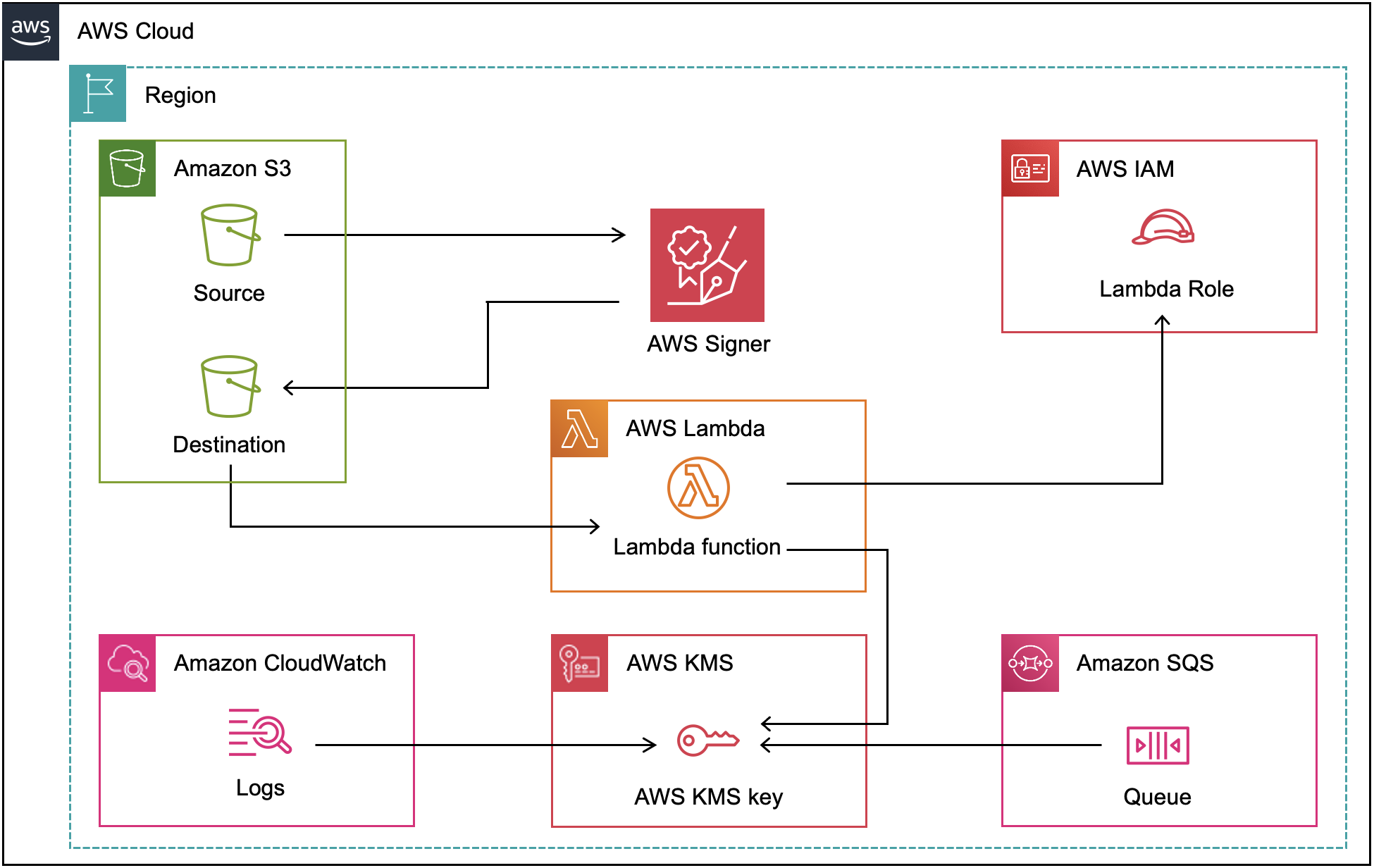
Figure 1: Architecture diagram of AWS Lambda signing with AWS Signer
The architecture includes:
AWS Signer: Creates signing profiles and jobs with strong cryptographic algorithms
Amazon S3: Stores original and signed Lambda code with versioning enabled
AWS Lambda: Deployed with code signing enforcement in a VPC environment
AWS KMS: Provides encryption for CloudWatch logs and SQS dead letter queue
VPC Configuration: Isolates Lambda execution in private subnets with VPC endpoints
Walkthrough
This walkthrough demonstrates how to deploy a secure Lambda function with code signing enabled using Terraform, a popular infrastructure as code.
The deployment process includes these key steps:
- Set up AWS Signer signing profile with cryptographic configuration
- Create S3 bucket with versioning for code storage
- Configure automated code signing jobs
- Secure Lambda deployment
- Implement security best practices including KMS encryption and VPC isolation
- Deploy the infrastructure with Terraform
Link to GitHub repository: AWS Lambda Code Signing with Terraform.
Prerequisites
For this walkthrough, you should have the following prerequisites:
– An AWS account with appropriate permissions for AWS Signer, Lambda, S3, and VPC services
– Terraform >= 1.0 installed on your local machine
– AWS CLI configured with credentials that have necessary service permissions
– Basic understanding of AWS Lambda, Terraform, and infrastructure as code concepts
1. Setup AWS Signer Signing Profile
The foundation of our code signing implementation starts with creating an AWS Signer signing profile. This profile is the identity that defines the cryptographic algorithm and signature validity period.
1.1 Define the signing profile resource in your Terraform configuration:
   resource "aws_signer_signing_profile" "lambda_signing_profile" {
     platform_id = "AWSLambda-SHA384-ECDSA"
     name        = "${replace(var.name, "-", "_")}_lambda_signing_profile_${random_string.suffix.result}"
     signature_validity_period {
       value = 135
       type  = "MONTHS"
     }
   }
We use the AWSLambda-SHA384-ECDSA platform, which provides strong cryptographic security with SHA-384 hashing and ECDSA (Elliptic Curve Digital Signature Algorithm).
1.2 Configure the code signing configuration that enforces security policies:
   resource "aws_lambda_code_signing_config" "configuration" {
     allowed_publishers {
       signing_profile_version_arns = [aws_signer_signing_profile.lambda_signing_profile.version_arn]
     }
     policies {
       untrusted_artifact_on_deployment = "Enforce"
     }
     description = "Code signing configuration for ${var.name} Lambda function."
   }
The untrusted_artifact_on_deployment = "Enforce" policy ensures that Lambda rejects any unsigned or improperly signed code.
2. Create S3 bucket with versioning for code storage
Before the code can be signed, it needs to be packaged and stored in a versioned S3 bucket. AWS Signer requires S3 versioning to uniquely identify the source artifact for each signing job.
2.1 Create the S3 bucket with versioning enabled:
resource "aws_s3_bucket" "lambda_source" {
  bucket        = "${var.name}-lambda-source-${data.aws_caller_identity.current.account_id}"
  force_destroy = true
}

resource "aws_s3_bucket_versioning" "lambda_source" {
  bucket = aws_s3_bucket.lambda_source.id
  versioning_configuration {
    status = "Enabled"
  }
}
Versioning is not optional here — AWS Signer uses the S3 object version_id to reference the exact artifact to sign.
2.2 Package the Lambda function code and upload it to the bucket:
data "archive_file" "python_file" {
  type        = "zip"
  source_dir  = "${path.module}/lambda_function/"
  output_path = "${path.module}/lambda_function/lambda_function.zip"
}

resource "aws_s3_object" "lambda_zip" {
  bucket     = aws_s3_bucket.lambda_source.bucket
  key        = "lambda_function.zip"
  source     = data.archive_file.python_file.output_path
  etag       = filemd5(data.archive_file.python_file.output_path)
  depends_on = [aws_s3_bucket_versioning.lambda_source]
}
The archive_file data source zips the contents of the lambda_function/ directory, and the aws_s3_object uploads it to the versioned bucket. The depends_on ensures versioning is active before the upload, so the object gets a version_id that the signing job can reference.
3. Configure automated Code Signing jobs
The next step creates an automated signing job that processes your Lambda code and generates signed artifacts.
3.1 Upload your Lambda code and configure the signing job:
   resource "aws_signer_signing_job" "build_signing_job" {
     profile_name = aws_signer_signing_profile.lambda_signing_profile.name

     source {
       s3 {
         bucket  = aws_s3_bucket.lambda_source.bucket
         key     = aws_s3_object.lambda_zip.key
         version = aws_s3_object.lambda_zip.version_id
       }
     }

     destination {
       s3 {
         bucket = aws_s3_bucket.lambda_source.bucket
         prefix = "signed/"
       }
     }
   }
This signing job automatically processes the uploaded Lambda code, creating a signed version stored in the signed/ prefix of your S3 bucket.
4. Secure Lambda Deployment
The Lambda function is configured to use the signed code and enforce code signing.
4.1 Deploy the Lambda function using the signed artifact:
resource "aws_lambda_function" "lambda_run" {
  s3_bucket        = aws_signer_signing_job.build_signing_job.signed_object[0].s3[0].bucket
  s3_key           = aws_signer_signing_job.build_signing_job.signed_object[0].s3[0].key
  source_code_hash = data.archive_file.python_file.output_base64sha256
  function_name    = var.name
  role             = aws_iam_role.lambda_role.arn
  handler          = "handler.lambda_handler"
  runtime          = "python3.12"

  code_signing_config_arn = aws_lambda_code_signing_config.configuration.arn

  kms_key_arn = aws_kms_key.encryption.arn
  vpc_config {
    subnet_ids         = aws_subnet.private[*].id
    security_group_ids = [aws_security_group.lambda.id]
  }
  tracing_config {
    mode = "Active"
  }
  dead_letter_config {
    target_arn = aws_sqs_queue.dlq.arn
  }
}
The s3_bucket and s3_key reference the signed artifact produced by the signing job. Terraform resolves aws_signer_signing_job.build_signing_job.signed_object[0].s3[0] to the output location where AWS Signer wrote the signed package in step 3. This ensures Lambda always deploys the signed version, never the unsigned source.
The code_signing_config_arn ties the Lambda function to the code signing configuration from step 1. At deploy time, Lambda validates the artifact’s signature against the allowed publishers in that configuration. If the signature is missing, expired, or from an untrusted profile, the deployment is rejected.
5. Implement Security Best Practices
This implementation includes additional security layers beyond code signing to create a comprehensive security framework.
5.1 Create a KMS key with automatic key rotation and a least-privilege policy:
resource "aws_kms_key" "encryption" {
  enable_key_rotation     = true
  description             = "Key to encrypt all the cloud resources in ${var.name}."
  deletion_window_in_days = var.deletion_window_in_days
}

data "aws_iam_policy_document" "encryption_policy" {
  statement {
    sid    = "Enable IAM User Permissions"
    effect = "Allow"
    principals {
      type        = "AWS"
      identifiers = ["arn:aws:iam::${data.aws_caller_identity.current.account_id}:root"]
    }
    actions = [
      "kms:Encrypt", "kms:Decrypt", "kms:ReEncrypt*",
      "kms:GenerateDataKey*", "kms:DescribeKey",
      "kms:Create*", "kms:Enable*", "kms:List*",
      "kms:Put*", "kms:Update*", "kms:Revoke*",
      "kms:Disable*", "kms:Get*", "kms:Delete*",
      "kms:ScheduleKeyDeletion", "kms:CancelKeyDeletion",
      "kms:TagResource", "kms:UntagResource"
    ]
    resources = [aws_kms_key.encryption.arn]
  }
  statement {
    sid    = "Allow CloudWatch to use the key"
    effect = "Allow"
    principals {
      type        = "Service"
      identifiers = ["logs.amazonaws.com"]
    }
    actions = [
      "kms:Encrypt", "kms:Decrypt", "kms:ReEncrypt*",
      "kms:GenerateDataKey*", "kms:DescribeKey", "kms:CreateGrant"
    ]
    resources = [aws_kms_key.encryption.arn]
    condition {
      test     = "ArnEquals"
      variable = "kms:EncryptionContext:aws:logs:arn"
      values   = [local.cloudwatch_log_group_arn]
    }
  }
  statement {
    sid    = "Allow Lambda to use the key"
    effect = "Allow"
    principals {
      type        = "Service"
      identifiers = ["lambda.amazonaws.com"]
    }
    actions = [
      "kms:Encrypt", "kms:Decrypt", "kms:ReEncrypt*",
      "kms:GenerateDataKey*", "kms:DescribeKey", "kms:CreateGrant"
    ]
    resources = [aws_kms_key.encryption.arn]
    condition {
      test     = "StringEquals"
      variable = "kms:EncryptionContext:LambdaFunctionName"
      values   = [var.name]
    }
    condition {
      test     = "StringEquals"
      variable = "aws:RequestedRegion"
      values   = [var.region]
    }
  }
}

resource "aws_kms_key_policy" "encryption" {
  key_id = aws_kms_key.encryption.id
  policy = data.aws_iam_policy_document.encryption_policy.json
}
The enable_key_rotation = true setting enables automatic annual key rotation, a recommended security practice. The policy uses aws_iam_policy_document instead of inline JSON for better readability and validation. Each statement is scoped to a specific principal: the root account gets administrative access with enumerated actions (not kms:*), CloudWatch Logs can only use the key for the specific log group via the kms:EncryptionContext:aws:logs:arn condition, and Lambda access is constrained to the specific function name and region. This ensures no service can use the key beyond its intended scope.
5.2 Configure VPC with private subnets for Lambda isolation:
resource "aws_vpc" "main" {
  cidr_block           = var.vpc_cidr
  enable_dns_hostnames = true
  enable_dns_support   = true
}

resource "aws_subnet" "private" {
  count             = length(var.subnet_cidr_private)
  vpc_id            = aws_vpc.main.id
  cidr_block        = var.subnet_cidr_private[count.index]
  availability_zone = data.aws_availability_zones.available.names[count.index]
}
The enable_dns_hostnames and enable_dns_support settings are required for VPC endpoints to resolve via private DNS.
5.3 Add VPC endpoints so the Lambda function can reach CloudWatch Logs and SQS from the private subnets without internet access:
resource "aws_vpc_endpoint" "logs" {
  vpc_id              = aws_vpc.main.id
  service_name        = "com.amazonaws.${var.region}.logs"
  vpc_endpoint_type   = "Interface"
  subnet_ids          = aws_subnet.private[*].id
  security_group_ids  = [aws_security_group.endpoint_sg.id]
  private_dns_enabled = true
}

resource "aws_vpc_endpoint" "sqs" {
  vpc_id              = aws_vpc.main.id
  service_name        = "com.amazonaws.${var.region}.sqs"
  vpc_endpoint_type   = "Interface"
  subnet_ids          = aws_subnet.private[*].id
  security_group_ids  = [aws_security_group.endpoint_sg.id]
  private_dns_enabled = true
}
The Lambda function uses an SQS dead letter queue and hence requires the SQS endpoint. The private_dns_enabled setting allows the Lambda function to reach these services using their standard endpoints without any code changes. For the complete networking configuration including security groups and route tables, see the GitHub repository.
These security measures create defense in depth, combining code signing with encryption, network isolation, and secure communication channels.
6. Deploy the Infrastructure
With all the resources defined, initialize and deploy the complete infrastructure:
terraform init
terraform plan
terraform apply
The terraform init command downloads the required providers. The terraform plan command previews all the resources that will be created, and terraform apply provisions the entire stack — signing profile, S3 bucket, signing job, Lambda function, and all supporting infrastructure — in the correct dependency order.
Verification
After the deployment completes, verify that the signing profile, signing job, and Lambda code signing configuration are correctly set up.
Verify the signing profile is active:
aws signer list-signing-profiles --query "profiles[].{Name:profileName,Status:status}" --output tableConfirm the signing job completed successfully:
aws signer list-signing-jobs --status Succeeded --query "jobs[0].{JobId:jobId,Status:status,SignedObject:signedObject}" --output tableVerify the Lambda function has code signing enforced:
aws lambda get-function-code-signing-config --function-name <YOUR-FUNCTION-NAME> --query "{CodeSigningConfigArn:CodeSigningConfigArn}" --output tableEach command should return results confirming the resources are active and properly configured. If any command returns empty results, review the Terraform output for errors during deployment.
Cleaning Up
To avoid incurring future charges, delete the resources created in this walkthrough using the command:
terraform destroyThis command removes all resources including the Lambda function, S3 bucket, VPC components, and KMS keys. This command also deletes the signing profile and code signing configuration.
Conclusion
In this post, you learned how to implement AWS Lambda code signing using Terraform to create a secure, automated deployment pipeline. This solution ensures code integrity, prevents unauthorized modifications, and helps meet compliance requirements while maintaining operational efficiency through infrastructure as code.
The implementation demonstrates defense-in-depth security practices including cryptographic signing, encryption at rest, network isolation, and comprehensive monitoring. By automating the entire process with Terraform, you can consistently deploy secure Lambda functions across multiple environments and maintain security standards at scale.
For more information about AWS Lambda security best practices, see the AWS Lambda Developer Guide. To learn more about AWS Signer, visit the AWS Signer Developer Guide.