AWS DevOps & Developer Productivity Blog
Modernizing Excel VBA to Python at Scale with AWS Transform custom
Learn how AWS Transform custom can help migrate Excel VBA applications to modern Python code while overcoming context window limitations, preserving functional equivalence, and enabling cloud-native deployment—turning weeks of manual rewriting into hours of AI-guided transformation.
Introduction
Many organizations maintain dozens of Excel VBA applications built over decades, containing business-critical logic trapped in workbooks—budget planning tools, demand planning, inventory management, financial modeling, and engineering calculations. Manual migration typically costs thousands of dollars per workbook and takes weeks, while traditional AI tools fail on large codebases that exceed context windows.
This post demonstrates how you can migrate VBA to Python using AWS Transform custom, addressing three key challenges: processing large codebases through intelligent chunking, converting legacy code to maintainable Python while preserving functionality, and validating equivalence through automated testing. You can reuse the transformation across similar projects or apply it to entire portfolios.
With AWS Transform custom, you can accelerate migration timelines, eliminate transcription errors, and scale from single applications to enterprise portfolios.
Solution Overview
The following diagram illustrates how AWS Transform custom migrates VBA source code to Python output through a four-step process powered by an AI agentic system.
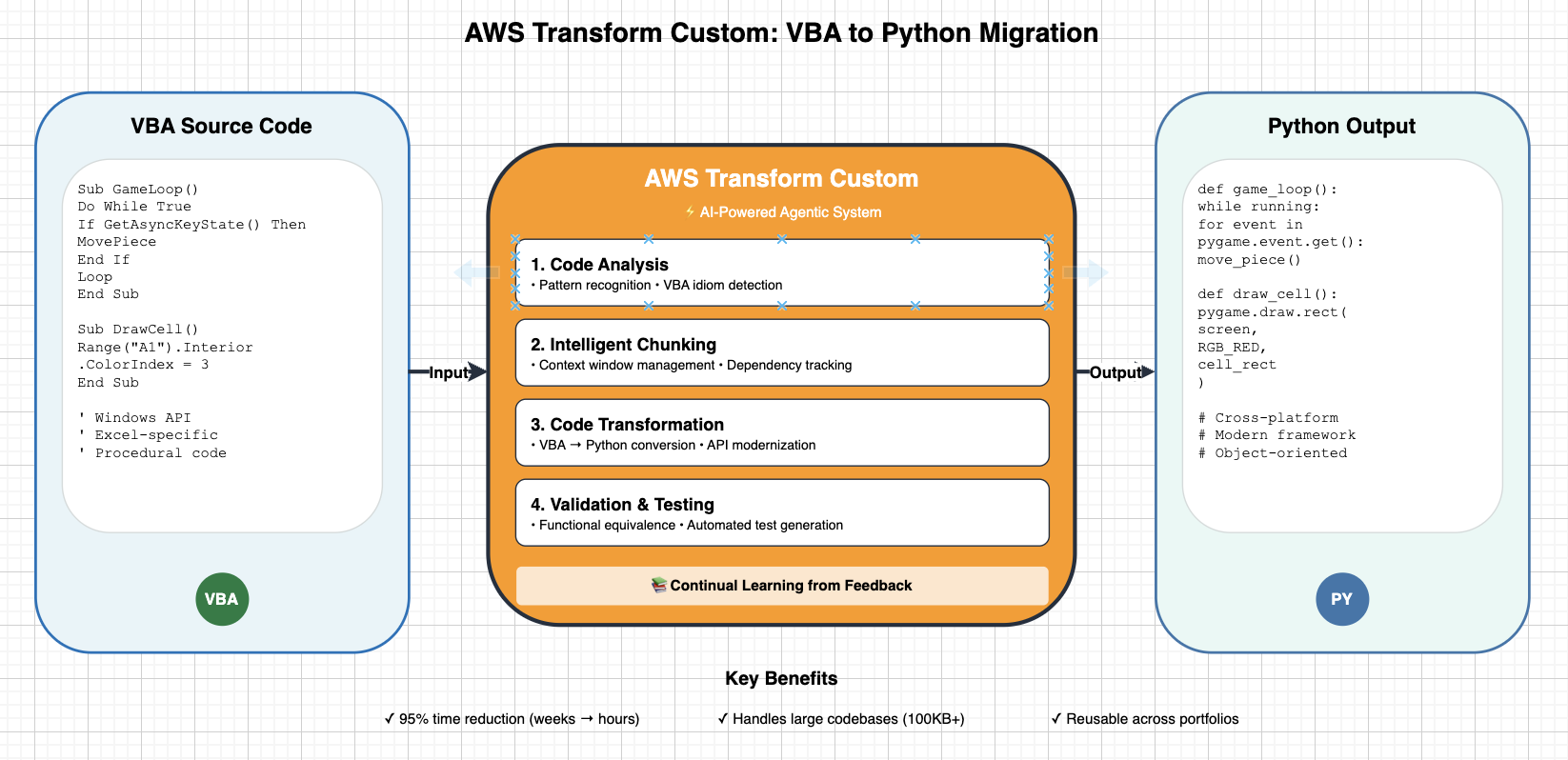
Figure1:AWS Transform custom VBA to Python migration architecture
AWS Transform custom provides an interactive workflow where you describe your migration requirements. The system interprets your intent and iteratively refines the transformation definition until it meets your specifications. As the system processes your code, it improves the quality of each subsequent run. Once you finalize a transformation, you can publish it to a registry so your team can reuse it across multiple projects without starting from scratch.
Migration Approach
The migration follows a three-phase process that takes you from defining your transformation through execution and validation and finally scaling across your portfolio.
In the first phase, transformation definition creation, you start an interactive session with AWS Transform custom to describe your migration requirements. You can reference your VBA code, API documentation, and target framework guides as context. The system uses these inputs to automatically generate transformation rules and patterns, which you can iteratively refine through build validation until the definition accurately captures your migration logic.
In the second phase, execution and validation, AWS Transform custom applies the transformation to your codebase. It intelligently chunks large codebases into logical modules and processes them in dependency-aware order, so cross-module references remain intact. Throughout execution, the system continuously validates builds and tests, automatically detecting and correcting errors as they arise.
In the third phase, scale and reuse, you publish your finalized transformation to the registry, making it available for your team to apply across similar projects. You can run campaign-based bulk executions across multiple repositories, extract knowledge items for continuous improvement, and integrate the transformation into your CI/CD pipelines.
Key capabilities
AWS Transform custom addresses the core challenges you face when migrating large VBA codebases to Python.
For context window management, the system automatically segments your codebase into logical modules, tracks cross-module dependencies, preserves interface contracts across chunks, and maintains state throughout the transformation. This means you can process codebases that far exceed standard AI context window limits without losing coherence between modules.
For intelligent code restructuring, AWS Transform custom recognizes VBA idioms and maps them to Python equivalents. It refactors procedural code into object-oriented designs, replaces Windows-specific APIs with cross-platform libraries, and applies proper encapsulation and separation of concerns. The result is a clean, maintainable Python that follows modern coding standards.
For functional equivalence preservation, the system generates automated tests based on the original VBA behavior and runs regression testing after each transformation step. It benchmarks performance metrics such as timing and resource usage and validates edge cases to confirm that your transformed Python code produces the same results as the original VBA application.
Prerequisites
Before you begin, you need an AWS account with the appropriate permissions to use AWS Transform custom. Start by configuring authentication and setting up the AWS CLI for your environment.
To create an IAM user for AWS Transform, follow the step-by-step instructions for creating an IAM user and managing IAM policies in the IAM User Guide.
Setup using AWS CLI:
Local Environment Setup
- Operating System: Linux, macOS, or WSL (Windows Subsystem for Linux)
- Node.js: Version 20 or higher (required for AWS Transform CLI installation via npm)
- Git: Required for all target repositories
- Internet Access: Required for AWS Transform service communication
AWS Transform CLI Installation
Follow the official AWS Transform Custom Getting Started Guide for complete installation and setup instructions, including:
- Platform requirements (Linux, macOS, or WSL)
- Installation script usage
- Authentication configuration
- Network requirements and firewall rules
Source Code Repository
- VBA application source code (Excel workbook with macros or exported .bas files)
- Git repository initialized in source directory
- Build/test commands defined (if applicable)
Target Environment Setup (for Python migration)
- Python 3.8 or higher installed
- Virtual environment tool (venv or virtualenv)
- Target framework dependencies (e.g., pygame for game applications, tkinter/PyQt6 for GUI, pandas for data processing, openpyxl for spreadsheet operations)
Walkthrough: VBA to Python Migration
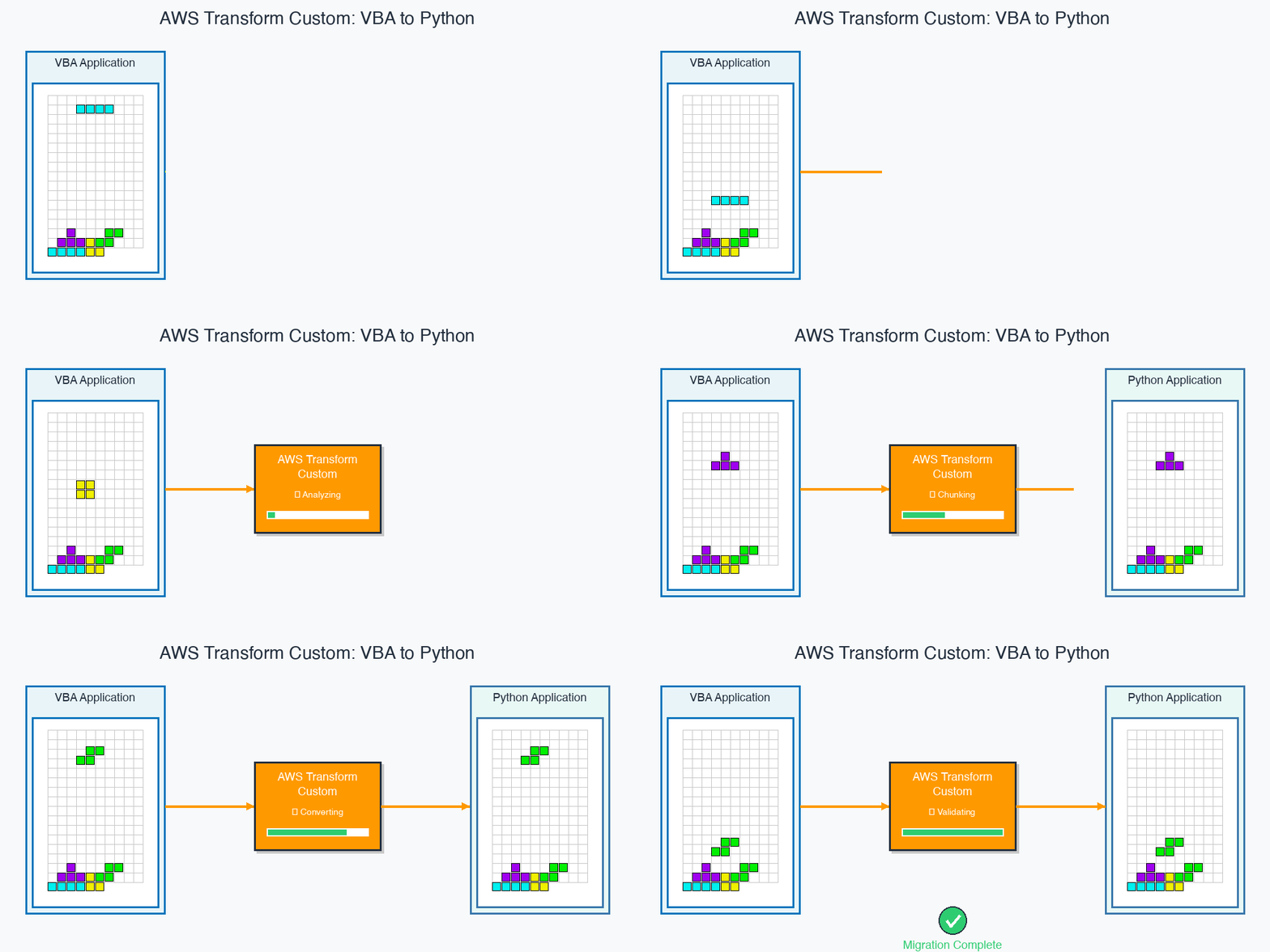
Figure2:AWS Transform custom CLI executing a VBA to Python transformation
Step 1: Prepare Your VBA Application
Initialize Git Repository
AWS Transform Custom requires your code to be in a Git repository. If your code isn’t already in Git:
Step 2: Create Transformation Definition
Start AWS Transform Interactive Session
Provide Migration Context
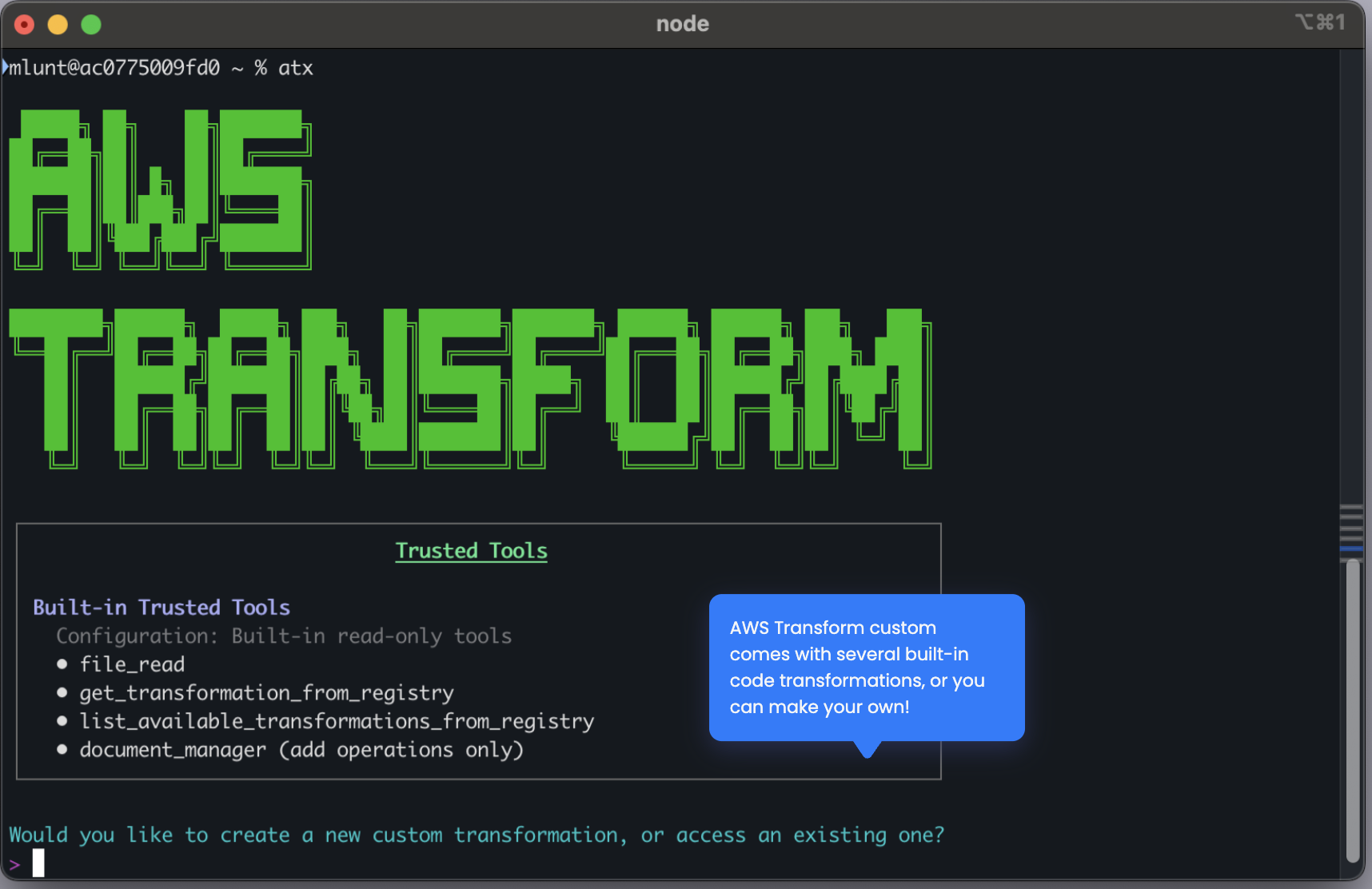
Figure3:AWS Transform custom interactive session with migration context
When you start the interactive session, provide a natural language description of your migration goal, such as “Migrate VBA application to Python.” Specify the target framework you want to use, for example, pygame for GUI applications or pandas for data processing. You should also include document references to give the system the context it needs — this includes your VBA code files, Python framework documentation, and any API migration guides relevant to your project.
Example conversation:
User: I want to migrate a VBA application to Python.
AWS Transform: I’ll help you create a transformation definition. Let me analyze the VBA patterns and generate Python equivalents…
Define Scope and Entry Criteria
Before creating your transformation, review your existing codebase to understand its structure, patterns, and dependencies. Identify the code type and technology stack you are working with, such as an Excel VBA game that uses Windows API calls. Check the transformation registry for existing similar transformations to avoid duplicating work. From there, define a clear objective and scope for your transformation, and document the entry criteria that determine what code qualifies. Outline detailed implementation steps with specific technical mappings, establish validation and exit criteria for measuring success, and name your transformation appropriately so your team can discover and reuse it.
Iterative Refinement
After you provide your migration context, AWS Transform custom generates an initial transformation definition.You can review this definition at: ~/.aws/atx/custom/<session-id>/artifacts/tp-staging/transformation_definition.md.
Examine the generated rules and provide feedback on patterns, edge cases, or missing scenarios. AWS Transform custom incorporates your feedback and regenerates the definition, allowing you to iterate until the transformation accurately captures your migration logic.
Key Patterns to Address
During the transformation definition process, you should account for the common patterns that differ between VBA and Python. AWS Transform custom maps VBA ColorIndex values to standard RGB tuples and converts Range objects to Python data structures such as lists and arrays. Do While loops in VBA translate to event-driven loops in Python. The transformation replaces Windows API calls with cross-platform libraries that provide portable alternatives. VBA UserForms map to Python GUI frameworks like tkinter or PyQt6, where form controls become Python widgets. VBA Property Get/Let constructs convert to Python @property and @setter decorators. Finally, VBA’s 1-based array indexing must be adjusted to Python’s 0-based indexing throughout your codebase.
Step 3: Execute Transformation
Apply Transformation to Codebase
What Happens During Execution
When you run the transformation, AWS Transform custom begins with agent planning. It analyzes your codebase structure, identifies all VBA components and their dependencies, and generates a step-by-step transformation plan with logical ordering — for example, data models first, then business logic, then UI. Each step in the plan has a clear scope and validation criteria.
Next, the system performs automatic code chunking. It analyzes your codebase size and complexity, then segments the code into logical modules such as constants, game logic, rendering, and controller. These chunks are processed in dependency order based on the plan, and the system manages the context window by focusing on one module at a time.
Throughout execution, AWS Transform custom tracks dependencies by mapping relationships between VBA subroutines, verifying that dependent code references remain valid, and maintaining interface contracts across modules.
The transformation proceeds incrementally, converting one module at a time. After each module is transformed, the system validates the build. If a failure occurs, it automatically rolls back and retries the transformation for that module before moving on.
Sample Output:
Review Transformed Code
After the transformation completes, check the generated Python files to verify the output. You can review the transformation logs at ~/.aws/atx/custom/<conversation-id>/logs/ to understand the decisions the system made during each step. Examine the build validation results to confirm that the transformed code compiles and passes all checks.
Step 4: Validate Functional Equivalence
Automated Test Generation
AWS Transform generates validation tests based on original VBA behavior:
test_validation.py – Verifies core logic:
test_performance.py – Benchmarks non-functional requirements:
Run Validation Suite
Manual Validation Checklist
- Application launches without errors
- UI renders correctly (layout, colors, sizing)
- User interactions work as expected (keyboard, mouse)
- Core functionality produces correct results
- Performance meets requirements (no lag, smooth rendering)
- Edge cases handled properly (boundary conditions, invalid inputs)
Step 5: Refine and Iterate
As you refine your transformation, you may encounter a few common issues. Here is how you can address them and provide feedback to AWS Transform custom.
Timing and performance differences can occur when the Python application runs faster or slower than the VBA original. To fix this, adjust timing constants and frame rate limiters. For example, if you notice the game runs too fast because VBA used Sleep(500) for piece drops, you can provide that feedback. AWS Transform custom corrects this by replacing time.sleep() with pygame.time.Clock.tick(60).
Color rendering mismatches happen when colors in the Python output don’t match the VBA version. This is typically caused by incorrect RGB mappings for VBA ColorIndex values. If you notice that ColorIndex 3 should be pure red (255,0,0) but is showing as dark red, provide that feedback. AWS Transform custom updates the COLOR_MAP dictionary with accurate RGB values.
Collision detection bugs may appear when pieces move through walls or other pieces. This requires refining boundary checking and collision logic. For instance, if rotation near walls allows pieces to go out of bounds, you can report this issue. AWS Transform custom adds boundary validation before rotation commits to resolve it.
Continual learning in action
Each time you provide a correction, AWS Transform custom captures it as a knowledge item. Future transformations automatically incorporate these fixes, so the same issues don’t recur. With each execution, the system improves quality for similar migrations across your portfolio.
Step 6: Publish and Scale
Save Transformation as Draft (for testing)
Publish to Registry (for team-wide use)
Apply to Multiple Projects
CI/CD Integration
Benefits
By using AWS Transform custom, you can reduce tech debt and accelerate enterprise modernization at scale. The service supports diverse transformation use cases beyond VBA to Python, adapting to the specific needs of your codebase and target platform. With continual learning and improvement, each transformation builds on the corrections and knowledge items from previous runs, delivering higher quality results over time. Once you define a transformation, you can apply it everywhere — across similar projects, teams, and entire application portfolios — without recreating the migration logic from scratch.
Architecture Evolution
Before migration, your legacy VBA application is constrained to a Windows-only execution environment, tightly coupled to the Excel runtime. The code follows a procedural style with a global state, and testing and deployment are manual processes.
After migration with AWS Transform custom, your application follows a modular architecture with clean separation of concerns across constants, logic, rendering, and controller layers. The code uses object-oriented design with proper encapsulation and runs cross-platform on Windows, macOS, and Linux. The transformed application is cloud-ready, with a structure that supports containerization through Dockerfile generation, serverless adaptation with decoupled logic and rendering, and standard Python packaging through requirements.txt and setup.py. It also integrates with modern DevOps workflows, including automated testing with pytest, CI/CD pipeline compatibility, and version control through Git.
You can deploy the transformed application in several ways: containerized with Docker and Kubernetes for scalable web applications, serverless with AWS Lambda for event-driven processing, as a standalone desktop executable with PyInstaller, or as a web application with FastAPI or Flask wrappers for browser access.
The following screenshot shows the transformed Tetris application running as a Python pygame application.
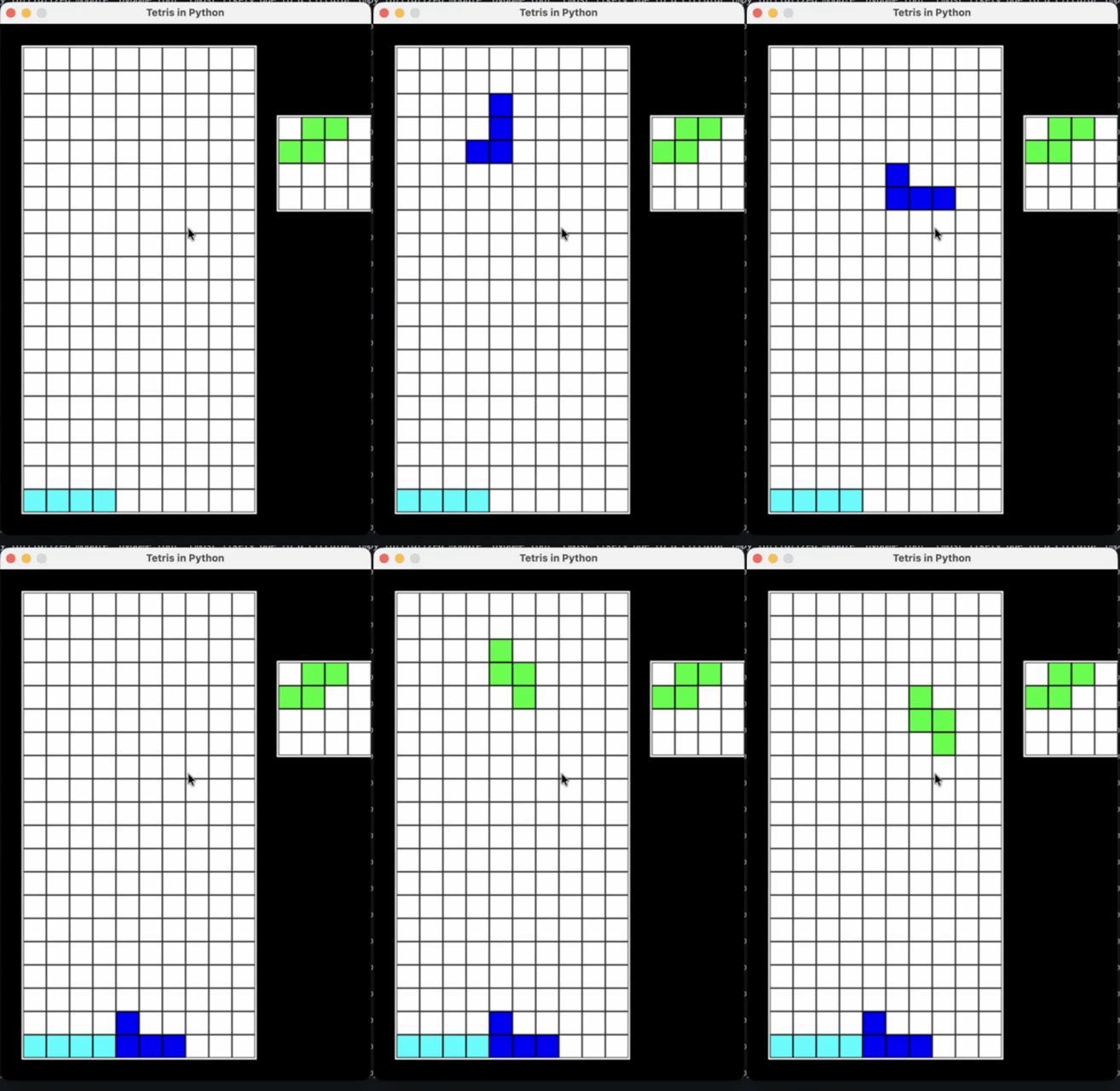
Figure4:Transformed Tetris game running as a Python pygame application
Transformation definition creation
When creating your transformation definition, provide comprehensive context by including your VBA code, target framework documentation, and migration guides. Focus on documenting application behavior by describing what the application does functionally, not just its code structure. Identify platform-specific dependencies such as Windows APIs, Excel features, and ActiveX controls that require special handling during migration. Define clear success criteria including performance targets, functional requirements, and test coverage expectations. Be explicit about construct mappings in your transformation definition — the more specific you are, the more consistent the output.
Execution strategy
Start with a pilot project by testing your transformation on a smaller, representative application before applying it broadly. Validate incrementally by reviewing each module transformation before proceeding to the next. Capture corrections as feedback by documenting issues and fixes so the system can incorporate them through continual learning. Iterate on edge cases to refine the transformation for corner cases and error conditions that may not surface during initial runs.
Quality assurance
Generate comprehensive automated test suites from the original VBA behavior to verify functional equivalence. Run performance benchmarking to confirm that non-functional requirements match the original application. Conduct manual validation through user acceptance testing to verify UI and UX consistency. After any refinements, run the full test suite for regression prevention to ensure that fixes in one area haven’t introduced issues elsewhere.
Scaling across your portfolio
When you are ready to scale, categorize your applications by similarity — for example, data processing, UI-heavy, or calculation-focused workbooks. Create transformation variants with customized definitions for each category. Use campaigns for bulk execution to process multiple applications in parallel. Monitor and aggregate results across your portfolio to track success rates, identify common issues, and measure time savings.
Cleanup
Archive Conversation Logs
Remove Temporary Files
Manage Published Transformations
Knowledge Items Management
Conclusion
In this post, you learned how AWS Transform custom can help you migrate Excel VBA applications to Python at scale. With AWS Transform custom, you can reduce weeks of manual migration work to hours. Intelligent chunking handles large codebases that exceed standard AI context window limits, while continuous validation and automated testing preserve functional equivalence throughout the process. Because transformations are reusable, and the system learns from each execution, you gain compound efficiency with every subsequent migration. The transformed applications are cloud-ready, supporting containerization, serverless deployment, and modern DevOps workflows.
AWS Transform custom is a strong fit when you are modernizing a portfolio of dozens or hundreds of similar legacy applications, when functional equivalence must be guaranteed for quality-critical migrations, or when you have repeatable migration patterns across multiple projects.
Next Steps
The transformation demonstrated in this post — VBA to Python migration with context window management, automated restructuring, and functional validation — is a template you can apply to other modernization challenges, such as mainframe COBOL to Java, Progress ABL to Spring Boot, or .NET Framework to .NET Core. The principles remain consistent: intelligent code analysis, dependency-aware processing, continuous validation, and transformation reuse.
Call to Action
Get Started with AWS Transform Custom
Documentation and Resources:
Explore AWS-Managed Transformations: Access pre-built transformations for common migration patterns:
- AWS SDK Java v1 to v2: AWS/java-aws-sdk-v1-to-v2
- Python Version Upgrades: AWS/python-version-upgrade
- Node.js Version Upgrades: AWS/nodejs-version-upgrade
- Java Version Upgrades: AWS/java-version-upgrade
Estimate Your Migration: Use the AWS Pricing Calculator to estimate costs for your specific modernization project.