.NET on AWS Blog
Accelerating Legacy .NET Modernization at Bio-Rad with AWS Transform and Kiro
Bio-Rad Laboratories, a global leader in life science research and clinical diagnostics, faced the challenge of modernizing their customer-facing applications built on unsupported .NET frameworks. Traditional approach to modernization of their legacy .NET and Classic ASP applications would have delayed making their applications secure, scalable and maintainable by more than a year.
Legacy application modernization remains one of the most complex challenges enterprises face today. By using AWS Transform and Kiro, Bio-Rad automated modernization of approximately 70% of the source code, compressing delivery timelines from 9–10 months to just 2–3 months per application. In this post, we walk through Bio-Rad’s journey, methodology, architecture decisions, and quantified business outcomes.
“AWS Transform custom allowed us to deliver in months what would have taken us nearly a year per application.”
– Jasmina Desai, Director – Software, Bio-Rad Laboratories
Solution Overview
The following diagram illustrates Bio-Rad’s end-to-end modernization pipeline, from legacy source analysis through automated transformation to production deployment.
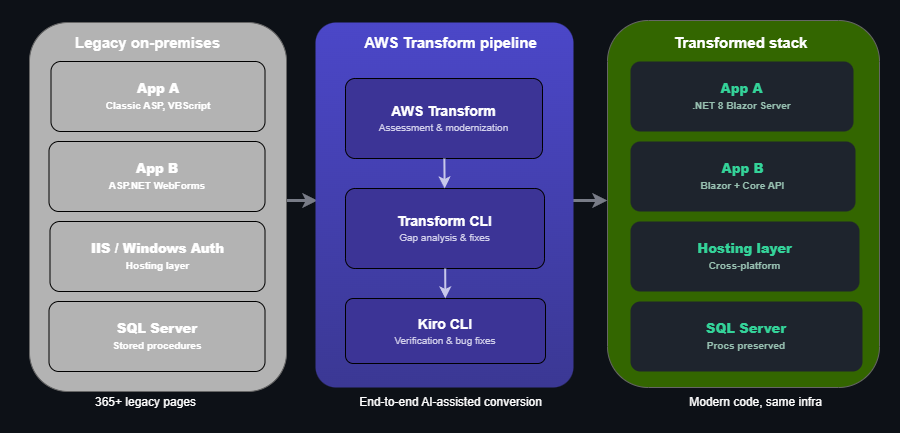
Figure 1: Architecture diagram of Bio-Rad’s legacy-to-modern conversion pipeline using AWS Transform and Kiro, converting legacy ASP and .NET pages to ASP.NET Core 8 Blazor
The pipeline compressed the original 9–10-month timeline to 2–3 months by automating ~70% of the work with AWS Transform custom and accelerating the remaining ~30% with Kiro.
This mattered because the legacy frameworks had been unsupported for nearly a decade – .NET 4.5 and .NET 2.0 both lost support in 2016, and Classic ASP no longer receives security patches. The migration scope covered approximately 365 pages of tightly coupled logic, yet the team achieved zero database schema changes. Large stored procedures were preserved intact, and data access layers (SqlClient, ODBC, OLE DB) carried forward without modification. AWS Transform and Kiro acted strictly as the conversion toolchain; the hosting infrastructure itself was not part of the migration scope.
Legacy Landscape and Risk
Bio-Rad’s customer-facing portfolio included applications built on technologies well past their supportability window:
Application A:
- Classic ASP / VBScript
- ASP.NET Web Forms (.aspx)
- .NET Framework 4.5 / IIS
- ADO + inline SQL
- Classic ASP configuration
- 189+ ASP pages with inline VBScript
Application B:
- ASP.NET WebForms (.NET 2.0)
- ASMX Web Services
- IIS / Windows Authentication
- 170+ pages with legacy of coupled logic
Key Risks
- Security exposure: Unsupported frameworks lack critical security patches.
- Talent scarcity: Developers skilled in legacy ASP/VBScript are increasingly rare.
- Operational fragility: Aging code bases resist change and increase deployment risk.
- Customer impact: Performance limitations affect user experience directly.
- Compliance gaps: Legacy stacks complicate regulatory adherence.
Without modernization, these applications faced deferral to the following year thus delaying value delivery and extending risk exposure.
AWS Transform Methodology
Bio-Rad used two complementary AWS Transform tools for this modernization.
- App A: AWS Transform custom (CLI-based, invoked via
atxcommand) provided rule-driven transformations for Classic ASP/VBScript conversion and architectural refactoring. Bio-Rad applied a customized methodology tailored to their specific source and target architectures. - App B: AWS Transform for .NET (console/IDE-based) handled assessment, .asmx services, .NET Framework upgrades, and Web Forms UI porting with documented file mappings.
How the Tools Were Applied
| Phase | Activity | Outcome |
| Discovery | Codebase analysis and dependency mapping | Migration scope and complexity assessment |
| Rule Configuration | Custom transformation rules for Web Forms → Blazor patterns | Automated conversion logic aligned to target architecture |
| Automated Conversion | Bulk code transformation at scale | ~70% of migration effort automated |
| Validation | Automated testing and manual review | Functional equivalence verified |
| Residual Development | Custom logic, UI polish, integration testing | Completed with Kiro acceleration |
What Was Automated
- Page-level conversion from Web Forms to Blazor components
- VBScript logic translation to C# equivalents
- Data binding pattern modernization
- Routing and navigation restructuring
- Dependency injection scaffolding
Target Architecture Decisions
Bio-Rad selected ASP.NET Core 8 Blazor Interactive Server as the target framework for both customer-facing applications. Note: Bio-Rad selected .NET 8 as the target during the project’s planning phase. With .NET 8 reaching end of standard support in November 2026, teams starting similar migrations today should consider targeting .NET 10 directly, which AWS Transform supports as a target framework.
Why Blazor Server?
- Component-based architecture: Enables reusable, testable UI components.
- Real-time interactivity: SignalR-based communication provides rich UX.
- Unified language: Full-stack C# removes context switching.
- Modern .NET: Access to latest performance and security improvements.
- Familiar paradigm: Eases transition for teams with .NET background.
Operational Considerations
Blazor Interactive Server maintains a stateful SignalR circuit per connected user. Teams adopting this model should plan for: session affinity at the load balancer, WebSocket support in the infrastructure, memory allocation proportional to concurrent sessions, reconnection handling for intermittent connectivity, and latency sensitivity for geographically distributed users. Bio-Rad chose Blazor Server over Blazor WebAssembly (which requires downloading the .NET runtime to the browser and was unsuitable for these data-heavy applications) and over MVC + Razor Pages (which would not provide the real-time interactivity required for these customer-facing workflows).
Migration Paths
| Source | Target |
| ASP.NET Web Forms (.NET Framework 2.0) | ASP.NET Core 8 Blazor Interactive Server |
| Classic ASP (VBScript) + ASP.NET Web Forms (.NET Framework 4.5) | ASP.NET Core 8 Blazor Server |
Kiro for Residual Development
After AWS Transform custom automated ~70% of the migration, the remaining 30% required human-guided development. Bio-Rad used Kiro to accelerate this residual work.
Residual Development Scope
- Custom business logic refinement
- UI/UX polish and responsive design
- Integration testing and edge case handling
- Performance optimization
- Accessibility compliance
How Kiro Accelerated Delivery
Kiro provided AI-assisted spec driven development capabilities that helped Bio-Rad’s engineering teams:
- Rapidly implement custom logic patterns
- Generate boilerplate and scaffolding code
- Accelerate test case development
- Streamline code review and refactoring
This combination of AWS Transform custom + Kiro created a powerful end-to-end modernization pipeline.
Unity Next Integration
Beyond the two standalone application migrations, Bio-Rad applied a customized Transform approach to a key feature within Unity Next, the next-generation cloud-native platform.
The Challenge
- Modernize a feature from an existing legacy .NET framework application
- Integrate into a modern cloud-native architecture (target stack: Angular SPA + AWS services)
- Navigate significant architectural differences between source and target
Architecture Overview
The Unity Next migration involved a fundamentally different architectural pattern than the standalone Blazor applications. Rather than a framework-level upgrade within the same language, this migration required bridging a legacy .NET monolith to a cloud-native containerized stack on AWS – including a language transition from .NET to GoLang. The following diagram illustrates the three-stage pipeline: from the legacy feature module through the AWS Transform and Kiro toolchain to its new home within Unity Next on AWS.
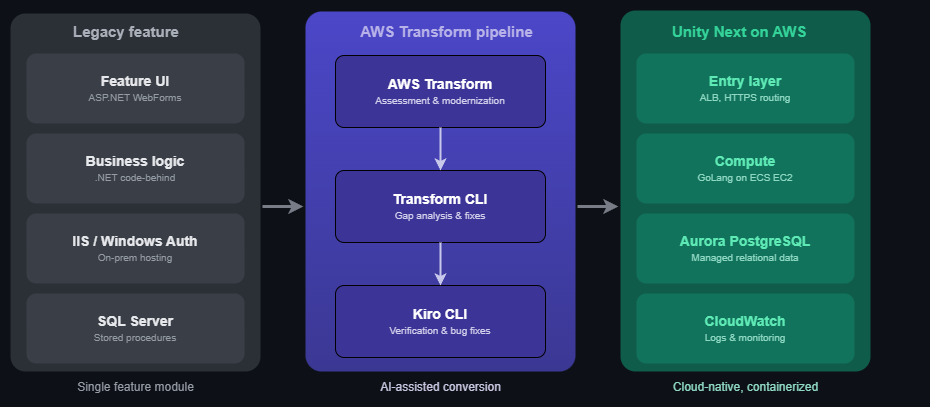
Figure 2: Architecture diagram showing the Unity Next feature migration: a legacy .NET module converted through the AWS Transform pipeline into a cloud-native containerized stack on AWS
The result: a single legacy .NET module – previously locked to on-premises IIS and Windows Authentication – now runs as a containerized GoLang service on Amazon Elastic Container Service (Amazon ECS), Amazon Elastic Compute Cloud (Amazon EC2) behind an Elastic Load Balancer (ELB), backed by Amazon Aurora (Aurora PostgreSQL) and monitored through Amazon CloudWatch (CloudWatch). Business logic and stored procedures carried forward intact with no schema changes. This demonstrated that the AWS Transform and Kiro toolchain could bridge even significant architectural gaps – from .NET monolith to cloud-native containerized services.
AWS Transform Custom for Unity Next
Despite the architectural gap between legacy .NET monolith and the cloud-native Angular Single Page Application (SPA) target, AWS Transform custom enabled:
- Extraction and conversion of business logic from legacy .NET to GoLang
- Adaptation to Amazon ECS compute patterns
- API contract generation for Angular frontend consumption
- Reduction of overall timeline by 4–5 months
Quantified Outcomes and Business Impact
Timeline Compression
| Application | Original Estimate | With AWS Transform custom | Savings |
| App A (Classic ASP → Blazor) | 9–10 months | 2–3 months | ~7 months |
| App B (Web Forms → Blazor) | 9–10 months | 2–3 months | ~7 months |
| Unity Next Feature | 9.5 months | ~4.5–5.5 months | 4–5 months |
Key Metrics
- ~70% automation of migration effort across customer-facing applications
- 65 – 75% timeline reduction for standalone application migrations
- ~50% timeline reduction for Unity Next feature integration
- Bio-Rad team projects that both applications will be upgraded and released to production within the current year instead of deferring the modernization to next year
Business Impact
- Accelerated time-to-market: Features delivered months ahead of original schedule.
- Reduced implementation risk: Automated conversion minimizes human error.
- Cost optimization: Fewer developer-months required per migration.
- Improved security posture: Modern frameworks with active support and patching.
- Enhanced customer experience: Modern, responsive applications.
- Team velocity: Engineering teams freed for innovation rather than maintenance.
Lessons Learned
Throughout this modernization journey, Bio-Rad’s team identified several key takeaways for organizations planning similar migrations:
- Invest in discovery upfront: The legacy estate was ~365 total pages of tightly coupled business logic, large stored procedures, and legacy code that had accumulated over years. The pipeline starts with “AWS Transform: Assessment & Modernization” as its own distinct phase before any code conversion happens, ensuring the team didn’t jump straight to automated conversion. We first had Transform assess and inventory the codebase (page count, dependencies, coupling patterns) so the tool’s understanding of the system matched reality before rules were applied
- Iterative rule refinement: This maps to the “AWS Transform CLI (atx): Gap Analysis & Fixes” stage. Bio-Rad team executed a deliberate modernization loop: run the transform, identify what didn’t convert cleanly, adjust, and re-run rather than a single one-shot conversion.
- Plan for the 30%: This was the final stage after automated transformation and gap-fixing. The team anticipated a residual layer of work that automation wouldn’t fully close and staffed/tooled for it deliberately (via Kiro) rather than treating it as overflow.
- Test early and continuously: The goal was to retain “features and user experience” as an explicit challenge, with zero database schema changes as a hard constraint ensuring validation had to confirm behavioral parity against the old system, not just that new code compiled.
Conclusion
In this post, we saw how Bio-Rad Laboratories used AWS Transform custom, combined with Kiro for residual development, to compress legacy .NET modernization timelines. By automating ~70% of the migration effort, Bio-Rad reduced delivery from 9–10 months to 2–3 months per application turning what would have been a year-long sequential modernization queue across the portfolio into parallel deliverables achieved within a single year. To get started, learn more about AWS Transform custom and Kiro.