AWS for Games Blog
Introducing enhanced capacity auto scaling for Amazon GameLift Streams
Quality game streaming requires instant responsiveness. Players expect to click and play, without waiting for infrastructure to provision or for long loading times to complete. Today, we’re excited to announce enhanced auto scaling capabilities for Amazon GameLift Streams that deliver both faster stream availability and intelligent cost optimization through an elastic, demand-based scaling system.
Amazon GameLift Streams helps developers deliver high-definition game streaming experiences at up to 1080p resolution and 60 frames per second to almost any device with an internet connection. Using AWS Global Infrastructure and GPU compute instances, you can deploy and stream games and other application content in minutes without requiring modification to your code. This allows players to start gaming in seconds without waiting for application installs.
Previously, Amazon GameLift Streams offered two capacity management approaches, always-on and on-demand. Although these served many use cases, we heard from customers that they need more granular control and an automatic scaling behavior, including the ability to maintain a warm pool of ready capacity while still benefiting from elastic scaling and cost optimization.
Understanding Amazon GameLift Streams capacity management
Before diving into the new features, let’s review the key concepts that form the foundation of capacity management in Amazon GameLift Streams:
- Stream group – A collection of compute resources that represents your streaming infrastructure. Stream groups define the applications you want to stream, the compute type (stream class) to use, and the stream capacity.
- Stream capacity – The number of concurrent stream sessions a stream group can support. This determines how many users can stream simultaneously.
- Stream class – Defines the Amazon Elastic Compute Cloud (Amazon EC2) instance type and the number of streams that can run on a single instance. For example, multi-tenant stream classes can serve multiple stream sessions from a single GPU.
- Stream session – An individual streaming instance where a user connects to and interacts with your application through their browser.
The following diagram shows the relationship between stream groups, stream classes, and stream sessions.
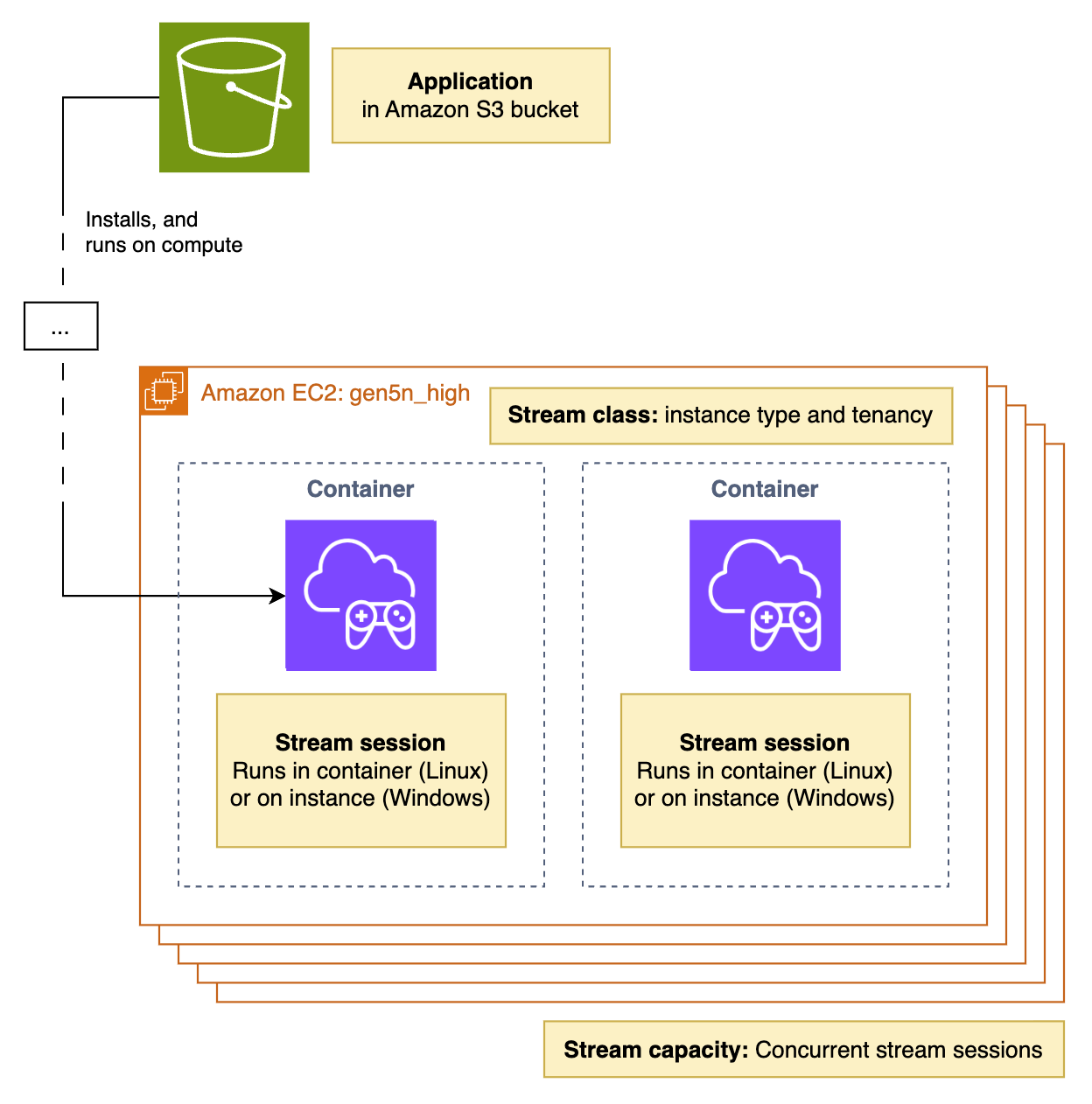
Figure 1: Architecture diagram
Previous scaling methods
Our previous scaling model offered two distinct approaches:
- Always-on capacity provided pre-allocated resources that enabled applications to start in 6–8 seconds. The benefit of the instant start times had to be balanced with the cost for this potentially unused capacity, whether the stream was being used or not. This delivers the fastest possible stream startup times, making it ideal for premium user experiences with predictable demand.
- On-demand capacity allocated resources only when needed, offering cost control at the expense of longer startup times (typically under 5 minutes). This choice was good for use cases in which a delay in application start time is tolerable for the cost optimization of not paying for capacity when it’s not being used.
The following pair of bar graphs illustrate an example of in-use and excess stream capacity for always-on and on-demand capacity settings. In this example, stream session requests are growing throughout the day, peaking at 20:00 and falling thereafter. The left bar graph shows the excess capacity required by the always-on setting. In the right bar graph, we see better capacity use with the on-demand settings, but this comes with the disadvantage of the longer session start times.
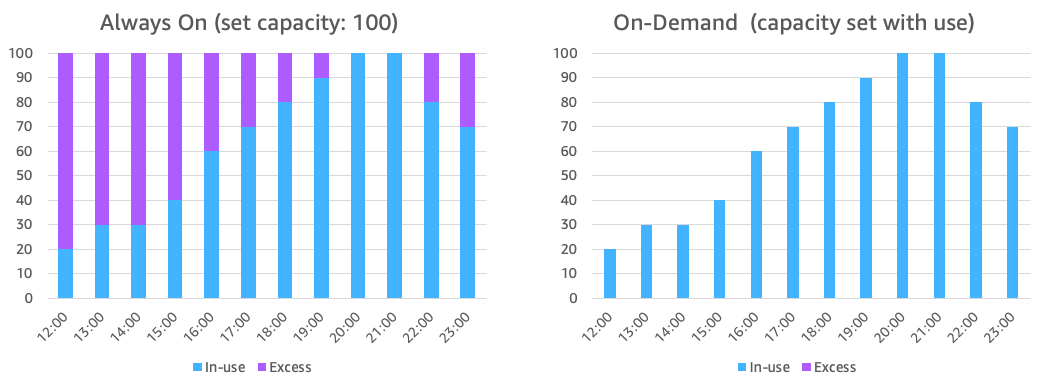
Figure 2: Always-on and on-demand capacity
Although you can configure both types in the same stream group for a hybrid approach, many customers found this binary choice limiting. They wanted the responsiveness of always-on capacity with the cost efficiency of on-demand, plus more granular control over their scaling behavior.
Introducing elastic and demand-based auto scaling
Previous capacity models required customers to implement their own, sometimes complex, scaling approaches by manually monitoring metrics and triggering scaling events. Our new auto scaling system fundamentally changes how Amazon GameLift Streams manages capacity. The system is now elastic and demand-based at all times, with three new parameters that give you precise control over your scaling behavior: target idle capacity, minimum capacity, and maximum capacity.
Target idle represents an exact number of stream slots that will remain idle at any given time (i.e. capacity is available but not being used). It can be thought of as a target capacity buffer. This creates a warm pool of immediately available capacity that eliminates wait times for your users.
When a user requests a stream session, the system first looks for an idle capacity slot in your stream group. If an idle slot is available, the stream starts immediately. The system then asynchronously refills the idle pool to maintain your target idle count, typically within 2 minutes on Linux, or 5 minutes on Windows.
The following pair of bar graphs show a comparison of how you would configure auto scaling to match your capacity needs, with low latency start stream times, and without paying for excessive excess capacity. The left bar chart shows how this can be achieved with a combination of always-on capacity and a CloudWatch alarm event-based application which you managed. The right bar chart shows how the new target idle setting makes this easier.
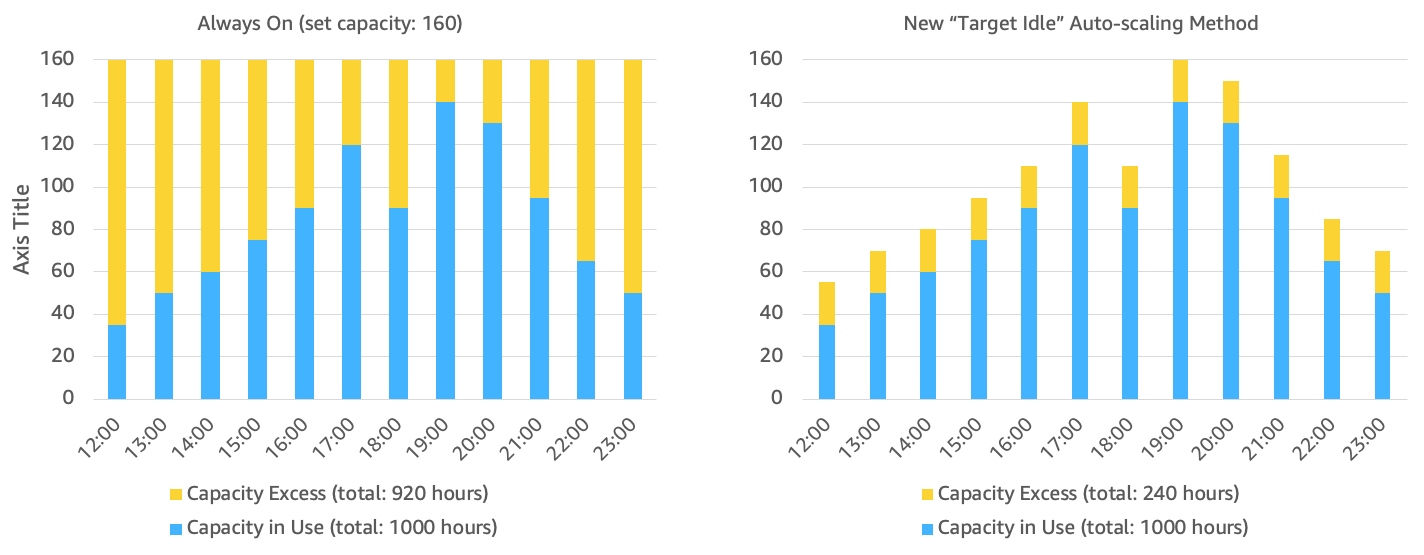
Figure 3: Always-on capacity setting using a CloudWatch alarm solution and the new target idle capacity approach
Minimum capacity provides that a baseline level of resources is always maintained, similar to the previous always-on concept. It comes into effect only if it’s higher than your target idle setting. If your minimum is smaller than or equal to your target idle setting, the target idle value takes precedence.
This parameter is particularly useful for use cases such as scheduled play tests where you need streams to start within 6–8 seconds and you know exactly how much capacity you need at a specific time. It’s also useful in cases where you have confidence in how many streams will be required and want this number to be adhered to.
Maximum capacity sets the upper limit for the total number of stream sessions your stream group can support. This acts as a cost control mechanism, preventing runaway scaling while handling your expected peak demand.
A stream request moves through the system as follows:
- Check for idle capacity
- If available, use immediately and refill pool
- If not available, scale up within minimum and maximum bounds
- Wait until capacity is available
This flow is shown in the following diagram.
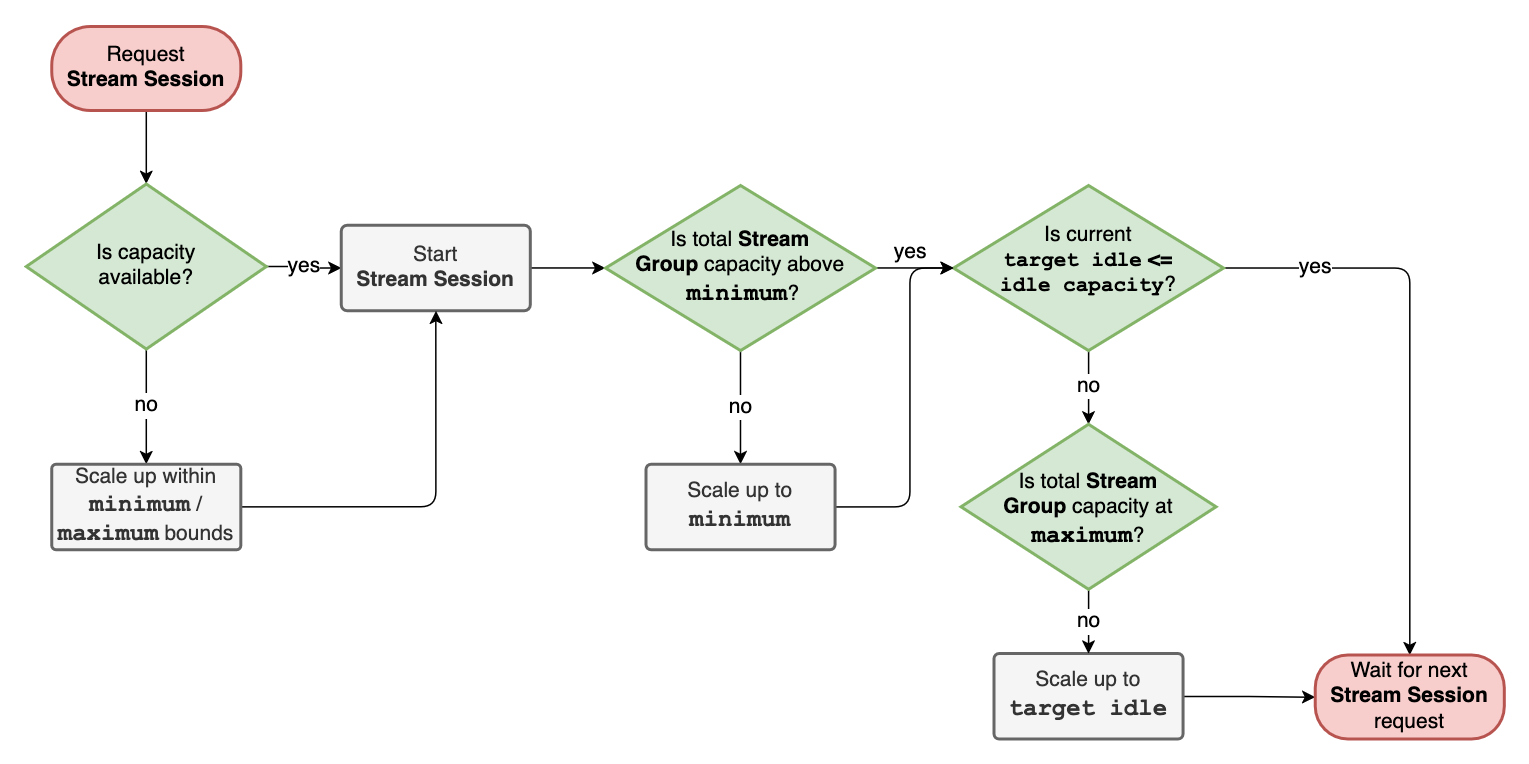
Figure 4: Flow diagram showing how stream requests advance through the system
How the new auto scaling process works in practice
When a user requests a stream session, the system follows this process:
- Check for idle capacity – The system first searches for an available idle session slot within your stream group.
- Idle capacity available – If idle capacity exists, the stream starts immediately.
- Idle capacity unavailable – If no idle capacity is available, the system scales up new resources (respecting your maximum limit).
- Asynchronous refill – The system begins refilling the idle pool in the background to match your target idle configuration.
- Intelligent scale-down – When sessions end, capacity becomes idle for the time specified in the connection timeout (typically 12 minutes), before being released back to the system. If it’s needed to maintain the target idle setting, it remains warm as part of the target idle pool.
This approach provides advantages of instant availability when idle capacity exists and automatic scaling and cost optimization when demand fluctuates.
Configuration recommendations
Although the best approach depends on your specific requirements and use cases, we recommend the following configuration to get started, based on our experience working with streaming customers:
- Set minimum to 0 – For most use cases, leave the minimum at zero to maximize cost efficiency.
- Set maximum to manage your cost expectations – Configure your maximum to handle unexpected demand spikes but to a limit at which you can manage the cost.
- Optimize target idle – Set your target idle based on how quickly you expect new users to arrive and how much buffer capacity you’re willing to provision. For example, if you typically see 10 new users join every minute during peak hours, you might set your target idle to 20–30 to provide immediate availability while maintaining cost efficiency.
Getting started
The enhanced auto scaling features are available now in the AWS Management Console and through the Amazon GameLift Streams APIs. To configure your stream group with the new parameters using the console:
- Navigate to the Amazon GameLift Streams console
- Create a new stream group
- Configure your target idle, minimum, and maximum capacity values
- Monitor your usage through Amazon CloudWatch metrics to optimize your settings over time
You can also configure your stream group with the new parameters using the Amazon GameLift Streams CreateStreamGroup API call. Existing stream groups will continue to work with their current always-on and on-demand configurations, but we encourage you to explore the new scaling options to optimize both performance and costs.
Conclusion
The enhanced auto scaling capabilities in Amazon GameLift Streams represent an evolution in how you can manage your streaming capacity. By providing granular control over idle capacity, minimum guarantees, and maximum limits, you can now optimize for both user experience and cost efficiency in ways that weren’t possible before.
We’re excited to see how you use these new capabilities to deliver even better streaming experiences to your users while optimizing your infrastructure costs.