IBM & Red Hat on AWS
Scaling agentic AI with Amazon Bedrock AgentCore and IBM Integration
Agentic AI scales more effectively when agents have trusted access to your business systems. Those systems can run on Amazon Web Services (AWS), on premises, or both. These systems connect through APIs, Apache Kafka events, messaging, electronic data interchange (EDI), or files.
Amazon Bedrock AgentCore provides services to deploy and operate agents, including secure tool access, identity, memory, and observability. IBM Integration (formerly IBM webMethods Hybrid Integration) connects those agent tools to existing enterprise systems through reusable, governed integrations.
In this post, you learn how AgentCore and IBM Integration work together to meet the requirements for enterprise-scale agentic AI: reusable connectivity, trusted and governed information, and reliable business execution. You also learn how AI-assisted integration development can reduce the integration bottleneck that slows agent adoption.
Building the integration foundation for AI agents
Connecting agents to enterprise systems is a context-engineering challenge: curating the enterprise data an agent needs to reach its goal. For example, an order-processing agent needs current inventory, credit information from enterprise resource planning (ERP) systems, and customer history from customer relationship management (CRM) systems.
Model Context Protocol (MCP) standardizes how agents discover and call tools. The integration behind each tool must still connect disparate systems, transform and combine data, orchestrate operations, and handle failures. At enterprise scale, you need a shared integration foundation so that teams can deploy each new agent faster and at lower cost.
How Amazon Bedrock AgentCore and IBM Integration work together
AgentCore helps agents access context and invoke approved tools. IBM Integration connects those tools to the systems where the business runs. Other agents and applications can reuse the same integrations without rebuilding connections or business logic.
AWS-native services can handle many cloud-native integration needs. IBM Integration adds value when business operations span environments, systems, and protocols.
Consider an order-processing agent running on AWS as shown in Figure 1. It may invoke a checkInventory tool backed by an IBM Integration flow to retrieve inventory from an on-premises warehouse system. The agent can also respond to inventory-change events published through Amazon Managed Streaming for Apache Kafka (Amazon MSK). It can then initiate fulfillment through ERP systems or EDI messages to trading partners.
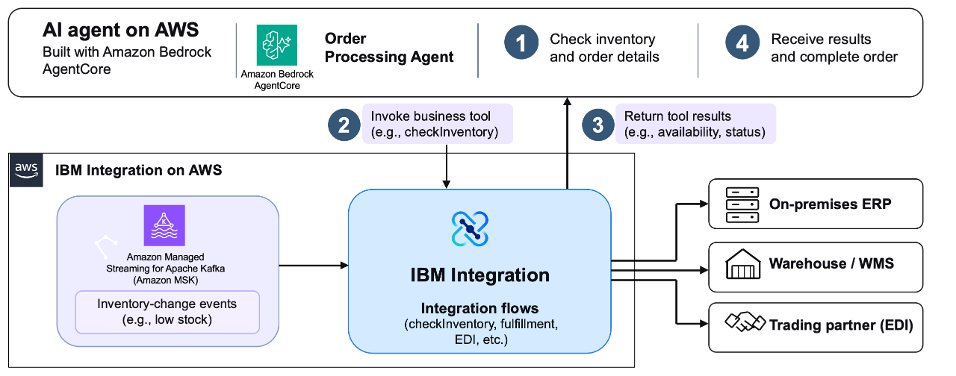
Figure 1. Order-processing agent running on Amazon Bedrock AgentCore using IBM Integration to connect to backend enterprise systems.
Requirements for enterprise-scale agentic AI
Enterprise-scale agentic AI depends on three requirements: reusable connectivity, trusted and governed information, and reliable business execution.
Connect once, reuse across many agents
Existing integrations are a strong basis for agent tools, because they often already include security and governance controls for your IT landscape. Enterprises have already invested in integrations linking ERP, CRM, mainframes, SaaS applications, and trading partners. IBM Integration can expose suitable flows and services through supported APIs or MCP interfaces, so each agent team doesn’t need to build its own connectors.
Support extends beyond request-response APIs to messaging, events, business-to-business (B2B) EDI, and managed file transfer. This reuse reduces duplicate engineering and preserves existing investments while you modernize older interfaces.
Deliver trusted information and govern access
A technically successful tool call can still produce a poor outcome if the underlying information is stale, inconsistent, or inaccessible. Integration patterns that combine standardized APIs with event-driven data flows can help agents retrieve current information and react when business conditions change.
IBM API Connect helps teams publish, discover, secure, and manage APIs across hybrid environments. Its federated API management features provide visibility across distributed API runtimes, including Amazon API Gateway through supported integrations.
Figure 2 shows the federated API management view in API Connect, including an Amazon API Gateway runtime.
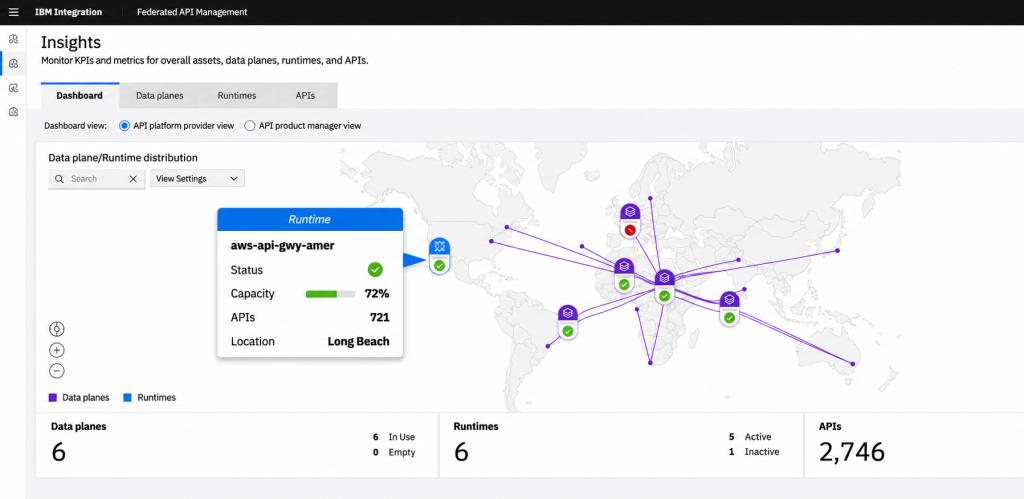
Figure 2. Federated API management in IBM API Connect showing an Amazon API Gateway runtime.
IBM Event Endpoint Management helps teams discover and govern Kafka event streams, including those on Amazon MSK.
Figure 3 shows how teams connect an Amazon MSK cluster and manage its Kafka topics in Event Endpoint Management.
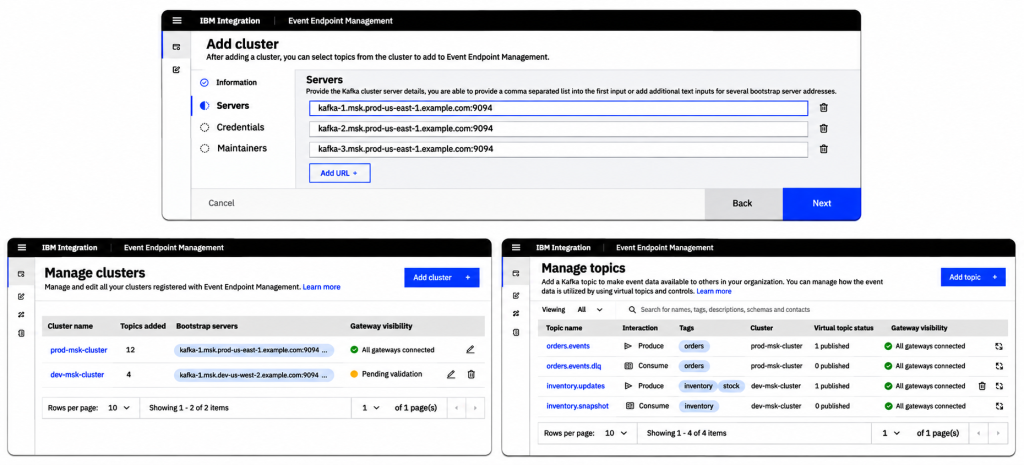
Figure 3. Connecting and managing Amazon MSK clusters and Kafka topics in IBM Event Endpoint Management.
Teams can generate AsyncAPI definitions (a specification for event-driven APIs) in Event Endpoint Management and import them into API Connect. This brings event-driven and REST APIs under common management, which improves discovery and reuse.
Figure 4 shows a Kafka topic in the Event Endpoint Management catalog, with governed self-service access and an AsyncAPI export option.
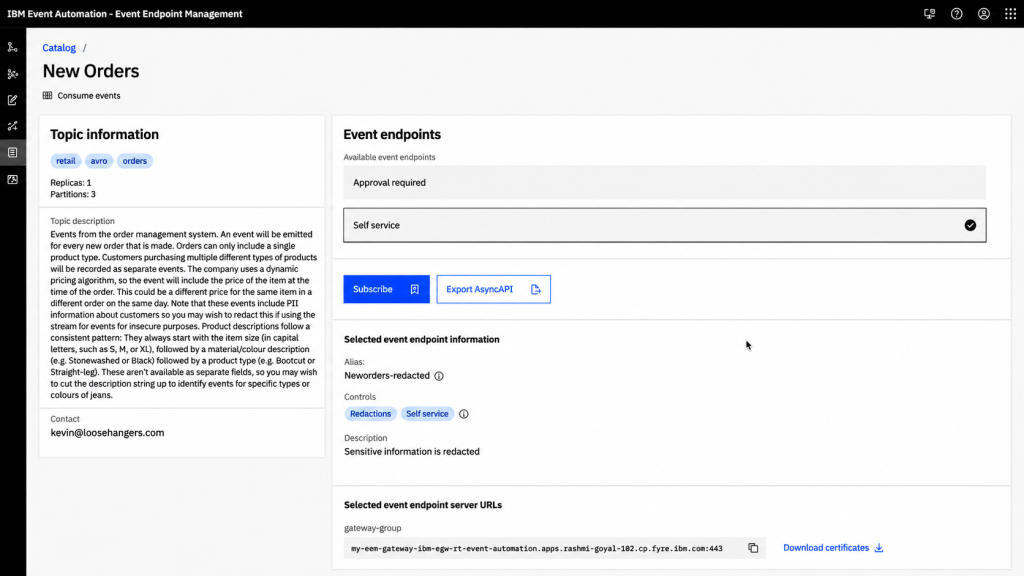
Figure 4. Governed self-service access to a Kafka topic, with AsyncAPI export, in Event Endpoint Management.
For example, an inventory update on Amazon MSK can trigger a workflow that engages an agent without waiting for a user request. AgentCore assesses the event and initiates an approved response, and IBM Integration connects that action to enterprise systems.
Execute business operations reliably
A tool invocation isn’t always an atomic transaction. An approved order may involve inventory reservation, ERP updates, shipping notifications, and partner exchanges, and some steps can fail after others succeed. Avoid exposing each backend function to the agent directly. The agent might not follow the sequencing, failover, and rollback that your business logic requires.
This orchestration belongs in a deterministic workflow. The agent uses large language model (LLM) reasoning to choose a workflow, and each workflow is a deterministic, pre-approved business response.
With IBM Integration, organizations can implement these operations as reusable flows that coordinate backend systems and handle failures, retries, and recovery. AgentCore invokes the flows and interprets their results. Figure 5 shows an example flow for order processing.
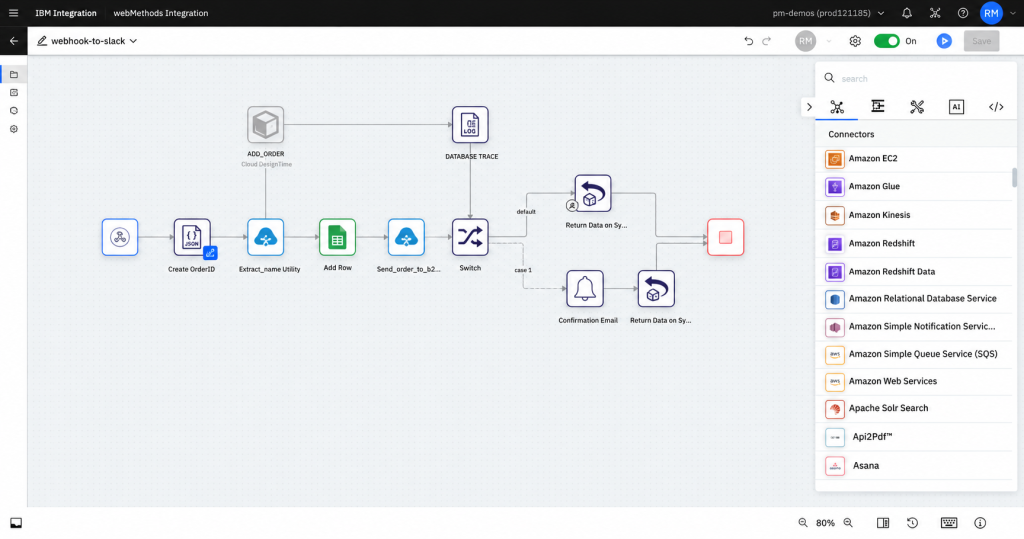
Figure 5. An IBM Integration flow that orchestrates order processing across backend systems.
Accelerate integration development alongside agent development
Scaling to many enterprise agents also means creating and maintaining the integrations they depend on. Demand for new integrations, APIs, and MCP servers can quickly make the integration team a bottleneck.
To reduce this load and make integration teams more efficient, IBM applies AI to integration development. IBM Integration Flow Pilot skills are designed so AI coding assistants, such as Kiro or IBM Bob, can work on integration-development tasks. IBM Integration Intelligence Hub adds enterprise integration context and governed tools. These help assistants understand the existing integration assets, dependencies, and reuse opportunities.
For example, a developer building a procurement agent could find an existing SAP service or Kafka endpoint before creating a new integration. These capabilities support integration development, not agent runtime reasoning. Availability and supported operations depend on product configuration and release.
Conclusion
In this post, you learned how Amazon Bedrock AgentCore and IBM Integration work together to support enterprise-scale agentic AI. AgentCore manages how agents access context and invoke approved tools. IBM Integration connects those tools to the systems where your business runs, across APIs, events, messaging, EDI, and files.
You also learned three requirements for scaling agents: reuse integrations across many agents, deliver trusted and governed information, and run business operations as deterministic, pre-approved workflows. AI-assisted integration development can help your integration team keep pace as demand for new agents grows.
To get started, identify one agent use case that depends on existing enterprise systems. Map the integrations it needs, and check which ones you can reuse. Track outcomes such as the time to connect a new agent, the reuse of existing services, and transaction completion rates.
Additional resources
To continue learning, explore the following resources: