IBM & Red Hat on AWS
IBM Integration Intelligence Hub on AWS: Enterprise context for AI coding
Developers increasingly use AI coding assistants to build and modify enterprise integrations. To do this work well, an assistant needs two things: the specialized tools and skills that integration products require, and information about what an organization has already built, what can be reused, and how existing assets relate to one another.
Consider an enterprise connecting SAP, Salesforce, trading partner applications, and applications running on Amazon Web Services (AWS) and other environments. Over many years, its teams have built APIs, integration flows, business-to-business (B2B) connections, and event-driven applications. Those assets embody business logic and architectural decisions, and knowledge about them is often spread across catalogs, repositories, documentation, and experienced specialists.
Model Context Protocol (MCP) standardizes how an agent accesses a tool. It doesn’t create the integration behind that tool, such as connecting systems, transforming data, coordinating business processes, and handling failures. For AWS customers moving agents from experiments into business workflows, an agent is only as effective as the enterprise connections behind it. With integration expertise and enterprise context, an assistant can reuse the right flow, select the current mapping, and check a shared integration’s dependencies before changing it. This helps teams keep the speed they expect from AI-assisted development.
Solution overview
IBM Integration Intelligence Hub, a capability of IBM Integration (formerly IBM webMethods Hybrid Integration), provides both. In this post, you learn how Intelligence Hub gives AI coding assistants enterprise context, specialized tools, and expert skills. You also see how it helps you decide which integration assets to reuse or change, and then move from design to implementation in your preferred AI coding assistant.
IBM Integration is available as a software as a service (SaaS) offering in AWS Marketplace and runs on AWS. It integrates with AWS services that enterprises already use, including Amazon API Gateway, Amazon Managed Streaming for Apache Kafka (Amazon MSK), Amazon EventBridge, and Amazon Simple Storage Service (Amazon S3). You can use AWS PrivateLink to connect privately from your Amazon Virtual Private Cloud (Amazon VPC) without exposing traffic to the public internet.
The following diagram (Figure 1) shows how Intelligence Hub connects AI coding assistants to IBM Integration products through its Context Engine, tool and skill registries, and governed MCP access. A developer describes a new flow in an assistant such as Kiro (1). The assistant asks Asset Explorer what already exists (2) and gets back two Kafka connections and what depends on each (3). The registries provide only the tools and skills the task needs (4). The developer reviews the plan (5), and the flow is built in IBM Integration (6).
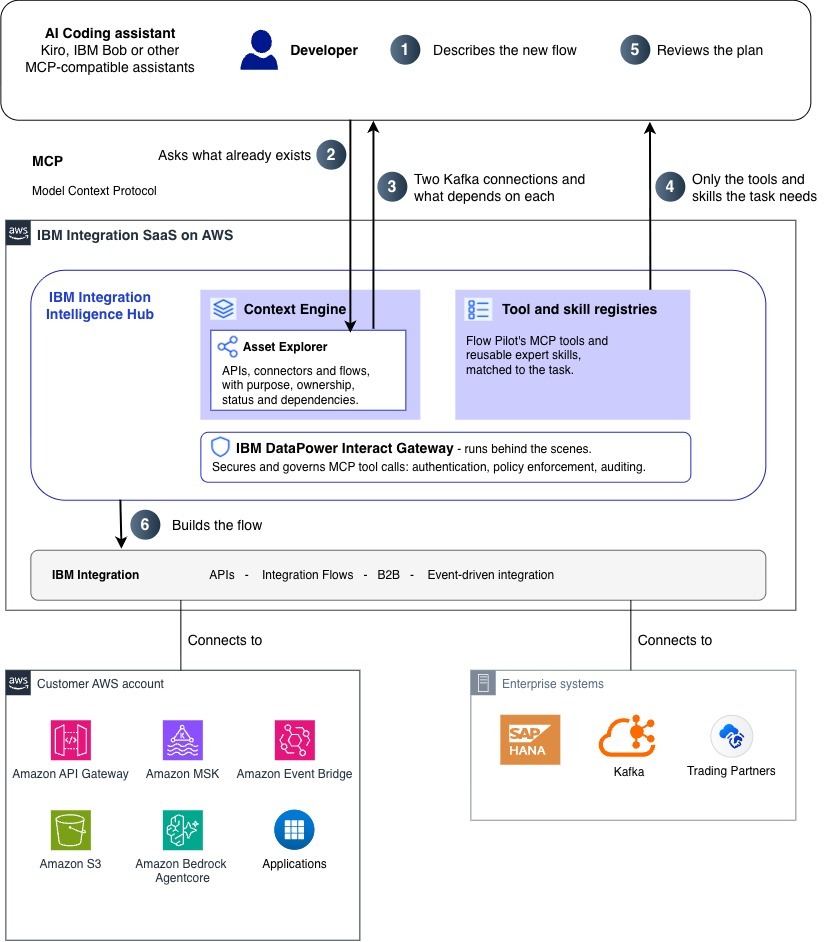
Figure 1. IBM Integration Intelligence Hub architecture on AWS, with steps that follow an order-tracking example.
Intelligence Hub maps integration assets and their dependencies, so an assistant can see the impact of a change before making it.
How Intelligence Hub works
Intelligence Hub brings together three capabilities. Asset Explorer gives AI assistants context about existing integration assets, including what they mean, how they connect, and who owns them. Skills give assistants a repeatable way to apply proven integration practices. IBM DataPower Interact Gateway enforces identity, access, and audit policies for MCP tool interactions. The following sections describe each capability.
Discover: Find, evaluate, and reuse existing integration assets
Asset Explorer, part of the Intelligence Hub Context Engine, gives AI assistants information about an organization’s existing integration estate. This includes APIs, connectors, flows, and other assets, along with their business purpose, ownership, lifecycle status, relationships, and dependencies. Because two assets can have similar names or technical characteristics but serve different business purposes, this context helps assistants choose the right asset to reuse, assess the impact of changes, and avoid duplication.
Guide: Turn integration requirements into working solutions
Intelligence Hub makes specialized MCP tools and expert skills available to compatible AI assistants for integration development and lifecycle management through Flow Pilot, an IBM Integration feature.
Using its tool and skill registries, Intelligence Hub identifies the MCP capabilities relevant to a developer’s task. An assistant connected to many MCP servers can load every tool description up front, which fills its context window and makes the right tool harder to pick. With Intelligence Hub, the assistant starts with a few entry tools and receives only the skills and tools the task needs. It can then translate natural-language requirements into a proposed solution, identify the required components, and guide development across IBM Integration products.
For example, when building a B2B purchase-order flow that processes orders in SAP S/4HANA and publishes successful transactions to Apache Kafka, an assistant can help define the partner configurations, channels, processing rules, connectors, custom actions, and integration flows. It can also present a visual execution plan for developer review before implementation.
Developers stay involved at key decision points. They review proposed plans, provide configuration details, and configure credentials where necessary.
Govern: Secure AI-assisted interactions
Before AI assistants work on production integrations, security teams need to know which assistants can call which tools, under whose identity, and how those calls are recorded. Intelligence Hub uses IBM DataPower Interact Gateway internally to handle authentication, policy enforcement, and auditing of MCP tool interactions. When an assistant invokes an MCP tool through Intelligence Hub, the gateway intercepts the request, validates the caller’s identity, enforces access policies, and logs the interaction. Developers don’t interact with the gateway directly. Intelligence Hub doesn’t approve or block deployments. Authorization and approval stay with the underlying products and the enterprise’s own processes.
Bring your own AI assistant
As shown in Figure 2, Intelligence Hub works with MCP-compatible AI coding assistants such as Kiro and IBM Bob. Developers can bring enterprise integration context, specialized skills, and product-specific tools into their existing workflows without adopting a separate development environment.
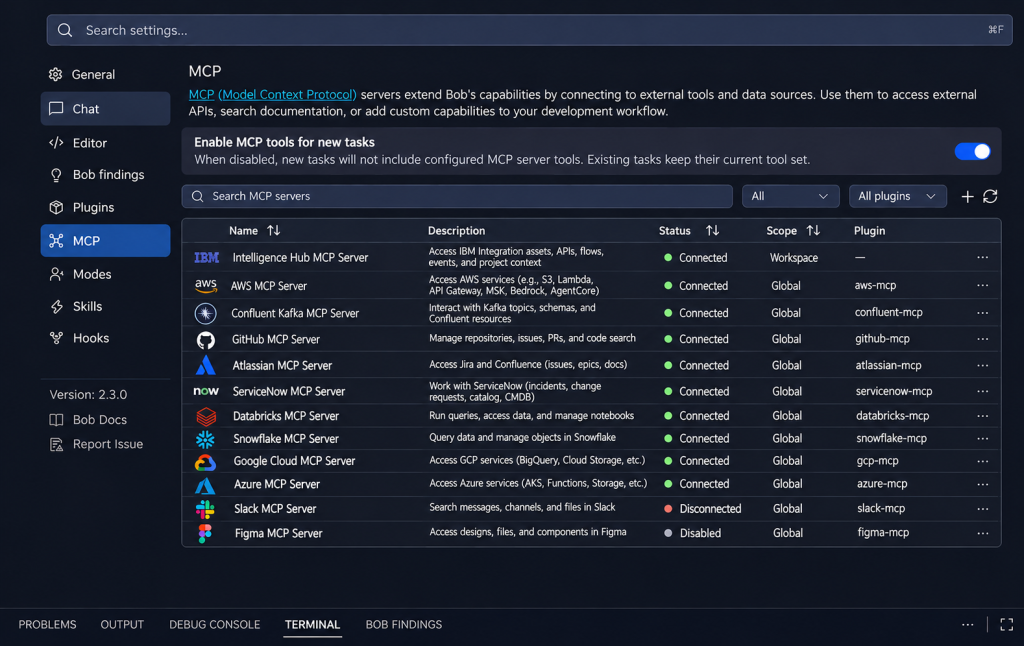
Figure 2. Adding the Intelligence Hub MCP server to AI assisted coding tools.
Example: Reuse the right Kafka connection for order tracking
Now consider the same enterprise, which needs to track customer orders across multiple purchase locations. A developer must build an integration flow that publishes order information to Kafka, reusing existing assets where possible.
Using IBM Bob, the developer describes the requirement and asks for help designing the integration. Through Asset Explorer, the assistant discovers existing Kafka connections, topics, flow services, and reusable actions, along with their business purpose, ownership, and dependencies. It finds two Kafka connections with similarly named topics that both look suitable.
In Bob, the exchange might look like this:
Developer: “I need a flow that publishes order updates from all our purchase locations to Kafka for tracking. Can we reuse an existing Kafka connection?”
Assistant: “I found two Kafka connections with similarly named topics. Kafka Fulfillment is used by the B2B order flow that publishes successful SAP S/4HANA transactions, so a change to it would affect partner orders. Kafka Analytics is used only by reporting flows. For order tracking, I recommend Kafka Analytics. Should I draft the flow with it?”
With the right connection identified, the developer moves from design to implementation in the same workflow. Using the Flow Pilot skills and MCP tools, the assistant creates the integration project, configures the connectors and custom actions, and builds the flow, then summarizes the resulting assets and their relationships. The developer reviews the execution plan and provides configuration details along the way.
Rather than generating a new flow from scratch, the assistant helps the developer decide what to reuse and what to change, and shows how those decisions affect existing systems.
Conclusion
In this post, you learned how IBM Integration Intelligence Hub gives AI coding assistants enterprise context, product-specific skills, and governed access to integration tools. Asset Explorer helps an assistant tell similar assets apart, the tool and skill registries keep it focused, and IBM DataPower Interact Gateway records each tool call. For integration teams, showing dependencies before a change is made can help reduce duplicate integrations and related incidents, and shorten review time for AI-generated changes.
As a next step, explore IBM Integration in AWS Marketplace, then review how Intelligence Hub can connect to the AI coding assistant your team already uses.
Additional resources
- Scale agentic AI to production with IBM webMethods hybrid integration on AWS
- Efficiently manage Kafka with IBM webMethods Hybrid Integration on AWS
- Real-time AI agents with Confluent Cloud and Amazon Bedrock AgentCore
- Real-time data streaming for AI workloads with Confluent on AWS
- Explore IBM Integration on AWS Marketplace
- IBM Integration Intelligence Hub
- Additional IBM on AWS blogs