AWS for Industries
Modernize legacy telecom automation at scale with AWS Transform
Legacy codebases are one of the biggest barriers to cloud modernization in telecommunications. Languages like Tool Command Language (TCL), Perl, shell, and proprietary scripting power critical production systems, but they carry growing risk: a shrinking talent pool, zero test coverage, tight coupling to obsolete infrastructure, and no path to cloud-native architectures. These systems work today, but the knowledge required to maintain them decreases over time.
To modernize at scale, you need an approach that doesn’t depend on legacy expertise — one that can learn transformation patterns and apply them consistently across repositories. AWS Transform custom provides exactly this. It uses agentic AI to convert legacy code to modern languages, letting you define transformation logic in natural language, refine iteratively, and reuse it across your organization. The approach works for any legacy-to-modern migration path: language upgrades, framework migrations, API translations, and full language-to-language conversions.
In this post, you walk through a telco use case, modernizing an automation project built with TCL and Expect — a TCL extension for automating interactive command-line sessions — to Python 3.12 using a custom transformation definition. The same methodology applies to any legacy modernization effort in your organization.
The challenge of modernization in telecommunications
Telco networks have accumulated decades of automation scripts across provisioning, fault management, and service assurance. Beyond the general risks, these codebases carry telco-specific constraints: institutional knowledge concentrated in a few engineers, runtime environments tied to obsolete platforms (proprietary OSS/BSS, Solaris workstations) that can’t be containerized, zero test coverage or documentation, and compliance requirements demanding functional equivalence under regulatory frameworks.
These systems also operate at 99.999% availability, so any modernization strategy must support parallel running, gradual cutover, and rollback. And because a typical telco organization has dozens of legacy projects across different network domains — each with its own scripting language and tribal knowledge — rewriting them one by one doesn’t scale.
You need a repeatable, learning-capable approach that improves with every repository it processes.
Solution overview
AWS Transform custom addresses these challenges with an agentic AI. The end-to-end workflow has three stages:
Define — Describe your transformation objectives in natural language to create a reusable transformation definition.
Transform — Apply the definition to your legacy codebase and validate the output locally.
Scale — Publish the definition to a registry so other teams can reuse it across repositories, with each run capturing new patterns that improve future transformations.
You bring your legacy source code and invoke AWS Transform custom through its command line interface, atx, on your developer machine. You create a transformation definition, convert the code through the service, and receive validated output locally. Build and validation run on your machine to verify functional equivalence.
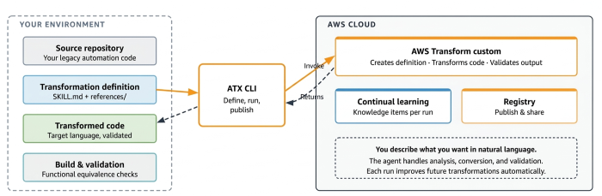
Figure 1: AWS Transform custom architecture — your local environment connects to the AWS Cloud service for transformation processing, continual learning, and registry storage.
A transformation definition contains the instructions and knowledge needed to perform a specific code transformation. It consists of:
- SKILL.md (required) — The core transformation logic in Markdown with YAML frontmatter. This file captures mapping rules, structural decomposition, naming conventions, error handling patterns, and execution instructions. AWS Transform custom generates this file based on your natural language prompt and iterative refinements.
- references/ folder (optional) — User-provided documentation that informs the transformation. For a telco modernization project, this might include numbering plan specifications, API migration guides, coding standards, or architectural decision records. The agent processes these materials to build domain context that improves transformation accuracy — particularly for industry-specific patterns the tool can’t infer from source code.
After each transformation run, AWS Transform custom automatically extracts knowledge items, including learned patterns from execution trajectories, developer feedback, and code fixes. You review and approve these items, and they inform all future runs of that definition. This means subsequent repositories benefit from accumulated learnings without additional configuration.
Prerequisites
Before you begin, ensure you have the following in place:
- An active AWS account with AWS Identity and Access Management (IAM) permissions to use AWS Transform custom.
- AWS Transform custom CLI (atx) installed and configured. For installation instructions, refer to the AWS Transform setup guide.
- AWS Command Line Interface (AWS CLI) version 2.x installed and configured with your AWS credentials.
- Git version 2.x or later. AWS Transform custom requires a Git-initialized project directory with no uncommitted changes before starting a transformation.
- Python 3.12 installed as the target runtime.
- An existing legacy automation Git repository ready for migration. This post uses a TCL/Expect project as the example.
Note: A TCL interpreter (tclsh 8.5+) is not required for the transformation, but can be useful for parallel validation testing — running both the original and transformed code side by side to verify functional equivalence.
Walkthrough: Modernize a TCL/Expect project to Python 3.12
In this walkthrough, you bring your own TCL/Expect automation repository, build a custom transformation definition interactively, run the transformation against your project, and then publish the definition so other teams across your organization can reuse it on their own legacy projects.
- Prepare your project
Start with your own TCL/Expect automation repository. A typical telco project might include Expect scripts that spawn SSH sessions to network devices, orchestration scripts that iterate over device inventories. Clone the repository locally.
git clone <your-repo-url>

cd your-telco-automation-project

git status # Should show a clean working tree- Create the Transformation definition
AWS Transform custom supports both interactive and non-interactive execution (non-interactive mode for CI/CD and batch execution). Launch the CLI in interactive mode with -t to trust all tools, which lets you use natural language to define and invoke transformations:
2a. Launch the transform process
atx -tAfter launching, the CLI displays an interactive prompt where you can enter natural language commands.
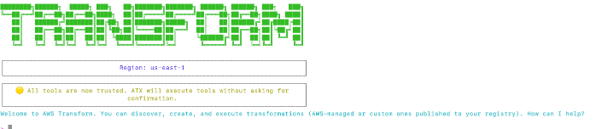
Figure 2: The ATX CLI interactive mode prompt after launching with the -t flag.
2b. Create a custom transformation definition for the project. Enter the following prompt:
“Create a custom transformation definition for converting Tcl automation projects to Python 3.12 with transformation name “Tcl-to-Python3.12-Automation-Migration”.
Build command: python -m compileall {project_name}-transformed
Three-phase execution:
- Analyze and classify all Tcl files by project type and Expect usage
- Convert all files incrementally by dependency order into a {project_name}-transformed output directory
- Validate with compileall, dependency install, and test execution”
The CLI generates the transformation definition based on your prompt, showing the SKILL.md structure and execution phases.

Figure 3: AWS Transform custom generates the transformation definition.
2c. Review the generated definition. You now have a custom transformation definition with a 3-phase plan. After you create the transformation definition, AWS Transform custom asks what you would like to do next.
2d. Refine the definition as needed. You can choose to review or modify the transformation definition and reiterate through this process as much as you need until you arrive at one that you are satisfied with.
2e. Enrich the definition with reference documents. Add domain-specific documentation to the references/folder — for example, numbering plan specifications, regulatory compliance requirements, target architecture coding standards, or API migration guides. AWS Transform custom processes these materials to build domain context that improves transformation accuracy, particularly for industry-specific patterns that can’t be inferred from source code alone.
- Run the transformation
With your definition ready, apply the transformation to your project.
3a. Choose Transform an application from the follow-up prompt. The CLI asks for the path in your file system to the application that needs to be migrated and, optionally, the build command it should use.
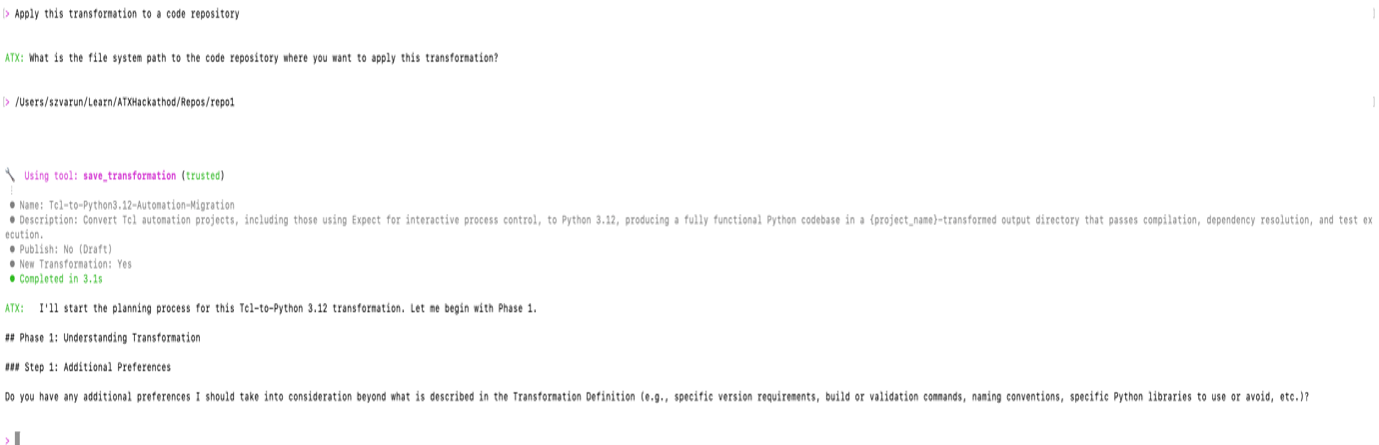
Figure 4: AWS Transform custom prompts for the next action after generating the transformation definition.
3b. After you provide that information, AWS Transform proceeds to analyze the code base and formulate a thorough step-by-step transformation plan based on the definition created earlier. After the analysis completes, you receive a JSON file containing a detailed plan designed for applying your transformation definition to this codebase.
3c. Review the plan. Similar to the process of creating the transformation definition, you can iterate through the plan as many times as you need — providing feedback and adjusting it to any specific requirements you might have.
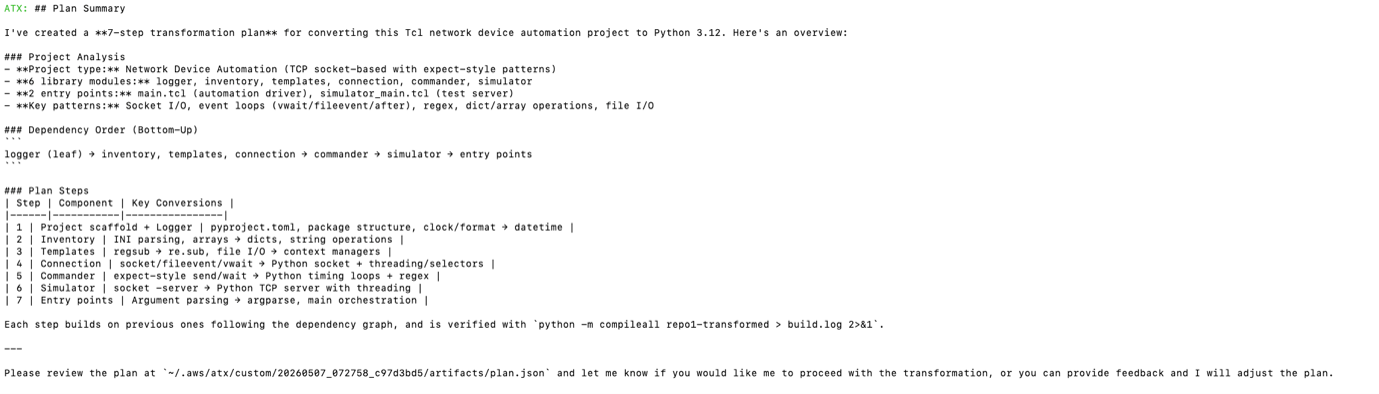
Figure 5: AWS Transform custom displays the transformation plan summary.
3d. When you are ready to accept the plan, you can use natural language to tell AWS Transform to start the migration process by entering proceed and monitor the progress in the shell as AWS Transform custom executes the plan and makes changes to your codebase one step at a time. The time it takes will vary depending on the complexity of the application.
3e. Review the transformation summary. After the transformation finishes, you see a summary showing the status of each exit criterion from the final verification phase, with supporting evidence.
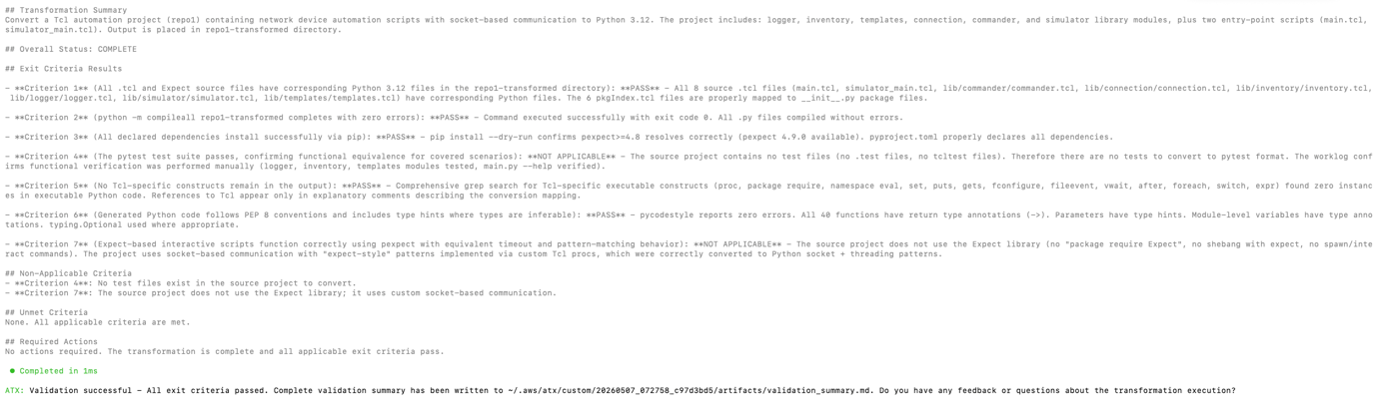
Figure 6: AWS Transform custom displays the transformation results and exit criteria.
- Publish and reuse
After the transformation completes, focus your testing on functional equivalence. For TCL/Expect automation, this means running the same scenarios through both the original and transformed code, and comparing behavior. Use a test harness or mock environment that simulates the interactive sessions (SSH to network devices, CLI prompts, serial consoles). Verify that the transformed Python code spawns the same sessions, sends the same commands, and handles the same response patterns as the original Expect scripts. A TCL interpreter (tclsh 8.5+) running the original alongside the transformed Python can help compare outputs side by side. Different applications require different test criteria — adapt the approach to your domain. Focus on representative scenarios that exercise critical and compliance-governed paths.
Once you are satisfied with the transformation quality, publish the definition so other teams can reuse it.
- Publish the transformation to the registry:
atx custom def publish- Any developer with the required IAM permissions can now discover and run your published transformation.
atx custom def listPublished transformations are available in your account’s transformation registry for execution by any user with the required IAM permissions. Teams no longer need to build transformation definitions from scratch — they can reuse what you’ve already refined and validated.
A telco modernization playbook
The walkthrough demonstrates a single transformation. Scaling this across an organization with dozens or hundreds of legacy repositories, each carrying its own dialect of tribal knowledge, requires a deliberate program strategy. The following playbook captures best practices for applying AWS Transform custom to telco automation estates at scale.
Define your target use case
“Modernize our legacy scripts” isn’t a use case; it’s an aspiration without enough specificity to act on. In telco, a well-scoped use case defines the source language, the operational domain, the interaction model, and the target runtime contract. For example:
“TCL/Expect access-layer provisioning scripts → Python 3.12 with pexpect for device CLI interaction, structured JSON logging for SLA traceability, and NETCONF as the forward integration path.”
That level of specificity forces telco-relevant decisions upfront:
- What domain context to assemble? (device CLI grammars, provisioning state machines, rollback semantics)
- What does “done” mean in operational terms? (same commands, same timeout handling, same confirmation records for downstream systems)
- What’s out of scope for this wave.
Scope each interaction model as its own definition. Device automation, element management, protocol-level signaling, northbound OSS integration, service fulfillment workflows, and billing mediation represent different transformation patterns, each carrying different session semantics, failure modes, and compliance requirements. Mixing them produces definitions too generic to handle any of them well.
Start with one well-bounded pattern in one domain, validate end-to-end including regulatory and SLA gates, then extend to adjacent patterns in subsequent waves.
Assess scale and prioritize
Before you build anything, understand the full extent of what you’re dealing with:
- Map the repositories across operational domains: access, transport, core, OSS/BSS, service delivery, workforce management, and billing/mediation systems.
- Assess the distribution: Are you looking at similar provisioning projects, or projects spanning multiple scripting languages and generations of tooling?
- Prioritize on two axes: business criticality and knowledge concentration risk (the risk of losing critical expertise when key personnel leave).
- Identify high-priority targets: A repository supporting numbering plan compliance or interconnect billing, maintained by a small team approaching retirement, ranks higher than a stable monitoring script understood broadly.
- Classify complexity: Single-system CLI automation and multi-hop orchestration with stateful session management are fundamentally different transformation challenges. Similarly, a batch billing mediation script and a real-time fault correlation workflow carry different timing and correctness constraints.
- Map dependencies between repositories: Scripts that invoke shared libraries, call into common abstraction layers, or feed downstream billing and reporting systems create transformation ordering constraints.
This prioritization focuses effort on the repositories that carry the highest organizational risk and gives realistic timelines for your modernization program.
Gather domain knowledge
The transformation definition is only as strong as the context you provide. For telco automation, critical context often lives in undocumented tribal knowledge: device behavior under failure conditions, prompt patterns that vary across firmware versions, regulatory nuances dictating output formats, or billing mediation logic calibrated through years of settlement disputes.
Assemble the subset relevant to your target use case:
- Regulatory specifications (numbering plans, interconnect billing formats, compliance thresholds)
- Interaction patterns (connection sequences, prompt handling, error recovery, session state management)
- Target architecture standards and observability requirements
- Operational runbooks describing how the automation runs in production, including maintenance window constraints and escalation procedures
Place them in the references/ folder. The investment pays compound returns: every document you provide reduces iteration cycles, not just for this repository, but for every subsequent one that reuses the definition.
Build the transformation definition
Follow the interactive workflow from the walkthrough. Focus your definition on three areas:
- How the legacy execution model maps to your target architecture: the programming paradigm shift, library equivalents, and runtime expectations your platform team has standardized on.
- How your organization’s error handling and resilience standards should manifest in modernized code: structured exception hierarchies, retry policies, and escalation patterns that align with your operational runbooks.
- What observability and compliance requirements the modernized code must satisfy: structured logging, audit trails, performance instrumentation for SLA tracking, and any regulated output formats.
Don’t over-engineer the first version. The definition is a living artifact that improves with each transformation run. Get the core mapping right and let iteration cycles handle edge cases.
Select representative repositories
Choose 2–4 repositories spanning the diversity of your estate:
- At least one straightforward single-purpose automation for baseline validation
- One orchestration project coordinating across multiple systems with stateful workflow management
- One compliance-critical repository where functional equivalence is non-negotiable and regulatory validation applies
- One batch operation exercising scaling patterns with error aggregation and partial-failure handling
This isn’t random sampling; it’s deliberate stress-testing. If the definition handles these patterns correctly, it generalizes across the remaining inventory with minimal surprises.
Iterate and capture knowledge
Run the transformation on each representative repository:
- Review output not just for correctness but for idiomatic quality; code that works but reads like machine-translated prose creates maintenance debt.
- Run domain-specific tests: side-by-side comparison of legacy and modernized outputs for identical operational scenarios.
- Review the knowledge items AWS Transform custom extracts after each run. Approve patterns that should inform future transformations (prompt handling, error recovery sequences, compliance output formatting). Reject false learnings.
- Refine the definition where gaps appear.
By the third or fourth repository, you should see significantly fewer manual corrections as the definition internalizes your organization’s patterns.
Test for functional equivalence
In telco, “it compiles” is insufficient. You need regression testing against simulators or recorded sessions, with particular attention to:
- Regulatory compliance verification against applicable rules (numbering plans, billing accuracy, lawful interception interfaces).
- Connection handling under adversarial conditions: timeouts, session drops, cascading failures, graceful degradation.
- Where five-nines availability applies, deploy legacy and modernized versions in parallel, route controlled traffic to the new code, and compare results in production-equivalent conditions.
- Advance to production cutover only when the repository passes every applicable validation criterion.
Regulatory compliance and service continuity require deterministic validation; advance only with confirmed equivalence.
Scale and publish
With a validated definition, move through remaining repositories in priority order:
- Use non-interactive mode to process repositories through CI/CD pipelines.
- Monitor knowledge extraction after each batch. New repositories surface patterns not seen in the initial group: edge cases, format variations across jurisdictions, and legacy idioms that emerge at scale. The definition adapts.
- Flag any repository that fails validation after two iterations for direct engineering attention.
- Publish the validated definition to the registry. Document scope, prerequisites, known limitations, and the validation criteria you applied.
- Communicate to peer teams across operational domains. They likely face the same modernization pressure with the same categories of legacy automation.
Version your definitions alongside your code. Publish updates for major refinements: new interaction patterns, target framework changes, additional regulatory compliance rules, or technology transitions. A published definition eliminates duplicate effort; teams get a proven transformation path on day one.
Establish continuous improvement
Legacy automation doesn’t stop surfacing. Acquisitions bring new repositories. Teams discover forgotten scripts on shared infrastructure. Technology migrations expose automation no one knew existed.
- Version your definitions alongside your code.
- Publish version bumps for major refinements: new patterns, target framework changes, or regulatory updates.
- Close the loop: once a repository is validated, cutover is complete, and the team is operating on modernized code, archive the legacy and move on.
The walkthrough teaches your engineers how to use the tool. This playbook is how you run the program. The difference between a successful modernization and a stalled one is rarely the technology; it’s whether the organization treats it as an engineering project or an operational transformation.
Cleanup
If you created transformation definitions during this walkthrough and no longer need them, remove them from your account
- List your transformation definitions:
atx list-definitions- Delete any draft definitions you no longer need:
atx delete-definition --name "Tcl-to-Python3.12-Automation-Migration"For more information about managing definitions in the transformation registry, refer to the AWS Transform custom documentation.
Conclusion
In this post, you walked through a complete workflow for modernizing legacy telco automation using AWS Transform custom — from creating a transformation definition in natural language, to running the transformation against your repository, to validating the output and publishing the definition for reuse across your organization. The telco migration playbook outlined a structured approach for scaling this process across multiple teams and network domains, turning isolated modernization efforts into a repeatable, organization-wide capability.
This approach scales. Each transformation run captures knowledge items that improve future run automatically. A single TCL/Expect-to-Python migration grows into a repeatable, organization-wide modernization capability that eliminates the need for every team to solve the same modernization problem independently.
To get started, install the ATX CLI and try it on one of your legacy automation repositories. For installation instructions, refer to the AWS Transform setup guide. For more details on transformation definitions, continual learning, and the transformation registry, refer to the AWS Transform custom documentation.