AWS for Industries
Transforming renewable asset development using Agentic AI
The renewable energy sector stands at a critical inflection point. The electricity demand in the USA is set to increase by 25% until 2030, meanwhile, over 90% of that demand will be covered by renewable additions. With global renewable power capacity projected to increase almost 4,600 GW between 2025 and 2030, double the deployment of the previous five years, the industry faces unprecedented challenges in planning, optimizing, and deploying clean energy assets at scale. Traditional manual processes for renewable asset planning, which can take months to complete, are becoming significant bottlenecks in a rapidly expanding market.
In this post, we dive deep into the early phase of the wind farm design process and showcase how a multi-agent AI workflow can accelerate and improve the output of this critical phase. Although we apply agentic AI to wind farm planning, a similar process could be created for solar or storage projects as well.
The challenge of scale and complexity
Modern renewable energy planning involves navigating complex interdependencies across environmental constraints, regulatory requirements, grid integration, and economic optimization. Wind farm design requires sophisticated analysis of terrain, wake effects, turbine placement, and energy yield simulation, considering setback requirements, land use compatibility, and interconnection constraints, as shown in the following figure. The initial design phase alone takes 6–18 months. Solar installations face similar complexity in site evaluation, panel layout optimization, and storage integration.
This planning phase determines site viability through wind resource measurement, land agreements, community engagement, environmental assessments, grid evaluation, preliminary turbine layout, and financial analysis. This culminates in a go/no-go decision before full permitting, engineering design, and construction. However, multiple teams with manual handovers create long iteration cycles, limiting scenario evaluations and resulting in suboptimal designs that cost millions in lost revenue over the project lifetime.
With over 2,600 GW of renewable capacity stuck in interconnection queues across the USA, speed-to-market has become the single biggest driver of energy deployment. The ability to rapidly evaluate sites and secure favorable interconnection positions provides critical competitive advantages, because faster project maturity and optimized designs improve success rates in securing capacity rights.
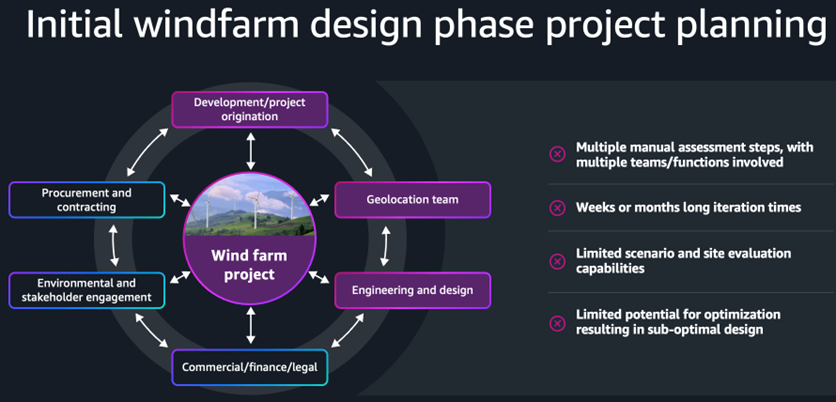
Figure 1: Wind farm design process
Business opportunity
Cloud and agentic AI-enabled workflows address these challenges and deliver faster time-to-market and optimized layout layouts. Therefore, we estimate the following:
- 60% cycle time reduction—from months to hours, with significant engineering cost savings
- 5x more scenario evaluations—for better risk management and comprehensive analysis
- 2+% energy output increase—through optimized layouts and improved ROI
The solution
We propose an AI-powered multi-agent system to analyze terrain, design optimal turbine layouts, and simulate wind farm performance, as shown in the following figure. Developers interact through a natural language front-end to modify constraints, re-run simulations, and compare scenarios against existing sites or industry standards.
A planning agent orchestrates the workflow across four specialized sub-agents:
- Terrain Agent: Identifies exclusion zones by analyzing bodies of water, buildings, infrastructure, and power lines using Overpass API and OpenStreetMap data. Applies turbine specifications from the National Renewable Energy Laboratory (NREL) and company-specific setbacks to generate color-coded GeoJSON boundaries for buildable land using United States Geological Survey (USGS) maps.
- Layout Agent: Creates optimal turbine layouts with spacing in elliptical patterns in the primary wind direction while avoiding exclusion zones. Wind patterns are obtained from the NREL Wind toolkit API.
- Simulation Agent: Performs wake analysis and energy calculations using PyWake library with the IEA37SimpleBastankhahGaussian wake model, outputting performance metrics, capacity factors, and AEP calculations based on NREL wind patterns and turbine power curves.
- Reporting Agent: Compiles comprehensive PDF reports with executive summaries, maps, layouts, performance metrics, financial projections, and optimization recommendations.
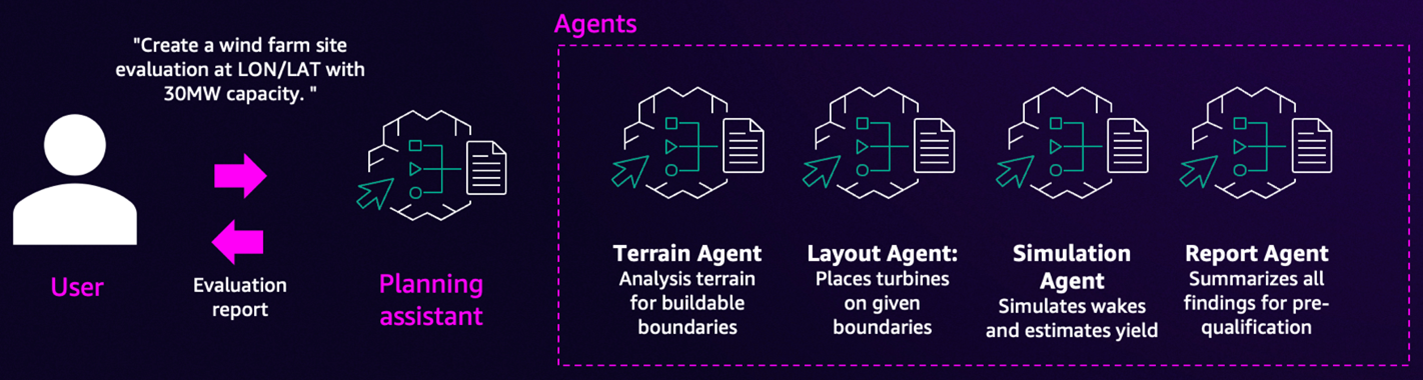
Figure 2: Multi-agent solution
The user can launch an entire end-to-end workflow with a request such as the following:
Run through the full workflow required to design a 30MW wind farm at location lat: 35.067482, lon: -101.395466 using IEA_Reference_3.4MW_130 turbines and output a report with all findings and simulation results.
However, in practice the engineers may be more likely to interact with one agent at the time to iterate and validate the output at each step before continuing. The following are example prompts to trigger a specific task:
1. Terrain analysis
Analyze terrain at 35.067482, -101.395466 with 5km radius. Use a setback from roads of 1.2 * turbine height. Use the turbine model "IEA_Reference_3.4MW_130
2. Layout design
Now create a turbine layout for a 60MW wind farm using IEA_Reference_3.4MW_130 turbines.
3. Energy simulation
Run a wake simulation for the layout previously generated using NREL wind conditions.
4. Report generation
Generate an executive report with charts and recommendations.
This solution demonstrates an example workflow and can be adapted to work with the existing workflows and tools of the companies. For example, the initial analysis may also be started from a pre-defined boundary polygon exported from the existing GIS tools used in the industry, rather than point coordinates. The setbacks and turbine specs may be integrated from company proprietary data. Furthermore, simulations can be performed by commercial simulation software.
Implementation
In this section, we walk through a solution that uses multiple Amazon Bedrock features and Strands Agent SDK to implement the workflow optimization use case. More code details for the deployment are available in this GitHub repository.
Architecture diagram
In this section we explore the solution architecture and each architectural component in detail. We examine its role in solving the problem and how Amazon Web Services (AWS) services enable the solution, as shown in the following figure.
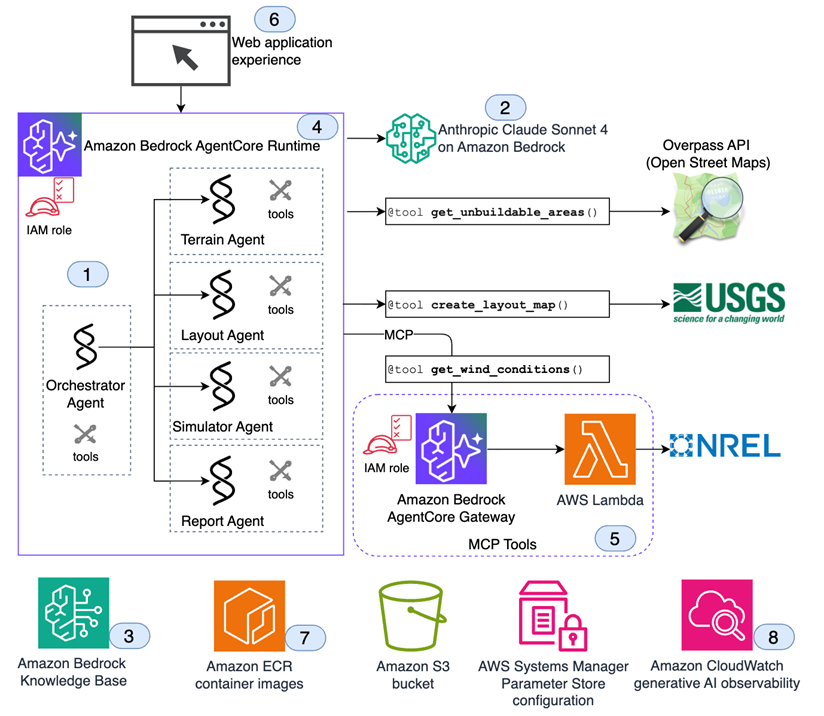
Figure 3: Solution architecture
- All agents are implemented using the open source Strands Agent SDK. This is an open source AWS toolkit that streamlines building AI agents with a loop-based architecture that enables complex, multi-step reasoning and autonomous behavior.
- Agents use the foundational model Claude Sonnet 4 available through Amazon Bedrock.
- Optionally, turbine specifications, or company-based constraints such as setbacks, can be retrieved from an Amazon Bedrock Knowledge Base using knowledge base ID as an input either in the agent environment or in the user prompt.
- All agents are deployed in Amazon Bedrock AgentCore, which accelerates the deployment of agents to production with composable services that work with any framework or any model. It provides the infrastructure to host and run your agents in production, so that they can be accessed through web applications and other interfaces with built-in observability features for monitoring agent performance and behavior.
- The tool to obtain wind conditions from NREL API is deployed as an AWS Lambda function and registered as a target to Amazon Bedrock AgentCore Gateway. This showcases how external API integrations can be deployed as reusable Model Context Protocol (MCP) tools.
- A sample web application using Python FastAPI and a React frontend provides the end-user experience.
- Agents and web applications are packaged as container images and pushed to Amazon Elastic Container Registry (Amazon ECR).
- Finally, Amazon CloudWatch generative AI Observability is used to monitor invocations and track foundation model token usage.
Deep dives
In this section we dive deeper into three implementation components:
- The orchestration approach using Agents as Tools pattern
- The MCP Gateway implementation
- The web application to provide the end-user-experience
Multi-agent orchestration approach: Agents as Tools
Agents as Tools is an AI pattern where specialized agents are callable functions (tools) invoked by a primary orchestrator agent. This hierarchical setup mimics a manager coordinating specialists to solve complex problems efficiently.
Key benefits include separation of concerns, modular architecture, and scalable collaboration, enabling flexible and maintainable multi-agent systems.
Structure:
- Primary orchestrator: Handles user interaction and delegates to specialized agents.
- Specialized agents: Perform domain-specific tasks independently when called.
This model fosters efficient collaboration across expert agents, as shown in the following figure.
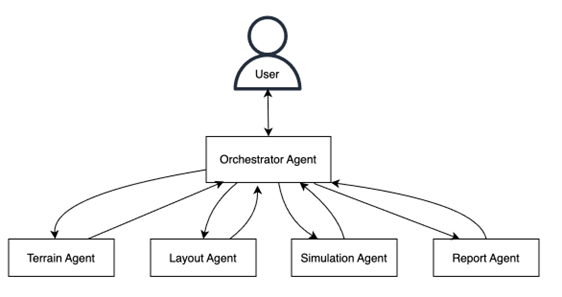
Figure 4: Agents as Tools pattern
We implement the Agents as Tools pattern in Strands Agents SDK by decorating the agents with @tool decorator and adding these agents to the tools list of the orchestrator agent.
For example, the following snippet shows how we use the @tool decorator in the agents/terrain_agent.py to enable the Agents as Tools pattern:
The following code snippet from wind_farm_dev_agent.py shows the tools list for our Orchestrator Agent with a mixture of agents and Python functions.
A project_ID is generated to preserve the context and save and retrieve generated assets such as maps, GeoJSONs, images, or raw data.
For a production deployment, this solution can be integrated with existing tooling to manage the project lifecycle and store project assets.
Using MCP tools
The get_wind_conditions tool accesses NREL data through their API and is shared by multiple agents, including the layout and simulation agents. To facilitate this, we created a Lambda function and registered it as a target to Amazon Bedrock AgentCore gateway so that the agents can call this tool through MCP.
MCP is an open standard that enables AI agents to dynamically connect to and use external tools and data sources. It acts as a universal interface allowing secure, real-time access to information and actions beyond a model’s training. Think of MCP as a “USB-C port” for AI: What APIs are for data, MCPs are for agents.
The AgentCore Gateway service provides zero-code MCP tool creation, transforming APIs or Lambda functions into MCP tools and providing added capabilities such as OAuth 2.1.
In our example, a Lambda function is used to deploy the actual tool code behind the gateway:
from get_wind_conditions import get_wind_conditions
def lambda_handler(event, context):
"""Lambda handler for AgentCore gateway"""
return get_wind_conditions(**event)
Explore this MCP tool implementation in GitHub to see the API access functions. It gets the NREL API key from the environment variables.
Web application
To test the end user experience, we implemented a web application using Python FastAPI and a React frontend. You can run it locally or deploy it on Amazon Elastic Container Service (Amazon ECS).
The web application connects to the AgentCore endpoint through a parameter stored in AWS Systems Manager Parameter Store.
The maps and GeoJSON are displayed on the left side of the following figure. The Assets tab provides downloadable links to the project assets.
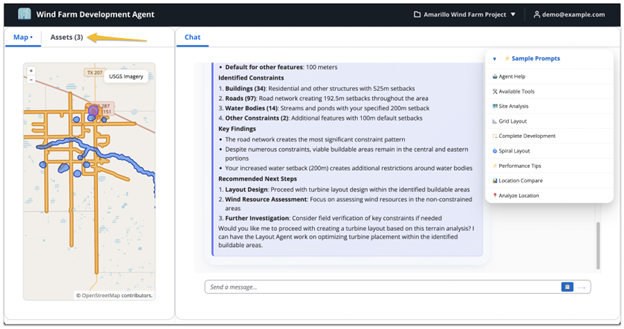
Figure 5: Web application interface
This application demonstrates how the AI agents we’ve built can be integrated into a web application, which makes wind farm development workflows accessible to non-technical stakeholders.
Conclusion
In this post we demonstrated how to transform the business workflow using agentic AI and how to deploy it on Amazon Bedrock AgentCore. We have created a multi-agent workflow with four subagents for each step of the early-phase development of wind farms. A clear web interface shows how you can integrate the agents to your user experiences.
This post uses opensource tools and data, and thus the numeric outputs can’t compete with enterprise grade tools. However, these tools can be replaced with your enterprise grade tools, which would unlock the true power of agentic workflows when combined with state-of-the-art enterprise tools.
Next steps
- Review the opensource sample in GitHub and/or explore the AWS workshop for a hands-on experience. Reach out to your AWS team to host a guided workshop for you.
- Experiment with different locations and parameters. Replace the open source tools and data with your own. For example, customize turbine specifications, integrate your simulation tools and other data sources, and extend the workflow to optimization or financial modelling. Or you could add land ownership data, which is critical for wind farm design.
- Experiment with multi-modal capabilities to interpret satellite images and position turbines.
- Discover how agentic AI can transform your business workflows and get started!