The Internet of Things on AWS – Official Blog
Mechanisms for IoT commands, control, and configuration
Imagine you need to build a system to command, control, and configure smart bulbs in a commercial building. A facilities manager taps their phone to remotely switch off a single bulb in an office. An end-of-day timing event triggers your system to switch off all bulbs on the second floor simultaneously. A technician pushes a new color profile to every bulb on the third floor overnight. A building automation system queues a color temperature change for a lobby bulb that is temporarily offline.
In all these scenarios you need to send an instruction from the cloud to a device. The right delivery mechanism for that instruction depends on factors such as latency, connection status, required observability, and whether you’re targeting one device or a group.
AWS IoT Core and AWS IoT Device Management offer several mechanisms to help you send commands, apply configuration, and control your IoT devices. This post introduces these mechanisms using a smart bulb as an example device and provides a comparison matrix to help you select the right mechanism for your use case.
Mechanisms
This section introduces five mechanisms that you can use to build command, control, and configuration solutions for your devices.
AWS IoT Core Direct Messaging
AWS IoT Core Direct Messaging sends a point-to-point message to a single connected device using the SendDirectMessage HTTP API. For one-to-one communication, this is more efficient than publishing through the pub-sub broker, reducing messaging cost and latency.
Direct Messaging operates in two modes: with delivery confirmation (MQTT QoS 1) and without delivery confirmation (MQTT QoS 0). The API call is synchronous in both modes. With confirmation, it waits until the device acknowledges receipt (PUBACK) or the timeout expires, with the confirmation coming directly from the device and not from the message broker. If the device is known to be offline, you receive an immediate HTTP 404 to indicate the message wasn’t delivered.
Direct Messaging confirms delivery so that you know the action was initiated. To know the subsequent outcome of that action, you need to implement your own status tracking, timeouts, and error handling.
Best for: Lowest-latency, near real-time initiation of actions on a single online device, or cost-effective messaging at high volumes across a large fleet.
Sample use cases: Light switching, garage door open/close, notifications and alerts.
Smart bulb example: Your backend calls SendDirectMessage with client ID bulb-01, arbitrary topic control/light, and payload {"power": "on"}. With confirmation enabled, the API returns 200 after the bulb acknowledges receipt. If the bulb is offline, you get an immediate 404 with reason TARGET_CLIENT_NOT_CONNECTED.
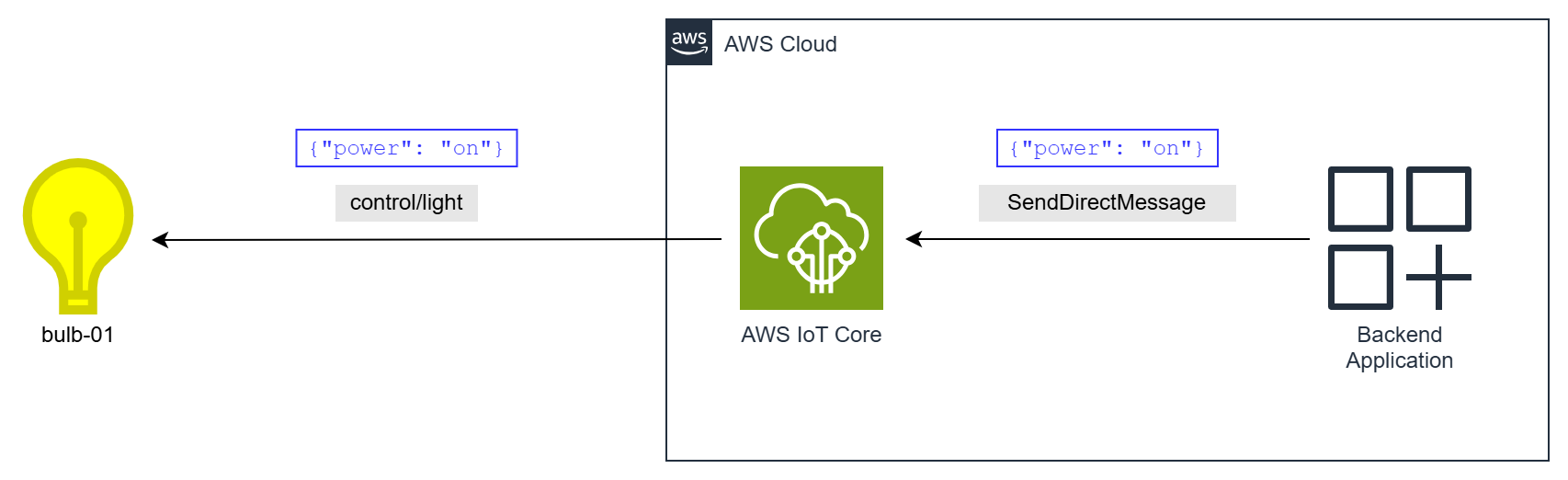
Figure 1: AWS IoT Core Direct Messaging
AWS IoT Core MQTT Pub-Sub
With AWS IoT Core MQTT publish-subscribe messaging you can build your own command-and-control solutions. Your backend would typically send a request to a custom topic using the Publish HTTP API or an MQTT publish. You can send messages as QoS 0 or QoS 1, and use persistent sessions to queue requests for offline devices. When the device receives a request, it acts on it, and optionally publishes a response to another custom topic. You can subscribe to that custom response topic to observe the outcome, or route the response messages through IoT Rules. You have complete flexibility, but you might need to build your own timeouts, retries, status tracking, and offline handling.
Best for: Near real-time simultaneous control or configuration of multiple devices through topic fan-out, or any pattern requiring flexibility that doesn’t map to the AWS managed mechanisms.
Sample use cases: Floor-wide lighting control, airport departure board updates, brownfield fleets with established topics.
Smart bulb example: Your backend calls Publish with payload {"power": "on"} and topic cmd/bulb-01/req. The bulb is subscribed to that topic, processes the request message, and publishes {"status": "success"} to cmd/bulb-01/resp. You implement your own 5-second timeout. If no response arrives, your backend retries or alerts the user.
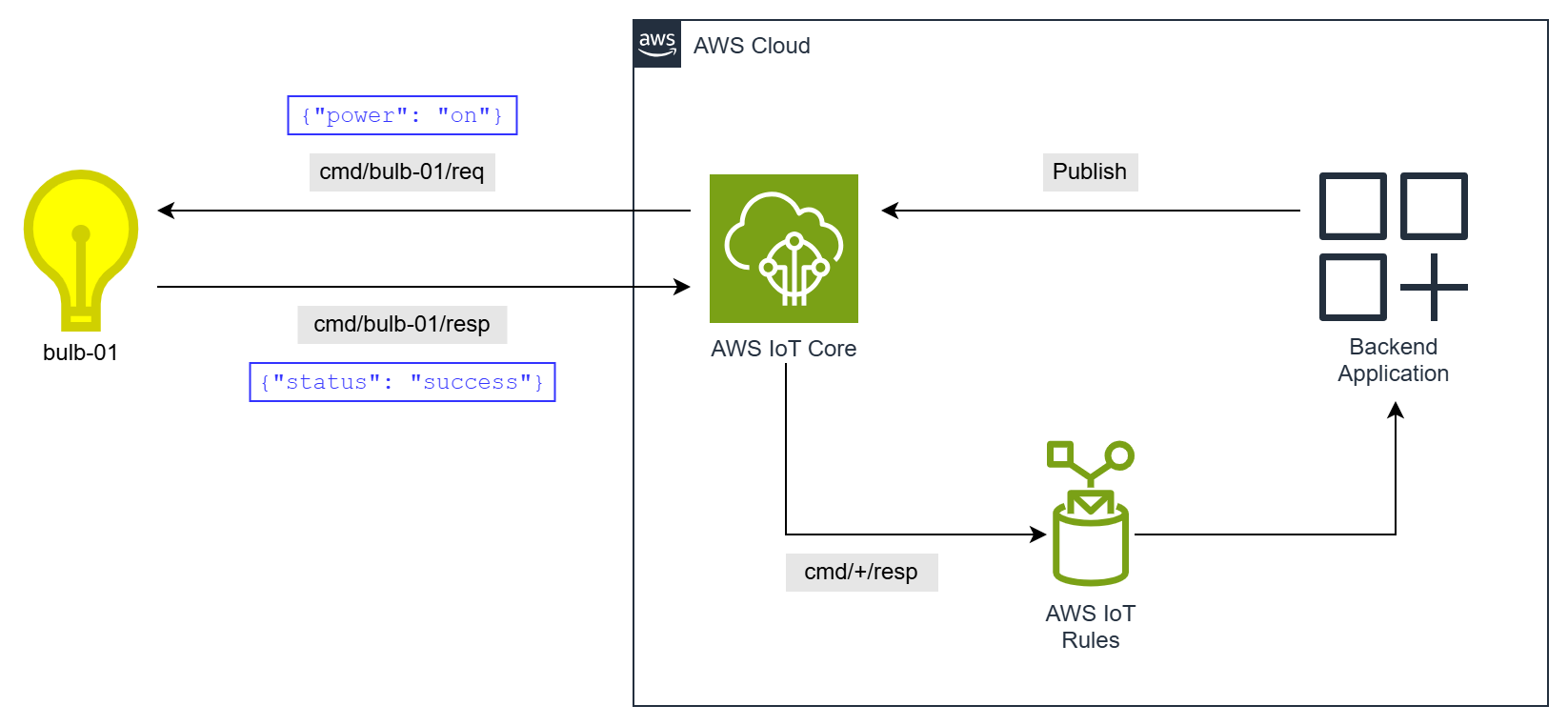
Figure 2: AWS IoT Core MQTT Pub-Sub
AWS IoT Device Management Commands
With AWS IoT Device Management Commands you can send individual instructions to a single device through reserved MQTT topics. You define instructions as reusable command templates with static or dynamic payloads, and then execute those templates on your devices. Your backend starts an execution by calling the StartCommandExecution API. Subsequent progress and outcome can be tracked through the GetCommandExecution API or status notifications through AWS IoT Rules.
Commands provides many capabilities such as built-in timeouts, execution status tracking (CREATED, IN_PROGRESS, SUCCEEDED, FAILED, REJECTED, TIMED_OUT), event notifications, commands execution history for auditing, and instruction-scoped access control. If a device is briefly offline when an execution starts, persistent sessions can queue the instruction for delivery when the device reconnects.
Where Direct Messaging confirms that an instruction arrived at a device, Commands confirms what the device did with the instruction. For example, Direct Messaging confirms a bulb received a “turn on” instruction, but Commands confirms the bulb actually turned on. Commands execution tracking and timeout capabilities also make it well-suited to longer-running actions that take time to complete.
Best for: Near real-time control of a single device, with progress tracking and a verified outcome.
Sample use cases: Light control, unlocking a door, dispensing a measured dose, remote diagnostics.
Smart bulb example: You create a reusable command with a payload {"power": "on"}. When a user taps “Turn on” in their app, your backend calls StartCommandExecution. The bulb receives the payload on $aws/commands/things/bulb-01/executions/+/request/json, turns on, and publishes {"status": "SUCCEEDED"} to the response topic.
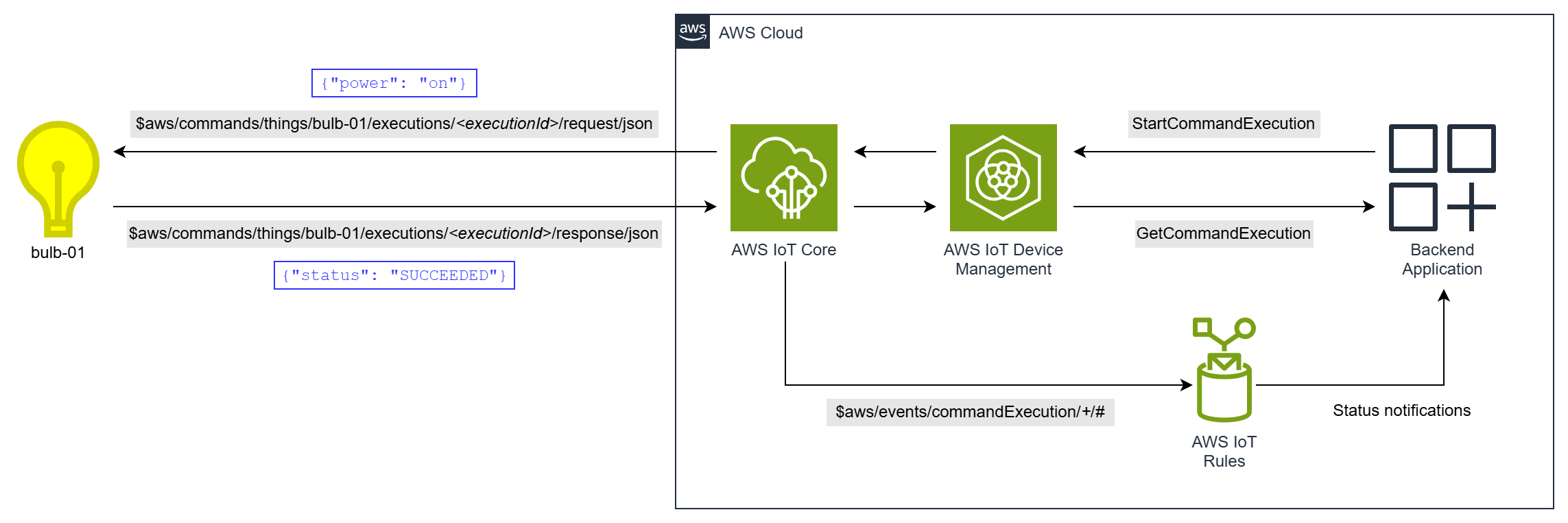
Figure 3: AWS IoT Device Management Commands
AWS IoT Device Shadows
The AWS IoT Device Shadow service provides persistent state storage in the cloud for your devices. A shadow document is a JSON document that has three sections: desired (what your application requests), reported (what your device confirms), and delta (the difference between the two). To change the state of a device, your backend sets the shadow desired state using the UpdateThingShadow API. AWS IoT Core then publishes a delta message to the device on reserved shadow MQTT topics. The device receives the delta, applies the change, and publishes the new reported state. The shadow service synchronizes the new state. If the reported state matches the desired state, the delta is cleared. You can observe convergence through the GetThingShadow API or events routed through IoT Rules.
Shadows work whether the device is online or offline, decoupling your backend from your device. Your backend can interact with a shadow at any time. If a device is offline when you set a desired state, the shadow persists that state until the device reconnects. Shadow documents are versioned to handle conflict resolution, and you can use multiple named shadows per device to separate logical property groups.
Best for: Non-real-time control or configuration of a single device, with resilience to intermittent connectivity.
Sample use cases: Light hue settings, thermostat setpoints, robot vacuum cleaning schedules.
Smart bulb example: The bulb’s shadow currently reports {"hue": 240}. Your backend calls UpdateThingShadow to set the desired state to {"hue": 150}. The Shadow service publishes a delta message containing {"hue": 150} to the bulb. If online, the bulb adjusts immediately and publishes its new reported state. If temporarily offline, the desired state waits in the cloud until the bulb reconnects and fetches the shadow.
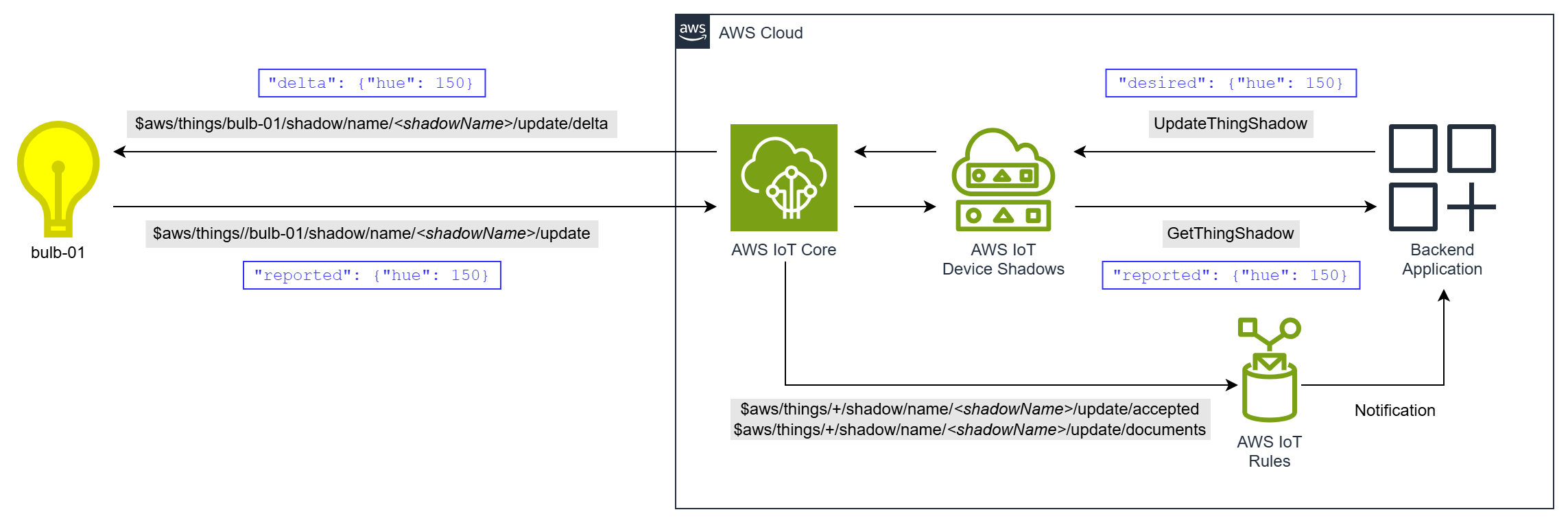
Figure 4: AWS IoT Device Shadows
AWS IoT Jobs
With AWS IoT Jobs you define remote operations to perform on one or more devices. The operations are defined using a job document, which is a JSON payload describing the operation. You can save job documents as reusable job templates. You send the job to one or more target devices. The job notifies target devices of pending job executions, which the devices then retrieve through reserved jobs MQTT topics.
Jobs provide fleet orchestration capabilities such as rollout rate control, abort criteria, retry configuration, and configurable timeouts. You create the job with the CreateJob API and monitor progress and outcome through the DescribeJob API and jobs events. Like Commands, Jobs also provide execution status tracking (QUEUED, IN_PROGRESS, SUCCEEDED, FAILED, TIMED_OUT, REJECTED, REMOVED, CANCELED), execution history for auditing, and instruction-scoped access control.
Best for: Long-running fleet-wide or group operations, with orchestrated rollout and resilience to intermittent connectivity.
Sample use cases: Batch configuration, firmware updates, certificate rotation, log uploads.
Smart bulb example: You need to update the default brightness curve on 2,000 bulbs across the building. Your backend calls CreateJob targeting a thing group of 2,000 bulbs including bulb-01. Each bulb pulls the job document, applies the new brightness curve, and reports SUCCEEDED. The job dashboard shows real-time progress across the fleet.
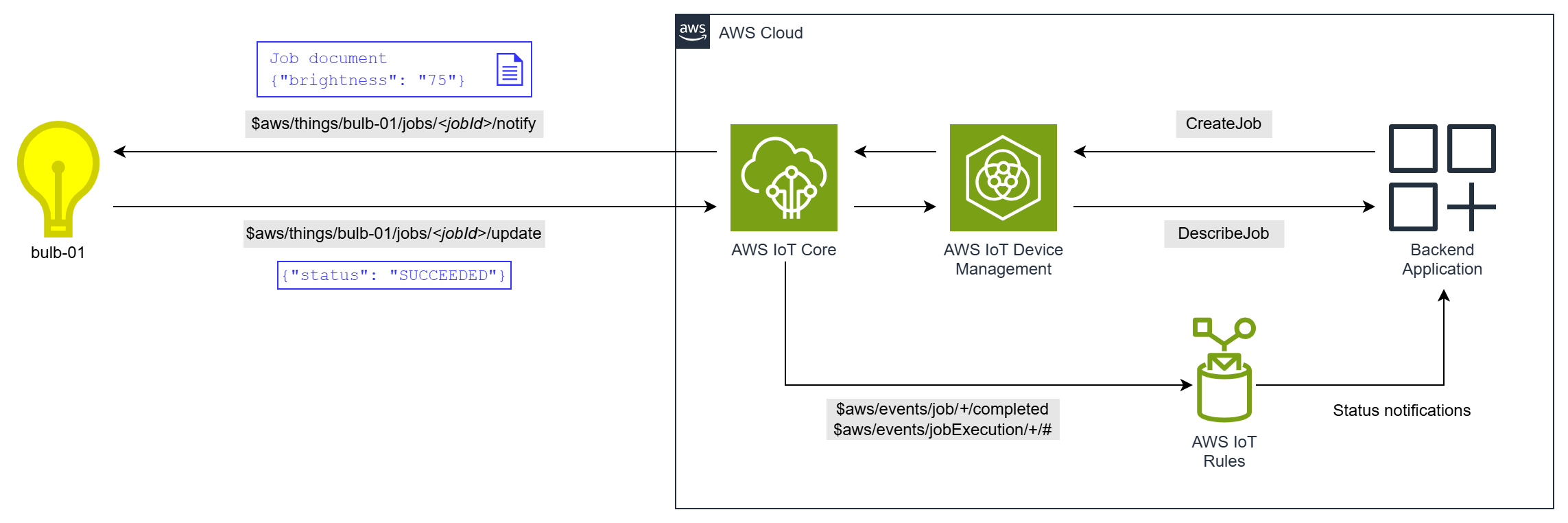
Figure 5: AWS IoT Jobs
Comparison matrix
The following table compares the mechanisms across key capabilities.
| Capability | Direct Messaging | MQTT Pub-Sub | Commands | Device Shadows | Jobs |
| Near real-time control — Instruction has time-bound completion | Yes | Yes | Yes | No | No |
| Offline control — Instruction persists for delivery on reconnect | No | Partial | Partial | Yes | Yes |
| Control multiple devices — Single instruction targets many devices | No | Yes | No | No | Yes |
| Interaction model — Synchronous (caller blocks) or asynchronous (observe through events) | Sync | Async | Async | Async | Async |
| Built-in timeouts — Configurable timeout for completion | Yes | No | Yes | No | Yes |
| Maximum timeout duration | 15 seconds | N/A | 12 hours | N/A | Optional |
| Retries — Built-in or automatic retry logic | No | No | No | Yes | Yes |
| Execution result — Device reports whether it successfully performed the action | Partial | Partial | Yes | Yes | Yes |
| Execution status tracking — Built-in lifecycle states for monitoring | No | No | Yes | Partial | Yes |
| Execution history — Retains a record of instructions sent and execution results | No | No | Yes | No | Yes |
| Reusable instructions — Define once, execute many times | No | No | Yes | No | Yes |
| Instruction-scoped access control — Authorize a specific instruction | No | No | Yes | No | Yes |
| Fleet orchestration — Rate control, staged rollouts, abort criteria | No | No | No | No | Yes |
Clarifications:
- Near real-time control: All mechanisms execute immediately when the device is online. When it’s offline, Direct Messaging and Commands can fail fast with a timeout or error. MQTT Pub-Sub can too, if you implement a response topic and timeout. Shadows and Jobs instead wait for the device to reconnect, with no time-bounded completion.
- Offline control: Shadows persist the delta state indefinitely. Job executions remain in a queue until the device gets them. Commands and MQTT Pub-Sub are Partial because QoS 1 with persistent sessions provides limited queuing, but messages expire when the session does.
- Maximum timeout duration: Job executions have an unlimited duration by default. The IN_PROGRESS state can have an optional timeout of up to 7 days.
- Retries: Shadow delta state persists until the reported state matches. Jobs support configurable retry policies.
- Execution result: This row indicates whether a device reports the outcome of the action, not only confirmation of receipt of the instruction. Direct Messaging and MQTT Pub-Sub are Partial because the device can publish a result, but you implement this yourself. Commands and Jobs provide structured execution results with built-in status values (SUCCEEDED, FAILED, REJECTED). Shadows confirm convergence when reported state matches desired state.
- Execution status tracking: Shadows is Partial because the delta resolves when reported matches desired, but there are no explicit status labels like SUCCEEDED or FAILED.
- Reusable instructions: With Commands, you can define an instruction once and execute it repeatedly with static or dynamic payloads. Jobs provide similar capability through job templates.
- Instruction-scoped access control: With Commands and Jobs, the reusable instruction itself is a resource (a command or job template). You can authorize principals to run one specific instruction, and separate who defines an instruction from who can run it.
Pricing
Precise IoT service cost of these mechanisms depends on many factors including: AWS Region, MQTT QoS you choose when subscribing, confirmed or unconfirmed direct messages, shadow size, message volume, payload size, and pricing tiers. The following spectrum gives a broad indication of relative IoT service cost.

Figure 6: Relative IoT service cost spectrum
Direct Messaging is the lowest cost because it meters a single message (when unconfirmed). MQTT Pub-Sub incurs standard pub-sub messaging plus IoT Rules costs. However, for MQTT Pub-Sub to reach parity with the capabilities of Commands (timeouts, status tracking, event notifications), you would need to build and operate additional application logic and infrastructure. This adds both development cost and ongoing service cost. Shadows generate multiple MQTT messages per state change in addition to the shadow operation fee. Jobs and Commands are feature-rich and add a per-execution management fee on top of messaging costs.
Review these pages for current region-specific rates:
- AWS IoT Core pricing — covers Direct Messaging, Device Shadows, and MQTT Pub-Sub.
- AWS IoT Device Management pricing — covers Commands and Jobs.
Conclusion
This post covered five AWS IoT mechanisms for commands, control, and configuration, and provided you with guidance on how to select the right mechanism for your use case. Here’s a quick-reference decision guide:
- Direct Messaging — Lowest-latency, near real-time initiation of actions on a single online device, or cost-effective messaging at high volumes across a large fleet.
- MQTT Pub-Sub — Near real-time simultaneous control or configuration of multiple devices through topic fan-out, or any pattern requiring flexibility that doesn’t map to the AWS managed mechanisms.
- Commands — Near real-time control of a single device, with progress tracking and a verified outcome.
- Device Shadows — Non-real-time control or configuration of a single device, with resilience to intermittent connectivity.
- Jobs — Long-running fleet-wide or group operations, with orchestrated rollout and resilience to intermittent connectivity.
You can also combine mechanisms within a single solution. For example, use Commands for near real-time user-initiated control actions, Shadows for stateful device configuration, and Jobs for fleet-wide or group device operations.
Getting started
Visit the AWS IoT console and the Commands and Jobs features.
Learn more
To learn more about AWS IoT services and how they can transform your connected device business, visit aws.amazon.com/iot.