AWS for M&E Blog
Build redundant live video workflows with AWS Elemental MediaConnect Router
A nightly news program and a global sports final have very different failure tolerances. Live streaming operators need to guarantee uptime for high-value events, but building cross-Region redundancy has traditionally required complex, custom-engineered solutions. AWS Elemental MediaConnect Router changes that, bringing familiar broadcast switching concepts to the AWS Cloud, enabling cross-Region routing with fixed end-to-end latency, automatic source failover, and packet-level source merging, all managed from a single global console. For a full overview of MediaConnect Router concepts, see the MediaConnect Router documentation.
In this post, we focus on how to build high-availability workflows using three cross-Region redundancy patterns:
- Single pipeline: One regional path (99.7% uptime)
- Dual pipeline: Two parallel paths across two AWS Regions (99.999% uptime)
- Dual pipeline with crossover: Four paths with cross-Region connections (99.9999% uptime)
In this post, we assume that you’re familiar with MediaConnect Router inputs, outputs, and network interfaces. If you need a refresher, see Using the MediaConnect Router.
Why redundancy matters: The SLA math
Each service in the pipeline—router input, router output, and MediaLive—offers a published 99.9% monthly uptime SLA. By combining these services with the MediaConnect Router global architecture, you can achieve dramatically higher availability with minimal effort:
| Architecture | Uptime | Best for |
|---|---|---|
| Single pipeline | 99.7% | Non-critical or test channels |
| Dual pipeline | 99.999% | Production content with dedicated encoders per Region |
| Dual pipeline + crossover | 99.9999% | Premium live events (sports, concerts) where any dark pipeline is unacceptable |
Table 1: Achievable uptime using published 99.9% SLAs. Router makes it straightforward to reach five or six nines.
We focus on cross-Region redundancy because dual-Availability Zone deployments within a single Region are ultimately limited by regional availability (~99.99% ceiling), whereas cross-Region architectures eliminate this shared dependency.
Architecture 1: Single pipeline
A single-Region pipeline chains three services in series: Router input, router output, and MediaLive. This is the most basic deployment and offers no redundancy.
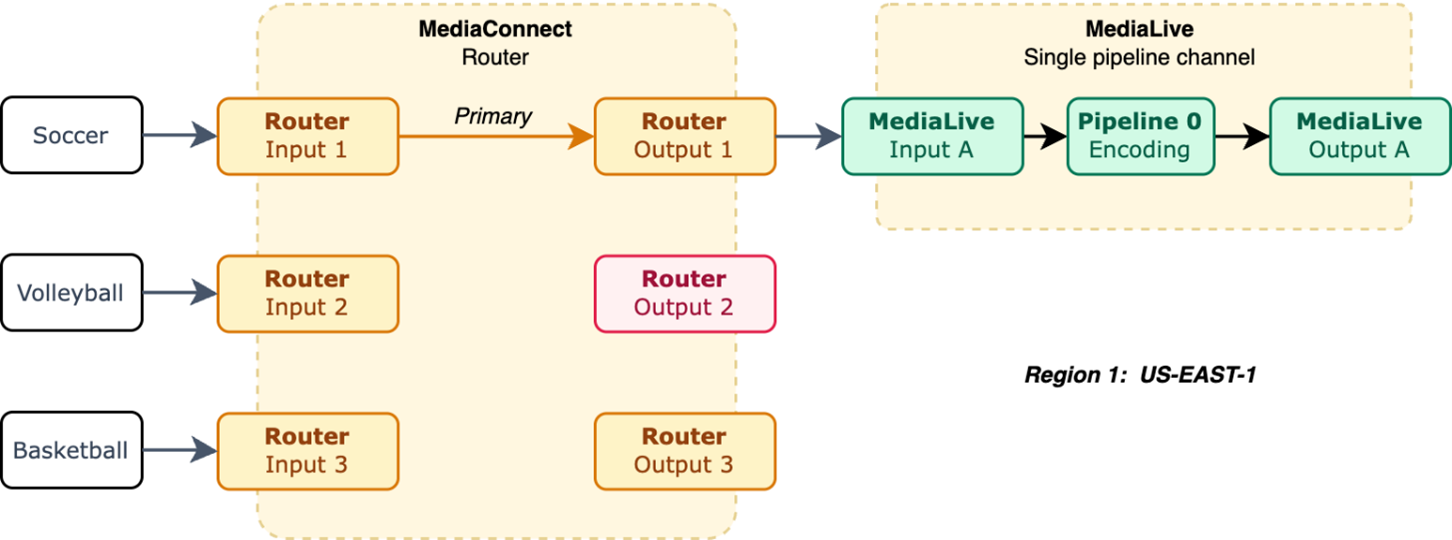
Figure 1: Single pipeline
How it adds up:
Pipeline uptime for a single pipeline can be calculated as:
0.999 × 0.999 × 0.999 = 0.999³ ≈ 99.7%
Any single component failure causes a complete outage. This is the baseline that redundancy architectures improve upon.
Architecture 2: Dual pipeline
Two complete, independent pipelines across two Regions (for example, us-east-1 and eu-west-1). Each ingests from its own source feed, processes through router inputs and outputs, and delivers to downstream services in that Region.
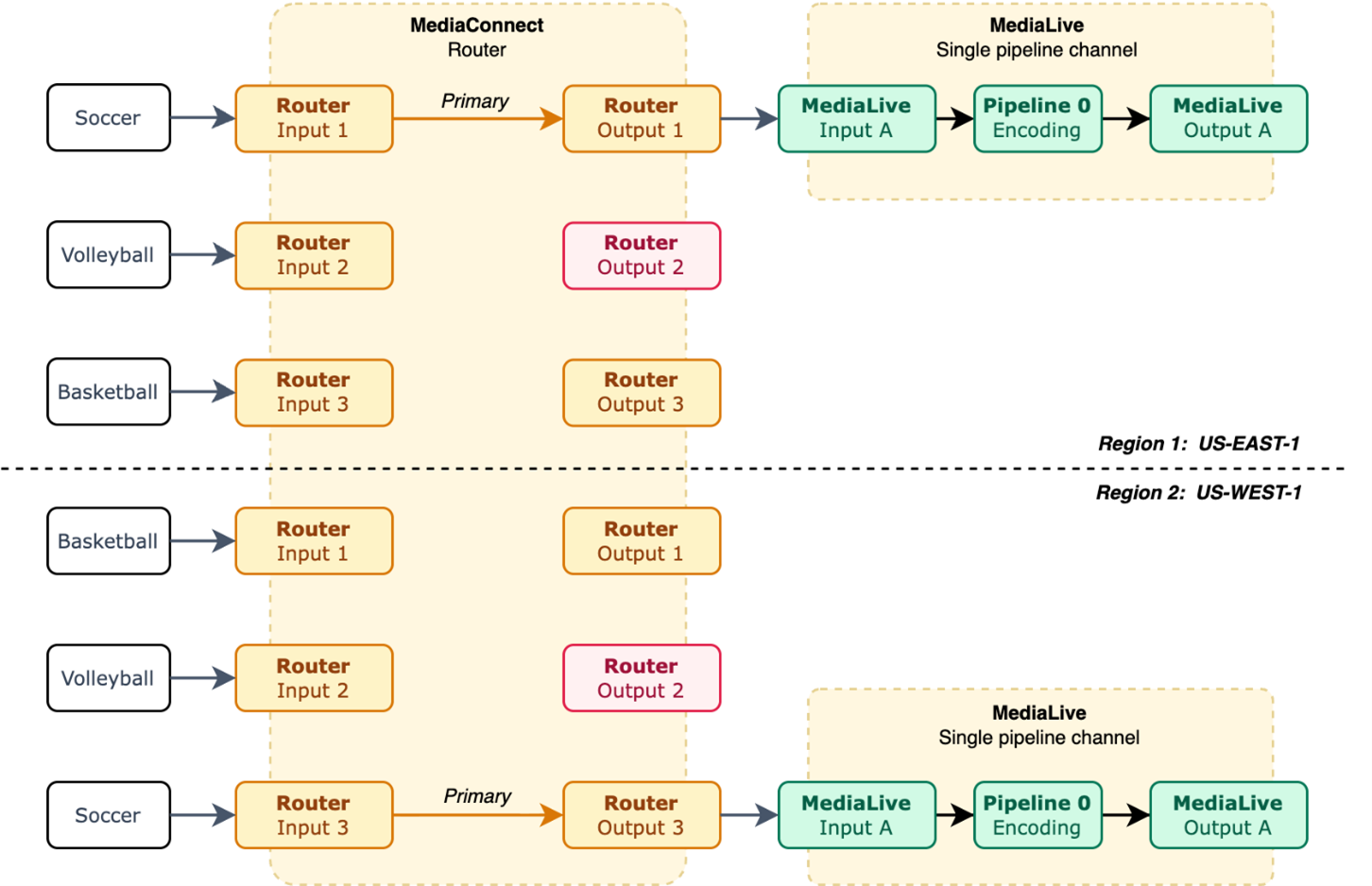
Figure 2: Dual pipeline
The two pipelines operate independently, so a failure in one Region doesn’t affect the other. If Region A experiences an outage, Region B continues serving viewers with zero interruption.
How it adds up:
The uptime for this model can be calculated as follows:
P(single pipeline fail) = 1 − 0.999³ = 0.003 P(both fail) = 0.003² = 0.000009 System uptime ≈ 99.999% (~5 minutes/year)
To set up this architecture:
- Create mirrored router inputs in two Regions, each receiving an independent contribution feed.
- Create router outputs of type MediaLive to automatically connect to MediaLive inputs, no manual networking or encryption configuration required.
Optional enhancements:
- Add failover or merge inputs on each regional router for source-level redundancy.
- Set routing scope to global if you want cross-feed capability later (default is regional).
Architecture 3: Dual pipeline with crossover
This architecture builds on the dual pipeline architecture by adding cross-Region connections. Each standard MediaLive channel receives feeds from the router inputs of both Regions. This creates four effective output paths.
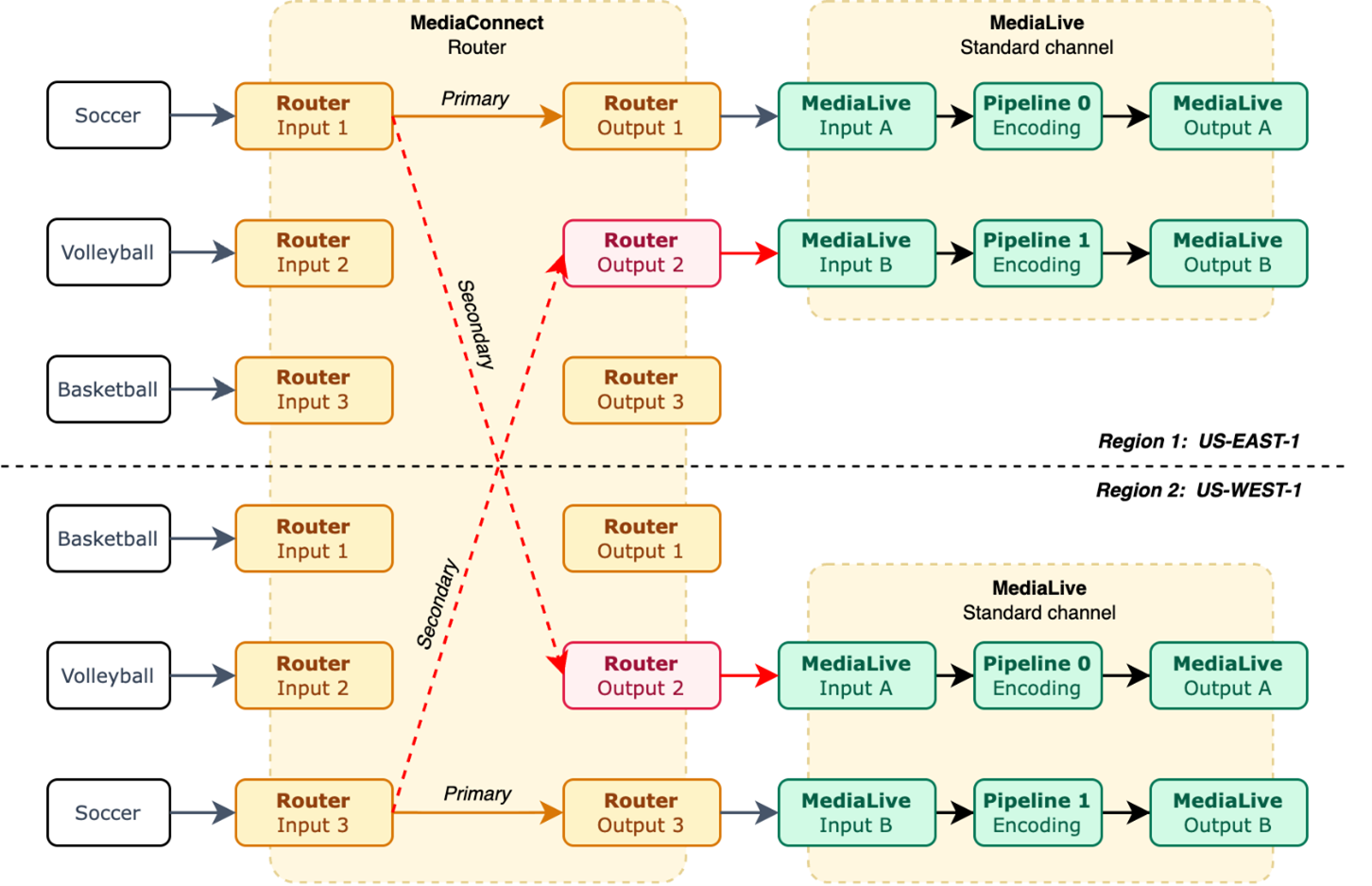
Figure 3: Dual pipeline with crossover
The benefit of a dual pipeline with crossover is that when a source encoder fails, the affected Region’s pipeline automatically continues on its cross-Region feed, so both pipelines remain live without manual intervention. A take action can optionally redistribute routes for optimization but isn’t required to maintain uptime.
How it adds up:
The uptime for this model can be calculated as follows:
Single Region: P(input up) = 0.999 P(single output leg up) = 0.999 × 0.999 = 0.998 P(both legs down) = (1 − 0.998)² = 0.000004 P(at least one leg up) = 1 − 0.000004 ≈ 0.999996 P(region up) = 0.999 × 0.999996 ≈ 0.998996
Two independent Regions (different source encoders): P(system down) = (1 − 0.998996)² = (0.001004)² ≈ 0.000001 System uptime ≈ 99.9999% (~32 seconds/year)
With four output paths across two Regions, the system only fails if both regional inputs go down simultaneously, an extremely unlikely scenario with independent source encoders.
How to choose
Both architectures tolerate a single pipeline fault. The difference is in the depth of fault tolerance and operational complexity:
Choose single pipeline when:
- You have less valuable content and cost is the most important consideration.
- A single point of failure is acceptable for your use case.
Choose dual pipeline when:
- Each Region has its own dedicated source encoder.
- You need redundancy with minimal operational overhead (two total output pipelines; both must fail for outage).
Choose dual pipeline with crossover when:
- Both pipelines must remain live even if a source encoder fails entirely.
- You distribute high-value live content (sports, premium events) where a dark pipeline is unacceptable.
- You need deeper fault tolerance. Four total output pipelines mean three can fail without viewer interruption.
- You have tooling to automate cross-Region take actions.
Note: Crossover requires standard (dual-pipeline) MediaLive channels with two inputs, one for local and one for cross-Region feeds. Plan your MediaLive channel class accordingly.
Tip: By using MediaConnect Router, you can mix and match architectures within the same routing matrix, for example, 10 dual-pipeline channels for premium content alongside 30 single-pipeline channels for less critical feeds, all managed from one console.
Conclusion
Choose the right architecture based on your fault tolerance requirements and operational complexity budget. Here’s how to get started:
- Review your architecture for single points of failure in contribution and processing.
- Deploy a dual pipeline architecture in two Regions with independent source feeds.
- Evaluate crossover if your SLAs justify the additional cross-Region outputs and standard MediaLive channels.
To learn more, visit the MediaConnect User Guide. For hands-on experience, the getting started tutorials walk you through creating your first Router Input and Output.