AWS Messaging Blog
A Complete Guide to Resource Sharing for AWS End User Messaging
UPDATED: April 27, 2026 — This guide has been updated based on real-world customer feedback from large-scale international SMS migrations
Do you need to send SMS across multiple AWS accounts? Or have you ever wanted to use the same specific 10DLC phone number or branded Sender ID across those accounts? Perhaps your development team needs to test an application in a sandbox account using a production-ready number, or you’re migrating a workload to a new account and need to ensure your customer communications aren’t disrupted. Centralizing your messaging resources across accounts improves efficiency and branding, while lowering the risk in compliance gaps..
In this step-by-step guide, we will show how to solve this challenge by sharing your AWS End User Messaging resources across multiple AWS accounts using AWS Resource Access Manager (AWS RAM). By creating a single sharing account for your messaging resources—like phone numbers, Sender IDs, and opt-out lists—and securely sharing them with your other “consuming” accounts, you can build a more efficient, secure, and scalable communication platform.
Common Use Cases for Resource Sharing
Important: resource sharing with AWS RAM is a regional feature. You can only share resources with accounts within the same AWS Region where those resources are located.
Centralizing and sharing resources is a powerful pattern that addresses several common customer needs:
- Testing in a Sandbox Environment: Allows development teams to test applications using production-ready phone numbers or Sender IDs in an isolated sandbox account, without giving them access to production configurations.
- Simplified Registration and Onboarding: Share an existing pre-registered 10DLC number or Sender ID with a new account that has not yet completed its own registration process, enabling it to start sending messages more quickly.
- Seamless Account Transitions: When migrating an application or workload to a new AWS account, you can share the existing origination identities. This makes certain that your phone numbers and Sender IDs remain consistent during the transition, preventing any disruption to your customer-facing communications.
This guide will walk you through the step-by-step process of sharing your AWS End User Messaging resources.
Shareable AWS End User Messaging Resources
You can share the following AWS End User Messaging resources using AWS RAM:
- Phone Numbers: Share your dedicated short codes, 10DLCs, long codes, and toll-free numbers. This allows different accounts to send messages using a centralized pool of numbers.
- Sender IDs: Share alphanumeric sender IDs to maintain consistent branding in one-way SMS messages across your accounts.
- Opt-out Lists: Centralize your opt-out management to ensure regulatory compliance. When a user opts out of messaging from one account, they are opted out across all accounts using that shared list. This is especially powerful when used with pools, as you can associate a pool with a specific opt-out list, ensuring all numbers in that pool adhere to the same primary list. As a best practice, you should create and share a dedicated opt-out list rather than relying on the default list for each account.
- Pools: Share your pools of phone numbers and sender IDs to manage origination identities at scale. Pools provide benefits like automatic failover and apply settings like opt-out lists or two-way SMS configurations to the entire pool.
- Important: for a shared Opt-out list or pool to be functional, all of its member resources (the phone numbers and/or Sender IDs within it) must also be included in the same AWS RAM resource share.
Resources That Cannot Be Shared via AWS RAM
Understanding what can be shared is only half the picture. It’s equally important to know what cannot be shared between accounts, so you can plan accordingly — especially during migrations or when standing up new consuming accounts.
The following resources and configurations are account-specific and must be created or configured independently in each consuming account:
| Resource | Why It Can’t Be Shared | What You Need to Do |
|---|---|---|
| Configuration Sets | These are account-level constructs that define how delivery events are routed. They are not AWS resources in the RAM-shareable sense. | Create new configuration sets in each consuming account. See our companion blog post, How to Send SMS Using Configuration Sets with AWS End User Messaging |
| Event Destinations | Tied to configuration sets, which are account-specific. Event destinations define where delivery status events (CloudWatch Logs, Amazon Data Firehose, Amazon SNS) are sent. | Set up event destinations in each consuming account and associate them with your locally created configuration sets. |
| Protect Configurations | Account-level settings that control destination country filtering and message content policies. These operate at three levels: account default, configuration set, and per-message. | Configure Protect settings independently in each consuming account. Verify settings at all three levels when troubleshooting delivery issues. |
| Message Template Registrations | Carrier-level registrations (e.g., China message templates) are submitted through AWS Support and processed by downstream carriers or regulatory bodies. These are tied to a specific AWS account, not to the origination identity itself. | Submit new template registrations via AWS Support for each account that needs to send to the destination country. Allow adequate lead time — China template registrations, for example, can take 15 or more days to process. |
| Account-Level Settings | Sandbox/production status, monthly spend limits, default message type, and other account-wide configurations are not transferable. | Configure these settings independently in each account. |
Important: When planning a migration or multi-account architecture, account for the time and effort required to recreate these resources in each consuming account. Some items — particularly carrier-level registrations like China message templates — may require significant lead time. We recommend inventorying your non-shareable resources early in the planning process and building their recreation into your migration timeline.
Tip: A useful mental model is to think of RAM sharing as sharing the “what you send with” (phone numbers, Sender IDs, pools, opt-out lists) but not the “how you send” (configuration sets, protect configurations, account settings) or the “where you’re allowed to send” (carrier-level registrations, country-specific allowlists).
Understanding AWS RAM Fundamentals
Before sharing your End User Messaging resources, it’s essential to understand the core concepts of AWS RAM.
- Resource Share: This is the central component in AWS RAM. A resource share consists of three elements:
- The resources to be shared (such as phone numbers, or opt-out lists).
- The principals (AWS accounts, OUs, or an entire organization) with whom you are sharing.
- The managed permissions that define what actions the principals can perform on the shared resources.
Important: The supported resources of AWS End User Messaging are shareable with AWS accounts, Organizations, and OUs, but not with individual AWS Identity and Access Management (IAM) roles or users. This restriction ensures that resource sharing remains at the account level, maintaining clear boundaries and simplifying access management for your End User Messaging infrastructure.
- Sharing Account vs. Consuming Account:
- The sharing account (or owner account) is the AWS account that owns the resources and creates the resource share.
- When a principal (such as an AWS account) is granted access to a resource share, it becomes a consuming account. It can use the shared resources according to the permissions granted and pays for its own usage of those resources, not for the resources themselves. For example: The consuming account pays for the volume of SMS sent by a shared number but the sharing account pays for any fees associated with owning that actual number.
- AWS Organizations Integration: While you can share resources with individual AWS accounts, the most powerful way to use AWS RAM is in conjunction with AWS Organizations. This service allows you to centrally manage and govern multiple AWS accounts under a single umbrella. When you enable sharing within your organization, you can share resources with all accounts in the organization, or with specific Organizational Units (OUs), seamlessly and without needing to send and accept individual invitations. This sharing is only possible between accounts that reside in the same AWS Region.
- Managed Permissions: AWS RAM uses managed permissions to control access.
- AWS managed permissions are predefined permission sets created and maintained by AWS for common use cases. For AWS End User Messaging, the key permission is
AWSRAMDefaultPermissionSmsVoice, which allows consumers to use the resources for sending messages but not for deleting or modifying them. - Customer managed permissions can be created for more granular control over shared resources.
- AWS managed permissions are predefined permission sets created and maintained by AWS for common use cases. For AWS End User Messaging, the key permission is
- Resource-Based Policies: Behind the scenes, AWS RAM works by creating and managing resource-based policies for you. These policies are what actually grant the consuming accounts access to the shared resources.
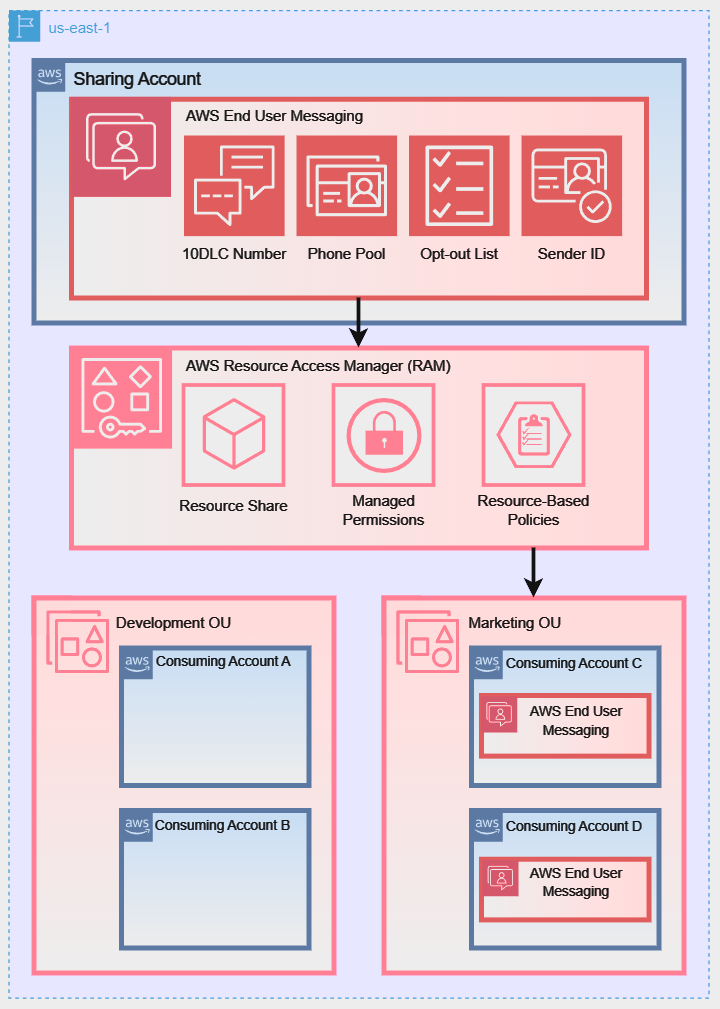
To better illustrate these sharing models, the following diagrams show how a Sharing Account can share its AWS End User Messaging resources using different strategies:
Diagram 1: Direct Account-to-Account Sharing:
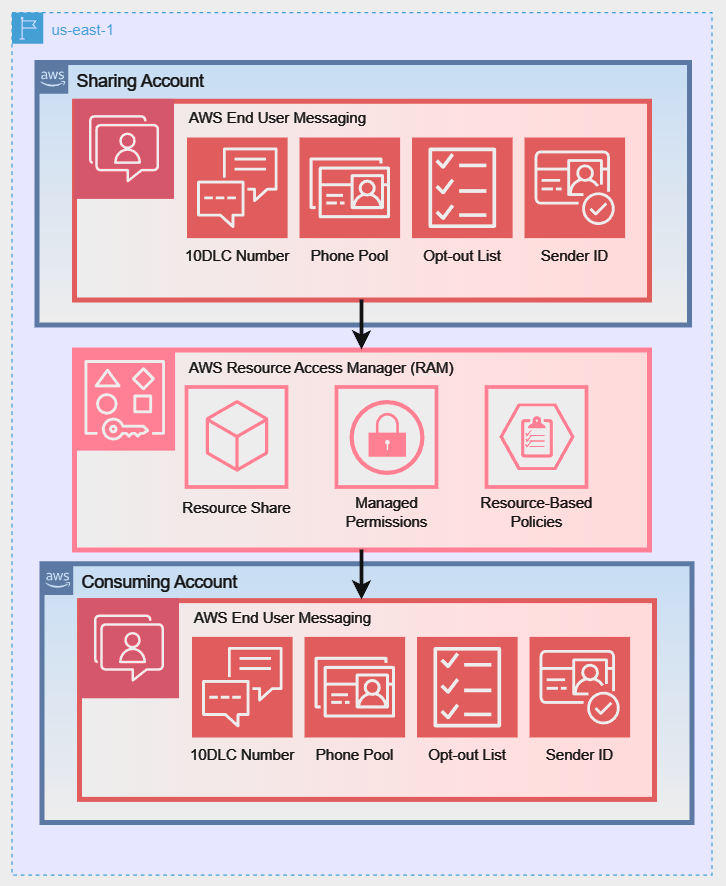
Diagram 2: Sharing with an Entire AWS Organization:
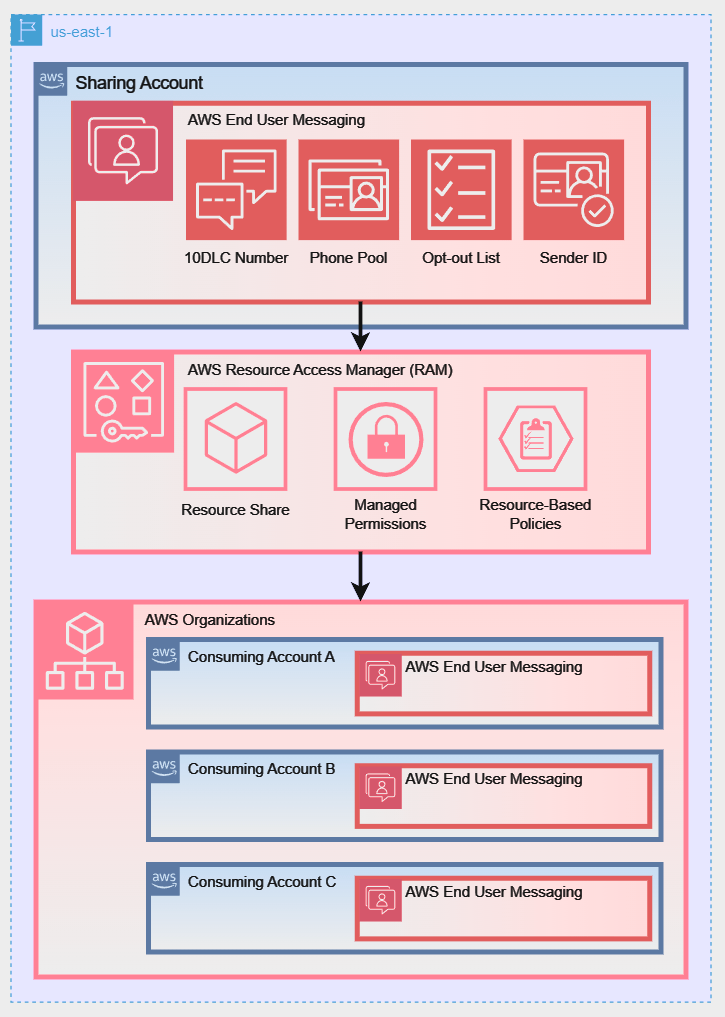
Diagram 3: Sharing with a Specific Organizational Unit (OU):
Prerequisites and Setup
For the following walkthrough, we will demonstrate how to configure the setup for Diagram 1: Direct Account-to-Account Sharing. However, the steps for managing and using the resource share are similar for all three scenarios. Before you begin, ensure your environment is set up correctly.
Note for AWS Organizations Users: When your account is managed by AWS Organizations, you can take advantage of that to share resources more easily. With or without Organizations, a user can share with individual accounts. However, if your account is in an organization, then you can share with individual accounts, or with all accounts in the organization or in an OU without having to enumerate each account.
If you plan to share resources using AWS Organizations (as shown in Diagram 2 or Diagram 3), you must complete the following prerequisite steps from your organization’s management account before creating a resource share:
1. Enable all features in your organization:
aws organizations enable-all-features2. Enable resource sharing with AWS RAM: This creates the necessary service-linked role.
aws ram enable-sharing-with-aws-organization1. Required IAM Permissions
The IAM user or role performing these actions needs permissions for both AWS RAM and AWS End User Messaging. The following policy grants the necessary permissions to manage resource shares.
{
    "Version": "2012-10-17",
    "Statement": [
        {
            "Sid": "RAMResourceShareManagement",
            "Effect": "Allow",
            "Action": [
                "ram:UpdateResourceShare",
                "ram:DeleteResourceShare",
                "ram:AssociateResourceShare",
                "ram:DisassociateResourceShare"
            ],
            "Resource": "arn:aws:ram:*:*:resource-share/*"
        },
        {
            "Sid": "DiscoveryAndCreationPermissions",
            "Effect": "Allow",
            "Action": [
                "ram:CreateResourceShare",
                "ram:GetResourceShares",
                "ram:ListResources",
                "organizations:ListAccounts",
                "organizations:DescribeOrganization",
                "sms-voice:DescribePhoneNumbers",
                "sms-voice:DescribeSenderIds",
                "sms-voice:DescribeOptOutLists",
                "sms-voice:DescribePools"
            ],
            "Resource": "*"
        }
    ]
}
Note on Least Privilege: This policy follows the security best practice of granting least privilege. The first statement scopes modification permissions to only AWS RAM resource shares. The second statement grants permissions for discovery actions (like Describe* and List*) and the ram:CreateResourceShare action, which require "Resource": "*" as they do not operate on a specific, pre-existing resource.
2. Regionality Requirement
Important Reminder: resource sharing with AWS RAM is a regional feature. You can only share resources with accounts within the same AWS Region where those resources are located.
For example, a resource in us-east-1 can only be shared with other accounts in us-east-1, regardless of where those accounts operate other resources. Ensure that the resources you intend to share and the accounts that you anticipate sharing with are each considering the same Region for this process.
3. Production Mode Requirement
Before sharing resources via AWS RAM, both the sharing account and the consuming account must have their SMS sandbox status set to Production. This is a critical prerequisite that is easy to overlook, especially when setting up new consuming accounts.
While in the SMS sandbox, accounts can only send messages to verified destination phone numbers — which effectively renders shared resources unusable for real-world traffic in the consuming account, even if the resource share itself is configured correctly.
To check your account’s sandbox status:
- Open the AWS End User Messaging SMS console at https://console.aws.amazon.com/sms-voice/.
- In the navigation pane, choose Overview.
- Under Account info, check the Sandbox status field.
If either account shows Sandbox, you must request production access before proceeding. To request production access:
- In the Account info section, choose Request production access.
- Complete the required fields, including your use case description, expected monthly message volume, and the countries you intend to send to.
- Submit the request. Approval typically takes 1–2 business days.
Important: Both accounts must be in production mode. A common mistake is to have the sharing account (which owns the resources) in production, but forget to move the consuming account out of the sandbox. The resource share will appear healthy, but messages sent from the consuming account will fail or be restricted to verified numbers only.
Creating and Managing Resource Shares (Sharing Account Actions)
This section provides a step-by-step guide to sharing your resources using the AWS CLI. We will walk through creating a resource share, associating and disassociating resources, and checking the status of your shares.
Step 1: Create an Empty Resource Share
First, create the resource share. Think of this as an empty container. You will associate principals (the consuming accounts) and resources (the phone numbers, etc.) with this share.
In the command below, we will create a share named EUM-Shared-Resources for an external account.
# Create a resource share and grant default End User Messaging permissions # Replace 123456789012 with the consuming account's ID
aws ram create-resource-share \
    --name "EUM-Shared-Resources" \
    --principals "123456789012" \
    --permission-arns "arn:aws:ram::aws:permission/AWSRAMDefaultPermissionSmsVoice" \
    --allow-external-principals \
--region us-east-1--principals: Specify one or more AWS account IDs.--allow-external-principals: This flag is required when sharing with accounts that are not part of your AWS Organization.
Expected Response: A successful command returns a JSON object describing the new resource share. Note that allowExternalPrincipals is now true.
{
    "resourceShare": {
        "resourceShareArn": "arn:aws:ram:us-east-1:111122223333:resource-share/a1b2c3d4-5678-90ab-cdef-example11111",
        "name": "EUM-Shared-Resources",
        "owningAccountId": "111122223333",
        "allowExternalPrincipals": false,
        "status": "ACTIVE",
        "tags": [],
        "featureSet": "STANDARD"
    }
}
For the following sections and when specifying resource ARNs, ensure you’re using the correct format for AWS End User Messaging resources:
- Phone numbers:
arn:aws:sms-voice:region:account-id:phone-number/phonenumber-id - Sender IDs:
arn:aws:sms-voice:region:account-id:sender-id/senderid - Opt-out lists:
arn:aws:sms-voice:region:account-id:opt-out-list/optoutlist-id - Pools:
arn:aws:sms-voice:region:account-id:pool/pool-id
Replace ‘region‘, ‘account-id‘, and the specific resource IDs with your actual values.
Step 2: Associate Resources with the Share
Now that you have your “container,” you can add resources to it. The associate-resource-share command links one or more of your End User Messaging resources to the share you just created, making them available to the principals.
# Define the ARN of the resource share from the previous step
RESOURCE_SHARE_ARN="arn:aws:ram:us-east-1:111122223333:resource-share/a1b2c3d4-5678-90ab-cdef-111111111111"

# Associate a phone number and a pool with the share # Replace the resource-arns with your actual resource ARNs
aws ram associate-resource-share \
    --resource-share-arn "$RESOURCE_SHARE_ARN" \
    --resource-arns \
        "arn:aws:sms-voice:us-east-1:111122223333:phone-number/phonenumber-a1b2c3d4" \
        "arn:aws:sms-voice:us-east-1:111122223333:pool/pool-b2c3d4e5" \
    --region us-east-1
Expected Response: A successful association returns a JSON object confirming the association and showing its status. The status will initially be ASSOCIATING and will transition to ASSOCIATED once complete.
Note: The association process is asynchronous. We’ll show you how to verify the completion status in the next step using the get-resource-shares and list-resources commands. It’s important to confirm the status has changed to ASSOCIATED before attempting to use the shared resources.
Step 3: Verify the Status and contents of the Share
Before making changes, it’s good practice to verify what’s in the share. Use get-resource-shares to check the status and list-resources to see the contents. This process helps ensure that all intended resources are properly associated and accessible to the principals you’ve designated.
# Verify the association status is ASSOCIATED
aws ram get-resource-shares \
    --resource-owner SELF \
    --name "EUM-Shared-Resources" \
    --association-status ASSOCIATED \
    --region us-east-1
Expected Response: If the command returns no results, wait a few moments and try again. The association process is typically quick but can sometimes take up to a few minutes.
{
    "resourceShares": [
        {
            "resourceShareArn": "arn:aws:ram:us-east-1:111122223333:resource-share/12345678-abcd-1234-efgh-111122223333",
            "name": "EUM-Shared-Resources",
            "owningAccountId": "111122223333",
            "allowExternalPrincipals": true,
            "status": "ACTIVE",
            "creationTime": "2023-07-01T12:00:00.000Z",
            "lastUpdatedTime": "2023-07-01T12:00:00.000Z",
            "featureSet": "STANDARD"
        }
    ]
}
Review the output carefully to ensure all intended resources are listed. If any resources are missing, you may need to reassociate them using the associate-resource-share command.
Expected Response (list-resources): This command will return a list of JSON objects, each representing a resource in the share.
# List the ARNs of all resources currently in the share
aws ram list-resources \
    --resource-owner SELF \
    --resource-share-arns "$RESOURCE_SHARE_ARN" \
    --region us-east-1
Review the output carefully to ensure all intended resources are listed. If any resources are missing, you may need to reassociate them using the associate-resource-share command.
# List the ARNs of all resources currently in the share
aws ram list-resources \
    --resource-owner SELF \
    --resource-share-arns "$RESOURCE_SHARE_ARN" \
    --region us-east-1
Expected Response (list-resources): This command will return a list of JSON objects, each representing a resource in the share.
{
    "resources": [
        {
            "arn": "arn:aws:sms-voice:us-east-1:111122223333:phone-number/phonenumber-a1b2c3d4",
            "type": "sms-voice:PhoneNumber",
            "resourceShareArn": "arn:aws:ram:us-east-1:111122223333:resource-share/a1b2c3d4-5678-90ab-cdef-example11111",
            "status": "AVAILABLE"
        },
        {
            "arn": "arn:aws:sms-voice:us-east-1:111122223333:pool/pool-b2c3d4e5",
            "type": "sms-voice:Pool",
            "resourceShareArn": "arn:aws:ram:us-east-1:111122223333:resource-share/a1b2c3d4-5678-90ab-cdef-example11111",
            "status": "AVAILABLE"
        }
    ]
}
Step 4: Disassociate Specific Resources from the Share
To stop sharing a specific resource, you use the disassociate-resource-share command. You must provide the ARN of the resource you wish to remove. This gives you granular control, allowing you to remove one resource while continuing to share others.
# Disassociate only the phone number from the share
aws ram disassociate-resource-share \
    --resource-share-arn "$RESOURCE_SHARE_ARN" \
    --resource-arns "arn:aws:sms-voice:us-east-1:111122223333:phone-number/phonenumber-a1b2c3d4" \
    --region us-east-1
Expected Response: The response will be nearly identical to the associate response, confirming the disassociation request. The status will be DISASSOCIATING.
{
    "resourceShareAssociations": [
        {
            "resourceShareArn": "arn:aws:ram:us-east-1:111122223333:resource-share/a1b2c3d4-5678-90ab-cdef-example11111",
            "associatedEntity": "arn:aws:sms-voice:us-east-1:111122223333:phone-number/phonenumber-a1b2c3d4",
            "associationType": "RESOURCE",
            "status": "DISASSOCIATING",
            "external": false
        }
    ]
}
How to Use Shared Resources
Once resources are shared, users in the consuming accounts can discover and use them for sending messages.
Step 1: Discovering Shared Resources
From a consuming account, you can list resources that have been shared with you by using the --owner SHARED parameter in the describe-* commands.
Note: Shared resources are discoverable via the AWS CLI and SDKs but will not appear in the AWS Management Console of the consuming account. This is expected behavior, as the resources are owned by the sharing account.
# List phone numbers shared with your account
aws pinpoint-sms-voice-v2 describe-phone-numbers \
    --owner SHARED \
    --region us-east-1
 # List sender IDs shared with your account
aws pinpoint-sms-voice-v2 describe-sender-ids \
    --owner SHARED \
    --region us-east-1

# List pools shared with your account
aws pinpoint-sms-voice-v2 describe-pools \
    --owner SHARED\
    --region us-east-1

# List shared opt-out lists with region specification
aws pinpoint-sms-voice-v2 describe-opt-out-lists \
    --owner SHARED \
    --region us-east-1
Expected Response: The command returns a JSON object listing the shared resources, including their ARNs, which you will need for sending messages.
{
    "PhoneNumbers": [
        {
            "PhoneNumberArn": "arn:aws:sms-voice:us-east-1:111122223333:phone-number/phonenumber-a1b2c3d4",
            "PhoneNumberId": "phonenumber-a1b2c3d4",
            "PhoneNumber": "+12065550100",
            "Status": "ACTIVE",
            "MessageType": "TRANSACTIONAL",
            "TwoWayEnabled": true,
            "CreatedTimestamp": "2023-10-26T14:34:56.123Z"
        }
    ]
}
Note: The commands provided in this guide are compatible with the latest versions of the AWS CLI. If you’re using an older version, you may need to use --filters Name=shared-with-me,Values=true instead of --owner SHARED. We recommend updating to the latest version of the AWS CLI for the most up-to-date functionality.
Step 2: Sending Messages with Shared Resources
Important: When using shared resources, consuming accounts must specify the full ARN of the shared resource in API calls. This differs from resource owners, who can use either the resource ID, ARN, or the number directly. You can specify the ARN of an individual phone number or a pool as the origination-identity.
# Send an SMS using a shared Phone Number ARN (consuming account MUST use ARN)
aws pinpoint-sms-voice-v2 send-text-message \
    --destination-phone-number "+12065550199" \
    --origination-identity "arn:aws:sms-voice:us-east-1:111122223333:phone-number/phonenumber-a1b2c3d4" \
    --message-body "Hello from a shared number!" \
    --region us-east-1

# Send an SMS using a shared Pool ARN (consuming account MUST use ARN)
aws pinpoint-sms-voice-v2 send-text-message \
    --destination-phone-number "+12065550199" \
    --origination-identity "arn:aws:sms-voice:us-east-1:111122223333:pool/pool-b2c3d4e5" \
    --message-body "Hello from a shared pool!" \
    --region us-east-1
Expected Response: A successful send-text-message call will return a MessageId, which confirms that the service has accepted the message for delivery.
{
    "MessageId": "a1b2c3d4-5678-90ab-cdef-example22222"
}
Message Delivery Reporting:
Once a message is sent, understanding its delivery status is crucial for ensuring your communications are effective. AWS End User Messaging provides several mechanisms for tracking message delivery, giving you a multi-layered approach to reporting.
Delivery Receipts (DLRs):
For traditional, carrier-provided Delivery Receipts (DLRs), which can sometimes take up to 72 hours to be returned, you must configure an event destination. This is the most common method for confirming that a message has reached the recipient’s handset, and is achieved through a Configuration Set.
Important Note About Configuration Sets:
Configuration sets cannot be shared via AWS RAM. When using shared resources from another account, you must:
- Create and manage configuration sets in the consuming account
- Use your own account‘s configuration sets when sending messages with shared resources
- Set up event destinations in the consuming account for tracking delivery status
Example for consuming account:
First, create a configuration set in your account:
aws pinpoint-sms-voice-v2 create-configuration-set \
    --configuration-set-name "MyConfigSet"
Then, use your locally created configuration set when sending messages with shared resources:
aws pinpoint-sms-voice-v2 send-text-message \
    --destination-phone-number "+12065550199" \
    --origination-identity "arn:aws:sms-voice:us-east-1:111122223333:phone-number/phonenumber-a1b2c3d4" \
    --message-body "Hello from a shared number!" \
    --configuration-set-name "MyConfigSet" \
    --region us-east-1
Note: Each account using shared resources needs to manage its own configuration sets and event destinations for tracking message delivery status.
For a detailed walkthrough, see our companion blog post, How to Send SMS Using Configuration Sets with AWS End User Messaging.
Message Feedback:
For more immediate, application-driven insights, you can use the Message Feedback feature. This allows you to programmatically mark messages as “delivered” based on a user’s action, such as using a one-time password (OTP) or clicking a link in the message. This provides a real-time confirmation loop that is independent of carrier DLRs.
Amazon CloudWatch:
To monitor these events at scale, you can stream them to Amazon CloudWatch Logs to track key performance indicators like the number of messages sent and delivered, and to set up alerts based on your specific business needs.
To set up comprehensive reporting:
- Configure an event destination for DLRs and detailed status events.
- Set up CloudWatch dashboards and alerts for ongoing monitoring.
This multi-layered approach provides both immediate feedback and long-term delivery insights, allowing you to optimize your messaging strategy and quickly identify potential delivery issues.
Troubleshooting Common Issues
Permission Denied Errors:
If a consuming account cannot access a shared resource, verify that the consuming account’s IAM policies include the necessary permissions. Here’s an example policy:
{
    "Version": "2012-10-17",
    "Statement": [
        {
            "Effect": "Allow",
            "Action": [
                "sms-voice:SendTextMessage",
                "sms-voice:SendVoiceMessage",
                "sms-voice:DescribePhoneNumbers,"
                "sms-voice:DescribeSenderIds",
                "sms-voice:DescribeOptOutLists",
                "sms-voice:DescribePools"
            ],
            "Resource": "*"
        }
    ]
}
Resource Not Visible:
Remember that shared resources do not appear in the consuming account’s AWS Management Console. If the describe-* commands with the shared-with-me filter return no results, ensure the resource share status is ACTIVE in the sharing account.
- Use the AWS CLI with the correct syntax:
aws pinpoint-sms-voice-v2 describe-phone-numbers --owner SHARED --region <your-region>- Note: Replace
<your-region>with the appropriate AWS region.
- Note: Replace
- If no results are returned, verify in the sharing account that:
- The resource share status is ACTIVE
- The resource is still associated with the resource share
- The consuming account is still a valid principal for the share
- If sharing via AWS Organizations, confirm the consuming account is correctly placed in the specified OU.
CLI Command Fails:
Resource not founderror:- Verify that you’re using the correct and full ARN of the shared resource
- Ensure you’re operating in the same AWS region as the shared resource
- Check that the resource is still shared and accessible
Invalid parametererror:- Double-check the syntax of your AWS CLI command
- Ensure you’re using the latest version of the AWS CLI
- Verify all parameter names and values are correct
Permission deniederror:- Review the IAM policies in the consuming account
- Ensure the IAM user or role you’re using has the necessary permissions
Configuration Set Issues:
Remember that configuration sets cannot be shared via AWS RAM. When using shared resources:
- Create and manage configuration sets in the consuming account
- Use the consuming account’s configuration sets when sending messages with shared resources
- Set up event destinations in the consuming account for tracking delivery status
Destination Country Blocked:
If you receive a DESTINATION_COUNTRY_BLOCKED error when sending from a consuming account using shared resources, check the following:
- Protect Configuration (all three levels): AWS End User Messaging applies Protect configurations at three levels: account default, configuration set, and per-message. All three levels must allow the destination country. A common mistake is to check only the account default and miss a restriction at the configuration set or per-message level.
To check your Protect configuration:
- Open the AWS End User Messaging SMS console.
- Navigate to Protect configurations in the navigation pane.
- Review the Country rules at each level to ensure the destination country is not blocked.
Sharing Status:
To check the status of your resource shares:
aws ram get-resource-shares
    --resource-owner SELF
    --region <your-region>
Best Practices and Considerations
- Security: Always follow the principle of least privilege. Use AWS managed permissions like
AWSRAMDefaultPermissionSmsVoicewhere possible and create customer-managed permissions only for specific, granular requirements. - Cost: The sharing account is billed for provisioning the resources (e.g., the monthly cost of a phone number). Consuming accounts are billed for their usage of those shared resources (e.g., the cost per message sent). There are no additional costs for using AWS RAM.
- Throughput and Quotas: Resource throughput quotas (e.g., messages per second) are shared along with the resource. High volume sending from multiple consuming accounts using the same shared number or pool, could collectively hit the service quota, which may result in throttling. Plan your usage accordingly or request quota increases if necessary.
- Sharing at Scale: When sharing a large number of origination identities (50 or more), be aware of AWS RAM API rate limits that can affect the resource policy creation process. RAM works by creating resource-based policies on each shared resource, and associating many resources simultaneously can trigger throttling. To avoid issues:
- Add principals (accounts) to the resource share first, then add resources incrementally. If you create a resource share containing hundreds of resources and then add a consuming account, RAM will attempt to set resource-based policies on all resources simultaneously. This is the most common trigger for throttling at scale.
- Batch resource associations in groups of 10 or fewer. After each batch, verify that all resources in the batch have reached
ASSOCIATEDstatus before adding the next batch: -
# Verify association status after each batch aws ram list-resources \ --resource-owner SELF \ --resource-share-arms "$RESOURCE_SHARE_ARN" \ --region us-east-1 - Verify resource policies after each batch. Use the
describe-*commands from the consuming account to confirm that shared resources are accessible: -
# From the consuming account — verify shared resources are visible aws pinpoint-sms-voice-v2 describe-sender-ids \ --owner SHARED \ --region us-east-1 - Consider the
PutResourcePolicyAPI as an alternative. For advanced use cases or when RAM’s rate limits become a constraint, you can set resource-based policies directly within AWS End User Messaging using thePutResourcePolicyAPI. This bypasses RAM’s association mechanism entirely and gives you direct control over the policy on each resource.
- Phone Pool Resource Limits: The default Phone Pool quota is 100 resources per pool. For customers operating across many countries — where each country may require its own dedicated origination identity (Sender ID, short code, or long code) — this limit can be reached quickly. You can request a quota increase through Service Quotas in the AWS Management Console. Self-service increases up to 200 are available without contacting AWS Support. For limits above 200, open a support case. When planning your pool architecture, consider whether a single global pool or multiple region-segmented pools best fits your use case and volume requirements.
Caution: If RAM API throttling occurs during a large-scale resource association, the service may fail to apply the new resource-based policy to some resources — and in some cases, may remove the previously existing policy without successfully writing the new one. This can result in resources with empty or corrupted resource policies, effectively making them inaccessible to the consuming account. If you suspect this has occurred, verify the resource policies on affected resources and re-associate them individually. Always verify policy integrity after large batch operations, and retain AWS CloudTrail logs for troubleshooting.
Conclusion
This guide has equipped you to centralize your AWS End User Messaging resources using AWS Resource Access Manager. By implementing this strategy, you can directly address the common challenges of a multi-account environment: maintaining consistent branding with shared Sender IDs, ensuring comprehensive compliance with centralized opt-out lists, and reducing operational overhead by managing resources in one place.
We have walked through the entire lifecycle, from the initial prerequisites in AWS Organizations and IAM, to the step-by-step CLI commands for creating shares, associating resources, and enabling consuming accounts to use them. By applying these techniques and keeping the best practices for security and throughput in mind, you are now able to build a more efficient, secure, and scalable communication platform across your entire AWS ecosystem.