AWS Messaging Blog
Adding a voice layer to WhatsApp conversations with AWS End User Messaging
Businesses around the world use WhatsApp as a primary channel to connect with customers. It’s familiar, trusted, and effective for everything from booking confirmations to customer support. But most of these conversations are still text-only. For many customers, text is fast and efficient. Yet there are times when typing is inconvenient, slow, or less effective at conveying nuance. In those moments, voice messages can transform the interaction — making it faster, more inclusive, and more human.
With AWS End User Messaging, businesses can now enable both voice note input and voice note responses on WhatsApp. Customers send a voice note, and a bot can respond with a natural-sounding voice note reply. Note: This solution processes asynchronous voice notes (recorded audio messages), not real-time voice calls. In this blog post, we explore why voice notes matter, where they make a difference, and how AWS helps you enable them through a sample voice note messaging solution.
Watch an end to end demo here.
Why voice notes matter in customer messaging
Text remains essential, but research shows that voice notes adds unique advantages:
- Richer communication: Voice carries tone, urgency, and emotion — reducing misunderstandings and helping businesses respond more appropriately (Preply survey).
- Natural and fast: Speaking is up to three times faster than typing on mobile devices, especially when users are on the go (Sherry Ruan, Jacob O. Wobbrock, Kenny Liou, Andrew Ng, and James A. Landay. 2018. Comparing Speech and Keyboard Text Entry for Short Messages in Two Languages on Touchscreen Phones. Proc. ACM Interact. Mob. Wearable Ubiquitous Technol. 1, 4, Article 159 (December 2017), 23 pages. https://doi.org/10.1145/3161187).
- Accessibility and inclusivity: Voice lowers barriers for people with limited literacy or visual impairments. Elderly customers or those with difficulty reading long text messages benefit significantly.
- Context-driven preference: A YouGov study across 17 markets found that while text is still preferred overall, a notable share of users choose both text and audio depending on situation (YouGov survey).
Where voice notes make a difference
Voice messaging is especially useful when speaking feels more natural than typing—helping customers communicate in ways that fit their situation and needs.
- Elderly customers – easier to listen than to read.
- Field workers or drivers – easier to speak than to type while working.
- Healthcare – patients can describe symptoms naturally by voice.
- Hospitality and reservations – “Book a table for 7 pm” is faster to say than to navigate online calendar.
- Customer support escalation – complex issues are often resolved more quickly with a voice exchange.
Voice notes don’t replace text. It complements it — giving customers the flexibility to communicate in the way that best suits their context.
AWS End User Messaging and WhatsApp
AWS End User Messaging is a managed AWS service that enables businesses to send and receive messages across multiple channels, including WhatsApp, SMS, MMS (US only), outbound voice, and push notifications.
When you use AWS End User Messaging for WhatsApp, you benefit from AWS’s global scale, resilience, and security. Inbound WhatsApp messages are automatically published to an Amazon SNS topic, enabling the integration with other AWS services such as Amazon SQS queues, AWS Lambda functions or Amazon Bedrock for downstream processing.
This flexibility is also what makes voice-to-voice messaging possible. Businesses can process inbound voice messages with Lambda, apply speech-to-text and text-to-speech services like Amazon Transcribe and Amazon Polly, or integrate third-party models such as Whisper through the AWS Marketplace for Amazon Bedrock.
Voice notes messaging solution
To demonstrate how voice can be enabled on WhatsApp, check out the AWS CDK sample project: GitHub – WhatsApp Voice Notes Messaging
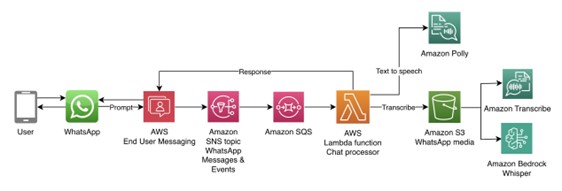
The solution shows how to:
- Receive a WhatsApp voice note through AWS End User Messaging.
- Transcribe the voice input to text.
- Process it with conversational bot logic.
- Convert the response back into a natural-sounding voice note.
- Send the reply to the user on WhatsApp.
You can enable inbound only, outbound only, or a full voice-to-voice notes loop depending on your requirements.
Getting started
The complete solution is available as an open-source AWS CDK project. To get started, you’ll need:
- An AWS account with appropriate permissions
- js 18.x or later installed
- AWS CDK CLI installed (
npm install -g aws-cdk) - A registered WhatsApp Business Account with AWS End User Messaging
Implementation
Clone the repository and deploy the solution:
Before deploying, you’ll need to configure your WhatsApp phone number ID in the CDK context or parameters. The deployment will prompt you for this configuration, or you can set it in the cdk.json file. Once configured, deploy with:
The CDK stack automatically provisions all required AWS resources including Lambda functions, SNS topics, S3 buckets, and IAM roles.
Clean up
To remove all resources and avoid ongoing charges:
For detailed architecture diagrams, configuration options, and step-by-step setup instructions, visit the GitHub repository.
Conclusion
Customers are already using voice notes in their personal WhatsApp conversations. Bringing that same option into business communication makes customer interactions more natural, inclusive, and efficient.
With AWS End User Messaging and its WhatsApp channel, you can add voice alongside text without changing how customers connect to you. And with the sample CDK project, you can try it out today, experiment, and extend it for your own business needs.
Explore the project here: AWS Sample – WhatsApp Voice Notes Messaging