AWS Messaging Blog
Navigating messaging requirements in betting and gaming technology applications (Part 2: Executing the registration and maintaining compliance)
This is Part 2 of a two-part series for developers and technical teams at betting and gaming operators registering SMS messaging for multi-factor authentication (MFA) and account verification through AWS End User Messaging. Part 1 covered why betting and gaming operators face heightened carrier scrutiny, how the AWS and carrier registration roles work, and how to prepare before you apply.
Here in Part 2, we move from preparation to execution: what to include in your application to maximize approval odds, how to maintain compliance and deliverability after approval, and what to do if your registration is denied.
Prerequisites: This guidance applies exclusively to transactional and MFA messaging (for example, one-time passcodes, account verification, and security alerts). AWS End User Messaging does not support marketing or promotional messages for the betting and gaming industry. If you have not read Part 1, we recommend starting there.
The registration process: Best practices for approval
The following sections cover what to include in your application to maximize your chances of registration approval.
Provide detailed use cases
Don’t submit vague use-case descriptions. “We send notifications to users” is not sufficient. For each message type, explain:
- The specific trigger (for example, “sent when a user logs in from an unrecognized device”).
- The audience (for example, “verified players who have completed account registration and opted in to MFA”).
- The content, including your actual one-time password (OTP) template.
- The basis (for example, “account security notification, MFA only, not promotional”).
- The expected volume (for example, “approximately 5,000 to 15,000 messages monthly based on current active user count”).
Document your opt-in workflow
Opt-in documentation is one of the most scrutinized components of a betting and gaming technology company’s registration. Include the following:
Implement double opt-in – A double opt-in process (where a user provides their number, receives a confirmation message, and replies to confirm) creates a clear consent record and reduces complaint rates.
Make opt-out instructions explicit in every message – Every message you send should include clear opt-out instructions (for example, “Reply STOP to unsubscribe”).
Document the consent flow with screenshots or flow diagrams – Show exactly where and how users provide consent on your application. Include the exact language of your consent disclosure.
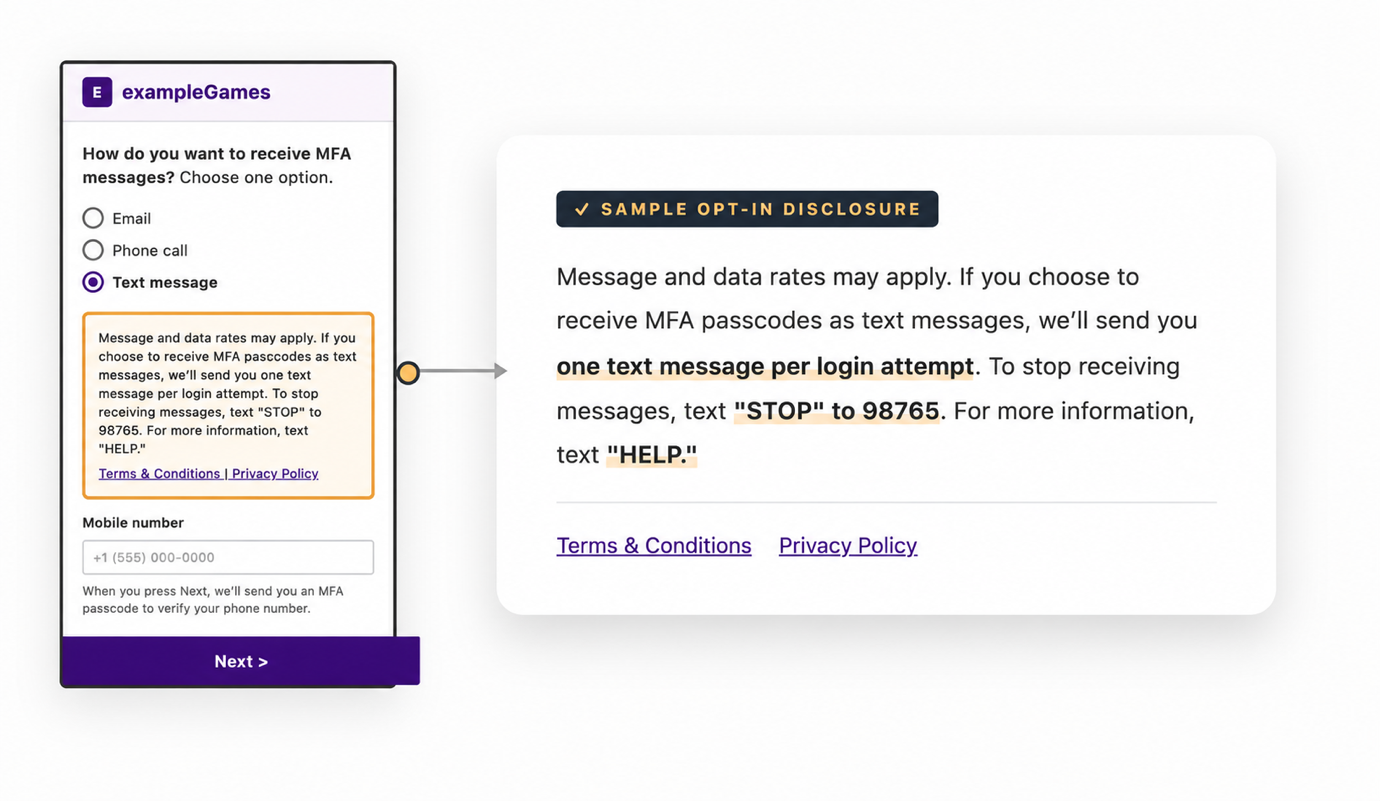
Figure 1: A sample double opt-in consent flow showing the SMS consent disclosure, STOP and HELP instructions, and links to terms and conditions and the privacy policy
Include relevant operating documentation
Don’t wait to be asked. Include your betting and gaming technology licenses, regulatory approvals, and messaging compliance documentation with your initial application. Providing this detail helps reduce back-and-forth with reviewers and increases your chances of approval.
Post-registration: Maintaining compliance and deliverability
Approval by the carrier is the beginning, not the end. Betting and gaming technology operators that treat registration as a one-time hurdle often find their messaging programs throttled or suspended months later. Long-term deliverability requires ongoing discipline, including the following best practices:
Manage message volume carefully
Declare your expected message volume during registration. Expressly state how many messages you plan to send monthly in the registration.
Maintain consistent sending patterns. Irregular volume (quiet for weeks, then a massive burst) looks like spam or suspicious activity to carriers, aggregators, and AWS monitoring systems. Sudden spikes can result in throttling or suspension, even if the traffic is legitimate. If you expect a temporary increase (major sporting events or new market launches, for example), open an AWS Support case in advance so the team can note the expected volume change and help prevent automated throttling during the spike.
Monitor and optimize your content
Regularly review message content. Regulations change, carrier policies evolve, and language that was acceptable last year might be filtered today.
Avoid language that could trigger gambling-related filters. Work with AWS Support to understand which terms are most likely to cause issues in your specific use cases.
Focus on account security messaging only. Keeping your active message templates strictly within that scope is both a compliance requirement and an effective way to maintain deliverability.
Manage feedback proactively
Set up alerts for spam complaint spikes. Investigate immediately. Carriers, aggregators, and AWS can suspend your messaging if complaint rates stay elevated.
Track delivery rates by template. If your password reset messages drop while OTP delivery stays stable, that’s a signal worth investigating. It is a sign of content-based carrier filtering, origination identity blocking, or malicious account takeover attempts targeting your application.
Maintain open communication with AWS Support. Do not hesitate to reach out to AWS Support if you have any questions.
If your registration is denied
Denial is a common outcome for gaming and betting registrations. If your application is rejected, here is how to move forward.
Understand the rejection
Review the rejection reason against official documentation. AWS publishes the full list of rejection reasons with remediation steps at Understanding rejection reasons. When your registration is rejected, the console displays a specific reason. Match it to the documentation to understand exactly what needs to be changed.
Rejection reasons most relevant to gaming registrations:
| Category | Rejection Reason (exact text) | What It Means | Action |
| Brand | Brand associated with or website references gambling which is prohibited by mobile operators | The carrier flagged your brand based on your website content or industry classification, regardless of your messaging use case. | Make sure your website clearly separates gaming operations from your MFA/security messaging program. Consider whether a dedicated subdomain for account security communications would reduce this signal. |
| Campaign | Use case is considered restricted or disallowed by mobile operators: Gambling | Your campaign use case was categorized as gambling-related by the carrier, even if scoped to MFA. | Rewrite your use case description to emphasize transactional/security messaging exclusively. Remove any language that references gaming operations beyond identifying your industry. |
| Campaign | Campaign description does not match sample messages or use case | The reviewer found a mismatch between your stated use case and the sample messages you provided. | Align your campaign description, use case selection, and sample messages, so they all describe the same MFA-only program consistently. |
| Opt-in workflow | Opt-in workflow indicates that use case is considered restricted or disallowed by mobile operators: Gambling | Your opt-in screenshots or workflow revealed gambling-related content, causing the reviewer to flag it as a restricted use case. | Remove gambling-related branding, imagery, or language from the screens shown in your opt-in flow. The opt-in should present a clean, security-focused experience. |
| Opt-in workflow | Opt-in workflow does not obtain sufficient consent | Your opt-in screenshots did not demonstrate explicit, affirmative user consent for SMS messaging (express written consent is required). | Update your opt-in flow to show a clear, unchecked checkbox or button that the user must actively select. Provide new screenshots showing the revised flow. |
| Opt-in workflow | Opt-in workflow URL or image is missing or inaccessible and could not be verified | No opt-in workflow screenshot or URL was provided, or the URL you submitted was inaccessible to the reviewer. | Provide a working URL to your live opt-in page or upload a screenshot/mockup showing your complete opt-in flow. Verify that the URL is publicly accessible before resubmitting. |
| Opt-in workflow | Opt-in workflow not compliant or is missing required terms and conditions language | Your opt-in page does not include complete terms and conditions language or a link to your full T&C. | Add a visible link to your complete messaging terms and conditions at the point of consent or include the full T&C language inline. Resubmit with updated screenshots. |
| Opt-in workflow | Opt-in workflow not compliant or is missing statement that data will not be shared with third parties or link to privacy policy disclosure | Your opt-in page does not include a privacy policy link or a statement that mobile opt-in data will not be shared with third parties. | Add a visible link to your privacy policy and a statement that phone numbers/opt-in data will not be shared with third parties at the point of consent. |
| Sample messages | Sample message(s) indicates that message content is related to gambling and is not permitted by US carriers | Your message templates contain language or keywords that trigger gambling content filters. | Revise message templates to remove any gambling-related terms (brand names containing “bet” or “casino,” for example). Use neutral phrasing for OTP delivery (for example, “Your verification code is 123456”). |
Revise and resubmit
If the rejection includes actionable feedback:
- Address every point raised in the denial specifically.
- Strengthen areas the reviewer questioned (additional documentation, revised message samples, clearer use case scoping).
- Consider narrowing your initial scope further (for example, registering for a single message type such as login OTP before expanding).
- Resubmit with a cover note explaining what you changed and why.
If the rejection is generic or provides no actionable detail, a resubmission with the same information is unlikely to produce a different result.
Conclusion
Messaging registration for betting and gaming technology operators is complex, and approval is never guaranteed. Carrier and registry decisions are ultimately outside an applicant’s control. However, companies that position themselves well approach registration as a thoughtful compliance exercise, not a technical checkbox. They invest time in documentation before they apply, lead with their MFA use cases, and treat post-approval compliance as an ongoing operational responsibility. Even when initial applications are denied, a well-prepared submission strengthens the foundation for appeals and future attempts.
Betting and gaming technology operators that follow this approach (thorough pre-registration documentation, a clearly scoped MFA-only program, and consistent post-approval hygiene) are better positioned for carrier approval and sustained message deliverability. That translates directly to fewer failed logins, lower account lockout rates, and a smoother onboarding experience for new players.
With AWS End User Messaging, you have the infrastructure to help you deliver MFA more reliably at scale. The suggested best practices described in this post give you the framework to support carrier approval and keep your messaging program running reliably.
Missed Part 1?
If you have not yet read Part 1, start there for the landscape and preparation steps. Together, the two parts give you an end-to-end playbook for getting your MFA messaging approved and keeping it deliverable.