Migration & Modernization
Accelerate large-scale server migrations with AI-driven orchestration
Introduction
Consider a team with over 400 servers to migrate, dozens of applications with varying dependencies, and multiple teams waiting on cutover windows. Every migration is unique, yet the challenges remain consistent. Teams struggle with manual tracking through spreadsheets, human errors in repetitive tasks like agent installation and DNS updates, decentralized orchestration across disconnected consoles, and communication gaps between stakeholders. These friction points compound at scale and contribute to slow migration cycles. AI-driven orchestration eliminates this overhead. By automating inventory tracking, cross tool coordination, and repetitive server level tasks, teams can scale migration velocity with wave size rather than headcount. This blog post provides the blueprint to accelerate these migrations by combining AWS services into an automated, AI-driven pipeline.
You will learn how AWS Cloud Migration Factory (CMF) orchestrates multi-wave pipeline execution while AWS Application Migration Service (AWS MGN) replicates servers in parallel without downtime. Amazon Bedrock AgentCore powers AI agents that investigate failures and notify stakeholders through Model Context Protocol (MCP). Kiro CLI agent ties it together with a natural language interface as a migration agent that drives orchestration and maintains security boundaries across services.
We will show service integration through simulation rather than providing actual code or deployment steps. The content progresses through three layers: Introduction and Prerequisites introduce the services, Solution Overview explains how they work together, and the Walkthrough demonstrates them in action.
Prerequisites
This blog post assumes familiarity with AWS core services, AWS AI services like Amazon Bedrock, Kiro, and data center migration practices. Readers also need an understanding of IAM roles, security boundaries, and identity protocols such as OAuth/OIDC, JWT, and AWS SigV4 signing used in MCP authentication workflows.
This walkthrough also assumes you have a data center server inventory export available. If not, see the Discovery and inventory section for guidance on generating one using AWS Transform.
For Discovery and inventory
Use the AWS Transform discovery tool as a self-contained appliance deployed in your on-premises environment (VMware, Hyper-V, or Linux). It maps server inventory, performance data, application groupings, and network dependencies. Export the inventory and use AWS Transform for VMware service to create wave plans. Export the wave plan as CSV for Step 3, where Kiro CLI loads it into CMF using an MCP.
Solution overview
This solution integrates AWS services where each handles a distinct migration phase. The solution combines six components: AWS Transform for discovery and wave planning, Cloud Migration Factory (CMF) for pipeline orchestration, and AWS Application Migration Service (AWS MGN) for server replication. Amazon Bedrock AgentCore provisions AI agents for migration tasks, while Kiro CLI acts as the conversational interface communicating with CMF through Model Context Protocol (MCP). These components coordinate through APIs and share metadata as illustrated in Figures 1 and 2.
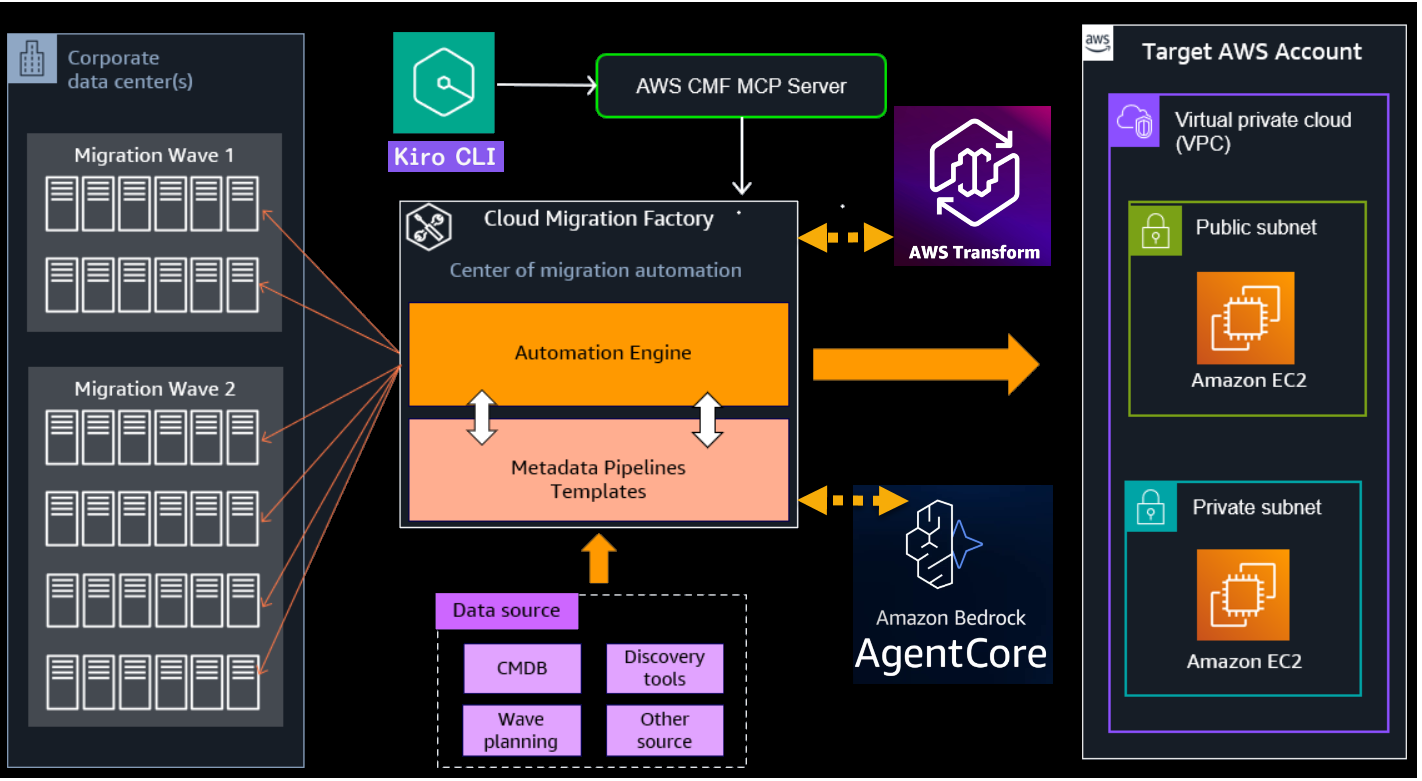
Figure 1 – Migration solution architecture showing AWS Transform, CMF, AWS MGN, and Amazon Bedrock AgentCore integration
AWS Transform for Assessment and VMware
AWS Transform for Assessment serves as the starting point of the migration journey. It generates a business case with cost estimates and projected savings for moving workloads to AWS.
The server discovery data feeds into the AWS Transform for VMware engine. It produces a server inventory with detailed VM metadata, including compute, storage, and network configurations. AWS Transform then organizes workloads into migration waves based on application dependencies and complexity, producing a wave plan that Kiro CLI and Cloud Migration Factory consume to orchestrate the migration.
Kiro CLI
Kiro CLI is your conversational interface. Instead of switching between the AWS MGN console, CMF dashboard, and ticketing system, you type natural language commands. Kiro CLI communicates with the CMF Model Context Protocol (MCP) Server, which translates your intent into actions within CMF. You ask, “What is the status of Wave 7?” and receive replication progress, test results, and open issues in one response. You photograph a whiteboard runbook, and the agent builds the pipeline template through the MCP server. When a manual step is pending, Kiro CLI pauses and asks for input before proceeding. You define the migration strategy. The agent implements it.
AWS Cloud Migration Factory (CMF)
CMF is an open-source solution that migrates thousands of servers at scale using customizable runbooks through its automation engine, pipelines, and metadata store. You build a pipeline template once and apply it to hundreds of servers. Routine tasks run without human intervention. High risk tasks require your approval. The Automation Server orchestrates replication, testing, validation, and cutover. The metadata store maintains the current context from your CMDB and wave planning data.
Amazon Bedrock and Amazon Bedrock AgentCore
Amazon Bedrock AgentCore lets you build purpose built migration AI agents scoped to specific tasks. Examples include creating change requests, updating Route 53 DNS records, sending stakeholder notifications, and investigating failures. When a cutover fails validation, you ask “Why did this fail?” The agent reads logs, identifies the root cause, and provides a remediation path.
AWS MGN
AWS MGN replicates source servers to AWS staging areas while production runs. You can migrate without scheduling maintenance windows. The workflow replicates continuously, launches test instances, validates, then cuts over via AWS CMF.
Model Context Protocol (MCP)
CMF provides the orchestration engine and metadata store but does not ship with an MCP server. You build one by using Kiro to extend your CMF deployment with an MCP layer that exposes its APIs as tools, then update your deployment with the MCP server in your AWS account. After the MCP deployment, configure Kiro CLI agent with the MCP endpoint URL and the CMF service account credentials to support natural language interaction. You describe what you want in natural language, and the MCP server handles pipeline creation, server assignments, wave configuration, and status queries on your behalf. The CMF MCP Server also returns structured responses back to Kiro CLI, giving you real-time feedback on task progress, validation results, and pipeline state without switching consoles. Migration workflow walkthrough AWS Transform for VMware ingests discovery data (RVTools, MPA, CMDB, or its own tool) to produce a business case, inventory, and wave plan. Kiro CLI then orchestrates the migration through CMF using MCP. It drives the execution where AgentCore handles pre/post tasks, CMF automates MGN operations, and human approvals gate critical decisions.
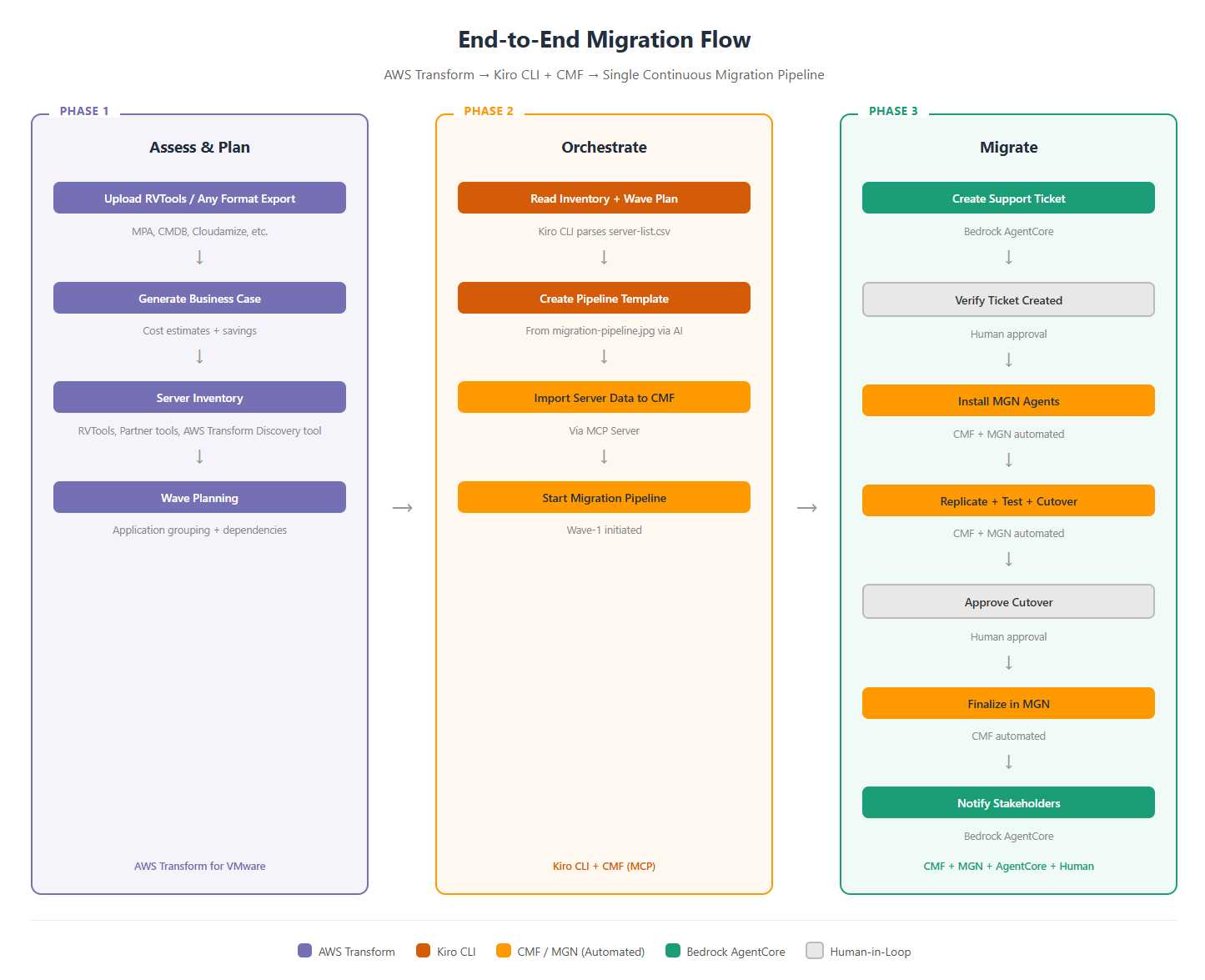
Figure 2- End to End migration flow
Consider this scenario:
An enterprise runs two applications on-premises, a customer-facing WordPress system and an internal Inventory Management application. These span four servers with two application servers and two database servers (MySQL for WordPress, PostgreSQL for Inventory).
The team organizes two waves using AWS Transform service.
- Wave 1: WordPress (1 app server + 1 MySQL server)
- Wave 2: Inventory Management (1 app server + 1 PostgreSQL server)
This example shows the workflow in action:
Figure 3 – End-to-End AI based migration workflow walkthrough example
WordPress migrates first as a validation run with fewer upstream dependencies. Each wave executes the same pipeline: replication, testing, cutover, DNS update, and verification.
Step 1: Run your assessment and create Wave plan.
Run AWS Transform assessment to create a business case. Use AWS Transform for VMware against your inventory to create dependency maps and a wave plan using the Discovery and migration planning job. In this example, the output identifies three applications, five servers, and two waves. Download the wave plan as CSV for Step 3.
If you use RVTools as a supplemental source, note that it lacks dependency data. Use an AWS funded partner assessments or the AWS Transform discovery tool for assessment of your environment.
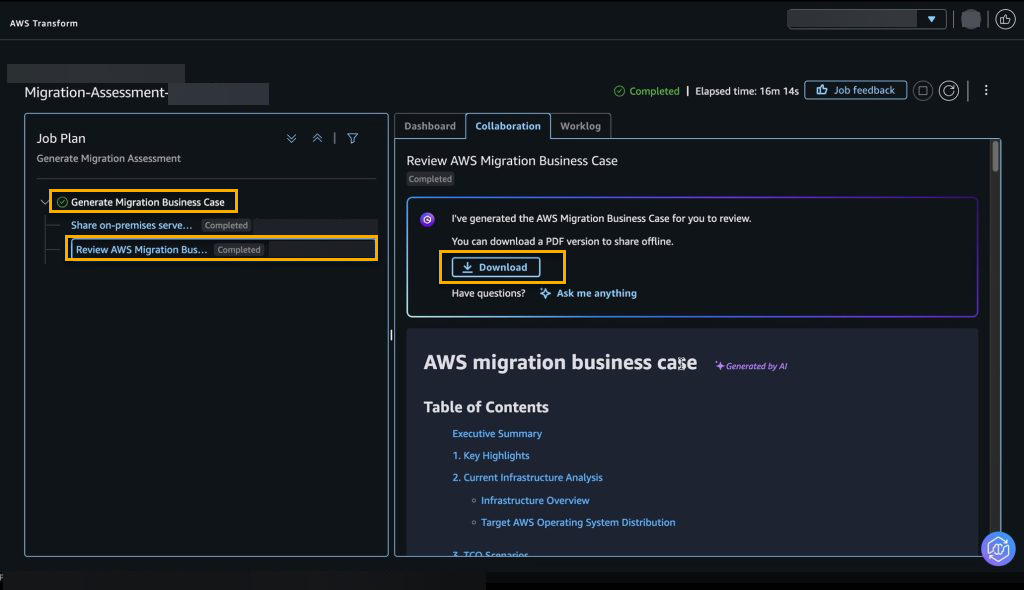
Figure 4 – AWS Transform assessment migration business case
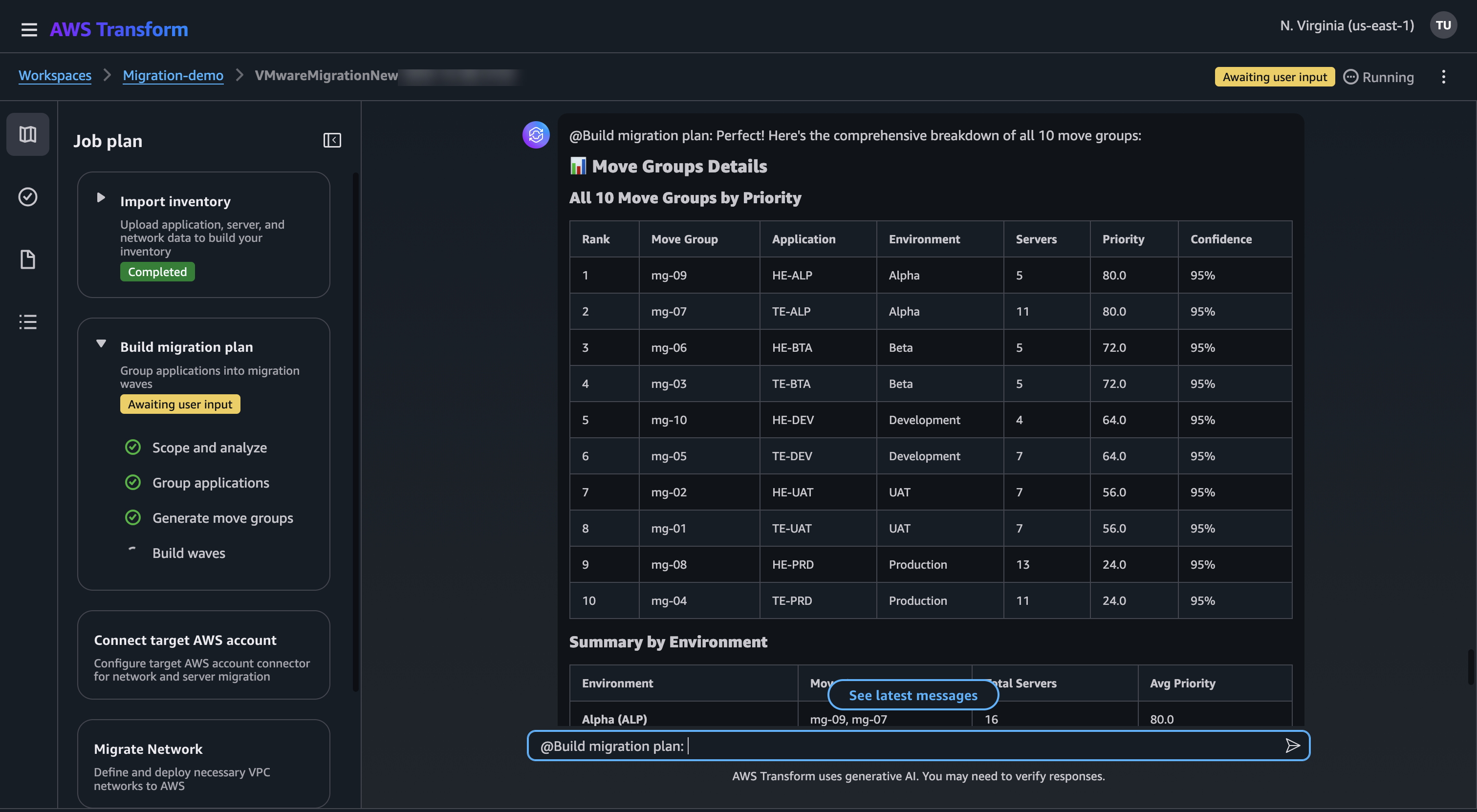
Figure 5 – AWS Transform VMware Wave planning
Step 2: Define your intent.
Provide Kiro CLI with your migration flowchart, a diagram or whiteboard photo. Launch Kiro CLI and provide your migration flowchart (diagram or whiteboard photo). Prompt: “Analyze this flowchart and create pipelines in CMF, template named ‘Datacenter Migration Pipeline’. Match the image exactly, including successors and task types. “Kiro CLI agent builds the template in CMF through the MCP server. The resulting pipeline includes 18 tasks: manual gates (support ticket verification, cutover approval, stakeholder notification) and automated steps (MGN prerequisites, agent installation, replication monitoring, test launch, cutover, validation). You apply this template to both waves for consistent execution.
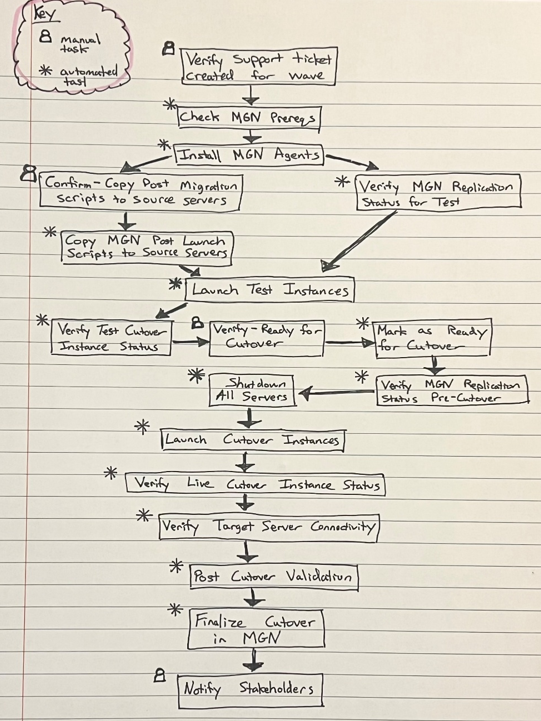
Figure 6 – Migration flowchart
Step 3: Load your inventory.
Provide Kiro CLI agent with AWS Transform generated wave plan CSV file from Step 1. e.g., “Load this AWS Transform created wave plan CSV into CMF and map each server to assigned wave and pipeline template”. Kiro CLI agent creates both waves in CMF, assigns servers to the pipeline template, populates the metadata store with server attributes, and flags missing fields. CMF checks completeness before execution begins.
Step 4: Monitor.
Interact and Ask Kiro CLI agent, e.g., “What is the status of my migration?” It queries CMF and AWS MGN simultaneously. You receive blocked tasks, pending approvals, replication lag, and open issues in one response. Query at the wave level, server level, or filter by manual tasks only.
Step 5: Execute.
Trigger Wave 1. CMF orchestrates the pipeline for both WordPress servers simultaneously. The pipeline starts with a human approval gate (change ticket number). CMF then runs Check MGN Prerequisites and Install MGN Agents. Block-level replication begins immediately after installation. CMF activates parallel branching: manual confirmation for post-migration scripts runs concurrently with replication monitoring. Both must complete before test instance launch, reducing total migration time.
Step 6: Validate and cut over
CMF launches test instances and verifies health, boot status, and network reachability. Your team validates WordPress against the migrated MySQL database. After sign-off, the pipeline confirms zero replication lag, shuts down the source servers, triggers a final sync, and launches the cutover instances.
CMF then runs automated validation, instance status checks, network connectivity on ports 80, 443, and 3306, and application health checks. If validation fails, ask Kiro CLI: For example, “Why did the Post Cutover Validation fail on wordpress-web-01?” Amazon Bedrock AgentCore returns: “WordPress-web-01 cannot reach wordpress-db-01 on port 3306. Security group sg-0a1b2c3d lacks an inbound rule for TCP 3306 from 10.0.1.45/32.” The agent provides a precise fix, accelerating investigation.
Step 7: Verify and notify
The solution includes an AgentCore Runtime (e.g., migrations_agent_runtime) and an AgentCore Gateway (e.g., migrations-gateway) with two AWS Lambda-backed tool targets (ChangeRequestTool and EmailNotificationTool). It also includes an AgentCore Identity linked to Amazon Cognito for user authentication and an SNS topic for delivering wave completion notifications to stakeholders.
Amazon Bedrock AgentCore sends a wave completion notification confirming servers migrated, applications verified, and FQDNs updated to new infrastructure. For example:
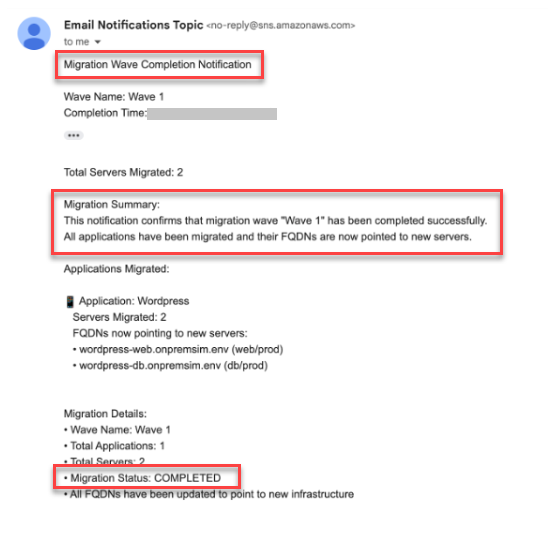
Figure 7 – Wave 1 migration completion notification email
The workflow has completed its full cycle assessment through cutover and notification without manual coordination. The pipeline handled dependency sequencing, failure recovery, and status reporting. Wave 2 follows an identical pattern, applying lessons validated in Wave 1.
Multiple services communicating autonomously and automated cutovers executing in production require well-defined trust boundaries. A misconfigured permission could expose the pipeline to unintended access.
The AI-driven migration workflow has now completed its full cycle from assessment through automated replication, cutover, and stakeholder notification. The pipeline verified every server, updated DNS records, and confirmed zero-downtime migration. The orchestration layer handled sequencing, failure recovery, and status reporting without manual intervention.
Security
With multiple services communicating autonomously and AI agents making migration decisions, this architecture applies least-privilege access and strict trust boundaries between components. This section explains how these key security design principles maintain security boundaries.
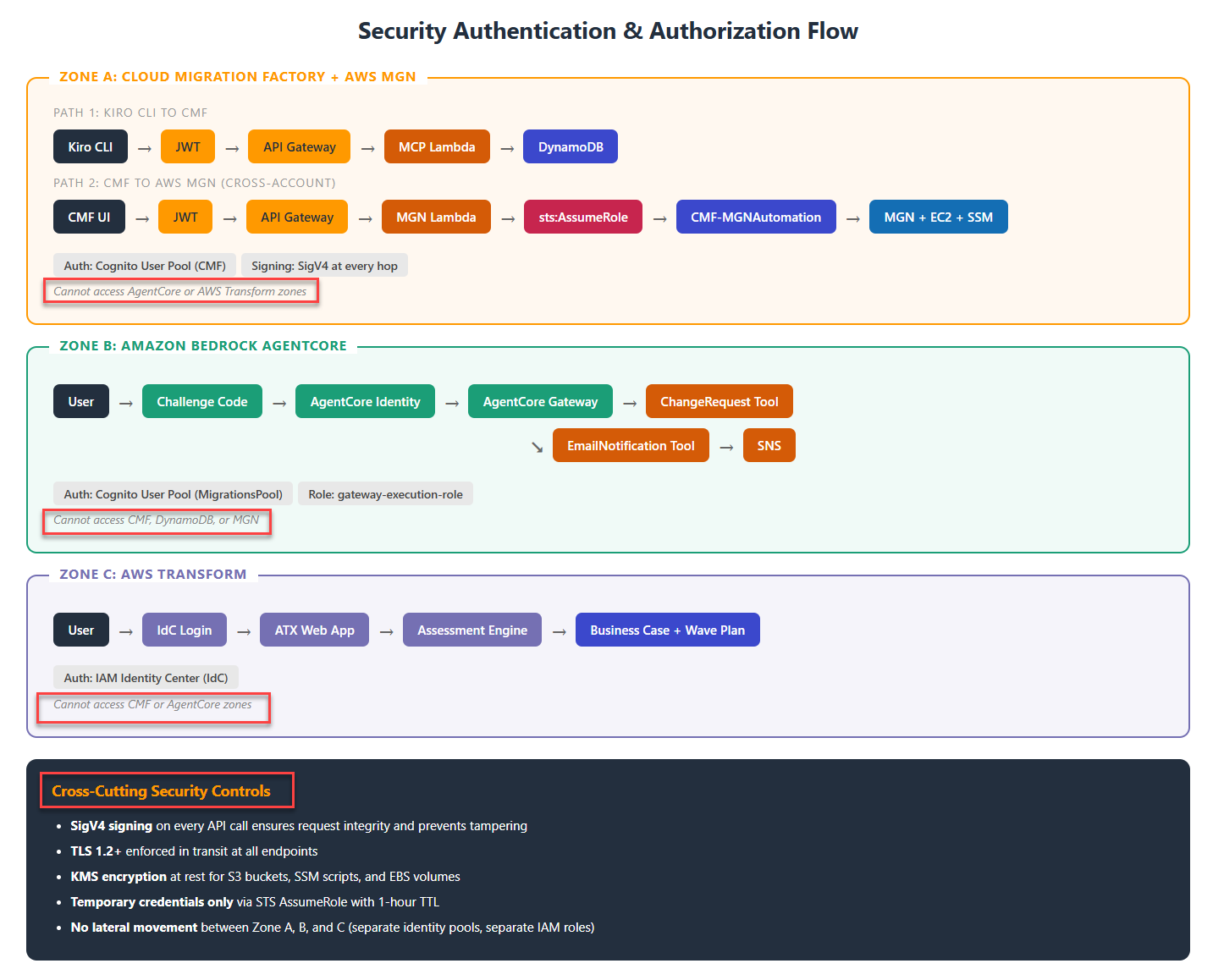
Figure 8 – Security Authentication and Authorization flow
The solution uses IAM roles with trust policies as the primary authentication mechanism. Each component in the architecture operates under a dedicated IAM role scoped to only the APIs it needs. For example,
- Role isolation: Each IAM role limits access to only its required APIs. User actions hit API Gateway, which invokes a backend Lambda function whose role is the only identity permitted to contact AWS MGN. All requests use SigV4 signing.
- No lateral movement: If the MCP Lambda gains inadvertent access, it can read/write CMF DynamoDB but cannot call MGN APIs (no MGN permissions in its role). If the AgentCore gateway role gains inadvertent access, it can only invoke its two Lambda tools; it has no access to AWS CMF or MGN.
- Short-lived credentials: AWS STS issues tokens that expire between 15 minutes and 12 hours, depending on the role configuration. No long-lived access keys exist in this architecture.
- No plaintext secrets: AWS Secrets Manager stores credentials for external systems (such as ServiceNow, email services, and third-party tools) and retrieves them at runtime. No credentials exist in environment variables or configuration files.
- Session-scoped trust: Kiro CLI authenticates via Cognito with a session-scoped JWT that expires when the session ends.
- Audit trail: AWS CloudTrail logs all AssumeRole calls, API actions, and Secrets Manager access. CMF logs agent actions at the workflow level. You get a correlated audit trail that supports both operational investigation and compliance review.
- Isolated identity pools: AWS CMF and Amazon Bedrock AgentCore use independent Cognito User Pools. Inadvertent access to one does not grant access to the other. Bedrock AgentCore does not communicate with CMF or MGN directly. It is a separate system with its own authentication boundary.
- Human approval gates: Production cutover, Source server shutdown, and rollback require explicit human approval before CMF and Amazon Bedrock AgentCore proceed. IAM permissions alone do not authorize these actions.
If an agent operating under one role exceeds its intended permissions, the scope of impact is contained. It cannot call APIs belonging to other services in the chain.
Benefits
The AI agent accelerates key phases of migration by automating repetitive steps and delivering these benefits simultaneously.
- Single pane of glass: Your team interacts with one conversational interface instead of switching between the MGN console, CMF dashboard, and ticketing systems.
- Reduced toil: Agent installation, replication monitoring, DNS updates, and stakeholder notifications run automatically, freeing engineers to focus on architecture and decision-making.
- Repeatable at scale: The same pipeline template that migrates Wave 1 migrates Wave n.
- Faster failure resolution: When a task fails, the AI agent reads the logs and returns a root cause with remediation steps in seconds.
- Scale without headcount: Adding more waves increases migration velocity without requiring additional headcount.
Conclusion
This blueprint illustrates how organizations can combine AWS services, including AI-powered capabilities, to orchestrate large-scale data center migrations with speed and consistency. Repetitive manual tasks such as agent installation, replication monitoring, validation checks, DNS updates, and stakeholder notifications become automated steps that run using AI agents. The simulated walkthrough showed how these services coordinate an automated migration pipeline from replication through cutover notification. Scaled migration programs will expand on this foundation by developing pipeline templates for different migration patterns. Automating as many manual tasks as possible maximizes scale and velocity. The agents in AgentCore and the automations directory in the Factory provide the extensible framework to get there.
“AWS gives you the flexibility to choose the right services. The power isn’t in how many you use, it’s in how you make them work together to achieve your end goal. Choice creates flexibility. Integration drives outcomes.”
What Next
To apply this blueprint to your environment, start with an AWS Transform assessment on a small application group (2–4 servers) to validate the pipeline pattern before scaling. For hands-on guidance, contact your AWS account team.
Related reading
- Introducing the AWS Transform Discovery Tool for data center inventory
- AWS Transform for VMware migration Discovery and migration planning
- AWS Cloud Migration Factory on AWS Implementation Guide
- Amazon Bedrock AgentCore Documentation