Migration & Modernization
Mass-migrating AI agents to Amazon Bedrock AgentCore
This post shows how to migrate a fleet of AI agents from Amazon Bedrock Agents Classic to Amazon Bedrock AgentCore Runtime using a pattern-first approach and parallel AI subagents. We migrated 20 agents from the open-source HCLS Agents Toolkit in approximately 2.5 hours of wall-clock time, across three phases: establishing a migration template, running parallel AI-assisted migrations, and hardening the result. pull request #275 captures the complete migration.
When Amazon Bedrock AgentCore launched, we used it to modernize our open-source healthcare and life sciences (HCLS) agent catalog (first introduced in Accelerating Life Sciences Innovation with Agentic AI on AWS): 38 AI agents covering clinical trials, drug discovery, medical imaging, and patient services. Twenty of those agents were built on Amazon Bedrock Agents—now Amazon Bedrock Agents Classic, which will no longer be open to new customers starting July 30, 2026. Migrating to Amazon Bedrock AgentCore was both a modernization and a future-proofing step.
What we needed was an approach that could fit into roughly 10–15% of one person’s time over the course of a week. Using Kiro CLI, an agentic development tool, we completed the migration in approximately 2.5 hours of wall-clock time with a pattern-first approach combined with parallel AI subagents—turning what would have been a quarter-long project into a series of short working sessions.
In this post, we share the migration pattern, the code transformations involved, and the reproducible approach that any team can apply to modernize their own agent fleet.
Why Amazon Bedrock AgentCore
Three specific problems were compounding with every new agent we added to the catalog:
Maintenance cost scaled with agent count, not complexity. Each agent carried its own CloudFormation stack, Lambda functions, AWS Identity and Access Management (IAM) roles, and OpenAPI schemas. A one-line bug fix to a shared utility required redeploying each agent’s entire stack independently. With 20+ agents, even simple updates became multi-hour tasks.
Deployment was complex and opaque. Amazon Bedrock Agents Classic could reach production, but getting there meant managing a CloudFormation stack per agent, navigating a black-box orchestration model with limited visibility into individual steps, and maintaining infrastructure that couldn’t be unit-tested at the tool level. There was no standard path — customers had to engineer their own deployment automation and rely on Amazon CloudWatch Logs as their only observability window.
Agents trapped tools in silos. A clinical trials search tool built for one agent wasn’t available to any other without duplicating code. There was no mechanism for tool discovery, shared access control, or credential management across agents.
Amazon Bedrock AgentCore addresses all three. A single Amazon Bedrock AgentCore Runtime hosts any Strands Agents SDK-based agent with one-command deployment, eliminating per-agent infrastructure management. The standardized @tool pattern makes every tool independently testable and reusable. And Amazon Bedrock AgentCore Gateway with Model Context Protocol (MCP) means tools can be shared across agents—or across teams—with Cedar-based access control and centralized credential management.
What standardization enables going forward: With 20 agents on a common pattern, adding a new agent to the catalog takes minutes (copy template, write tools, deploy). Customers can mix and match tools across agents. AWS Agent Registry in Amazon Bedrock AgentCore (now generally available) lets users browse and deploy agents from the catalog with a single command. And because every agent now has automated tests, the community can contribute without fear of breaking existing functionality.
Overview of solution
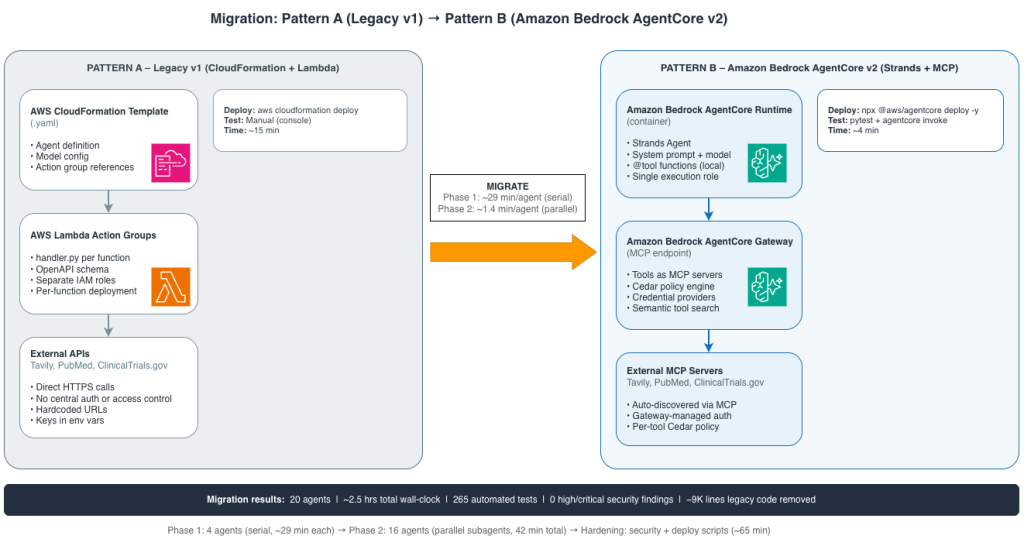
The migration transforms agents from Pattern A (Amazon Bedrock Agents, now Amazon Bedrock Agents Classic, orchestrated with AWS CloudFormation and AWS Lambda action groups) to Pattern B (Amazon Bedrock AgentCore Runtime + Strands Agents SDK + @tool functions), with optional integration to external tools through Amazon Bedrock AgentCore Gateway (Pattern B with optional MCP integration).
Walkthrough
We took a pattern-first approach: establish the migration pattern on a few agents, then use AI subagents to replicate it across the rest.
The migration follows three phases: (1) Establish the template—4 agents migrated serially to define a reusable standard pattern; (2) Parallel migration—16 agents migrated simultaneously using Kiro CLI subagents; (3) Hardening—security scanning, deployment packaging, and legacy code cleanup. Phases 1 and 2 together complete in approximately 2.5 hours; Phase 3 adds roughly 65 minutes.
Prerequisites
• An AWS account with Amazon Bedrock model access (Claude Sonnet 4.5, Claude Haiku 4.5)
• Amazon Bedrock AgentCore CLI (npx @aws/agentcore)
• Amazon Elastic Container Registry (ECR) repository (one per agent)
• IAM execution role for Amazon Bedrock AgentCore Runtime
• Python 3.11+, pytest, ruff, bandit
Phase 1: Establish the template (4 agents, serial)
We migrated four agents serially, spending approximately 29 minutes on each (timings recorded during the actual migration in pull request #275). These are real open-source agents from the open-source HCLS Agents Toolkit — see the table below for per-agent detail. This wasn’t about speed—it was about refining the migration pattern and building a reference template that encoded all our decisions. The template defined a standard directory layout, a convention for converting Lambda handlers to @tool functions, three test levels (unit, integration, and end-to-end system tests), a deploy.py wrapper script, and model selection logic for upgrading deprecated models. The first agent (Clinical Prior Auth) took the longest at roughly 45 minutes because it was where we established the pattern and identified end-of-life models that needed replacement. Each subsequent migration was faster as the template stabilized.
| Agent | Time | Tools* | Unit Tests** | Total Tests** |
|---|---|---|---|---|
| 29 – Clinical Prior Auth | ~45 min | 5 | 10 | 16 |
| Enrollment Pulse (#27) | ~30 min | 40+ | 12 | 16 |
| 30 – Clinical PreVisit | ~25 min | 12 | 10 | 15 |
| Medical Device (#26) | ~15 min | 4 | 11 | 16 |
Table note: Agent names include a catalog ID in parentheses (e.g., #29) — these are GitHub issue numbers in the HCLS Agents Toolkit repository that track each agent. Tools* = number of @tool functions per agent. Unit Tests** / Total Tests** = automated test counts (unit, integration, and end-to-end) as validated in pull request #275.
Phase 2: Parallel migration (16 agents, simultaneous)
With the template established, we used Kiro CLI subagents to migrate the remaining 16 agents in parallel. Each subagent received the template pattern, the agent’s existing Lambda code, and acceptance criteria. The 16 parallel migrations completed in 42 minutes—approximately 1.4 minutes per agent effective throughput (all timings are from the actual migration, captured in pull request #275).
| Domain | Agents migrated |
|---|---|
| Drug Discovery & Research | In Vivo Study Scheduler, Safety Signal Detection, Data Harmonisation, DMTA Orchestration |
| Clinical Trials | Clinical Study Research, Clinical Trial Protocol Generator, Enrollment Pulse |
| Clinical Operations | JSL Analyze Medical Reports, JSL Medical Reasoning, Medical Device |
| Patient Services | Clinical Prior Auth, Clinical PreVisit Questionnaire |
| Research & Literature | Tavily Web Search, Wiley OA Life Sciences, UniProt Protein Search |
| Genomics & Omics | Single Cell QC |
| Commercialization | SEC 10-K, USPTO Search |
| Lab & Devices | Sila2 Lab Automation |
Phase 3: Hardening (~65 min)
Hardening is a production-readiness pass—security scanning, deployment packaging, and legacy code removal. After migration, we:
- Fixed 48 medium-severity security findings
- Packaged the PCSR scan
- Added deploy scripts for all 20 agents
- Removed roughly 9,000 lines of v1 code
- Updated READMEs with deprecation notices
The Gateway pattern: Tools through MCP
We connected agents to external tools using Amazon Bedrock AgentCore Gateway and the Model Context Protocol (MCP). The agent discovers available tools at runtime—no hardcoded endpoints, no API-specific code. Adding a new data source is a CLI command, not a code change. The Amazon Bedrock AgentCore Gateway handles credential management through Cedar policies for fine-grained access control. For architecture details and a sample MCP configuration, see the repository README. For a deep dive on deploying external tools through Amazon Bedrock AgentCore Gateway with MCP, see Build a biomedical research agent with Biomni tools and Amazon Bedrock AgentCore Gateway.
Results
We consolidated the migration in pull request #275. The table below summarizes the before-and-after state of the catalog.
| Metric | Before (Pattern A) | After (Pattern B) |
|---|---|---|
| Agents migrated | — | 20 of 38 |
| Automated tests | 0 | 265 |
| Security findings (high/critical) | Not scanned | 0 |
| Legacy code removed | — | -9,000 lines |
| Deploy time (per agent) | ~15 min | ~4 min |
| Total migration wall-clock | — | ~2.5 hours |
| Observability | CloudWatch Logs only | OpenTelemetry traces + metrics |
| Access control | IAM only | IAM + Cedar policies |
| @tool functions (individual tools) | 0 (monolithic Lambda handlers) | 194 (independently testable) |
Cleaning up
To avoid incurring future charges, delete the following resources:
• Amazon Bedrock AgentCore agent deployments (one per agent)
• ECR repositories
• IAM execution roles
• Amazon Bedrock AgentCore Gateway targets and MCP configurations
Conclusion
What would have taken roughly 40 engineer-days was completed in approximately 2.5 hours of wall-clock time—4 agents migrated serially to establish the pattern, 16 migrated in parallel by AI subagents, and a hardening pass to close security findings and remove 9,000 lines of legacy code. The ongoing benefits compound beyond the migration itself: per-agent deployment time dropped from roughly 15 minutes to about 4 minutes with a single npx @aws/agentcore deploy -y command. Adding a new agent to the catalog now means copying the template, writing tool functions, and deploying—no new infrastructure provisioning.
The pattern is reproducible for any team managing a fleet of agents: establish your template by migrating 2–4 agents serially, document every decision in that template, parallelize the remaining migrations with AI-assisted tooling, and harden with security scans and batch verification. The key investment is in the pattern, not the migration itself—once the template is solid, scaling from 5 agents to 50 is a matter of compute time, not engineering time.
The entire Healthcare and Life Sciences Agents Toolkit on AWS is open source under the MIT-0 license. Clone the repository, browse the migrated agents, or use the template to start your own migration: