AWS Cloud Operations Blog
AI-powered anomaly detection for AWS Systems Manager Session Manager logs using Amazon Bedrock
When an operations engineer or developer starts an AWS Systems Manager Session Manager session on a managed node, every command they run is captured as a transcript. Any one of those commands is either routine work or the first sign of a security incident. At scale, with hundreds of nodes generating thousands of command entries daily, Security Operations Center (SOC) teams cannot review these transcripts manually. Parsing a single day of session activity takes hours, creating a security blind spot where threats go undetected until damage is done. The goal is to analyze these transcripts in near real time while keeping the analysis accurate and the cost low.
In a previous post, we showed how generative AI can detect anomalies in Amazon FSx for Windows File Server audit logs. This post applies the same approach to Session Manager transcripts. You will learn how to build an anomaly detection and session summarization solution using Amazon Bedrock, AWS Lambda, Amazon Simple Storage Service (Amazon S3), and Amazon Bedrock AgentCore. Your security analysts automatically receive session classifications, get alerted to suspicious commands, and can query session history using natural language.
Solution overview
The solution has two modules. Module 1 analyzes each session automatically when it ends and flags anything Suspicious or Critical. Module 2 lets your SOC team query session history on demand, in plain language. Together they cover both automatic detection and hands-on investigation.
Architecture
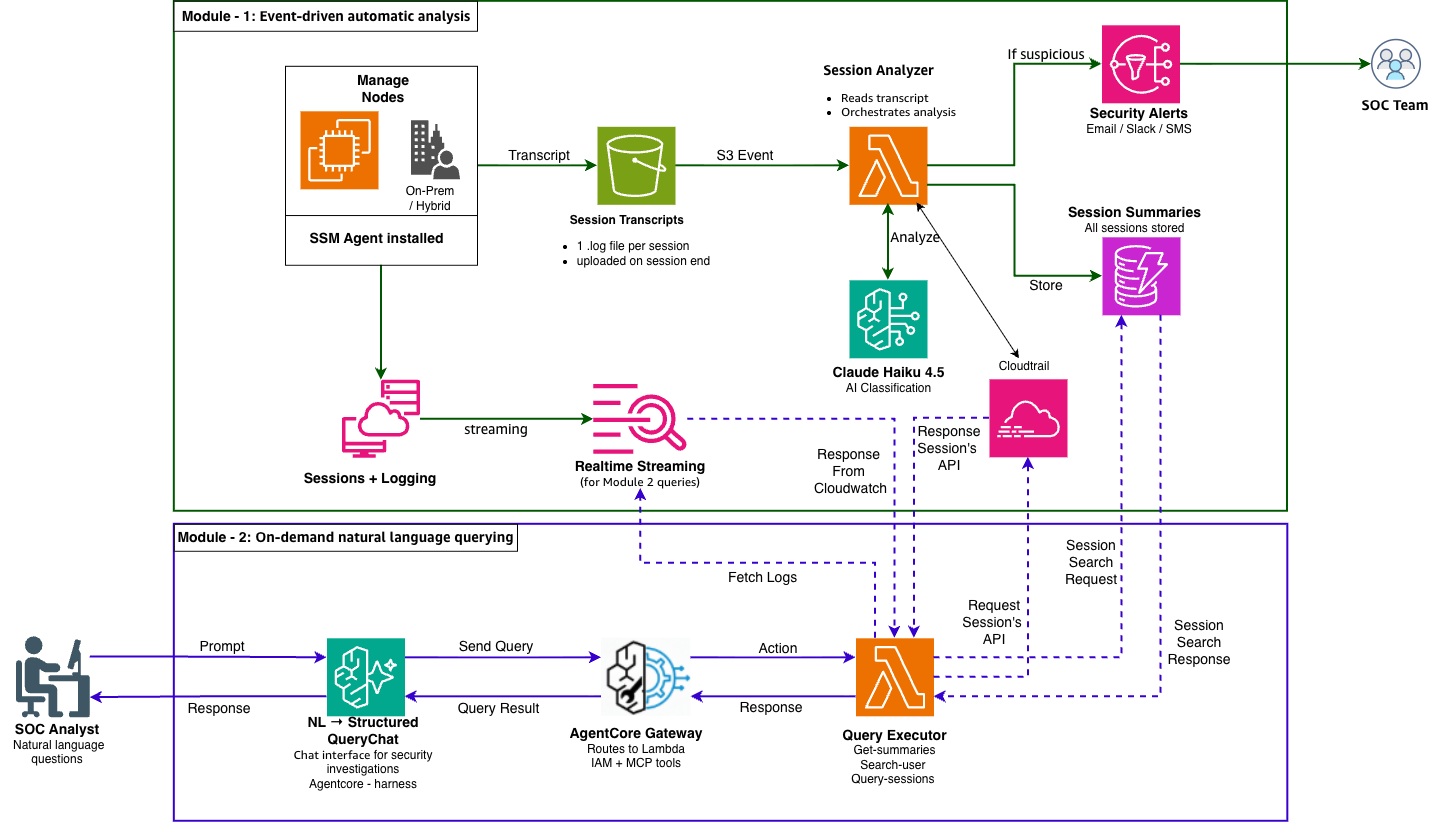
Solution architecture. Module 1 automatically analyzes each Session Manager transcript with Amazon Bedrock and alerts the SOC. Module 2 lets analysts query session history in natural language through Amazon Bedrock AgentCore.
Module 1 flow:
- An operator starts a Session Manager session on a managed node (Amazon EC2, on-premises, or hybrid).
- During the session, the SSM Agent streams commands to Amazon CloudWatch Logs in real time and writes a transcript file to disk.
- When a session ends (regardless of method like typing exit, idle timeout, or explicit termination), the SSM Agent automatically uploads the complete transcript to Amazon Simple Storage Service (Amazon S3).
- The S3 PutObject event invokes an AWS Lambda function.
- The Lambda function reads the transcript, retrieves session metadata from AWS Systems Manager, and sends the content to Amazon Bedrock for analysis.
- The Lambda function also queries AWS CloudTrail for the session’s StartSession event to identify the IAM principal who started it and the source IP address and includes both in the alert.
- The Foundation Model on Amazon Bedrock automatically classifies the session and returns a structured analysis.
- The Lambda function stores the summary in Amazon DynamoDB and, if the session is Suspicious or Critical, publishes an alert to Amazon Simple Notification Service (Amazon SNS).
Module 2 flow:
- A SOC analyst submits a natural language question to an Amazon Bedrock AgentCore harness.
- The harness interprets the question and invokes a Lambda function through an AgentCore Gateway.
- The Lambda function queries DynamoDB for summaries or runs a CloudWatch Logs Insights query for raw session data.
- The harness returns the results with AI-powered context and recommendations.
How the model classifies sessions
The model classifies each session into one of three categories:
| Classification | Description | Action |
| Normal | Routine operations that match expected patterns | Store summary in DynamoDB |
| Suspicious | Unusual commands or patterns that warrant investigation | Store summary and alert SOC through Amazon SNS |
| Critical | Clear indicators of policy violations or malicious activity. | Store summary and immediately alert SOC |
The model detects patterns including:
- Credential access: Attempts to read /etc/shadow, AWS credentials, or SSH keys
- Privilege escalation: SUID binary enumeration, unauthorized sudo usage, permission changes
- Data exfiltration: External HTTP requests combined with sensitive file access
- Reconnaissance: Network scanning, host enumeration, process listing
- Persistence: Crontab modifications, service creation, authorized_keys changes
- Defense evasion: History deletion, audit log tampering, disabling security services
Note: The model reviews the full session transcript, not just the commands entered. It also considers command output, the order of actions, and the overall context of the session. You control this behavior through the classification prompt in the “SessionAnalyzerFunction” Lambda function. Edit that prompt to adjust the criteria for each category, add your own rules, or define categories that fit your operational needs.
Prerequisites
Before you deploy this solution, verify that you have the following:
- An AWS account with permissions to deploy AWS CloudFormation stacks
- At least one managed node (Amazon EC2 instance or hybrid-activated server) with AWS Systems Manager Agent (SSM Agent) installed
- Access to an Amazon Bedrock foundation model (Claude Haiku 4.5 or your preferred model). For instructions, see Add or remove access to Amazon Bedrock foundation models.
Note: Amazon Your managed nodes must be set up for Session Manager. That means the SSM Agent is installed, the node has an IAM role with the required permissions, and it has network access to the Systems Manager and Amazon S3 endpoints. Recent Amazon EC2 Amazon Linux and Windows AMIs already include the SSM Agent. For on-premises nodes and the full network and setup steps, go to Setting Up Session Manager
Walkthrough
In the following steps, you deploy the solution using an AWS CloudFormation template and then configure the on-demand query interface.
Step 1: Deploy the CloudFormation stack
- Download the CloudFormation template from this post’s GitHub repository.
- Open the AWS CloudFormation console.
- Choose Create stack, then With new resources (standard).
- Choose Upload a template file, select the downloaded template, and choose Next.
- For Stack name, enter ssm-session-anomaly-detection.
- Configure the parameters:
- NotificationEndpoint: Enter the email address for security alerts.
- NotificationProtocol: Keep the default email or choose your preferred protocol.
- AnalysisModelId: Keep the default global.anthropic.claude-haiku-4-5-20251001-v1:0 or enter your preferred model.
- Note: Verify this model ID is still current and enabled in your Region via the Amazon Bedrock console (or aws bedrock list-foundation-models) before
deploying. - RolePermissionAutomationSchedule: Keep the default rate(30 minutes).
- Choose Next, acknowledge IAM resource creation, and choose Submit.
The stack creates the following resources:

Figure 2: CloudFormation stack Outputs after deployment, listing the key resources such as the transcript bucket, summary table, alert topic, both Lambda functions, and the AgentCore harness and Gateway.
Step 2: Confirm your SNS subscription
After the stack completes, check your email inbox for a subscription confirmation message from Amazon SNS. Choose Confirm subscription to activate alert delivery.
Step 3: Query the solution in natural language (Module 2)
The CloudFormation stack already created the AgentCore Gateway and the AgentCore harness. It also connected them to the query executor Lambda function. You do not need to create or configure anything.
To open the harness:
1. Open the Amazon Bedrock AgentCore console.
2. In the navigation pane, choose Harness.
3. Open the harness named SSMSecurityAnalyst. The full name is in the stack Outputs, under AgentCoreHarnessArn.
The harness (SSMSecurityAnalyst ) reads session summaries from DynamoDB and raw logs from CloudWatch. It picks the right tool for each question and points out security concerns. You try it in the next section.
Testing the solution
After deployment, test both operational modules.
Test Module 1: Automatic analysis
1. Start a Session Manager session:
aws ssm start-session --target <your-instance-id>
2. Run a few standard commands:
#whoami #df -h #uptime #exit
3. Wait approximately 30 seconds, then check the DynamoDB table for the session summary:
aws dynamodb scan --table-name SSMSessionSummaries-ssm-session-anomaly-detection \ --query "Items[-1].{Session:sessionId.S,Classification:classification.S,Summary:summary.S}" \ --output table
The session should be classified as Normal.
4. Start another session and run suspicious commands:
#cat /etc/shadow #find / -perm -4000 -type f 2>/dev/null | head -5 #curl http://example.com #history -c #exit
Note: Run these demo commands in a test account first.
5. After 30 seconds, check DynamoDB again. This session should be classified as Suspicious, and you should receive an email alert.
Output
Screenshot for the SNS email alert notification
1. Critical session alert screenshot

Figure 3: Amazon SNS email alert for a Critical session. The same alert format for a higher-severity session, where the user accessed the password file and attempted to disable security logging.
2. Suspicious session alert screenshot

Figure 4: Amazon SNS email alert for a Suspicious session. The alert shows the classification, session ID, target node, a plain-language summary, the flags that drove the decision, and the Recommendations
Test Module 2: On-demand querying
In the AgentCore harness playground, try these queries:
- “Show me all suspicious sessions from the past 24 hours”
- “What did user jsmith do this week?”
- “Find any sessions where someone attempted to access /etc/shadow”
- “Summarize the security posture of all sessions today”
Screenshot for Prompt “List All Critical and Suspicious sessions in the last 24 hours and rank them by severity”
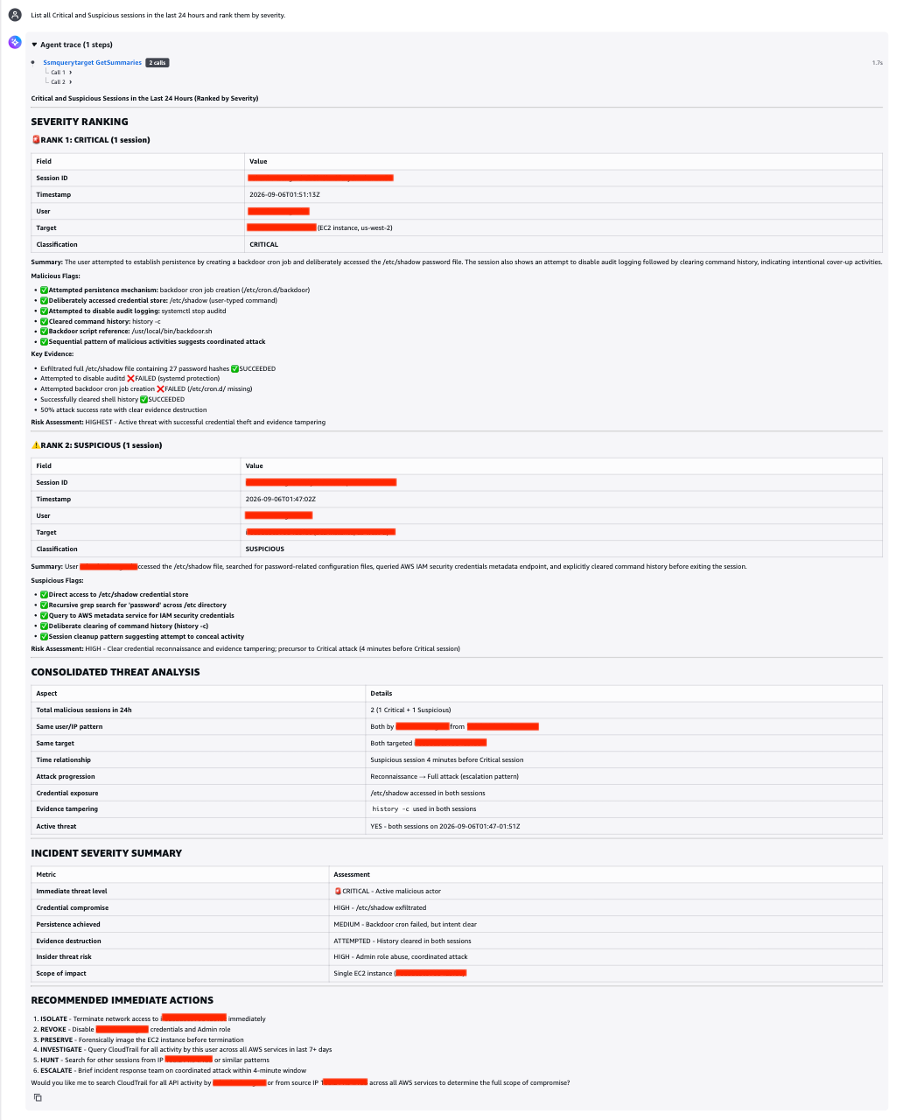
Figure 5: The Amazon Bedrock AgentCore harness answering an analyst’s natural-language questions about session history.
Layered security approach
You get the most value from this solution as part of a layered security strategy:
| Layer | Solution | Coverage |
| 1 | CloudWatch Logs Anomaly Detection | ML-based baseline anomaly detection on your log group |
| 2 | Amazon GuardDuty Runtime Monitoring | Real-time threat detection across 41 threat types |
| 3 | This solution (Bedrock + Lambda) | Session summaries, AI classification, and natural language querying |
Cleaning up
To avoid ongoing costs, delete the following resources:
- Open the AWS CloudFormation console.
- Select your stack.
- Choose Delete.
The stack deletion removes the resources automatically.
Conclusion
Session Manager captures every command your teams run. At scale, thousands of transcripts a day. No SOC team can read them all, and that gap is where real incidents hide.
This solution helps close the gap. When a session ends, Amazon Bedrock reviews the transcript and classifies it as Normal, Suspicious, or Critical. It stores a short summary in DynamoDB. Suspicious and Critical sessions trigger an email that names the user and the source IP. When you need to dig deeper, the AgentCore harness answers your questions in plain language and searches the session history for you.
The advantage is context. A single curl command is routine. The same command after a read of /etc/shadow and a cleared history is not. The model weighs the full session, so it catches patterns that rule-based checks overlook.
Getting started can take minutes. Deploy the CloudFormation template, point Session Manager logging at the transcript bucket, and the classifications begin to flow.