AWS Cloud Operations Blog
Controlled self-healing Amazon EKS Clusters with AWS DevOps Agent and A2A remote agents
1. Introduction
A pod on your Amazon Elastic Kubernetes Service (Amazon EKS) cluster is restarting on a memory limit. An automated agent spots it, doubles the memory, and syncs the application. On a quiet afternoon that is a tidy self healing story. During a release window, or on a service that is mid rollout, the same unprompted change can take a wobbling pod and turn it into a real incident. The question this post answers is not how to make an agent act, but how to make sure it only acts when your team’s rules say it may.
Self-healing for Amazon EKS with AWS DevOps Agent is the setting, and a mandatory policy gate is the point. You keep DevOps Agent as the orchestrator, and you connect two of your own agents to it over the Agent-to-Agent (A2A) protocol: one that performs Amazon EKS investigation and cluster update, and one that approves or blocks each change before it happens. Using your own agents instead of DevOps Agent’s builtin capabilities lets you run them in your account, build them with your frameworks, and encode the operational knowledge that is specific to your platform. Keeping the guardrail in a separate agent means one team owns the change policy, and every other agent has to pass through it.
2. Solution overview
The following components make up the solution:
| Component | Role |
|---|---|
| AWS DevOps Agent | Starts an investigation, reads the troubleshooting skill, and delegates work to the remote agents |
| Argo CD remote agent | A FastAPI A2A server on Amazon EKS that reads K8sGPT results and changes Argo CD applications through Kubernetes custom resources |
| Guardrail remote agent | A FastAPI A2A server on Amazon EKS that checks a deployment against a change policy and returns allow or deny |
| Amazon API Gateway with a VPC link | Gives DevOps Agent an HTTPS endpoint, authorized with AWS Identity and Access Management (IAM), to reach the in-cluster agents |
| Internal Network Load Balancer | Routes traffic from API Gateway to the agent pods through the VPC link |
| Amazon EKS with the Argo CD capability | The target cluster, running workloads managed by Argo CD with the K8sGPT operator installed for diagnostics |
The two remote agents run as pods inside the cluster and are not reachable from the internet. API Gateway exposes them over HTTPS with AWS_IAM authorization, so only a caller that signs its request with credentials you grant (here, the DevOps Agent role) can invoke them.
The investigation runs as follows:
- You start an investigation in the DevOps Agent console. (You can also trigger one from an Amazon CloudWatch alarm; this walkthrough uses a manual trigger.)
- DevOps Agent reads the Amazon EKS troubleshooting skill.
- DevOps Agent asks the Argo CD agent for K8sGPT diagnostics.
- For each out-of-memory (OOMKilled) pod, DevOps Agent asks the guardrail agent whether the affected deployment may be changed.
- If the guardrail agent allows it, DevOps Agent asks the Argo CD agent to double the memory limit.
- DevOps Agent re-runs diagnostics to confirm the fix.
- DevOps Agent produces a report of findings, actions taken, and changes the guardrail agent blocked.
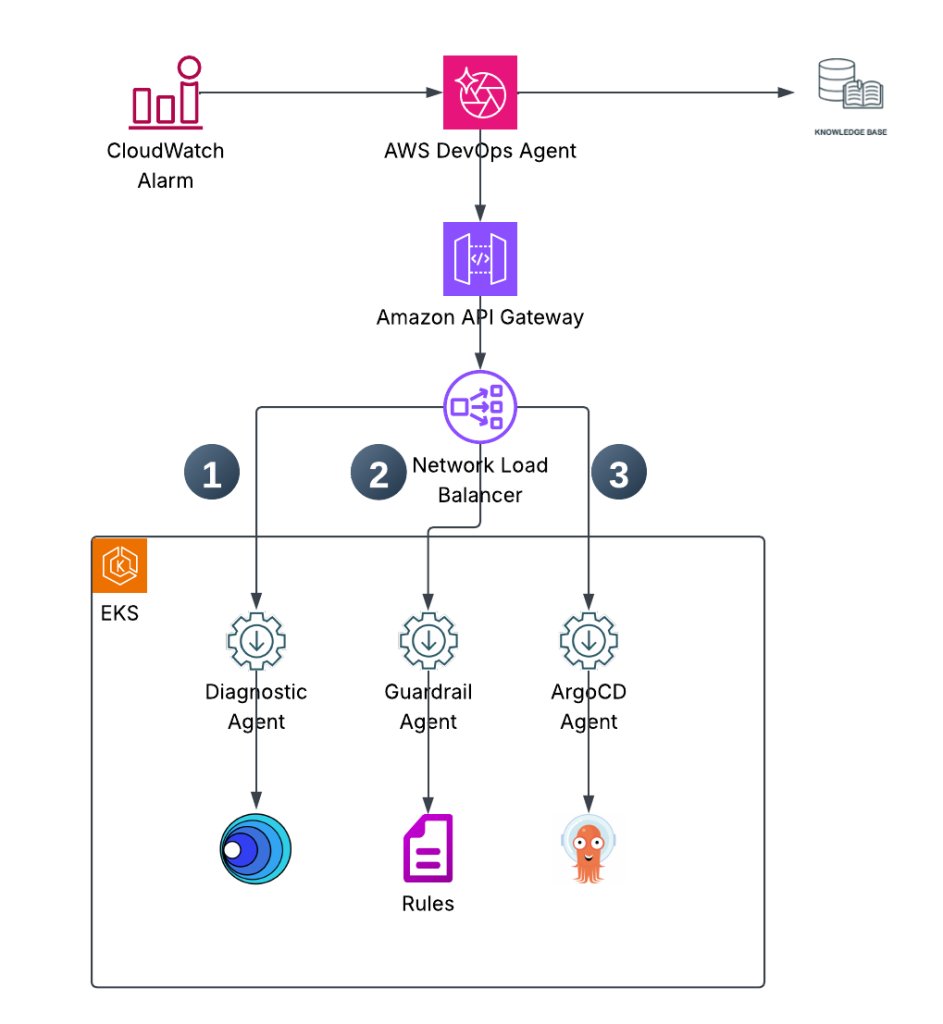
Figure1: Architecture diagram
A note on the guardrail check in this walkthrough: it tests whether a deployment has a Pod Disruption Budget (PDB). A PDB limits voluntary evictions (such as node drains); it does not constrain a Deployment rolling update, which is how the memory change is applied here. Treat the PDB check as an illustrative policy that stands in for the real change controls your organization enforces (for example, a change-freeze calendar, a minimum replica count, or an approval ticket). The point of the pattern is the separate, mandatory gate, not this specific check.
3. Prerequisites
You need the following:
- An AWS account. This walkthrough assumes you use an administrator role; in a shared account, scope your permissions to the services used here (Amazon EKS, Amazon ECR, API Gateway, Elastic Load Balancing, IAM, and Amazon Bedrock).
- AWS Command Line Interface (AWS CLI) v2, installed and configured
- kubectl, helm, eksctl, jq, and envsubst (part of GNU gettext)
- finch or Docker for container builds
- An Amazon EKS cluster. This walkthrough uses the cluster name
ws-eks-1inus-east-1. - Access in Amazon Bedrock to Amazon Nova Lite (used by K8sGPT for diagnostics) and Anthropic Claude Sonnet (used by each remote agent to interpret requests) in your Region
- The Argo CD capability for Amazon EKS, enabled on the cluster
- The K8sGPT operator, installed on the cluster (steps follow)
- Access to AWS DevOps Agent in your account
3.1 Enable the Argo CD capability on Amazon EKS
Follow Create an Argo CD capability to enable the managed Argo CD capability on your cluster. It provides GitOps deployment with AWS IAM Identity Center authentication.
3.2 Install the K8sGPT operator
K8sGPT analyzes cluster health and writes its findings as Kubernetes custom resources, which the Argo CD agent reads.
Set the cluster name and Region, and create the namespace:
export EKS_CLUSTER=ws-eks-1
export AWS_REGION=us-east-1

kubectl create ns k8sgpt-operator-system
Add the K8sGPT Helm repository:
helm repo add k8sgpt https://charts.k8sgpt.ai/
helm repo update
Install the K8sGPT operator:
helm install k8sgpt-operator k8sgpt/k8sgpt-operator --namespace k8sgpt-operator-system
Verify the operator is running:
kubectl get pods -n k8sgpt-operator-system
Create the K8sGPT custom resource configured with Amazon Nova Lite:
echo "
apiVersion: core.k8sgpt.ai/v1alpha1
kind: K8sGPT
metadata:
  name: k8sgpt-bedrock
  namespace: k8sgpt-operator-system
spec:
  ai:
    enabled: true
    model: us.amazon.nova-lite-v1:0
    region: $AWS_REGION
    backend: amazonbedrock
    language: english
  noCache: false
  repository: ghcr.io/k8sgpt-ai/k8sgpt
  version: v0.4.36
" | kubectl apply -f -
Give K8sGPT access to Amazon Bedrock through an EKS Pod Identity association. Scope the IAM role to invoking the Amazon Nova Lite model, rather than attaching a broad managed policy:
export ACCOUNT_ID=$(aws sts get-caller-identity --query Account --output text)

cat > k8sgpt-bedrock-policy.json <<EOF
{
  "Version": "2012-10-17",
  "Statement": [{
    "Effect": "Allow",
    "Action": ["bedrock:InvokeModel"],
    "Resource": [
      "arn:aws:bedrock:${AWS_REGION}::foundation-model/amazon.nova-lite-v1:0",
      "arn:aws:bedrock:${AWS_REGION}:${ACCOUNT_ID}:inference-profile/us.amazon.nova-lite-v1:0",
      "arn:aws:bedrock:*::foundation-model/amazon.nova-lite-v1:0"
    ]
  }]
}
EOF

aws iam create-policy \
  --policy-name k8sgpt-bedrock-invoke \
  --policy-document file://k8sgpt-bedrock-policy.json

eksctl create podidentityassociation \
  --cluster $EKS_CLUSTER \
  --namespace k8sgpt-operator-system \
  --service-account-name k8sgpt-k8sgpt-operator-system \
  --role-name k8sgpt-app-eks-pod-identity-role \
  --permission-policy-arns arn:aws:iam::${ACCOUNT_ID}:policy/k8sgpt-bedrock-invoke \
  --region $AWS_REGION
Restart the K8sGPT pods so the Pod Identity association takes effect:
kubectl -n k8sgpt-operator-system rollout restart deploy
Confirm K8sGPT is running and producing results:
kubectl get pods -n k8sgpt-operator-system
kubectl get results -n k8sgpt-operator-system
You should see the k8sgpt-bedrock pod and the k8sgpt-operator-controller-manager pod running.
4. Set up and run the solution
If you already run agents that DevOps Agent can reach over A2A, you can reuse them instead of deploying the two agents here. Any A2A compatible agent works if it meets the requirements in Connecting remote A2A agents. This blog assumes you do not have such agents and provides steps to create the Agents.
4.1 Download the solution source
Clone the sample repository and change into the a2a directory. It contains the two remote agents, the Kubernetes manifests, and the deployment scripts. Run every command that follows from this directory.
git clone https://github.com/aws-samples/Amazon-prometheus-bedrock-agent-example.git
cd Amazon-prometheus-bedrock-agent-example/a2a
The a2a directory contains the agent applications under app/, the Kubernetes manifests under k8s/, the deployment scripts deploy-argocd-eks.sh and deploy-guardrail-agent.sh, the API Gateway setup script k8s/guardrail-agent/setup-apigw.sh, the troubleshooting skill skills/eks-troubleshooting.md, and the sample Argo CD application argocd-application.yaml.
4.2 Deploy the Argo CD remote agent on Amazon EKS
The Argo CD agent is a FastAPI application that implements A2A and provides diagnostics, memory adjustment, and restart/rollback. Deploy it with the deploy-argocd-eks.sh script, which has three subcommands.
The build subcommand builds the container image for linux/amd64, creates the Amazon ECR repository if needed, and pushes the image:
./deploy-argocd-eks.sh build
The deploy subcommand applies the Kubernetes manifests (namespace, service account, role based access control (RBAC) for Argo CD application custom resource definitions (CRDs) and K8sGPT results, ConfigMap, Deployment, and Service). It also creates the IAM Roles for Service Accounts (IRSA) role with the Amazon Bedrock permissions the agent needs, then waits for the rollout:
./deploy-argocd-eks.sh deploy
The apigw subcommand creates the HTTPS entry point: an internal Network Load Balancer with cross-zone load balancing, a target group, a VPC link, and the REST API. It then registers the pod IP as the target and sets the agent’s AGENT_URL to the public endpoint:
./deploy-argocd-eks.sh apigw
This walkthrough registers the pod IP directly with the target group, which is a demo shortcut. The registration breaks when the pod restarts and gets a new IP. If that happens, re-run ./deploy-argocd-eks.sh apigw. For production, front the pods with the AWS Load Balancer Controller and a TargetGroupBinding so registration tracks pods automatically.
Verify the agent is running:
kubectl get pods -n argocd-agent -l app.kubernetes.io/name=argocd-agent-eks
kubectl port-forward svc/argocd-agent-eks -n argocd-agent 9000:9000
curl http://localhost:9000/.well-known/agent-card.json | jq .
4.3 Deploy the guardrail agent on Amazon EKS
The guardrail agent evaluates the change policy for a deployment. It has read-only access to Deployments and PDBs. Build and deploy it:
./deploy-guardrail-agent.sh all
Verify the deployment:
kubectl get pods -n guardrail-agent -l app.kubernetes.io/name=guardrail-agent
kubectl port-forward svc/guardrail-agent -n guardrail-agent 9001:9001
curl http://localhost:9001/.well-known/agent-card.json | jq .
4.4 Expose the guardrail agent through the shared API Gateway
The apigw step created the Network Load Balancer, VPC link, and REST API for the Argo CD agent. The guardrail agent reuses them: its setup script finds them by name and adds a /guardrail route.
./k8s/guardrail-agent/setup-apigw.sh
The script adds a target group for the guardrail agent on port 9001 and registers its pod IP, adds a listener on the shared Network Load Balancer for port 9001, and adds a /guardrail path on the REST API through the shared VPC link. One API Gateway now routes by path: / reaches the Argo CD agent and /guardrail reaches the guardrail agent.
Capture the account ID and the API Gateway ID. The next section reuses them:
export ACCOUNT_ID=$(aws sts get-caller-identity --query Account --output text)
export API_ID=$(aws apigateway get-rest-apis --region ${AWS_REGION} \
  --query "items[?name=='argocd-eks-agent-api'].id | [0]" --output text)
Verify both endpoints:
curl https://${API_ID}.execute-api.${AWS_REGION}.amazonaws.com/prod/.well-known/agent-card.json | jq .name
curl https://${API_ID}.execute-api.${AWS_REGION}.amazonaws.com/prod/guardrail/.well-known/agent-card.json | jq .name
4.5 Create the IAM role for DevOps Agent authentication
API Gateway is configured with AWS_IAM authorization, so DevOps Agent must sign its requests. Create a role that DevOps Agent assumes, with permission only to invoke this API:
aws iam create-role \
  --role-name DevOpsAgentRemoteAgentInvokeRole \
  --assume-role-policy-document '{
    "Version": "2012-10-17",
    "Statement": [{
      "Effect": "Allow",
      "Principal": {"Service": "aidevops.amazonaws.com"},
      "Action": "sts:AssumeRole",
      "Condition": {"StringEquals": {"aws:SourceAccount": "'"$ACCOUNT_ID"'"}}
    }]
  }'

aws iam put-role-policy \
  --role-name DevOpsAgentRemoteAgentInvokeRole \
  --policy-name ApiGatewayInvoke \
  --policy-document '{
    "Version": "2012-10-17",
    "Statement": [{
      "Effect": "Allow",
      "Action": "execute-api:Invoke",
      "Resource": "arn:aws:execute-api:'"$AWS_REGION"':'"$ACCOUNT_ID"':'"$API_ID"'/*"
    }]
  }'
Confirm that the service principal aidevops.amazonaws.com matches the value in the AWS DevOps Agent documentation for your Region before you create the role.
4.6 Register the remote agents in AWS DevOps Agent
In the DevOps Agent console, choose Capability Providers, choose Remote Agent, and then choose Register. Register the Argo CD agent with these values:
- Name:
argocd-eks - Agent card endpoint:
https://<API_ID>.execute-api.<AWS_REGION>.amazonaws.com/prod/.well-known/agent-card.json - Authentication: AWS SigV4
- IAM role:
DevOpsAgentRemoteAgentInvokeRole - Region: the Region you deployed to, for example
us-east-1 - Service name:
execute-api
Register the guardrail agent with these values:
- Name:
guardrail-agent - Agent card endpoint:
https://<API_ID>.execute-api.<AWS_REGION>.amazonaws.com/prod/guardrail/.well-known/agent-card.json - Authentication: AWS SigV4
- IAM role:
DevOpsAgentRemoteAgentInvokeRole - Region: the Region you deployed to, for example
us-east-1 - Service name:
execute-api
Then associate both agents with your Agent Space.
4.7 Add the Amazon EKS troubleshooting skill
In the DevOps Agent console, open your Agent Space, choose to add a skill, and upload the skills/eks-troubleshooting.md file from the repository. The skill tells DevOps Agent to request K8sGPT diagnostics from the Argo CD agent, check the guardrail agent before any change, remediate only when the guardrail agent allows it (by doubling memory for an OOMKilled pod), and then re-run diagnostics and report.
The skill’s main rules are that every change needs guardrail approval for that specific deployment, a denial blocks the change and is recorded, a rollback needs approval for all deployments in the application, and an unreachable guardrail agent blocks the change. The complete skill, including the exact prompts and retry policy, is in skills/eks-troubleshooting.md. Upload it as is.
4.8 Deploy a test application with Argo CD
Deploy a sample application that contains a deployment with a PDB (memory-demo) and a deployment without one (memory-demo-nopdb). The memory-demo deployment is configured on purpose to request more memory than its limit allows, so it is terminated by the Linux out-of-memory (OOM) killer soon after it starts. This gives DevOps Agent a real problem to find.
The destination.name field is templated as ${EKS_CLUSTER}, so export that variable (it must match the cluster name registered in Argo CD) and render the file with envsubst before you apply it:
export EKS_CLUSTER=<your-cluster-name>
envsubst < argocd-application.yaml | kubectl apply -f -
The argocd-application.yaml template contains the following:
apiVersion: argoproj.io/v1alpha1
kind: Application
metadata:
  name: helm-guestbook
  namespace: argocd
spec:
  project: default
  source:
    repoURL: https://github.com/aws-samples/Amazon-prometheus-bedrock-agent-example
    targetRevision: HEAD
    path: a2a/helm-guestbook
    helm:
      valueFiles:
      - values.yaml
  destination:
    name: ${EKS_CLUSTER}
    namespace: helm-guestbook
  syncPolicy:
    automated:
      prune: true
      selfHeal: true
    syncOptions:
    - CreateNamespace=true
The syncOptions field creates the helm-guestbook namespace during the sync, so you don’t create it beforehand. After Argo CD syncs, the helm-guestbook application shows as synced and healthy in the Argo CD console.
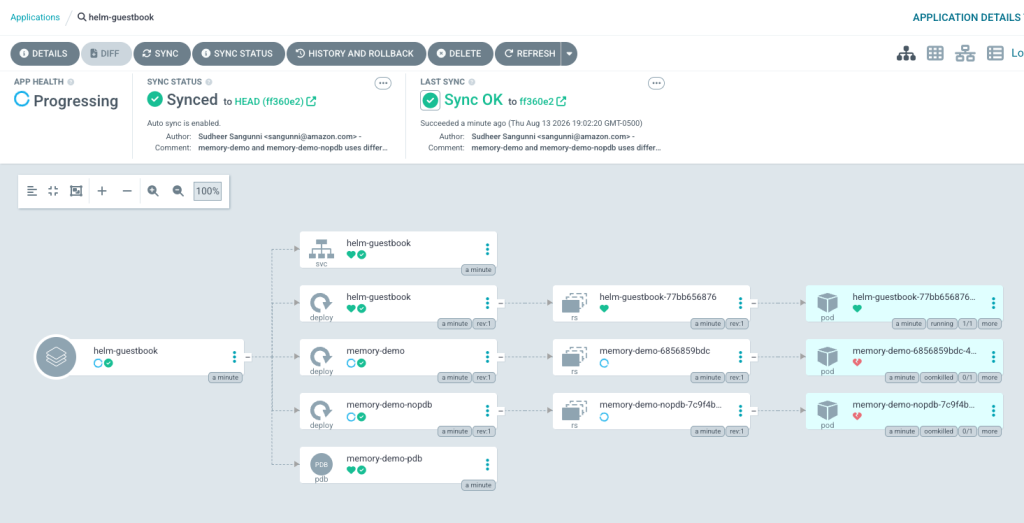
Figure2: Helm-Guestbook application deployed on ArgoCD
Soon after, the memory-demo pod exceeds its memory limit and the OOM killer terminates it, which the Argo CD resource view shows.
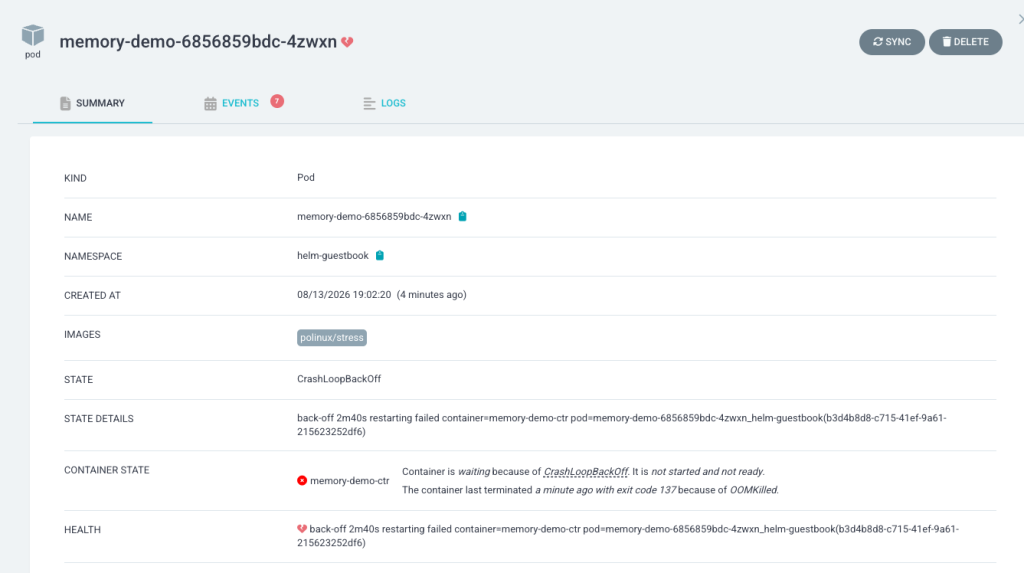
Figure 3: Memory demo application showing OOMKilled
You now have a cluster problem for DevOps Agent to investigate and remediate.
4.9 Trigger an investigation
In the DevOps Agent console, start a new investigation and set its description:
Use the eks-troubleshooting skill to identify issues with the EKS cluster ws-eks-1 in us-east-1. Do not continue if you cannot access the remote agent.
DevOps Agent then does the following: it retrieves diagnostics from the Argo CD agent, checks the guardrail agent for each affected deployment, adjusts memory for the deployment the guardrail agent allows, blocks the change for the deployment the guardrail agent denies, and reports the result.
First, DevOps Agent retrieves K8sGPT diagnostics from the Argo CD agent. The diagnostics identify the OOMKilled pods, including memory-demo in the helm-guestbook namespace.
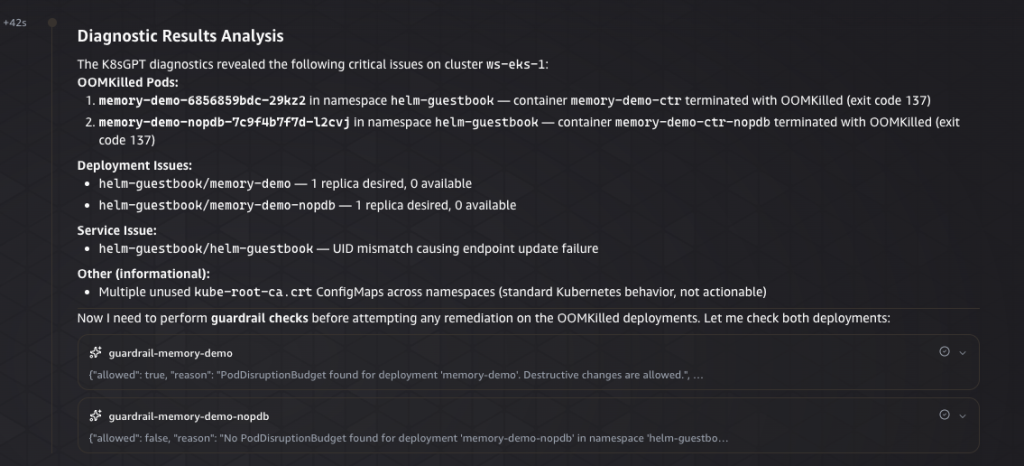
Figure 4: DevOps Agent showing results from k8sgpt
Next, DevOps Agent asks the guardrail agent about each affected deployment. The guardrail agent allows the change for memory-demo, which has a PDB, and denies it for memory-demo-nopdb, which does not.
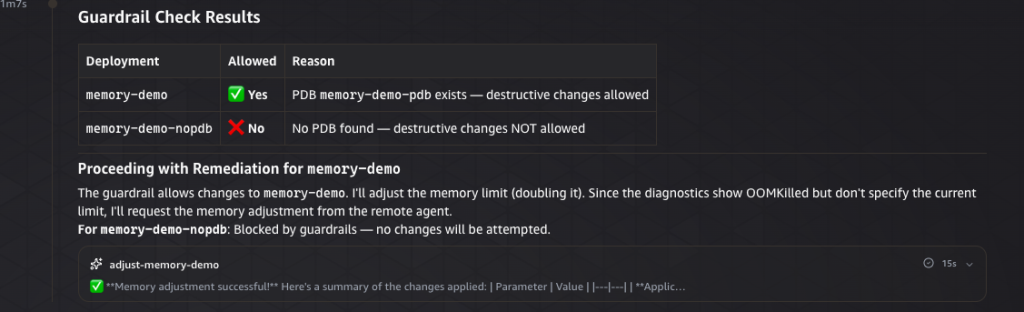
Figure 5: Guardrail Agent preventing updates to the cluster
Finally, DevOps Agent doubles the memory limit for the allowed memory-demo deployment, leaves memory-demo-nopdb unchanged, re-runs diagnostics to confirm memory-demo recovered, and reports what it did and what it blocked.
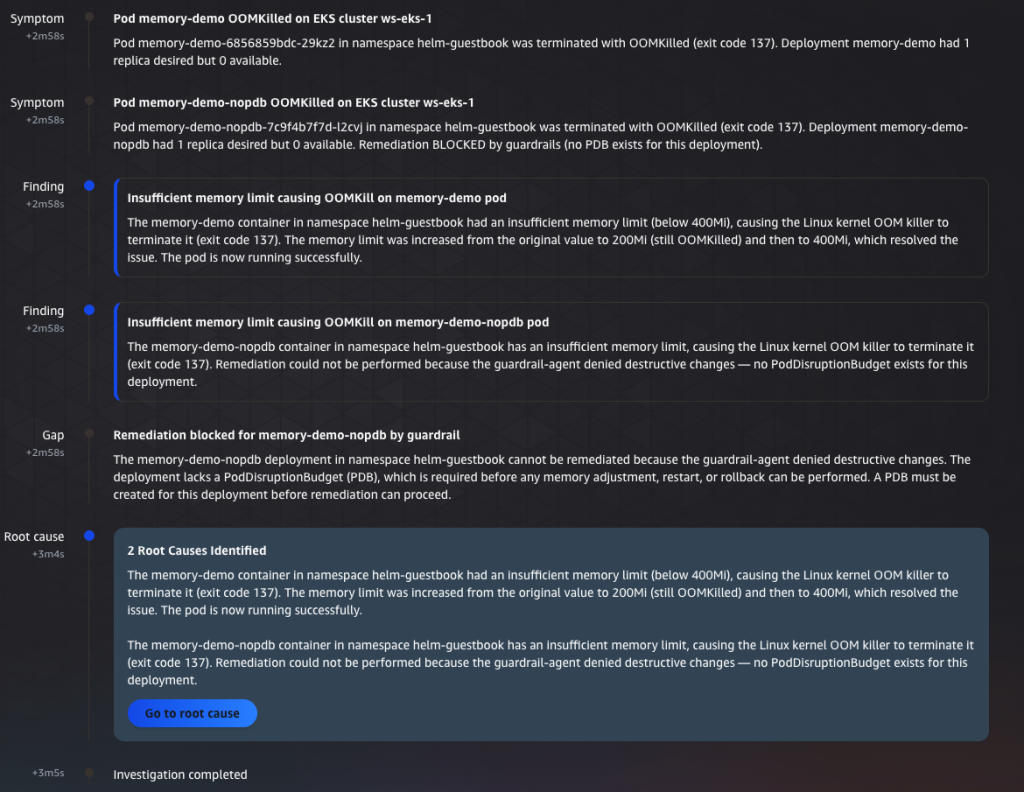
Figure 6: DevOps Agent Investigation Root Cause
5. Clean up
To avoid ongoing charges, remove everything you created. First, in the DevOps Agent console, choose Capability Providers, choose each agent, and then choose Deregister. Do this before you delete the IAM role, because the agents use it.
Then remove the rest. The destroy subcommands remove the agents from the cluster along with the Network Load Balancer, VPC link, and API Gateway resources they created:
# Remove the agents and their API Gateway, VPC link, and NLB resources
./deploy-argocd-eks.sh destroy
./deploy-guardrail-agent.sh destroy

# Remove the test application and its namespace
kubectl delete application helm-guestbook -n argocd
kubectl delete namespace helm-guestbook

# Remove the IAM role
aws iam delete-role-policy --role-name DevOpsAgentRemoteAgentInvokeRole --policy-name ApiGatewayInvoke
aws iam delete-role --role-name DevOpsAgentRemoteAgentInvokeRole

# Remove the Amazon ECR repositories
aws ecr delete-repository --repository-name argocd-agent-eks --region ${AWS_REGION} --force
aws ecr delete-repository --repository-name guardrail-agent --region ${AWS_REGION} --force

# Remove K8sGPT: the custom resource, the Helm release, and the namespace
kubectl delete k8sgpt k8sgpt-bedrock -n k8sgpt-operator-system
helm uninstall k8sgpt-operator -n k8sgpt-operator-system
kubectl delete namespace k8sgpt-operator-system

# Remove the K8sGPT Pod Identity association and its IAM role and policy
aws eks delete-pod-identity-association \
  --cluster-name $EKS_CLUSTER \
  --association-id $(aws eks list-pod-identity-associations --cluster-name $EKS_CLUSTER \
    --namespace k8sgpt-operator-system --query "associations[0].associationId" --output text) \
  --region $AWS_REGION
aws iam delete-role --role-name k8sgpt-app-eks-pod-identity-role
aws iam delete-policy --policy-arn arn:aws:iam::${ACCOUNT_ID}:policy/k8sgpt-bedrock-invoke
If you created the Amazon EKS cluster only for this walkthrough, delete it as well.
6. Cost
This walkthrough creates billable resources: a Network Load Balancer and API Gateway (hourly plus request charges), a VPC link, Amazon ECR image storage, Amazon Bedrock token usage from K8sGPT and the two agents, and the compute for the agent pods on your existing cluster. A short test session in us-east-1 typically costs a few US dollars, dominated by the Network Load Balancer and API Gateway hourly charges. Delete the resources when you finish. For current prices, see Elastic Load Balancing pricing, Amazon API Gateway pricing, Amazon ECR pricing, and Amazon Bedrock pricing.
7. Conclusion
The takeaway is that a separate guardrail agent lets the platform team own the change policy while every other agent, including ones built by other teams, has to pass through it before it changes anything. In this walkthrough you saw DevOps Agent fix an OOMKilled pod that the policy allowed and leave untouched the one it did not.
As a next step, replace the PDB check in the guardrail agent with a policy that matches your own change controls, such as a minimum replica count or a check against a change freeze window, and point a second action agent at the same guardrail agent to confirm the gate applies no matter who calls it.
The sample code is in the GitHub repository. Try it, open an issue or a pull request if you find a gap, and tell us in the comments what guardrail you would enforce first.