AWS Cloud Operations Blog
Investigate your AWS account activity in plain language with Amazon Q
AWS CloudTrail now integrates with Amazon Q in the AWS Management Console, letting you investigate your AWS account activity using plain language. CloudTrail records API activity across your AWS account for security auditing, compliance, and operational troubleshooting. Getting insights from this data has traditionally meant writing queries in Amazon Athena or Amazon CloudWatch Logs Insights, and knowing which one to reach for. Whether you are a compliance officer checking logging coverage, a security analyst triaging an incident, or a developer debugging a broken automation, you needed a query language or someone who knew one. Now, you can ask Amazon Q a question about your CloudTrail data and get the pattern, root cause, and recommended fix back, all without writing a single query.
With this integration, Amazon Q investigates on your behalf. It automatically selects where to read based on how your CloudTrail is configured. For management events, it queries your Event history, which is available by default with no setup. When a question goes beyond what Event history can filter on directly, Amazon Q adapts. For error-code or source-IP questions, it filters your recent events itself. For data events such as Amazon Simple Storage Service (Amazon S3) object access, it queries the Amazon CloudWatch log group your trail delivers to, which it locates for you. It gives you answers grounded in your actual account activity. Questions tend to fall into three broad kinds:
- Configuration and coverage. “Is my CloudTrail turned on?”, “What’s my logging coverage?”, “Am I logging AWS Lambda data events?”, “What data sources is my CloudTrail connected to?”
- Security investigations. “Who accessed the Admin role?”, “Were there any unauthorized access attempts in the last week?”, “Who modified this security group?”, “Show me all AWS Identity and Access Management (IAM) policy changes made in the last 48 hours.”
- Operational troubleshooting. “Who created or deleted this resource?”, “Which API calls are generating AccessDenied errors?”, “Find all events from IP address 203.0.113.50”, “Is there anything CloudTrail related that could have spiked my bill?”
In this post, we walk through four examples so you can confirm your logging coverage, investigate access-denied errors, attribute a change and assess its risk, and see who accessed your data, all in plain language.
Confirm your logging coverage
Is my CloudTrail turned on and what is my logging coverage?
Amazon Q inspects your CloudTrail configuration and reports your posture in plain language (Figure 1): whether logging is on, the home Region, multi-Region status, global service event coverage, and log file validation. It flags gaps and offers to close them. In our test it found an active, multi-Region trail with log file validation enabled, delivering to Amazon S3, and flagged that data events and CloudWatch Logs were not configured. In seconds, you know how your trail is configured and where the gaps are.
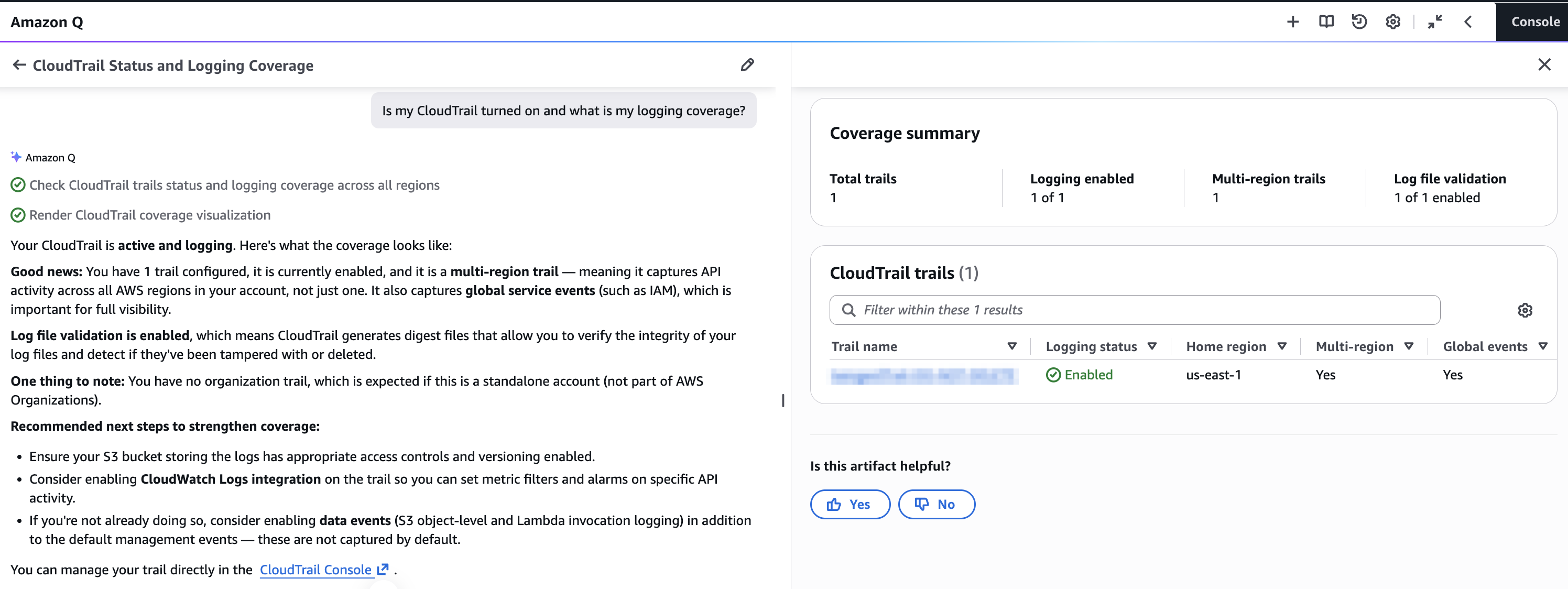
Figure 1. CloudTrail logging coverage.
Investigate a failing automation
This is where it earns its keep.
Give me the list of access denied events for the nightly-report-job user in the last 24 hours.
Say a scheduled job, nightly-report-job, starts throwing errors. Ask Amazon Q for its access-denied events. It returns them as a table (Figure 2), then goes further by analyzing the pattern, identifying the root cause, and recommending a fix.
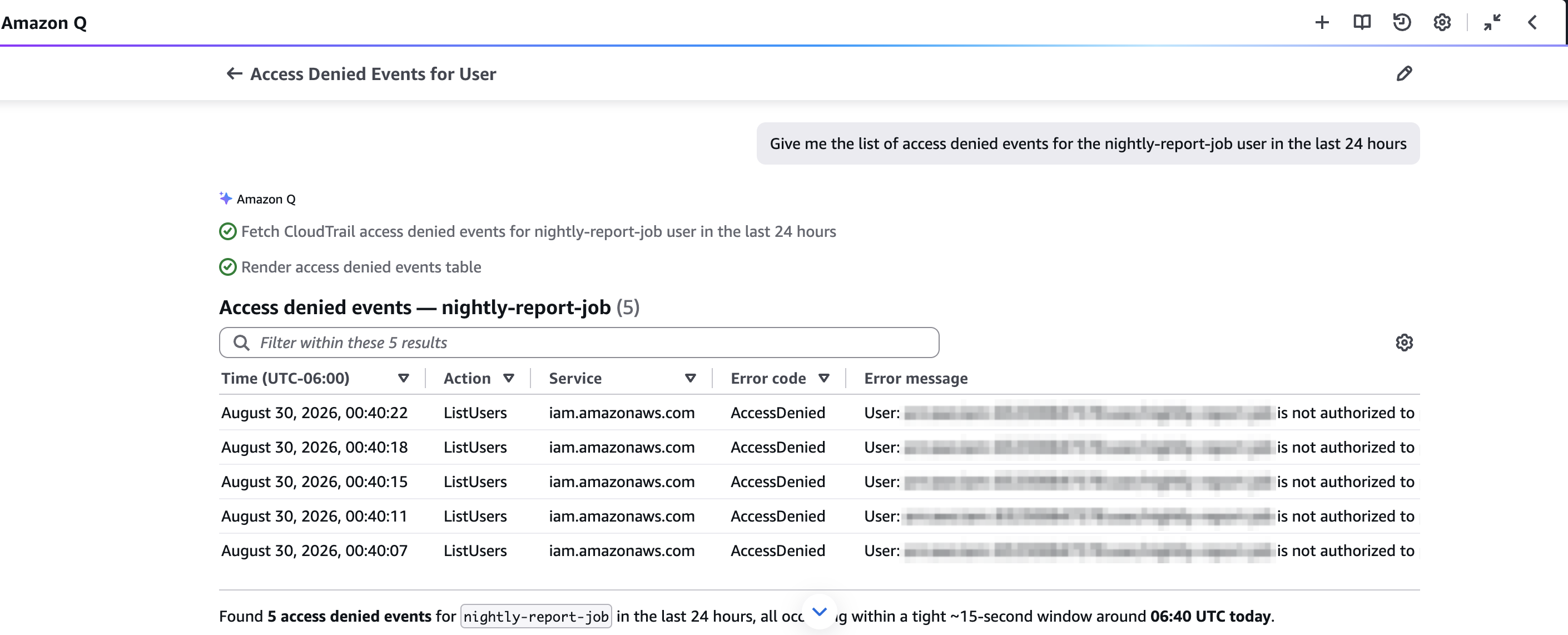
Figure 2. Access-denied events table.
In our test it found five AccessDenied events, all the same iam:ListUsers call from the same principal (the identity making the call) in quick succession. The pattern was a retry loop repeatedly hitting a missing permission. The calls came from an AWS-owned IP, which pointed to an internal job on Amazon EC2 or Lambda rather than an external actor. Amazon Q traced the root cause to the principal lacking iam:ListUsers and gave the exact IAM policy statement to fix it (Figure 3). Pattern, source, root cause, and remediation, all from one question.
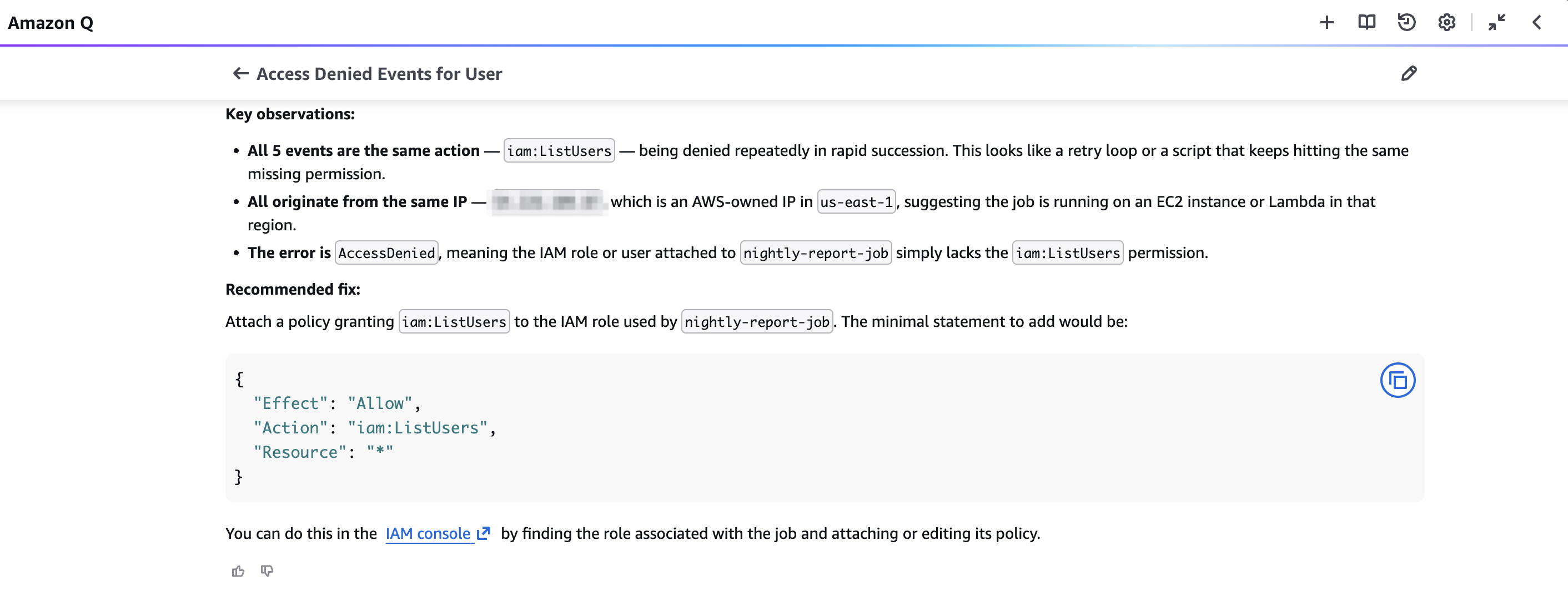
Figure 3. Root cause and recommended fix (policy statement plus follow-up actions).
Attribute a change and assess its risk
Who created temp-admin-access-role, what policies are attached, and are there any security concerns?
Amazon Q draws on your CloudTrail record to answer the “who and when”: the role was created moments ago via an assumed admin role, from the AWS CLI in AWS CloudShell. It combines that with the role’s current configuration to flag the risk (Figure 4): the role carries AdministratorAccess (full account access), its trust policy (which controls who or what can assume the role) has no conditions restricting that, and despite its “temp” name it has no expiry. Amazon Q proposes concrete fixes for each. Attribution from CloudTrail, a risk assessment alongside it, from a single question.
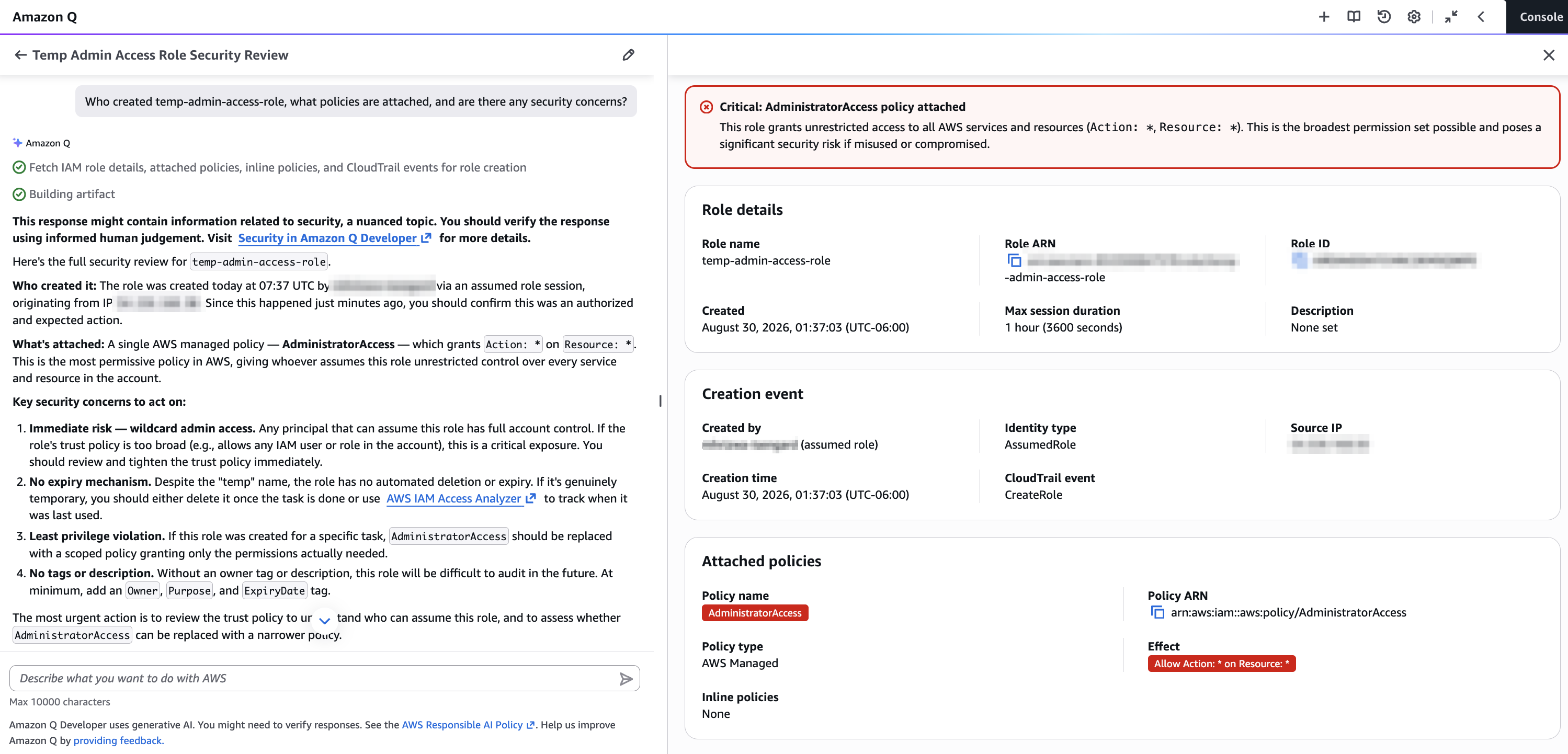
Figure 4. Attribution plus a security review flagging AdministratorAccess.
See who accessed your S3 data
Who accessed objects in my S3 buckets in the last hour?
The first three questions all drew on management events, which record configuration changes and are captured by default. Object-level access is different: reading a file from Amazon S3 is a data event, and data events are not logged unless you enable them. This is the gap Figure 1 flagged. Once you turn on S3 data events and deliver that trail to Amazon CloudWatch Logs, this question works too, and you do not need to know where the events are delivered. Amazon Q discovers the log group itself, queries it, and returns each read with the identity, the action, and the bucket (Figure 5). In our test it found five GetObject calls on the same object by the same IAM user inside about ten seconds.
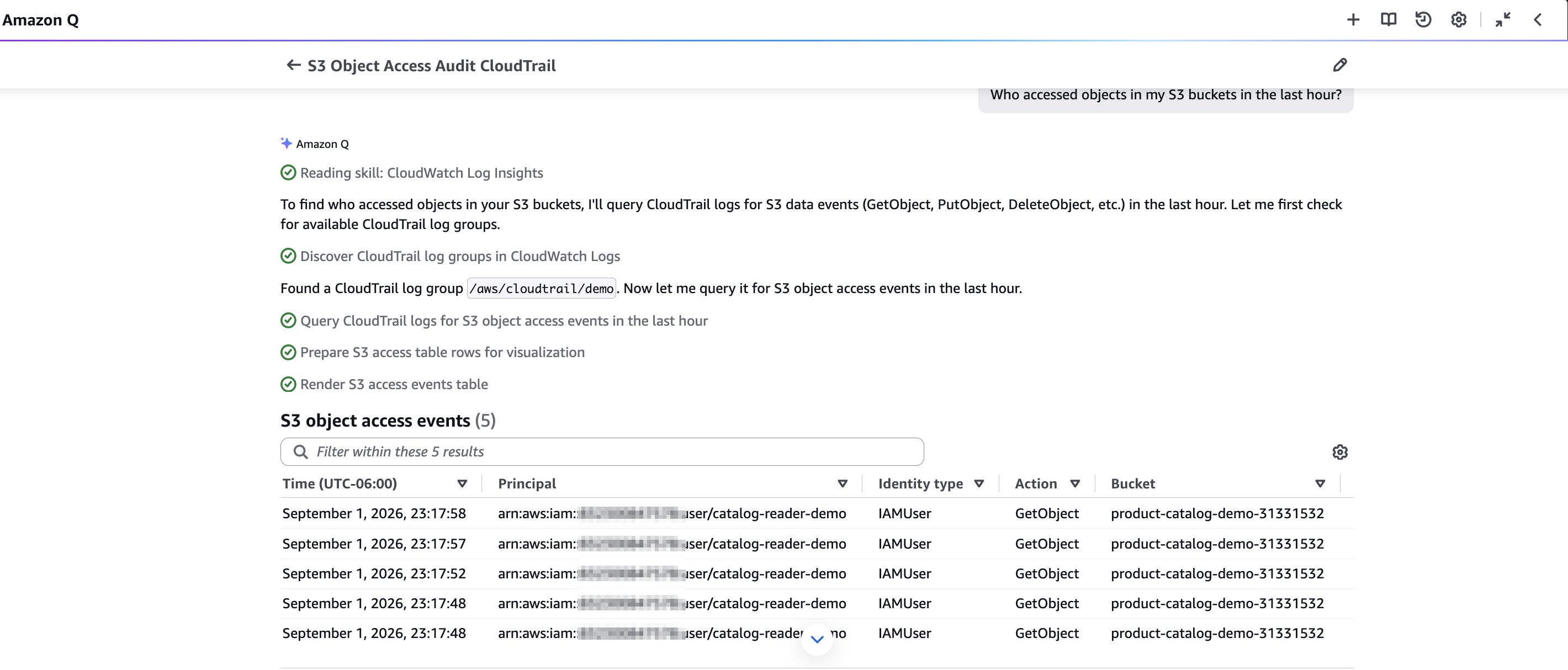
Figure 5. Object-level access, from S3 data events delivered to CloudWatch Logs.
Considerations
These are the practical boundaries of what Amazon Q can answer, and what you need in place first.
- Verify before acting. Amazon Q uses generative AI, so treat findings as a well-informed starting point and confirm against the underlying events, especially for security-sensitive conclusions.
- No setup for management events. Event history is on by default and retains the last 90 days of management events, so lookups by event name, user, or resource work immediately. Error-code and source-IP questions also work from Event history, though Amazon Q applies those filters itself, so results are bounded to your most recent activity.
- Data events are opt-in. Object-level activity (Amazon S3 object access, AWS Lambda invokes) is not captured by default. Enable data events on a trail and deliver that trail to Amazon CloudWatch Logs so Amazon Q can query them. Data events and CloudWatch Logs ingestion are billed separately.
- Your permissions, read-only. Answers are scoped to what you’re already authorized to see; there’s no privilege escalation and nothing to grant.
- Across Regions and accounts. A multi-Region trail lets Amazon Q reason across Regions in one session. For multi-account investigations, centralize your organization trail into a source Amazon Q can query, such as Amazon CloudWatch Logs. Without a central source, Amazon Q focuses on the account you’re signed in to.
- Long-range forensics. Event history retains 90 days. If your trail delivers to Amazon CloudWatch Logs with a longer retention period, Amazon Q can reach management events older than that. For activity beyond what your log group retains, query your trail’s S3 logs with Amazon Athena.
Nothing is provisioned by asking questions. If you enabled data events or CloudWatch Logs delivery to follow along, remember to delete any resources you created.
Top 10 questions to ask Amazon Q about your CloudTrail activity
Once you’re set up, here are ten of the most useful prompts to try. Copy any of them into Amazon Q.
- Check your logging coverage and gaps: “Is my CloudTrail turned on and what’s my logging coverage? Are there any gaps?”
- Audit AWS KMS key usage: “What KMS key operations happened in my account today?”
- Track infrastructure changes: “What CloudFormation stacks were created or deleted this week?”
- Audit IAM changes: “Show me all IAM policy changes made in the last 48 hours.”
- Spot unauthorized access: “Were there any unauthorized access attempts to my account recently?”
- Monitor root user activity: “Show me all root user activity in my account for the past month.”
- Investigate activity from an IP address: “Find all events from IP address 203.0.113.50 in the past day.”
- Recover the story of a deleted resource: “Someone deleted a file from my S3 bucket, can you find out who?”
- Audit Lambda invocations: “Who invoked my Lambda functions in the last week?”
- Investigate a cost anomaly: “Is there anything CloudTrail-related that could have spiked my bill?”
Conclusion
Investigating CloudTrail used to mean knowing a query language and the shape of your data. Now it’s a conversation: you ask, Amazon Q investigates your own activity, and you get an answer with the evidence and the next step. We showed four investigations: confirming your logging coverage, tracing a failing automation to a missing permission, attributing a change to an identity along with its risk, and identifying who accessed objects in Amazon S3, each from a single plain-language prompt. Open Amazon Q in the AWS Management Console and ask about your CloudTrail configuration or activity. It’s available in all AWS commercial Regions where Amazon Q in the console is supported, at no cost on the Amazon Q Developer Free tier. To learn more about CloudTrail, see the AWS CloudTrail User Guide.
Prefer an IDE or agent? The open-source AWS Labs CloudTrail Model Context Protocol (MCP) server brings the same querying to AI agent frameworks, coding assistants, and tools like Kiro.