Networking & Content Delivery
Automating AWS Application Load Balancer Capacity Unit Reservation
Building resilient and fault-tolerant systems in Amazon Web Services (AWS) is essential for maintaining stable workloads. When designing cloud architecture, the ability to handle sudden traffic surges becomes a critical consideration. Elastic Load Balancing (ELB) serves as the primary entry point for distributing both external and internal traffic efficiently across applications. In this post, we explore a solution that automates Load Balancer Capacity Unit (LCU) reservation for Application Load Balancers (ALB) in an AWS Organizations multi-account environment, helping prepare for sharp traffic increases across multiple load balancers.
This solution uses the ELBV2 API to automate ALB capacity provisioning, pre-warming ALBs before anticipated traffic surges and resetting LCU values after the event. The solution automates these processes and thus helps optimize LCU costs while maintaining performance during peak traffic periods.
This solution can scale to handle hundreds of ALBs running in an Organizations environment. It identifies ALBs based on specific tags and sets the LCU reservation values accordingly. Manually managing such a large fleet of ALBs could be cumbersome and error-prone, making this automated approach particularly valuable. You can deploy this solution in your AWS account by downloading the AWS CloudFormation template hosted on AWS public GitHub repository.
Some of the typical use cases that may necessitate LCU reservation across multiple load balancers include the following:
- Stock trading companies (FSI Capital Markets)
- Sports event organizers
- Ticket sales platforms
- Large advertising campaigns
Our previous post, Using Load Balancer Capacity Unit Reservation to prepare for sharp increases in traffic, explained the feature and its use cases. This post focuses on implementing it in a scalable and automated way, across various load balancers and AWS accounts.
ALB scaling and capacity reservation
An LCU measures the maximum resource consumption across different dimensions of ALB traffic processing, such as new connections, active connections, bandwidth, and rule evaluations. You can use LCU to reserve a minimum capacity for your load balancer for a specified period. Although ALBs automatically scale to handle organic traffic growth by adding capacity. It effectively manages most workloads and traffic variations. You should consider LCU reservation when you anticipate traffic spikes that more than double your normal traffic volume in less than five minutes.
The following graph demonstrates an ALB’s LCU consumption during a traffic surge, comparing provisioned capacity against actual LCU utilization.
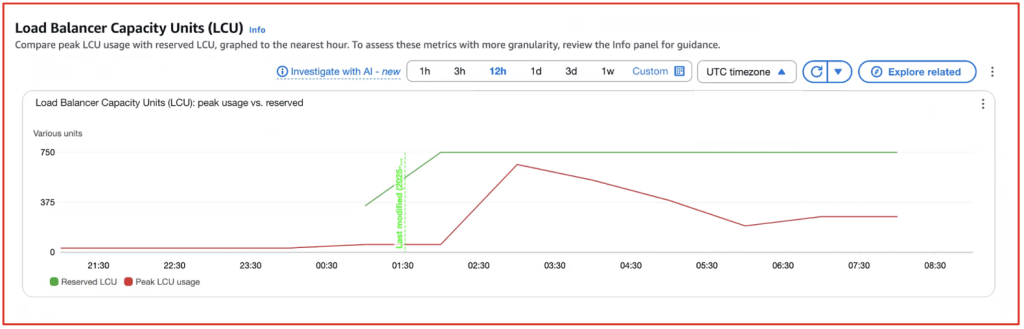
Figure 1: Load Balancer Capacity Units (LCU) peak usage vs. reserved LCU
Managing predictable yet volatile trading platform traffic
In this post we explore a scenario for a Financial Services Industry – Capital Markets use case for LCU reservation for stock trading applications. Stock trading applications experience predictable traffic patterns, with peak volumes during market hours (9:00 AM – 4:00 PM) and spikes at market open and close, especially on Mondays or during significant events. This creates common challenges, particularly when markets reopen after weekends, as applications face a sudden surge in traffic. Stock trading companies often use multi-account architectures with multiple ALBs to meet regulatory requirements, enhance security, and make sure of fault isolation. Although this setup is essential for handling millions of concurrent users, it complicates ALB capacity management across accounts. Automating ALB capacity reservation across multiple accounts is crucial for stock trading platforms to make sure of sufficient LCUs during peak trading hours. This automation eliminates manual overhead while maintaining performance and reliability. The solution focuses on using LCU reservation for two daily spikes at 9:00 AM and 4:00 PM. However, comprehensive preparation for high-load events should also include scaling load balancer targets and dependencies.
Solution overview
This solution enables you to centrally manages ALB’s provisioned capacity across multiple accounts in a large organization. Rather than configuring each ALB manually in the member accounts, the solution implements a centralized, automated approach.
Two AWS Lambda functions are deployed in the Organization’s management account. These functions use AWS Security Token Service (AWS STS) Assume Role to access the ALBs running in member accounts, an Amazon DynamoDB table, and AWS Identity and Access Management (IAM) roles for the organization.
The first Lambda function scans ALBs across member accounts and stores ALB information in a DynamoDB table within the management account, while the second function sets and cancels LCU reservations for the ALBs. These functions are triggered on a schedule by Amazon EventBridge Schedulers.
To identify ALBs that need LCU capacity provisioning, they must be tagged with:
- Key = ALB-LCU-R-SCHEDULE
- Value = Yes
To set the LCU value, ALBs must be tagged with:
- Key = LCU-SET
- Value = <LCU value>
The process operates in three stages
- A few hours before the event starts, EventBridge Scheduler invokes a Lambda function that scans for ALBs tagged with “ALB-LCU-R-SCHEDULE = Yes” across all member accounts. The function collects key information from the ALBs (such as Amazon Resource Names (ARNs), names, account IDs, and LCU value set as TAG) and stores this data in a DynamoDB table within the management account.
- One hour before the event starts, a second Lambda function activates by EventBridge Scheduler. This function retrieves ALB information from the DynamoDB table and gradually adjusts the capacity on these ALBs. The capacity is configured based on the “LCU-SET” tag value.
- After stock market closes, another EventBridge Scheduler invokes same Lambda function from step two, resets the LCU capacity for all ALBs, optimizing costs during off-hours.
This process significantly reduces operational overhead while making sure that ALBs are optimally configured for both performance and cost-efficiency. We have centralized the management and used AWS services such as Lambda, DynamoDB, and Organization to create a scalable solution capable of managing hundreds of ALBs across multiple accounts.
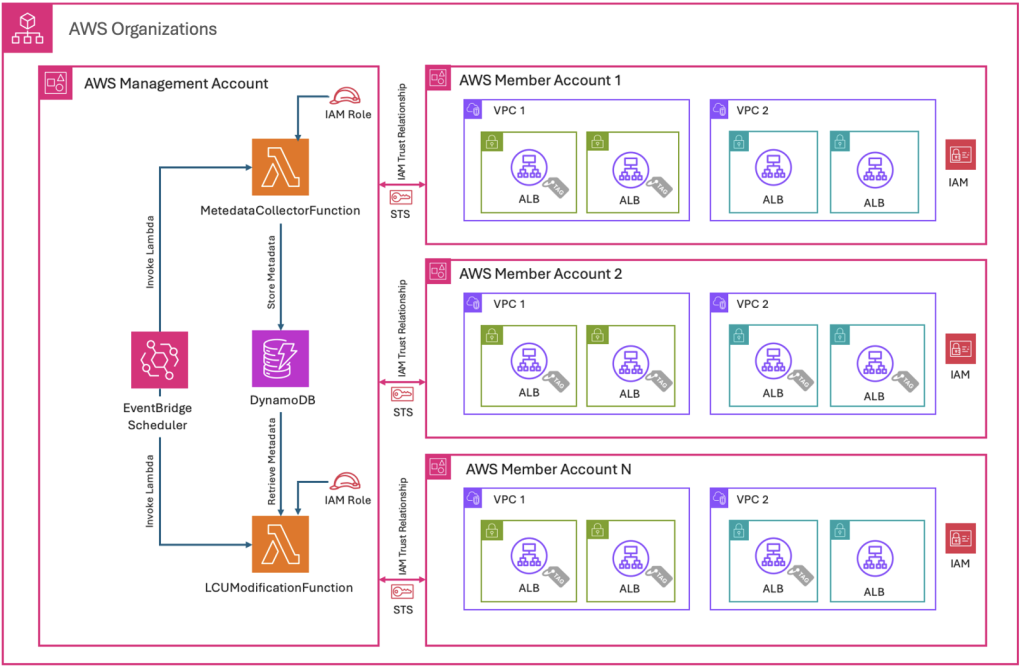
Figure 2: Solution architecture and implementation flow
End-to-end execution flow overview
The preceding architecture demonstrates the end-to-end execution flow. This can be split into two flows: First, the ALB metadata collection flow, where execution collects metadata information from ALB and stores it in a DynamoDB table. Second, the ALB update flow, which initiates before the event starts. This flow retrieves the ALB and LCU information from the DynamoDB table and sets the LCU of ALBs. When traffic normalizes, this flow triggers again and resets the LCU value.
A. ALB metadata collection flow:
When EventBridge Scheduler runs in the management account, it invokes the “MetadataCollectorFunction” Lambda function, which runs in the management account with logic to describe and collect ALBs deployed across member accounts with specific tags. The Lambda function “MetadataCollectorFunction” assumes an IAM STS role to describe the member account ALBs, collects their metadata, and stores this information in a DynamoDB table in the management account, as shown in the following figure.
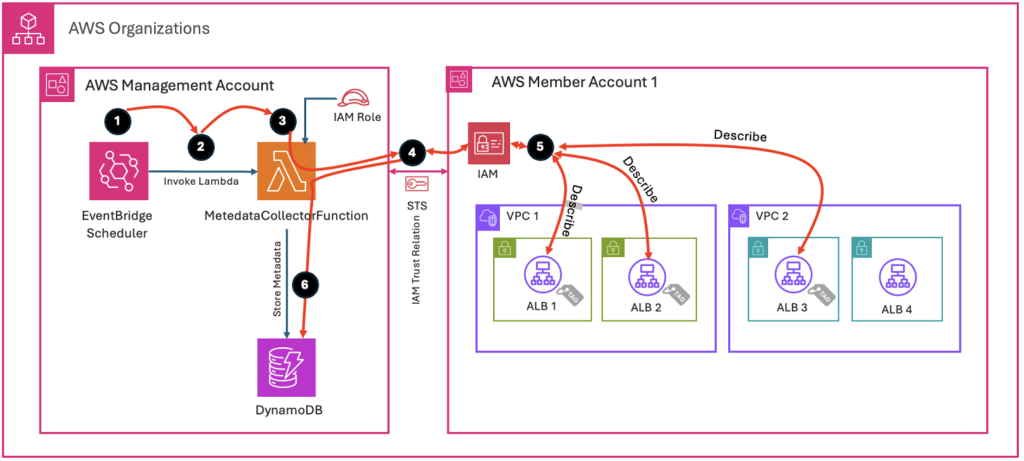
Figure 3: Execution flow diagram for ALB metadata collection
B. ALB update flow:
When EventBridge Scheduler runs in the management account, it invokes the “LCUModificationFunction” Lambda function, which runs in the management account with logic to set the Provisioned Capacity for ALBs deployed across member accounts with specific tags. The Lambda function “LCUModificationFunction” extracts the ALB metadata information from the DynamoDB table, then assumes an IAM STS role to update the ALBs with LCU values or Reset the LCU, as shown in the following figure.
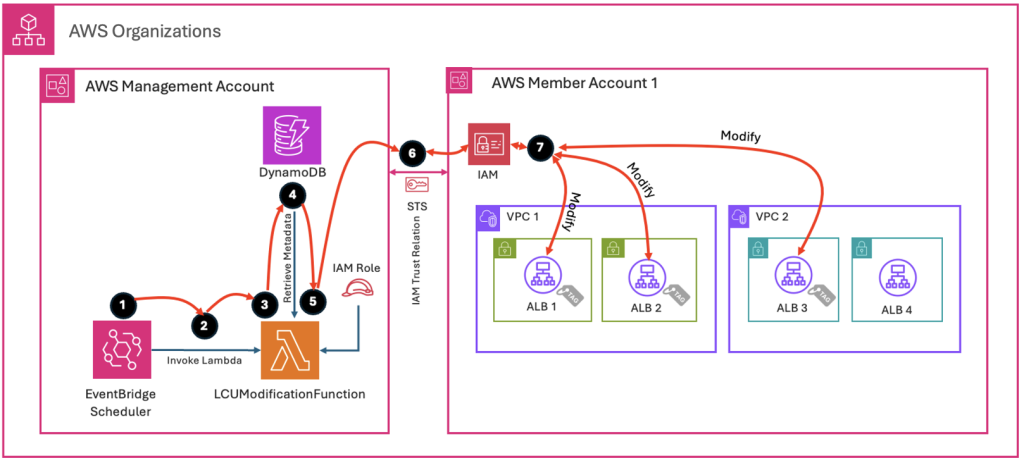
Figure 4: Execution flow diagram for updating ALB LCU values
Lambda function cross-account access in AWS Organizations
The Lambda function in the management account uses AWS STS to assume roles in member accounts. This is made possible through a trust relationship that allows the management account’s Lambda execution role to assume the cross-account role. Each member account contains an IAM role with permissions to modify ALB attributes and maintains a trust relationship with the Lambda execution role in the management account.
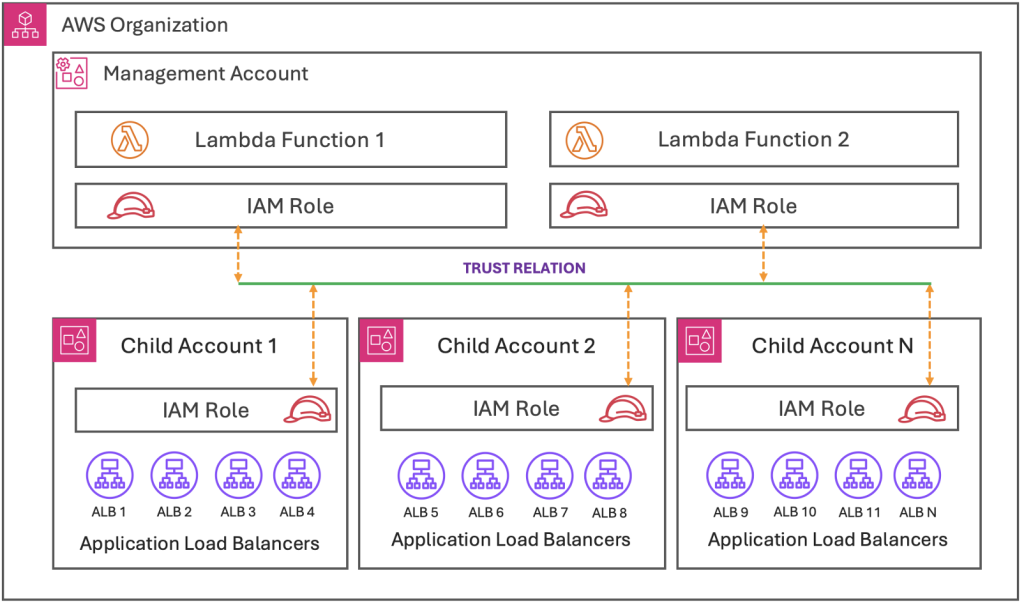
Figure 5: Cross-account trust relationship architecture for centralized ALB management
Prerequisites
Management account requirements
- Organizations must set up and configure all member accounts with proper enrollment.
- Management accounts should not have any IAM roles that conflict with the name of the role being deployed.
Member account requirements
- All member accounts must be registered and active with Organizations.
- Member accounts should not have any IAM roles that conflict with the name of the role being deployed.
- Add the following tags to the ALB for which you want to provision capacity. For instructions on how to add tags, refer to refer to “Tag an Application Load Balancer” in the documentation.
| Key | Value | Description |
| ALB-LCU-R-SCHEDULE | Yes | Value Yes indicates that this ALB is subject to be prewarming |
| LCU-SET | 100 | This TAG indicates the LCU value to be set for this ALB. The minimum LCU value is 100, set the value according to your needs.
For guidance on calculating the LCU Reservation, refer to the post Using Load Balancer Capacity Unit Reservation to prepare for sharp increases in traffic |
Solution implementation using AWS CloudFormation template
This solution is comprised of two CloudFormation templates, one for the management account and the other for member accounts. To implement this solution, you need to download the CloudFormation templates from the following GitHub link. After obtaining the templates, follow the instructions to deploy them in your AWS environment.
The solution is available in the following GitHub repository: GitHub repo link for AWS ALB Capacity Reservation Automation solution
- Management Account: ALBCapacityAutomationMgmtAccount.yaml
- Member Account(s): ALBCapacityAutomationMemberAccount.yaml
Deployment instructions
A. To create resources using the CloudFormation template in the management account, follow these steps:
-
- Sign in to the AWS Management Console.
- Navigate to the CloudFormation console > Create Stack > With new resources.
- Upload the YAML template file and choose
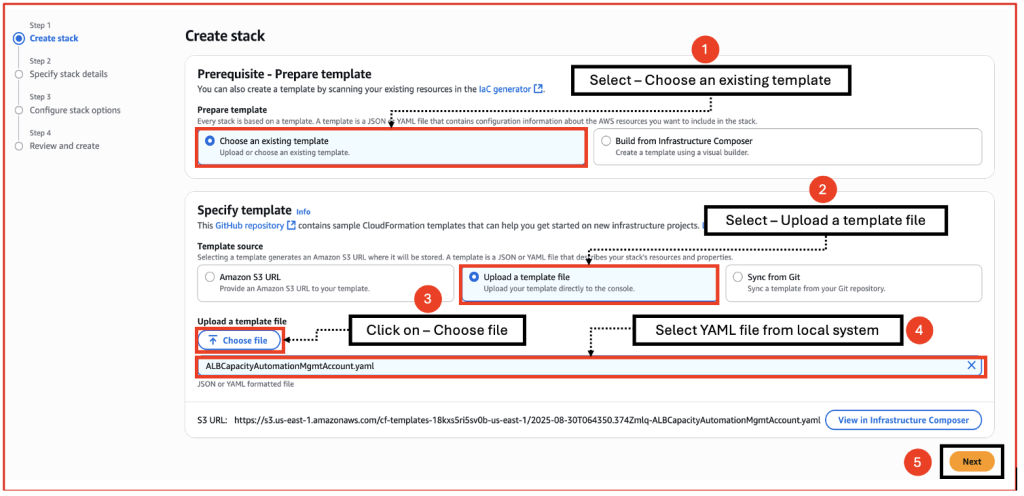
Figure 6.a: Uploading YAML template file for stack creation
-
- Enter a Stack name, review the parameters, and choose
When deploying the Management account template, you can modify the schedule time and day for each one of the three events. Refer the cron syntax in the EventBridge documentation.
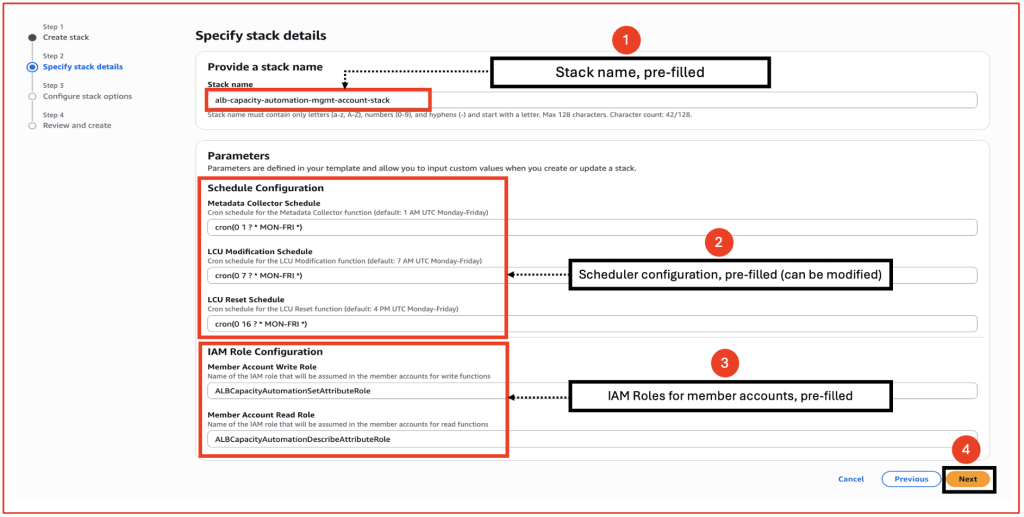
Figure 6.b: CloudFormation stack configuration screen with pre-filled parameters
- Keep the Configure stack options at their default values and choose
- Review the details on the final screen and under Capabilities, check the box for I acknowledge that AWS CloudFormation might create IAM resources with custom names.
- Choose
B. To create resources using the CloudFormation template in member accounts, follow these steps:
-
- Sign in to the Console.
- Navigate to the CloudFormation console > Create Stack > With new resources.
- Upload the YAML template file and choose Next.
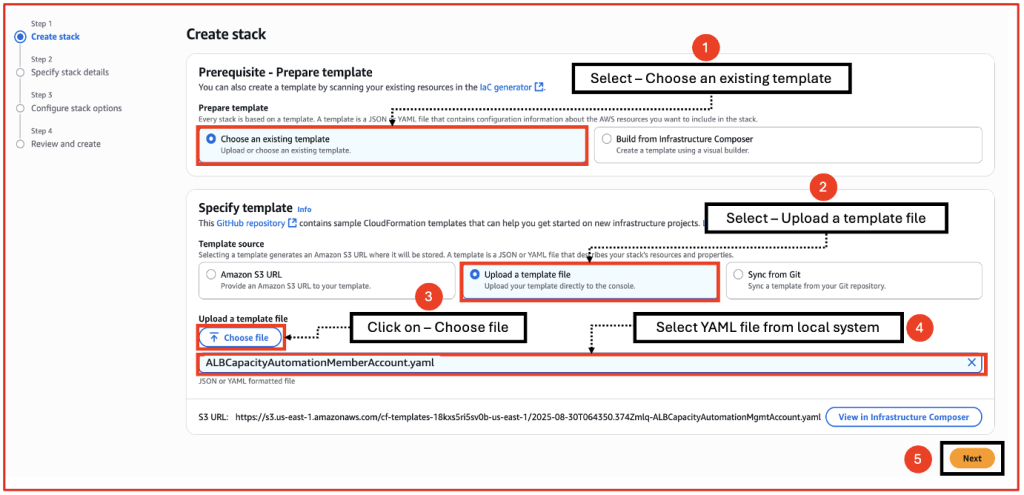
Figure 7.a: Uploading YAML template file for stack creation
-
- Enter a Stack name, review the parameters, and choose Next.
- When deploying the Management account template, you can modify the schedule time and day for each one of the three events. Refer the cron syntax in the EventBridge documentation.
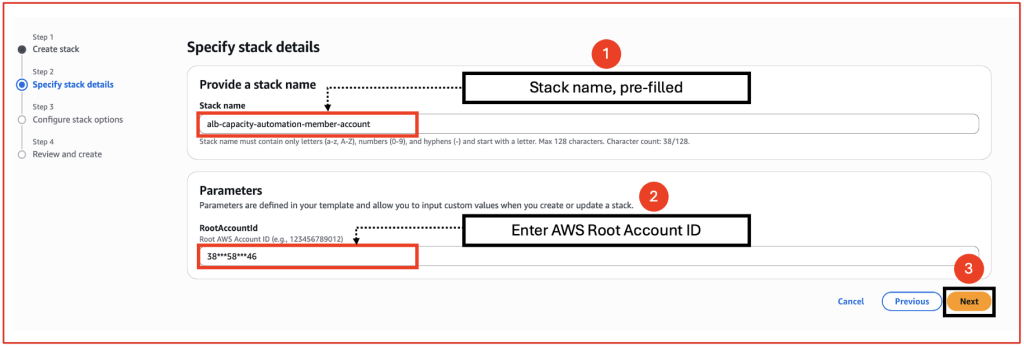
Figure 7.b: CloudFormation stack configuration screen with pre-filled parameters
- Keep the Configure stack options at their default values and choose Next.
- Review the details on the final screen and under Capabilities, choose the checkbox I acknowledge that AWS CloudFormation might create IAM resources with custom names.
- Choose
Upon successful deployment, the CloudFormation templates create the following resources:
- In the Management account:
- Two Lambda Functions
- One DynamoDB table
- Three EventBridge Schedulers
- Two IAM roles in the Management account
- In the Member accounts:
- Two IAM roles with trust policies
Invoking Lambda functions with EventBridge Scheduler
|
# |
EventBridge Scheduler |
Lambda function |
|
1 |
ALBautomation-MetedataCollector |
ALB-CapacityAutomation-MetadataCollector-Lambda |
|
2 |
ALBautomation-LCUModification |
ALB-CapacityAutomation-LCUModification-Lambda |
|
3 |
ALBautomation-LCUReset |
ALB-CapacityAutomation-LCUModification-Lambda |
Clean up
To clean up AWS resources deployed through CloudFormation, delete the associated CloudFormation stack using the CloudFormation console.
- Navigate to the CloudFormation console: Sign in to the Console and open the CloudFormation console.
- Choose the stack: Choose the stack you want to delete from the list of stacks.
- Initiate deletion: Choose Delete.
- Confirm deletion: A confirmation window may appear listing resources that might fail to delete. Choose any resources that you want to retain (if applicable), then choose Delete stack.
- Monitor Progress: Watch the stack’s status in the console as it transitions to DELETE_COMPLETE.
Troubleshooting
The best way to troubleshoot the Lambda functions is by examining their execution logs. The solution provides detailed logging for each step. Refer to the documentation Access function logs using the console for step-by-step instructions on viewing the logs.
Conclusion
In this post, we demonstrated an automated solution that efficiently manages ALB provisioned capacity across multiple load balancers within an AWS Organization. The solution’s core components are AWS Lambda functions working in conjunction with Amazon EventBridge Scheduler, creating a system that intelligently handles LCU reservations through automated probing, commitment, and release processes.
This approach is especially beneficial for businesses experiencing predictable traffic spikes because it makes sure that their infrastructure is prepared for high-demand periods. The automation streamlines capacity management while optimizing costs by increasing capacity when needed and scaling down during quieter periods. Organizations can now move away from manual methods, reduce their operational workload, and implement a more efficient approach to handling LCU reservations across their AWS accounts and applications.
About the authors

Abhishek Dey
Abhishek is a Senior Technical Account Manager for the Financial Services Industry at Amazon Web Services (AWS). He leads the Networking Field Community for Enterprise Support in India, where he helps customers build and design scalable, highly available, secure, resilient, and cost-effective networks. He is a lifelong learner and tech enthusiast with a strong focus on Networking, Data Engineering, Generative AI, and cutting-edge technologies.

Sourav Bhattacharjee
Sourav is an Enterprise Support Manager at Amazon Web Services with over 20+ years of industry experience spanning consulting, advisory, and leadership. He leads the India FSI Enterprise Support customer segment, partnering with financial services organizations to drive strategic cloud adoption, foster executive relationships, and enable teams to build scalable, modern, and cost-effective solutions for customers.