Networking & Content Delivery
Cross-account canary routing with Amazon VPC Lattice and Amazon API Gateway
Modernizing a monolith into microservices may require placing each new service in its own AWS account for isolation, independent scaling, and clear ownership. During that migration you hit a hard question: how do you shift a small, precise slice of live traffic from the monolith to a new service in a different account? You need to watch how it behaves and roll it back quickly if something looks wrong.
This post explores a cross-account canary routing pattern that combines Amazon API Gateway canary releases with Amazon VPC Lattice service networking to achieve per-request, weighted traffic splitting across AWS accounts – with quick rollback and no custom routing code. In microservice architectures, teams often expose their internal applications through a centralized API Gateway where security protections are centrally managed.
The challenge: Cross-account canary routing
Organizations modernizing a monolithic application into microservices commonly adopt the strangler fig pattern: standing up new services alongside the monolith and gradually shifting traffic to them, service by service, until the monolith is retired. For scope isolation, IAM boundaries, and service-quota separation, many teams place each new service in its own AWS account. This multi-account microservices strategy provides strong security boundaries, independent scaling, and clear ownership. However, it introduces a critical networking challenge: how do you connect services across account boundaries while maintaining fine-grained traffic control?Teams need a network construct that enables microservices to communicate directly across AWS accounts – while also supporting canary routing. Canary routing lets you shift a small percentage of traffic to a new version of a service, validate its behavior in production, and gradually increase traffic only when confidence is established.
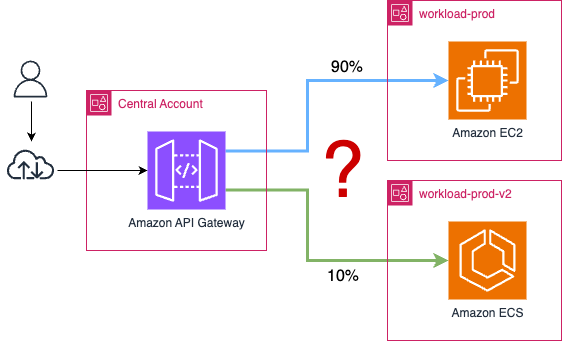
Figure 1 – Cross-account connectivity and weighted control
The challenge is two fold:
- Cross-account connectivity – Services in separate AWS accounts must discover and communicate with each other without complex networking overlays or tightly coupled configurations.
- Weighted traffic control – Teams must be able to route a precise percentage of traffic to a canary deployment, even when the target service lives in a different account.
VPC Lattice makes intra-account service routing straightforward; define your target groups, set your weights, and traffic flows exactly where you want it. In a situation where you have a multi-account setup and performing a migration where your monolith lives in an AWS account and new microservices need to live in their own AWS accounts, you hit a boundary. Lattice’s target groups are scoped to the owning account, so a single service can’t natively split traffic across accounts. That’s not a design flaw – it’s a scoping decision that keeps the service model clean. It just means you need a complementary layer to handle cross-account traffic shifting.This is where a request-level routing layer becomes essential. With API Gateway canary deployments, you can control traffic shifting, and with VPC Lattice you can connect services securely across accounts
Solution overview
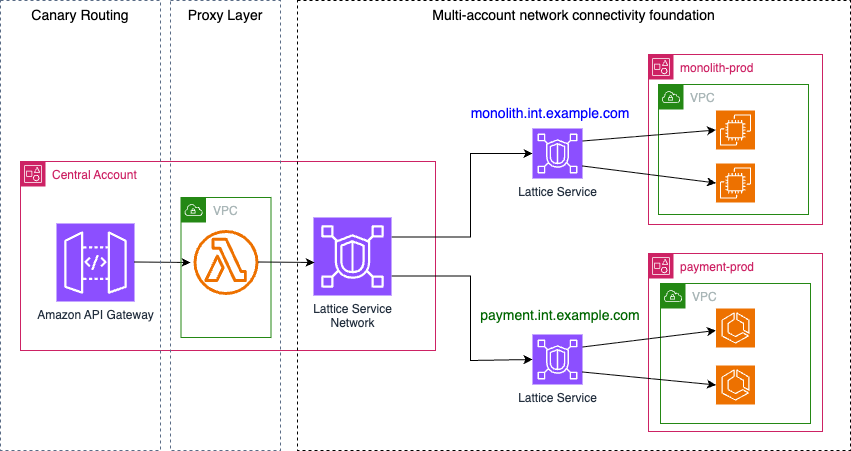
Figure 2 – Solution Overview
This post explores the building of this pattern using key AWS services. This architecture has the following key components:
- Multi-account network connectivity foundation
- Canary routing at API Gateway layer
- Proxy layer
Multi-account network connectivity foundation
In this architecture, there is a central AWS account that owns the centralized Amazon API Gateway responsible for exposing API endpoints to the public internet. You can then add layers of security protections against a variety of potential attacks by using Amazon Cognito, Amazon CloudFront, AWS Shield Advanced, and AWS WAF.
There are also workload AWS accounts that host the backend applications. In this architecture, there is a monolith application that resides in an AWS account – the idea is to use strangler fig pattern to replace a service/functionality with a new service or application. This new application will reside in separate workload accounts. The outcome required is being able to canary route from the old service to the new service, and this function will live in the API Gateway. A network connectivity foundation is required to forward traffic once the routing layer has decided which path to take. The networking foundation that makes this possible is VPC Lattice.
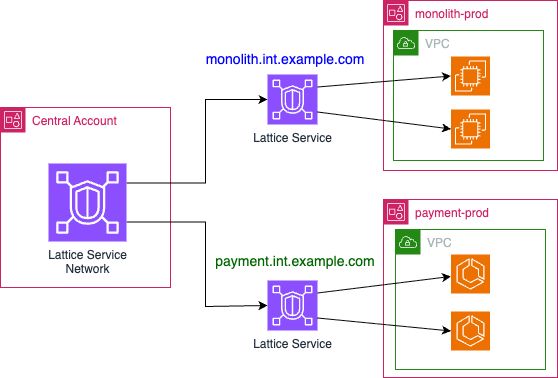 Figure 3 – Multi-account network connectivity foundation
With VPC Lattice, you can connect services across accounts and VPCs and acts as the secure transport layer in this architecture. It enforces zero-trust access controls at the service endpoint but does not perform canary routing in this multi account architecture. That logic lives upstream, in the API Gateway layer.
VPC Lattice connects the accounts through a shared service network. Depending on your operational model, you either share the service network from the central account or share each service from the workload accounts – either way, services become reachable by their managed DNS names, with no VPC peering or transit gateway. For details on sharing VPC Lattice across accounts, refer to Share your VPC Lattice entities in the Amazon VPC Lattice User Guide.
Canary routing at API Gateway layer
In this architecture, Amazon API Gateway serves a dual purpose: it is the public-facing entry point that exposes the API to consumers, and it is the layer that owns the canary routing decision. The REST API accepts all inbound requests and forwards them to a VPC-attached Lambda function (more on the need for the Lambda function later). The canary logic is implemented entirely through the API Gateway’s native stage canary feature – the stage defines a base stage variable (e.g. latticeTarget: monolith) for the initial service, and a canarySetting block used to override that variable to the new service (e.g. payments).On each incoming request, API Gateway itself makes the per-request decision by either invoking “monolith” or “payments”. The code below shows a canary to 10%, meaning that 10% of the time, the latticeTarget variable is set to “payments”, resulting downstream traffic to be routed the canary Lattice service. The weighting for the entire canary lives in the CanarySettings at the API Gateway stage, making rollback (set to 0) and promotion (ramp toward 100) a one-parameter update that requires no changes in the downstream infrastructure.
Proxy layer
Today, API Gateway cannot call a VPC Lattice service directly — it is a managed regional service with no presence inside a VPC, while Lattice endpoints are only reachable from a VPC associated with the service network. In this architecture, a forwarder Lambda fills that role.The forwarder is a stateless proxy. API Gateway invokes it on every request through a Lambda proxy integration, passing the HTTP request and resolved stage variables. The function reads the LatticeTarget value (“monolith” for base, “payments” for canary), maps it to the corresponding Lattice service DNS name, and forwards the request over HTTP, signing with SigV4 if the target service enforces IAM auth. Because the function’s ENI sits in a VPC associated with the service network, Route 53 Resolver resolves Lattice DNS names to the data plane’s link-local addresses. The forwarder makes no weighting decision; the canary split is owned entirely by the API Gateway stage. Two properties make the forwarder reachable across accounts:
- VPC attachment: The function runs in a fronting VPC in the central account, associated with the shared service network. This gives it access to every Lattice service in the network.
- Cross-account reach: Both workload accounts associate their Lattice services with the same shared service network. The forwarder reaches “monolith.int.example.com” and “payment.int.example.com” by their managed DNS names – no VPC peering, transit gateways, or custom routing required.
How a request flows end to end
With the three layers in place, let’s trace a single request through the architecture, as shown in Figure 2. The path is the same for every request — only the target the canary resolves to changes.
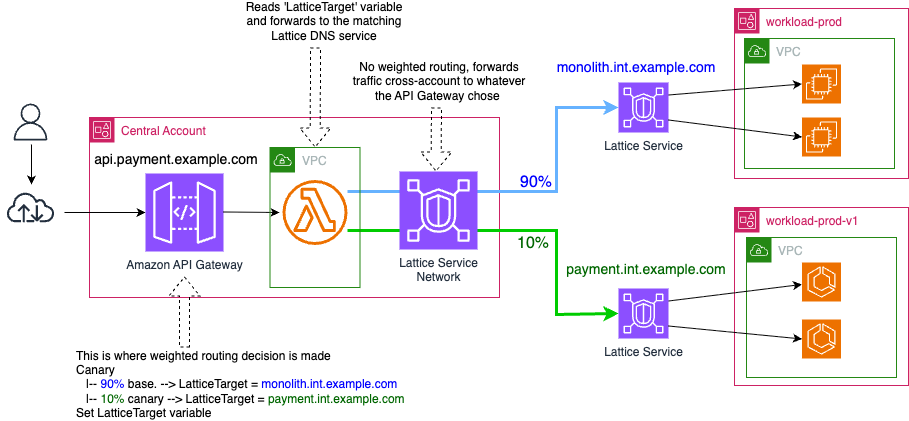
Figure 4 – End-to-end request flow
- (1) A client sends a request to the public API Gateway endpoint in the central account (for example, api.payment.example.com).
- (2) API makes the canary decision (in this case, 90% base and 10% canary) and sets the LatticeTarget variable based on decision (base: monolith, canary: payment)
- (3) API Gateway invokes the forwarder Lambda function through a proxy integration and passes the resolved stage variable in the event.
- (4) The forwarder (a VPC-attached Lambda function) reads LatticeTarget and forwards the request over HTTP to the matching VPC Lattice service DNS name
- (5) Traffic is forwarded to the appropriate Lattice service based on routing decision made in the API Gateway.
The result is a per-request canary decision made at the API Gateway layer and carried across the account boundary by VPC Lattice, with no weighting logic anywhere in the data path except the API Gateway stage. To change the split, you update one parameter on that stage; every subsequent request follows the new weighting immediately. If the canary target returns elevated error rates, you can set the canary percentage back to 0% to immediately route all traffic to the monolith.
Scaling to multiple services with independent canaries
The pattern described so far extracts a single service. In practice, a strangler fig migration decomposes the monolith into many services — payment, order, invoice — each with its own risk profile and migration timeline. One service may be battle-tested and ready for 30% canary traffic while another is still at 5%.API Gateway canary settings operate at the stage level – the percentage applies uniformly to every route in that stage. When you extract several microservices (for example, payment, order, and invoice), each service tends to have its own risk profile and migration timeline, so each one needs an independent canary percentage.
The approach is to deploy one API per extracted microservice, each with its own public domain (for example, “api.payment.example.com”, “api.order.example.com”, and “api.invoice.example.com”) and its own stage and canary percentage. Each API has its own forwarder Lambda function, but they all share the same fronting VPC and the single VPC Lattice service network. This gives you fully independent rollout control per service, as shown in Figure 5.
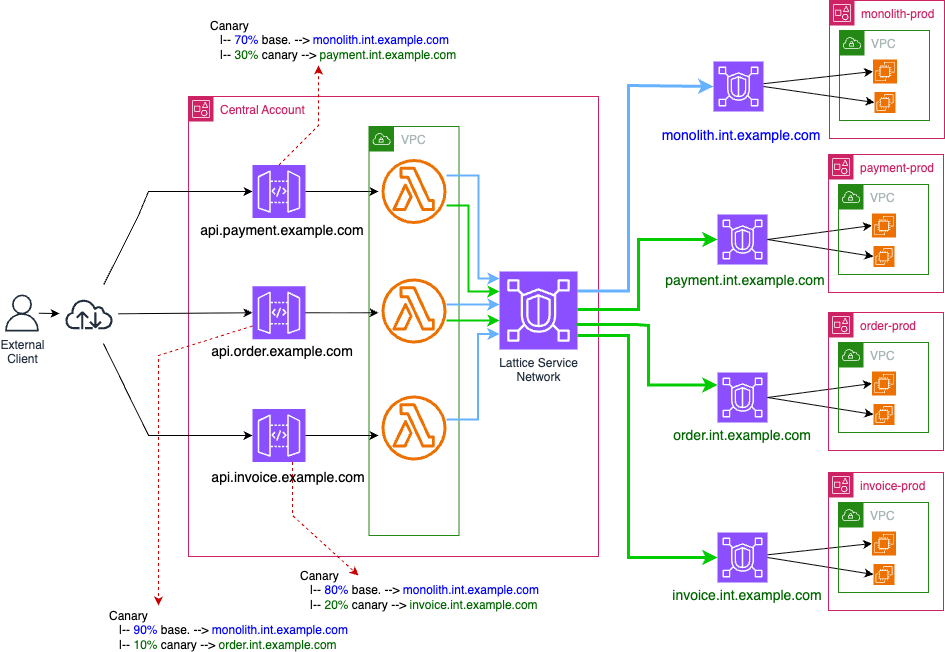
Figure 5: Scaling to multiple services with independent canary percentages
The following table is a representation of the canary configuration for the individual APIs shown in Figure 5.
| Microservice | API Gateway Domain | Base % | Canary % | Base Target | Canary Target |
| Payment | api.payment.example.com | 70 | 30 | monolith.int.example.com | payment.int.example.com |
| Order | api.order.example.com | 90 | 10 | monolith.int.example.com | order.int.example.com |
| Invoice | api.invoice.example.com | 80 | 20 | monolith.int.example.com | invoice.int.example.com |
Table 1 – API configuration showing canary deployment
Because every forwarder deploys into the same fronting VPC that is already associated with the shared service network, adding a new service requires only a lightweight API Gateway and forwarder Lambda function – not new VPC associations, AWS Resource Access Manager (AWS RAM) shares, or security-group changes. The shared infrastructure absorbs each new service without modification.
This also means rollback is scoped to a single service: setting Payment’s canary to 0% has no effect on Order or Invoice. Each gateway emits its own Amazon CloudWatch metrics (5XXError, Latency, Count) under a distinct API name, so monitoring and alarms map directly to the service under migration rather than being shared across unrelated workloads.
Considerations
- API Gateway cannot invoke VPC Lattice endpoints directly. A compute layer in a VPC associated with the service network is required to bridge the gap, in this architecture, a forwarder Lambda function is used.
- A Lambda function is the lightest proxy option, but any compute in an associated VPC (for example, a container behind an API Gateway VPC link) works. Lambda scales to zero and adds no standing infrastructure.
- In production, set AuthType: AWS_IAM on the service network and services, add SigV4 signing in the forwarder Lambda function so that requests are authenticated and authorized.
- When sharing the service network through AWS RAM outside an AWS Organization, set AllowExternalPrincipals: true and accept the invitation manually in each workload account.
- Refer to Amazon API Gateway quotas for limits on number of APIs per account per region. If you’re planning multiple APIs just to get independent canaries, that is usually fine from a quota perspective if you stay below the per-Region limit
Conclusion
In this post, we explored how to implement per-request canary deployments across AWS accounts by combining API Gateway canary releases with VPC Lattice cross-account service networking. By placing the canary control plane at the API Gateway layer, you sidestep the constraint that VPC Lattice target groups must reside in the same account as their service, while still using VPC Lattice for secure, low-friction cross-account connectivity.The pattern uses a shared VPC Lattice service network shared through AWS RAM, independent services registered in separate workload accounts, and API Gateway stage-level canary settings to split traffic with per-request granularity. For multi-service migrations, one API Gateway per extracted service gives you independent rollout control. The result is instant rollback (a single API call), progressive traffic shifting (one parameter), per-service independence, and clean separation between the routing control plane and application logic — with no custom routing code.
For more background, see Build secure multi-account, multi-VPC connectivity for your applications with Amazon VPC Lattice and the API Gateway canary release documentation.
About the authors

Mahmoud Ismail
Mahmoud is a Senior Networking Solutions Architect based in Melbourne, Australia. He has a passion for learning new technologies and helping customers design and architect network solutions on AWS. He holds a double bachelor’s degree in computer science and engineering from University of Swinburne. In his spare time, he loves spending time with family and playing sports.

Nael Almadani
Nael is a Partner Solutions Architect at AWS based in Melbourne, Australia. He works with partners to design and modernize their networking architectures on AWS. He has a passion for solving complex connectivity challenges and turning them into simple, scalable patterns. He holds a bachelor’s degree in computer engineering. In his spare time, he enjoys spending time with family and getting outdoors.