Networking & Content Delivery
Introducing CloudWatch Metrics for AWS Direct Connect Virtual Interface BGP Health and Prefix Count
Today, AWS Direct Connect announces support for three new virtual interface (VIF) metrics in Amazon CloudWatch: VirtualInterfaceBgpStatus, VirtualInterfaceBgpPrefixesAccepted, and VirtualInterfaceBgpPrefixesAdvertised. These metrics give you visibility into Border Gateway Protocol (BGP) session health and prefix count directly from CloudWatch, without the need to manually poll APIs or check the console. This blog provides an overview of the new metrics, their use cases and how to set up alarms to trigger remediation actions. For the full list of Direct Connect metrics available in CloudWatch, see Monitor with Amazon CloudWatch in the Direct Connect User Guide.
Before VIF BGP status and prefix count metrics
Before this launch, Direct Connect CloudWatch metrics covered physical connection health and traffic throughput. For BGP-level telemetry, such as BGP session status, prefix counts accepted from your on-premises router, route advertisements from AWS, or silent route withdrawals, customers needed to poll the Direct Connect API, build custom Lambda functions, or rely on on-premises network management tools. The Monitor BGP status on AWS Direct Connect VIFs and track prefix count advertised over transit VIF blog post describes one such approach. With these new CloudWatch metrics, that complexity is no longer necessary and prefix count monitoring is not limited to transit VIFs only.
Overview of the New Metrics
The three new CloudWatch metrics are published for all three VIF types: private virtual interface, public virtual interface, and transit virtual interface.
Figure 1 illustrates a multi-Region Direct Connect architecture that demonstrates how on-premises networks connect to AWS resources through three types of virtual interfaces. The diagram shows connectivity from a corporate data center to AWS Regions (us-east-1 and us-west-2) using Direct Connect. Private virtual interface can connect directly to a single VPC or through a Direct Connect gateway to multiple VPCs across different AWS Regions, providing access to private resources. Transit virtual interface enables connectivity to AWS Transit Gateways, allowing you to access multiple VPCs across different AWS Regions through a single virtual interface. Public virtual interface provides access to AWS public service endpoints such as Amazon S3, Amazon Kinesis, Amazon SQS, and Amazon SNS without traversing the public internet.
The architecture also showcases the new BGP monitoring capabilities introduced with these CloudWatch metrics for each virtual interface type. The diagram shows how these metrics are collected in CloudWatch and can be further processed to create CloudWatch Dashboards or generate CloudWatch Alarms and send notifications to Amazon SNS for comprehensive monitoring and alerting across your entire Direct Connect infrastructure.
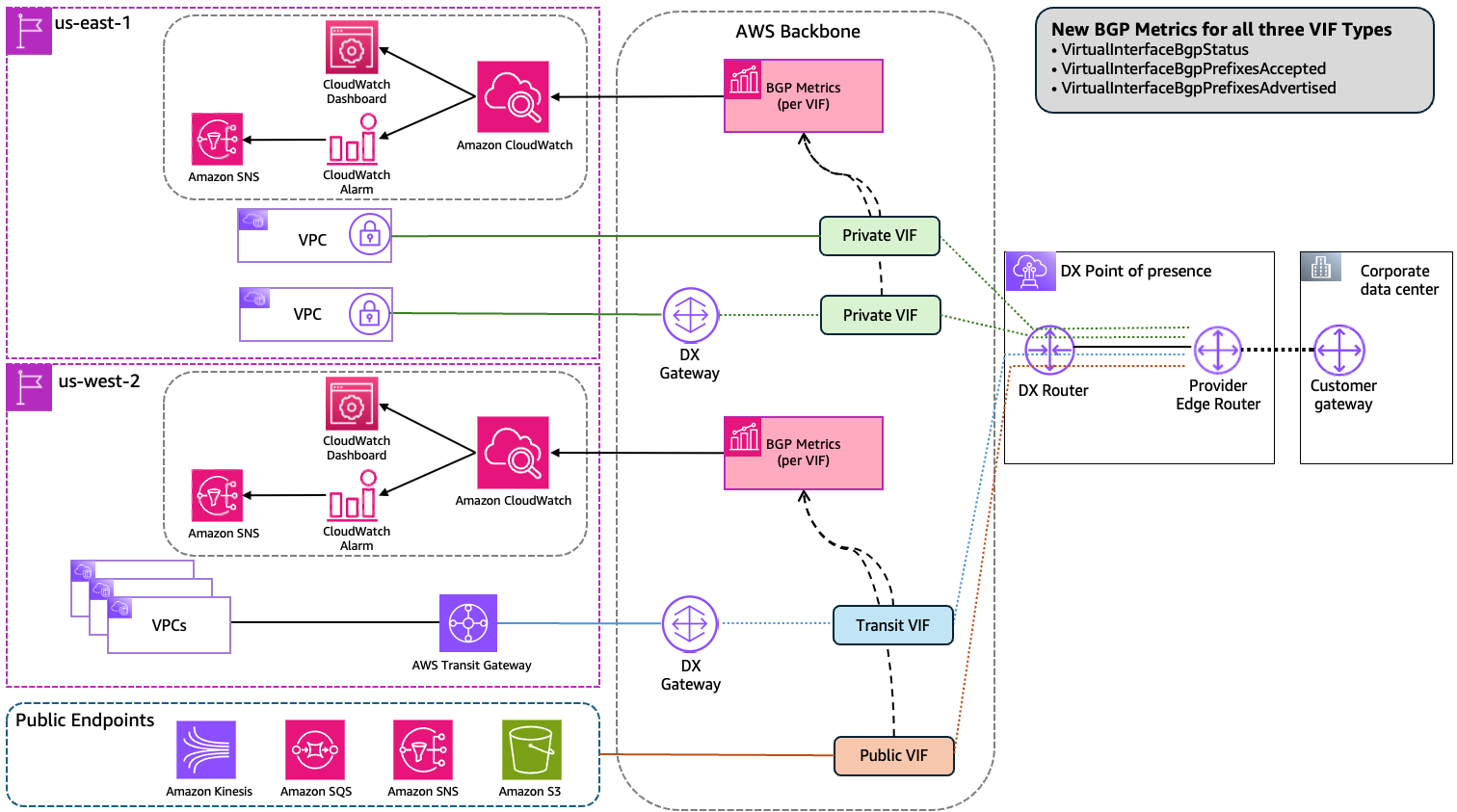
Figure 1: The three new CloudWatch BGP metrics across all three Direct Connect virtual interface types.
VirtualInterfaceBgpStatus
This metric reports the current state of the BGP session on a virtual interface. A value of 1 indicates the BGP session is up; a value of 0 indicates it is down. You can set a CloudWatch alarm on this metric to receive a notification when a BGP session goes down, replacing the need to poll the DescribeVirtualInterfaces API or check the Direct Connect console.
VirtualInterfaceBgpPrefixesAccepted
This metric reports the number of BGP prefixes accepted from your on-premises network over the virtual interface. Direct Connect enforces prefix limits per BGP session that vary by virtual interface type. If these limits are exceeded, the BGP session goes into an idle state with the session status down. For current quota values of route limit by VIF type, see the Direct Connect quotas page. Monitoring VirtualInterfaceBgpPrefixesAccepted lets you set a proactive CloudWatch alarm below your applicable limit to receive an early warning before you approach it. This metric also helps you detect unexpected route withdrawals, such as when a routing policy change on-premises causes routes to stop being advertised to AWS.
VirtualInterfaceBgpPrefixesAdvertised
This metric reports the number of BGP prefixes advertised from AWS to your on-premises network over the virtual interface. Prefix limits also apply to outbound advertisements and vary by virtual interface type. Tracking VirtualInterfaceBgpPrefixesAdvertised metric helps you confirm that AWS is advertising the expected routes and detect any unintended changes. For example, if a route summarization or policy change causes routes to be withdrawn unexpectedly.
Use Cases
The three new CloudWatch metrics for Direct Connect address two primary operational needs:
Monitoring BGP session health
You can now create a CloudWatch alarm directly on VirtualInterfaceBgpStatus metric, no Lambda function or API polling required. When the metric value changes to 0, CloudWatch fires the alarm and you receive a notification through Amazon Simple Notification Service (Amazon SNS). This reduces both operational complexity and mean time to detect (MTTD) for traffic disruption issues related to BGP session status change.
Monitoring and diagnosing BGP prefix changes
By monitoring VirtualInterfaceBgpPrefixesAccepted and VirtualInterfaceBgpPrefixesAdvertised metrics, you can set CloudWatch alarm at threshold below your applicable prefix limits and receive an early warning before the session is affected.
Beyond prefix limit protection, these metrics help you detect and diagnose route changes that affect traffic even when the BGP session remains up. A BGP session can stay up while routes are silently withdrawn. For example, after a routing policy change, on premises removes a prefix from advertisement, or after an unintended change causes AWS to stop advertising an expected prefix outbound. In this scenario, VirtualInterfaceBgpStatus stays at 1, but traffic to the affected prefix stops flowing. By monitoring the accepted and advertised prefix metrics alongside BGP status, you can detect a sudden drop in either direction and correlate it with a traffic impact event, reducing the time it takes to identify the root cause.
For multi-Region or Disaster Recovery (DR) architectures where two Direct Connect locations connect to two Regions with active/passive or active/active BGP configurations, these metrics provide a way to confirm that both paths are carrying the full expected route table in both directions. A standby path receiving or advertising only a fraction of the expected prefixes indicates a broken failover path. By setting CloudWatch alarms on both prefix metrics for each virtual interface, you can detect this condition proactively, before a DR event or planned maintenance window.
Monitoring BGP metrics in a CloudWatch dashboard
You can combine all three BGP metrics in a single CloudWatch dashboard to get a unified view of BGP session health and prefix counts across your virtual interfaces. Figure 2 shows an example dashboard with VirtualInterfaceBgpStatus, VirtualInterfaceBgpPrefixesAccepted, and VirtualInterfaceBgpPrefixesAdvertised displayed together.
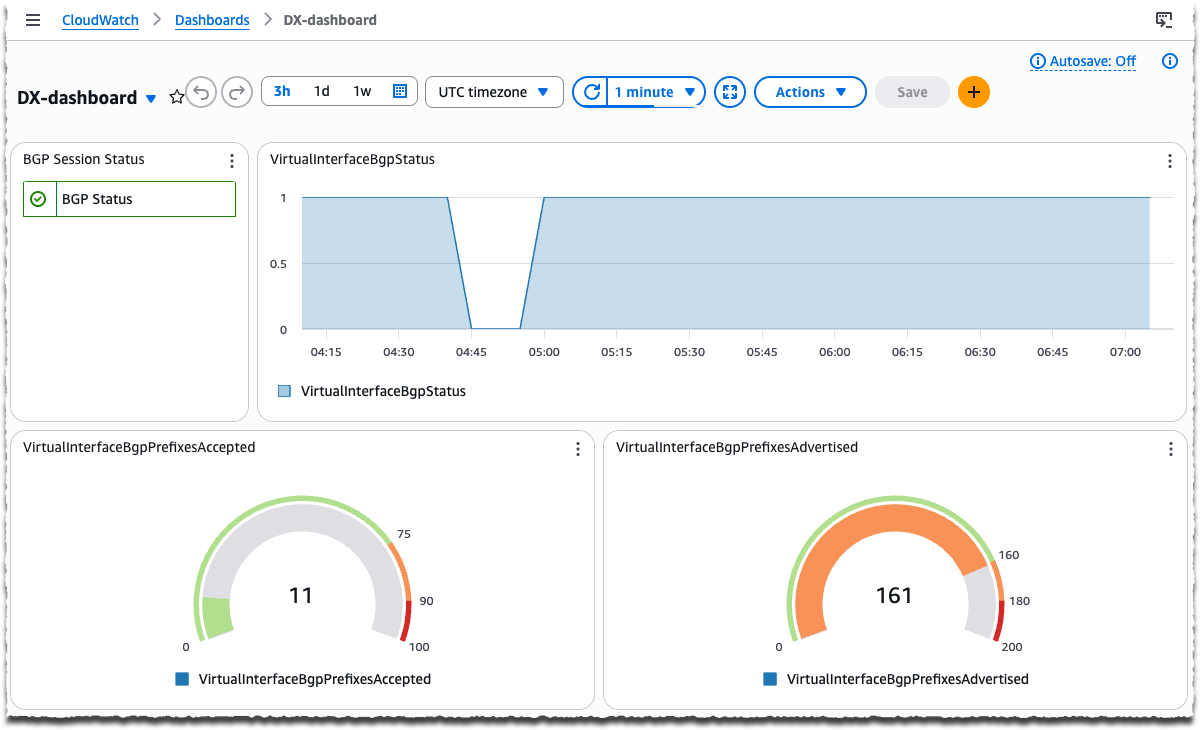
Figure 2: CloudWatch dashboard showing BGP session status and prefix counts for AWS Direct Connect virtual interfaces.
Setting Up CloudWatch Alarms for BGP Monitoring
The following procedure walks you through creating a CloudWatch alarm on VirtualInterfaceBgpStatus metric to detect BGP session failures.
Prerequisites
- An AWS account with an active Direct Connect virtual interface.
- Permissions to create CloudWatch alarms and SNS topics.
To create a BGP status alarm
- Open the CloudWatch console and in the navigation pane, choose Alarms, then choose Create alarm.
- Choose Select metric.
- In the search box, enter VirtualInterfaceBgpStatus and choose the metric for your virtual interface ID and choose Select metric.
- For Statistic, choose Minimum and set the Period to 5 minutes.
- For Conditions, set the threshold type to Static, select Lower than, and enter 1 to alarm when the BGP session is down.
- Choose Next, then configure an Amazon SNS notification action to receive alerts.
- Choose Next, enter a name for the alarm, then choose Next and Create alarm.
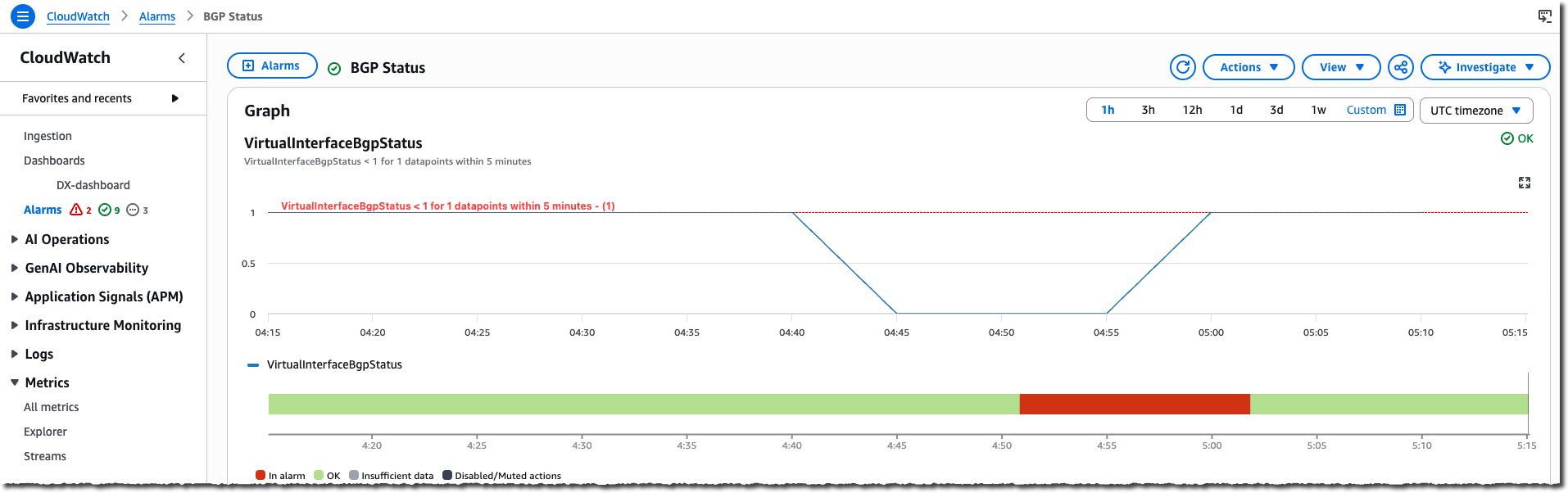
Figure 3: CloudWatch alarm for VirtualInterfaceBgpStatus metric
To create prefix count alarms
- Repeat steps 1–2 from the preceding procedure.
- Search for the metric name and select the metric for your virtual interface:
- VirtualInterfaceBgpPrefixesAccepted monitors the number of prefixes AWS accepts from your on-premises network.
- VirtualInterfaceBgpPrefixesAdvertised monitors the number of prefixes AWS advertises to your on-premises network.
- For Statistic, choose Maximum and set the Period to 5 minutes.
- For Conditions, set the threshold type to Static, select the comparison operator, and enter a threshold value:
- Select Greater/Equal to alarm when the prefix count rises above a threshold — for example, to detect when accepted or advertised prefixes approach your applicable prefix limit.
- Select Lower/Equal to alarm when the prefix count drops below a threshold — for example, to detect when accepted or advertised prefixes fall below the expected minimum, which may indicate a route withdrawal.
- Choose Next, then configure an SNS notification action to receive alerts.
- Choose Next, enter a name for the alarm, then choose Next and Create alarm.
Cleanup
If you created CloudWatch alarms for testing purposes, delete them to avoid unnecessary charges. Refer to the Amazon CloudWatch Pricing page for details.
- Open the CloudWatch console.
- In the navigation pane, choose Alarms.
- Select the alarms you created, then choose Actions, Delete.
Considerations
- Metric data is available in all AWS Regions where Direct Connect is available. For the current list of supported locations, see the Direct Connect locations page.
- All CloudWatch metrics for Direct Connect resources are published at no extra cost.
- Consider combining all three BGP metrics in a CloudWatch dashboard to get a single-pane view of BGP session health and route counts across all your virtual interfaces.
- Metric values are updated every 5 minutes. CloudWatch metrics capture BGP session state at the time of collection, so BGP sessions that flap and recover between collection intervals may not be reflected in the metrics. Monitor the BGP state metric consistently over time to track session stability patterns.
- For multi-region or disaster recovery architectures, consider creating CloudWatch alarms for each virtual interface independently. A significant difference in prefix counts between your primary and standby paths may indicate an incomplete or broken standby route table.
Conclusion
The new VirtualInterfaceBgpStatus, VirtualInterfaceBgpPrefixesAccepted, and VirtualInterfaceBgpPrefixesAdvertised CloudWatch metrics for Direct Connect virtual interfaces give you native visibility into BGP session health and prefix counts. You no longer need custom Lambda functions or API polling to detect BGP failures or monitor route changes. By setting CloudWatch alarms on these metrics, you can reduce detection time for BGP issues, prevent BGP sessions from going down due to prefix limit violations, and gain confidence that your hybrid network is operating as expected. To learn more about Direct Connect and CloudWatch, refer to the following:
About the authors

Hardik Shah
Hardik is a Sr. Technical Account Manager at AWS. He brings extensive experience from finance, travel, and retail industries to support customers on their cloud journey. With deep expertise in AWS networking services and cloud architecture, he helps customers design resilient, scalable solutions and optimize their AWS infrastructure.

Henrique Marcandier
Henrique is a Senior Cloud Infrastructure Architect at AWS Professional Services in Brisbane, Australia. He helps Public Sector customers across Asia Pacific migrate and architect cloud foundations and networking services. With over 10 years of hands-on experience, he’s driven to turn complex infrastructure challenges into elegant cloud solutions.