Networking & Content Delivery
Protect MCP Endpoints at the Edge with Amazon CloudFront and AWS WAF
AWS WAF gives you a practical way to secure and observe Model Context Protocol (MCP) endpoints at the edge. MCP has quickly become the standard way AI agents communicate to tools and data. Originally, it was a stateful protocol built around long-running sessions, persistent connections, and client-to-server-instance binding. The 2026-07-28 MCP revision redesigned MCP as a stateless HTTP request/response protocol, so every MCP request is now a self-contained POST that looks, on the wire, like any other REST API call. That opens the door to the same kinds of layer-7 inspections, transformations, and optimizations at the CDN and AWS WAF layers that you already use in front of your other HTTP APIs, without changes to your MCP server code.
In this post, we show how to use AWS WAF to secure and observe an MCP endpoint deployed behind Amazon CloudFront or an Application Load Balancer (ALB). We walk through eight use cases the new specification makes easy to enforce:
- Requiring an allowed MCP-Protocol-Version on every request
- Classifying the caller with AWS WAF Bot Control so you know which agent is on the other side
- Adding a body-size preflight
- Constructing an Allowlist for the tools an agent is permitted to call
- Blocking Server-Side Request Forgery (SSRF) issues hidden in tool arguments
- Catching SQL injection in query-shaped inputs
- Rate limiting per tool so that a single expensive operation cannot exhaust your backend
- An optional global rate cap sits underneath the per-tool limit as a ceiling
Why MCP is now inspectable at the edge
Before the 2026-07-28 specification, an MCP session required a handshake. The client sent initialize, the server returned an Mcp-Session-Id, and every subsequent request carried that identifier back to the same server instance. Remote deployments pinned connections, shared session state across replicas, or ran proxies to hold streams open. Edge inspection wasn’t practical because the protocol was stateful, and the request stream was opaque.
The new specification removes the session entirely. An MCP request is now a single, self-contained HTTP POST that any server instance can handle:
POST /mcp HTTP/1.1
MCP-Protocol-Version: 2026-07-28
Mcp-Method: tools/call
Mcp-Name: query_database
Authorization: Bearer eyJhbGciOi...
Content-Type: application/json

{
  "jsonrpc": "2.0",
  "id": 1,
  "method": "tools/call",
  "params": {
    "name": "query_database",
    "arguments": { "filter": "id = 42" }
  }
}
Two headers matter for edge enforcement: Mcp-Method and Mcp-Name. Both are mandatory on the Streamable HTTP transport (SEP-2243). They exist so that load balancers, gateways, and firewalls can route on the operation without parsing the body. The server rejects any request where the headers and body disagree, making the headers trustworthy signals of intent.
For AWS WAF, this means the two most important facts about an MCP request (what operation is being performed, and which tool is being called) are visible in headers alone. When deeper inspection is needed, the target is the JSON body at path $.params.arguments (where every MCP tool call places its per-tool arguments; for the sample request above, that is the filter value passed to query_database). Everything else in the JSON payload is protocol scaffolding.
You can enforce policy inside the MCP client (e.g., restricting which tools the agent is allowed to call), at the network boundary (e.g., firewall rules that block unapproved MCP methods), or at the CDN layer in front of your server. This post focuses on the CDN layer (edge): it’s the only enforcement point you fully control; it covers callers regardless of framework or network path, and it requires no changes to your MCP server code.
Securing MCP endpoints with AWS WAF reference architecture
The architecture is the same one you run in front of any REST API. An Amazon CloudFront distribution (or an Application Load Balancer) fronts your MCP server. An AWS WAF web ACL is associated with the distribution. Requests arrive from agents, AWS WAF evaluates them inline, and only requests that pass every rule reach your origin. There’s no additional hop, no proxy tier, and no changes to your MCP server code. Figure 1 shows the request path.
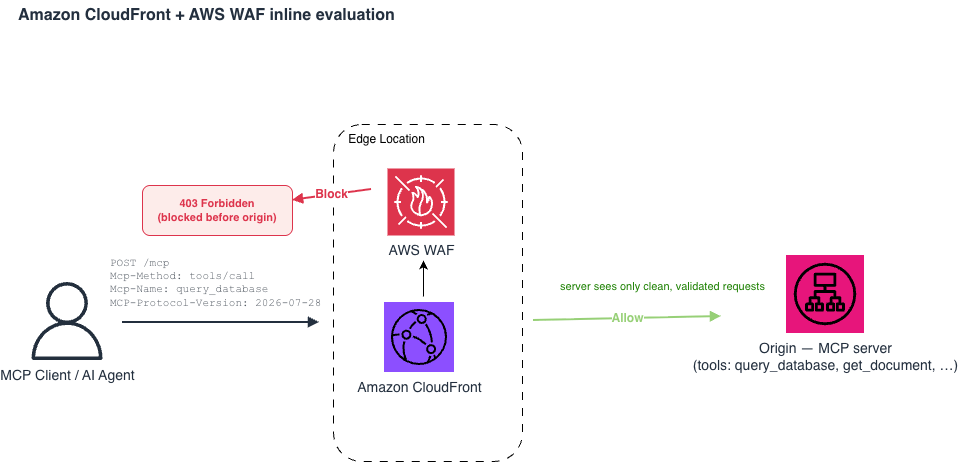
Figure 1. Amazon CloudFront (or ALB) with an AWS WAF web ACL evaluating each MCP request inline. Requests that match a blocking rule receive a 403; requests that pass are forwarded to the MCP server.
Understanding inspection boundary: Edge vs Origin
On Amazon CloudFront, AWS WAF evaluates the request before CloudFront Functions and Lambda@Edge run (AWS WAF request evaluation order). AWS WAF cannot see any header that an edge function adds. It only sees what the caller originally sent. For MCP traffic, that means four fields are available: MCP-Protocol-Version, Mcp-Method, Mcp-Name, and the Authorization header. AWS WAF can match and rate-limit on the first three directly. It cannot verify or decode the bearer token; token validation belongs at the origin.
This boundary splits your security posture into two. Protocol-based and shape-based enforcement (version checks, tool allowlisting, argument inspection, SSRF pattern detection, SQL injection detection, IP-based rate limits) belongs at AWS WAF. Identity-based enforcement (per-user rate limits, role-based tool access, token verification, fine-grained authorization) belongs at your MCP server, after the bearer token is verified and the caller is a known principal.
The AWS WAF rule stack
AWS WAF has rule recommendations and best practices for rule ordering for baseline protections. We’d recommend adhering to these patterns as your baseline. This blog walks through them with references. Inside each rule’s JSON, Priority is the AWS WAF property that controls evaluation order. An example would be lightweight header checks first, targeted JSON-body inspection second, rate limits last. The priorities used in the blog are not prescriptive. What matters is the sequence, not the exact numbers. The gaps are intentional so you can insert new rules later without renumbering your entire WebACL.
Use case 1: Reject requests without a valid MCP protocol version
Every downstream rule trusts Mcp-Method and Mcp-Name as signals of intent. That trust is only defensible if the request declares a protocol version that mandates header-body validation. The 2026-07-28 specification states this explicitly: intermediaries enforcing policy based on mirrored headers should reject requests with an older or absent MCP-Protocol-Version rather than trusting unvalidated header values.
This rule blocks any request to /mcp without a valid MCP-Protocol-Version. It’s the most lightweight rule in the stack (a single header match, no body inspection), and it belongs at the top.
Rule logic: Block if path starts with /mcp AND header mcp-protocol-version does not match ^2026-07-28$
{
  "Name": "RequireMCPProtocolVersion",
  "Priority": 1,
  "Action": {
    "Block": {}
  },
  "Statement": {
    "AndStatement": {
      "Statements": [
        {
          "ByteMatchStatement": {
            "SearchString": "/mcp",
            "FieldToMatch": {
              "UriPath": {}
            },
            "PositionalConstraint": "STARTS_WITH",
            "TextTransformations": [
              {
                "Priority": 0,
                "Type": "NONE"
              }
            ]
          }
        },
        {
          "NotStatement": {
            "Statement": {
              "RegexMatchStatement": {
                "RegexString": "^2026-07-28$",
                "FieldToMatch": {
                  "SingleHeader": {
                    "Name": "mcp-protocol-version"
                  }
                },
                "TextTransformations": [
                  {
                    "Priority": 0,
                    "Type": "NONE"
                  }
                ]
              }
            }
          }
        }
      ]
    }
  },
  "VisibilityConfig": {
    "SampledRequestsEnabled": true,
    "CloudWatchMetricsEnabled": true,
    "MetricName": "RequireMCPProtocolVersion"
  }
}
The regex is anchored so subtly different values (e.g., 2026-07-28-preview) are rejected. When new revisions ship, extend the alternation: ^(2026-07-28|2026-11-15)$. Scoping to /mcp keeps the rule out of the way of other content on the same distribution.
Use case 2: Label each caller’s identity with AWS WAF Bot Control
Agentic traffic is machine traffic. The strongest signal you can attach to a machine caller is a normalized identity label and pair “which agent is calling” with “which tool it is calling”. That composition is the differentiator of this rule and why we deploy Bot Control before all other body-inspecting rules.
The AWS WAF Bot Control attaches labels to each request. The families relevant to MCP are documented in the Bot Control labels reference:
| Caller Type | Label(s) | Notes |
| Verified crawlers | awswaf:managed:aws:bot-control:bot:name:<name> awswaf:managed:aws:bot-control:bot:verified |
Label emitted for verified bot |
| Agents with Web Bot Auth | awswaf:managed:aws:bot-control:bot:web_bot_auth:verified | :invalid, :expired, or :unknown_bot when signature fails |
| Identifiable vendors | awswaf:managed:aws:bot-control:bot:vendor:<vendor_name> | Currently emitted for Amazon Bedrock AgentCore-hosted agents |
| Cloud-hosted callers | awswaf:managed:aws:bot-control:signal:cloud_service_provider:<csp> | Suffix is aws, gcp, azure, or oracle |
| Headless browsers | awswaf:managed:aws:bot-control:signal:automated_browser | On an MCP endpoint, treat as suspicious |
Bot Control’s common protection level ships with several sub-rules whose default action is Block. Five of them will produce false-positives on legitimate agentic traffic and need to be overridden to Count on an MCP endpoint.
- SignalNonBrowserUserAgent blocks callers whose User-Agent is not a real browser, so every agent framework that uses a standard HTTP client (python-requests, Go net/http, Node fetch) trips it.
- CategoryHttpLibrary blocks known HTTP libraries directly, catching curl, wget, and the SDKs most MCP-client codebases are built on.
- SignalAutomatedBrowser blocks headless Chrome, Selenium, and Playwright, which agent frameworks commonly drive under the hood.
- CategoryAI blocks traffic that self-identifies as AI-agent traffic, which is a category most legitimate MCP clients fall into.
- SignalKnownBotDataCenter blocks callers from known cloud data-center IP ranges. The vast majority of agentic traffic to an MCP endpoint originates from a data center rather than a residential IP, so this rule would otherwise catch most legitimate callers.
Overriding these five preserves the rest of Bot Control’s protection: the targeted volumetric rules (TGT_VolumetricSession, TGT_VolumetricIpTokenAbsent) stop bots hammering the endpoint at scale, the scraper and SEO category blocks, and the Web Bot Auth (WBA) decisions that are the input to the identity-and-tool composition rule that follows it. Use RuleActionOverrides on the managed rule group statement rather than an ACL-level ‘OverrideAction: Count’ on the whole group. The latter forces the entire rule group into Count and throws away everything Bot Control is good at.
Rule logic: Evaluate all the requests with the Bot Control rule group at COMMON inspection level. Set the rules SignalNonBrowserUserAgent, CategoryHttpLibrary, SignalAutomatedBrowser, CategoryAI, and SignalKnownBotDataCenter to Count so labels are emitted without blocking.
{
  "Name": "BotControlCommon",
  "Priority": 2,
  "OverrideAction": {
    "None": {}
  },
  "Statement": {
    "ManagedRuleGroupStatement": {
      "VendorName": "AWS",
      "Name": "AWSManagedRulesBotControlRuleSet",
      "ManagedRuleGroupConfigs": [
        {
          "AWSManagedRulesBotControlRuleSet": {
            "InspectionLevel": "COMMON"
          }
        }
      ],
      "RuleActionOverrides": [
        {
          "Name": "SignalNonBrowserUserAgent",
          "ActionToUse": {
            "Count": {}
          }
        },
        {
          "Name": "CategoryHttpLibrary",
          "ActionToUse": {
            "Count": {}
          }
        },
        {
          "Name": "SignalAutomatedBrowser",
          "ActionToUse": {
            "Count": {}
          }
        },
        {
          "Name": "CategoryAI",
          "ActionToUse": {
            "Count": {}
          }
        },
        {
          "Name": "SignalKnownBotDataCenter",
          "ActionToUse": {
            "Count": {}
          }
        }
      ]
    }
  },
  "VisibilityConfig": {
    "SampledRequestsEnabled": true,
    "CloudWatchMetricsEnabled": true,
    "MetricName": "BotControlCommon"
  }
}
All five sub-rules emit their labels (signal:non_browser_user_agent, bot:category:http_library, signal:automated_browser, bot:category:ai, signal:known_bot_data_center) after the override, so downstream rules can still consume them. They just no longer terminate evaluation with Block.
With those labels in scope, a later rule can compose an identity condition with an Mcp-Name match to write things like “block if the caller has an invalid Web Bot Auth signature and is calling a high-cost tool” without any fingerprinting logic of your own. The example below is that rule. It matches “tools/call”, the tool being in your expensive-tools pattern set, and either an invalid or unknown_bot Web Bot Auth label.
Rule logic: Block if headers “mcp-method” equals tools/call AND mcp-name matches the expensive-tools pattern set AND the caller has an invalid or unknown Web Bot Auth label.
{
  "Name": "BlockUnverifiedBotOnHighCostTool",
  "Priority": 4,
  "Action": {
    "Block": {}
  },
  "Statement": {
    "AndStatement": {
      "Statements": [
        {
          "ByteMatchStatement": {
            "SearchString": "tools/call",
            "FieldToMatch": {
              "SingleHeader": {
                "Name": "mcp-method"
              }
            },
            "PositionalConstraint": "EXACTLY",
            "TextTransformations": [
              {
                "Priority": 0,
                "Type": "LOWERCASE"
              }
            ]
          }
        },
        {
          "RegexPatternSetReferenceStatement": {
            "ARN": "arn:aws:wafv2:us-east-1:123456789012:global/regexpatternset/mcp-expensive-tools/def456",
            "FieldToMatch": {
              "SingleHeader": {
                "Name": "mcp-name"
              }
            },
            "TextTransformations": [
              {
                "Priority": 0,
                "Type": "NONE"
              }
            ]
          }
        },
        {
          "OrStatement": {
            "Statements": [
              {
                "LabelMatchStatement": {
                  "Scope": "LABEL",
                  "Key": "awswaf:managed:aws:bot-control:bot:web_bot_auth:invalid"
                }
              },
              {
                "LabelMatchStatement": {
                  "Scope": "LABEL",
                  "Key": "awswaf:managed:aws:bot-control:bot:web_bot_auth:unknown_bot"
                }
              }
            ]
          }
        }
      ]
    }
  },
  "VisibilityConfig": {
    "SampledRequestsEnabled": true,
    "CloudWatchMetricsEnabled": true,
    "MetricName": "BlockUnverifiedBotOnHighCostTool"
  }
}
Deploy BlockUnverifiedBotOnHighCostTool in Count mode first and watch the distribution of labels your callers pick up for a soak window before promoting the composition rule to Block. Bot Control is billed as a subscription plus a per-request evaluation charge, so if you turn it on, budget for it; see AWS WAF pricing and the Bot Control pricing section for the current rates.
Use case 3: Block oversized request bodies before inspection
AWS WAF’s default body inspection limit is 16 KB on CloudFront. You can raise it to 64 KB via the web ACL’s AssociationConfig. This post raises the limit to 32 KB, which is enough for typical MCP tool arguments without inviting oversized payloads.
Note: When AWS WAF is associated with Application Load Balancer (ALB), the body inspection limit is capped at 8 KB and cannot be raised. If you front your MCP endpoint with an ALB, either keep tool arguments under 8 KB or move the AWS WAF association to a CloudFront distribution in front of the ALB.
Anything past the configured limit hits each rule’s OversizeHandling setting. Setting every body-inspecting rule to OversizeHandling: MATCH is safe but noisy, because any legitimate large body trips every rule. Instead, fail closed once up front: reject bodies over 32 KB with a single size-constraint rule. With that in place, every downstream rule can safely use OversizeHandling: NO_MATCH because oversized bodies never reach them.
For the preflight to work at 32 KB, the web ACL’s body inspection limit must be at least that high. The 16 KB default would trip OversizeHandling: MATCH on any request between 16 and 32 KB and produce spurious blocks. Raise the limit at web-ACL creation:
{
  "Name": "mcp-web-acl",
  "Scope": "CLOUDFRONT",
  "AssociationConfig": {
    "RequestBody": {
      "CLOUDFRONT": {
        "DefaultSizeInspectionLimit": "KB_32"
      }
    }
  },
  "DefaultAction": {
    "Allow": {}
  },
  "Rules": [ /* ... */ ]
}
The preflight rule:
{
  "Name": "MCPBodySizePreflight",
  "Priority": 5,
  "Action": {
    "Block": {}
  },
  "Statement": {
    "SizeConstraintStatement": {
      "FieldToMatch": {
        "Body": {
          "OversizeHandling": "MATCH"
        }
      },
      "ComparisonOperator": "GT",
      "Size": 32768,
      "TextTransformations": [
        {
          "Priority": 0,
          "Type": "NONE"
        }
      ]
    }
  },
  "VisibilityConfig": {
    "SampledRequestsEnabled": true,
    "CloudWatchMetricsEnabled": true,
    "MetricName": "MCPBodySizePreflight"
  }
}
Use case 4: Restrict the callable tool surface to an allowlist
Your organization may expose twenty tools, but applying the principle of least privilege at the tool layer means an agent should only be permitted to call the tools its specific task requires. Restrict the callable surface with a regex pattern set so that if prompt injection convinces an agent to call execute_shell or delete_all_records, the request stops at the edge with a 403; it never reaches your server. Because Mcp-Name is a first-class header, this is a pure header rule with no body parsing.
The rule returns a JSON-formatted 403 body that includes the AWS WAF request ID via dynamic label interpolation. The ${awswaf:request_id:} placeholder resolves at evaluation time, giving callers a single field to send to support and giving on-call a direct grep target in the logs.
Rule logic: Block if request headers ‘mcp-method’ equals tools/call AND ‘mcp-name’ does not match the allowed-tools regex pattern set
{
  "Name": "BlockUnapprovedMCPTools",
  "Priority": 10,
  "Action": {
    "Block": {
      "CustomResponse": {
        "ResponseCode": 403,
        "CustomResponseBodyKey": "McpBlockedTool",
        "ResponseHeaders": [
          {
            "Name": "x-mcp-waf-request-id",
            "Value": "${awswaf:request_id:}"
          }
        ]
      }
    }
  },
  "Statement": {
    "AndStatement": {
      "Statements": [
        {
          "ByteMatchStatement": {
            "SearchString": "tools/call",
            "FieldToMatch": {
              "SingleHeader": {
                "Name": "mcp-method"
              }
            },
            "PositionalConstraint": "EXACTLY",
            "TextTransformations": [
              {
                "Priority": 0,
                "Type": "LOWERCASE"
              }
            ]
          }
        },
        {
          "NotStatement": {
            "Statement": {
              "RegexPatternSetReferenceStatement": {
                "ARN": "arn:aws:wafv2:us-east-1:123456789012:global/regexpatternset/mcp-allowed-tools/abc123",
                "FieldToMatch": {
                  "SingleHeader": {
                    "Name": "mcp-name"
                  }
                },
                "TextTransformations": [
                  {
                    "Priority": 0,
                    "Type": "NONE"
                  }
                ]
              }
            }
          }
        }
      ]
    }
  },
  "VisibilityConfig": {
    "SampledRequestsEnabled": true,
    "CloudWatchMetricsEnabled": true,
    "MetricName": "BlockUnapprovedMCPTools"
  }
}
The response body it points at is defined once at the web ACL level so any other Block action can reuse it:
{
  "CustomResponseBodies": {
    "McpBlockedTool": {
      "ContentType": "APPLICATION_JSON",
      "Content": "{\"error\":\"tool_not_allowed\",\"waf_request_id\":\"${awswaf:request_id:}\",\"client_ip\":\"${awswaf:ip:}\"}"
    }
  }
}
The regex pattern set is generated from the server’s tools/list response so it stays in sync with the manifest. The initial contents are the tool names joined into an anchored alternation: ^(query_database|get_document|send_notification)$.
Use case 5: Block destructive SQL in a query_database tool
Many MCP servers expose a database query tool. The query argument carries raw SQL that the LLM constructs. A prompt injection can turn a SELECT into a DROP TABLE. AWS WAF can reject destructive patterns at the edge before the request reaches your server.
This rule differs from the AWSManagedRulesSQLiRuleSet managed rule group. That group uses a syntax parser that flags any well-formed SQL it encounters, including the legitimate SELECT queries the tool is designed to run, because it was built for fields where SQL should never appear. The rule described here is narrower: it allows SQL in the query argument because that is the tool’s purpose, but blocks the subset (DROP, TRUNCATE, ALTER, GRANT, DELETE FROM, UPDATE…SET) that a read-only tool never needs to emit.
Implementation: A labeling rule stamps mcp:tool:query_database when the Mcp-Name header matches. A blocking rule fires only when that label is present and the query argument contains a destructive keyword.
Rule logic (pair): Label with mcp:tool:query_database if mcp-name equals query_database. Then block if that label is set AND /params/arguments/query matches a destructive SQL keyword.
{
  "Name": "LabelToolQueryDatabase",
  "Priority": 15,
  "Action": {
    "Count": {}
  },
  "RuleLabels": [
    {
      "Name": "mcp:tool:query_database"
    }
  ],
  "Statement": {
    "ByteMatchStatement": {
      "SearchString": "query_database",
      "FieldToMatch": {
        "SingleHeader": {
          "Name": "mcp-name"
        }
      },
      "PositionalConstraint": "EXACTLY",
      "TextTransformations": [
        {
          "Priority": 0,
          "Type": "LOWERCASE"
        }
      ]
    }
  },
  "VisibilityConfig": {
    "SampledRequestsEnabled": true,
    "CloudWatchMetricsEnabled": true,
    "MetricName": "LabelToolQueryDatabase"
  }
}
{
"Name": "BlockDestructiveSQL",
"Priority": 20,
"Action": {
"Block": {}
},
"Statement": {
"AndStatement": {
"Statements": [
{
"LabelMatchStatement": {
"Scope": "LABEL",
"Key": "mcp:tool:query_database"
}
},
{
"RegexMatchStatement": {
"RegexString": "\\b(DROP|TRUNCATE|ALTER|GRANT|REVOKE|CREATE|DELETE\\s+FROM|INSERT\\s+INTO|UPDATE\\s+.+\\s+SET)\\b",
"FieldToMatch": {
"JsonBody": {
"MatchPattern": {
"IncludedPaths": [
"/params/arguments/query"
]
},
"MatchScope": "VALUE",
"InvalidFallbackBehavior": "MATCH",
"OversizeHandling": "NO_MATCH"
}
},
"TextTransformations": [
{
"Priority": 0,
"Type": "COMPRESS_WHITE_SPACE"
},
{
"Priority": 1,
"Type": "UPPERCASE"
}
]
}
}
]
}
},
"VisibilityConfig": {
"SampledRequestsEnabled": true,
"CloudWatchMetricsEnabled": true,
"MetricName": "BlockDestructiveSQL"
}
}The tool is meant to read data. If the query argument contains write or destroy keywords, something upstream has been corrupted—most likely a prompt injection. COMPRESS_WHITE_SPACE catches evasion attempts such as “D R O P”. InvalidFallbackBehavior: MATCH blocks requests that omit the query argument entirely, treating a missing field as a policy violation rather than letting it pass uninspected.
Use case 6: Detect and block SSRF hidden in tool arguments
MCP tools that fetch, resolve, or post to a caller-supplied target are a natural SSRF attack surface. An argument naming an internal IP, a cloud metadata endpoint, or a service-internal DNS name is a common pattern. A single body-inspecting rule covers the common shapes: the Instance Metadata Service (IMDS) endpoint (169.254.169.254), IPv4 private ranges, IPv6 loopback and unique-local prefixes, and DNS names used to reach cluster-internal services. Apply URL_DECODE before matching to unpack single-pass percent-encoding.
Rule logic: Block if mcp-method equals tools/call AND any value in /params/arguments matches a private IP, IMDS endpoint, or internal DNS name
{
  "Name": "BlockMCPSSRF",
  "Priority": 30,
  "Action": {
    "Block": {}
  },
  "Statement": {
    "AndStatement": {
      "Statements": [
        {
          "ByteMatchStatement": {
            "SearchString": "tools/call",
            "FieldToMatch": {
              "SingleHeader": {
                "Name": "mcp-method"
              }
            },
            "PositionalConstraint": "EXACTLY",
            "TextTransformations": [
              {
                "Priority": 0,
                "Type": "LOWERCASE"
              }
            ]
          }
        },
        {
          "OrStatement": {
            "Statements": [
              {
                "RegexMatchStatement": {
                  "RegexString": "(169\\.254\\.169\\.254|metadata\\.google\\.internal|kubernetes\\.default(\\.svc)?|\\.(local|internal)([^a-z0-9.-]|$))",
                  "FieldToMatch": {
                    "JsonBody": {
                      "MatchPattern": {
                        "IncludedPaths": [
                          "/params/arguments"
                        ]
                      },
                      "MatchScope": "VALUE",
                      "InvalidFallbackBehavior": "NO_MATCH",
                      "OversizeHandling": "NO_MATCH"
                    }
                  },
                  "TextTransformations": [
                    {
                      "Priority": 0,
                      "Type": "URL_DECODE"
                    },
                    {
                      "Priority": 1,
                      "Type": "LOWERCASE"
                    }
                  ]
                }
              },
              {
                "RegexMatchStatement": {
                  "RegexString": "\\b(10|127|169\\.254|172\\.(1[6-9]|2[0-9]|3[01])|192\\.168)\\.\\d{1,3}\\.\\d{1,3}\\b",
                  "FieldToMatch": {
                    "JsonBody": {
                      "MatchPattern": {
                        "IncludedPaths": [
                          "/params/arguments"
                        ]
                      },
                      "MatchScope": "VALUE",
                      "InvalidFallbackBehavior": "NO_MATCH",
                      "OversizeHandling": "NO_MATCH"
                    }
                  },
                  "TextTransformations": [
                    {
                      "Priority": 0,
                      "Type": "URL_DECODE"
                    }
                  ]
                }
              },
              {
                "RegexMatchStatement": {
                  "RegexString": "(::1|::ffff:|f[cd][0-9a-f]{2}:|fe80:)",
                  "FieldToMatch": {
                    "JsonBody": {
                      "MatchPattern": {
                        "IncludedPaths": [
                          "/params/arguments"
                        ]
                      },
                      "MatchScope": "VALUE",
                      "InvalidFallbackBehavior": "NO_MATCH",
                      "OversizeHandling": "NO_MATCH"
                    }
                  },
                  "TextTransformations": [
                    {
                      "Priority": 0,
                      "Type": "URL_DECODE"
                    },
                    {
                      "Priority": 1,
                      "Type": "LOWERCASE"
                    }
                  ]
                }
              }
            ]
          }
        }
      ]
    }
  },
  "VisibilityConfig": {
    "SampledRequestsEnabled": true,
    "CloudWatchMetricsEnabled": true,
    "MetricName": "BlockMCPSSRF"
  }
}
Two caveats are worth calling out here: First, this rule is defense-in-depth, not the primary SSRF control. Decimal or octal IP encodings, DNS rebinding, and multi-pass encoding will slip past it because AWS WAF text transformations run a single pass. The primary control is network-level: enforce IMDSv2 on the tool executor and restrict its egress with security groups or a VPC endpoint policy. Second, if you have a tool that legitimately talks to private addresses (for example, a Kubernetes-cluster introspection tool) exempt it via a label match. It is easier to reason about “this specific tool is allowed to reach .svc.cluster.local” than to weaken the global rule.
Use case 7: Catch SQL injection in query-shaped inputs
There are two ways to attach SQL-injection detection to WAF: the AWS-managed rule group AWSManagedRulesSQLiRuleSet, or the built-in SqliMatchStatement primitive. The managed rule group is the right default for HTML forms and URL-encoded APIs because it inspects the raw body against its ruleset. For MCP, though, the payload is JSON, and the vulnerable field (“sql”, “query”, “filter”, …) is a string inside $.params.arguments. Classic injection payloads that survive JSON-encoding, for example “1 UNION SELECT username, password FROM users” embedded as a value, can slip past raw-body inspection because the surrounding JSON structure disguises them.
The reliable approach for MCP is to point WAF’s SQL parser directly at the arguments field. SqliMatchStatement on JsonBody extracts the string values at a given JSON path first, then runs the SQL syntax parser against each one. It inspects the actual SQL content, not the JSON wrapper. As with the other body-inspecting rules, we scope it to tools/call and use label chaining to exempt tools that legitimately accept SQL.
Rule logic: Block if mcp-method equals tools/call AND label mcp:tool:execute_sql is NOT set AND /params/arguments trips the SQL injection parser at LOW sensitivity
{
  "Name": "MCPSQLiProtection",
  "Priority": 40,
  "Action": {
    "Block": {}
  },
  "Statement": {
    "AndStatement": {
      "Statements": [
        {
          "ByteMatchStatement": {
            "SearchString": "tools/call",
            "FieldToMatch": {
              "SingleHeader": {
                "Name": "mcp-method"
              }
            },
            "PositionalConstraint": "EXACTLY",
            "TextTransformations": [
              {
                "Priority": 0,
                "Type": "LOWERCASE"
              }
            ]
          }
        },
        {
          "NotStatement": {
            "Statement": {
              "LabelMatchStatement": {
                "Scope": "LABEL",
                "Key": "mcp:tool:execute_sql"
              }
            }
          }
        },
        {
          "SqliMatchStatement": {
            "FieldToMatch": {
              "JsonBody": {
                "MatchPattern": {
                  "IncludedPaths": [
                    "/params/arguments"
                  ]
                },
                "MatchScope": "VALUE",
                "InvalidFallbackBehavior": "NO_MATCH",
                "OversizeHandling": "NO_MATCH"
              }
            },
            "SensitivityLevel": "LOW",
            "TextTransformations": [
              {
                "Priority": 0,
                "Type": "URL_DECODE"
              },
              {
                "Priority": 1,
                "Type": "HTML_ENTITY_DECODE"
              },
              {
                "Priority": 2,
                "Type": "LOWERCASE"
              }
            ]
          }
        }
      ]
    }
  },
  "VisibilityConfig": {
    "SampledRequestsEnabled": true,
    "CloudWatchMetricsEnabled": true,
    "MetricName": "MCPSQLiProtection"
  }
}
SensitivityLevel deserves care. At HIGH, WAF’s SQL parser flags any well-formed SQL: a plain “SELECT id FROM users LIMIT 10” is treated as an issue because it is SQL. That’s the right choice for endpoints where callers should never be sending SQL at all, and the wrong choice for a tool that accepts filter expressions. LOW is the practical setting for MCP: it catches the classic injection markers (OR 1=1, UNION SELECT, stacked statements with ;, EXEC xp_cmdshell) without flagging normal filter values.
There is a related design point that is worth stating here. If a tool accepts arbitrary raw SQL from callers, no AWS WAF sensitivity setting can distinguish “safe SELECT” from “unintended SELECT”. Every complete SQL statement is, structurally, SQL, and the parser has to treat it as such. Design MCP tools to take structured arguments (a table name, a filter expression, a column list) rather than a full SQL statement, and reserve raw-SQL tools for narrow, exempted paths like an admin execute_sql. In the reference implementation, query_database takes a filter argument (a WHERE-clause-style expression) and execute_sql is the label-exempted raw-SQL tool. This is the pattern we recommend.
Use case 8: Rate-limit expensive tools
Mcp-Name makes per-tool rate limiting simple. Set a modest limit on tools in a “high-cost” pattern set (database queries, paid APIs, heavy compute) and a laxer limit on cheap tools. WAF’s RateBasedStatement aggregates by IP by default; for MCP, aggregate by the tool header with custom aggregation keys to cap specific operations. EvaluationWindowSec accepts 60, 120, 300, or 600 seconds. The example uses 300 (five minutes).
Rule logic: Block if mcp-name matches the expensive-tools pattern set AND the same mcp-name + source IP exceeds 200 requests in 300 seconds
{
  "Name": "MCPExpensiveToolRateLimit",
  "Priority": 50,
  "Action": {
    "Block": {}
  },
  "Statement": {
    "RateBasedStatement": {
      "Limit": 200,
      "EvaluationWindowSec": 300,
      "AggregateKeyType": "CUSTOM_KEYS",
      "CustomKeys": [
        {
          "Header": {
            "Name": "mcp-name",
            "TextTransformations": [
              {
                "Priority": 0,
                "Type": "LOWERCASE"
              }
            ]
          }
        },
        {
          "IP": {}
        }
      ],
      "ScopeDownStatement": {
        "RegexPatternSetReferenceStatement": {
          "ARN": "arn:aws:wafv2:us-east-1:123456789012:global/regexpatternset/mcp-expensive-tools/def456",
          "FieldToMatch": {
            "SingleHeader": {
              "Name": "mcp-name"
            }
          },
          "TextTransformations": [
            {
              "Priority": 0,
              "Type": "NONE"
            }
          ]
        }
      }
    }
  },
  "VisibilityConfig": {
    "SampledRequestsEnabled": true,
    "CloudWatchMetricsEnabled": true,
    "MetricName": "MCPExpensiveToolRateLimit"
  }
}
We aggregate on the combination of Mcp-Name and source IP so that a single caller cannot exhaust the whole tool-wide budget on their own, while still allowing many legitimate callers to each get their share. This is the closest approximation AWS WAF can offer to “per-caller, per-tool” without decoding OAuth tokens, and it is a sensible default at the edge. That said, IP is a coarse proxy for identity. Agent traffic tends to come from a small number of data-center egress ranges and can collapse thousands of distinct users behind a handful of IPs. The right layer for true per-user rate limiting is the origin, after the bearer token has been verified and the user’s identity is established.
Use case 9 (optional): Global rate limit per IP
Underneath the per-tool limit, a global RateBasedStatement scoped by IP on the /mcp path gives you a ceiling: no single source, verified or not, can exhaust more than N requests inside the evaluation window. AWS WAF supports EvaluationWindowSec values of 60, 120, 300, and 600, so you can pick a window that matches how you think about traffic. A common shape is 5,000 requests per five-minute window per IP, which catches runaway loops and clearly abusive volume without disturbing legitimate agent workloads; a shorter window (60 seconds) reacts faster to bursts but tolerates less variance in normal traffic.
Observability
Blocking rules are half the picture. AWS WAF logging (to Amazon CloudWatch Logs, Amazon S3, or Amazon Data Firehose) gives you a per-request record with headers, terminating rule, applied labels, and final action. Because Mcp-Method and Mcp-Name are in httpRequest.headers, each log entry is self-describing; you know what tool was called and what happened to it.
Extracting tool names: In AWS WAF logs, httpRequest.headers is an array of {name, value} objects. This Amazon CloudWatch Logs Insights query extracts and aggregates by tool:
fields @timestamp, action, terminatingRuleId, @message
| parse @message /"name":"[Mm][Cc][Pp]-[Nn][Aa][Mm][Ee]","value":"(?<tool>[^"]+)"/
| filter ispresent(tool)
| stats count() as invocations by tool
| sort invocations desc
| limit 10
Figure 2. A sample dashboard showing the top tool calls by invocation count.
Detecting tool-enumeration attacks: A well-behaved MCP client calls two or three tools in a predictable loop. When a prompt injection redirects an agent into capability exploration, the distinct-tool count per source IP spikes. An IP jumping from three tools to fifteen in a few minutes has changed shape. While this query won’t catch subtler techniques like parameter tampering on approved tools, it’s a useful early warning because it captures intent shift, not just throughput.
This query surfaces IPs calling more than five distinct tools:
parse @message /"name":"[Mm][Cc][Pp]-[Nn][Aa][Mm][Ee]","value":"(?<tool>[^"]+)"/
| parse @message /"clientIp":"(?<ip>[^"]+)"/
| filter ispresent(tool)
| stats countDistinct(tool) as tools_called_by_ip, count() as total_reqs_by_ip by ip
| filter tools_called_by_ip > 5
| sort tools_called_by_ip desc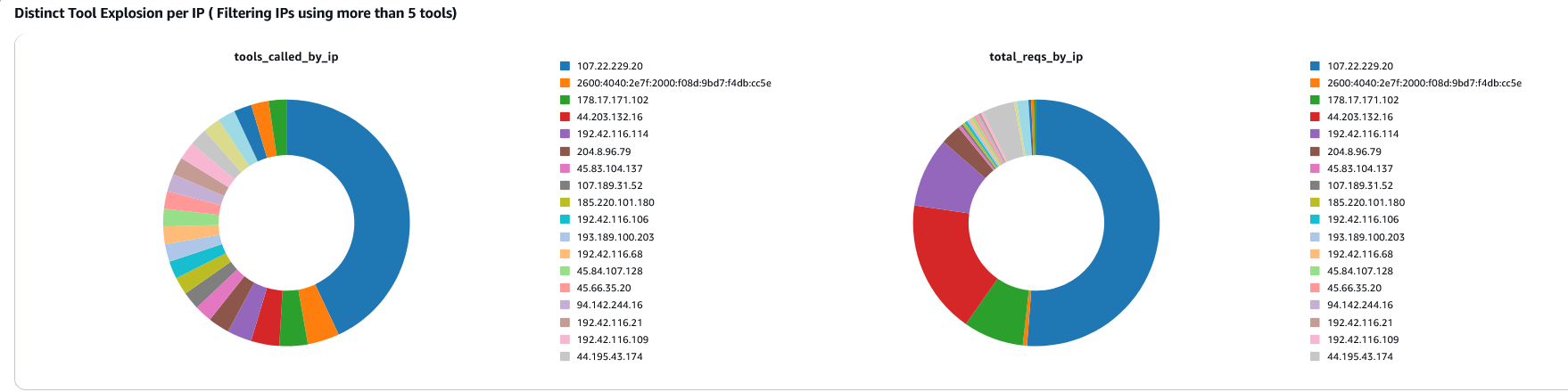
Behavioral baseline: agent identity × tool fingerprint. Bot Control’s CategoryAI rule detects verified AI bots calling your endpoint. Under normal operation, the relationship between a verified agent and the tools it calls is stable. While this won’t catch unverified or spoofed agents, those never receive a bot:name label. It’s a useful baseline because a new (agent, tool) pair that didn’t exist yesterday tells you something upstream changed. This query builds that mapping:
parse @message /awswaf:managed:aws:bot-control:bot:category:(?<category>[^"]+)/
| parse @message /awswaf:managed:aws:bot-control:bot:name:(?<bot_name>[^"]+)/
| parse @message /"name":"[Mm][Cc][Pp]-[Nn][Aa][Mm][Ee]","value":"(?<tool>[^"]+)"/
| filter category = "ai" and ispresent(tool)
| stats count() as calls by bot_name, tool
| sort calls desc
Figure 4. AI traffic analysis dashboard showing verified versus unverified agentic traffic to the MCP endpoint.
You can also use the free AI traffic analysis dashboards in the AWS WAF console to analyze verified versus unverified agentic traffic to your MCP endpoint.
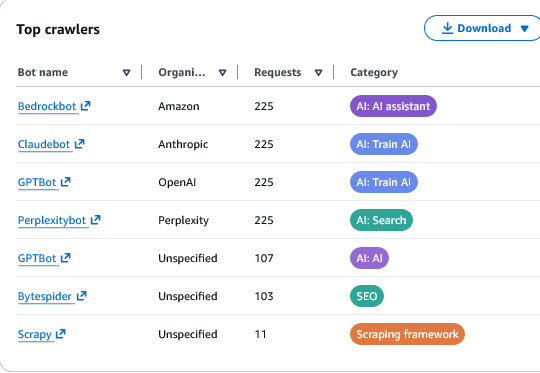
Figure 5. Top bot crawlers by request count and category, identifying verified AI agents such as Bedrockbot, Claudebot, and GPTBot accessing the MCP endpoint.
Anomaly detection: Use Amazon CloudWatch Anomaly Detector against labeling-rule metrics to flag deviations from the historical band. Run a daily Amazon Athena query over archived logs for the “distinct-tool” signal. An agent whose distinct-tool count jumps from 3 to 15 in a day has changed shape, a stronger prompt-injection indicator than raw volume. Use Amazon CloudWatch Contributor Insights for a rolling top-contributors view on blocked mcp-name values.
Alerting: The alerts worth paging on are tied to explicit blocks:
- SSRF block: Page immediately. Any SSRF block indicates an active attempt to reach internal infrastructure.
- Unapproved-tool block spike: Investigate as a candidate prompt-injection event. A sudden surge in blocked tool calls suggests an agent is being manipulated.
- Sustained rate-limit burn: Escalate for human review. A caller consistently hitting the global rate cap is misbehaving badly enough to warrant manual investigation.
Deploying safely
Deploy every rule in Count mode before enabling Block. Count mode evaluates requests and records matches in Amazon CloudWatch metrics without blocking traffic (Testing and tuning). Review sampled requests to identify false positives, then tune with scope-down statements or label-based exclusions (Sampled requests). Promote rules to Block one at a time so you can isolate impact and revert a single rule if needed. Keep SampledRequestsEnabled set to true after promotion. AWS WAF retains three hours of matched request data per rule.
Wrapping up
The 2026-07-28 revision turned MCP into an HTTP protocol with enough structured metadata in headers to make edge security a viable option. A well-ordered AWS WAF stack gives you a defensible perimeter without changing your MCP server code.
The observability layer built on AWS WAF logs and labels shows you what agents are doing across that perimeter. Per-user rate limiting is deliberately not at the edge. That belongs at your origin, where the bearer token is verified, and the caller’s identity is a first-class value. There are several other blogs that describe various techniques to accomplish user or IP-based rate limiting, like this one: Limiting requests to a web application using a Gatekeeper Solution.


