Networking & Content Delivery
Streamline your Amazon EKS deployments with Gateway API support for AWS Load Balancer Controller and Amazon VPC Lattice
Building on the recent announcement of Gateway API support in AWS Load Balancer Controller, in this post we demonstrate a practical architecture that uses both controllers through a single API specification. This approach simplifies operations while maintaining the flexibility to choose the right AWS service for each networking requirement.
Managing application networking in Kubernetes has traditionally required learning multiple APIs and controller-specific configurations. Teams deploying on Amazon Elastic Kubernetes Service (Amazon EKS) often use AWS Load Balancer Controller for internet-facing traffic and various solutions for service-to-service communication. This fragmentation of configuration APIs creates operational complexity and increases the learning curve.
Gateway API addresses this challenge by providing a unified, role-oriented API for configuring ingress and service-to-service communication. This post demonstrates how to use Gateway API with both AWS Load Balancer Controller and Amazon VPC Lattice. While we use different AWS services for different networking layers (ALB for internet ingress, VPC Lattice for service-to-service communication), Gateway API provides a consistent configuration interface. Instead of learning Ingress annotations, custom CRDs, and service-specific configurations, you can use a single, standardized API across distinct networking layers.
Understanding the Kubernetes Gateway API
Gateway API is an official Kubernetes project focused on L4 and L7 routing in Kubernetes. This project represents the next generation of Kubernetes Ingress, Load Balancing, and Service Mesh APIs. It has been designed to be generic, expressive, and role oriented. Gateway API is a collection of Kubernetes Custom Resource Definitions (CRDs) that model service networking. Unlike the traditional Ingress API, Gateway API provides:
- Role-oriented design: Separate resources for infrastructure operators (GatewayClass, Gateway) and application developers (HTTPRoute, GRPCRoute), with clear separation of ownership.
- Expressive routing: Rich traffic routing capabilities including header-based routing and weighted routing, without requiring controller-specific annotations.
- Extensibility: A standardized way to extend functionality through policy attachments and custom resources.
- Portability: Consistent API across different implementations, making it easier to switch between or combine multiple controllers.
The core resources in Gateway API are:
- GatewayClass: Defines a class of Gateways that can be instantiated, similar to StorageClass for persistent volumes. Each GatewayClass specifies which controller will manage Gateways of that class.
- Gateway: Represents an instance of a load balancer or proxy. It defines listeners (ports and protocols) and references a GatewayClass to determine the implementation.
- HTTPRoute: Defines HTTP traffic routing rules, including hostname matching, path-based routing, and backend service selection.
These are shown in the following diagram (Figure 1). For details, refer to the Kubernetes Gateway API documentation.
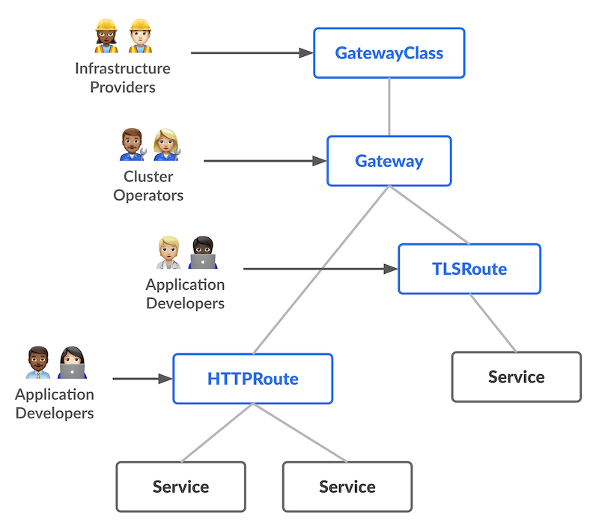
Figure 1: Kubernetes Gateway API specification (source)
Architecture considerations: Choosing the right controller
When designing your EKS networking architecture with Gateway API, it’s important to understand when to use each controller. Both AWS Load Balancer Controller and VPC Lattice Gateway API Controller implement the same Gateway API specification, but they are optimized for different traffic patterns and use cases.
Use AWS Load Balancer Controller when you need any of the below:
- Internet ingress: Your service needs to be accessible from the public internet
- AWS Web Application Firewall (WAF) integration: You require AWS WAF for application-layer security
- Advanced ALB features: You need features like OIDC integration (Amazon Cognito), fixed response rules, or redirect actions; You can also integrate Amazon CloudFront with your private Application Load Balancers as VPC origins.
Example use cases include public-facing web applications, REST APIs consumed by mobile applications or third-party services, GraphQL endpoints for external developers, or webhook receivers from external systems.
Use VPC Lattice Gateway API Controller when you need any of the below:
- Cross-cluster communication: Services need to communicate across multiple EKS clusters
- Cross-VPC connectivity: Services span multiple VPCs and they need to communicate with each other, or services have targets across multiple VPCs.
- Cross-Account access: Services in different AWS accounts need to communicate
- Service-to-service communication features: You need features like automatic service discovery, traffic management, service-level routing capabilities
- Authentication and authorization: You want to enforce service-to-service authentication and authorization policies
- Simplified networking: You want to avoid managing network connectivity services such as VPC peering or AWS Transit Gateway.
- Mixed compute options: You have applications that use AWS Lambda, Amazon Elastic Container Service (ECS), ECS Fargate, or Amazon Elastic Compute Cloud (EC2) instances, and you want simplified connectivity across all compute options.
Example use cases include microservices architectures with services distributed across clusters, multi-tenant platforms, hybrid architectures with services using multiple compute options such as EKS, Lambda and ECS, internal APIs that should not be exposed to the internet, or services requiring fine-grained access control
You can also use both controllers together in the same cluster. This is the most flexible pattern: use AWS Load Balancer Controller for internet-facing services and VPC Lattice Gateway API Controller for internal service-to-service communication. Each controller watches only for Gateways that reference its GatewayClass, so they operate independently without conflict. The GatewayClass Name field in your Gateway resource determines which controller manages it.
Architecture example: EKS multi-cluster application networking
To demonstrate the simplicity of this unified approach, we explore a practical architecture that uses both controllers. Consider a microservices application with:
- A frontend service named
shopthat needs to be exposed to clients on the internet - Internal services named
payments,cartandinventorythat need to communicate with each other - These services are distributed across multiple EKS clusters for isolation or organizational boundaries
In the architecture shown in figure 2, the Edge cluster uses both controllers simultaneously for complementary use cases: AWS Load Balancer Controller manages the shop.api.example.com service exposed to the internet via ALB, and VPC Lattice Gateway API Controller manages the payments.api.example.com service for internal consumption via VPC Lattice. This demonstrates that both controllers coexist in the same cluster, each managing their respective GatewayClass.
Apps-A cluster uses VPC Lattice Gateway API Controller to expose the cart.api.example.com service, and Apps-B cluster uses VPC Lattice Gateway API Controller to expose the inventory.api.example.com service. All internal services communicate with each other through VPC Lattice, which provides automatic service discovery and routing across clusters without requiring any additional networking configuration.
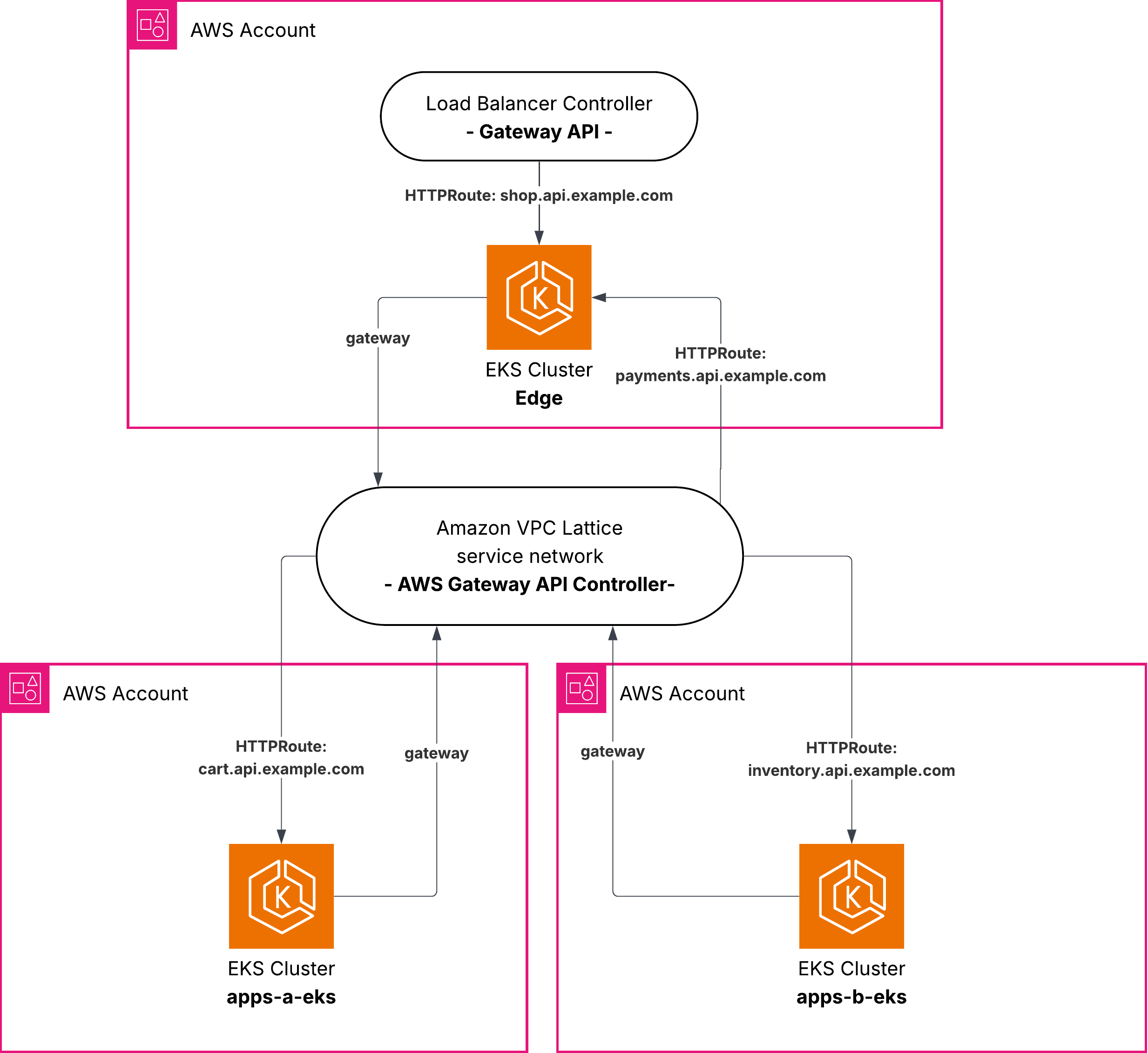
Figure 2: Architecture diagram with the 3 EKS clusters and the 4 apps
The following diagram (Figure 3) shows the Edge EKS cluster in more detail. Both controllers are deployed as pods in the cluster, each watching for Gateway resources that reference their GatewayClass:
- The AWS Load Balancer Controller watches for Gateways referencing
aws-alb-gateway-classand provisions ALBs accordingly. - The VPC Lattice Gateway API Controller watches for Gateways referencing
amazon-vpc-latticeand creates VPC Lattice services in the associated service network.
When an HTTPRoute is created, the corresponding controller picks it up based on which Gateway it references, and configures the routing rules on the appropriate AWS resource.
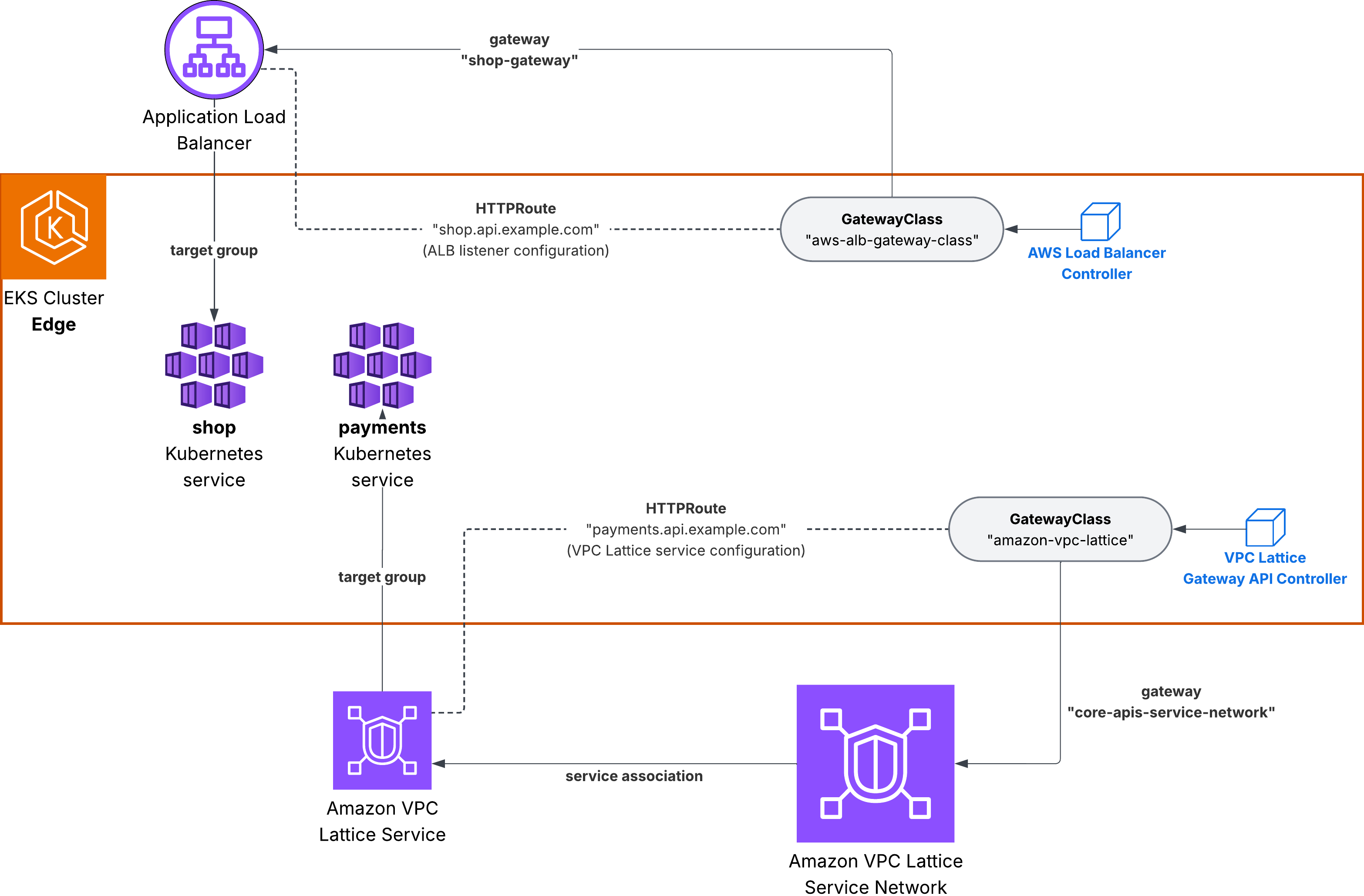
Figure 3: Edge EKS cluster running both controllers
Traffic flows
Understanding how traffic flows through this architecture helps clarify which controller handles each networking layer. The following diagrams show the complete request path from internet client to backend services.
Flow 1: Internet client to shop service (ALB)
Figure 4 details the internet ingress traffic flow. When an external client sends a request to shop.api.example.com, the Application Load Balancer receives the request and terminates TLS using the certificate provisioned through AWS Certificate Manager (ACM). The ALB then forwards the traffic to the shop pods running in the Edge EKS cluster, using the target group that the AWS Load Balancer Controller automatically configures and keeps in sync as pods scale up or down. The entire flow is managed by the AWS Load Balancer Controller, which watches for changes to the Gateway and HTTPRoute resources and updates the ALB configuration accordingly.
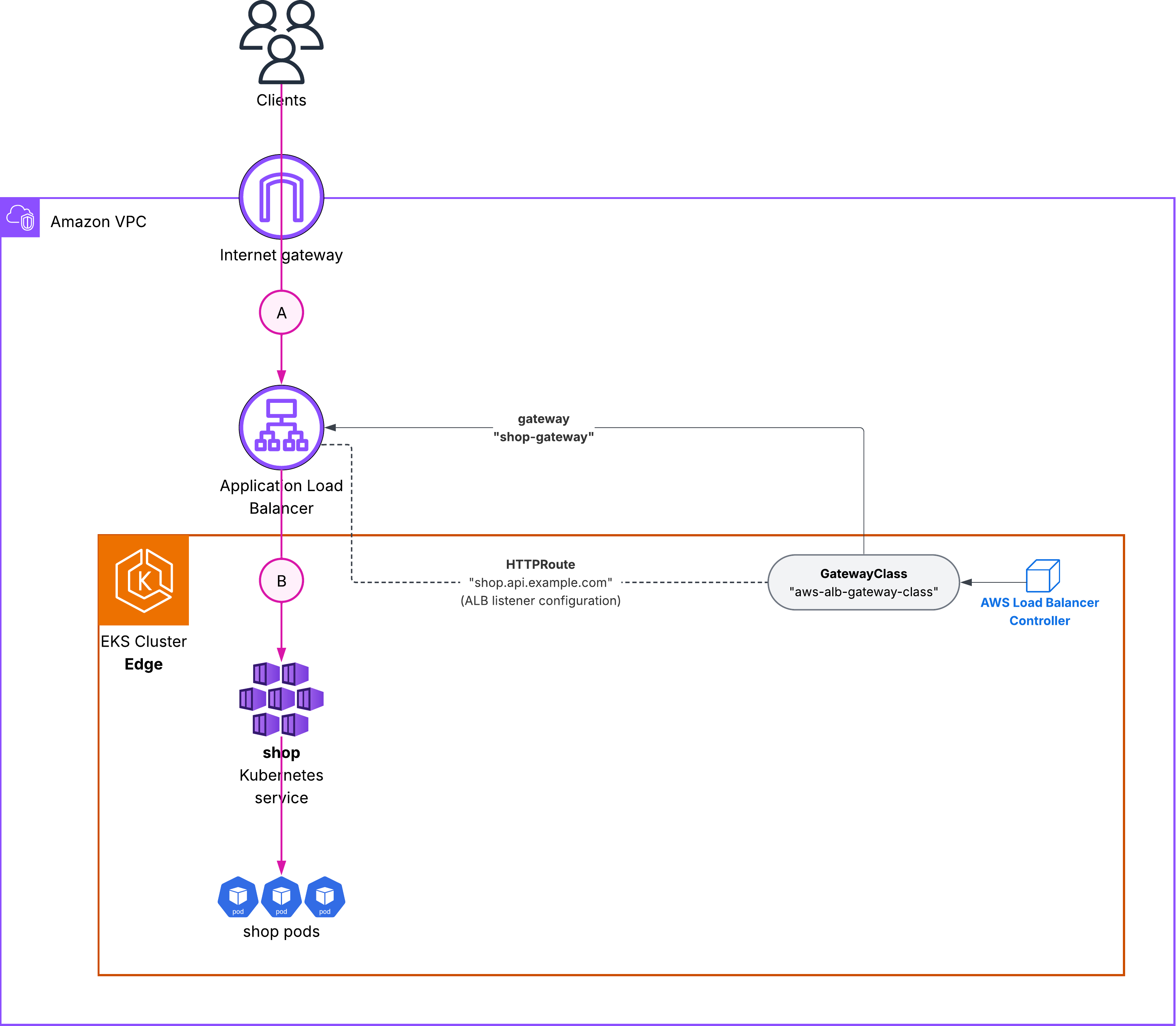
Figure 4: Traffic flow 1 – internet clients to shop ALB
Flow 2: Cross-cluster communication (VPC Lattice)
Figure 5 details the cross-cluster traffic flow. When the shop pod calls cart.api.example.com, the request is resolved by VPC Lattice DNS to a VPC Lattice endpoint. VPC Lattice routes the request to the cart service running in Apps-A cluster, without requiring VPC peering, Transit Gateway, or any additional networking configuration. The VPC Lattice Gateway API Controller in each cluster is responsible for registering its services with the shared service network and keeping target groups up to date as pods scale.
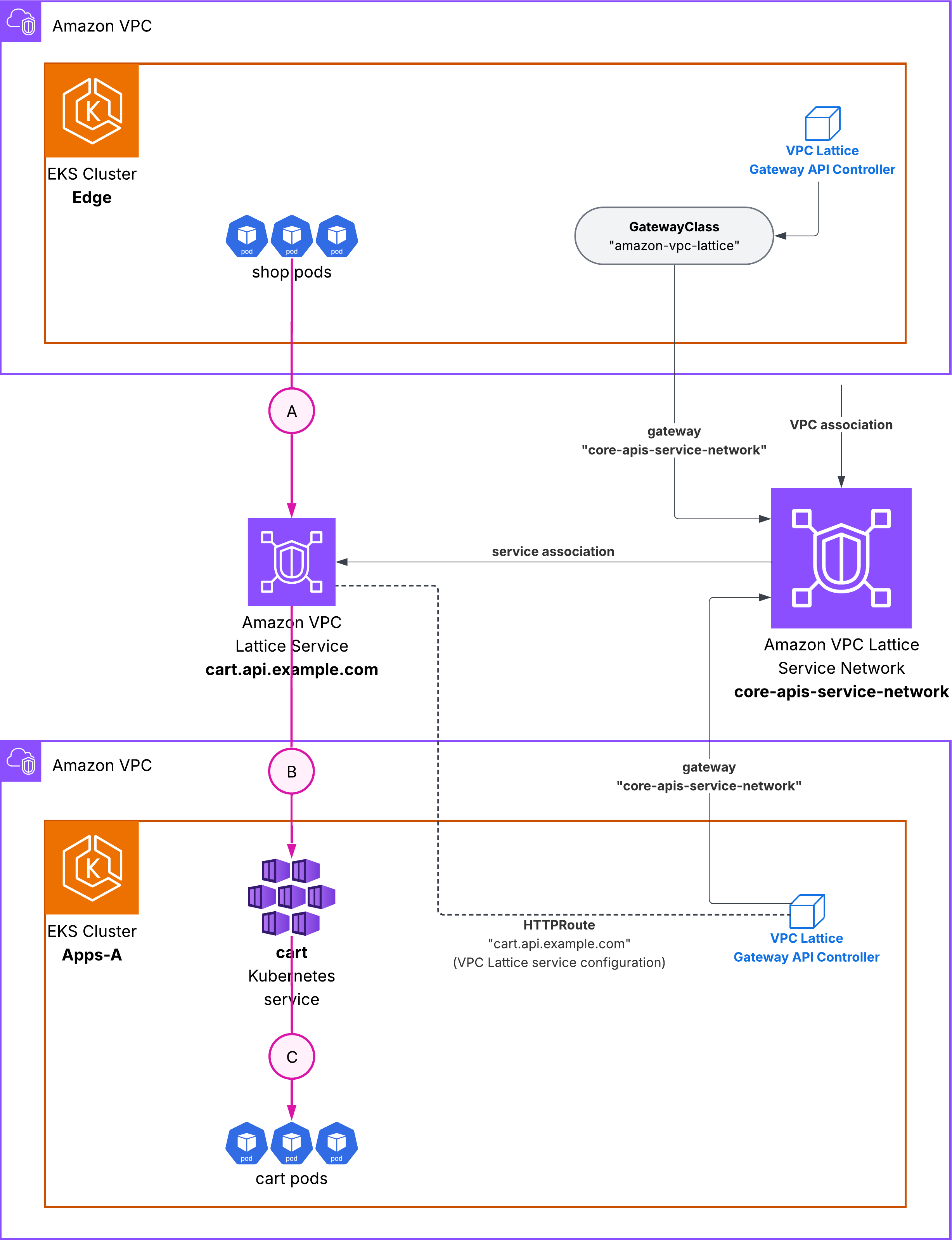
Figure 5: Traffic flow 2 – shop calls cart through VPC Lattice
End-to-end flow
The end-to-end flow combines both controllers. An external client sends a request to shop.api.example.com, which the ALB receives and routes to the shop pods in the Edge cluster. The shop application then calls internal services such as cart.api.example.com and inventory.api.example.com. These DNS names resolve to VPC Lattice endpoints, which route the requests to the corresponding pods in Apps-A and Apps-B clusters. The shop pod can also call payments.api.example.com, which VPC Lattice routes to the payments pods in the same Edge cluster. VPC Lattice handles the cross-cluster routing, target health checking, and load balancing transparently.
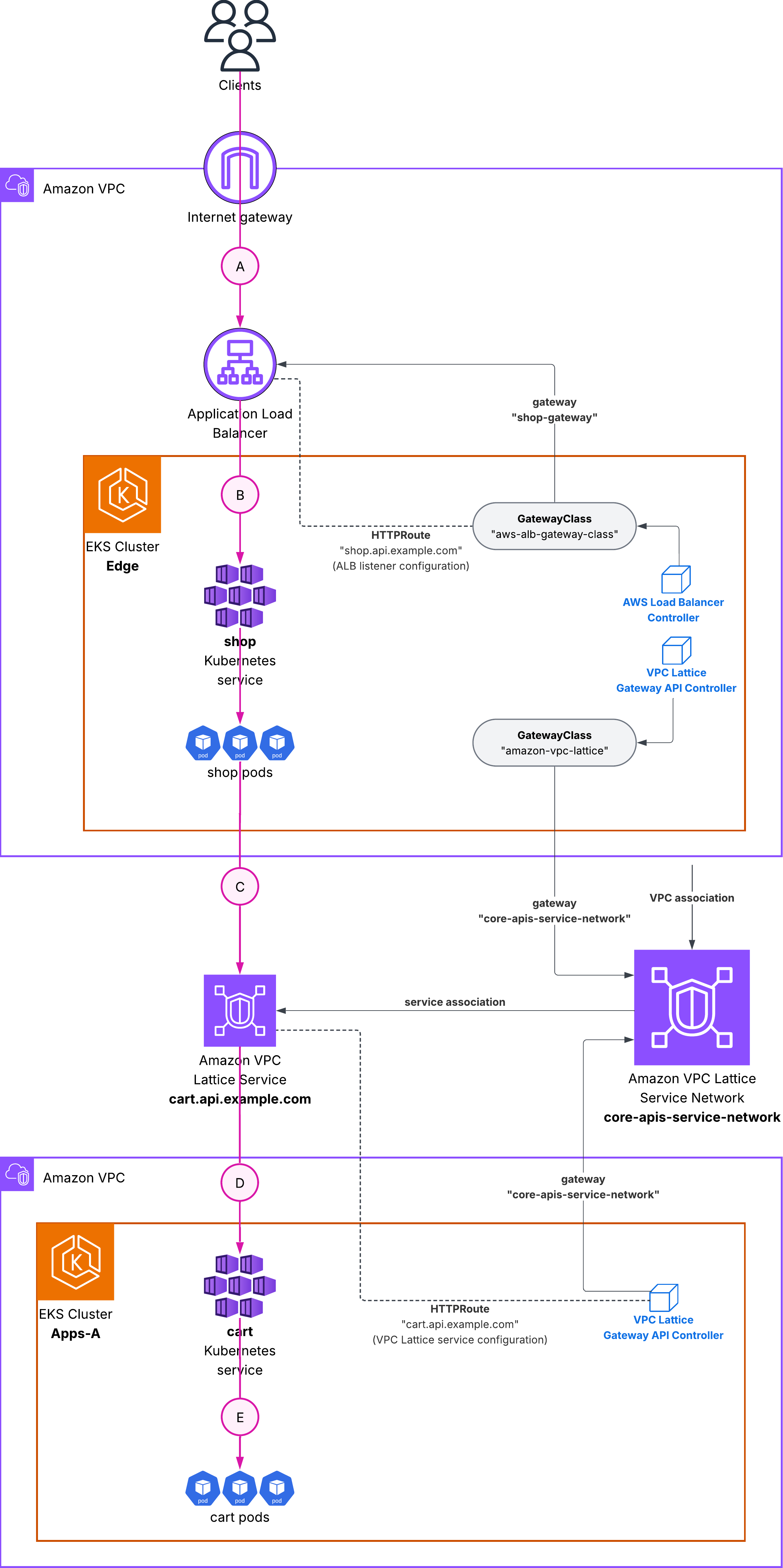
Figure 6: End-to-end flow
Key configuration highlights
The detailed installation instructions and complete code examples are in our GitHub repository. AWS provides two controllers that implement the Gateway API specification, each optimized for different use cases.
AWS Load Balancer Controller with support for Gateway API
The AWS Load Balancer Controller manages Elastic Load Balancing resources for Kubernetes clusters. With Gateway API support, it creates Application Load Balancers (ALBs) or Network Load Balancers (NLBs) based on Gateway resources. The following diagram (figure 7) shows the mapping between Gateway API specification and the AWS Load Balancer Controller components:
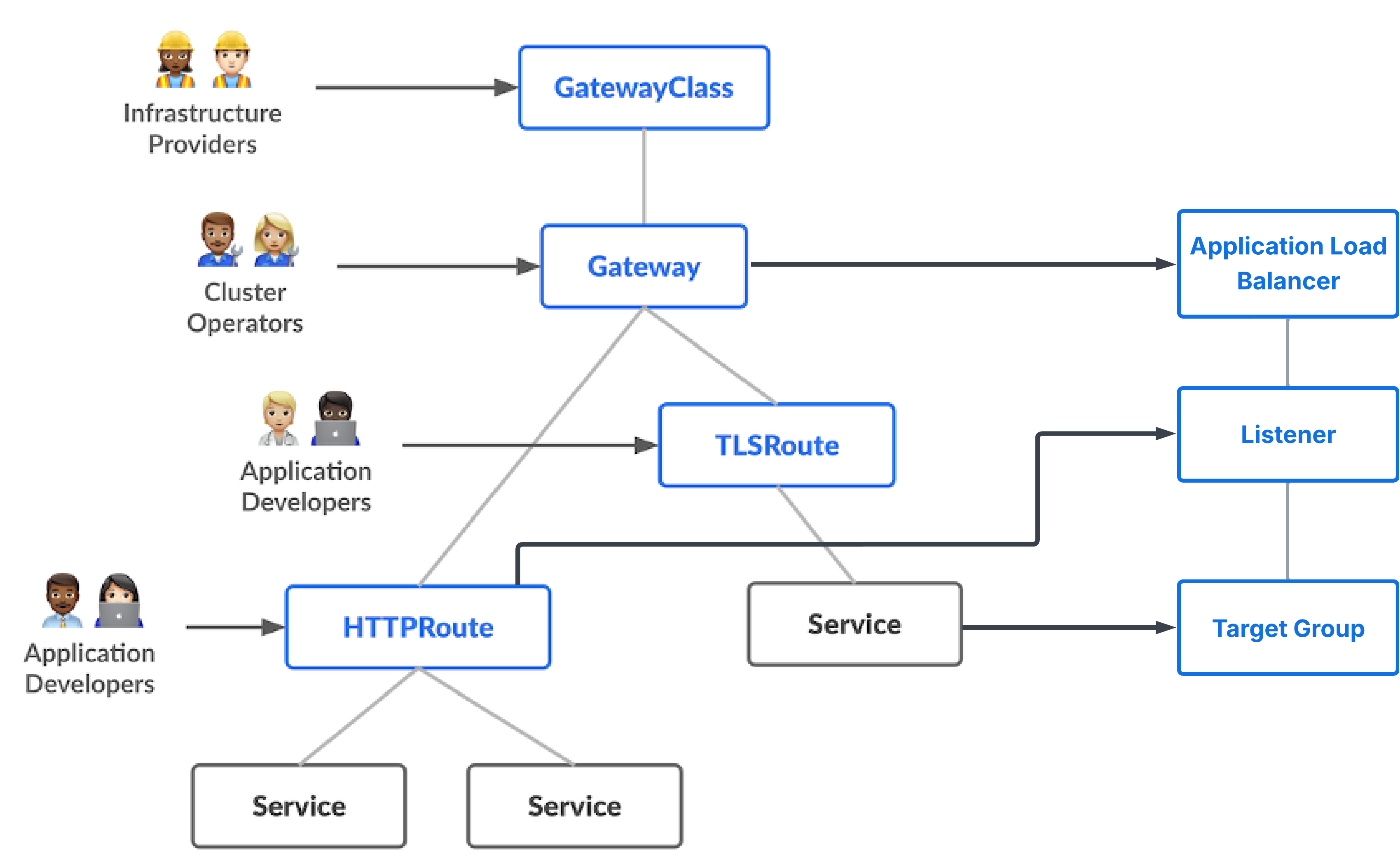
Figure 7: Gateway API specification mapping to AWS LBC components
Below are definition examples for:
- GatewayClass for AWS Load Balancer Controller:
# alb-gatewayclass.yaml
apiVersion: gateway.networking.k8s.io/v1beta1
  kind: GatewayClass
  metadata:
    name: aws-alb-gateway-class
  spec:
    controllerName: gateway.k8s.aws/alb
- The corresponding Gateway instantiation of the GatewayClass that triggers ALB provisioning:
# my-alb-gateway.yaml
apiVersion: gateway.networking.k8s.io/v1beta1
  kind: Gateway
  metadata:
    name: my-alb-gateway
  namespace: eks-gateway-demo
  spec:
    gatewayClassName: aws-alb-gateway-class
    infrastructure:
      parametersRef:
        kind: LoadBalancerConfiguration
        name: lbconfig-gateway
        group: gateway.k8s.aws
     listeners:
       - name: https
          hostname: "ahop.api.example.com"
          protocol: HTTPS
          port: 443
          allowedRoutes:
            namespaces:
from: Same- LoadBalancerConfiguration that specifies custom configuration parameters for your load balancer, such as the ACM certificate:
apiVersion: gateway.k8s.aws/v1beta1
kind: LoadBalancerConfiguration
metadata:
  name: shop-alb-config
  namespace: eks-gateway-demo
spec:
  listenerConfigurations:
    - protocolPort: HTTPS:443
defaultCertificate: arn:aws:acm:REGION:ACCOUNT_ID:certificate/CERT_ID- And the HTTPRoute referring to the Kubernetes service for shop:
apiVersion: gateway.networking.k8s.io/v1
kind: HTTPRoute
metadata:
  name: shop-route
  namespace: eks-gateway-demo
spec:
  parentRefs:
    - name: shop-gateway
      sectionName: https
  hostnames:
    - shop.api.example.com
  rules:
    - matches:
        - path:
            type: PathPrefix
            value: /
      backendRefs:
        - name: shop
          port: 80
Amazon VPC Lattice Gateway API Controller
The VPC Lattice Gateway API Controller creates Amazon VPC Lattice services and associates them automatically with the service network. VPC Lattice is a fully managed application networking service that simplifies service-to-service communication across VPCs and accounts.
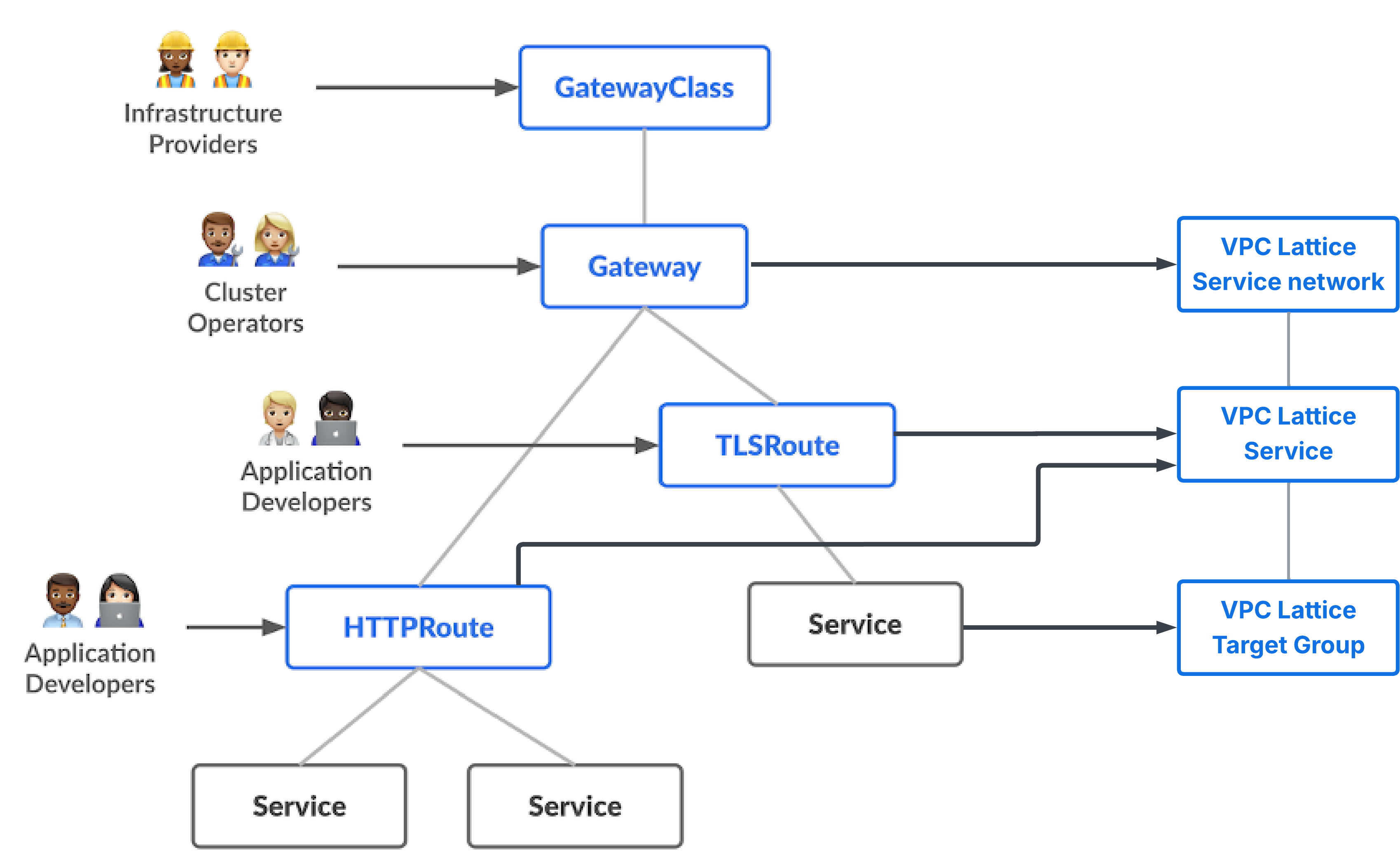
Figure 8: Gateway API specification mapping to Amazon VPC Lattice components
Below are definition examples for:
- GatewayClass for VPC Lattice:
apiVersion: gateway.networking.k8s.io/v1beta1
kind: GatewayClass
metadata:
  name: amazon-vpc-lattice
spec:
  controllerName: application-networking.k8s.aws/gateway-api-controller
- The corresponding Gateway instantiation that uses the VPC Lattice service network:
apiVersion: gateway.networking.k8s.io/v1
kind: Gateway
metadata:
  name: core-apis-service-network
  namespace: eks-gateway-demo
spec:
  gatewayClassName: amazon-vpc-lattice
  listeners:
    - name: https
      protocol: HTTPS
      port: 443
      allowedRoutes:
        namespaces:
          from: Same
    - name: http
      protocol: HTTP
      port: 80
      allowedRoutes:
        namespaces:
from: Same- And the HTTPRoute for the
paymentsVPC Lattice service:
apiVersion: gateway.networking.k8s.io/v1
kind: HTTPRoute
metadata:
  name: payments-route
  namespace: eks-gateway-demo
spec:
  parentRefs:
    - name: core-apis-service-network
      sectionName: https
  hostnames:
    - payments.api.example.com
  rules:
    - matches:
        - path:
            type: PathPrefix
            value: /
      backendRefs:
        - name: payments
          port: 80
The Gateway and HTTPRoute resources use the same CRDs regardless of which controller you are using. The only difference between the two is the gatewayClassName field, which determines whether you configure an ALB or a VPC Lattice service. This architecture gives you flexibility to standardize on using Gateway API as the developer-facing contract, then select the appropriate data plane for each networking layer.
Validating the architecture
Once deployed, you can validate that traffic flows correctly through both controllers. The complete test suite with automated validation scripts is in the GitHub repository. Also check our application deployment for a visual test of the end-to-end flow.
Validation flow
Test 1: Internet → ALB → Shop Service
curl https://shop.api.example.com
✓ Validates: AWS Load Balancer Controller
✓ Validates: ALB provisioning and routing
✓ Validates: TLS termination with ACM
Test 2: Shop → Inventory (Cross-Cluster via VPC Lattice)
From shop pod:
curl http://inventory.api.example.com
✓ Validates: Cross-cluster VPC Lattice routing
✓ Validates: Service network associations
✓ Validates: Multi-cluster service discovery
Migration strategy: AWS Load Balancer Controller with Ingress and Gateway API support
The AWS Load Balancer Controller supports both the Ingress API and Gateway API simultaneously in the same cluster. This means you can:
- Keep existing Ingress resources running. Your current production traffic continues to flow through existing ALBs managed by Ingress resources.
- Deploy new services using Gateway API. New applications can use Gateway API from day one.
- Gradually migrate existing services from Ingress to Gateway API at your own pace.
The AWS Load Balancer Controller watches for both resource types:
# Your existing Ingress resources continue to work
apiVersion: networking.k8s.io/v1
kind: Ingress
metadata:
  name: legacy-app
  annotations:
    alb.ingress.kubernetes.io/scheme: internet-facing
spec:
  rules:
    - host: legacy.example.com
      http:
        paths:
          - path: /
            pathType: Prefix
            backend:
              service:
                name: legacy-service
                port:
                  number: 80

---
# New Gateway API resources work alongside Ingress
apiVersion: gateway.networking.k8s.io/v1
kind: Gateway
metadata:
  name: new-app-gateway
spec:
  gatewayClassName: aws-alb-gateway-class
  listeners:
    - name: https
      protocol: HTTPS
      port: 443

---
apiVersion: gateway.networking.k8s.io/v1
kind: HTTPRoute
metadata:
  name: new-app-route
spec:
  parentRefs:
    - name: new-app-gateway
  hostnames:
    - newapp.example.com
  rules:
    - backendRefs:
        - name: new-service
          port: 80
Migration approach
When migrating from Ingress to Gateway API, the key advantage is that both APIs can coexist in the same cluster. To migrate, start by updating your AWS Load Balancer Controller to a version that supports Gateway API (v2.14.0+) and installing the Gateway API CRDs. Your existing Ingress resources continue to work without any changes. For new services, you can start using Gateway API resources. For existing services, you can migrate them one at a time by creating equivalent Gateway and HTTPRoute resources alongside the existing Ingress resources. Once you validate that traffic flows correctly through the new Gateway API resources, you can delete the old Ingress resources.
This gradual approach allows you to validate each migration step, maintain rollback options, and avoid service disruptions. There is no requirement to migrate all services. You can run both APIs long-term if needed, choosing Gateway API for new services while keeping stable production services on Ingress until you are ready to migrate them.
Considerations
When implementing this architecture in production, consider the following:
- Security: You can use HTTPS for all services, not just internet-facing ones. VPC Lattice supports TLS termination and can integrate with ACM for public certificate management, and with ACM’s Private Certificate Authority (PCA). Implement IAM-based authentication for service-to-service communication using VPC Lattice auth policies.
- Observability: Enable access logging for both ALB and VPC Lattice services. VPC Lattice can send logs to Amazon S3, Amazon CloudWatch Logs, or Amazon Kinesis Data Firehose.
- High availability: Deploy Gateway resources in multiple Availability Zones by ensuring your EKS node groups span multiple AZs. Both ALB and VPC Lattice automatically distribute traffic across healthy targets.
- Cluster lifecycle: When deleting clusters, ensure Gateway resources are deleted first to allow controllers to clean up AWS resources properly. The cleanup scripts in our GitHub repository demonstrate the correct deletion order.
Conclusion
Kubernetes Gateway API provides a unified interface for configuring application networking. By using Gateway API with both AWS Load Balancer Controller and Amazon VPC Lattice, you can create multi-cluster architectures while maintaining a consistent operational experience.
The architecture example we explored demonstrates how to combine internet ingress with Application Load Balancer and service-to-service communication with VPC Lattice, all through a single API. Both controllers coexist in the same cluster, each managing their respective GatewayClass. This allows you to use the right tool for each networking layer without learning multiple APIs.
Get started now
To get started with this architecture, visit our GitHub repository for complete code examples, detailed tutorials, and troubleshooting guides. The repository includes:
- Complete Kubernetes manifests for all three clusters
- Automated setup scripts for quick deployment
- Step-by-step tutorials in a beginner-friendly format
- Troubleshooting guide with common issues and solutions
For more information about Gateway API support in AWS services, see:
- AWS Load Balancer Controller Gateway API documentation
- Amazon VPC Lattice Gateway API Controller documentation
- Kubernetes Gateway API documentation
About the authors

Alexandra Huides
Alexandra Huides is a Principal Networking Specialist Solutions Architect in the AWS Networking Services product team at Amazon Web Services. She focuses on helping customers build and develop networking architectures for highly scalable and resilient AWS environments. Alex is also a public speaker for AWS, and is helping customers adopt IPv6. Outside work, she loves sailing, especially catamarans, traveling, discovering new cultures, running and reading.

Pablo Sánchez Carmona
Pablo is a Senior Network Specialist Solutions Architect at AWS, where he helps customers to design secure, resilient and cost-effective networks. When not talking about Networking, Pablo can be found playing basketball or video-games. He holds a MSc in Electrical Engineering from the Royal Institute of Technology (KTH), and a Master’s degree in Telecommunications Engineering from the Polytechnic University of Catalonia (UPC).