AWS Physical AI Blog
Fine-tuning OpenVLA on Amazon SageMaker AI with LoRA
Introduction
Fine-tuning a Vision-Language-Action (VLA) model like OpenVLA with LoRA on Amazon SageMaker AI lets you adapt a 7-billion parameter robot brain to a new task in hours, not days. This cuts GPU compute costs, shortens adaptation cycles, and lets Physical AI engineers focus on their core domain rather than on infrastructure. Physical AI, a system of hardware and software that integrates perceiving, understanding, reasoning, and learning to interact with the physical world, is one of the fastest-moving frontiers in “generative” AI. Unlike conventional AI that reasons about text or images, Physical AI processes multimodal inputs (cameras, depth sensors, language instructions) and extends its capabilities into the physical world through actuators: it identifies, grasps, lifts, and pours a cup of coffee in real-world conditions, and uses its actions to continuously improve over time. Training these models requires large-scale GPU compute, massive datasets, data preprocessing pipelines, and managed infrastructure for distributed training. Amazon SageMaker AI is purpose-built for this class of workload: fully managed training jobs with multi-GPU instances, automatic data staging from Amazon Simple Storage Service (Amazon S3), and built-in support for frameworks like PyTorch, Hugging Face Accelerate, and PEFT.
This tutorial walks you through the process. LoRA (Low-Rank Adaptation) updates fewer than 1% of the model’s parameters while keeping the rest frozen. Think of it as adding a small, specialized adapter to a general-purpose model rather than rebuilding the whole thing from scratch. The result: 44% lower action prediction error (L1 mean: 0.3081 → 0.1732), measured on a held-out validation set of 500 samples (see Results).
By the end you will know how to:
- Prepare a robot manipulation dataset and upload it to Amazon S3 for training
- Configure and launch a multi-GPU LoRA fine-tuning job on SageMaker AI using the ModelTrainer API
- Evaluate a fine-tuned model by comparing its action predictions against ground-truth data
Why Amazon SageMaker AI for VLA fine-tuning
VLA models sit at the intersection of computer vision, natural language processing, and robotic control. A single model like OpenVLA has 7 billion parameters, processes camera images and text instructions simultaneously, and outputs continuous robot actions. Fine-tuning these models demands multi-GPU infrastructure with high-bandwidth interconnects, large-memory accelerators, and a training framework stack (PyTorch, Accelerate, PEFT, DeepSpeed) that must be correctly configured for distributed execution. For teams without dedicated ML platform engineers, this infrastructure overhead, not the modeling itself, is what stalls projects.

Figure 1: VLA models combine vision, language, and action prediction — cloud-scale GPU infrastructure makes fine-tuning practical.
Amazon SageMaker AI eliminates that overhead. You define a training job with a few API calls: specify the instance type (ml.g6e.48xlarge, ), point to your dataset in Amazon S3, and select a pre-built PyTorch Deep Learning Container. SageMaker provisions the hardware, mounts S3 data channels, launches your training script across all GPUs using the framework of your choice (Accelerate DDP in this tutorial), and streams checkpoints back to S3 as training progresses. When the job completes, the instance terminates and billing stops. Warm pools let you keep capacity reserved between iterative runs, cutting startup time from minutes to seconds.
Parameter-efficient fine-tuning methods like LoRA pair especially well with managed training. Because LoRA updates less than 1% of the model’s weights, memory requirements drop sharply: you can fine-tune a 7B VLA model on 4x L40S GPUs (48 GB each) rather than the 8x A100 80 GB GPUs typically required for full fine-tuning.
This means smaller, less expensive SageMaker instances, faster iteration cycles, and the ability to experiment with multiple LoRA configurations in parallel by launching concurrent training jobs. SageMaker’s ModelTrainer API makes each experiment a single function call with full artifact tracking.
In the following sections, we demonstrate this pattern end-to-end using OpenVLA-7B as the example model and a robot manipulation dataset derived from BridgeData V2. The same SageMaker pipeline – data staging, managed multi-GPU training, checkpoint collection – works for any VLA or foundation model that supports PEFT adapters: Octo, SmolVLA, or your own architecture.
Background: OpenVLA and LoRA
OpenVLA (Open Vision-Language-Action) combines three capabilities into one 7-billion parameter model: it sees through a camera (dual vision encoder based on SigLIP and DINOv2), understands language instructions (using a Llama 2 7B backbone), and predicts physical robot actions as 7 numbers representing arm movement (x, y, z position, 3 rotation angles, gripper open/close). Developed at Stanford and Toyota Research Institute, the model is open-source on Hugging Face (code under an MIT license, model weights under the Llama 2 Community License Agreement).
The clever part: robot actions are treated like words. Each of the 7 action dimensions is split into 256 bins and mapped to tokens in the vocabulary. With 256 bins over the [-1, 1] range, each bin represents about 0.0078 units of resolution. When OpenVLA predicts the next action, it uses the same next-token prediction mechanism that generates text. The model was pre-trained on the Open X-Embodiment (OXE) dataset: 970,000 robot demonstrations across 22 different robot types (Kim et al., 2024). That broad training gives the model a general sense of robotic manipulation, but on any specific robot and task, the predictions are rough. Fine-tuning closes that gap.
LoRA (Low-Rank Adaptation) freezes the entire pre-trained model and injects small trainable matrices into each transformer layer’s attention mechanism. For OpenVLA with rank 16, this adds approximately 6.5 million trainable parameters – less than 1% of the total – so you can fine-tune a 7B model on a single multi-GPU SageMaker instance in hours rather than days.
| Aspect | Full fine-tuning | LoRA fine-tuning |
|---|---|---|
| Trainable parameters | ~7 billion (100%) | ~6.5 million (<1%) |
| GPU memory required | 8x A100 80 GB minimum | 4x L40S 48 GB sufficient |
| Training time (600 episodes) | ~24 hours (estimated, full fine-tuning) | ~2–6 hours |
Prerequisites
Before starting, ensure you have the following:
- An AWS account with access to Amazon SageMaker AI
- A service quota for ml.g6e.48xlarge training instances (8x NVIDIA L40S 48 GB GPUs). Alternatively, ml.p4d.24xlarge (8x A100 40 GB) works with the same configuration. Request a quota increase through the Service Quotas console if needed.
- A Hugging Face account and access token, as the training job downloads the OpenVLA-7B base model at runtime
- An Amazon S3 bucket in your training region for staging the dataset and collecting model artifacts
- Familiarity with Python and PyTorch. SageMaker provides pre-built PyTorch training containers that this tutorial uses.
- Estimated time: ~3 hours end-to-end (30–45 minutes for data preparation, 2–6 hours for training depending on instance type, 10–15 minutes for evaluation)
- Estimated cost: Consult the Amazon SageMaker AI pricing page for current ml.g6e.48xlarge on-demand rates; multiply the hourly rate by 2–6 hours for the training job, plus nominal S3 storage costs.
Important: This tutorial is for research and development purposes. Deploying learned robot policies to physical hardware requires independent safety validation, hardware interlocks, and compliance with applicable robotics safety standards. Always maintain human oversight when operating robots controlled by ML models.
Dataset
This tutorial uses a synthetic robot manipulation dataset derived from BridgeData V2, a large-scale collection of real robot demonstrations recorded on a WidowX robot arm. The source data (BridgeData V2 Scripted Images on Hugging Face) contains 8,802 episodes, each with three key frames from a fixed camera.
The original dataset has images but no action labels, so we introduce a separate process during the data preparation step that estimates robot movements using optical flow, a computer vision technique that measures how pixels move between consecutive frames. The mean pixel displacement is divided by 100.0 (an empirical scaling factor) and mapped to the x and y action dimensions. The z-axis, rotation, and gripper dimensions remain zero because 2D image motion cannot capture depth or end-effector state. This is a real limitation (see Known Limitations section later in this blog), but it provides enough training signal to demonstrate the full pipeline.
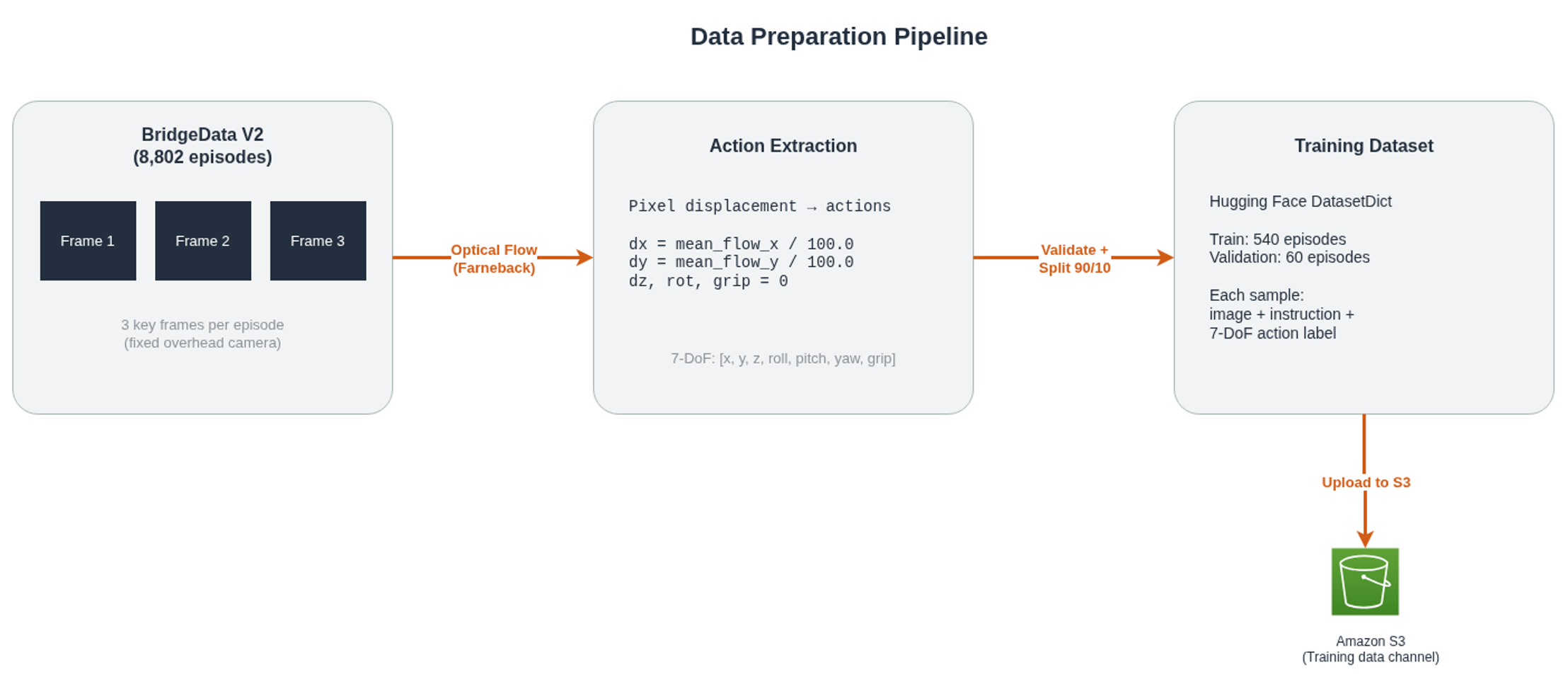
Figure 2: Camera frames are processed with optical flow to estimate action vectors, producing a structured dataset ready for SageMaker training.
| Parameter | Value |
|---|---|
| Source dataset | VyoJ/BridgeData-V2-Scripted-Images (Hugging Face) |
| Episodes used | 600 (540 train / 60 validation) |
| Frames per episode | 3 (sampled at start, middle, and end of each trajectory) |
| Action dimensions | 7-DoF (x, y, z, roll, pitch, yaw, gripper) |
| Action generation | Optical flow (Farneback method) |
| Task instruction | “move object to target” |
Solution overview
The pipeline has three steps, each implemented as a Jupyter notebook running on Amazon SageMaker AI. First, prepare the dataset and upload it to Amazon S3. Second, launch a SageMaker fully managed training job that applies LoRA adapters to OpenVLA and trains across 8 GPUs. Third, download the trained model and measure how much the action predictions improved. SageMaker handles GPU provisioning, data channel mounting, and artifact collection – you focus on the model and the recipe.
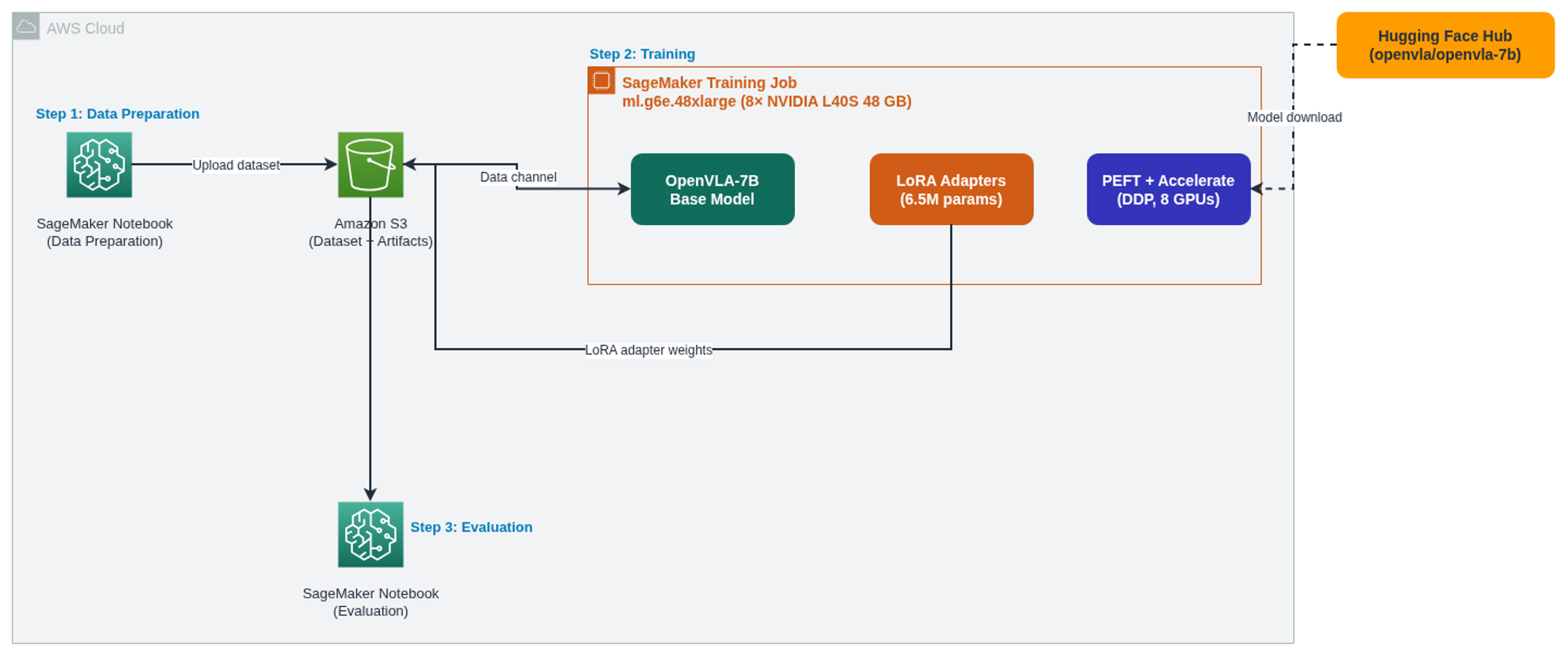
Figure 3: Solution architecture – data preparation, distributed LoRA training on SageMaker AI, and model evaluation. The Hugging Face Hub provides the base OpenVLA-7B model at runtime (dashed line).
Walkthrough
The complete source code is available in the GitHub repository.
Step 1: Prepare the dataset
The data preparation notebook (01_data_preparation.ipynb) downloads BridgeData V2 from Hugging Face, generates 7-DoF actions via optical flow, validates every episode, and converts the result into a Hugging Face DatasetDict with a 90/10 train/validation split. This step runs on any instance (no GPU required) and takes 30–45 minutes for 600 episodes.
After generating the dataset locally, upload it to Amazon S3:
import boto3 from pathlib import Path from tqdm import tqdm
s3_client = boto3.client('s3') local_root = Path('./bridge_hf_synthetic') files = [f for f in local_root.rglob('*') if f.is_file()]
print(f'Uploading {len(files)} files to s3://{bucket_name}/{S3_PREFIX}/') for f in tqdm(files, desc='Uploading to S3'): relative = f.relative_to(local_root) s3_client.upload_file(str(f), bucket_name, f'{S3_PREFIX}/{relative}')
print(f'Dataset uploaded to: s3://{bucket_name}/{S3_PREFIX}/')
Step 2: Launch the SageMaker training job
Next, you configure and launch a SageMaker fully managed training job using the ModelTrainer API (02_training_job.ipynb). Inside the container, the entry point script downloads the OpenVLA-7B base model from Hugging Face, freezes all base weights, applies LoRA adapters, and trains using cross-entropy loss on the discretized action tokens. Only the action predictions contribute to the loss; the instruction tokens are masked out.
The job uses Hugging Face Accelerate to swap between multi-GPU Distributed Training Configurations like Distributed Data Parallel (DDP) or DeepSpeed, PEFT (Parameter-Efficient Fine-Tuning) for LoRA integration, and the NVIDIA Collective Communications Library (NCCL) for GPU-to-GPU communication. Training runs in bf16 mixed precision with gradient checkpointing enabled.
from sagemaker.core.training.configs import ( SourceCode, Compute, InputData, OutputDataConfig, StoppingCondition, CheckpointConfig, ) from sagemaker.train import ModelTrainer
image_uri = f'763104351884.dkr.ecr.{region}.amazonaws.com/pytorch-training:2.7-gpu-py312'
env = { 'HF_TOKEN': hf_token, 'ACCELERATE_CONFIG': './accelerate_configs/ddp.yaml', 'training_recipe': './recipes/openvla_config.yaml', 'NCCL_PROTO': 'simple', 'NCCL_DEBUG': 'WARN', }
model_trainer = ModelTrainer( training_image=image_uri, environment=env, source_code=SourceCode( source_dir='./scripts', requirements='requirements.txt', entry_script='run_finetuning.sh', ), compute=Compute( instance_type='ml.g6e.48xlarge', instance_count=1, keep_alive_period_in_seconds=3600, ), base_job_name='openvla-lora-finetune-bridge', stopping_condition=StoppingCondition(max_runtime_in_seconds=36000), output_data_config=OutputDataConfig(s3_output_path=output_path), checkpoint_config=CheckpointConfig( s3_uri=output_path + '/checkpoints', local_path='/opt/ml/checkpoints', ), )
train_input = InputData(channel_name='train', data_source=dataset_s3_uri) model_trainer.train(input_data_config=[train_input], wait=True)
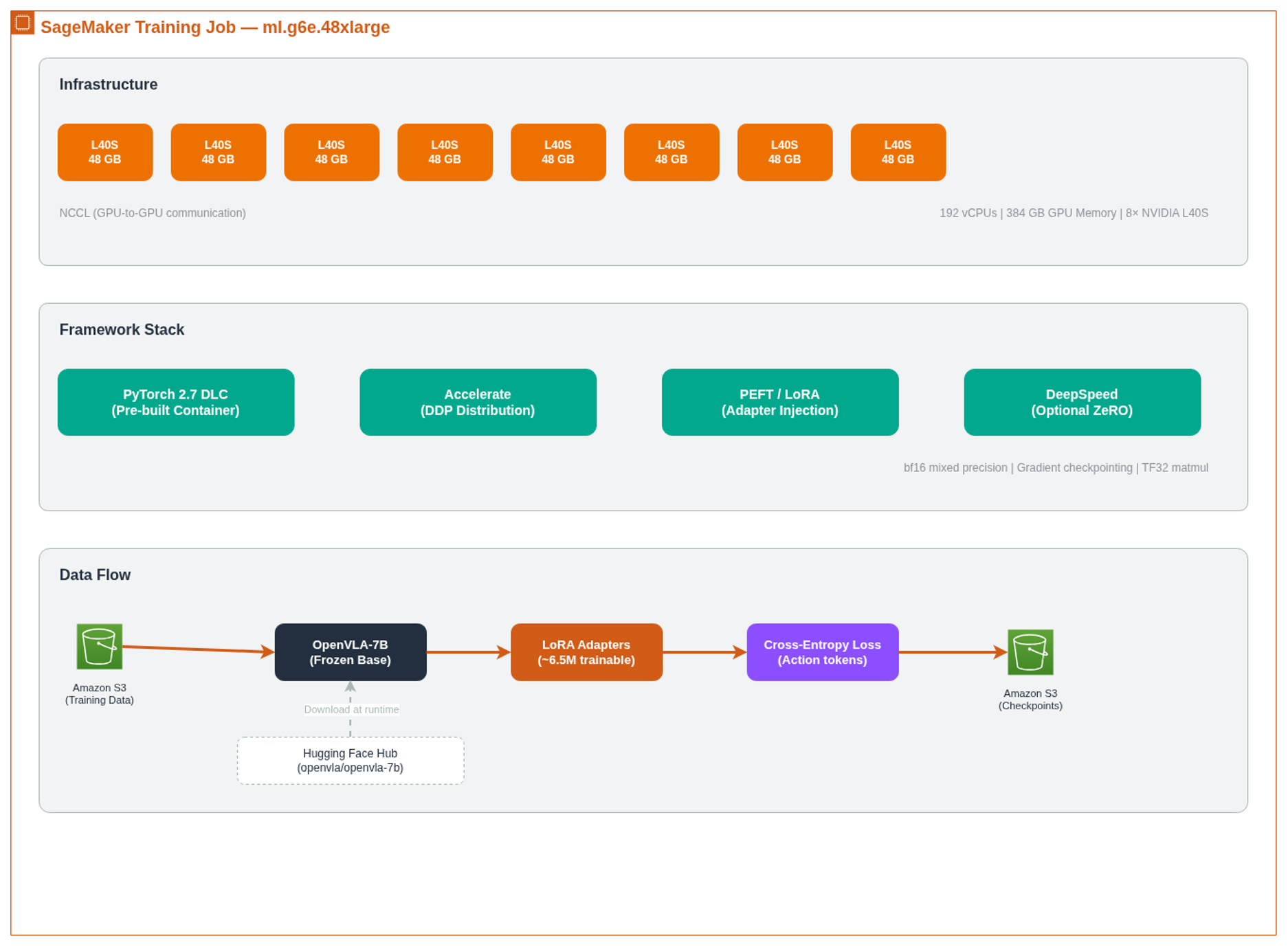
Figure 4: SageMaker training job internals – the managed container handles distributed training, LoRA injection, and artifact collection.
Training hyperparameters are configured via recipes/openvla_config.yaml:
| Parameter | Value |
|---|---|
| Fine-tuning method | LoRA |
| LoRA rank / alpha | 16 / 16 |
| LoRA target modules | q_proj, v_proj, k_proj, out_proj |
| LoRA initialization | Gaussian |
| Epochs | 10 |
| Batch size | 4 per device |
| Learning rate | 1e-4 (cosine schedule, 500 warmup steps) |
| Optimizer | AdamW (weight decay 0.01) |
| Mixed precision | bf16 with TF32 matmul enabled |
| Gradient checkpointing | Enabled |
| In-training validation | Disabled (evaluation is post-hoc) |
| Instance type | ml.g6e.48xlarge (8x NVIDIA L40S 48 GB) |
Key package versions pinned in requirements.txt: PyTorch 2.7.1, Transformers 4.57.6, Accelerate 1.12.0, PEFT 0.18.1, DeepSpeed 0.18.5.
Step 3: Evaluate the fine-tuned model
The evaluation notebook (03_evaluation.ipynb) downloads model artifacts from Amazon S3, loads the fine-tuned checkpoint, and runs inference on the validation set. For each sample, the model receives a camera image, and the instruction “move object to target,” runs a forward pass, and decodes the predicted action tokens back to continuous 7-DoF values.
from transformers import AutoProcessor, AutoModelForVision2Seq from utils.openvla_utils import ActionTokenizer, PurePromptBuilder
processor = AutoProcessor.from_pretrained( 'openvla/openvla-7b', trust_remote_code=True ) model = AutoModelForVision2Seq.from_pretrained( finetuned_model_path, torch_dtype=torch.bfloat16, attn_implementation='eager', trust_remote_code=True, ).to('cuda') model.eval()
action_tokenizer = ActionTokenizer(processor.tokenizer) prompt_text = PurePromptBuilder('openvla').build_prompt(instruction, '') inputs = processor( text=prompt_text, images=image, return_tensors='pt' ).to('cuda', dtype=torch.bfloat16)
with torch.no_grad(): outputs = model(**inputs) action_logits = outputs.logits[0] action_token_ids = torch.argmax(action_logits[-7:], dim=-1).cpu().numpy() action_pred = action_tokenizer.decode_token_ids_to_actions(action_token_ids)
Note: Evaluation uses a single forward pass with argmax decoding on the last 7 logits, not autoregressive generation. At deployment time, you would use model.generate(), which predicts tokens sequentially. The prompt format is “In: What action should the robot take to {instruction}?\nOut:” (constructed by PurePromptBuilder). The attn_implementation='eager' parameter selects standard PyTorch attention because OpenVLA’s architecture requires eager mode. The processor is always loaded from the base openvla/openvla-7b model because the tokenizer is unchanged by LoRA fine-tuning.
Results
For a WidowX arm with a roughly 30 cm workspace (based on the robot’s published specifications), the base model’s average error of 0.31 per action dimension (15.5% of the full [-1, 1] range) translates to about 4.6 cm of positional error per movement. Fine-tuning cuts this to 0.17 per dimension (8.7%), or about 2.6 cm, sufficient for coarse grasping tasks but still too imprecise for sub-centimeter assembly work.
The table below compares the base OpenVLA-7B model against the fine-tuned version on 500 validation samples. The base model was pre-trained on the broad OXE dataset, which includes BridgeData V2 among its constituent datasets. However, the base model has never seen these specific optical flow-derived action labels, so it serves as the pre-adaptation baseline.
| Metric | Base Model | Fine-Tuned | Improvement |
|---|---|---|---|
| L1 Mean | 0.3081 | 0.1732 | 43.8% lower |
| L1 Median | 0.2926 | 0.1562 | 46.6% lower |
| L1 Std | 0.0907 | 0.0597 | 34.2% lower |
| L1 Max | 0.6562 | 0.3826 | 41.7% lower |
| L2 Mean (RMSE) | 0.4097 | 0.3253 | 20.6% lower |
| L2 Std | 0.0929 | 0.0644 | 30.7% lower |
Fine-tuning reduces L1 mean error by 44%, and the improvement holds across validation runs of varying sizes, confirming the model learned the task distribution rather than memorizing training episodes. Standard deviation dropped by 34%, meaning fewer outlier predictions. The worst-case error dropped from 0.66 to 0.38. L2 (RMSE) improved by 21% compared to L1’s 44% because RMSE penalizes large errors more heavily; a few edge cases still produce outsized deviations.
Known limitations
The optical flow approach generates non-zero values only for x and y translation. The remaining 5 action dimensions are zero throughout training, so the fine-tuned model has not learned to predict them. Replacing synthetic actions with recorded robot demonstrations (such as those collected via ALOHA or LeRobot) would fill these gaps.
All 600 training episodes use a single instruction (“move object to target”), each with only 3 frames. The model has not been exposed to diverse phrasing or multi-step manipulation sequences. Finally, optical flow captures apparent visual motion, not true end-effector trajectory, so there may be a domain gap when deploying to a physical robot. This tutorial validates that LoRA adaptation reduces prediction error on held-out data; deploying to real hardware would require real demonstration data and closed-loop evaluation.
Clean up
To avoid ongoing charges, delete the following resources after completing this tutorial:
- SageMaker training job warm pool – If you enabled warm pool (keep_alive_period_in_seconds=3600 ), the GPU capacity stays reserved after training completes. In the Amazon SageMaker AI console, navigate to Training > Training jobs and set the warm pool period to 0 or delete the job.
- Amazon S3 data – Delete the training dataset and model artifacts. Run
aws s3 rm s3://amzn-s3-demo-bucket/openvla-finetuning/ --recursivefrom the CLI, or use the Amazon S3 console. - SageMaker notebook instances – Stop and delete any notebook instances created for this tutorial.
- SageMaker Studio apps – Shut down all running apps (kernels, terminals) from the Studio UI to stop the underlying compute instances.
Conclusion
In this post, we showed how to fine-tune OpenVLA, a 7-billion parameter Vision-Language-Action model, using LoRA on Amazon SageMaker AI. SageMaker made this accessible without any cluster management or infrastructure engineering – a single API call launched a distributed training job across 8 GPUs, and the fine-tuned model achieved a 44% reduction in action prediction error. This validates that parameter-efficient adaptation on managed infrastructure works for robotics, not just language tasks.
The three-notebook pipeline gives you a reproducible template: prepare your dataset, launch a SageMaker fully managed training job, and evaluate. To move toward production, replace synthetic optical flow actions with real robot demonstrations, diversify the language instructions, and evaluate in closed-loop simulation before deploying to hardware. You could also deploy the fine-tuned model as a SageMaker real-time endpoint for closed-loop robot control (subject to appropriate safety validation and human oversight requirements for your deployment environment), or switch from DDP to the included DeepSpeed ZeRO configurations for larger LoRA ranks. The companion blog on Sim-to-Real pipelines covers the simulation infrastructure that produces the training data these models need.
Start with the GitHub repository for the complete notebooks, training scripts, and configuration files. If you have questions or feedback about this tutorial, leave a comment on this post.
Further reading
- Physical AI: Building the Next Foundation in Autonomous Intelligence – defines Physical AI and the AWS approach to building autonomous systems
- Sim-to-Real and Real-to-Sim: The Engine Behind Capable Physical AI – architecture blog on simulation pipelines for VLA training
- OpenVLA: An Open-Source Vision-Language-Action Model (Kim et al., 2024) – foundational paper describing the OpenVLA architecture and Open X-Embodiment pre-training
- Fine-Tuning Vision-Language-Action Models: Optimizing Speed and Success (Kim et al., 2025) – OpenVLA-OFT, a follow-up by the same team achieving 97.1% success with parallel decoding and continuous actions
- GitHub: OpenVLA LoRA Fine-Tuning on SageMaker – complete notebooks, training scripts, and configuration for this tutorial
- Amazon SageMaker AI documentation – ModelTrainer API, distributed training, and instance selection
- PEFT: Parameter-Efficient Fine-Tuning – Hugging Face library for LoRA and adapter methods
- Open X-Embodiment dataset – the 970K-demonstration multi-robot dataset used to pre-train OpenVLA
- LoRA: Low-Rank Adaptation of Large Language Models (Hu et al., 2021) – the original LoRA paper