AWS Security Blog
Introducing simplified onboarding for AWS WAF Bot Control at the targeted inspection level
Today, we’re announcing simplified onboarding and bot confidence levels for AWS WAF Bot Control at the targeted inspection level, which we refer to as Targeted bot control in this post, matching the console. Bot confidence levels and the new LATEST rule group version are available for the resource types that AWS WAF protects: you act on advanced bot detections by confidence level instead of writing label rules, and you stay on the newest detections without manual upgrades, helping you respond to automated traffic, including traffic from AI-powered bots. For the websites and applications that you deliver through Amazon CloudFront, simplified onboarding goes further: you turn on Targeted bot control from a single console setting, and automatic SDK integration, which launched last month, removes the need for application code changes in many cases.
In this post, we explain what the simplified onboarding experience looks like and how to get started when protecting CloudFront-delivered applications.
Granular control takes effort to configure
Targeted bot control uses advanced behavioral analysis designed to help identify sophisticated bots that attempt to evade traditional detection mechanisms. It uses machine learning and client-side signals to help detect sophisticated AI-based bots. It’s also deliberately granular: it surfaces each detection as its own label, so you can build rules around specific behaviors. The number of choices (which labels, which combinations, and which order) is a lot to evaluate and implement when your immediate goal is to implement the first round of protections.
To get the full value of Targeted bot control, and to help reduce false positives by grouping its signals into confidence levels, you typically do the following:
- Add the AWS WAF Bot Control managed rule group to your protection pack, set the inspection level to Targeted, and choose a rule group version.
- Integrate the AWS WAF JavaScript SDK into your application. This is an application code change, often owned by a different team at your company and tied to a different release cycle.
- Learn which AWS WAF labels the rules emit and what they mean, and decide which combinations indicate a bot with high confidence.
- Write label-match rules that group those labels into bot confidence levels, place them in the right order, and keep them current as new rule group versions add labels.
We’ve published guidance on grouping targeted bot labels into confidence tiers. For teams without dedicated security engineers, the path to implement the solution can be long. Completing every step can take time, especially when the SDK integration depends on another team’s release cycle, so rules can remain in Count mode longer than intended.
What’s new
You can now turn on Targeted bot control with a single toggle. AWS WAF sets up the recommended configuration for you and keeps it on the latest detections, and you don’t need to change your application code to integrate AWS WAF JavaScript SDK for CloudFront-delivered applications in many cases. When you use this toggle, AWS WAF configures the following for you:
- Targeted inspection level – The AWS WAF Bot Control rule group is added (or configured) with the inspection level set to Targeted and machine learning turned on.
- Actions for each bot confidence level – Each confidence level (High, Medium, or Low) gets an AWS-recommended action, which you can change.
- Rule group version – The rule group is set to the
LATESTversion, which points to the most recent AWS WAF Bot Control release, so you get new detections without upgrading manually. - Rule order – A newly added AWS WAF Bot Control rule group is placed after the existing rules.
- Automatic SDK integration – This option is available for protection packs with the CloudFront scope and is turned on by default, so the targeted detections receive browser signals from the start. If you want, you can use this feature stand-alone.
Bot confidence
With bot confidence, AWS WAF Bot Control now adds a High, Medium, or Low bot confidence level to each request that it evaluates at the targeted inspection level. The confidence level reflects how likely it is that the request comes from an automated client that exhibits behaviors that you might not want.
Several AWS WAF Bot Control rules already report their own confidence levels with AWS WAF labels, for example TGT_ML_CoordinatedActivityLow/Medium/High and TGT_TokenReuseIpLow/Medium/High rules, and the TGT_VolumetricSession rule emits labels ending in volumetric:session:low, volumetric:session:medium, and volumetric:session:high. Each of those describes the strength of one detection. Bot confidence combines the targeted detections into one High, Medium, or Low level for each request, so you choose one action per level instead of writing rules across many labels. Bot confidence also emits three labels ending in targeted:signal:bot_signal:low, targeted:signal:bot_signal:medium and targeted:signal:bot_signal:high.
The confidence levels and their default actions reflect AWS recommendations to AWS WAF Bot Control customers.
| Confidence level | What it indicates | Default action |
|---|---|---|
| High | A signal that by itself strongly indicates automation, or two or more signals that corroborate each other | CAPTCHA |
| Medium | A signal that indicates automation, but no other signal corroborates it; the request might still come from a person | CAPTCHA |
| Low | Only weak signals of automation | Challenge |
The defaults are chosen to help keep false positives low. High-confidence and Medium-confidence bot traffic receives a CAPTCHA puzzle rather than a block, so a misclassified user can still get through. Low-confidence bot traffic receives a silent Challenge, which is designed to complete in the browser without requiring user interaction. You can change any of these actions to Allow, Block, CAPTCHA, Challenge, Count, or Monetize.
The confidence levels are added alongside the existing AWS WAF Bot Control labels. The existing detection labels that AWS WAF Bot Control emits are still attached to the request, so you can inspect any request and see which signals contributed to its confidence level.
Automatic SDK integration for CloudFront
The AWS WAF JavaScript SDK runs in the viewer’s browser, where it can see signals the server doesn’t normally receive, such as mouse movements, key presses, form interactions, and device characteristics. These client-side signals help improve the accuracy of the targeted detections in distinguishing between a person and an automated client. The SDK silently acquires and refreshes an AWS WAF token as the page loads, without the extra charges or interruptions of Challenge and CAPTCHA rule actions.
That token travels with each request and is used by AWS WAF Bot Control at the targeted inspection level, AWS WAF Fraud Control account takeover prevention, and AWS WAF Fraud Control account creation fraud prevention. Until now, integrating the SDK meant adding a script tag to your pages yourself.
With automatic SDK integration for CloudFront, you don’t add the script tag yourself. When the setting is on, CloudFront inserts the same script tag that a manual integration uses, pointing to your protection pack’s integration URL. AWS WAF evaluation, token acquisition, and token refresh work the same way as they do with a manual integration.
Automatic SDK integration is available for any protection pack with the CloudFront scope that contains one of the following managed rule groups:
- AWS WAF Bot Control with targeted inspection level
- AWS WAF Fraud Control account takeover prevention
- AWS WAF Fraud Control account creation fraud prevention
For the up-to-date list of managed rule groups supporting this feature, see Automatic SDK integration for CloudFront distributions.
A rule group also qualifies when its actions are overridden to Count, so you can add the SDK while you evaluate the rule group. When you create a new protection pack with the CloudFront scope in the console, automatic SDK integration is turned on by default. Protection packs created before the feature launched aren’t changed. You can also turn the setting off with a single toggle if you prefer to integrate the SDK yourself. The SDK collects client-side signals and stores the AWS WAF token in a cookie named aws-waf-token. The token contains information collected from your visitors’ browsers. As described in AWS WAF token characteristics, the information gathered is non-unique and can’t be mapped to an individual human being. Before you turn on automatic SDK integration, review your privacy notice and any cookie consent obligations that apply to your sites, for example under GDPR and the ePrivacy Directive.
Walkthrough
In this section, we show you how to enable Targeted bot control with bot confidence and automatic SDK integration for CloudFront.
Prerequisites
To follow this walkthrough, you need the following:
- A CloudFront distribution that serves HTML pages.
- The CloudFront distribution uses pay-as-you-go pricing, because distributions on a CloudFront flat-rate pricing plan don’t support AWS WAF Bot Control at the targeted inspection level.
Enable Targeted bot control on a new protection pack
When you create a new protection pack, you can turn on Targeted bot control together with automatic SDK integration.
- Open the AWS Management Console for AWS WAF & Shield and choose Protection packs (web ACLs), then Create protection pack (web ACL).
- Under App category, select the category that describes your application. Under Add resources, select your CloudFront distribution.
- Select one of the predefined protection pack options. The Targeted bot control section isn’t available when you choose Build your own.
- In the Targeted bot control section, choose Enable Targeted bot control.
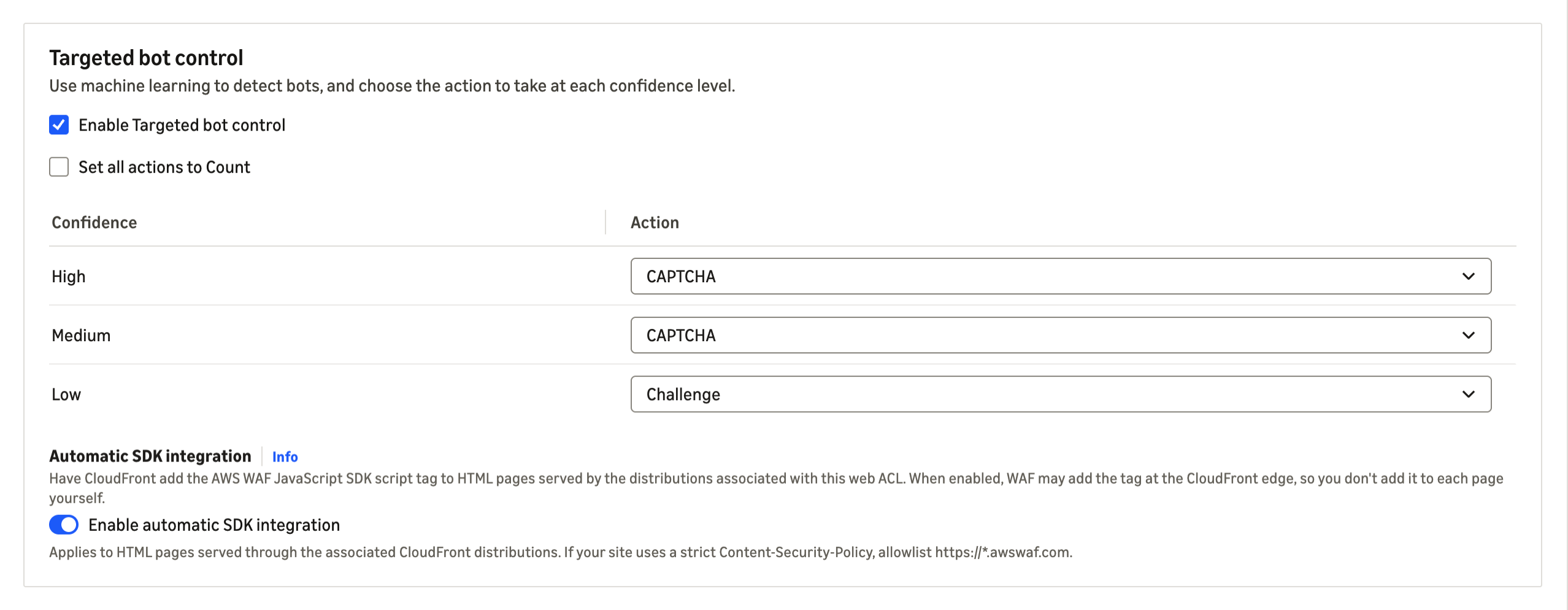
Figure 1: The Targeted bot control section during protection pack creation
- Review the action for each confidence level. The defaults are CAPTCHA for High, CAPTCHA for Medium, and Challenge for Low. To observe the effect before you enforce, select Set all actions to Count.
- Confirm that Enable automatic SDK integration is selected.
- Choose Create protection pack (web ACL).
Enable Targeted bot control on an existing protection pack
These steps work whether your protection pack doesn’t yet have AWS WAF Bot Control, uses AWS WAF Bot Control at the common level, or uses an older AWS WAF Bot Control version.
- In the AWS WAF & Shield console, open Protection packs (web ACLs) and select a protection pack with the CloudFront scope.
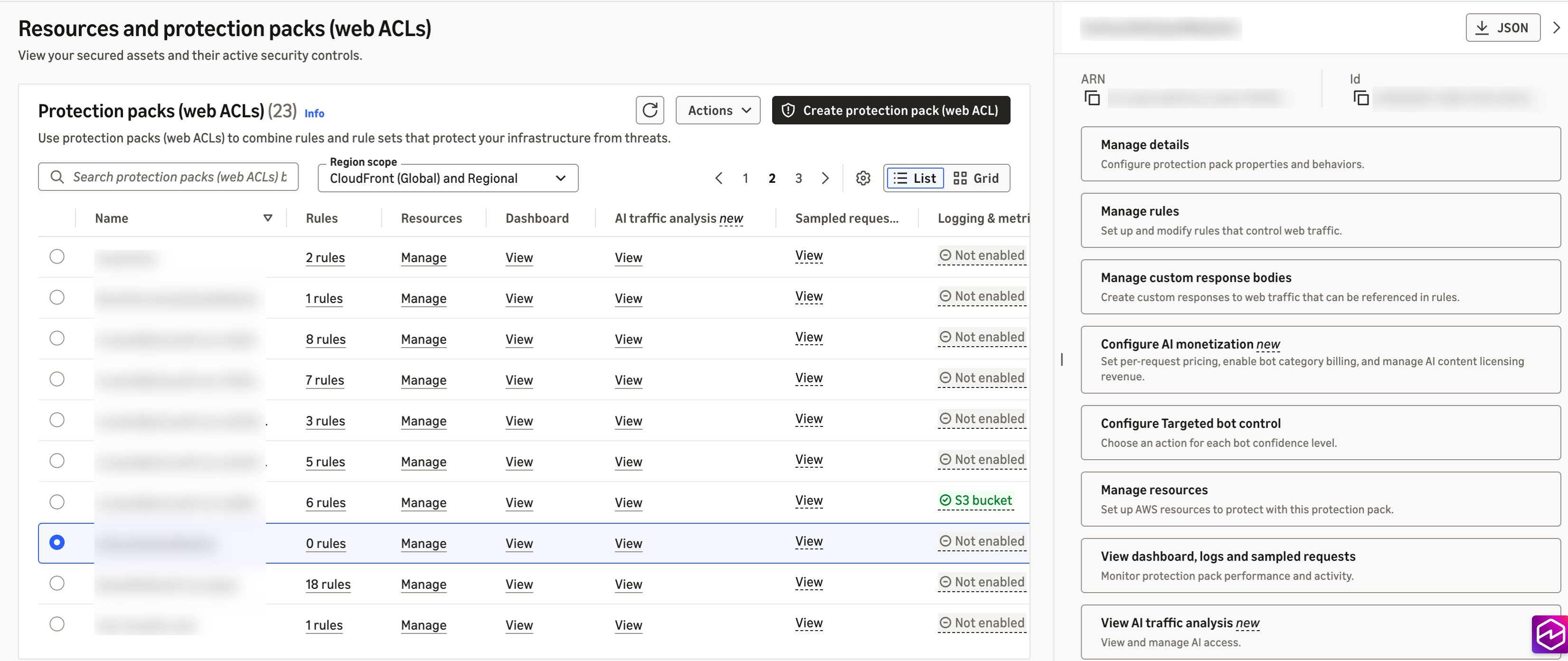
Figure 2: Choosing an existing protection pack
- In the side pane, choose Configure Targeted bot control.
- Choose Enable Targeted bot control.
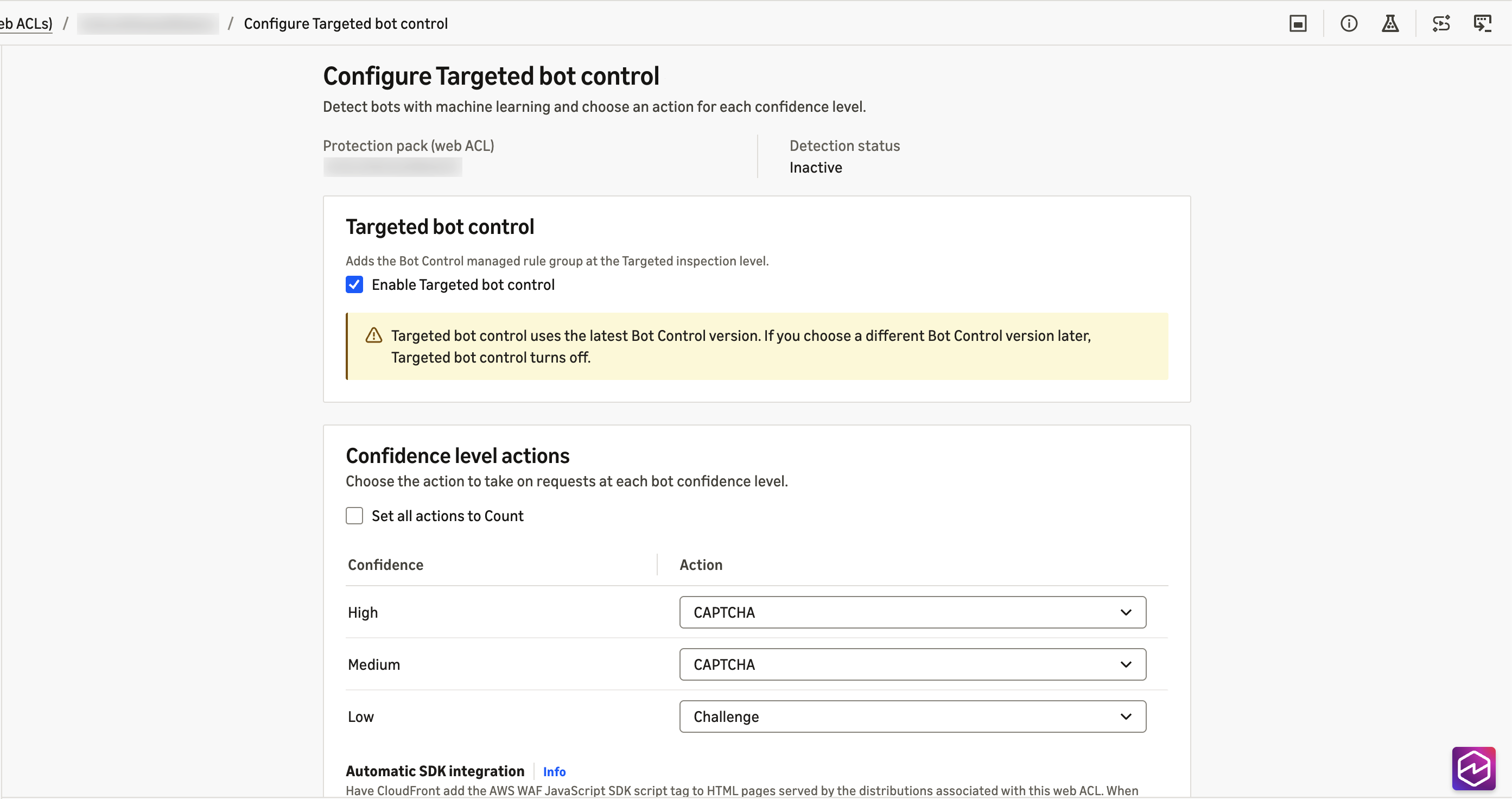
Figure 3: The Configure Targeted bot control page
- Review the actions for each confidence level and the automatic SDK integration setting.
- Choose Save. If the change upgrades the AWS WAF Bot Control rule group to
LATEST, a confirmation dialog shows the current and target versions. Review it and confirm.
Configuring through the API
If you manage AWS WAF as code, you can configure the same pieces directly. For automatic SDK integration, add the ChallengeJavascriptSdkInjection setting to the AssociationConfig of the web ACL in a CreateWebACL or UpdateWebACL request, using the CLOUDFRONT key with an empty configuration object:
Through the API, the setting is off by default. An UpdateWebACL request that omits the setting turns it off, even if you turned it on in the console. For the rule group, set the inspection level to TARGETED with machine learning enabled in the AWSManagedRulesBotControlRuleSet configuration, and use RuleActionOverrides to set the actions for TGT_SignalBotHigh, TGT_SignalBotMedium, and TGT_SignalBotLow.
For the API specifications, see AssociationConfig and ManagedRuleGroupStatement in the AWS WAF API Reference.
Considerations
Considerations when using bot confidence and automatic SDK integration for CloudFront:
Bot confidence
Review the following when you use bot confidence.
- Exclude known automation from bot inspection. If you find known clients that are being flagged, add a scope-down statement to the AWS WAF Bot Control rule group that excludes them, for example by path, header, or IP set. This also keeps you from paying to inspect traffic you already trust.
- Stay on the
LATESTversion. Bot confidence requires version 8.0 or later.LATESTkeeps you on the newest release automatically; if you pin a static version for change control, choose 8.0 or later and review new versions as they’re released.
For the full list of considerations about bot confidence, see Bot confidence levels in the AWS WAF Developer Guide.
Automatic SDK integration for CloudFront
Review the following before you turn on automatic SDK integration.
- Confirm that the SDK reaches the pages that matter. After you turn the setting on, view the source of your key pages, such as the home page, sign-in, checkout, and search, to confirm the script tag is present. If your distribution caches HTML, invalidate the cached HTML paths so viewers get the updated pages right away. Do the same when you turn the setting off.
- Update your content security policy. If your pages set a content security policy, allowlist
https://*.awswaf.comin the directives shown in Using the JavaScript API with content security policies. - Use
Cache-Control: no-transformto keep the tag off specific pages. The setting applies to the whole protection pack, and scope-down statements don’t limit where the tag is inserted. - Keep your existing integration where your application relies on the SDK directly. Single-page applications that attach tokens to their own API calls, and applications that use the CAPTCHA JavaScript API or the mobile SDKs, should continue to integrate the SDK as they do today.
For the full list of considerations and edge cases, see Considerations and limitations and When pages don’t receive the tag in the AWS WAF Developer Guide.
Availability and pricing
Simplified onboarding to Targeted bot control is available for protection packs with the CloudFront scope. Bot confidence levels and the new LATEST rule group version are available for the resource types that AWS WAF protects, in the AWS Regions where AWS WAF Bot Control is available. Automatic SDK integration is available for protection packs with the CloudFront scope. This post focuses on CloudFront because you get both features there.
Standard AWS WAF Bot Control charges for the targeted inspection level apply. Automatic SDK integration for CloudFront is available at no additional cost. For details, see AWS WAF pricing.
Conclusion
Simplified onboarding for Targeted bot control takes care of most of the configuration work. You enable Targeted bot control and choose one action for each of three bot confidence levels, or keep the defaults, and enable automatic SDK integration for CloudFront. Your protection pack starts with the configuration we recommend, stays on the latest detections, and doesn’t require you to integrate the JavaScript SDK manually with your CloudFront-delivered applications.
If you have questions about this post, contact AWS Support or start a new thread on AWS re:Post.