AWS DevOps & Developer Productivity Blog
Building a scalable code modernization solution with AWS Transform custom
Introduction
Software maintenance and modernization is a critical challenge for enterprises managing hundreds or thousands of repositories. Whether upgrading Java versions, migrating to new AWS SDKs, or modernizing frameworks, the scale of transformation work can be overwhelming. AWS Transform custom uses agentic AI to perform large-scale modernization of software, code, libraries, and frameworks to reduce technical debt. It handles diverse scenarios including language version upgrades, API and service migrations, framework upgrades and migrations, code refactoring, and organization-specific transformations. Through continual learning, the agent improves from every execution and developer feedback, delivering high-quality, repeatable transformations without requiring specialized automation expertise.
Organizations need to run transformations using AWS Transform custom concurrently across their entire code estate to meet aggressive modernization timelines and compliance deadlines. Running it at enterprise scale requires a solution to process repositories in parallel, in a controlled remote cloud environment, manage credentials securely, and provide visibility into transformation progress. Today, we’re introducing an open-source solution that brings production-grade scalability, reliability, and monitoring to AWS Transform custom. This infrastructure enables you to run transformations on thousands of repositories in parallel using AWS Batch and AWS Fargate, with REST API access for programmatic control and comprehensive Amazon CloudWatch monitoring.
Requirements for Enterprise-Scale Code Modernization
AWS Transform custom provides powerful AI-driven code transformation capabilities through its CLI. To effectively scale transformations across enterprise codebases, organizations need:
Scale: Ability to run transformations on 1000+ repositories concurrently rather than one-by-one
Infrastructure: Dedicated compute resources for long-running transformations beyond developers’ laptops
API Access: REST API for programmatic orchestration and seamless integration with CI/CD pipelines
Monitoring: Centralized visibility into transformation progress and status across multiple repositories
Reliability: Automatic retries, secure credential management, and built-in fault tolerance
The Solution: Batch Infrastructure with REST API
This solution provides complete, production-ready infrastructure that addresses these challenges:
Core Capabilities
- Scalable Batch Processing Run transformations on thousands of repositories in parallel using AWS Batch with Fargate. The default configuration (256 max vCPUs, 2 vCPUs per job) supports up to 128 concurrent jobs, with automatic queuing and resource management. The compute environment scales based on your needs and Fargate service quotas.
- REST API for Programmatic Access Seven API endpoints provide complete job lifecycle management, enabling you to submit single jobs or bulk batches of thousands in one request. The API offers real-time status tracking and progress monitoring, with Amazon Identity and access Management (IAM) authentication ensuring secure access to transformation operations.
- Multi-Language Container The solution includes a container supporting Java (8, 11, 17, 21), Python (3.8-3.13), and Node.js (16-24) with all build tools pre-installed, including Maven, Gradle, npm, and yarn. The AWS Transform CLI and AWS CLI v2 are bundled in. The container is fully extensible for custom requirements—you can add your own libraries, languages, or tools by customizing the Dockerfile to meet their specific needs
- Enterprise-Grade Reliability Automatic IAM credential management eliminates long-lived keys, with credentials auto-refreshing every 45 minutes for jobs up to 12 hours. The system includes automatic retries for transient failures (default: 3 attempts), with configurable timeout and retry settings to match your transformation complexity.
- Comprehensive Monitoring A CloudWatch dashboard provides job tracking with success and failure rates, trends over time, and API and Lambda health metrics. Real-time log streaming enables you to monitor transformation progress and quickly diagnose issues.
Architecture
The solution uses a serverless architecture built on AWS managed services:
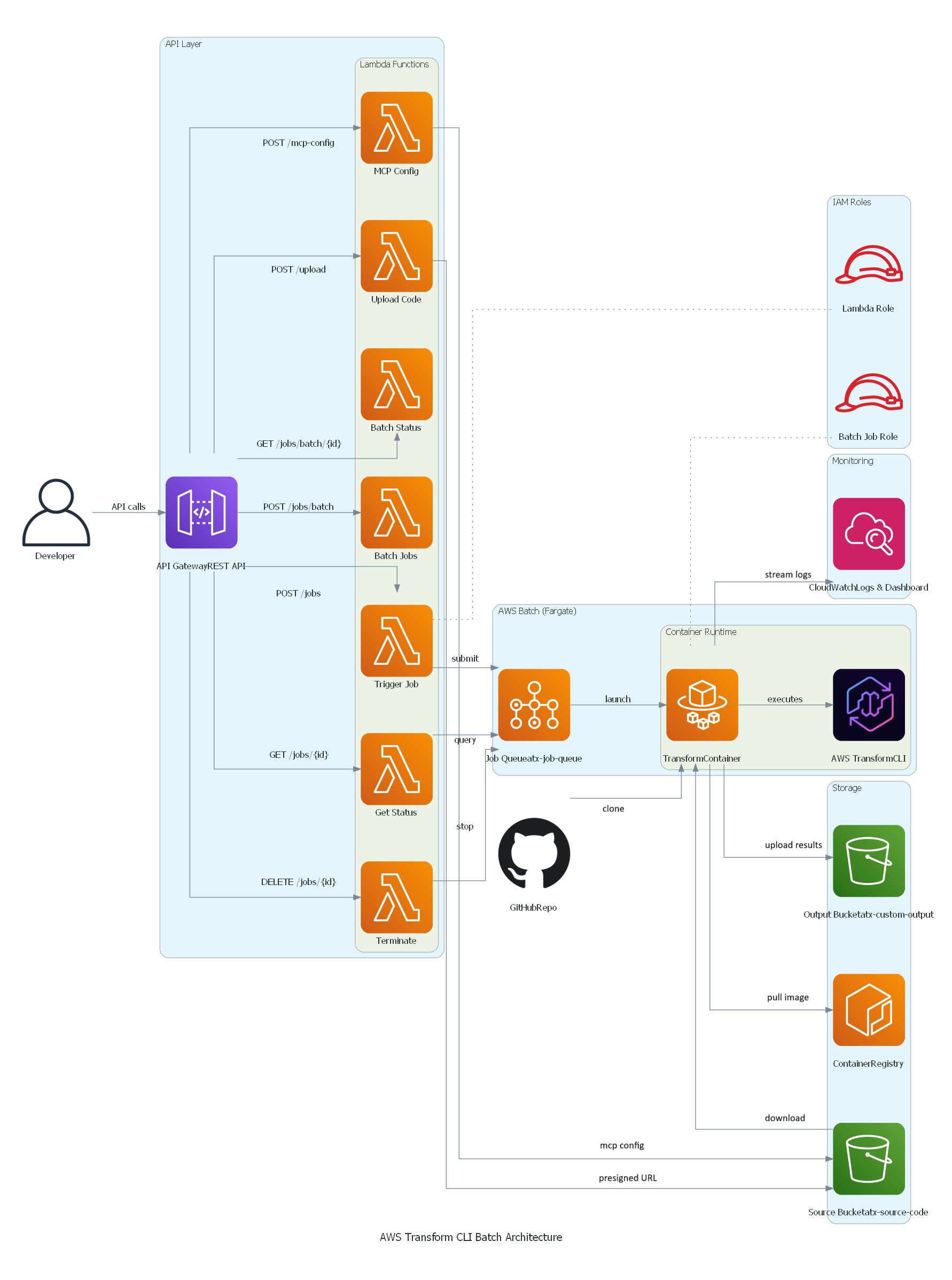
AWS Transform custom Batch solution architecture
Key Components:
- API Gateway: REST API with IAM authentication
- Lambda Functions: Job orchestration, status tracking, bulk submission
- AWS Batch: Job queue and compute environment management
- Fargate: Serverless container execution (no EC2 to manage)
- S3: Source code input and transformation results output
- CloudWatch: Logs, metrics, and operational dashboard
Getting Started
Prerequisites
Before deploying, ensure you have:
- AWS Account with appropriate IAM permissions (ECR, S3, IAM, Batch, Lambda, API Gateway, CloudWatch)
- AWS CLI v2 configured with credentials or AWS SSO login
- Docker installed and running
- Git for cloning the repository
- Node.js 18+ and AWS CDK (for CDK deployment)
- Python3for testing the APIs
Deployment Options
Option 1: CDK Deployment (Recommended)
Step 1: Clone the Repository
git clone https://github.com/aws-samples/aws-transform-custom-samples.git

cd aws-transform-custom-samples/scaled-execution-containers
Step 2: Set Environment Variables
export AWS_ACCOUNT_ID=$(aws sts get-caller-identity --query Account --output text)
export CDK_DEFAULT_ACCOUNT=$AWS_ACCOUNT_ID
export CDK_DEFAULT_REGION=us-east-1
Step 3: Verify prerequisites
This checks that Docker is installed and running, AWS CLI v2 is configured with credentials, Git is available, and your AWS account has the required VPC and public subnets.
cd deployment
chmod +x *.sh
./check-prereqs.sh
Step 4: Set up IAM Permissions (Optional, but recommended)
Generate a least-privilege IAM policy instead of using broad permissions:
./generate-custom-policy.shThis creates iam-custom-policy.json with minimum permissions scoped to your specific resources.
Create and attach the policy:
aws iam create-policy \
  --policy-name ATXCustomDeploymentPolicy \
  --policy-document file://iam-custom-policy.json
aws iam attach-user-policy \
  --user-name YOUR_USERNAME \
  --policy-arn arn:aws:iam::$(aws sts get-caller-identity --query Account --output text):policy/ATXCustomDeploymentPolicy
Note: If you have administrator access, you can skip this step and proceed directly to deployment.
Step 5: Deploy with CDK (One Command Does Everything!)
cd ../cdk
chmod +x *.sh
./deploy.sh
Time: 20-25 minutes (all resources)
What CDK Does Automatically:
- Builds Docker image from Dockerfile
- Pushes image to ECR
- Creates all AWS resources
- Configures everything
What Gets Deployed:
- ECR repository with Docker image
- S3 buckets (output, source)
- IAM roles with least-privilege
- AWS Batch infrastructure (Fargate)
- 7 Lambda functions
- API Gateway REST API
- CloudWatch logs and dashboard
See cdk/README.md for detailed instructions and configuration options.
Step 6: Get Your API Endpoint
After deployment completes, retrieve the API endpoint URL:
export API_ENDPOINT=$(aws cloudformation describe-stacks \
  --stack-name AtxApiStack \
  --query 'Stacks[0].Outputs[?OutputKey==`ApiEndpoint`].OutputValue' \
  --output text)

echo "API Endpoint: $API_ENDPOINT"
This endpoint is used in all subsequent API calls.
Option 2: Bash Scripts (Alternative)
If you prefer manual control over each deployment step or need to customize individual components, use the bash script deployment. See deployment/README.md for the complete 3-step process with detailed explanations of what each script deploys.
Using the Solution
Single Job Submission
Quick test: Run cd ../test && ./test-apis.sh to validate all API endpoints (MCP, transformations, bulk jobs, campaigns).
Submit a Python version upgrade transformation:
cd ..
python3 utilities/invoke-api.py \
  --endpoint "$API_ENDPOINT" \
  --path "/jobs" \
  --data '{
    "source": "https://github.com/venuvasu/todoapilambda",
    "command": "atx custom def exec -n AWS/python-version-upgrade -p /source/todoapilambda -c noop --configuration \"validationCommands=pytest,additionalPlanContext=The target Python version to upgrade to is Python 3.13. Python 3.13 is already installed at /usr/bin/python3.13\" -x -t"
  }'
This API call triggers a Python version upgrade transformation on the todoapilambda public git repository. The transformation uses the AWS Managed transformation to upgrade from the current Python version to Python 3.13. The configuration parameter specifies additional validation command to be run and plan context to specifies the location of python 3.13 installation in the container and the target version. The -x flag is for non-interactive mode of the transformation , and -t flag is to trust all tools for this transformation.
API returns a job ID for tracking. Job names are auto-generated from the source repository and transformation type.
See api/README.md for complete API documentation with examples for Java, Node.js, and other transformations.
Bulk Job Submission
Transform multiple repositories in a single API call:
python3 utilities/invoke-api.py \
  --endpoint "$API_ENDPOINT" \
  --path "/jobs/batch" \
  --data '{
    "batchName": "codebase-analysis-2025",
    "jobs": [
      {"source": "https://github.com/spring-projects/spring-petclinic", "command": "atx custom def exec -n AWS/early-access-comprehensive-codebase-analysis -p /source/spring-petclinic -x -t"},
      {"source": "https://github.com/venuvasu/todoapilambda", "command": "atx custom def exec -n AWS/early-access-comprehensive-codebase-analysis -p /source/todoapilambda -x -t"},
      {"source": "https://github.com/venuvasu/toapilambdanode16", "command": "atx custom def exec -n AWS/early-access-comprehensive-codebase-analysis -p /source/toapilambdanode16 -x -t"}
    ]
  }'
This API call triggers a deep static analysis of the codebase to generate hierarchical, cross-referenced documentation for three open source repositories in parallel. The transformation uses the AWS Managed transformation to generate behavioral analysis, architectural documentation, and business intelligence extraction to create a comprehensive knowledge base organized for maximum usability and navigation.
The API submits these jobs in a async manner. i.e the API returns a batch id upon submitting these jobs to AWS Batch. Then you can monitor the progress as specified below.
See api/README.md for status checking, MCP configuration, and other API endpoints.
Monitoring Progress
Check batch status:
python3 utilities/invoke-api.py \
  --endpoint "$API_ENDPOINT" \
  --method GET \
  --path "/jobs/batch/BATCH_ID"
Response shows real-time progress:
{
  "status": "RUNNING",
  "progress": 45.5,
  "totalJobs": 1000,
  "statusCounts": {
    "RUNNING": 195,
    "SUCCEEDED": 432,
    "FAILED": 23
  }
}
Viewing Results
After a job completes, the results are stored in your S3 output bucket.
S3 Output Structure:
Results are organized by job name and conversation ID:
Validation Summary:
AWS Transform CLI generates a validation summary showing all changes made:
This file contains:
- Summary of all code changes
- Files modified, added, or deleted
- Validation results
- Transformation statistics
Download Results:
# Download all results for a specific job
aws s3 sync s3://atx-custom-output-{account-id}/transformations/{job-name}/{timestamp}{conversation-id}/ ./local-results/

# Download just the validation summary
aws s3 cp s3://atx-custom-output-{account-id}/transformations/{job-name}/{timestamp}{conversation-id}/logs/custom/{timestamp}{conversation-id}/artifacts/validation_summary.md ./

# Download transformed code only
aws s3 sync s3://atx-custom-output-{account-id}/transformations/{job-name}/{timestamp}{conversation-id}/code/ ./transformed-code/
Monitoring and Observability
The solution includes a CloudWatch dashboard with operational metrics:
Job Tracking:
- Completion rate with hourly trends (completed vs failed)
- Recent jobs table showing job name, timestamp, last message, and log stream
- Real-time visibility into job execution
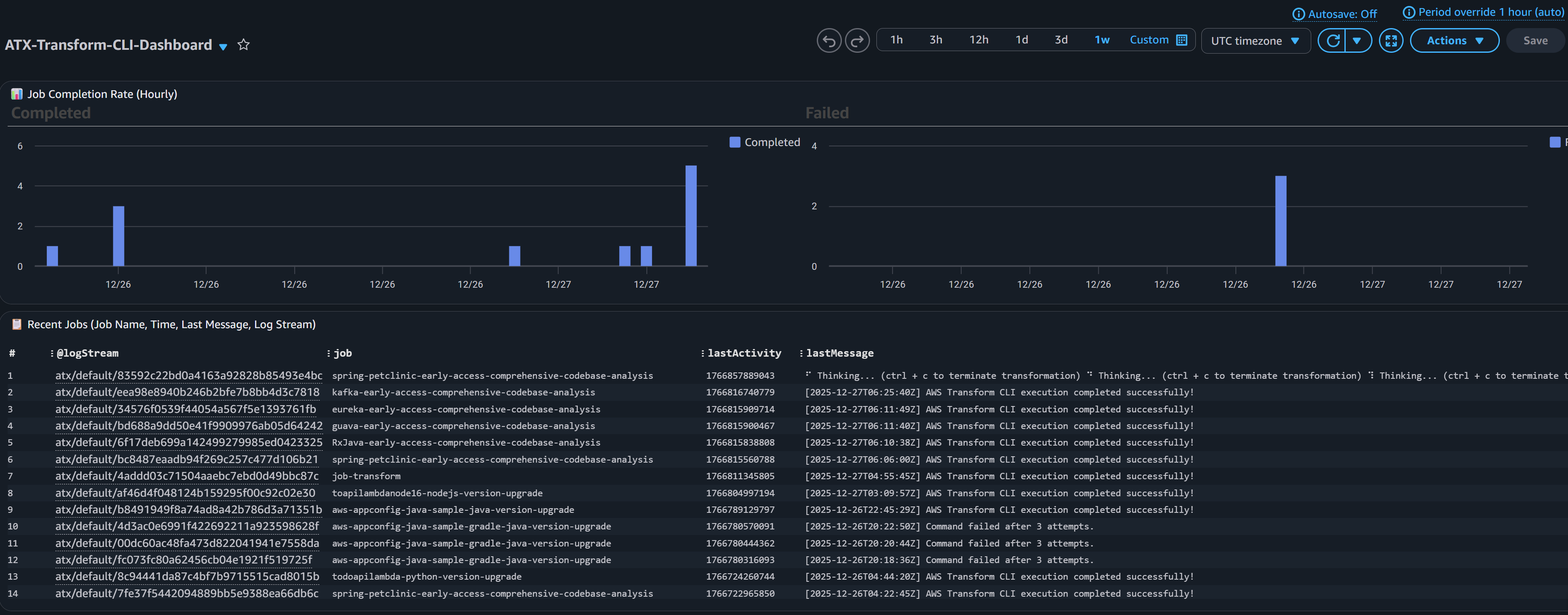
CloudWatch Dashboard screenshot for Job tracking
API and Lambda Health:
- API Gateway request counts and error rates
- Lambda invocation metrics per function
- Performance monitoring (duration by function)
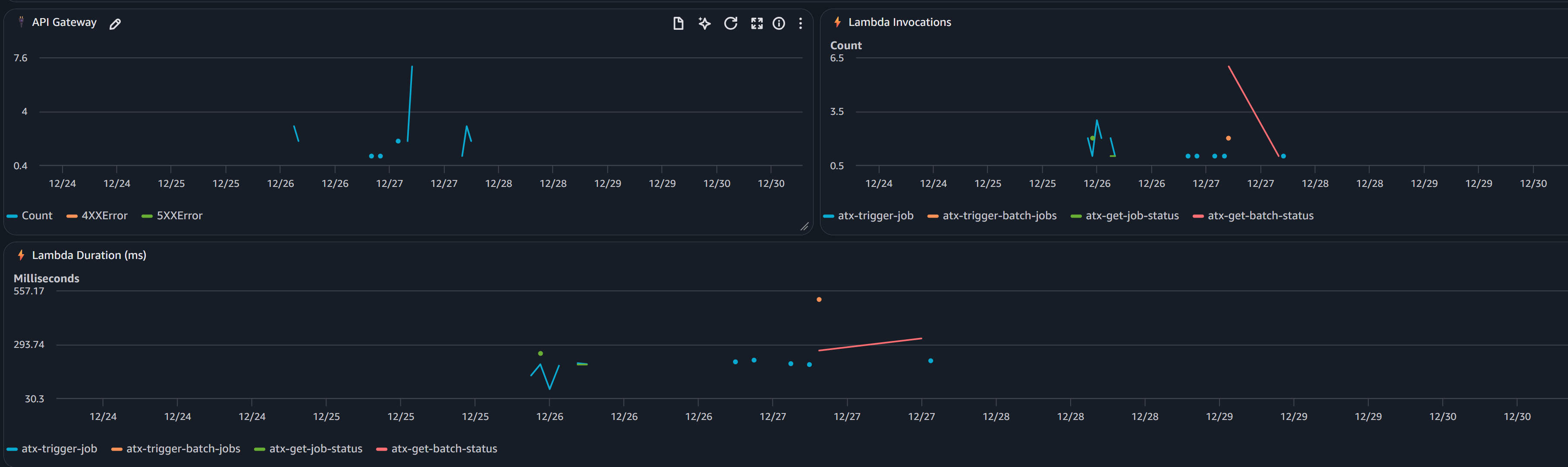
CloudWatch Dashboard screenshot for API and Lambda Health
CloudWatch Logs:
All logs are centralized in CloudWatch Logs (/aws/batch/atx-transform) with real-time streaming.
View logs via AWS CLI:
aws logs tail /aws/batch/atx-transform --follow --region us-east-1Or use the included utility:
python3 utilities/tail-logs.py JOB_ID --region us-east-1View in AWS Console: CloudWatch → Log Groups → /aws/batch/atx-transform
Model Context Protocol (MCP) Integration
AWS Transform custom supports Model Context Protocol (MCP) servers to extend the AI agent with additional tools. Configure MCP servers via API:
python3 utilities/invoke-api.py \
  --endpoint "$API_ENDPOINT" \
  --path "/mcp-config" \
  --data '{
    "mcpConfig": {
      "mcpServers": {
        "github": {"command": "npx", "args": ["-y", "@modelcontextprotocol/server-github"]},
        "fetch": {"command": "uvx", "args": ["mcp-server-fetch"]}
      }
    }
  }'
The configuration is stored in S3 and automatically available to all transformations. Test with atx mcp tools to list configured servers.
See api/README.md for status checking, MCP configuration, and other API endpoints.
Customization for Private Repositories
You may need to access private repositories and artifact registries. Extend the base container to add credentials:
To access your private Git repositories or artifact registries during transformations:
Two approaches:
- AWS Secrets Manager (RECOMMENDED) – Credentials fetched at runtime, never stored in image
- Hardcode in Dockerfile (NOT RECOMMENDED) – For testing only
Steps:
- Uncomment placeholders in
container/entrypoint.sh(Secrets Manager) orcontainer/Dockerfile(hardcoded) - Redeploy container (see below)
See container/README.md for complete setup instructions, examples, and security best practices.
Redeploying after customization:
If using CDK:
cd cdk && ./deploy.shCDK automatically detects Dockerfile changes and rebuilds. If changes aren’t detected, force rebuild:
cd cdk && ./deploy.sh —forceIf using bash scripts:
cd deployment
./1-build-and-push.sh --rebuild
./2-deploy-infrastructure.sh
The infrastructure will use your custom container with private repository access. You can also customize the container to add support for additional language versions or entirely new languages based on their specific requirements.
See container/README.md for complete examples.
Note: For automated PR creation and pushing changes back to remote repositories after transformation, you have two options: (1) extend container/entrypoint.sh with git commands using your private credentials (see commented placeholder in the script), or (2) use a custom Transformation definition with MCP configured to connect to GitHub/GitLab for more sophisticated PR workflows.
Campaigns
Central platform teams can create campaigns through the AWS Transform web interface to manage enterprise-wide migration and modernization projects. For instance, to upgrade all repositories from Java 8 to Java 21, teams create a campaign with the Java upgrade transformation definition and target repository list. As developers execute transformations, repositories automatically register with the campaign, enabling you to track progress and monitor across your organization.
Creating a Campaign
- Setup Users and Login to AWS Transform web application
- Create a Workspace and Create a Job
- In the chat, specify the type of the job . For example , “I would like comprehensive code analysis on multiple repos”
- Based on your request, AWS Transform will display the list of transformation that matches the criteria, in this case “AWS/early-access-comprehensive-codebase-analysis (Early Access)”
- Once you confirm the transformation, AWS Transform will create a campaign and a command to execute for the transformation. You can just copy that command and execute via the API as described below replacing the repo details.
atx custom def exec \
--code-repository-path <path-to-repo> \
--non-interactive \
--trust-all-tools \
--campaign 0d0c7e9f-5cb2-4569-8c81-7878def8e49e \
--repo-name <repo-name> \
--add-repo
Executing the Transformation in a Campaign
python3 utilities/invoke-api.py \
  --endpoint "$API_ENDPOINT" \
  --path "/jobs" \
  --data '{
    "source": "https://github.com/spring-projects/spring-petclinic",
    "command": "atx custom def exec --code-repository-path /source/spring-petclinic --non-interactive --trust-all-tools --campaign 0d0c7e9f-5cb2-4569-8c81-7878def8e49e --repo-name spring-petclinic --add-repo"
  }'
Once this transformation Job is successful, you can view the results and dashboard in Web application as well.
Cleanup
To remove all deployed resources:
CDK Cleanup (Recommended)
cd cdk ./destroy.shBash Scripts Cleanup (Alternate)
cd deployment ./cleanup.shThis script deletes:
- AWS Batch resources (compute environment, job queue, job definitions)
- Lambda functions and API Gateway
- IAM roles
- S3 buckets (after emptying)
- CloudWatch logs and dashboard
- ECR repository
Conclusion
Enterprise software modernization requires infrastructure that can operate at scale with reliability and observability. This solution provides a production-ready platform for running AWS Transform custom transformations on thousands of repositories concurrently.
By combining AWS Batch’s scalability, Fargate’s serverless compute, and a REST API for programmatic access, you can:
- Accelerate modernization initiatives
- Reduce manual effort and human error
- Gain visibility into transformation progress
- Integrate with existing DevOps workflows
The code repository is open-source, fully automated, and ready for you to deploy in your AWS account today.
Get started today with AWS Transform custom