What Is Recovery Time Objective (RTO)?
What is recovery time objective (RTO)?
Recovery time objective (RTO) is the maximum allowable time to restore a system after a disruption to make sure the least impact on business operations. Setting RTOs helps organizations recover faster from events, meet customer expectations and compliance goals, and minimize impact on operations and reputation. System complexity and dependencies can impact recovery times, and tiered system levels can be set for RTOs, depending on system criticality. Using recovery time objectives helps organizations develop reliable plans for recovery in the case of system events.
What is the difference between RTO, RPO, and MTTR?
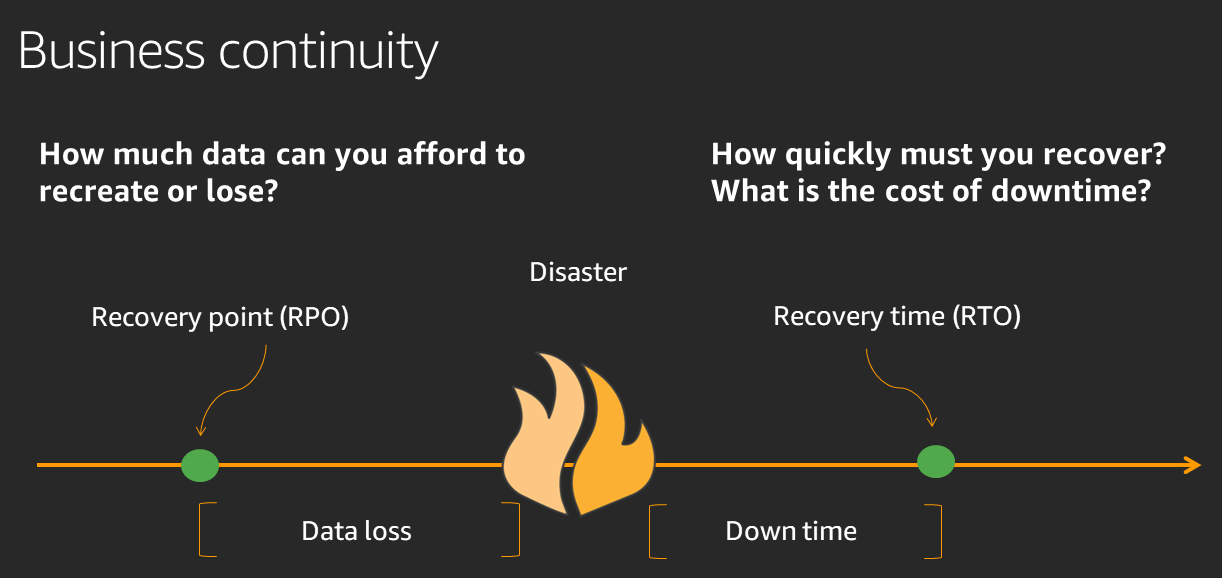
Recovery time objective, recovery point objective (RPO), and mean time to recover (MTTR) are three metrics commonly used in disaster recovery and planning. Although these metrics overlap, organizations should be aware of their unique definitions and purposes.
Recovery point objective (RPO)
The recovery point objective is the maximum amount of data loss you can tolerate, explained in a time period. RPO indicates how much data loss is acceptable to your company if there were some sort of data loss event or disaster. For example, if you define your RPO as one hour, then your organization is able to tolerate one hour of lost data changes in the event of a disaster.
A recovery point objective is usually different for distinct systems in your company. A critical workload might have an extremely low RPO that approaches zero. A less important system that logs or archives non-audited information is less crucial to business, meaning it can safely have an RPO of days or more.
While a zero-time RPO is ideal, the lower the RPO, the more organizational strain in the process of creating and updating backups. Determining RPOs is a balancing act between backup frequency and resource drain.
Recovery time objective (RTO)
The recovery time objective is how long it should take your business to restore your system to a functional status after a disruption. The RTO time frame is calculated based on how much time has to pass before your business begins to suffer unacceptable damages or impacts due to an outage.
The RTO also gives disaster recovery experts a timeframe that they must work toward meeting in the event of an outage or data disaster.
Mean time to recover (MTTR)
The mean time to recover is the actual total amount of time that it takes your business to recover from a system outage. As a mean, this measurement represents an average of several different times over distinct event scenarios. Unlike RPO and RTO, MTTR is a factual time based on data, rather than a desired estimate or goal.
The mean time to recovery metric is often compared to the recovery time objective, as a discrepancy could represent work to be done to improve disaster recovery processes.
How do you calculate RTO?
Calculating your recovery time objectives involves several steps, allowing you to holistically design an RTO that accounts for downtime costs, tolerable downtime, and recovery capabilities.
Here is how to calculate RTO.
Conduct business impact analysis
First of all, your business should conduct a business impact analysis, which aims to identify and quantify any potential effect that a disaster event and system downtime can have on your operations. Here are a few categories you should take into account:
- Revenue loss: Calculate the total expected revenue loss, taking into account items such as sales that you expect to make during a period, the total number of paused transactions, and the cost of service disruptions to you and your customers.
- Productivity impacts: If a system outage or event removes employee access to internal systems, they will be unable to work. Include an estimated cost of employee downtime, such as potential damages for not advancing internal or client projects.
- Reputation damages: Especially if your downtime is caused by a cybersecurity event, your customers may lose faith in your brand’s ability to keep data safe. Reputational damage can decrease your brand authority and negatively impact future sales or even encourage customers to cancel contracts.
- Regulatory penalties: If a disaster event is a notifiable event, you may receive regulatory penalties for non-compliance with reporting within specific timeframes.
Assign a monetary value to each of these categories and add them to create a final figure for business impact.
Determine maximum tolerable downtime
The maximum tolerable downtime for your organization can depend on what systems are experiencing the outage. For example, a critical system might need a much faster RTO than a little-used adjunct system. To help map this out, define multiple RTO tiers based on how critical the system is to your organization.
A Tier 1 system would be your highest priority, requiring the shortest possible RTO, while a Tier 3 might not need fixing for upward of 24 hours.
Assess current recovery capabilities
After scoping out your maximum tolerable downtime, you will have an estimate of the ideal RTO for specific systems. Next, you need to establish whether these RTO targets are realistic based on the recovery objectives architecture you have in place.
A central pillar of your disaster recovery planning should be to conduct a baseline examination of your existing recovery capabilities. Map out existing data backup systems, your business continuity plan, and any other strategies you have available. An initial investigation will help reveal whether your RTO figures are realistic.
Design recovery architectures to meet RTO targets
Design and implement additional recovery architectures to help meet your RTO targets. An implementation approach will see you add failover mechanisms, redundancy systems, continuous monitoring, and configuration management systems. These additional architectural systems help to improve your response times, allowing you to reduce RTO in general.
What are the disaster recovery strategies for different RTO requirements?
Depending on the specific tier of system requiring a disaster recovery process, the exact mechanisms you have in place and tools you use will vary. Here are some strategies and tools to use in different disaster recovery scenarios, based on distinct RTO requirements.
Backup and restore (RTO: hours to days)
A backup and restore strategy is one of the most common and easy-to-implement strategies for disaster recovery. It involves running frequent backups to store your business data. Whenever there is an event that impacts your systems, you can simply revert to the backup data to get the systems up and running again.
While this does promote business continuity, it also means that you will have to define the RPO for mission-critical applications ahead of time. A low RPO could result in many incremental backups to continually store data.
Pilot light (RTO: hours)
In cyber resilience, a pilot light is a small, scaled-down version of your core infrastructure that runs at minimum capacity. This is a system that you can scale up into a functional state at a moment’s notice. You will host mission-critical databases and systems within this external system. Whenever a disaster impacts your main systems, you can switch to the pilot light system and scale it up to meet demand while working to recover your main systems.
Warm standby (RTO: minutes to hours)
Warm standby is a step up from the pilot light strategy, which hosts a near-clone of your active running environment. Engineers regularly push updates from the primary system to this clone, meaning it can take over at a moment’s notice if your main system were to go offline. Warm standby systems are resource-intensive, so they are typically only used with critical systems that cannot experience much downtime.
Multi-site active-active (RTO: seconds to minutes)
Finally, a multi-site active-active is a complete clone of your systems that runs in parallel. As they are simultaneously active, with a continual data stream between them to keep them in sync, they can instantly replace any system experiencing downtime. Of course, these are extremely resource-intensive and only used in a system that cannot, for any reason, experience more than a few minutes of downtime.
How can AWS support your RTO requirements?
AWS provides a range of services and architectural patterns that help meet your RTO requirements in recovery events:
- Amazon Application Recovery Controller helps you manage and automate recovery of your applications across AWS Regions and Availability Zones (AZs). These capabilities make it easier to reliably recover applications without the manual steps required by traditional tools and processes.
- AWS Backup is a fully managed service that centralizes and automates data protection across AWS services and hybrid workloads.
- AWS Elastic Disaster Recovery (AWS DRS) minimizes downtime and data loss with fast, reliable recovery of on-premises and cloud-based applications using affordable storage, minimal compute, and point-in-time recovery.
- AWS Resilience Hub is a central location in the AWS Console for you to manage and improve the resilience posture of your applications on AWS. AWS Resilience Hub enables you to define your resilience goals, assess your resilience posture against those goals, and implement recommendations for improvement based on the AWS Well-Architected Framework.
Get started with event recovery solutions on AWS by creating a free account today.
Browse all cloud computing concepts
Browse all cloud computing concepts content here:
Did you find what you were looking for today?
Let us know so we can improve the quality of the content on our pages