AWS Partner Network (APN) Blog
Simplify multi-account log ingestion to Splunk
By: Jan Klotter, Solutions Architect – AWS
By: Ranjit Kalidasan, Principal Solutions Architect – AWS
By: Paul Frederiksen, Global AWS Partner Technical Leader – Splunk
 |
| Splunk |
 |
Managing logs across multiple AWS accounts and forwarding them to Splunk has traditionally required high-maintenance, custom-built aggregation pipelines. With Amazon CloudWatch Logs centralization, you can consolidate log data from across your organization into a single account and then forward it to Splunk through one integration point.
This post describes how CloudWatch Logs centralization works, how to architect your Splunk integration around it, and what cost and operational benefits you can expect.
How CloudWatch Logs centralization works
CloudWatch Logs centralization replicates log data from multiple accounts and AWS Regions into a central account. It integrates with AWS Organizations, so you can define rules that automatically scope centralization to your entire organization, specific organizational units, or individual accounts.
Key capabilities include:
- Selective log group copying based on your requirements
- Automatic merging of same-named log groups in the destination account
- Source context enrichment through
@aws.accountand@aws.regionsystem fields - Optional backup Region setup for resilience
- Encryption control for log groups copied from source accounts, including data originally encrypted with customer-managed AWS Key Management Server (AWS KMS) keys
The CloudWatch Log centralization feature is available in 17 AWS Regions at the time this post was published.
What this means for your Splunk integration
The following section describes the architectural design pattern, which will benefit from the architecture pattern with CloudWatch Logs centralization.
Simplify custom solutions
Previously, organizations had to build complex custom-built aggregation solutions to consolidate logs from multiple accounts before forwarding them to Splunk. Previous built solutions can be found here. For example, the traditional approach required creating CloudWatch Logs destinations and AWS Identity and Access Management (IAM) roles in the central account, configuring access policies to allow sender accounts to write log data, and setting up separate subscription filters in each source account—all forwarding through multiple Amazon Data Firehose streams or Amazon Kinesis Data Streams. CloudWatch Logs centralization helps by removing the need for per-account pipeline setup by using centralization rules that automatically replicate log data from source accounts into the destination account, including automatic onboarding of new accounts and log groups based on your organizational scope.
CloudWatch Logs can be forwarded to other destinations using CloudWatch subscription filters, enabling integration with third-party tools like Splunk. The centralization feature works in conjunction with subscription filters to provide a near real-time feed of log events that can be delivered to services such as Kinesis Data Streams, Data Firehose streams, or AWS Lambda for custom processing and forwarding to Splunk.
Recommended architecture for Splunk
The recommended architecture for Splunk includes consolidating the CloudWatch logs by Splunk sources. For example, if you plan to consolidate Amazon Virtual Private Cloud (Amazon VPC) Flow Logs and AWS WAF logs across multiple accounts, consolidate VPC Flow Logs into one log group and AWS WAF logs into another log group in the destination account. This grouping of logs of same data types helps to stream the logs with a Data Firehose subscription filter with the CloudWatch Logs decompression feature along with message extraction, without requiring any additional data transformation using Lambda.
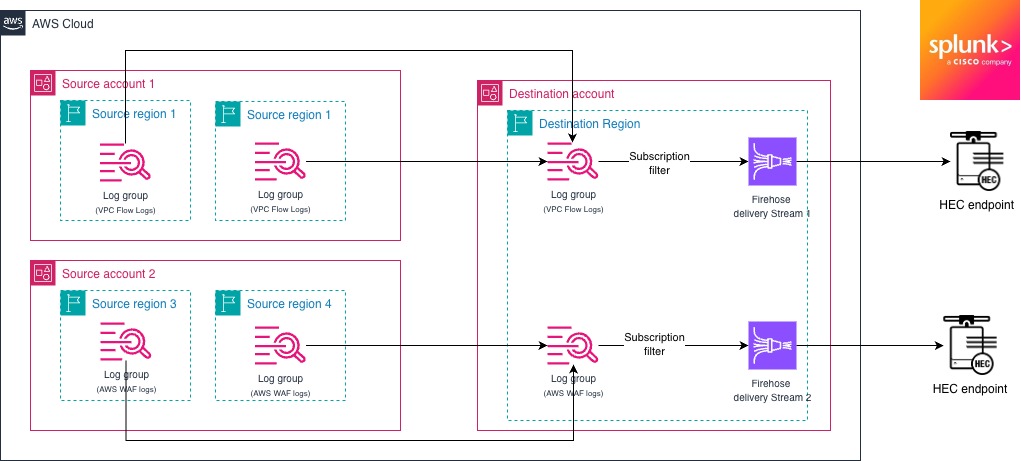
Figure 1: Example architecture for Splunk ingestion
TCO considerations
CloudWatch Logs centralization offers a straightforward pricing model:
- Primary destination Region: No additional charge for centralizing logs from source accounts. Standard CloudWatch Logs ingestion and storage pricing applies in the destination account.
- Optional backup Region: $0.05 per GB for replicating centralized logs to a second Region for resilience.
The AWS costs of the centralized approach are comparable to a per-account forwarding pipeline. In both cases, you pay for CloudWatch Logs ingestion in the source accounts and Data Firehose delivery to Splunk. Each subscription filter and IAM role requires configuration, monitoring, and error handling. At scale, the engineering time spent maintaining per-account pipelines, troubleshooting failed deliveries, and onboarding new accounts can result in a higher TCO. Centralization helps reduce this to a single pipeline to manage.
Implementation considerations
While the described architecture reduces the operational heavy lifting, the following guidelines should be still followed in a multi-account architecture.
Security and compliance
Centralized logging makes log data readily accessible to investigation teams by aggregating and standardizing logs in one location. You maintain complete control over encryption behavior for copied log groups, and you should verify that centralized data is accessible only to authorized personnel with appropriate access controls in place. When configuring IAM roles and policies for the centralization pipeline and Splunk integration, apply the principle of least privilege by granting only the minimum permissions required for each component to function. For example, the IAM role used by Data Firehose should have permissions limited to reading from specific CloudWatch Logs groups and writing to the designated Splunk endpoint, without broader access to other AWS resources. To detect unauthorized changes to IAM policies or roles used in your centralization pipeline (this solution is described here), you can configure Amazon EventBridge rules that match IAM API calls recorded by AWS CloudTrail and send notifications through Amazon Simple Notification Service (Amazon SNS).
Hybrid approach considerations
Consider whether a purely centralized approach or a hybrid model fits your organization. Application logs and metrics are often best kept in the workload account for day-to-day troubleshooting, while a separate logging account aggregates all workload logs for centralized analysis and operations.
Scaling with your organization
The centralization feature is designed to automatically handle new accounts and log groups without manual configuration updates. If you use AWS Control Tower or other multi-account management solutions, new accounts are automatically included in centralization rules based on your organizational scope. Enable CloudWatch Logs deletion protection on centralized log groups to prevent accidental deletion, and consider using AWS Organizations service control policies (SCPs) to enforce broader logging requirements across member accounts. Define log retention policies in the destination account based on your compliance requirements, and use CloudWatch Logs centralization rule health metrics to monitor replication status across accounts. For organizations with multiple business units, you can create separate centralization rules with different scopes and destination log group naming patterns to maintain logical separation of log data.
Conclusion
You can use Amazon CloudWatch Logs centralization to consolidate logs from across your organization in AWS into a single ingestion point for Splunk. It reduces the operational overhead of custom aggregation architectures while maintaining security boundaries and data lineage.

.
Splunk – AWS Partner Spotlight
Splunk is an AWS Specialization Partner with Competencies in Cloud Operations, Data and Analytics, DevOps, and more. Leading organizations use Splunk’s unified security and observability platform to keep their digital systems secure and reliable.