AWS Architecture Blog
Automate medical coding with Step Functions and Amazon Bedrock AgentCore
With AI agents, you can automate medical coding while keeping the workflow deterministic, auditable, and subject to human approval. The key is division of labor: the workflow engine owns sequencing and approval gates, while agents reason within individual, bounded steps. Handing the entire workflow to an agent would make the runtime path a property of the model’s reasoning, which is difficult to review and replay.
Medical coding makes this concrete. Teams must translate free-text clinical terms like “migrane” (a typo) or “flutters in my chest sometimes” into standardized codes before they can analyze or report the data. The target vocabularies include controlled medical dictionaries such as MedDRA for adverse events and WHODrug for medications. This work is safety-critical because a coding error can send an adverse event to the wrong safety signal. Yet it’s mostly repetitive work, with skilled coders reviewing terms one by one. The opportunity is to code the confident cases automatically and route only the ambiguous ones to a human.
In this post, we show you how to combine deterministic orchestration with bounded agentic reasoning using AWS Step Functions and the Amazon Bedrock AgentCore harness integration, a managed capability of Amazon Bedrock AgentCore. We walk through a medical coding workflow that escalates cheapest-first: a safety block-list, then exact matching, then an AI agent only for the terms that need judgment. We also explain the design decisions that keep the model bounded. The complete sample, including infrastructure code and a seeded test dataset, is available in the aws-samples GitHub repository.
Note that MedDRA is a registered trademark of the International Federation of Pharmaceutical Manufacturers and Associations (IFPMA), managed by the MedDRA Maintenance and Support Services Organization (MSSO). WHODrug is maintained by the Uppsala Monitoring Centre (UMC). Both are proprietary, licensed dictionaries. Deploying against them requires a valid subscription. The sample dataset contains generated study identifiers and verbatims with a de minimis illustrative set of dictionary entries, and no patient data. The AWS services used in this sample, including Amazon Aurora and Amazon Bedrock, are HIPAA-eligible when used under a signed AWS Business Associate Addendum (BAA). Before processing protected health information, see the HIPAA Eligible Services Reference and the AWS HIPAA Compliance overview.
Solution overview
The design follows one principle: spend the cheapest, most deterministic mechanism that can code a term with confidence and escalate only when it can’t. A large language model (LLM) agent is powerful but expensive and non-deterministic, so it isn’t the default. Even then, the workflow, not the model, owns every routing decision. The agent might choose which medical code and how confident it is. It doesn’t decide what happens next. A compliance reviewer can read the state machine definition and understand the execution path independent of any agent’s runtime reasoning.
The solution uses AWS Step Functions to orchestrate the coding decision, AWS Lambda for the deterministic steps, and the Amazon Bedrock AgentCore harness for the agentic step. An Amazon Bedrock AgentCore Gateway, a capability of Amazon Bedrock AgentCore, exposes the agent’s tools. Amazon Aurora PostgreSQL-Compatible Edition (Serverless v2) with the pgvector extension serves as a single store for the reference data and its embeddings, so there is no separate vector store to synchronize.
Figure 1 shows the architecture.
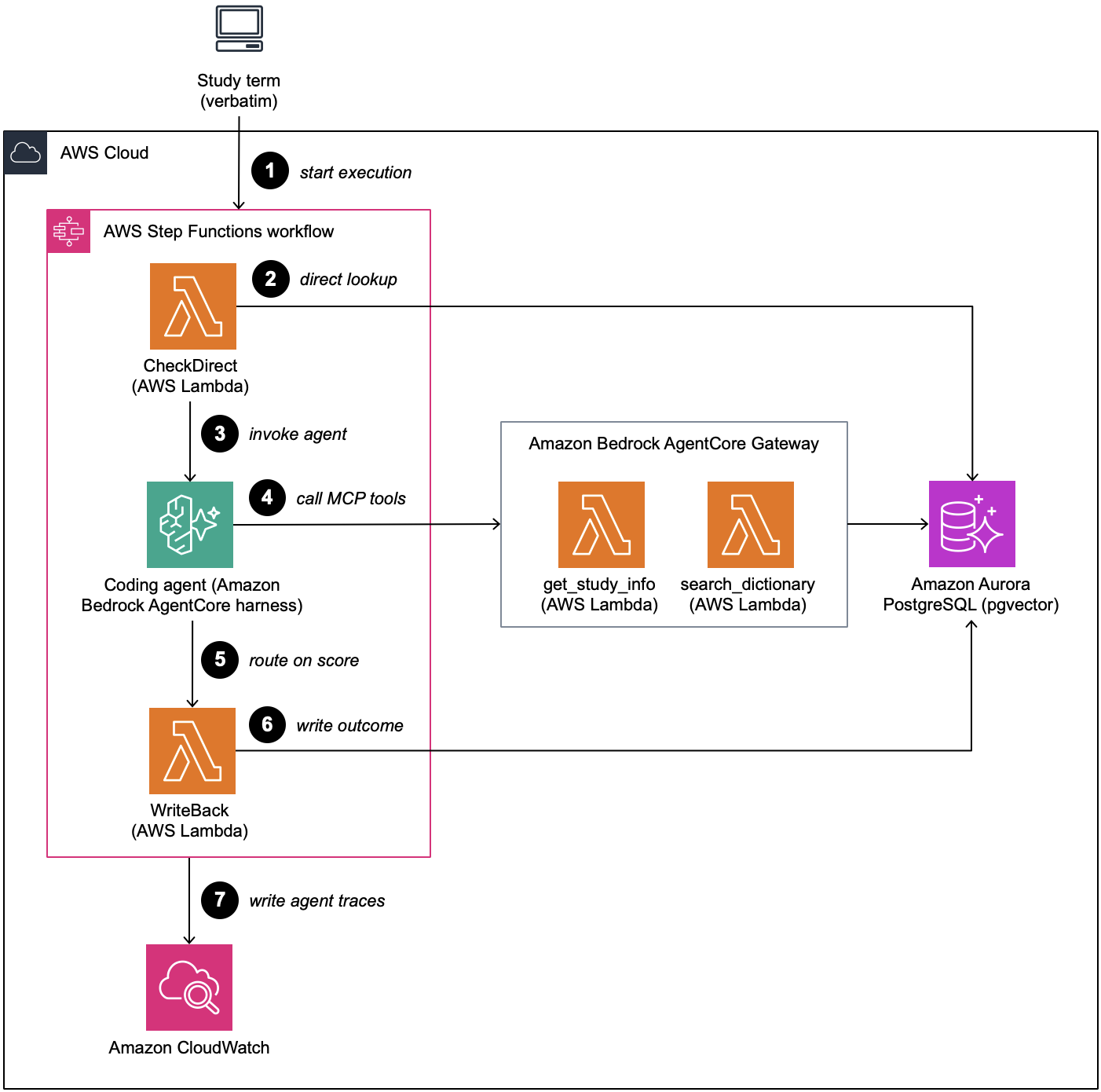
Figure 1: Medical coding workflow solution architecture
Each Step Functions execution codes one verbatim: a deterministic direct lookup, an agentic semantic search that runs only on a miss, score-threshold routing on the agent’s confidence, and a write-back onto the same study record. The state machine is deliberately a standard workflow. Executions are exactly-once, and the queryable history is a per-term audit trail. For a regulated coding process, answering “why was this term coded this way, by what, and when” is a requirement. Error paths in this sample end with the term left open, so every record gets a terminal status. In production, send errors that survive the retries to a Fail state instead. The execution then shows as failed in Amazon CloudWatch, and you can redrive it after fixing the cause.
The write-back step stores every symptom entry’s full medical family tree, not just an isolated code. For example, a symptom like ‘muscle spasms’ links all the way up to its overarching category, ‘musculoskeletal and connective tissue disorders’. Safety teams can then roll up signals at any level, not just the lowest one. Additionally, the agent logs a one-sentence explanation for its decision. This makes sure that if similar symptoms (like cramps) end up categorized differently across studies, teams can trace the exact study context that caused the variance. They don’t need to guess based on a generic confidence score.
Figure 2 shows the coding decision flow in Unified Modeling Language (UML) activity notation.
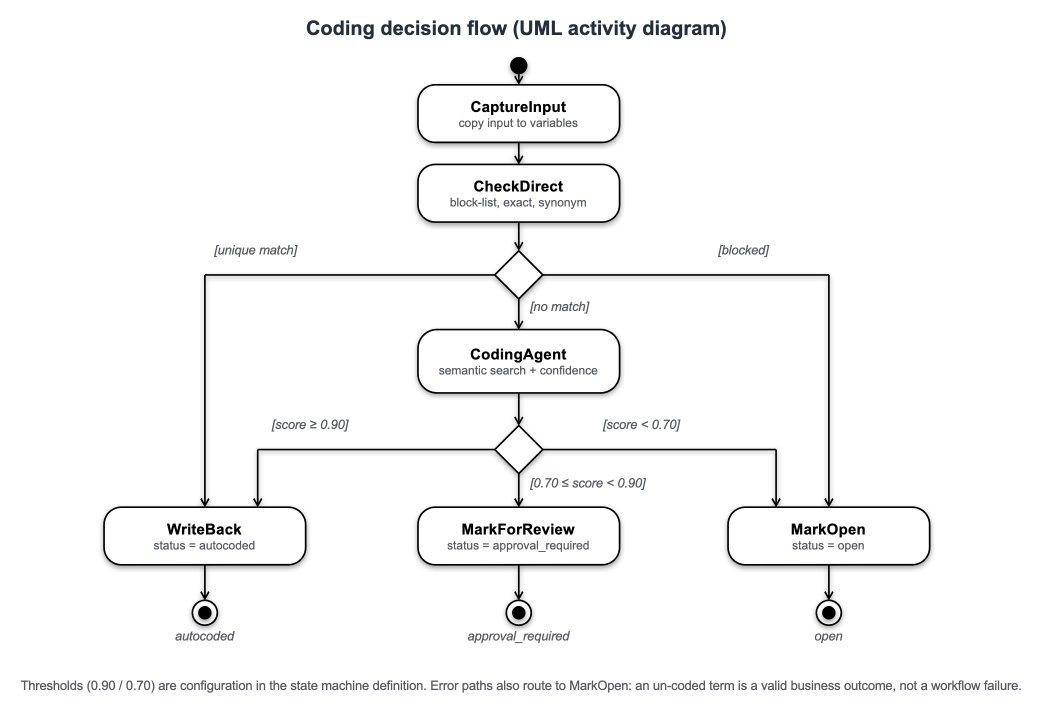
Figure 2: Medical coding decision flow with the three terminal outcomes in UML activity notation
Note: This sample is for demonstration purposes only and is not intended for clinical use. Before using this pattern in production, validate it against a known-correct dataset and measure coding precision and the incorrect autocode rate.
Walkthrough
The walkthrough follows one verbatim through the state machine, focusing on the architectural decision each stage encodes.
Prerequisites
Before you begin, make sure that you have the following:
- An AWS account with permissions to create Step Functions state machines, Lambda functions, an Aurora PostgreSQL cluster, Amazon Bedrock AgentCore resources, and AWS Identity and Access Management (IAM) roles.
- Access to Amazon Bedrock AgentCore in a supported AWS Region. The harness uses Claude Sonnet 5 (
us.anthropic.claude-sonnet-5), and the dictionary search uses Amazon Titan Text Embeddings V2 (amazon.titan-embed-text-v2:0). Both models are enabled by default, but Anthropic models require a one-time usage form before first use, which you can submit from the Amazon Bedrock playground. For model availability by Region, see Supported models by AWS Region in Amazon Bedrock. Node.js24+, the AWS Cloud Development Kit (AWS CDK) CLI, and a bootstrapped target account.
Estimated cost
The largest cost is the Aurora Serverless v2 cluster. It keeps a minimum capacity of 0.5 Aurora Capacity Units (ACUs), so it’s billed for every hour it runs, even when idle. For current rates, see Amazon Aurora pricing. To stop the charges, delete the stack as described in Clean up.
Step 1. Resolve the deterministic cases first
The first task state invokes a Lambda function that makes two checks, in a deliberate order. It first checks a terms-not-to-autocode block-list. These are real dictionary terms, like “HAEMORRHAGE,” that are too broad to auto-assign because the code changes depending on where the bleeding occurred. A hit ends the workflow with the term left open for a human. Because this runs before any model call, it’s a hard control: a safety rule placed ahead of the model cannot be prompted away, and costs nothing to enforce.
The same function then runs a case-insensitive exact match against the dictionary and a curated synonym list (“Hypothyroid” maps to “Hypothyroidism”). A match is accepted only if it resolves to exactly one distinct code. On the sample workload, five of twelve cases finish here: one safety block and four auto codes at score 1.00, each for the cost of an indexed query. More than a third of the workload never reaches the agent at all.
Step 2. Declare the coding agent in the workflow definition
We use an agent for this step because deciding when to pull in study context is judgment, not a fixed rule. In our test run, the agent called the study-info tool only for ambiguous terms and skipped it for a clear typo and for gibberish input. That kind of judgment is hard to encode as a threshold, and the agent can take on new tools later without a workflow redesign. This is also why the agent sits last in line, after two cheaper, deterministic checks.
Only on a miss does Step Functions invoke the agent, using the AgentCore harness optimized integration. The harness resource declares only the model. The system prompt, tools, and allowed tool names are supplied per invocation from the task state. The agent’s full contract is therefore readable in the workflow definition, and there is no container to build or operate. The following abbreviated excerpt shows the shape. See the sample for the full definition. The InvokeHarness Task state has a hard 15-minute execution cap regardless of TimeoutSeconds, so a term needing many tool round-trips could hit it. The sample’s two-tool, single-turn design stays well under that limit.
The agent has exactly two tools, exposed as Model Context Protocol (MCP) tools through an AgentCore Gateway. search_dictionary embeds the verbatim with Amazon Titan Text Embeddings V2 and runs a pgvector similarity search. It searches the verbatim exactly as given, because the misspelling is the signal. get_study_info returns the study’s free-text protocol description. It exists because similarity search can return several clinically plausible candidates it can’t separate on text alone. A human coder breaks that tie using knowledge of the study. This tool gives the agent the same context and nothing else: it returns prose only, not codes.
The clearest illustration is the same verbatim coded in two different studies. “cramps” returns an identical candidate list in both. Only the study description differs. In an oncology study that monitors muscle spasms as adverse events of special interest, the agent coded it to “muscle spasms.” In a reflux study where abdominal cramping is expected and musculoskeletal events aren’t an endpoint, it coded the same verbatim to “abdominal pain.” In this run, the oncology result scored 0.92 and was autocoded, and the gastrointestinal (GI) result scored 0.85 and went to a coder for review. In both cases the agent’s job was to bring the right candidate to the top with a reason a coder can check. That’s how a coder who knows the protocol would decide.
Step 3. Route on coding confidence, not retrieval similarity
The most important design decision is what the threshold routes on. Routing on retrieval similarity, the distance between the two embeddings, is measurably wrong. Table 1 illustrates this with an example.
| Verbatim | Selected term | Retrieval similarity | Agent confidence |
| migrane | Migraine | 0.37 | 0.97 |
| flutters in my chest sometimes | Cardiac flutter | 0.65 | 0.75 |
Table 1. Retrieval similarity and agent confidence for sample terms (one run, Claude Sonnet 5)
Table 1 shows the problem. The typo “migrane” looks very different from “Migraine” as text, so its similarity score is low, but the right code is obvious. “Flutters in my chest sometimes” shares more words with “Cardiac flutter,” so its similarity score is higher, but the right code is less certain. Similarity ranks these two cases the wrong way round, and no threshold can fix that. So instead, the agent reports how confident it is in its own choice, using three bands set in the system prompt. It reports 0.95 to 1.00 when the match is clear, 0.70 to 0.94 when the verbatim is vague or the agent needed study context to choose between candidates, and below 0.70 when nothing fits. For example, “cramps” in the GI study could mean muscle cramps or stomach cramps. The agent checked the study description to choose, and reported 0.85, in the middle band. The bands describe the model’s confidence. The 0.90 autocode gate is a separate, fixed rule in the workflow, applied by the Choice state that comes next.
Note that the routing number is authored by the model. The block-list runs before any model call, and the thresholds are auditable configuration in the state machine definition. The write-back checks the code exists, and anything below the autocode gate reaches a human. Note also that the agent is instructed never to abstain. For gibberish it still returns the top candidate at low confidence, and the gate discards it. The agent scores the candidate, and the workflow decides what happens to it.
Step 4. Write back with a fabrication guard
The terminal task persists the outcome onto the same study record: status, code, hierarchy, score, and a status_changed_by marker that distinguishes machine coding from human action. Before writing, it checks that the chosen code exists in the target dictionary and version. The prompt tells the agent not to invent codes, and this check enforces it. It matters because the agent reads free-text study metadata, which is the kind of input that invites copying a plausible number out of a protocol description. A code that fails the check leaves the term safely open, with the reason recorded. This check has one limit. It can’t tell whether the code was one of the search results, because the workflow only gets the agent’s final response, not what the tools returned. To verify that, look at the agent’s tool calls in AgentCore Observability, a capability of Amazon Bedrock AgentCore.
Deploy and test the solution
The sample deploys with three commands and seeds twelve verbatims that exercise every branch:
Each verbatim runs as one Step Functions execution (the repository README shows the exact CLI calls). The following table shows a live run:
| Verbatim | Route | Score | Outcome |
| HAEMORRHAGE | block-list | n/a | open (safety block) |
| Dislocated shoulder | exact match | 1.00 | autocoded |
| Hypothyroid | synonym match | 1.00 | autocoded |
| ibuprofen | exact match (WHODrug) | 1.00 | autocoded |
| FULVESTRANT | exact match, derivation-only | 1.00 | autocoded |
| migrane | agent | 0.97 | autocoded (Migraine) |
| nexiuum | agent | 0.95 | autocoded (NEXIUM) |
| cramps (oncology study) | agent + study context | 0.92 | autocoded (Muscle spasms) |
| cramps (GI study) | agent + study context | 0.85 | review (Abdominal pain) |
| flutters in my chest sometimes | agent | 0.75 | review (Cardiac flutter) |
| heart races when I stand up | agent | 0.80 | review (Tachycardia) |
| asdfghjkl | agent | < 0.70 | open |
Table 2. Score and outcome for sample terms (same run as Table 1)
Derivation-only (FULVESTRANT row): a WHODrug ingredient-level exact match, where the write-back updates only the generic-name derivation and ATC hierarchy fields. No new dictionary term is assigned.
The agent skipped the study-info tool for the unambiguous typo and the gibberish and called it only for the ambiguous cases. Every execution’s graph is inspectable in the Step Functions console, and AgentCore Observability records the agent’s tool calls and token usage in Amazon CloudWatch.
Note: Across repeated runs of identical inputs in this sample, the selected code was stable every time, but the confidence score moved within a band. Cases that land near the 0.90 autocode gate can therefore autocode on one run and route to review on another. In our testing, the oncology cramps case scored between 0.75 and 0.92 over six runs. It was autocoded twice and sent to review four times, and Muscle spasms was selected every time. Assert your tests on the selected code, not the exact score, and set your own autocode threshold with margin below 0.90 rather than directly on it.
Scaling beyond one verbatim: This walkthrough codes one verbatim per execution so each decision stays straightforward to inspect. To code a full study, wrap the workflow in a Step Functions Distributed Map state that reads verbatims from an Amazon Simple Storage Service (Amazon S3) manifest, and set MaxConcurrency based on your account’s Amazon Bedrock quota. To size MaxConcurrency, divide your model’s tokens-per-minute quota by the tokens one agent run burns (model calls * (input tokens + 10 * output tokens) for Sonnet 5). Then multiply by the runtime duration in minutes, divide by the share of verbatims that reach the agent, and apply a safety margin. In our testing, 12 concurrent executions against a cluster that had scaled to zero failed 8 of 12 while still reporting SUCCEEDED, which is why the sample keeps a 0.5 ACU minimum and retries the resume errors. Most verbatims resolve in the two deterministic steps, so only a small share ever reaches the agent. For the quotas that apply to your model, see Quotas for Amazon Bedrock.
Clean up
To avoid future charges, delete the deployed resources with npx cdk destroy. All sample data is reseedable, so nothing needs to be retained.
Recognizing the pattern
This pattern fits when the execution path must be reviewable independently of model reasoning, most of the workload is deterministic, only a judgment-heavy minority needs a model, and “escalate to a human” is a first-class outcome rather than an error. It is not limited to clinical trials: the same pattern applies to medical summaries, case narratives, registry intake, study data, and other adjudication workflows such as laboratory test coding, claims triage, and document classification.
You can extend the AgentCore harness with AgentCore Memory to carry context across invocations, Skills to provide task-specific instructions on demand, and AgentCore Gateway to connect MCP servers, knowledge bases, and other tools. Models, tools, and system prompts can also be selected per invocation from the Step Functions task state. Treat a model change like any other release. Rerun your evaluation set, compare the selected codes and confidence scores with the current model’s, and recalibrate the thresholds before you switch. Through all of this, the workflow remains responsible for sequencing and the audit trail.
This isn’t a pattern for open-ended conversations. If the agent must decide what happens next, a workflow engine that owns sequencing is the wrong boundary. Retrieval quality also constrains the agent: if a term isn’t surfaced, it can’t be chosen. In the sample, “flutters in my chest sometimes” would normally be coded to Palpitations, but vector search ranks Palpitations 19th, so the agent does not see it and selects Cardiac flutter instead. The confidence gate still sent it to a coder, but no prompt or study context can recover a term that retrieval never returns. For production dictionaries, use hybrid retrieval, such as lexical search or curated synonym expansion alongside vectors, and calibrate thresholds against your own verbatim distribution.
Conclusion
In this post, we showed how deterministic orchestration and agentic reasoning become complementary when the boundary between them is explicit. AWS Step Functions owns sequencing, thresholds, and the audit trail. The agent owns bounded judgment inside one step and reports a confidence the workflow routes on. The result is a pipeline that codes the common cases for the cost of a query, focuses skilled coders on the ambiguous minority, and routes terms below the confidence gate to a human. The execution history shows exactly which mechanism made each decision. The declarative harness integration keeps the agent inside that boundary as configuration a reviewer can read, not code inside a container.
Next steps
Deploy the sample solution with the AWS Cloud Development Kit (AWS CDK), run the twelve golden cases, then swap in your own reference data and calibrate the thresholds from measured precision. For background, see the AWS Step Functions service integrations, the Amazon Bedrock AgentCore documentation, and pgvector on Amazon Aurora PostgreSQL.
To learn more, see how Step Functions invokes an Amazon Bedrock AgentCore harness from a Task state, the AgentCore harness developer guide, and transforming data with JSONata in Step Functions. To run at study scale, see Distributed Map for large-scale parallel workloads and quotas for Amazon Bedrock. For service details, see AWS Step Functions and Amazon Bedrock AgentCore.