AWS Architecture Blog
How Synthesia optimizes generative AI video inference on Amazon EC2 G7e instances
Synthesia, an enterprise-focused AI video platform, has transformed content creation, helping everyone to create video content without cameras or microphones. To achieve this, Synthesia allows its users to create video avatars that synthesize the likeness and voice of real people. Synthesia achieves this through a series of in-house developed models based on various architectures, including latent diffusion video generation models.
Customers like Synthesia often choose to host their models on Amazon Elastic Compute Cloud (Amazon EC2) instances because of the flexibility and control over the underlying hardware that the service provides. Among them, they find the G7e instance family to be a cost-efficient option to serve GPU-memory intensive generative AI video models because it gives customers access to NVIDIA RTX PRO 6000 Blackwell Server Edition GPUs with 96GB of GPU memory.
When generating videos using AI models with a Variational Auto Encoder (VAE) Decoder in the architecture, customers often find the GPU utilization is bottlenecked by the saving rate of the video frames to a file held on storage. This causes GPU stalls and reduces average GPU kernel utilization, which is the percentage of time the GPU is actively executing compute kernels rather than idle.
This post introduces a video decoding optimization technique that we have ideated in collaboration with Synthesia Research Engineering team, which we call Asynchronous Frame Generation Pipeline. Adopting this technique allows you to overlap GPU compute, device-to-host (D2H) data transfer, and host-side post-processing. In this post, we apply this technique to the VAE decoder of a Wan video generation model as an example, where our benchmarks on G7e show increased GPU kernel utilization from 82% to 99.9%, in turn leading to an 8.2% decrease in latency (and increase in throughput) for video decoding. We expect this technique to benefit any customer with a chunked video generation pipeline that transfers frames to host memory.
You can find an end-to-end example implementation of the Asynchronous Generation Pipeline applied to the Hugging Face Diffusers format of the Wan 2.2 14B Model in the associated GitHub repository.
In the following section, you will see how latent diffusion models generate video and why the traditional sequential decoding approach can lead to inefficient GPU utilization.
Understanding the sequential decoding bottleneck
Latent diffusion video generation models have emerged as powerful tools for generating temporally coherent video sequences. To reduce compute and memory requirements, these models perform the diffusion process in a compressed latent space of a variational auto-encoder (VAE), as depicted in the below figure, which has generally a much lower dimensionality than the originating video pixel space.
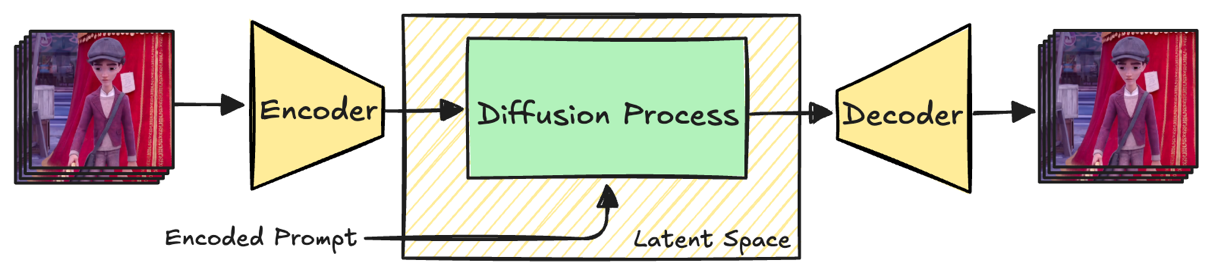
Fig. 1 High-level architecture of a VAE model. The depicted frames are taken from the Wan 2.2 repository sample video used in the example implementation in the next sections.
At inference time, a latent representation is initialized with noise and iteratively denoised via a Diffusion Process. To make sure that the output follows the text prompt, every denoising step is conditioned on the text input if present. After the final denoising step, the Diffusion Process yields a generated video that is still represented in the latent space of the VAE. The last step therefore consists in decoding the latent video back into a human-readable pixel video using the decoder part of the VAE.
Processing the whole latent or pixel video at once is usually too resource-intensive, even on large GPUs. It is therefore common to split the video along the temporal dimension and to decode video frames one latent frame at a time, resulting in a chunk of, for example, 4 consecutive pixel frames, as shown in Fig 2.
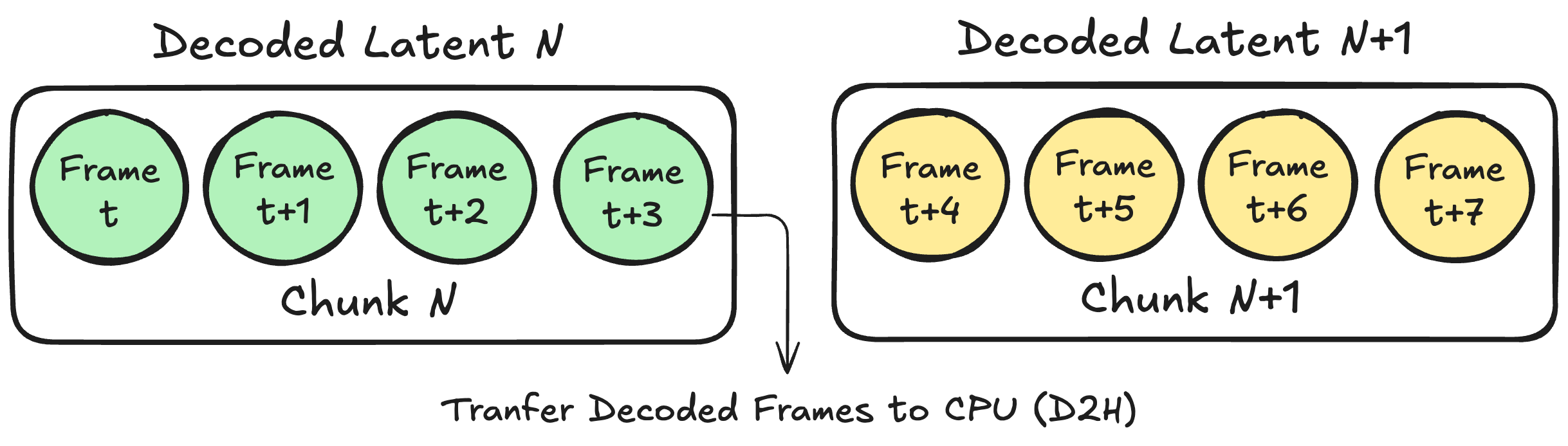
Fig.2 Decoding one latent results in a chunk of 4 time-consecutive pixel frames which are transferred from the GPU to the host.
Once a chunk has been decoded and processed on the GPU, the corresponding pixel frames must be transferred back to host (CPU) memory with a D2H transfer, so they can be written to a file or further processed. If you wait to transfer the video frames once the entire video has been decoded, the full decoded video must fit in GPU memory before being transferred, making this strategy hard to scale for arbitrarily long videos. A more memory-efficient alternative is to transfer the decoded frames every time a chunk is decoded, so that the GPU memory footprint of the decoder scales with the size of the chunk instead of the full video.
Traditionally, a newly generated set of frames in a chunk N is passed from GPU memory to CPU RAM synchronously, and it is committed to storage before the CPU can launch the CUDA kernels (referred to as kernels from now on) that process the N+1 chunk. This leads to systematic GPU stalls between chunks, as the copy from device to host prevents the GPU from immediately starting work on the next chunk, reducing overall hardware utilization, and in turn increasing processing time. We will refer to this synchronous process as Sequential Frame Generation Pipeline, which is depicted in Fig. 3.

Fig.3 Schematic representation of the Sequential Frame Generation Pipeline. Launching the kernels processing Chunk N+1 needs to wait for the full copy and storage of the frames in Chunk N.
In the following section, you will learn how to overcome this bottleneck using an asynchronous pipeline that overlaps GPU computation with data transfers and host-side processing.
Asynchronous Frame Generation Pipeline
To minimize GPU stalling, and in turn increase GPU utilization, you need to modify the Sequential Frame Generation Pipeline introduced in the previous section, so that all host-side CPU work (such as appending decoded frames to a file) runs in parallel with a stream of uninterrupted device-side kernels. This section shows you how to achieve this using as an example the implementation of an Asynchronous Wan VAE Decoder, which is implemented with PyTorch and you can find in the associated GitHub repository.
By default, PyTorch schedules work on a single (default) CUDA stream per device which executes the operations in issue order unless additional streams are explicitly created. To decouple compute and D2H copies, the implementation uses two CUDA streams so that the GPU is allowed to overlap compute kernels, which are enqueued on the default stream, and D2H copies on a dedicated copy stream. Compute kernels are enqueued on the default stream, which from now on can be referred to as Compute Stream, and D2H copies on a dedicated copy stream, namely the Copy Stream. In Fig. 4 you can find the full setup on a GPU accelerated instance (G7e in our example) depicted.
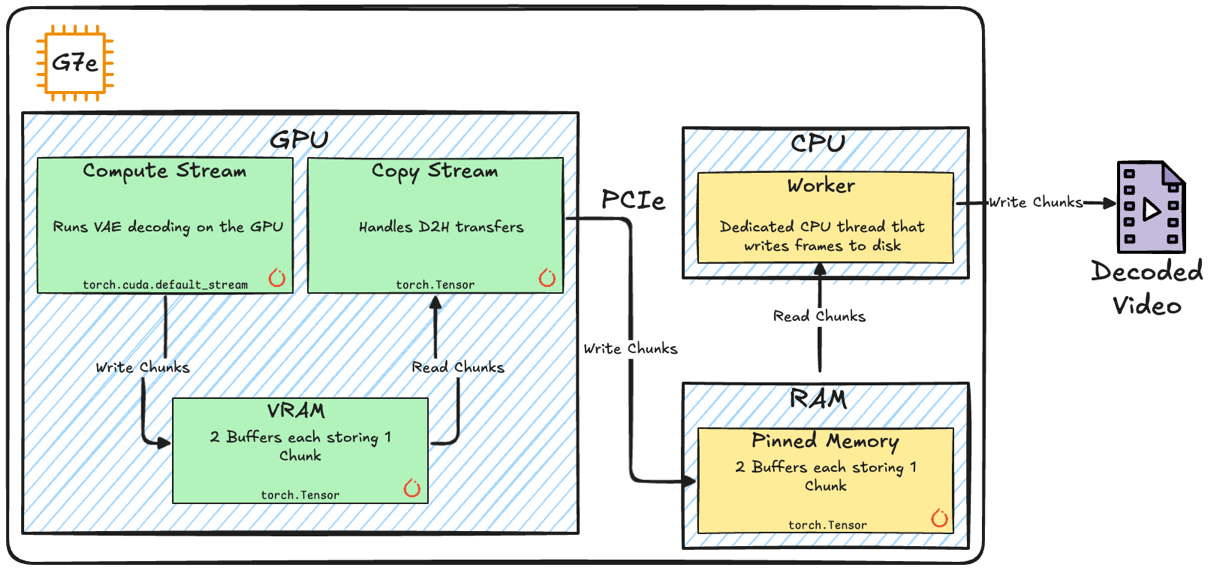
Fig. 4 High level diagram of the key components in our implementation of the Asynchronous Frame Generation Pipeline.
On the host side, kernel submissions are interleaved with D2H transfers and post-transfer processing and, to avoid host-side blocking calls and maximize GPU utilization the Asynchronous Frame Generation Pipeline introduces two mechanics:
- A dedicated Worker CPU thread responsible for reading chunks from Host Memory (RAM), and writing them to file, leaving the main Python thread to focus on launching kernels and scheduling D2H transfers.
- Two in-memory Buffers on the GPU Memory (VRAM), and on the Host Memory (RAM), and page-lock the required Host Memory buffers to make sure D2H copies are performed fully asynchronously.
Using a double-buffer strategy makes sure that for adjacent chunks the compute, D2H transfer, and host processing can overlap safely as they operate on distinct memory buffers.
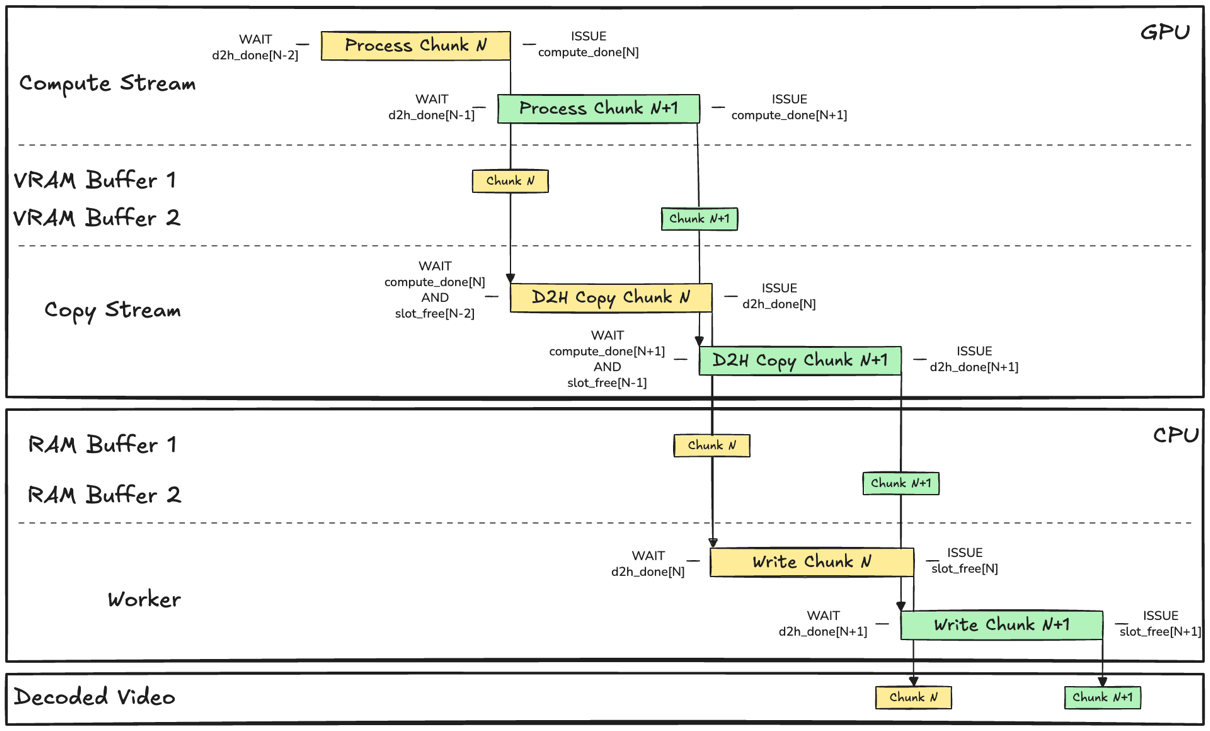
Fig. 5 Schematic representation of the interplay between Events, Streams, Buffers, and Worker component in the Asynchronous Frame Generation Pipeline implementation. Events are depicted as left and right conditions, expressing what the process WAITs for, and ISSUEs when it has completed. The size of the boxes representing operations has been scaled to fit the text, and therefore not representative of the actual processing time.
Since buffers can be accessed concurrently by different components, the implementation introduces a synchronization mechanism to avoid different kernels and threads corrupting data held in the buffer. This can be achieved using CUDA Events which are used as a barrier that clears if it can answer closed questions such as: Has decoding of chunk N completed? You can find the interplay between Streams, Threads and Events depicted in Fig. 5.
G7e benchmark results
To quantify the impact of the Asynchronous Frame Generation pipeline, you can benchmark the decoding of a single 41 latent-frames test video for both the Synchronous and Asynchronous pipeline on a g7e.2xlarge EC2 instance using this sample notebook. To have a common baseline, the benchmarks are based on the unoptimized Hugging Face Diffusers Wan 2.2 14B model, and, in both cases, the benchmarking loop performs an initial full decoding cycle to let CUDA and PyTorch initialize and allocate memory pools and cache. After warmup, the benchmarking session carries out 10 consecutive full video decoding cycles. We have run an end-to-end run as an example and present the results in Table 1.
| Metric | Synchronous (time s /video) | Asynchronous (time s / video) |
| min | 21.98 | 20.16 |
| mean | 21.99 | 20.17 |
| P99 | 22.01 | 20.20 |
Table. 1 Benchmark results for 10 consecutive decoding runs for the Synchronous and Asynchronous pipelines.
The example results show a speed gain of up to 8.2% on this benchmark, decreasing the Real Time Factor of the decoder from 3.21 to 2.95. Considering the g7e.2xlarge pricing as of writing this post ($3.36 per GPU on-demand in the Ohio region), this leads to an average saving of $896 for decoding 1,000 hours of video on a single GPU. This is a theoretical saving, calculated assuming that the underlying model operates at full computational efficiency without bottlenecks.
To have a qualitative understanding of how this performance boost is achieved, you can profile both the Synchronous and Asynchronous pipelines using this sample notebook. The results for an example run are reported in Fig. 6 and Fig. 7, showing the absence of GPU stalls in the Asynchronous pipeline as opposed to the Synchronous pipeline.
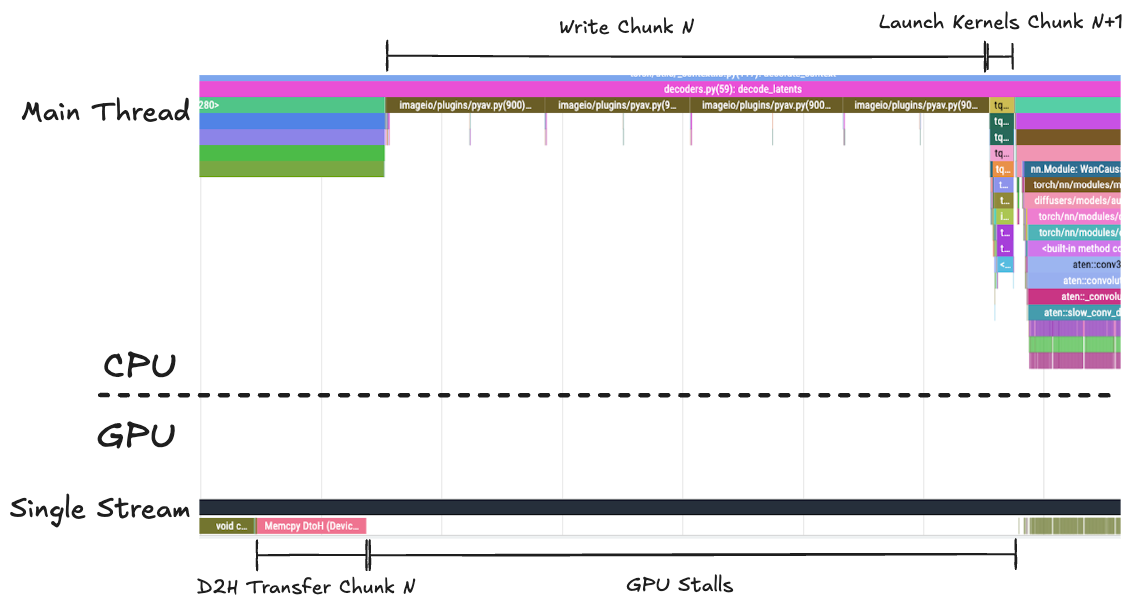
Fig. 6 Profile of the Synchronous pipeline single thread and stream. As the main CPU thread is writing Chunk N frames to disk, the GPU stream stalls, waiting for the CPU to launch the kernels needed to process Chunk N+1
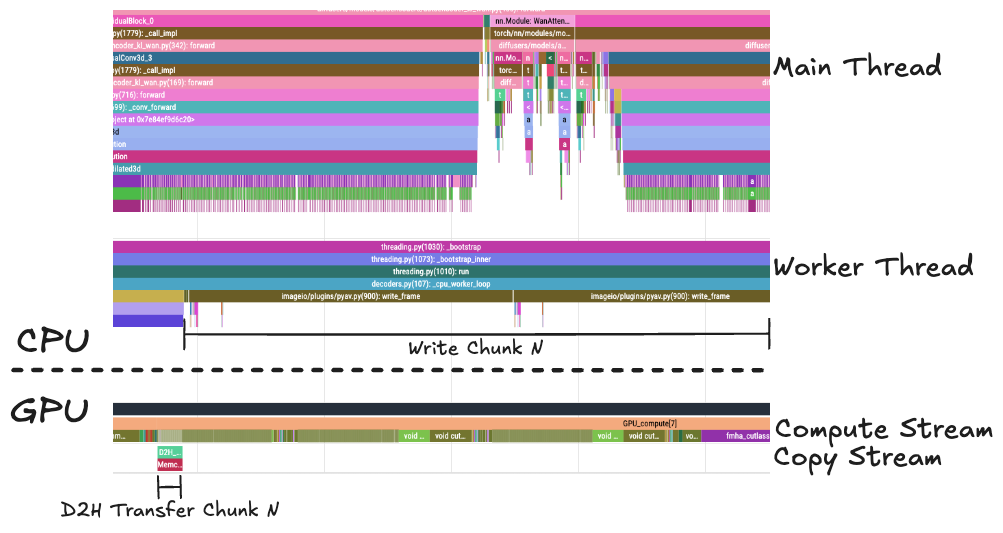
Fig.7 In the Asynchronous pipeline, the Compute Stream is not interrupted by the copying and writing of the frames to disk. The Main Thread is free to launch the processing kernels. This figure is displayed with a different zoom level than Fig. 6 to highlight the qualitative differences.
By focusing on the temporal axis for two consecutive chunks in the steady state, you can quantify the GPU kernel utilization increase, which, in our example run was 82% for the Synchronous case, increasing to 99.9% for the Asynchronous case.
Conclusion
In this post, we demonstrated how the Asynchronous Frame Generation Pipeline can improve GPU utilization when decoding latent videos on Amazon EC2 G7e instances. By decoupling GPU compute from device-to-host transfers and host-side I/O using dual CUDA streams, pinned memory buffers, and a dedicated worker thread, we eliminated the GPU stalls inherent in traditional synchronous decoding pipelines.
The sample benchmarks on the Wan 2.2 14B VAE decoder show an 8.2% reduction in decoding latency, translating to approximately $896 in savings per 1,000 hours of decoded video on a single GPU when considering the g7e.2xlarge pricing as of writing this post ($3.36 per GPU on-demand in the Ohio region). These gains come without any changes to model weights or inference quality, purely from better hardware utilization. We expect the kernel utilization gain to be even more impactful on optimized and compiled models, which make more efficient use of the GPU.
The techniques presented here are not specific to the Wan architecture, nor to the specific GPU utilized. Any chunked video generation pipeline that transfers frames to host memory can benefit from this approach. We encourage you to explore the associated sample implementation to experiment with how the Asynchronous Frame Generation Pipeline could be integrated into your own video generation workloads.
To get started with G7e instances for your generative AI video workloads, visit the Amazon EC2 G7e instance page.