AWS Cloud Financial Management
Track Amazon Bedrock Costs by Caller Identity with IAM Principal-Based Cost Allocation
As you scale Generative AI usage with Amazon Bedrock, a common question emerges: “Which team, application, or user is driving the Bedrock spend?” Until now, answering that question required manual reconciliation correlating AWS CloudTrail logs with billing data to map API calls back to specific identities. That approach is time-consuming, error-prone, and difficult to maintain at scale.
AWS has announced AWS Identity and Access Management (IAM) Principal-Based Cost Allocation for Amazon Bedrock, a new capability that automatically records the identity of the caller (IAM user or role) for every Bedrock API call directly in your AWS Cost and Usage Report (CUR 2.0) and AWS Cost Explorer. With this feature, you can now track, allocate, and optimize Bedrock model spend by the IAM principal that made the call without using custom tooling.
This post walks you through how this feature works, how to set it up, and how to use it to gain granular visibility into your Amazon Bedrock costs.
Why IAM Principal-Based Cost Allocation Matters
Multiple teams, applications, and users often share the same AWS account to invoke foundation models. Without principal-level attribution, Bedrock costs appear as a single line item, making it nearly impossible to answer questions like:
- Which team is consuming the most tokens on Anthropic Claude?
- How much is our customer-facing chatbot costing compared to our internal summarization tool?
- Can we charge back Bedrock costs to the correct department or project?
IAM principal-based cost allocation solves these challenges by automatically capturing who made each Bedrock API call and associating that identity, along with tags applied to the IAM principal, with the corresponding costs and token usage.
This allows you to:
- Identify which IAM users or roles are invoking Bedrock models
- Map Bedrock model usage to organizational structures such as departments, teams, and projects
- Chargeback and showback for Bedrock model consumption
- Reveal optimization opportunities by analyzing usage patterns per principal
How It Works
When you enable IAM principal data in your CUR 2.0 data export, AWS automatically records the caller identity for each Bedrock API call. Once enabled, the following data becomes available in CUR 2.0:
line_item_iam_principal: A new column containing the IAM ARN of the caller for each Bedrock API call (for example,arn:aws:iam::123456789012:user/usernameorarn:aws:sts::123456789012:assumed-role/rolename/session-name)- IAM principal tags: Tags applied to the calling IAM principal, that have been activated as cost allocation, tags appear in the Tags column with the prefix
iamPrincipal/ (for example, if you activate department and costCenter as cost allocation tags, they appear asiamPrincipal/department,iamPrincipal/costCenter)
You can also group and filter costs in Cost Explorer using these IAM principal cost allocation tags. Select Tag as a dimension, then choose the relevant “IAM principal” tag (for example, iamPrincipal/department) to get visual breakdowns of Bedrock model spend by department, team, project, or any other tag dimension you define.
Getting Started
Setting up IAM principal-based cost allocation for Amazon Bedrock involves three steps. Let’s walk through each one.
Prerequisites
Before you begin, confirm the following:
- IAM users or roles are being used to make Amazon Bedrock API calls
- You have access to the IAM console and the Billing and Cost Management console
- You have a CUR 2.0 data export configured (or permissions to create one)
Important: IAM principal-based cost allocation must be activated at the management account level in the Billing and Cost Management console. Member accounts in an AWS Organization cannot activate this independently.
Step 1: Apply Tags to Your IAM Principals
First, tag the IAM users and roles that invoke Bedrock APIs with descriptive, standardized keys.
1. Navigate to the IAM console
2. Select the IAM user or role that invokes Bedrock APIs
3. Under the Tags tab, add tags using keys such as department, costCenter, team, or project (see Figure 1)
4. Repeat for relevant IAM principals
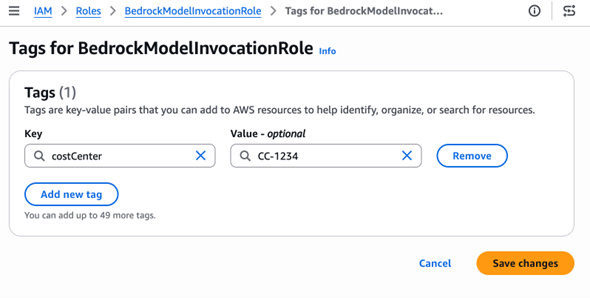
Figure 1: IAM console showing tags being applied to an IAM role
Tip: Use meaningful, low-cardinality tag values. Tags like department=engineering or costCenter=CC-1234 are ideal. Avoid high-cardinality values such as session IDs or timestamps, which can cause cardinality explosion in Cost Explorer and inflate CUR file sizes.
Step 2: Activate Tags for Cost Allocation
Next, activate these tags in the Billing console so they appear in your cost reports. Tags only appear for activation after the IAM principal with the tags has made at least one API call. This applies whether the principal is an IAM user, role, or assumed role session.
5. Navigate to the Billing and Cost Management console
6. Go to Cost Allocation Tags
7. Locate the IAM principal tags you applied in Step 1
8. Select the tags and choose Activate (see Figure 2)
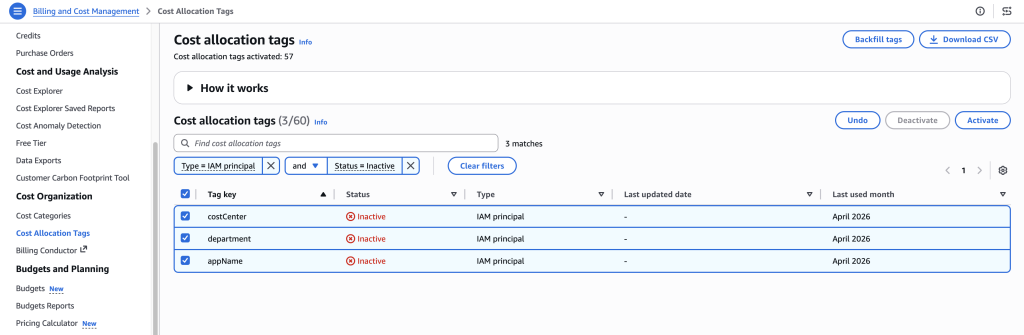
Figure 2: Billing console showing Cost Allocation Tags activation page
Note: Tag activation can take up to 24 hours before tags appear in Cost Explorer and CUR reports.
Step 3: Enable IAM Principal Data in CUR 2.0
Finally, configure your CUR 2.0 export to include caller identity data.
9. In the Billing and Cost Management console, navigate to Data Exports
10. Create a new CUR 2.0 export
11. Select the option: “Include caller identity (IAM principal) allocation data” (see Figure 3)
12. Save the export configuration
Important: There is no additional charge for enabling IAM principal cost allocation. However, enabling this feature increases CUR file sizes because cost line items that were previously a single row now expand into multiple rows, one for each IAM principal that contributed to the usage. For high-volume usage patterns with many distinct principals, this can meaningfully increase S3 storage costs. Plan accordingly and consider S3 lifecycle policies for older CUR files.
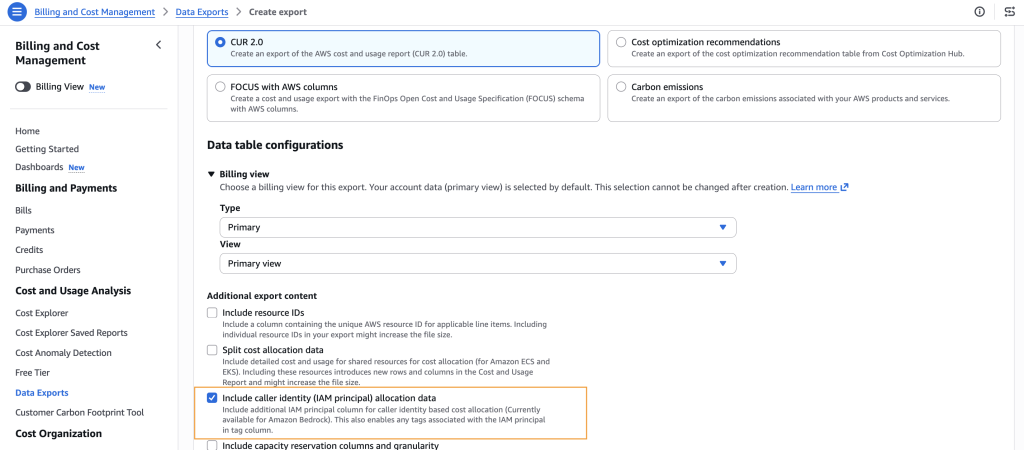
Figure 3: Data Exports configuration page showing the IAM principal allocation data checkbox
Viewing Your Cost Data
Once the setup is complete and data begins flowing (allow up to 24 hours), you can analyze Bedrock costs by IAM principal in two ways: in Cost Explorer and in CUR 2.0 Reports.
In Cost Explorer
13. Navigate to AWS Cost Explorer
14. Select Tag as a dimension (see Figure 4)
15. Choose the relevant “IAM Principal” tag (for example, iamPrincipal/costCenter)
16. View visual breakdowns of Bedrock model spend by your chosen tag dimension
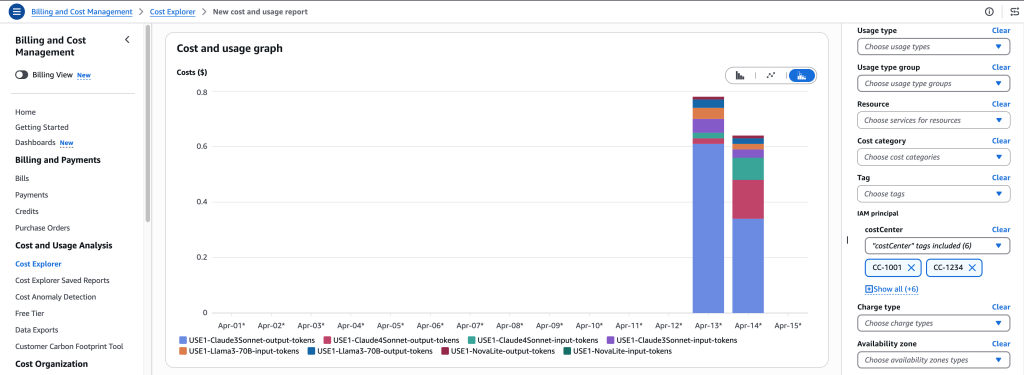
Figure 4: Cost Explorer chart showing Bedrock spend broken down by IAM Principal tags
In CUR 2.0 Reports
Query your CUR 2.0 data in Amazon Athena or your preferred analytics tool. The line_item_iam_principal column contains the full IAM ARN for each Bedrock inference cost, and the iamPrincipal/ prefixed tags in Tags columns allow you to slice costs by tag dimension.
Handling Gateway Architectures
Many organizations route Amazon Bedrock API calls through an intermediary gateway such as Amazon API Gateway, a custom proxy, or a shared internal service. In this architecture, the IAM principal recorded in CUR 2.0 is the gateway’s execution role, not the end user’s identity. This means Bedrock costs may appear attributed to a single IAM role.
If you see your Bedrock costs grouped under one IAM role, this is likely the cause. Here are strategies to maintain cost visibility in a gateway pattern:
Use Distinct IAM Roles per Consumer Group
Assign separate IAM roles for each team or application behind the gateway. This preserves cost attribution granularity without requiring changes to the gateway itself.
Apply Tags to the Gateway’s Execution Role(s)
Even when using a shared role, you can apply IAM principal tags (such as department or application) to map costs to the appropriate business unit.
Use Session Tags for Dynamic Attribution
For the most granular cost attribution behind a gateway, session tags provide a powerful mechanism. When the gateway assumes a shared IAM role using AssumeRole, it can pass session tags as parameters that override the role’s existing tags for that session.
Here’s how it works:
- The gateway application calls AssumeRole or a similar AWS Security Token Service (STS) API
- At the time of assuming the role, the application passes session tags (for example, department=engineering, project=devx-v2, costCenter=CC-1234)
- These session tags override the corresponding IAM role tags for that session
- Bedrock API calls made during that session are recorded in CUR 2.0 with the session tag values
- This helps cost allocation at the application, project, or department level even through a shared gateway role
Note: Bedrock captures the union of tags, which includes the original IAM principal tags, overridden tags, and new tags added during the session. Session tags can override matching tag keys or add new ones, but they cannot selectively remove existing IAM principal tags. For detailed implementation guidance on passing session tags when assuming a role, see the AWS documentation on session tags.
Best Practices
Best practices for implementing IAM principal-based cost allocation effectively:
- Use low-cardinality tag keys. Tags like department, costCenter, and project are ideal. Avoid values that change frequently or are unique per request.
- Standardize naming conventions. Agree on tag key casing, naming patterns, and allowed values across the organization before enabling cost allocation. Inconsistent naming (e.g., Department vs. department vs. dept) creates fragmented cost views.
- Regularly review and deactivate unused tags. Stale or unused tags add noise to cost reports. Periodically audit active cost allocation tags.
- Monitor tag usage across teams. Verify that new IAM principals are being tagged consistently as teams onboard to Bedrock models.
Conclusion
IAM principal-based cost allocation gives organizations the visibility to understand exactly which identities drive Amazon Bedrock spending. By tagging IAM principals, activating those tags for cost allocation, and enabling IAM principal data in CUR 2.0, organizations gain the ability to track, allocate, and manage Bedrock costs across the organization. Start by enabling this feature today, and within 24 hours begin analyzing your Bedrock spend by team, department, or project.
To learn more, visit the IAM Principal-Based Cost Allocation Documentation. For questions or feedback about this feature, reach out through AWS re:Post or contact AWS Support.