AWS for SAP
Achieving Single-Sign-On Agentic access to SAP with AWS for SAP MCP Server
Picture a finance analyst asking an AI assistant, “which of my customer invoices are overdue?” and getting an answer straight from SAP. Enterprises want exactly this, but connecting an AI agent to a system of record raises a hard question: when the agent reaches SAP, who is making the request? Many early integrations route every request through one shared SAP service user. This maps every user’s activity to a single technical user, so SAP can no longer authorize or audit the real operator, and it forces storage of static SAP credentials that security and compliance teams rarely approve. As a result, promising AI pilots stall before they reach production.
Full identity propagation solves this by carrying each user’s identity through every authentication leg to SAP. When the request arrives as the named user, SAP applies that user’s own authorizations, logs the action against that user in the Security Audit Log, and stores no shared standing credential. On-Behalf-Of (OBO) access, defined in RFC 8693 token exchange, makes this possible by exchanging a user’s existing token for a downstream token scoped to SAP. Enterprise Identity providers (IdPs) such as Microsoft Entra ID and Okta support this flow, so users get SSO with no second login prompt. This blog discusses how to build that experience: Use Amazon Quick to ask about sales orders, financials, and plant maintenance in SAP, and increasingly take actions, with your identity carried through to SAP by the AWS for SAP MCP Server and an enterprise IdP such as Microsoft Entra ID.
How it works?
The end-to-end flow has four moving parts: the AI Agent that acts as the MCP client (Amazon Quick), the Amazon Bedrock AgentCore Runtime hosting the AWS for SAP MCP Server, Entra ID, and the SAP system. Two distinct authentication boundaries are set up within Amazon Bedrock AgentCore to traverse through the flow.
- Inbound: Amazon Quick proves to AgentCore who the user is. AgentCore validates the user identity against Entra ID.
- Outbound: AgentCore obtains a token that SAP accepts. The OBO exchange produces this token, scoped to the SAP resource.
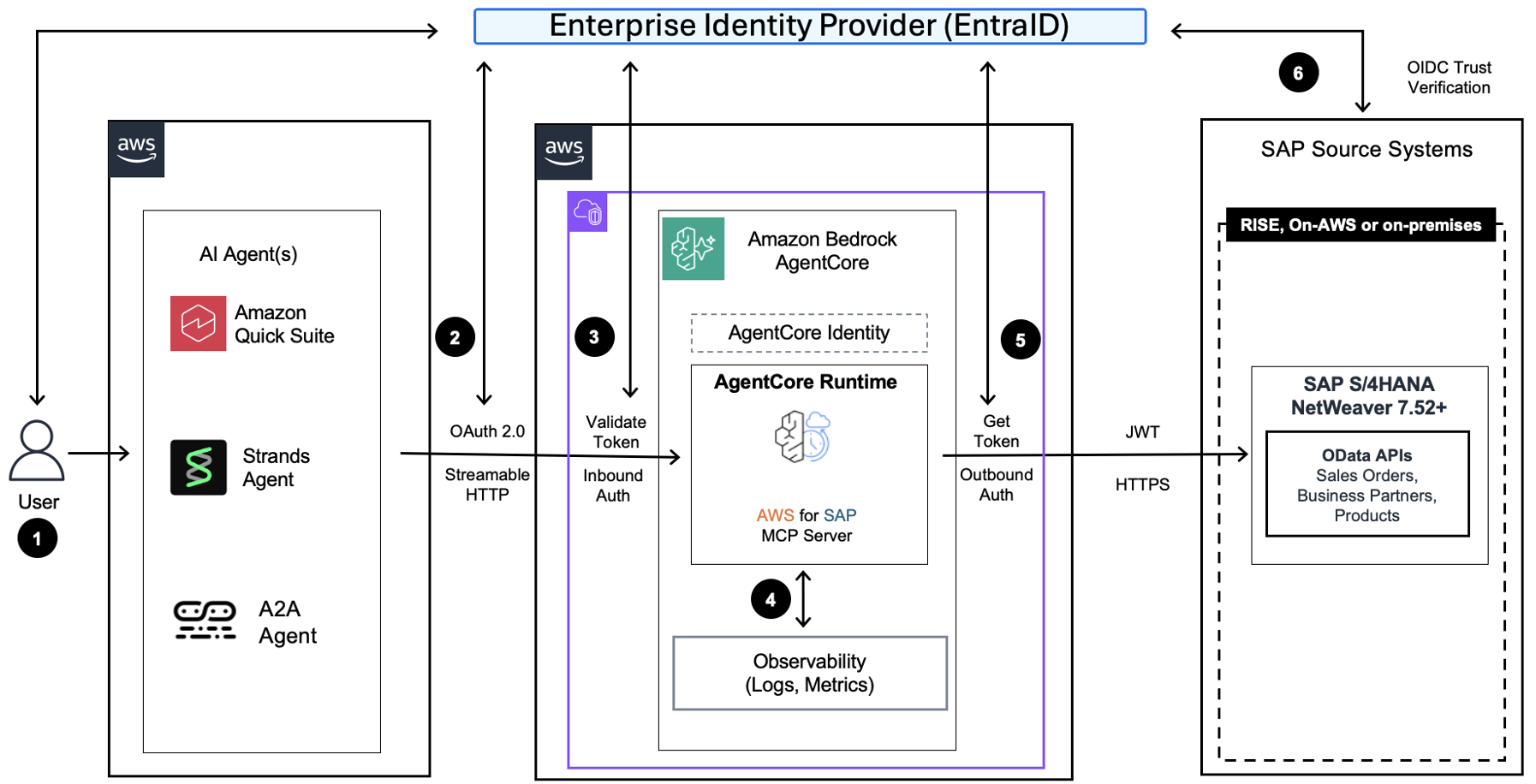
Figure 1. High-level architecture integrating Amazon Quick, AWS for SAP MCP Server and SAP S/4HANA for single sign-on.
- Users sign-in with Amazon Quick through Entra ID login (email address) or Single-Sign-On
- Amazon Quick authenticates this user with Entra ID via OAuth 2.0 to AWS for SAP MCP Server
- AgentCore validates the access token with Entra ID
- AgentCore logs all user’s access in AgentCore Observability
- AWS for SAP MCP Server performs OBO exchange with Entra ID and the JSON Web Token (JWT) is used in the HTTPS API call to SAP
- Entra ID provided JWT is validated by SAP OpenID Connect (OIDC) Trust
This design uses three app registrations in Entra ID as described below.
- Amazon Quick Client App – The OAuth client used by Quick to sign the user in.
- Inbound / Resource App – Validates inbound token and performs OBO exchange. AgentCore’s credential provider uses its client_id, which is also the aud of Quick’s token.
- Outbound App – Represents SAP access scope. SAP validates final token against this app.
Refer to AgentCore Identity documentation to learn about Microsoft Entra ID based provider setup and to understand the constructs involved.
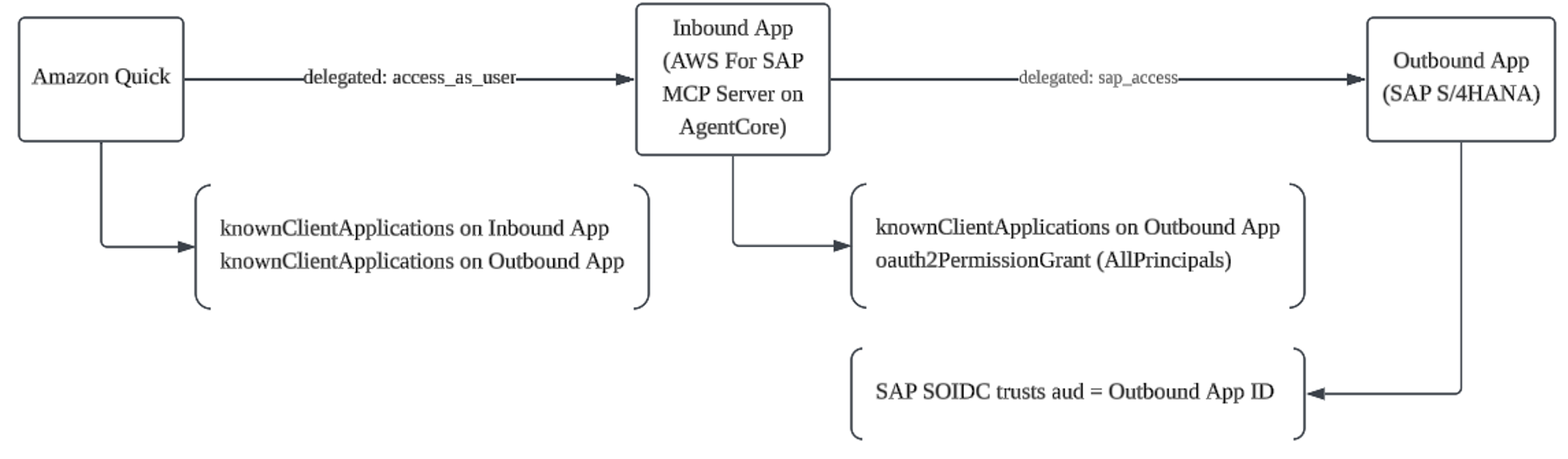
Figure 2. The delegated-permission chain across the three Entra ID app registrations.
SAP BTP Integration Suite also supports this pattern through the OBO (On Behalf Of) token chain, extending the identity flow as: Amazon Quick → AWS for SAP MCP Server → SAP BTP Integration Suite → SAP S/4HANA. Identity propagation referred to as principal propagation in SAP BTP is handled by SAP BTP API Management. For best practices on MCP access patterns to SAP solutions, refer to SAP’s guidance
Implementation details
The section describes the steps to configure the end-end setup, from the Entra ID app registrations through SAP user mapping. The following are the prerequisites for this setup.
| Requirement | Details |
| Azure CLI | az CLI authenticated with Global Administrator or Application Administrator role |
| AWS CLI | Configured for the target AWS account and Region |
| SAP BASIS | 7.56 SP1+ (or 7.52 with SAP Note 3313726) |
| SAP transaction | SOIDC must be available |
| CloudFormation template | Latest from s3://awsforsap-mcp-server-setup-{region}/cfn-launch-template/latest/ |
| Amazon Quick | Access to create MCP connectors. Registering the connector creates the Amazon Quick client app in Entra ID; capture its QUICK_APP_ID, QUICK_OBJECT_ID, and delegated scope IDs from the Entra ID portal (App registrations) for use in Step 4. |
Refer to SAP documentation on OIDC Support for latest information
Step 1: Create the inbound Entra ID App registration
The inbound app issues tokens that MCP clients use to authenticate into AgentCore runtime. Two settings in this step matter later in the flow. First, you set requestedAccessTokenVersion to 2, because both OBO exchange and SAP validation expect v2.0 tokens. Second, you expose an access_as_user delegated scope, which is the permission the Quick client app will request to call this app on the user’s behalf.
TENANT_ID="<your-entra-tenant-id>"
INBOUND_APP_NAME="agentcore-mcp-inbound"

# Create the inbound app registration
az ad app create --display-name "$INBOUND_APP_NAME" --sign-in-audience "AzureADMyOrg"

# Capture the Application (client) ID and Object ID
INBOUND_APP_ID=$(az ad app list --display-name "$INBOUND_APP_NAME" --query "[0].appId" -o tsv)
INBOUND_OBJECT_ID=$(az ad app list --display-name "$INBOUND_APP_NAME" --query "[0].id" -o tsv)

# Require v2.0 tokens and set the Application ID URI
az rest --method PATCH \
  --uri "https://graph.microsoft.com/v1.0/applications/${INBOUND_OBJECT_ID}" \
  --body '{"api":{"requestedAccessTokenVersion":2}}'
az ad app update --id "$INBOUND_APP_ID" --identifier-uris "api://${INBOUND_APP_ID}"

# Expose the access_as_user delegated scope
INBOUND_SCOPE_ID=$(uuidgen)
az rest --method PATCH \
  --uri "https://graph.microsoft.com/v1.0/applications/${INBOUND_OBJECT_ID}" \
  --body "{\"api\":{\"requestedAccessTokenVersion\":2,\"oauth2PermissionScopes\":[{\"adminConsentDescription\":\"Access AgentCore MCP Server\",\"adminConsentDisplayName\":\"access_as_user\",\"id\":\"${INBOUND_SCOPE_ID}\",\"isEnabled\":true,\"type\":\"User\",\"userConsentDescription\":\"Access AgentCore MCP Server on your behalf\",\"userConsentDisplayName\":\"Access AgentCore MCP\",\"value\":\"access_as_user\"}]}}"

# Create the service principal
az ad sp create --id "$INBOUND_APP_ID"
Step 2: Create the Outbound Entra ID App registration
The outbound app represents SAP access. AgentCore Identity uses it as the target of the OBO exchange, and SAP validates the final token against it. This step exposes a sap_access scope so the inbound app has something to request. It also pre-authorizes the inbound app as a known client application, which is the setting that lets Entra ID issue an OBO token across the two apps without prompting the user for consent.
OUTBOUND_APP_NAME="agentcore-mcp-obo-sap"

az ad app create --display-name "$OUTBOUND_APP_NAME" --sign-in-audience "AzureADMyOrg"
OUTBOUND_APP_ID=$(az ad app list --display-name "$OUTBOUND_APP_NAME" --query "[0].appId" -o tsv)
OUTBOUND_OBJECT_ID=$(az ad app list --display-name "$OUTBOUND_APP_NAME" --query "[0].id" -o tsv)

# v2.0 tokens + Application ID URI
az rest --method PATCH \
  --uri "https://graph.microsoft.com/v1.0/applications/${OUTBOUND_OBJECT_ID}" \
  --body '{"api":{"requestedAccessTokenVersion":2}}'
az ad app update --id "$OUTBOUND_APP_ID" --identifier-uris "api://${OUTBOUND_APP_ID}"

# Expose the sap_access delegated scope (SAP validates tokens against this)
OUTBOUND_SCOPE_ID=$(uuidgen)
az rest --method PATCH \
  --uri "https://graph.microsoft.com/v1.0/applications/${OUTBOUND_OBJECT_ID}" \
  --body "{\"api\":{\"requestedAccessTokenVersion\":2,\"oauth2PermissionScopes\":[{\"adminConsentDescription\":\"Access SAP on behalf of user\",\"adminConsentDisplayName\":\"sap_access\",\"id\":\"${OUTBOUND_SCOPE_ID}\",\"isEnabled\":true,\"type\":\"User\",\"userConsentDescription\":\"Access SAP on your behalf\",\"userConsentDisplayName\":\"SAP Access\",\"value\":\"sap_access\"}]}}"

az ad sp create --id "$OUTBOUND_APP_ID"

# Pre-authorize the inbound app as a known client application (enables OBO)
az rest --method PATCH \
  --uri "https://graph.microsoft.com/v1.0/applications/${OUTBOUND_OBJECT_ID}" \
  --body "{\"api\":{\"knownClientApplications\":[\"${INBOUND_APP_ID}\"]}}"
Step 3: Configure permissions and admin consent
This step grants the inbound app delegated permission to the outbound app’s sap_access scope and then admin-consents it. This grant is what makes the inbound-to-outbound half of the OBO chain valid, because Entra ID will only issue an OBO token when the requesting app holds a consented delegated permission to the target scope.
az rest --method PATCH \
  --uri "https://graph.microsoft.com/v1.0/applications/${INBOUND_OBJECT_ID}" \
  --body "{\"requiredResourceAccess\":[{\"resourceAppId\":\"${OUTBOUND_APP_ID}\",\"resourceAccess\":[{\"id\":\"${OUTBOUND_SCOPE_ID}\",\"type\":\"Scope\"}]}]}"

az ad app permission admin-consent --id "$INBOUND_APP_ID"
Step 4: Configure the OBO permission chain
This step completes the permission chain and when incomplete, the OBO exchange fails. Entra ID validates four things together before it issues an OBO token:
- the assertion
audmatches the exchangingclient_id - the client app holds delegated permission to the target scope
- the target app’s
knownClientApplicationsincludes the full client chain - an oauth2PermissionGrant exists for the service principal
Key design principle: the OBO client must match the token audience. For Entra ID OBO, the client_id performing the token exchange must match the aud claim of the assertion token. Amazon Quick’s token carries aud = Inbound App ID, so the AgentCore credential provider must use the Inbound App’s credentials, not the Outbound App’s. A mismatch here is the most common cause of failure, surfacing as AADSTS500131 (assertion audience mismatch) or AADSTS7000114 (OBO not allowed).
The following commands wire up each of these requirements. They assume you have created the Amazon Quick client app (see the prerequisites) and captured its QUICK_APP_ID, QUICK_OBJECT_ID, and scope IDs.
# 1. Add Quick + Inbound to the OUTBOUND app's knownClientApplications
az rest --method PATCH \
  --uri "https://graph.microsoft.com/v1.0/applications/${OUTBOUND_OBJECT_ID}" \
  --body "{\"api\":{\"knownClientApplications\":[\"${INBOUND_APP_ID}\",\"${QUICK_APP_ID}\"]}}"

# 2. Add Quick to the INBOUND app's knownClientApplications
az rest --method PATCH \
  --uri "https://graph.microsoft.com/v1.0/applications/${INBOUND_OBJECT_ID}" \
  --body "{\"api\":{\"knownClientApplications\":[\"${QUICK_APP_ID}\"]}}"

# 3. Grant the Quick client delegated access to both scopes, then admin-consent
az rest --method PATCH \
  --uri "https://graph.microsoft.com/v1.0/applications/${QUICK_OBJECT_ID}" \
  --body "{\"requiredResourceAccess\":[{\"resourceAppId\":\"${INBOUND_APP_ID}\",\"resourceAccess\":[{\"id\":\"${INBOUND_SCOPE_ID}\",\"type\":\"Scope\"}]},{\"resourceAppId\":\"${OUTBOUND_APP_ID}\",\"resourceAccess\":[{\"id\":\"${OUTBOUND_SCOPE_ID}\",\"type\":\"Scope\"}]}]}"
az ad app permission admin-consent --id "$QUICK_APP_ID"

# 4. Create the oauth2PermissionGrant for the INBOUND service principal
INBOUND_SP_ID=$(az ad sp show --id "$INBOUND_APP_ID" --query "id" -o tsv)
OUTBOUND_SP_ID=$(az ad sp show --id "$OUTBOUND_APP_ID" --query "id" -o tsv)
az rest --method POST \
  --uri "https://graph.microsoft.com/v1.0/oauth2PermissionGrants" \
  --body "{\"clientId\":\"${INBOUND_SP_ID}\",\"consentType\":\"AllPrincipals\",\"resourceId\":\"${OUTBOUND_SP_ID}\",\"scope\":\"sap_access\"}"

# 5. Emit the email claim on the OUTBOUND app — this is the only claim SAP uses for user mapping
az rest --method PATCH \
  --uri "https://graph.microsoft.com/v1.0/applications/${OUTBOUND_OBJECT_ID}" \
  --body '{"optionalClaims":{"accessToken":[{"name":"email","essential":true}]}}'
Step 5: Store the Inbound Entra ID App details in AWS Secrets Manager
AgentCore Identity performs the OBO exchange through a credential provider. The following choices in this step are non-negotiable and follow directly from how Entra ID validates an OBO request.
Use the inbound app’s credentials, not the outbound app’s. Entra ID OBO requires the exchanging client_id to equal the aud of the assertion token, and Quick’s token carries aud = Inbound App ID.
AWS_REGION="us-east-1"

# Client secret for the INBOUND app + store it in AWS Secrets Manager
INBOUND_APP_SECRET=$(az ad app credential reset --id "$INBOUND_APP_ID" \
  --display-name "obo-exchange-secret" --query "password" -o tsv)
aws secretsmanager create-secret \
  --name "AWSforSAP-MCP-OAuthCredentials-EntraId" \
  --secret-string "{\"clientId\":\"${INBOUND_APP_ID}\",\"clientSecret\":\"${INBOUND_APP_SECRET}\"}" \
  --region "$AWS_REGION"
Step 6: Deploy the MCP Server with AWS CloudFormation
This step deploys the AWS for SAP MCP Server with AWS CloudFormation. Two parameters drive how the server authenticates requests, and CloudFormation provisions both authentication components for you, so you do not build either one by hand. Setting InboundAuthProvider to Entra ID attaches a JWT authorizer to the AgentCore runtime for inbound authentication. This is the runtime’s built-in JWT authorizer, configured from your Entra ID discovery URL and allowed audiences, not a separate custom authorizer. Setting AuthFlow to ON_BEHALF_OF_TOKEN_EXCHANGE creates a MicrosoftOauth2 credential provider that performs the outbound OBO exchange. The parameters in the following table connect the server to your Entra ID tenant and the two app registrations.
| Parameter | Value |
| SapBaseUrl | https://<sap-host>/sap/opu/odata/sap/ |
| SapSystemType | S4HANA or ECC |
| InboundAuthProvider | Entra ID |
| DiscoveryUrl | https://login.microsoftonline.com/{TENANT_ID}/v2.0/.well-known/openid-configuration |
| AllowedAudiences | {INBOUND_APP_ID} |
| AuthFlow | ON_BEHALF_OF_TOKEN_EXCHANGE |
| SapCredentialsSecret | AWSforSAP-MCP-OAuthCredentials-EntraId |
| SapTokenUrl | https://login.microsoftonline.com/{TENANT_ID}/oauth2/v2.0/token |
| OauthScopes | api://{OUTBOUND_APP_ID}/sap_access |
| McpServerReadEnabled | true |
| McpServerWriteEnabled | true |
| McpServerCreateEnabled | true |
| McpServerUpdateEnabled | true |
| McpServerDeleteEnabled | true |
| McpServerFunctionImportEnabled | true |
TEMPLATE_URL="https://awsforsap-mcp-server-setup-${AWS_REGION}.s3.${AWS_REGION}.amazonaws.com/cfn-launch-template/latest/AwsForSapMcpServerStack.template.json"

aws cloudformation create-stack \
  --stack-name "sapmcp-${UNIQUE_ID}" \
  --template-url "$TEMPLATE_URL" \
  --parameters \
    ParameterKey=UniqueId,ParameterValue="${UNIQUE_ID}" \
    ParameterKey=SapBaseUrl,ParameterValue="${SAP_BASE_URL}" \
    ParameterKey=SapSystemType,ParameterValue="S4HANA" \
    ParameterKey=InboundAuthProvider,ParameterValue="EntraId" \
    ParameterKey=DiscoveryUrl,ParameterValue="https://login.microsoftonline.com/${TENANT_ID}/v2.0/.well-known/openid-configuration" \
    ParameterKey=AllowedAudiences,ParameterValue="${INBOUND_APP_ID}" \
    ParameterKey=AuthFlow,ParameterValue="ON_BEHALF_OF_TOKEN_EXCHANGE" \
    ParameterKey=SapCredentialsSecret,ParameterValue="AWSforSAP-MCP-OAuthCredentials-EntraId" \
    ParameterKey=SapTokenUrl,ParameterValue="https://login.microsoftonline.com/${TENANT_ID}/oauth2/v2.0/token" \
    ParameterKey=OauthScopes,ParameterValue="api://${OUTBOUND_APP_ID}/sap_access" \
    ParameterKey=McpServerVpcSecurityGroup,ParameterValue="${VPC_SG}" \
    ParameterKey=McpServerNetworkSubnets,ParameterValue="${SUBNET_ID}" \
    ParameterKey=McpServerReadEnabled,ParameterValue="true" \
    ParameterKey=McpServerWriteEnabled,ParameterValue="true" \
    ParameterKey=McpServerCreateEnabled,ParameterValue="true" \
    ParameterKey=McpServerUpdateEnabled,ParameterValue="true" \
    ParameterKey=McpServerDeleteEnabled,ParameterValue="true" \
    ParameterKey=McpServerFunctionImportEnabled,ParameterValue="true" \
  --capabilities CAPABILITY_IAM CAPABILITY_NAMED_IAM \
  --region "$AWS_REGION"

aws cloudformation wait stack-create-complete --stack-name "sapmcp-${UNIQUE_ID}" --region "$AWS_REGION"

# Verify both auth components were created
  aws bedrock-agentcore-control get-oauth2-credential-provider \
    --name "AWSForSAP-MCP-OAuth2-Provider-${UNIQUE_ID}" --region "$AWS_REGION" \
    --query "{vendor:credentialProviderVendor, clientId:oauth2ProviderConfigOutput.microsoftOauth2ProviderConfig.clientId, status:status}"

# Register the CFN-created credential provider's callback URL on the inbound app
  CALLBACK_URL=$(aws bedrock-agentcore-control get-oauth2-credential-provider \
    --name "AWSForSAP-MCP-OAuth2-Provider-${UNIQUE_ID}" --region "$AWS_REGION" \
    --query "callbackUrl" --output text)

  az rest --method PATCH \
    --uri "https://graph.microsoft.com/v1.0/applications/${INBOUND_OBJECT_ID}" \
    --body "{\"web\":{\"redirectUris\":[\"${CALLBACK_URL}\"]}}"
Post-deployment steps: After the stack is created successfully, register the MCP Server endpoint URL as an Identifier URI on the inbound app (Amazon Quick sends it as the resource parameter), and register the credential provider’s callback URL as a redirect URI on the inbound app.
The following table summarizes each authentication component and the parameters it is created from. Although the runtime configuration type is named customJWTAuthorizer, this is the AgentCore runtime’s standard JWT authorizer parameterized with your Entra ID issuer and audiences, so you do not write or deploy a separate authorizer.
| Component | Type | Auto-Created From |
| Inbound Auth Provider | customJWTAuthorizer on runtime | InboundAuthProvider + DiscoveryUrl + AllowedAudiences |
| Outbound OAuth2 Provider | MicrosoftOauth2 credential provider on the runtime | AuthFlow=ON_BEHALF_OF_TOKEN_EXCHANGE + SapCredentialsSecret (+ SapTokenUrl + OauthScopes) |
Step 7: Configure the SAP OIDC trust and user mapping
On the SAP side, transaction SOIDC creates an OIDC trust that tells SAP to accept tokens from Entra ID. This step is where identity propagation becomes real, because SAP maps the token to a named user rather than a service account. SAP validates the following:
- iss: the token issuer must be your Entra ID tenant.
- aud: must equal the Outbound App ID.
- Signature: verified against Entra ID’s published JWKS.
- User mapping: SAP maps the
emailclaim in the token to the individual SAP user.
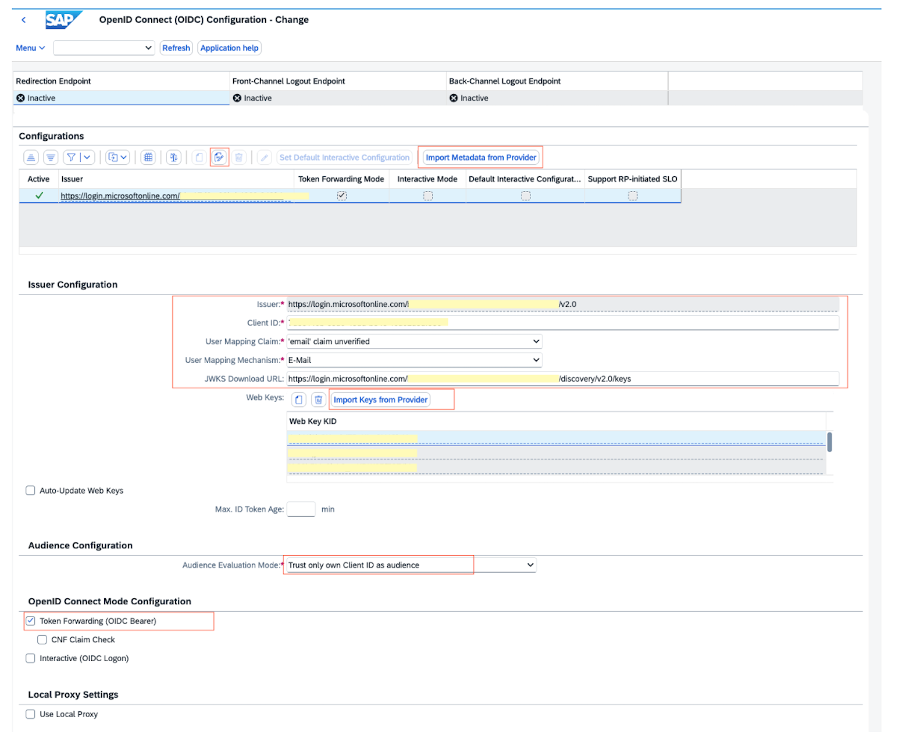
Figure 3. SAP OIDC configuration for Entra ID
Because the mapping is on email, verify that each user’s SAP business partner or user record carries the same email address that Entra ID emits. This match is what resolves an authenticated token to a specific SAP user such as MULLERF.
Step 8: Test the OBO flow end-to-end
Before you can test the flow, add the AWS for SAP MCP Server as a connector in Amazon Quick. This is also the step that provisions the Amazon Quick client app in Entra ID. To add the connector, complete the following steps.
- In Amazon Quick, open connectors (MCP server) settings and choose to add a new MCP connector.
- Enter the AWS for SAP MCP Server endpoint URL found in CloudFormation stack output in Step 6.
- On the Authenticate step, choose the “User authentication method”, then set Auth configuration to “Custom user based OAuth” and fill in the OAuth fields for your Entra ID tenant: Provide the following – Amazon Quick client app’s AppID (client) as the Client ID, leave Public OAuth client unchecked, Client secret, Authroization URL (https://login.microsoftonline.com/{TENANT_ID}/oauth2/v2.0/authorize), and Token URL (https://login.microsoftonline.com/{TENANT_ID}/oauth2/v2.0/token).
- Save the connector and complete the interactive sign-in once. Amazon Quick registers its client application in Entra ID; capture its QUICK_APP_ID, QUICK_OBJECT_ID, and scope IDs, then run Step 4 if you have not already completed the permission chain.
With the connector in place, sign in as a real user and ask a natural-language question that maps to an SAP read, such as “show me my open sales orders.” A successful test confirms the following.
- Quick authenticates you against Entra ID with no SAP password prompt.
- The MCP Server returns SAP data.
- In SAP, the Security Audit Log (transaction
SM20) attributes the request to your user, not a service account. This last point is the proof that identity propagated end-to-end. - Confirm in transaction SOIDC that the OIDC trust maps the token’s email claim to the individual SAP user, and verify that the connector and CloudFormation configuration hold no SAP service-account credentials (the only stored secret is the Entra ID inbound app client secret in AWS Secrets Manager). This proves access is granted by identity propagation, not a shared SAP password.
Troubleshooting
The following notes address the most common issues:
- AADSTS500131 (assertion audience mismatch): the credential provider is using the wrong client_id. It must be the inbound app’s, matching the aud of Quick’s token.
- AADSTS7000114 (OBO not allowed): the permission chain in Step 4 is incomplete. Check knownClientApplications, the delegated permission grants, admin consent, and the oauth2PermissionGrant.
- SAP rejects the token: re-check the SOIDC trust for iss, aud = Outbound App ID, and confirm the email claim is present (Step 4.5) and matches an SAP user.
Get Started
Giving AI agents access to SAP does not require giving up per-user security. With AWS for SAP MCP Server, powered by Amazon Bedrock AgentCore, you can interact with SAP through Amazon Quick while preserving your identity all the way to the backend.
This solution delivers four outcomes:
- Audit trail records individual user actions. SAP authenticates, authorizes, and audits every AI-driven request as the real person, not a shared service account.
- Stores no SAP passwords. The OBO exchange runs fully server-side, and the only stored secret is the Entra ID inbound app credential.
- Retains least privilege and auditing. SAP continues to enforce the user’s own roles and logs their actions under their own identity.
- Scoped out design. Separate client, inbound, and outbound apps, with the OBO exchange using the inbound app’s credentials to match the token audience.
To get started, deploy the AWS for SAP MCP Server with Microsoft Entra ID and AgentCore Identity On-Behalf-Of token exchange. This gives your AI agents secure, per-user access to SAP with no shared SAP credentials.
Read more on the AWS for SAP Blog to learn how customers like Fortescue, PLDT and Harman are using AWS for SAP MCP Server to achieve their Agentic AI enhancements. Start building today. To get started, visit the AWS for SAP MCP Server page. To learn why AWS is the platform of choice and innovation for thousands of SAP customers, visit the AWS for SAP page.
About the Authors

Ferry Mulyadi
Ferry is a World Wide SAP Tech Alliance Principal Partner Solution Architect at Amazon Web Services (AWS) in Singapore, leveraging over 25 years of enterprise application and cloud experience to lead advancements in Agentic AI. He architected autonomous workflows, agent-led transformation patterns, and enterprise-scale integration frameworks that bridge artificial intelligence with SAP ecosystems.

Rengarajan Sridharan
Renga is a Senior Technical Program Manager in AI and Strategic Partner Engineering at AWS, driving programs focused on SAP workloads. With over 20 years of experience in enterprise resource planning (ERP) solutions, Renga specializes in helping customers and partners modernize their enterprise systems, to maximize business value and drive digital transformation outcomes.