AWS Marketplace
Deploy enterprise multicloud connectivity in under an hour with Megaport Cloud Router in AWS Marketplace
Enterprises pursuing multicloud strategies need high-performing cross-cloud connectivity and streamlined procurement of third-party networking solutions. Amazon Web Services (AWS) Marketplace eliminates the second barrier by making advanced solutions such as Megaport Cloud Router (MCR) with AWS Direct Connect available through a single transaction. This means instant access to enterprise-grade Layer 3 connectivity with pay-as-you-go flexibility tied to your existing AWS billing, with no separate vendor contracts and no hardware procurement cycles.
MCR is a third-party networking solution available in AWS Marketplace that eliminates the traditional 4–6-week procurement cycle for enterprise networking solutions. Customers can deploy production-grade multicloud connectivity in under an hour using AWS accounts and consolidated billing. The solution supports bandwidth options from 1 gigabyte per second (Gbps) to 100 Gbps and offers deployment without hardware procurement or licensing agreements. Built-in redundancy reduces the operational effort of procuring resiliency. You can provision this solution in AWS Marketplace using your existing AWS account.
Key benefits include:
- Global availability – Available in multiple locations worldwide
- Enhanced security through private peering – Private dedicated connectivity designed to enhance security for your multicloud environment
- Improved time-to-market – Deploy MCR and Virtual Cross Connect (VXC) connections within an hour without the need to manage colocation facilities, hardware, or licensing
- Configurable bandwidth – Scale bandwidth between 1 Gbps and 100 Gbps depending on your needs
- Cost-optimized solution – A pay-as-you-go model charges only for what you consume
- Built-in resiliency – Redundant connections are designed to reduce the operational effort of procuring resiliency
What is MCR?
MCR is a virtual routing service provided by Megaport that enables private Layer 3 connectivity between cloud services, data centers, and other networks without requiring physical infrastructure. It acts as a virtual router on the Megaport software-defined network (SDN). With this service, you can establish private peering between multiple cloud providers or between clouds and your own network, all managed through a single logical routing instance.
Start your no-cost 30-day trial: Experience enterprise-grade multicloud connectivity with accelerated provisioning and unified billing approach enabled through AWS Marketplace solution. Subscribe to Megaport Cloud Router in AWS Marketplace and deploy your first cross-cloud connection in under an hour—no hardware, no contracts, no upfront costs.
Key characteristics include:
- Virtual Layer 3 router – Hosted on Megaport’s global backbone—no hardware to deploy
- Multicloud interconnect – Peer between multiple cloud providers privately over the Megaport fabric
- Border Gateway Protocol (BGP)-based routing – With support for multiple VXCs terminated on a single MCR instance
- Global availability – Available in Megaport-enabled data centers worldwide, with configurable bandwidth options
- Use cases – Cloud-to-cloud connectivity, multicloud architectures, disaster recovery across providers, and reducing reliance on public internet for inter-cloud traffic
Prerequisites
Unlike traditional networking procurements requiring separate vendor agreements, capital expenditure approvals, and multi-month lead times, provisioning MCR in AWS Marketplace requires only an active AWS account to spin up the free trial offering and begin testing.
To set up and provision MCR as an inter-cloud connectivity solution, you must meet the following requirements:
- Have an active AWS account
- Have an active Megaport account
AWS Marketplace: Create Megaport no-cost trial
The Megaport no-cost trial offer includes one MCR and two VXCs for a 30-day trial period. Follow these steps to subscribe and get started with the no-cost trial in AWS Marketplace:
- Sign in to the AWS Marketplace console and go to Megaport – Complex Networks, Simplified – Direct Connect.
- Choose Try for free, as shown in the following screenshot, to review the subscription and confirm pricing details:

Figure. 1: AWS Marketplace page for Megaport Cloud Router offering
The following screenshot shows the Megaport portal pricing details page with connection costs and contract total:
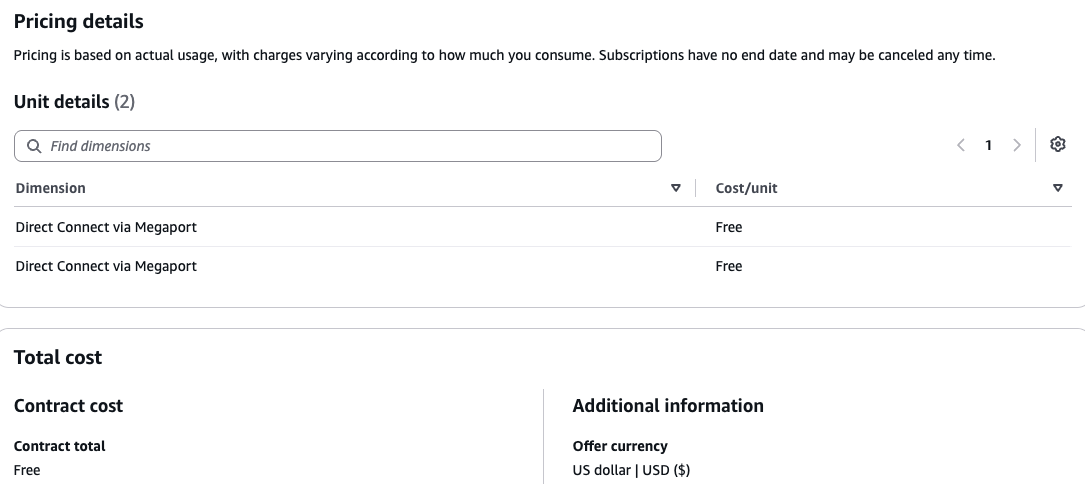
Figure 2: Try for no cost in AWS Marketplace
- Choose Subscribe to process the order.
- In the next step, choose Set up your account, which launches a link to the Megaport portal with the AWS Onboarding registration form.
- In the registration form, enter your information and choose Submit, as shown in the following screenshots:
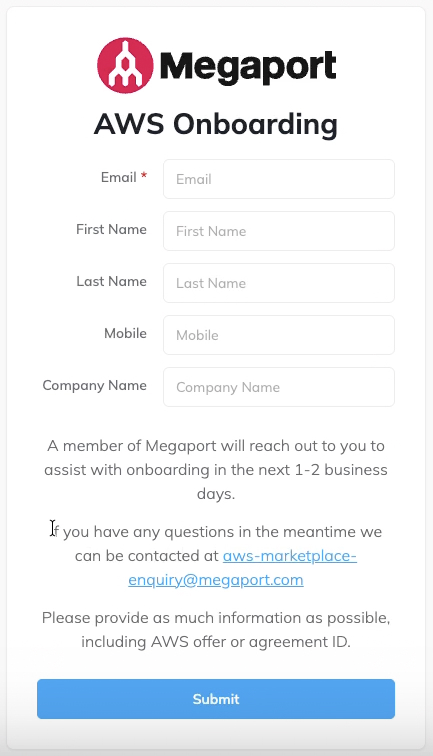
Figure 2: Complete AWS onboarding registration
Upon successful completion of onboarding, a confirmation screen will appear:
- You receive onboarding instructions through email from Megaport within 1–2 business days.
- Navigate to Megaport portal and sign in with your user credentials.
- When ordering your MCR and VXCs in the Megaport portal, apply the promo codes provided by Megaport. Apply promo codes during checkout in the Discounts field in the Megaport portal.
- Choose Order Now, as shown in the following screenshot, to begin the deployment process for MCR:
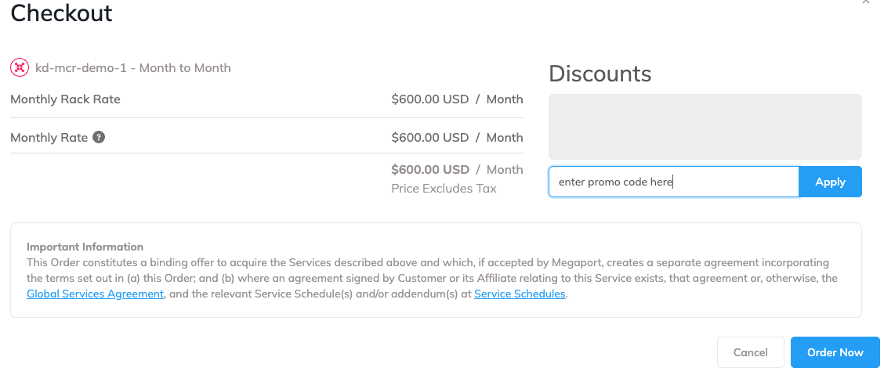
Figure 4: Complete the checkout and order
After you receive your onboarding email and promo codes from Megaport, you’re ready to begin provisioning your MCR.
Solution walkthrough: Deploy enterprise-grade multicloud connectivity in under 60 minutes in AWS Marketplace
To deploy enterprise-grade multicloud connectivity in under 60 minutes using your AWS account, sign up for the no-cost trial, then complete the following high-level steps:
- Create a Megaport Cloud Router.
- Create a hosted connection.
- Accept the hosted connection.
- Create a virtual interface for the same hosted connection.
These steps are possible without a separate vendor contract because your MCR subscription is managed entirely in AWS Marketplace. To implement the solution, complete the steps in the following sections.
Create an MCR
Because you subscribed in AWS Marketplace for this no-cost trial, your Megaport account is already linked to your AWS billing and will be reflected in your AWS Marketplace invoice without any separate invoicing or vendor support.
- Log in to the Megaport Portal and choose Services.
- Choose Create MCR.
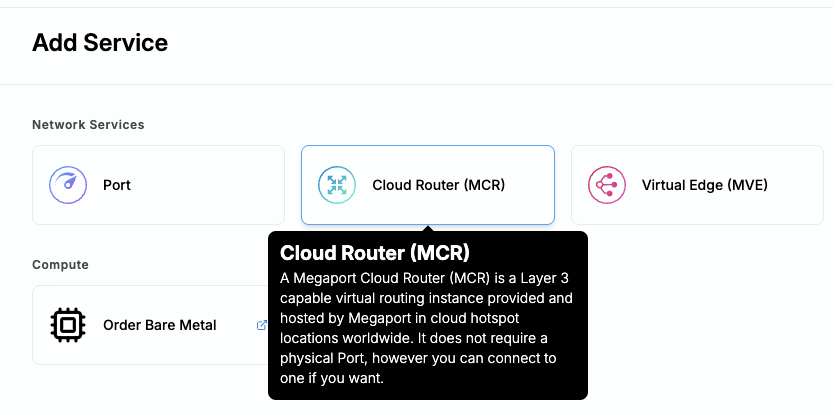
Figure 5: Create MCR in Megaport portal
- Follow the on-screen instructions to complete the setup in Creating an MCR in the Megaport documentation. The MCR provisioning takes approximately 59 seconds to complete.
MCR is postpaid. For example, if you place your order on January 15, your first invoice will be issued on February 1, and the charge will cover the period from January 15 to January 31.
Create a hosted connection
To create a Hosted Connection VXC from an MCR to AWS:
- In the Megaport Portal, go to the Services page and choose the MCR you want to use.
- Choose +Connection and choose Cloud.
- Choose Amazon Web Services (AWS) as the service provider, choose Hosted Connection as the AWS Connection Type, choose the destination port, and choose Next. You can use the search field to find the port name, country, metro city, or address of your destination port.
These steps are shown in the following screenshot: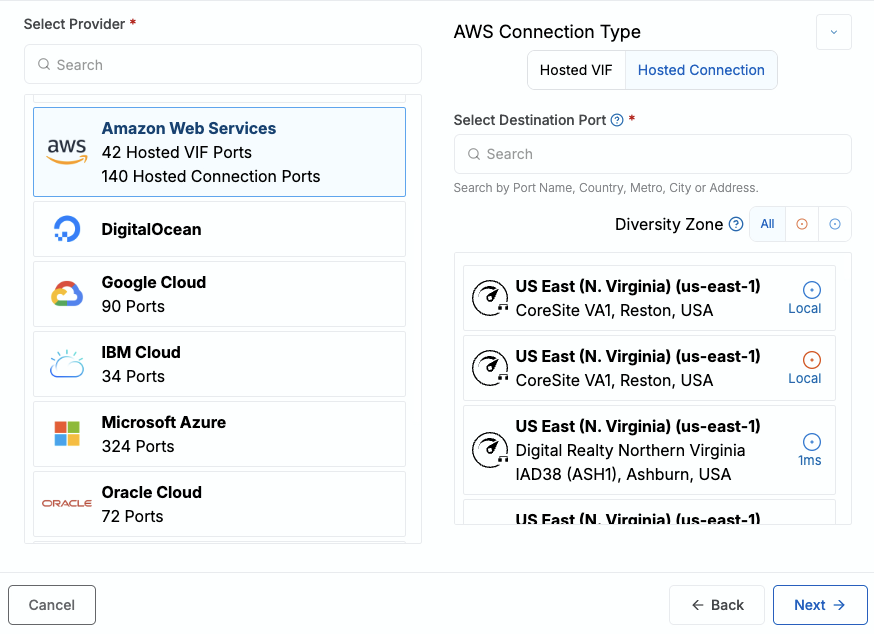
Figure 6: Create hosted connection in Megaport portal
- Specify the connection details:
- Connection Name – The name of your VXC to be shown in the Megaport Portal
- Service Level Reference (optional) – Specify a unique identifying number for billing purposes
- Rate Limit – The speed of your connection in megabits per second (Mbps)
- VXC State – Choose Enabled or Shut Down to define the initial state of the connection. For more information, refer to Shutting Down a VXC for Failover Testing.
- Minimum Term – The duration for which you’re planning to use this connection
- Resource Tags – You can use resource tags to add your own reference metadata to a Megaport service
For detailed steps, refer to Creating MCR Connections to AWS in the Megaport documentation to confirm you complete all steps.
5. Specify the connection details for the AWS service:
-
- AWS Connection Name – Given name of your virtual interface
- AWS Account ID – Your AWS account ID
6. Choose Next to proceed to the connection detail summary, choose Add VXC, and order the connection.
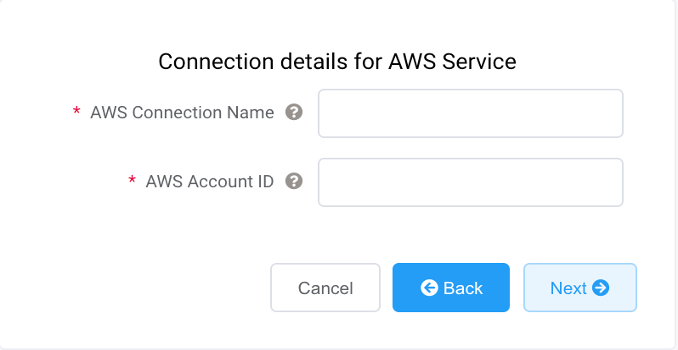
Figure 7: Fill in details for AWS service
After it’s deployed in the Megaport Portal, complete the setup by accepting the connection in the AWS console.
Accept the hosted connection
- Sign in to the AWS Management Console and go to AWS Direct Connect.
- In the navigation pane, choose Connections.
- Choose the hosted connection that you created in the Megaport console and then choose Accept. For more information, refer to the Accept a Direct Connect hosted connection.
Create a virtual interface for the same hosted connection
- After accepting the connection, choose it and choose Create Virtual Interface.
- Choose the interface type as private or transit to access your Amazon Virtual Private Cloud (VPC) environment. Confirm that you enter these values for Border Gateway Protocol (BGP) peering:
- Virtual interface name – A name to help you identify the new virtual interface
- Connection – Choose the same hosted connection you accepted
- VLAN ID – It must match the VLAN used in the Megaport configuration
- BGP ASN – The same autonomous system number (ASN) number you configured on the MCR portal
- Your router peer IP – The BGP peer IP configured on the MCR
- Amazon router peer IP – The BGP peer IP configured on the AWS endpoint
- BGP authentication key – The password used to authenticate the BGP session
- Choose the appropriate gateway type (private or transit) based on your use case.
- Choose Create.
For more information on detailed steps, refer to Direct Connect virtual interfaces in the Direct Connect documentation.
Configure BGP on Megaport MCR
Complete these steps:
- Navigate back to the Megaport portal.
- On the MCR Connection detail page, choose Add BGP Connection.
- Specify and match the same BGP values provided by AWS.
- The following screenshot shows the BGP information that must be entered:
- BGP Peer IPs – Your router IP and AWS router IP
- Your BGP ASN – Your AWS side ASN
- Choose Add, then choose Next to save the configuration.
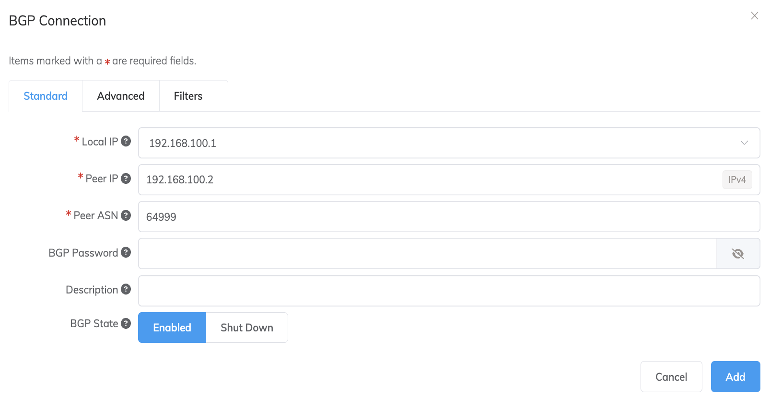
Figure 8: Configure BGP settings in Megaport portal
For more information on configuring BGP advanced settings, see Configuring BGP Advanced Settings in the Megaport documentation.
You’ve now deployed enterprise-grade multicloud connectivity in under 60 minutes entirely through your AWS account. If you’re on the no-cost trial, this connection is live at no cost for 30 days. After you accept the hosted connection in your AWS account and create a virtual interface with appropriate BGP peering settings, the VXC state changes to CONFIGURED in the Megaport Portal. This entire deployment from subscribing to the no-cost trial in AWS Marketplace to live BGP peering was completed in under 60 minutes without engaging procurement teams, negotiating contracts, or provisioning physical infrastructure. This speed-to-value exemplifies how AWS Marketplace transforms complex enterprise solutions into self-service experiences.
Use case-driven deployment scenarios
Use cases include mergers and acquisitions, artificial intelligence and machine learning (AI/ML) model training across clouds, large-scale data migrations, and applications requiring low-latency access to data in different clouds. In this post, we highlight different use cases where the MCR offering can be beneficial.
Cloud-to-cloud disaster recovery using an active-backup model to avoid cloud outages
You can use MCR to establish direct, private Layer 3 connections between AWS, Oracle Cloud, and Microsoft Azure using cloud-specific private and dedicated connectivity options without routing traffic back through an on-premises data center. In this architecture, end users log in to their Azure Virtual Desktop workspaces to access their corporate tools, including business intelligence dashboards hosted on Oracle Cloud Analytics.
This low-latency cross-cloud connectivity allows those Oracle Analytics tools to query massive datasets residing in an Amazon Redshift data warehouse. This multicloud setup is designed to support high-performance data processing and a responsive user experience while bypassing the high egress costs and security risks of the public internet. The following graphic illustrates MCR connecting to these services:
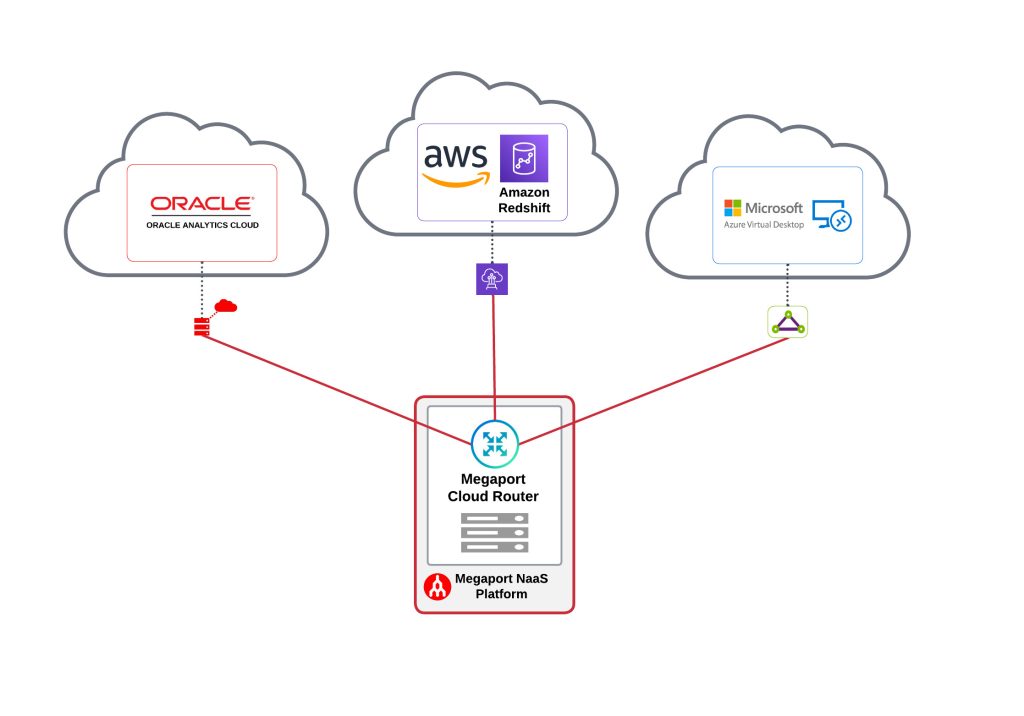
Figure 9: Inter-cloud recovery model for active-backup scenario
By sourcing MCR through AWS Marketplace, the customer consolidated their billing for AWS Direct Connect, Megaport connectivity, and cloud compute into a single invoice, streamlining cost allocation across business units and eliminating the need for separate vendor payment workflows.
Cross-cloud application access to improve availability
You can deploy MCRs across physically distinct data centers managed by different operators. Use isolated Red and Blue hardware diversity zones to reduce single points of failure. By positioning a primary MCR in a Red zone at one operator’s facility and a secondary MCR in a Blue zone at a competing provider’s site, you can achieve a highly granular, fault-tolerant architecture.
This dual-zone design extends to cloud on-ramps, routing redundant cloud connections through separate physical paths and distinct data center infrastructures. This approach pairs cloud on-ramp diversity with operator diversity to help maintain multicloud connectivity during a facility or provider outage.
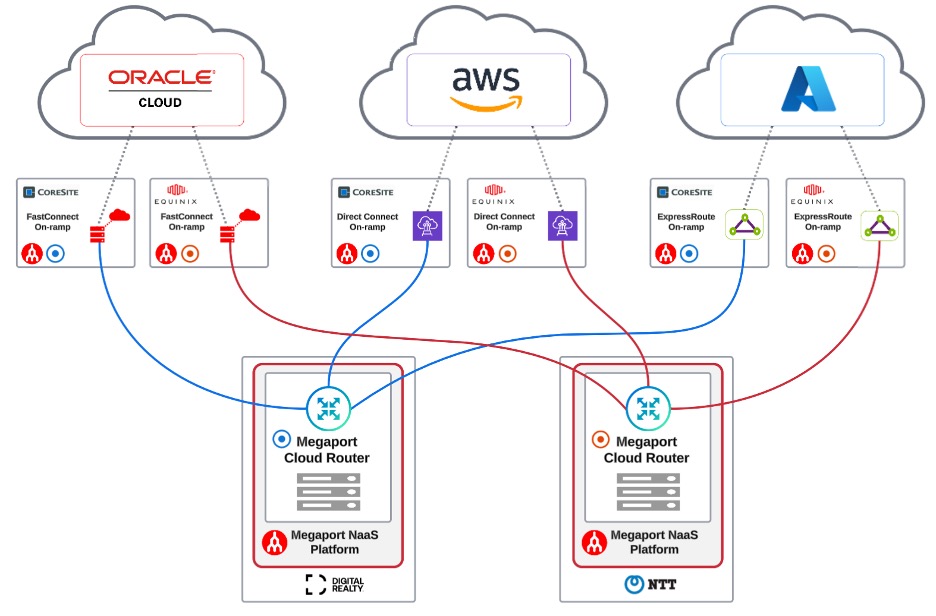
Figure 10: Cross-cloud replication for application availability
By provisioning the MCR instances through AWS Marketplace, you could manage redundant cross-cloud connectivity under a consolidated AWS billing relationship. The following diagram shows multicloud connectivity using the MCR offering to depict multicloud redundancy for mission-critical workloads.
Private, more secure access between AI/ML training models hosted across multiple clouds
Organizations increasingly demand the operational consistency of a fully managed Kubernetes control plane without compromising on where their compute workloads physically reside. This joint solution integrates Amazon Elastic Kubernetes Service (Amazon EKS) Hybrid Nodes, Neocloud edge GPU and compute providers, and AWS Direct Connect through Megaport SDN.
The customer used an AWS Marketplace private offer to apply existing Enterprise Discount Program (EDP) commitments toward Megaport MCR costs, effectively funding their multicloud networking infrastructure from pre-negotiated AWS spend. The following diagram shows cross-cloud connectivity hosting an AI/ML training workload connected using the MCR offering:
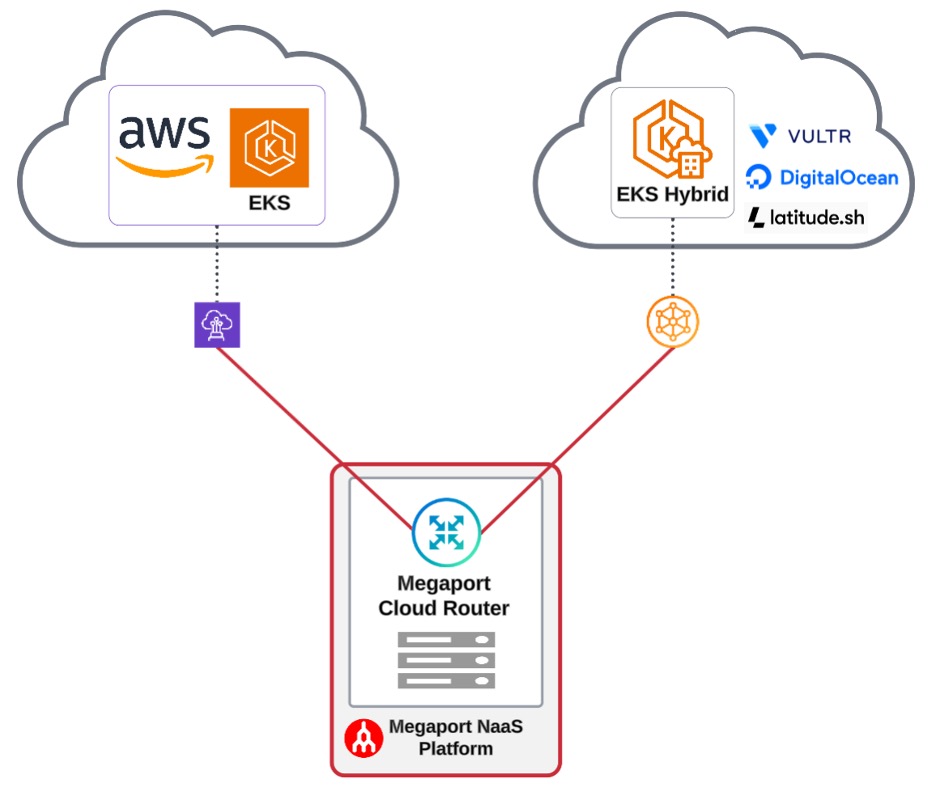
Figure 11: AI/ML workloads deployed across cloud providers
By uniting these three technologies, you can deploy data-intensive, AI/ML-driven, or latency-sensitive workloads on global, dedicated bare metal or virtual machines (VMs) while maintaining a centralized Kubernetes control plane managed by AWS—all connected over a more secure, high-throughput, private network backbone.
Cleanup
If you aren’t planning to proceed beyond the no-cost trial for your AWS Marketplace subscription, we recommend canceling your subscription so you won’t incur charges on your billing statement. Navigate to your AWS Management Console. Under the Manage Subscriptions page, choose Manage next to the software subscription, and choose Cancel.
Learn more about canceling your AWS Marketplace subscription. Similarly, on the Megaport console, delete any resources you provisioned as part of the no-cost trial or getting started guide if you don’t plan to use them.
Conclusion
AWS Marketplace transforms how enterprises adopt multicloud networking solutions. By making MCR available as a self-service, pay-as-you-go offering with integrated AWS billing, AWS Marketplace eliminates the procurement friction that traditionally delays infrastructure modernization.
Whether you’re architecting disaster recovery across clouds, enabling low-latency AI/ML pipelines, or building resilient hybrid environments, the combination of MCR and AWS Direct Connect, delivered in AWS Marketplace, provides the performance, security, and operational seamlessness that modern enterprises demand.
Ready to get started? Visit the Megaport Cloud Router listing in AWS Marketplace to begin your no-cost 30-day trial. Deploy your first multicloud connection today and experience how AWS Marketplace can accelerate your cloud networking strategy.
If you would like hands-on experience in setting up multicloud networking using AWS Direct Connect and Azure ExpressRoute, you can access a publicly available workshop in the AWS Workshop Studio.