AWS Big Data Blog
Accelerate context-aware data analysis and ML workflows with Amazon SageMaker Data Agent
Accelerating data analysis and machine learning (ML) development requires AI tools that understand your specific data environment, not just generic code generation. General-purpose AI assistants lack context about your specific data environment, creating a gap between AI capabilities and practical implementation. Data practitioners often start by looking for relevant tables, understanding relationships, and writing exploratory code before answering their first business question. Data teams still spend time translating AI-generated suggestions into working code that correctly references their actual data assets, understands their organization’s data relationships, and integrates with their existing workflows.
AWS released Amazon SageMaker Data Agent in November 2025, addressing these challenges by providing an AI assistant that’s deeply integrated within Amazon SageMaker (IAM-based domains only) with notebooks. SageMaker Data Agent has direct access to your AWS data context, including AWS Glue Data Catalog metadata, Amazon DataZone business data catalog, and your current notebook state. This helps it generate environment-aware code that works directly with your petabyte-scale data through serverless compute resources, helping you analyze massive datasets without infrastructure management overhead. With this contextual awareness, the agent creates executable analysis plans from natural language prompts that specifically reference your actual tables, data types, and analytical needs, while maintaining reasoning throughout multi-step analyses. Importantly, the agent performs these operations securely within the AWS environment, using built-in governance controls, Amazon Identity and Access Management (IAM) policies, and data security features to make sure your data doesn’t leave your organizational boundaries. By operating within your Amazon SageMaker Unified Studio interface, it reduces context-switching between AI assistants and your development environment, improving how you interact with your analytics and ML workflows.
In this post, we demonstrate the capabilities of SageMaker Data Agent, discuss the challenges it addresses, and explore a real-world example analyzing New York City taxi trip data to see the agent in action.
Challenges in data workflows
General AI tools can generate code snippets, but you still face three key challenges when applying these to your specific data environments:
- Contextual disconnect – Standard AI assistants generate generic code referencing hypothetical tables like
customersrather than your actual tables likecustomer_activity_prod, forcing extensive modifications to work with your data environment. - Complex data environment – Many enterprises work with complex data environments containing numerous tables and large-scale data stores, making it extremely difficult to locate relevant data assets for analysis. You must navigate complex catalog structures, understand table relationships, and determine which subset of data is relevant for your specific analytical needs before you can begin actual analysis.
- Language and syntax barriers – You must work across multiple programming languages and query syntaxes during analysis workflows. Some might excel in SQL but struggle with Python, while others might be Python experts but have limited PySpark knowledge.
Additionally, you face challenges around data quality validation, data governance, and performance optimization. SageMaker Data Agent addresses these fundamental workflow challenges while adapting to your requirements.
Solution overview
SageMaker Data Agent addresses these key challenges through its context-aware architecture and deep AWS integration. In this section, we discuss how it works.
Context-aware understanding
SageMaker Data Agent builds a detailed understanding of your specific data environment and references your actual tables through two parallel processes. SageMaker Data Agent is embedded within your AWS data environment, allowing it to understand what you’re asking, what data you have available, how it’s structured, and how it relates to your analytical objectives. The following are the two ways the agent achieves this contextual understanding:
- Integrated data environment – SageMaker Data Agent exists within the same integrated environment as your data, harnessing the power of your AWS infrastructure. It begins by exploring the AWS Glue Data Catalog and the Amazon DataZone business data catalog, which reveal business metadata, glossaries, and relationships, enabling it to reference your actual tables rather than generic placeholders. This intelligence extends to working directly with your full datasets where they naturally reside, preserving your existing security policies and access controls without requiring data movement. The agent integrates with Amazon Simple Storage Service (Amazon S3), Amazon Athena, and Amazon SageMaker AI to use their respective capabilities for data storage, query processing, and ML while adapting to your data environment. This lets you process petabyte-scale data through serverless compute resources with the agent acting as an intelligent interface to your complete data environment.
- Notebook context awareness – Simultaneously, the agent examines your current notebook state, including existing dataframes, imported libraries, previous cell results, and ML artifacts. This context awareness makes sure generated code works with your specific environment without extensive modifications.
Language and syntax flexibility
SageMaker Data Agent resolves language and syntax barriers by selecting the optimal language for each analytical task. The agent can switch between SQL for efficient data querying and Python and PySpark for complex transformations and ML operations without requiring practitioners to manually translate between languages. This avoids language barriers, because the agent automatically selects and generates the appropriate code syntax, whether SQL, Python, or PySpark, based on the specific analytical or ML task at hand.
SageMaker Data Agent provides four key capabilities that work together to give you control over complex analyses:
- When handling complex requests, the agent creates structured analysis plans by breaking them into logical steps with clear reasoning for each operation.
- At each stage, you have intermediate validation points where you can review and approve each step before proceeding to the next.
- Throughout multi-step analyses, the agent maintains consistent context, retaining understanding of your data environment and previous steps.
- Most importantly, you maintain human-in-the-loop control with full oversight and the ability to modify any generated code to match your specific requirements.
Interaction modes
SageMaker Data Agent provides two interaction modes optimized for different analytical tasks: the Agent Panel and in-line assistance.
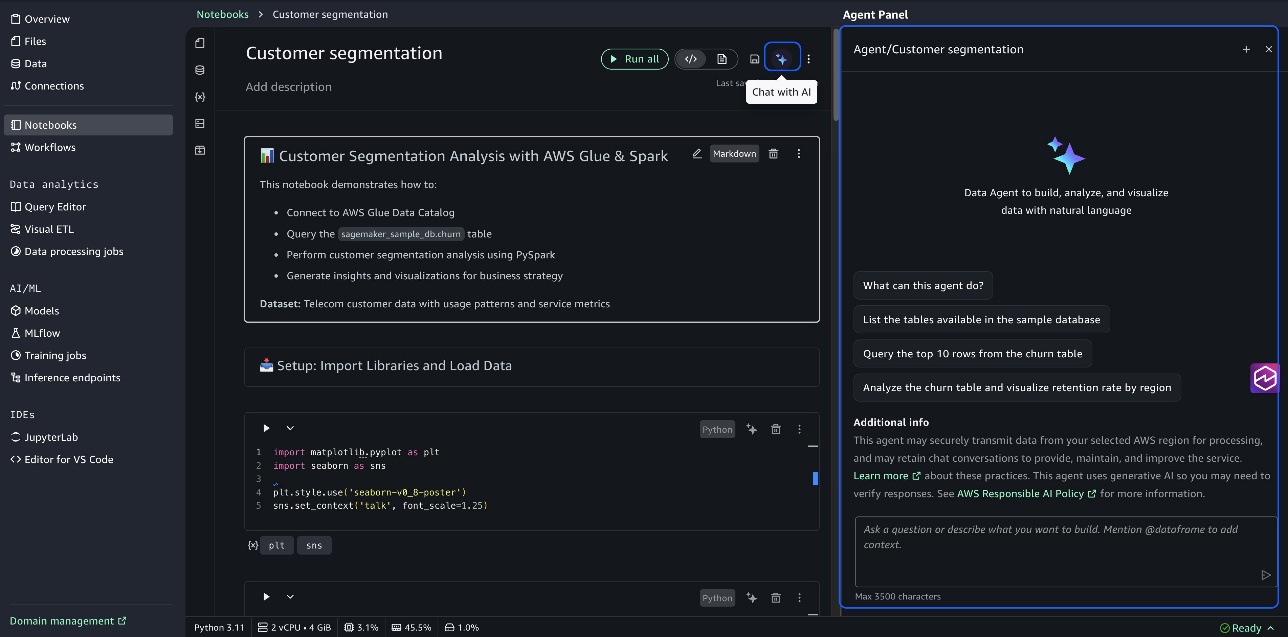
The Agent Panel supports comprehensive analytical tasks by breaking them down into structured steps, each with generated code that builds on previous results. When you submit a request such as “perform customer segmentation,” the agent identifies relevant tables, understands their relationships, and creates a complete analysis workflow with intermediate review points. The following screenshot illustrates this example.
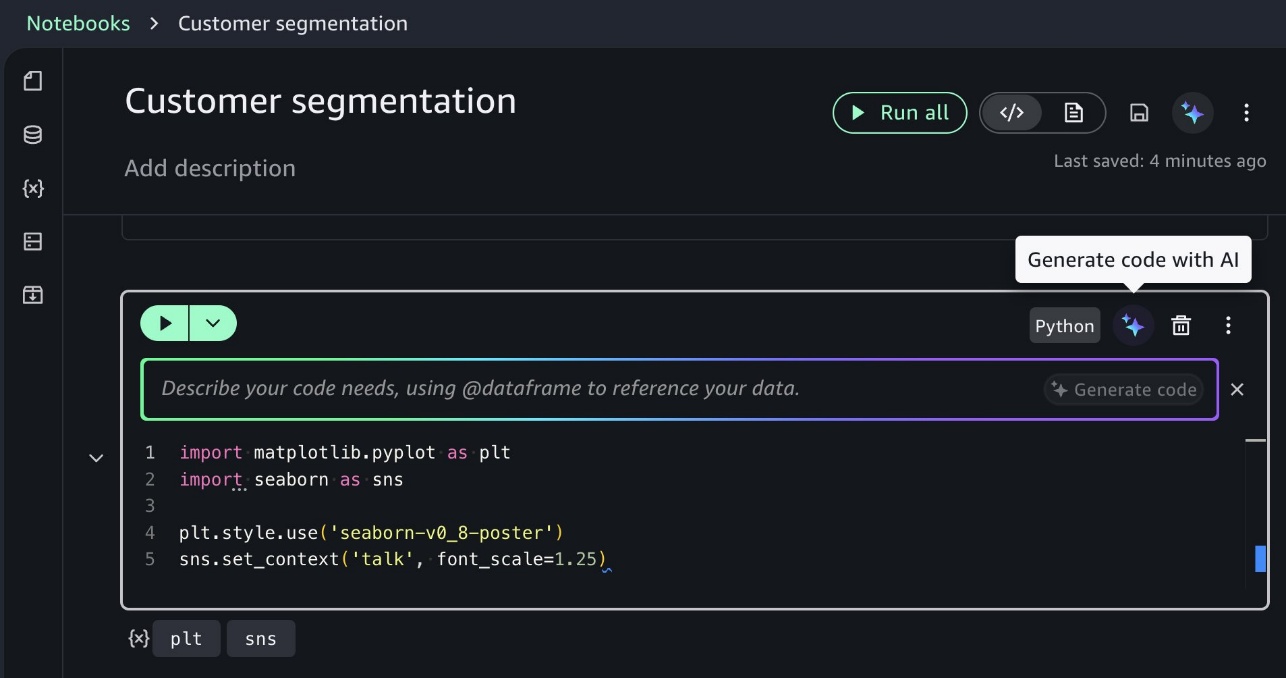
In-line assistance mode supports direct cell modifications, one-click error fixes, and keyboard shortcuts (Alt+A for Windows/Linux, Opt+A for Mac) that maintain your coding flow. You can quickly enhance existing code or fix errors without leaving your current notebook context, improving productivity during iterative development. You can code directly within notebook cells by using the inline prompt interface, as illustrated in the following screenshot. Use in-line assistance for focused tasks like specific queries or visualizations directly within cells.
Execution and control
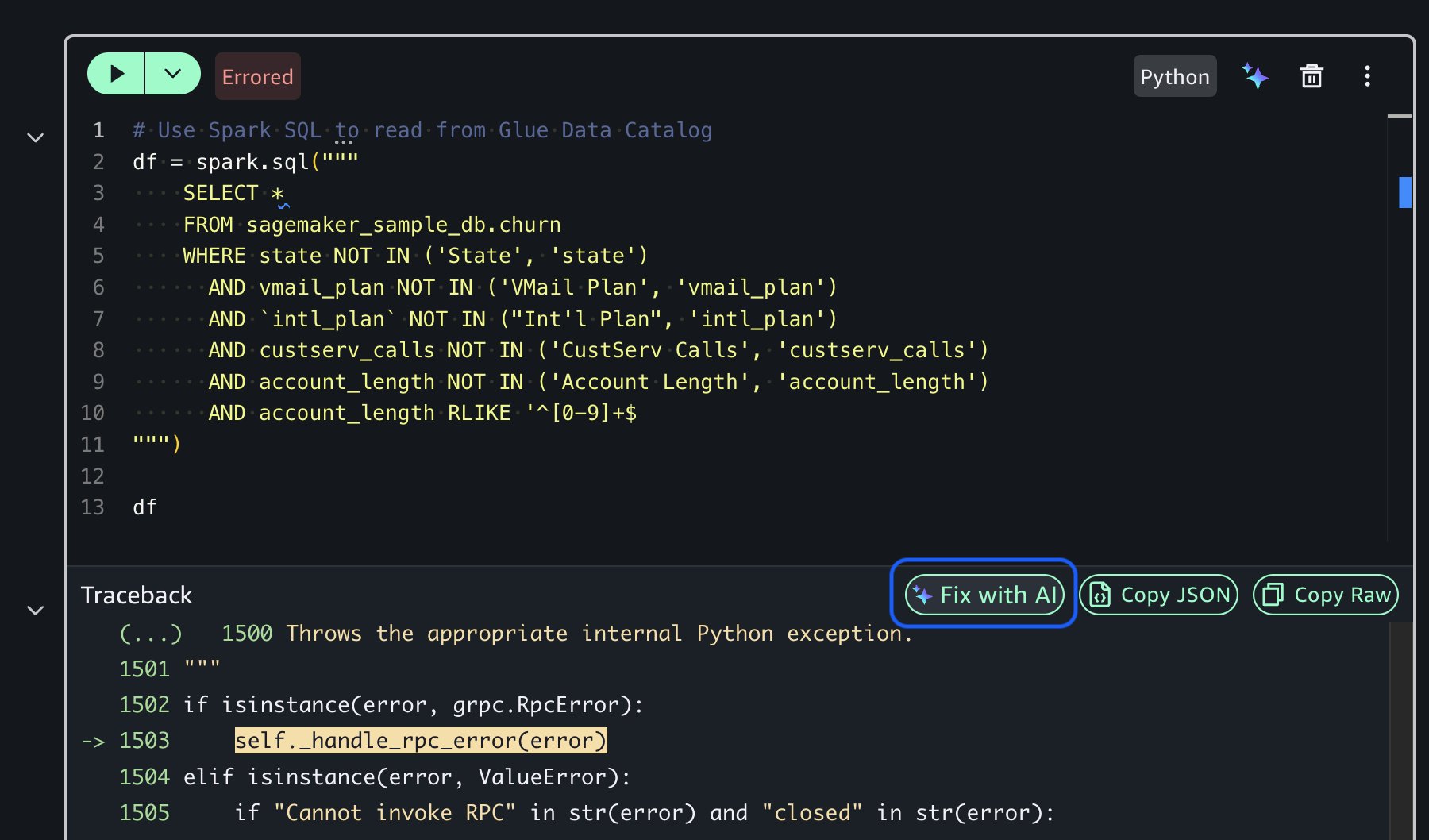
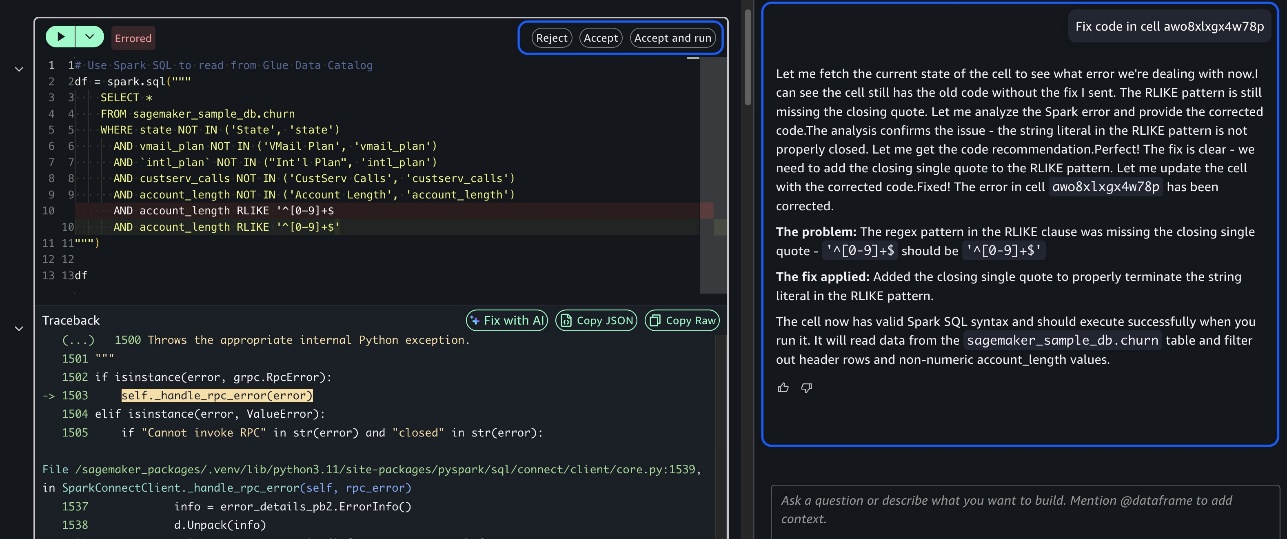
Throughout the process, you maintain execution control. You can review generated plans before execution, execute steps individually with intermediate result review, modify code as needed for your specific requirements by providing feedback, and get AI-powered error diagnosis and fixes using the Fix with AI option when issues arise. This human-in-the-loop approach makes sure you maintain oversight while benefiting from AI assistance.
The following screenshots demonstrate how the Fix with AI feature works in practice, showing how the agent diagnoses code errors and provides corrected solutions with explanations.
By bringing together context-aware understanding, reasoning, and interaction modes within your existing AWS environment, SageMaker Data Agent improves how you work. It removes the traditional friction between AI assistance and your actual data environment, providing direct access to petabyte-scale data with no operational overhead. This combination helps you shift your focus from repetitive setup tasks to high-value analysis and decision-making, accelerating insights while maintaining control over the analytical process.
Getting started with SageMaker Data Agent
Now that you understand how SageMaker Data Agent works, let’s see these capabilities in action. Getting started with SageMaker Data Agent is straightforward. For detailed setup instructions, refer to New one-click onboarding and notebooks with a built-in AI agent in Amazon SageMaker Unified Studio. It provides step-by-step guidance on setting up your environment and beginning your journey with SageMaker Data Agent.
To get the most from SageMaker Data Agent, begin by asking clear, specific questions about your data rather than generic requests. Provide context about your analytical goals so the agent can tailor its responses to your specific use case. Always review and validate generated code before execution, using the agent’s built-in explanations to understand the approach. For complex analyses, take advantage of the agent’s reasoning capabilities that can break down multi-step processes and explain the logic behind each recommendation.
NYC taxi trip analysis
In this section, we demonstrate how SageMaker Data Agent helps analyze the NYC Taxi Trip dataset, a collection of over 1.2 billion taxi trips (approximately 63.7 GB) throughout New York City with information on pickup/drop-off locations, timestamps, trip distances, fare amounts, payment types, and passenger counts.
If you’re looking to try a simpler end-to-end flow before diving into this large-scale analysis, SageMaker Unified Studio provides a sample database with pre-loaded customer churn data. You can perform similar analytical workflows on this smaller dataset to quickly familiarize yourself with the agent’s capabilities before working with larger, more complex datasets. To explore this dataset, complete the following steps:
- On the SageMaker Unified Studio console, choose Data in the navigation pane.
- In the data explorer, under Catalogs, select
AwsDataCatalog. - Select
sagemaker_sample_db. - Select the
churntable from the tables list.
NYC Taxi Trip dataset
The NYC Taxi Trip dataset is publicly available in Amazon S3 at s3://aws-data-analytics-workshops/shared_datasets/nyc_taxi_trips_parquet/.
To replicate this, you can work with this dataset in two ways:
- Catalog it beforehand (recommended for repeated analysis)
- Provide the S3 path directly in your prompt (quickest for one-time exploration)
For this demonstration, we used SageMaker Data Agent to catalog the dataset prior to analysis.
Our analysis approach
For this demonstration, we asked SageMaker Data Agent to perform a comprehensive analysis on the cataloged taxi trip data to uncover business insights. We used the following prompt:
You can add the S3 path (s3://aws-data-analytics-workshops/shared_datasets/nyc_taxi_trips_parquet/) in the preceding prompt if you don’t have the NYC Taxi Trip data cataloged.
The following video demonstrates how SageMaker Data Agent processes this natural language prompt and creates a complete analytical workflow. The agent constructs a six-step analysis plan, generates executable code for each step, and progressively builds toward actionable insights.
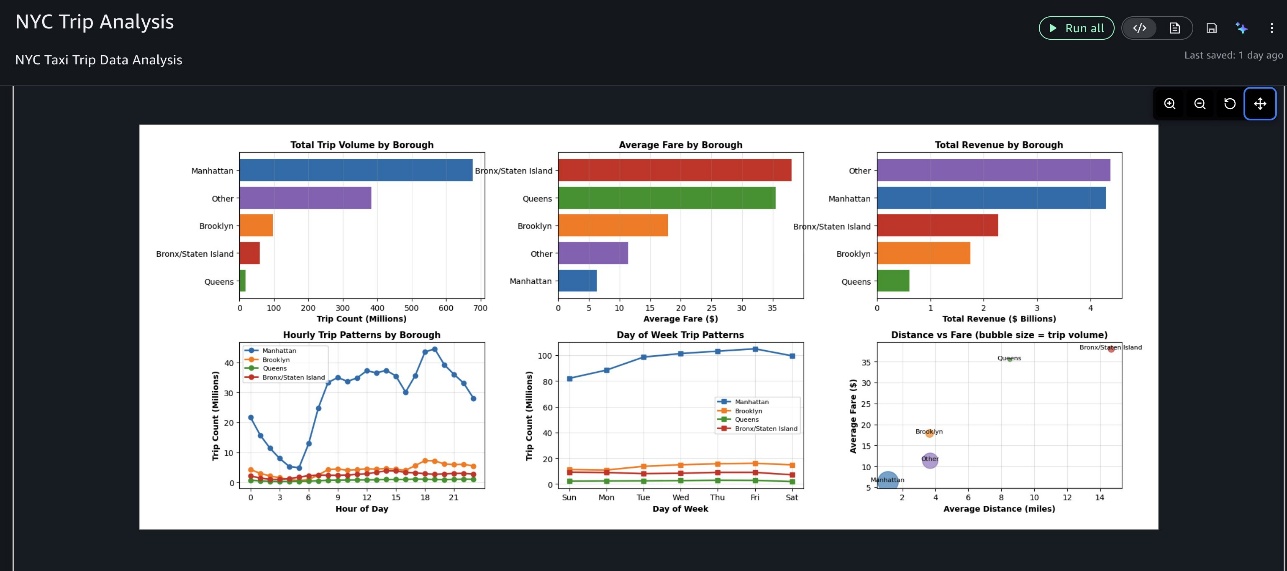
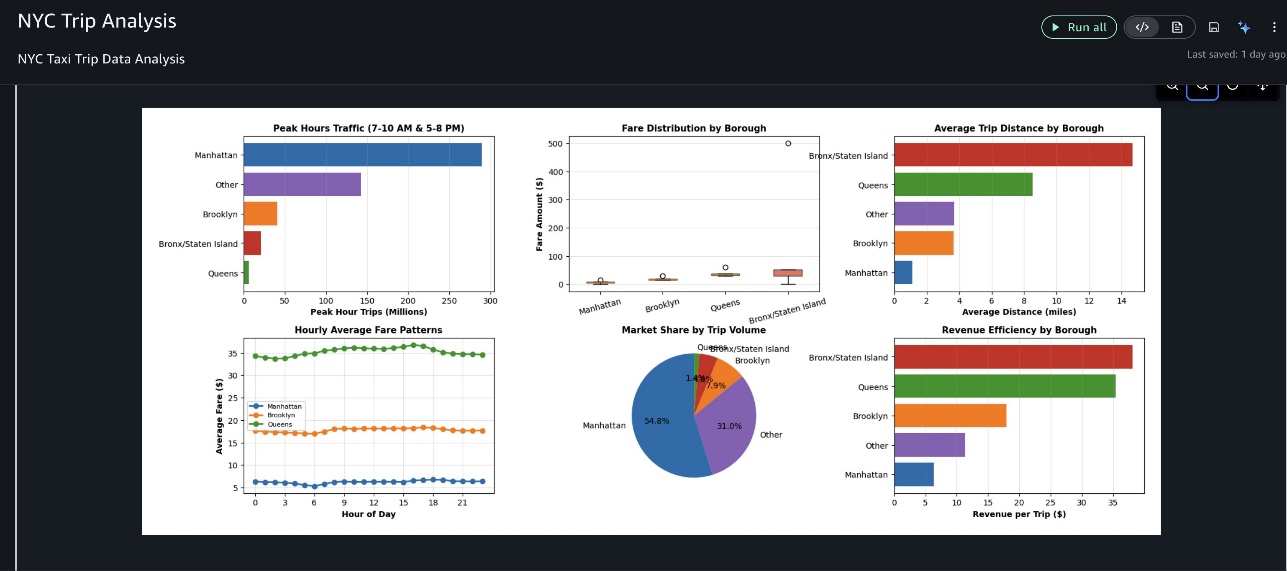
The outputs shown in this demonstration video are specific to this analysis session. Due to the generative nature of AI, your results might vary when running the same prompts.The agent executed each step sequentially, so we can review intermediate results and provide feedback. After loading and cleaning NYC taxi trip records, the agent analyzed fare patterns and trip trends across boroughs and time periods, then created a comprehensive multi-panel dashboard visualizing key insights, as shown in the following screenshots.
Finally, it provided actionable business insights, highlighting the most significant findings and their business recommendations.
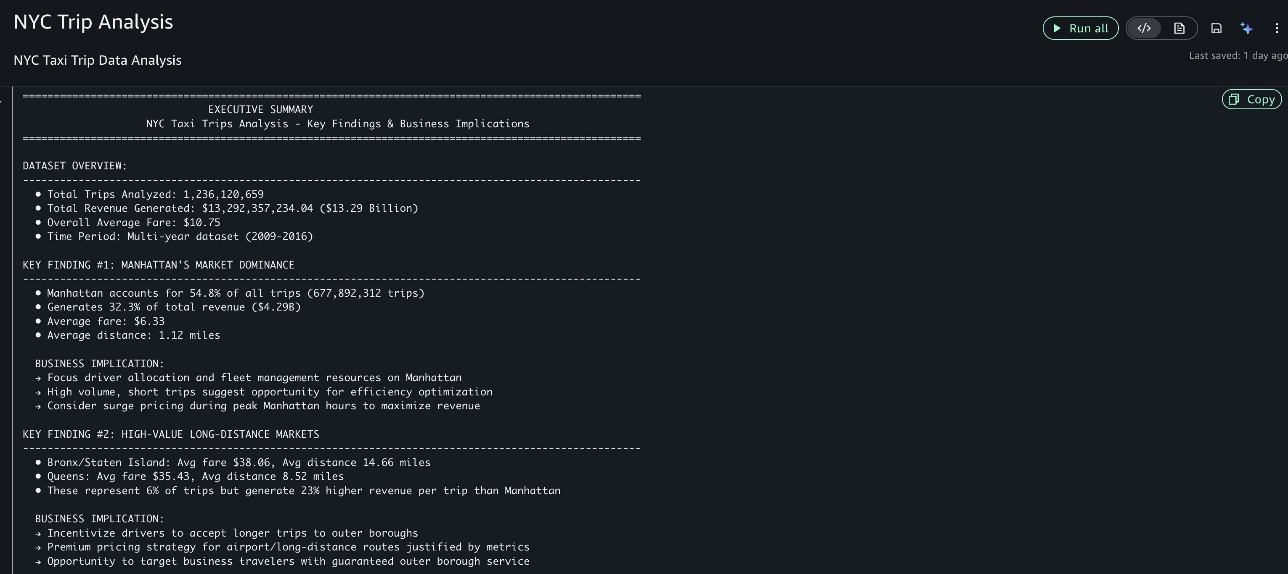
This example demonstrates how SageMaker Data Agent helps transform complex analytical tasks into actionable insights without requiring extensive coding or data preparation. The agent’s ability to understand both the data structure and business context allows it to generate meaningful analyses that directly address business objectives.
Security and governance
SageMaker Data Agent follows your AWS security settings. It accesses data you’ve explicitly permitted through your IAM access controls or using AWS Lake Formation, helping maintain your organization’s security policies. To use SageMaker Data Agent, your project role must have permissions to invoke specific Amazon DataZone APIs, including SendMessage, GenerateCode, StartConversation, GetConversation, and ListConversations. For more information, visit Actions, resources, and condition keys for Amazon DataZone.
Guardrails
SageMaker Data Agent has in-built guardrails to prevent the agent from responding to undesired requests. These include but are not limited to requests asking the agent to reveal its system prompt, internal tools, or other technical implementation. These guardrails also prohibit the agent from talking about non-AWS related topics and from generating output in any language except English.
Data storage and privacy
SageMaker Data Agent doesn’t store code you write or modify yourself, notebook context or metadata, or data from your AWS Glue Data Catalog or other sources. The agent only stores your natural language prompts, questions, and generated code/responses in the AWS Region where your SageMaker Unified Studio domain was created. AWS might use stored content (prompts, questions, and generated code/responses) to improve the service, fix issues, or for debugging, but maintains clear boundaries by not using your self-written code, manually modified code, notebook metadata, or actual data sources for service improvement. To opt out of data usage for service improvement, you can configure an AI services opt-out policy for Amazon DataZone in AWS Organizations, which will delete previously collected data and prevent future collection or usage. For more information, refer to Data storage in the SageMaker Data Agent, Service improvement, and AI services opt-out policies.
Conclusion
SageMaker Data Agent improves how data practitioners accelerate insights. By combining context-aware understanding, AWS integration, and flexible interaction modes, it alleviates the traditional friction between AI-assisted development and your actual data environment. The NYC taxi analysis demonstrated this in practice: what might have required manual data exploration, catalog navigation, and code translation instead took minutes through natural language prompts.
The real value extends beyond speed. SageMaker Data Agent preserves your security posture, maintains governance controls, and keeps your data within your AWS environment while supporting petabyte-scale analysis without operational overhead. More importantly, it shifts your team’s focus from repetitive setup to business analysis and decision-making.
Getting started is straightforward. Begin with simple prompts against your existing data catalog, then progressively tackle more complex analytical challenges. Invest time enriching your data catalog with business metadata—this investment directly multiplies the agent’s effectiveness by providing richer context for code generation.
SageMaker Data Agent adapts to your specific analytical needs, such as analyzing customer behavior, working with financial data, or building ML models. Access it today through your IAM-based SageMaker Unified Studio domain, and discover how context-aware AI assistance can accelerate your organization’s data-driven decision-making.