AWS Big Data Blog
Amazon OpenSearch Service: Mechanisms to secure your domain
Imagine you’re building a product search feature for your website or storing customer records in Amazon OpenSearch Service to power full-text search. The moment that real user data enters your domain, security becomes essential.
Whether your workload is a public-facing website search, an internal application querying sensitive data, or a pipeline handling personally identifiable information (PII), the questions you face are the same:
- Who should be allowed to connect to my domain?
- How do I authenticate users and services?
- How do I make sure that even authenticated users only see data they are entitled to see?
- How do I satisfy regulatory requirements such as HIPAA, PCI DSS, or SOC 2?
This post offers an overview of the security mechanisms available for Amazon OpenSearch Service, spanning authentication and authorization, encryption, and network access controls. You learn how to implement fine-grained access control, manage AWS Identity and Access Management (IAM) roles, and secure data both in transit and at rest for both public and virtual private cloud (VPC) access domains.
Scope: This post covers security for Amazon OpenSearch Service managed clusters only. It doesn’t cover Amazon OpenSearch Serverless, which uses a different security model. For serverless security, see Amazon OpenSearch Serverless security in the AWS documentation.
To begin, let’s look at the security layers in Amazon OpenSearch Service.
Amazon OpenSearch Service security layers
Amazon OpenSearch Service has multi-layer security. The following diagram illustrates the multi-layer security in Amazon OpenSearch Service.
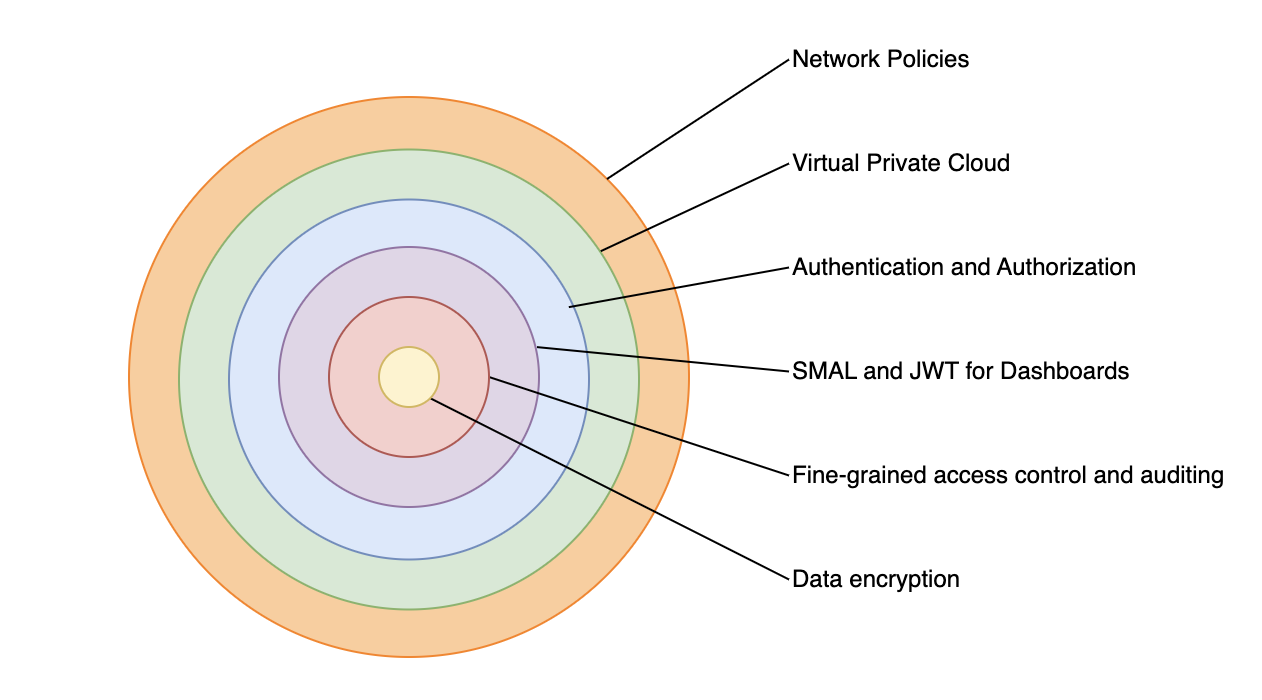
Figure 1: Multi-layer security.
The three main layers of security are network, domain access policy, and fine-grained access control.
Network – The first security layer is the network, which determines whether requests reach an OpenSearch Service domain. If you choose Public access when you create a domain, requests from any internet-connected client can reach the domain endpoint. If you choose VPC access, clients must connect to the Amazon Virtual Private Cloud (Amazon VPC) (and the associated security groups must permit it) for a request to reach the endpoint.
Domain access policy – The second security layer is the domain access policy. After a request reaches a domain endpoint, the resource-based access policy allows or denies the request access to a given URI. The access policy accepts or rejects requests at the edge of the domain, before they reach data or indexes in OpenSearch itself.
Fine-grained access control – The third and final security layer is fine-grained access control. After a resource-based access policy allows a request to reach a domain endpoint, fine-grained access control evaluates the user credentials and either authenticates the user or denies the request. If fine-grained access control authenticates the user, it fetches all OpenSearch internal roles mapped to that user and uses the full set of permissions to determine how to handle the request.
With fine-grained access control, you can control access to your data in Amazon OpenSearch Service. For example, depending on who makes the request, you might want to hide certain fields in your documents or exclude certain documents altogether. With fine-grained access control, you can:
- Define role-based access control to determine who can perform which actions on which indexes, documents, and fields.
- Define security at the index, document, and field level to allow access to only required data.
Fine-grained access control requires OpenSearch or Elasticsearch 6.7 or later. It also requires HTTPS for all traffic to the domain, encryption of data at rest, and node-to-node encryption. Depending on how you configure the advanced features of fine-grained access control, more processing of your requests might require compute and memory resources on individual data nodes. After you turn on fine-grained access control, you can’t turn it off. For more details, see Fine-grained access control in Amazon OpenSearch Service in the AWS documentation.
To learn more about security features in an OpenSearch Service domain, let’s start by configuring a new public access domain. We discuss a VPC access domain later in the post.
Public access domain
With a public access domain, you can configure an OpenSearch Service domain so that the domain endpoint is accessible from the internet.
The AWS console for Amazon OpenSearch Service provides a guided wizard that you can use to configure and reconfigure your provisioned Amazon OpenSearch Service domains. Follow the Tutorial: Configure a domain with the internal user database and HTTP basic authentication in the AWS documentation to configure a domain with basic authentication and validate fine-grained access control.
Let’s review some important configuration attributes for a public access domain.
Network:
Public access. To simplify the network access configurations, you can use Public access, but for production workloads, we recommend VPC access.
With the domain in public access, you have several options to secure access. While you can use a resource-based access policy to restrict access to specific IAM principals or IP addresses, the recommended approach is to turn on fine-grained access control (FGAC) and use it as the primary mechanism for securing your domain. With FGAC turned on, you can set an open access policy (allowing all traffic to reach the domain) and let FGAC handle authentication and authorization at the index, document, and field level.
When using IAM-based authentication with FGAC, you should map IAM roles to backend roles in OpenSearch. You can use backend roles to assign permissions to groups of users based on their IAM role, rather than managing individual user mappings. This is especially important because if your IAM federation or authentication mechanism changes, the backend role mappings make sure of consistent access control within OpenSearch.
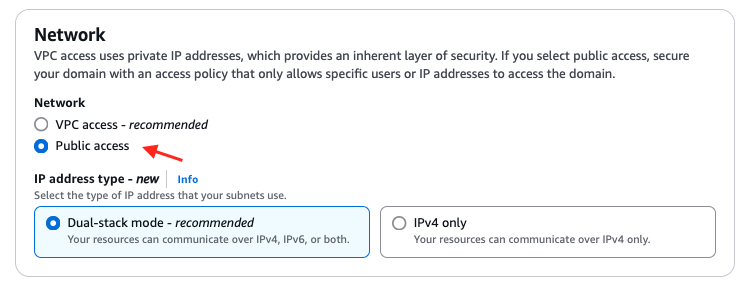
Figure 2: Use public access domain.
Fine-grained access control: Fine-grained access control provides numerous features to help you keep your data secure, such as document-level security, field-level security, read-only users, and OpenSearch Dashboards/Kibana tenants. Fine-grained access control requires a primary user, which is the administrator identity we discuss through the rest of this post.
The primary user is the administrator identity for your OpenSearch domain. This user can set up additional users in Amazon OpenSearch Service, assign roles to them, and assign permissions for those roles. You can choose username and password authentication for the primary user or use an IAM identity. You use these credentials to log in to OpenSearch Dashboards. Following the best practices on choosing your primary user, you should move to an IAM primary user for production workloads.
Fine-grained access control can be applied regardless of how you log in. You can follow your organization’s suggested authentication mechanism and apply fine-grained access control on top of it.
FGAC provides security at multiple levels to meet your security needs:
- Index-level security – Controls who can create, search, read, write, update, or delete within specific indexes.
- Document-level security – Restricts which documents within an index a user can see, using OpenSearch query filters (for example, only show documents where department: “sales”).
- Field-level security – Controls which fields within documents are visible (include or exclude specific fields).
- Field masking – Anonymizes sensitive field data (for example, hash a release_date or SSN field) rather than hiding it entirely.
Fine-grained access control supports several authentication mechanisms, including HTTP basic authentication using an internal user database, Amazon Cognito for web-based Dashboards access, SAML for enterprise identity provider integration, JSON Web Tokens (JWT) for token-based authentication, and AWS Identity and Access Management with SigV4 signing for IAM users and roles.
Encryption:
Amazon OpenSearch Service encrypts data both in transit and at rest. When you turn on fine-grained access control, encryption is required—the corresponding settings are automatically turned on and can’t be changed. These include Transport Layer Security (TLS 1.2 or later) for requests to the domain and for traffic between nodes in the domain, and encryption of data at rest through AWS Key Management Service (AWS KMS).
For encryption at rest, OpenSearch Service supports three key types: AWS owned keys, AWS managed keys, and customer managed keys. While AWS owned keys provide a quick-start option with no additional configuration, customer managed keys are the recommended best practice. Customer managed keys give you full control over the encryption key lifecycle, including key rotation policies, granular access control through key policies, and the ability to audit key usage through AWS CloudTrail. To use a customer managed key, create a symmetric encryption key in AWS KMS and select it when configuring your domain’s encryption settings.
For a basic public access domain with FGAC, all traffic reaches the domain freely (no VPC restriction), and an open access policy is used so no SigV4 signing is needed. FGAC then takes over, authenticating users through the internal user database (username/password) and enforcing role-based permissions at the index, document, and field level.
The public access configuration we discussed is useful for development and testing, but for production workloads, a best practices deployment combines VPC access, IAM-based authentication, and fine-grained access control. This approach layers all three security mechanisms—network isolation, identity verification, and granular permissions—to protect your domain end to end.
VPC access domain
Placing your OpenSearch Service domain inside a VPC restricts network-level access to resources within the VPC or connected networks. Traffic between your applications and the OpenSearch endpoint doesn’t traverse the public internet, and you can use security groups to further limit which entities can communicate with the domain. OpenSearch Service places a VPC endpoint (VPCe) using AWS PrivateLink into one, two, or three subnets of your VPC depending on your Availability Zone configuration. For high availability (HA), turn on multiple Availability Zones with each subnet in a different zone within the same AWS Region. For more details, see Launching your Amazon OpenSearch Service domains within a VPC.
For this best practices deployment, we use an IAM primary user with Amazon Cognito authentication for OpenSearch Dashboards and for fine-grained access control. We configure a primary IAM role and a limited IAM role, associate them with users in Amazon Cognito through a user pool and identity pool, and then use fine-grained access control to manage permissions. The primary user can then sign in to OpenSearch Dashboards, create backend roles, map the limited user to a restricted role, and enforce granular access at the index, document, and field level. For more details, see Tutorial: Configure a domain with an IAM master user and Amazon Cognito authentication in the AWS documentation.
The following high-level steps detail what’s needed to configure a VPC access domain with Amazon Cognito users. These steps use the Amazon Cognito user pool for authentication. The same basic process works for any Cognito authentication provider that lets you assign different IAM roles to different users.
- Create an Amazon Cognito user pool.
- Add users in the user pool for the primary user and a limited-access user.
- Create an Amazon Cognito identity pool.
- Update the IAM role for the primary user to allow access to OpenSearch Dashboards.
- Create an IAM role for the limited user.
- Create the domain.
You can follow Creating and managing Amazon OpenSearch Service domains in the AWS documentation to provision a domain. The following sections describe some important attributes for the domain.
Network:
VPC access. Public access isn’t recommended for production workloads. We recommend that you use VPC access for all production workloads. Pick the VPC, subnets, and security group that you have created for the OpenSearch domain.

Figure 4: Use VPC access.
Fine-grained access control:
Turn on fine-grained access control with OS[MasterUserRole] as the primary user. You can follow steps in Tutorial: Configure a domain with an IAM master user and Amazon Cognito authentication to create OS[MasterUserRole].
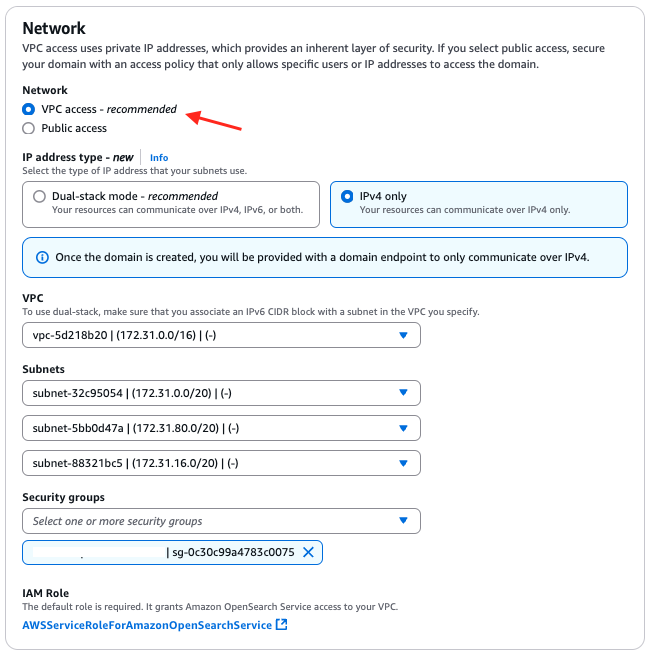
Figure 5: Turn on fine-grained access control with an IAM role.
Fine-grained access control provides numerous features to help you keep your data secure, such as document-level security, field-level security, read-only users, and OpenSearch Dashboards/Kibana tenants. Fine-grained access control requires a primary user.
The primary user is the administrator identity for your OpenSearch domain. This user can set up additional users in Amazon OpenSearch Service, assign roles to them, and assign permissions for those roles. You can choose username and password authentication for the primary user or use an IAM identity. You use these credentials to log in to OpenSearch Dashboards. Following the best practices on choosing your primary user, you should choose an IAM primary user for production workloads.
Fine-grained access control can be applied regardless of how you log in. You can follow your organization’s suggested authentication mechanism and apply fine-grained access control on top of it.
Amazon Cognito authentication:
To turn on Amazon Cognito authentication, select Enable Amazon Cognito authentication and choose the Amazon Cognito user pool and Amazon Cognito identity pool for your OpenSearch Dashboards.
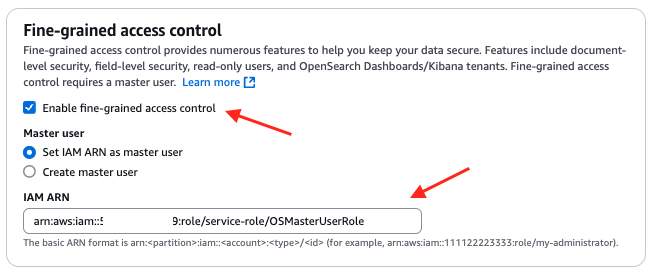
Figure 6: Turn on Amazon Cognito authentication.
Access policy:
The access policy controls whether a request is accepted or rejected when it reaches the Amazon OpenSearch Service domain. You can configure a domain-level access policy to allow access to your Amazon OpenSearch Service domain.
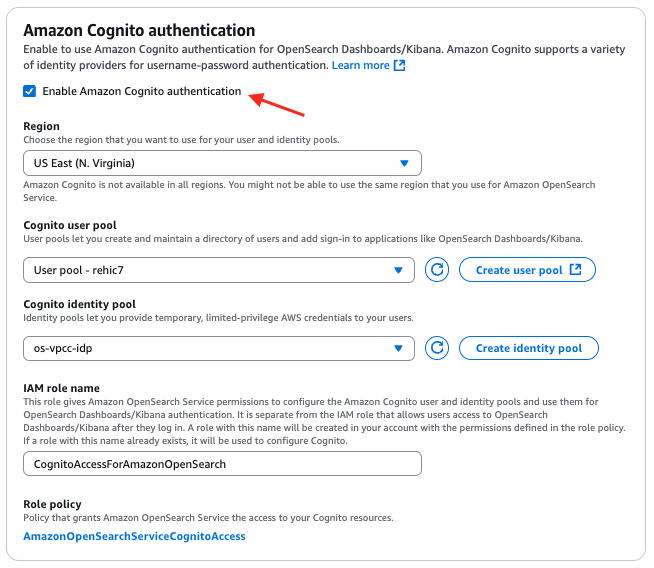
Figure 7: Configure domain-level access to the domain.
Encryption:
Amazon OpenSearch Service encrypts data both in transit and at rest. When you turn on fine-grained access control, encryption is required—the corresponding settings are automatically turned on and can’t be changed. These include Transport Layer Security (TLS 1.2 or later) for requests to the domain and for traffic between nodes in the domain, and encryption of data at rest through AWS KMS.
For encryption at rest, OpenSearch Service supports three key types: AWS owned keys, AWS managed keys, and customer managed keys. While AWS owned keys provide a quick-start option with no additional configuration, customer managed keys are the recommended best practice. Customer managed keys give you full control over the encryption key lifecycle, including key rotation policies, granular access control through key policies, and the ability to audit key usage through AWS CloudTrail. To use a customer managed key, create a symmetric encryption key in AWS KMS and select it when configuring your domain’s encryption settings.
With these configurations, you can configure your Amazon OpenSearch domain and OpenSearch Service Dashboards so that they’re accessible only within the chosen VPC. For your production scenario, you can follow your organization’s approved mechanism to access the resources in a VPC. You can access OpenSearch Service Dashboards with a primary user to create a limited-access role and map it to the IAM role with limited access to validate fine-grained access control.
Conclusion
In this post, we looked at the important security configurations for a public and a VPC-based Amazon OpenSearch domain. You can examine more settings for fine-grained access control in the OpenSearch Dashboards Security section.
If you have feedback about this post, submit comments in the Comments section. If you have questions about this post, start a new thread on the Amazon OpenSearch Service forum or contact AWS Support.