AWS Big Data Blog
Deliver Apache Kafka data to streaming tables for Apache Iceberg with Amazon MSK Express brokers
Today, we are announcing delivery to streaming tables on Apache Iceberg for Amazon Managed Streaming for Apache Kafka (Amazon MSK) Express brokers, a fully managed capability that continuously materializes your streaming data as queryable Apache Iceberg tables on Amazon S3 Tables, a capability of Amazon Simple Storage Service (Amazon S3). With delivery to streaming tables, you no longer need to deploy, scale, or maintain Kafka connectors, Flink jobs, or custom consumers to make your streaming data available for analytics. You select a Kafka topic, choose S3 Tables as your destination, and your data becomes a read-only Iceberg table queryable from Amazon Athena, Amazon Redshift, and Apache Spark within minutes. Delivery to streaming tables provides up to 60% cost savings compared to self-managed alternatives. It also reduces downstream query costs by up to 30% through optimized file sizing, without writing a single line of code or managing any infrastructure. Because this capability delivers to S3 Tables registered in AWS Glue Data Catalog, your tables are automatically discoverable through Glue Data Catalog Business Context and Semantic Search (preview). Data stewards can enrich streaming tables with business descriptions, glossary terms, and skill assets. AI agents can then discover and reason in real time using semantic search grounded in trusted business definitions rather than raw schema inference.
In addition to S3 Tables, you can deliver Amazon MSK streaming data to general purpose Amazon S3 buckets in source data format. Data delivery to general purpose Amazon S3 buckets enables workloads like archival, backup, or ML training data delivery. This provides a price-performant, serverless, and scalable way to deliver streaming data as-is to your general purpose Amazon S3 buckets.
Challenges with delivering streaming data to Apache Iceberg
Customers today face three critical challenges when integrating streaming data with Apache Iceberg. First, ease of use: customers must manage complex Kafka Connect deployments, handle frequent pipeline failures, maintain custom configurations, handle data format conversions, and manage pipeline infrastructure for data delivery. These operational tasks consume significant engineering time and introduce ongoing risk of downtime. Second, resiliency: without proper coordination, simultaneous writes from multiple high-throughput Kafka partitions can conflict with each other, leading to failed commits, data freshness delays, and performance issues. Streaming ingestion of high-volume data creates large numbers of small Parquet files in Iceberg tables, significantly degrading query performance and forcing a difficult trade-off between data freshness and query efficiency. Third, price performance can become a bottleneck to enriching your data lake with streaming data into. With delivery to streaming tables, pricing is predictable, and up to 60% lower than self managed Kafka deployments, lowering the barrier to getting real-time context to your data agents.
How delivery to streaming tables solves these challenges
Delivery to streaming tables is a native capability built directly into Amazon MSK Express brokers. It addresses each challenge directly: it eliminates operational complexity by removing the need to deploy, configure, or maintain pipeline infrastructure, you enable it with a few clicks. It provides built-in write coordination and exactly-once delivery semantics, resolving concurrent writer conflicts and supporting data integrity without manual intervention. And it performs intelligent inline compaction during ingestion, producing query-optimized Parquet files that eliminate the small-file problem while maintaining minute-level data freshness. The capability automatically scales to process gigabytes per second of throughput.
End-to-end managed streaming analytics architecture
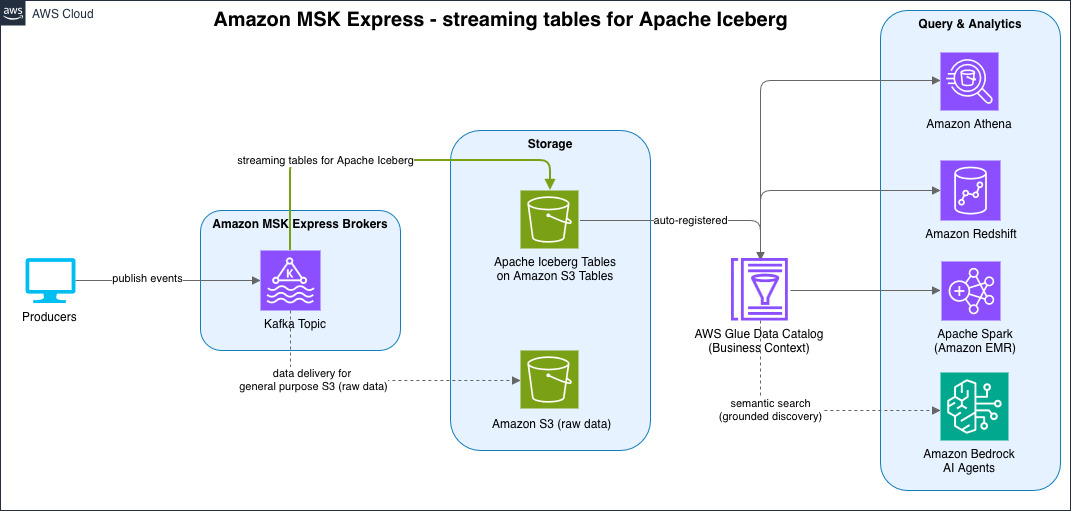
With delivery to streaming tables, you now have a fully managed end-to-end real-time data architecture from data ingestion through storage to analytics. Your producers publish events to Amazon MSK Express brokers, which continuously deliver data as optimized Iceberg read-only tables in S3 Tables, registered automatically on AWS Glue Data Catalog. From there, you can query your streaming data using analytics engines like Amazon Athena, Amazon Redshift, Amazon EMR (Apache Spark), or Apache Flink . You can also let AI agents discover and reason over your data through Glue Data Catalog semantic search. This managed experience eliminates the intermediate infrastructure that customers previously assembled, no separate connector clusters, no compaction jobs, no custom consumers, replacing it with a single, serverless pipeline from stream to insight.
The following diagram illustrates this end-to-end architecture.
Getting started
To get started, log into the Amazon MSK console, navigate to your Amazon MSK Express cluster, and enable delivery to streaming tables with a few clicks. Specify the Kafka topic you want to deliver, configure your schema settings using AWS Glue Schema Registry, and choose your destination. Destinations can be either fully managed Iceberg tables in S3 Tables or self-managed Iceberg tables in general purpose S3 buckets. Once enabled, delivery to streaming tables immediately begins materializing your Kafka data as queryable Iceberg tables in S3 with no further intervention required.
Additionally, you can use Amazon MSK APIs to programmatically set up, update, or delete delivery to streaming tables configurations for your Kafka topics. This allows teams to build agentic workflows and infrastructure-as-code patterns for teams managing configurations across multiple clusters and topics at scale.
Getting started with the streaming tables Agent Skill
The streaming tables Agent Skill provides AI-assisted guidance for setting up streaming tables integrations for your existing or new topics in Amazon MSK Express cluster. The skill helps you configure delivery to S3 Tables (Iceberg) or S3, including schema registry setup, IAM role configuration, and validation.
Installing as an Agent Skill
Agent Skills are discovered automatically by compatible tools through the SKILL.md file. Refer to the Agent Toolit for AWS Skill Installation Guide to install the managing-amazon-msk Agent Skill. We also recommend you install the AWS MCP Server in your developer tool of choice, which exposes tools for searching AWS documentation, blogs, and Skills dynamically at runtime. These capabilities make agents more accurate and powerful for AWS related development and operational tasks, and make skill discovery and installation more flexible. Refer to Setting up the AWS MCP Server for guidance on installing the AWS MCP Server in your environment.
For example:
To verify the installation, interact with the skill in your preferred tool.
To start delivering data from your Kafka topics to Apache Iceberg tables in real time, for example, prompt “Create me a streaming table on my MSK cluster for my events topic” to your agent of choice:
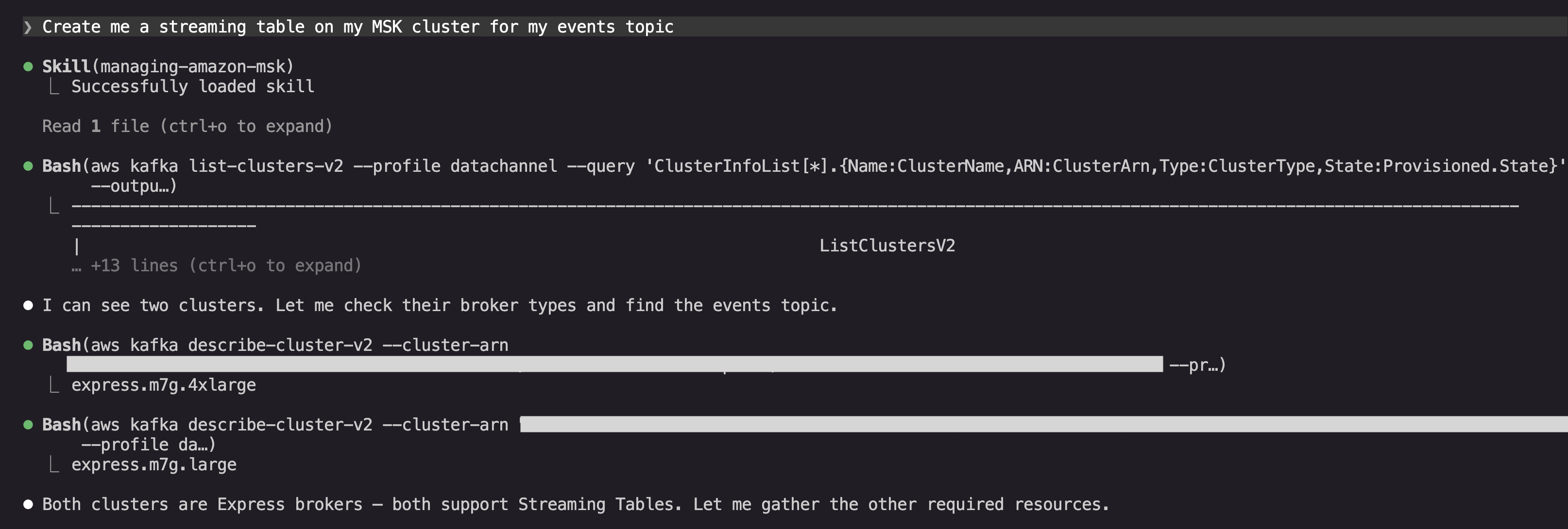
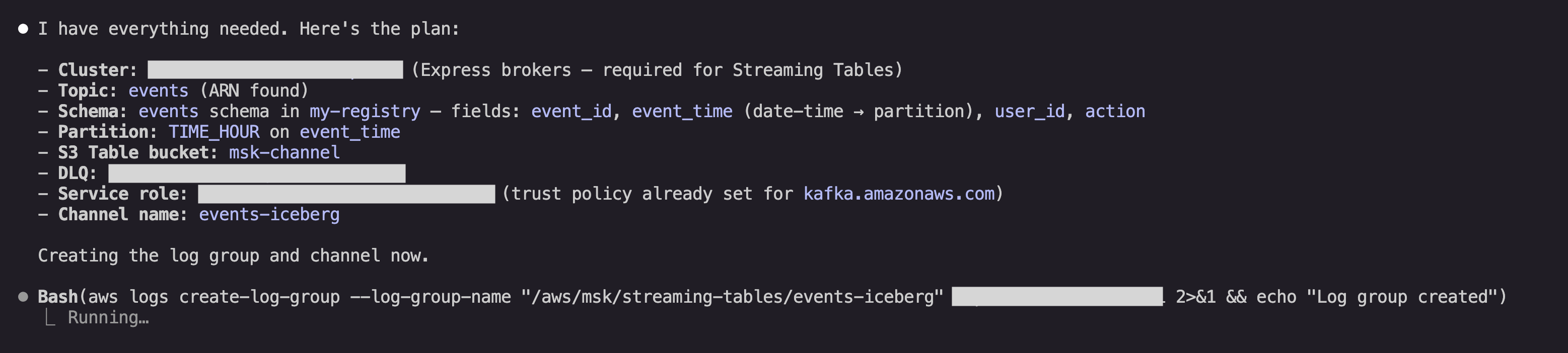
The agent will dynamically load the managing-amazon-msk skill, and start by gathering the available resources in your AWS account to use for the streaming tables integration. Once it gathers that data, it will confirm the resources to use or create, and create the integration:
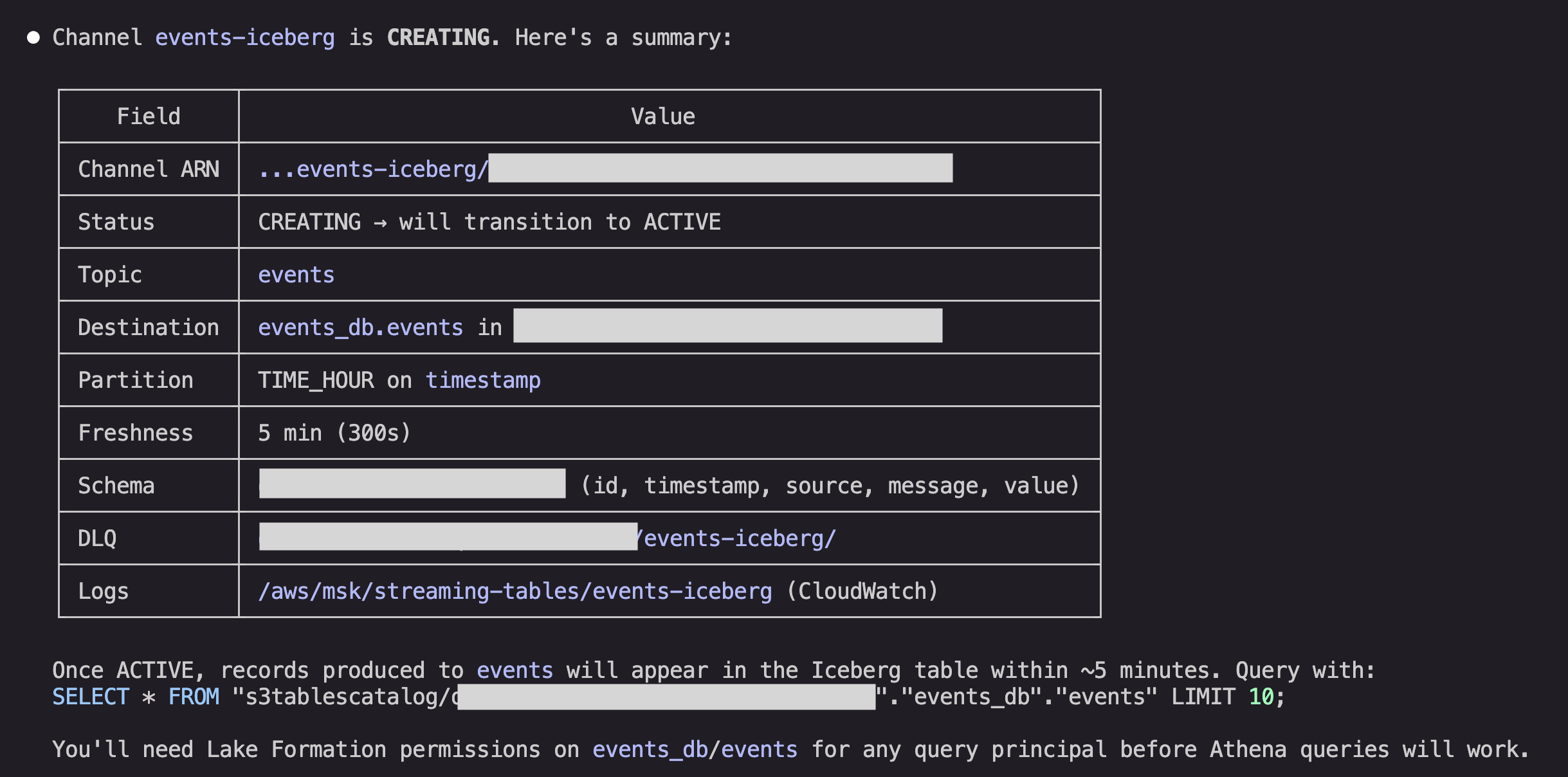
After creating the integration, the agent will summarize the status and can then help with any other operational tasks with your data. For example, the agent can help you set up AWS Lake Formation permissions for you to query the data in S3 Tables with Athena, or configure your table maintenance behavior in S3 Tables:
Conclusion
Delivery to streaming tables and general purpose S3 buckets is available in all AWS Regions where Amazon MSK Express brokers are available. To learn more about delivery to streaming tables, visit the documentation and pricing pages.