AWS Big Data Blog
GPU-accelerated Apache Spark with Amazon EMR and NVIDIA RTX PRO 4500 on Amazon EC2 G7 instances runs up to 3.7x faster
For years, Apache Spark has been the backbone of large-scale data processing. However, as datasets grow and artificial intelligence and machine learning (AI/ML) pipelines become more complex, modern workloads demand more computational power. Feature engineering for machine learning models, large-scale extract, transform, and load (ETL) transformations, and real-time analytics workloads are computationally intensive by nature. GPU-accelerated instances improve performance and transform jobs that once took hours into minutes, so you can iterate on models faster and reduce operational costs. You can process larger datasets in single batches, make decisions in real time, and achieve strong performance without over-provisioning infrastructure.
We’re excited to share the benchmarking results on Amazon EMR with Amazon Elastic Compute Cloud (Amazon EC2) G7 instances, powered by NVIDIA RTX PRO 4500 Blackwell Server Edition GPUs. For data engineers and data scientists running Apache Spark workloads, this means faster pipelines, shorter iteration cycles, and more time spent on insights.
Amazon EMR on EKS natively supports the NVIDIA cuDF plugin for Apache Spark. This support is the result of joint engineering between AWS and NVIDIA to qualify the cuDF plugin for Amazon EMR, co-optimize Spark execution paths for RTX PRO 4500, and validate performance at scale through shared TPC-DS benchmarking on Amazon EC2 G7 instances. Now, Apache Spark workloads on Amazon EMR on EKS run up to 3.7x faster with Amazon EC2 G7 GPU instances than with comparable CPU instances, and require no changes to existing Spark code.
In the TPC-DS 3 TB benchmark, at the 64 GB memory tier, EC2 G7 instances with RTX PRO finished in 4.7 minutes. If you run large-scale data processing pipelines, you can cut job run times by more than two-thirds while maintaining full compatibility with the applications you already have in production.
The use cases that benefit most are those where speed directly unlocks business value. In AI/ML feature engineering, faster Spark jobs mean data science teams can iterate on features more quickly, reducing the time from raw data to trained model. In complex ETL pipelines, like financial transactions, clickstream aggregation, or supply chain data consolidation, GPU acceleration compresses multi-hour batch windows into near-real-time processing. For real-time analytics, teams running fraud detection, personalization engines, or operational dashboards can process larger volumes of data within tighter latency windows, without redesigning their architecture.
Beyond data analytics, the G7 instances will support a broad range of AI and graphics workloads, including conversational AI, content generation, recommender systems, and video streaming and rendering. Built on the AWS Nitro System, they deliver the security and resource efficiency that production AI, analytics, and graphics workloads demand.
The following sections walk through the cluster configuration, benchmark methodology, and performance results.
Cluster configuration
We benchmarked four instance types to measure the real-world performance of G7 GPU instances against comparable CPU instances for Spark SQL performance. The g7.4xlarge also provides 80 Gbps network bandwidth (compared to 15–17 Gbps on the CPU baselines) and uses RapidsShuffleManager. However, CPU runs showed no evidence of being network- or shuffle-bound at this cluster scale. All tests used Amazon EMR on EKS 7.12.0 with Apache Spark 3.5.6 and cuDF plugin 26.04.2, running the full TPC-DS benchmark at 3 TB scale across 103 queries. Each experiment ran 5 iterations. We report the median. Data was stored as Parquet on Amazon Simple Storage Service (Amazon S3) (same-region gateway endpoint). All instances were launched in a single Availability Zone.
Instance specifications
All four instance types share the same compute footprint of 16 vCPUs and 64 GB system RAM. The g7.4xlarge additionally includes an NVIDIA RTX PRO 4500 Blackwell GPU with 32 GB of dedicated video memory (VRAM), which the cuDF plugin uses to accelerate Spark SQL operations. The baseline for all speedup and cost comparisons is m9gd.4xlarge (Graviton), the lowest-cost CPU instance in the group.
| . | g7.4xlarge | m9gd.4xlarge | m8id.4xlarge | m8a.4xlarge |
| Architecture | x86_64 | arm64 (Graviton) | x86_64 | x86_64 |
| vCPU | 16 | 16 | 16 | 16 |
| RAM | 64 GB | 64 GB | 64 GB | 64 GB |
| GPU | 1× RTX PRO 4500 Blackwell (32 GB VRAM) | – | – | – |
| NVMe | 875 GB | 950 GB | 950 GB | EBS only (GP3 16k IOPS and 2000 MB/s throughput to match NVMe |
| Network | 80 Gbps | Up to 17 Gbps | Up to 15 Gbps | Up to 15 Gbps |
The g7.4xlarge uses the RTX PRO 4500 Blackwell Server Edition GPU. The CPU baselines cover all three major architectures: m8id.4xlarge (Intel x86), m8a.4xlarge (AMD x86), and m9gd.4xlarge (Graviton arm64).
Spark configuration
All instances used eight executor nodes with the following configuration:
| Configuration | GPU instances | CPU instances |
| Amazon EMR release | emr-7.12.0-spark-rapids-latest | emr-7.12.0-latest |
| executor.cores | 14 | 14 |
| executor.instances | 8 | 8 |
| executor.memory | 20G | 20G |
| executor.memoryOverhead | 30G | 30G |
| spark.plugins | com.nvidia.spark.SQLPlugin | – |
| rapids.memory.pinnedPool.size | 8G | – |
| rapids.sql.concurrentGpuTasks | 3 | – |
| shuffle.manager | RapidsShuffleManager | default (sort) |
| sql.adaptive.enabled | true | true |
| io.compression.codec | zstd | zstd |
CPU instances use the same 30 GB memoryOverhead as GPU to make sure that the memory comparison is apples-to-apples. This setting reserves off-heap memory for shuffle and caching on both sides.
For GPU instances, the cuDF plugin offloads Spark SQL operations to the GPU automatically. No code changes are required. The executor.memoryOverhead value is set higher on GPU instances to accommodate GPU memory management and the RAPIDS shuffle manager.
The cuDF plugin automatically falls back to CPU execution for unsupported operators and user-defined functions (UDFs). Your job still completes, but those stages run without GPU acceleration. To identify which operations run on GPU compared to CPU, set spark.rapids.sql.explain=NOT_ON_GPU in your Spark configuration. For a pre-migration assessment of your workloads, use the NVIDIA cuDF tool to estimate GPU acceleration potential before moving to G7 instances.
To tune settings like concurrentGpuTasks and pinnedPool.size, use the Spark History Server on Amazon EMR on EKS, which provides per-stage execution details to identify CPU fallback and shuffle bottlenecks.
Getting started
Reference the Using cuDF Accelerator for Apache Spark with Amazon EMR on EKS for detailed setup instructions.
Prerequisites
Before running GPU-accelerated Spark on Amazon EMR on EKS, make sure the following are in place:
- Amazon EMR on EKS release version 6.9.0 or later (this post uses
emr-7.12.0-spark-rapids-latest).
The
-spark-rapidsrelease variant ships the NVIDIA cuDF plugin pre-installed.
- Amazon Elastic Kubernetes Service (Amazon EKS) cluster with a GPU-enabled node group using G7 instances.
- Node AMI:
AL2023_x86_64_NVIDIA(Amazon EKS optimized accelerated AMI). - NVIDIA device plugin installed in the cluster to expose GPUs to Kubernetes pods:
- Amazon EMR on EKS virtual cluster registered to the EKS namespace.
To validate GPU availability on your nodes:
Note: Getting started with GPU-accelerated Spark on Amazon EMR is straightforward. To use the latest cuDF plugin, overlay the latest version (for example, 26.04.2 as of May 2026) onto the Amazon EMR RAPIDS image using an initContainer technique. This replaces the bundled cuDF JAR with a newer version while preserving all other Amazon EMR dependencies. We recommend using the latest Amazon EMR release to get the most up-to-date cuDF plugin for better performance. In our benchmarks, upgrading from cuDF plugin 25.08.0 to 26.04.2 reduced runtime by 36–38 percent. Download the latest cuDF plugin JAR from the NVIDIA repository. AWS Support covers Amazon EMR. For issues specific to a cuDF JAR, file a GitHub issue or contact NVIDIA at cudf-spark-support@nvidia.com.
Performance benchmarks and cost efficiency
We ran the full TPC-DS benchmark suite (103 queries) at 3 TB scale on 8-node clusters in us-east-1. The following table summarizes the results:
| . | GPU instances | CPU instances |
| Cost per run | $2.06 | $2.93–$3.18 |
| Total time (103 queries) | 281s (4.7 min) | 1,010–1,043s (16.8–17.4 min) |
| Speedup compared to CPU instances | 3.7× | baseline |
Cost per run is the total cluster cost for the benchmark’s duration: Cluster $/hr × (median runtime ÷ 3,600). The hourly rate combines the EC2 On-Demand cost for all 8 nodes and the Amazon EMR on EKS charge for the vCPU and memory the Spark pods consume. Both are billed per second (one-minute minimum), so you pay only for what a job uses while it runs. All runs used Amazon EMR on EKS 7.12.0 in us-east-1, with 8 × 4xlarge nodes (128 vCPU) on both the GPU and CPU sides. The g7.4xlarge cluster runs at $26.35/hr (8 × $3.042 EC2 = $24.34, plus $2.01 for Amazon EMR on EKS) and finishes in 281 seconds, at $2.06 per run. The CPU clusters run at a lower hourly rate ($10.43–$10.99) but take 1,010–1,043 seconds, landing at $2.93–$3.18 per run. All prices reflect On-Demand pricing in us-east-1 as of May 2026. G7 instances are also eligible for EC2 Spot and Compute Savings Plans, which can further reduce costs for recurring batch workloads.
Cost-per-run calculations include EC2 and Amazon EMR charges only. They exclude the EKS control-plane fee, EBS volumes, S3 request and storage costs, and the driver pod.
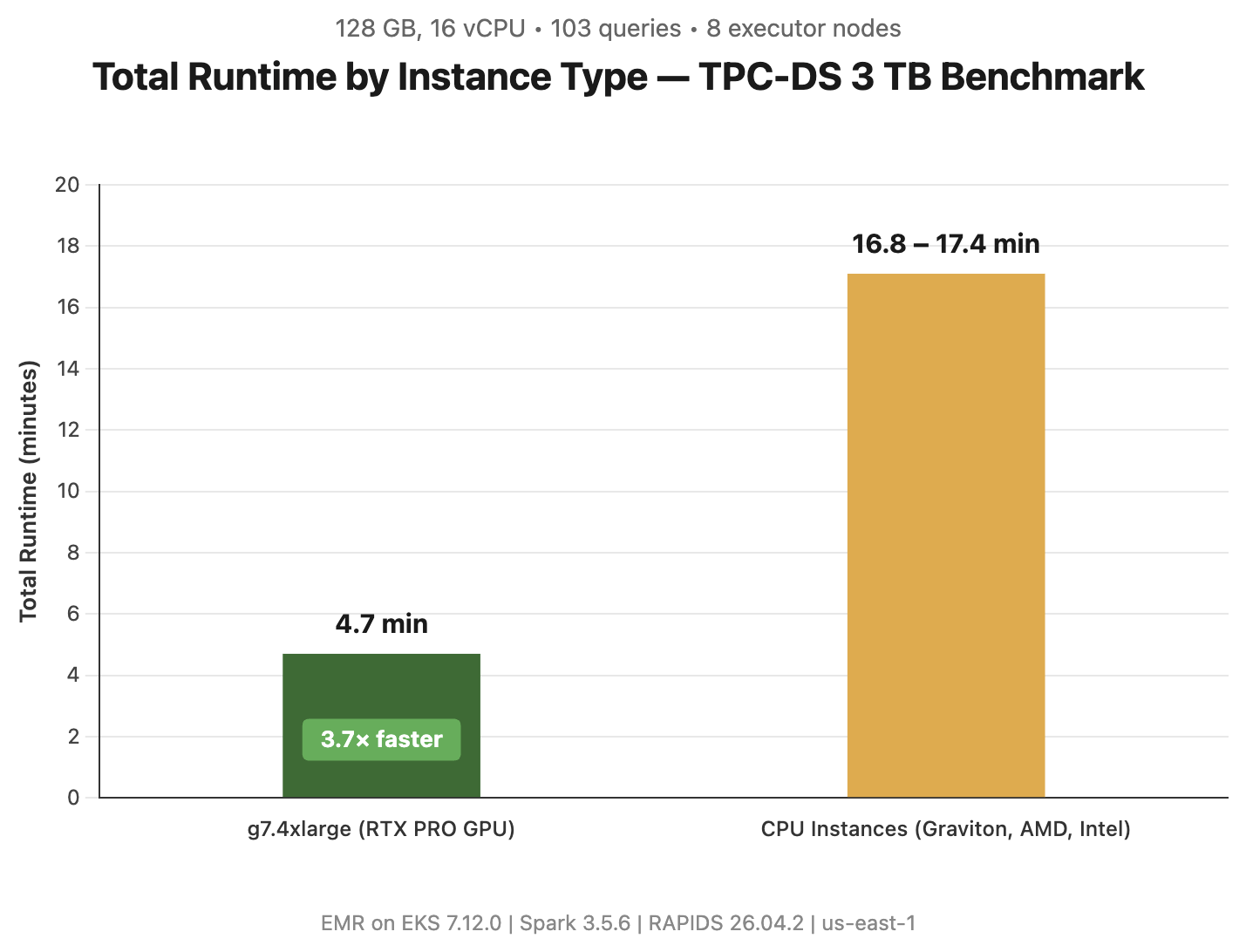
Figure 1: Total runtime by instance type for all 103 TPC-DS queries at 3 TB scale. The g7.4xlarge with GPU acceleration completed the benchmark in 4.7 minutes, 3.7× faster than CPU instances (16.8-17.4 minutes)
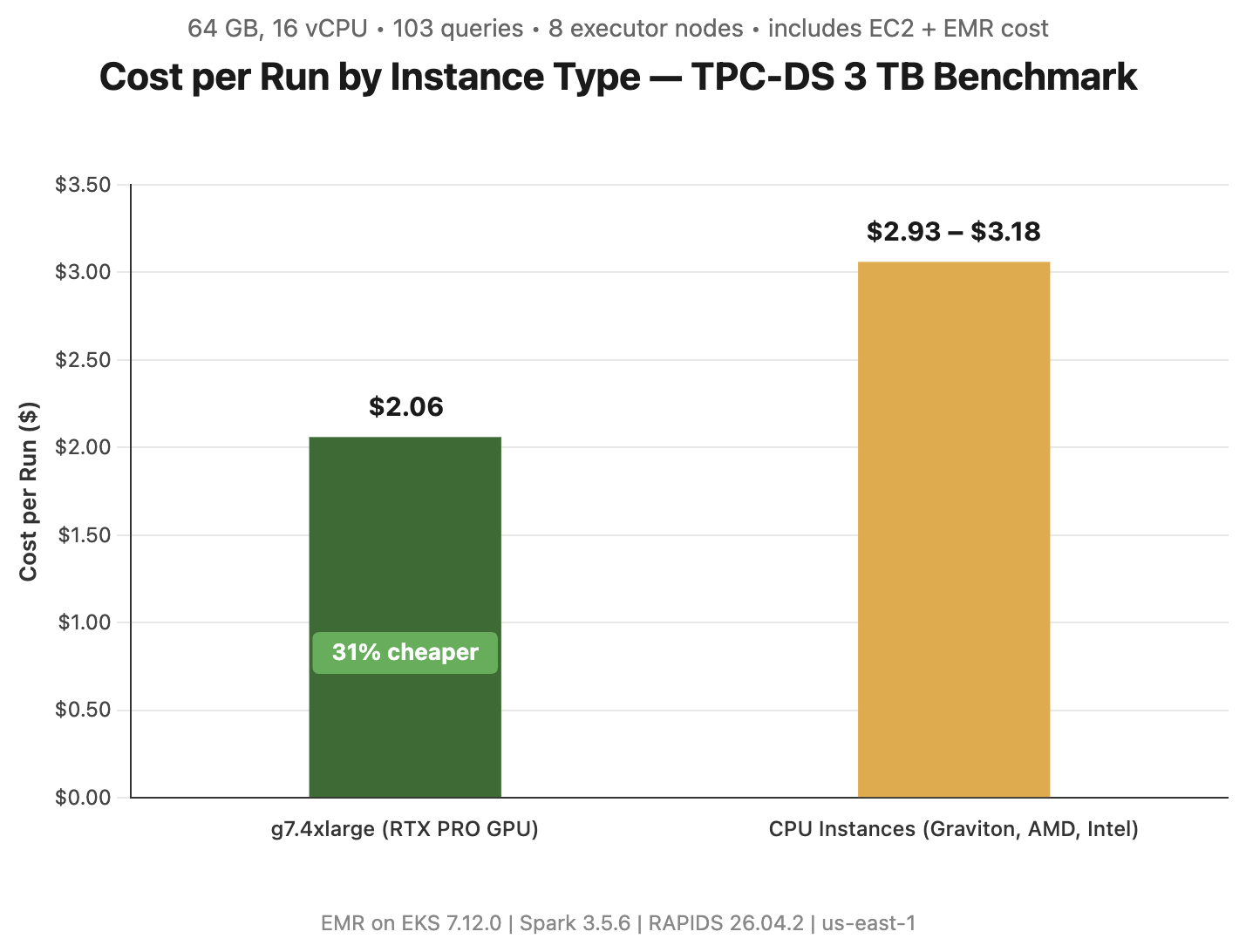
Figure 2: Total cost per benchmark run, including both Amazon EC2 instance and Amazon EMR on EKS cost across all 8 nodes. Despite a ~2.5× higher hourly rate, the g7.4xlarge GPU instance costs up to 31% less per run than Graviton because it finishes the workload 3.7× faster
Where GPU acceleration excels
GPU acceleration completed the 103-query power run in 281s compared to 1,032s on CPU, an overall 3.7× speedup that saves 750 seconds per run. GPU was faster on 102 of 103 query executions.
GPU acceleration delivers the largest gains on the long-running, compute- and shuffle-heavy queries where kernel throughput outweighs launch overhead. The biggest absolute time savings:
| Query | CPU time | GPU time | Speedup | Time saved |
| q24 (part 1+2) | 81.6s | 15.9s | ~5.1× | 65.7s |
| q23 (part 1+2) | 79.4s | 16.4s | ~4.9× | 63.1s |
| q93 | 63.7s | 5.6s | 11.4× | 58.1s |
| q76 | 30.4s | 3.4s | 9.0× | 27.0s |
| q64 | 35.4s | 8.5s | 4.2× | 26.9s |
| q50 | 27.6s | 3.5s | 7.9× | 24.0s |
Speedup distribution across all 103 executions:
| Speedup band | Queries |
| ≥5× | 15 |
| 4–5× | 13 |
| 3–4× | 21 |
| 2–3× | 26 |
| 1–2× | 27 |
| <1× (CPU faster) | 1 |
Median per-query speedup 2.94× (geomean 2.84×). The heaviest wins (q50, q76, q93) are aggregation- and shuffle-join-intensive queries that convert cleanly to GpuHashAggregate and GpuBroadcastHashJoin.
Where CPU wins
With RAPIDS 26.04.2, the following query showcases a workload pattern where CPU was faster:
| Query | CPU time | GPU time | Ratio | Root cause |
| q16 | 0.96s | 1.44s | CPU 1.5x faster | Trivial/near-empty scan. Sub-second runtime where GPU kernel-launch overhead is not amortized |
Choosing the right instance
| Instance | Best for | Summary |
| g7.4xlarge (RTX PRO GPU) | Fastest and most cost-effective | Up to 3.7× faster than comparable CPU instances and up to 31% cheaper per run. Completes in 4.7 min compared to 17.2 min. Best choice for both speed and cost efficiency. |
| CPU instances (m8a / m8id / m9gd) | Flexibility, availability, and always-on workloads | Multiple architecture options deliver similar Spark SQL performance. Choose CPU when GPUs are unavailable, when clusters need to remain running continuously (for example, overnight jobs ready for next-day analysis), or when workloads cannot use GPU acceleration. CPU instances offer broad availability and predictable capacity without startup delays. |
G7 instances require a G-instance vCPU service quota in your account (default is often 0 for GPU types). Request a quota increase through the Service Quotas console, or use On-Demand Capacity Reservations (ODCRs) to guarantee availability for recurring batch jobs.
Based on these benchmark results, consider evaluating GPU acceleration for your own Apache Spark workloads. Start by identifying compute-intensive operations in your current pipelines, particularly those involving large-scale aggregations, joins, or machine learning feature engineering that could benefit from the performance improvements demonstrated here.
Conclusion
Amazon EMR on EKS with NVIDIA RTX PRO 4500 together provide a meaningful step forward for teams running data-intensive Spark workloads at scale. Whether you’re building ML pipelines that demand rapid feature iteration, running complex ETL transformations across massive datasets, or powering real-time analytics that can’t afford to wait on slow batch jobs, GPU-accelerated Spark on G7 delivers the performance and speed to do more. As data and AI workloads continue to evolve, GPU-accelerated analytics on Amazon EMR is becoming the foundation for data teams. Get started with GPU-accelerated Spark on Amazon EMR on EKS today by visiting Amazon EMR documentation to launch your first G7-powered cluster and see the performance gains for yourself.