AWS Big Data Blog
How Intuit migrated from Apache Hive Metastore to AWS Glue Data Catalog
Migrating from Apache Hive Metastore (HMS) to AWS Glue Data Catalog (GDC) is a priority for many organizations as they scale their data analytics operations. At enterprise scale, maintaining an efficient and reliable metadata management system becomes increasingly critical. Many enterprises started their big data journey with HMS, which has served as a reliable catalog service for storing table definitions and metadata. As cloud adoption has grown, so have requirements for fine-grained access control and for serverless, fully managed solutions. As a result, organizations are looking to modernize their data catalog infrastructure and are moving their metastores to GDC, a fully managed AWS metadata repository. With GDC, they gain native integration with various AWS analytics and AI services, along with centralized data management and governance.
In this post, we walk through how Intuit successfully migrated its extensive data catalog from HMS to GDC. This migration is part of Intuit’s journey to an open, secure lakehouse architecture for data and analytics. We explore the challenges Intuit faced and the solutions it implemented. We also cover the benefits that motivated the move: reduced operational overhead, improved data discovery, and enhanced integration with AWS analytics services. Whether you are considering a similar migration or exploring your options for metadata management, this real-world example provides practical insights into the migration process.
Migration considerations and prerequisites
- Audit the HMS catalog and remove unused tables and views by deleting or flagging them to filter out during initial migration to GDC. This will make sure that after migration you have a clean catalog and will help with better migration performance.
- Estimate the read and write API limits you will need in GDC based on the traffic in HMS. To do this, you can audit the internal HMS tables and get the P99 numbers for reads and writes to tables and partitions. These numbers will need to be translated to AWS Glue Data Catalog API limits and the necessary quota increase requests will need to be submitted. Load test with these quotas to confirm that they support your peak read and write rates without throttling, and implement retries to handle any throttling that does occur.
- Make sure you have your AWS Glue quotas sized properly for your account and use case. You can work with AWS Support to increase these quotas based on the results of the load testing.
- Data is stored in Amazon Simple Storage Service (Amazon S3) for table resources that are planned for migration. Only databases, tables, and partitions can be migrated. Other entities, such as column statistics, privileges, roles, functions, and transactions, were outside the scope of the migration.
- Plan for table renames: In GDC table/database rename isn’t supported. In some cases, customers rename tables as part of their data pipelines to get atomic updates for tables that are non-partitioned and don’t use an open table format (OTF). For use cases where this pattern is required, we recommend writing to a new S3 location and then running the following
ALTER TABLEcommand to change the S3 location.
Architecture
The following diagram shows the overall architecture of the solution across two consumer accounts (spoke accounts), and a central data governance account as part of a hub-and-spoke architecture.
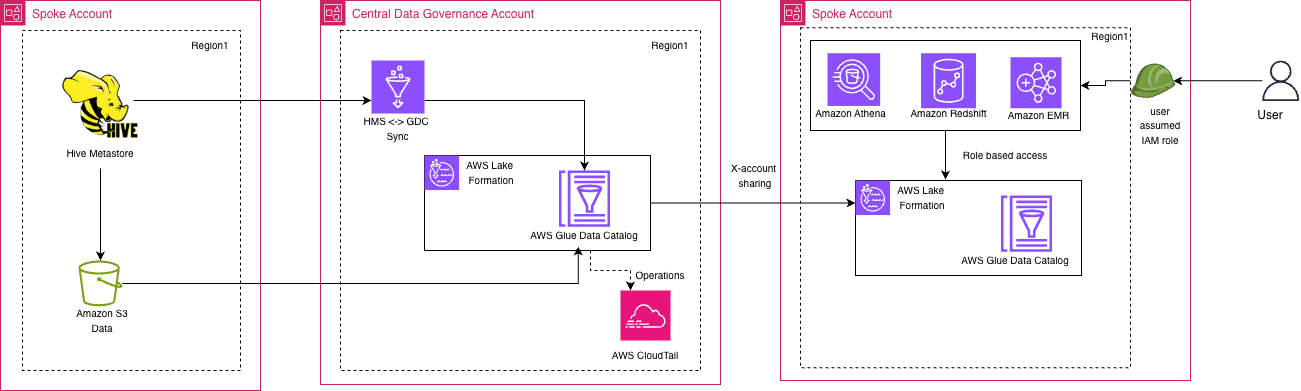
Figure 1: Solution architecture spanning the source and consumer spoke accounts and the central data governance account
In the source spoke account, Hive Metastore manages the metadata for data stored in Amazon S3. This is the current state. In the central data governance account, an HMS and GDC sync process propagates this metadata into the central AWS Glue Data Catalog, which AWS Lake Formation governs. AWS CloudTrail records operations on the central catalog. The central catalog is shared across accounts with the consumer spoke account. There, Amazon Athena, Amazon Redshift, and Amazon EMR query the data through role-based access, using Lake Formation and a local AWS Glue Data Catalog. This migration strategy is explained in detail in the following sections.
Migration strategy
At Intuit, the central team manages the data catalog and offers it as a platform for the different teams to use. Because of the scale of Intuit’s data lake and the large number of teams using the data platform, Intuit had to come up with a phased strategy. With these tenets in mind, Intuit came up with the following approach:
- One-time migration of all databases, tables, and partitions. During this phase all the objects were migrated from HMS to GDC. The migration will be point-in-time and any changes happening in HMS will not be captured by the initial migration.
- Ongoing sync from HMS to GDC to capture all changes happening in HMS and apply them to GDC. This would make sure any team that is ready to migrate their pipelines to GDC can do so without any dependency on upstream and downstream processes.
- Ongoing sync from GDC to HMS to capture any changes that happen in GDC and apply them back to HMS. Some of your pipelines might still point to HMS while the upstream pipelines whose tables they consume have already moved to GDC. This sync process replicates all changes back to HMS, so those pipelines aren’t impacted.
- To make sure both catalogs remain in sync and to prevent drift, a parity tool runs hourly to compare all critical metadata values and verify consistency between the catalogs. For details, see the Parity tool section later in this post.
- An ad hoc sync process was also built. If the parity tool identifies that the two catalogs are out of sync, this process provides a straightforward way to bring them back in sync.
To prevent a circular loop between the HMS-to-GDC sync (#2) and the GDC-to-HMS sync (#3), each table is assigned a single source of truth. The source of truth is recorded as a sourceCatalog flag (HMS or GDC) in an Amazon DynamoDB arbitration table. During the HMS-to-GDC incremental sync, only tables whose source of truth is HMS are picked up and synced to GDC. Conversely, the GDC-to-HMS sync checks the sourceCatalog flag to confirm the change genuinely originated in GDC and isn’t a cascading update that was originally synced from HMS. This arbitration model makes sure each table’s metadata flows in only one direction at any given time, eliminating the risk of circular updates between the two catalogs.
1. Initial full migration
The first step is to migrate all the databases, tables, and partitions from HMS to GDC. This will need to be planned over a weekend to make sure there is no impact on the workloads running on HMS. The duration of this initial migration will vary depending on the size of your data lake. After being customized to support batching and retries, the AWS Glue Hive metastore migration utility was used to migrate all the metadata (databases, tables, and partitions) from HMS to GDC.
This utility runs an AWS Glue extract, transform, and load (ETL) job that pulls the metadata from the Amazon Aurora MySQL tables that hold the HMS metadata. The job transforms the data and writes it to the AWS Glue Data Catalog.
The following diagram shows the one-time sync process.
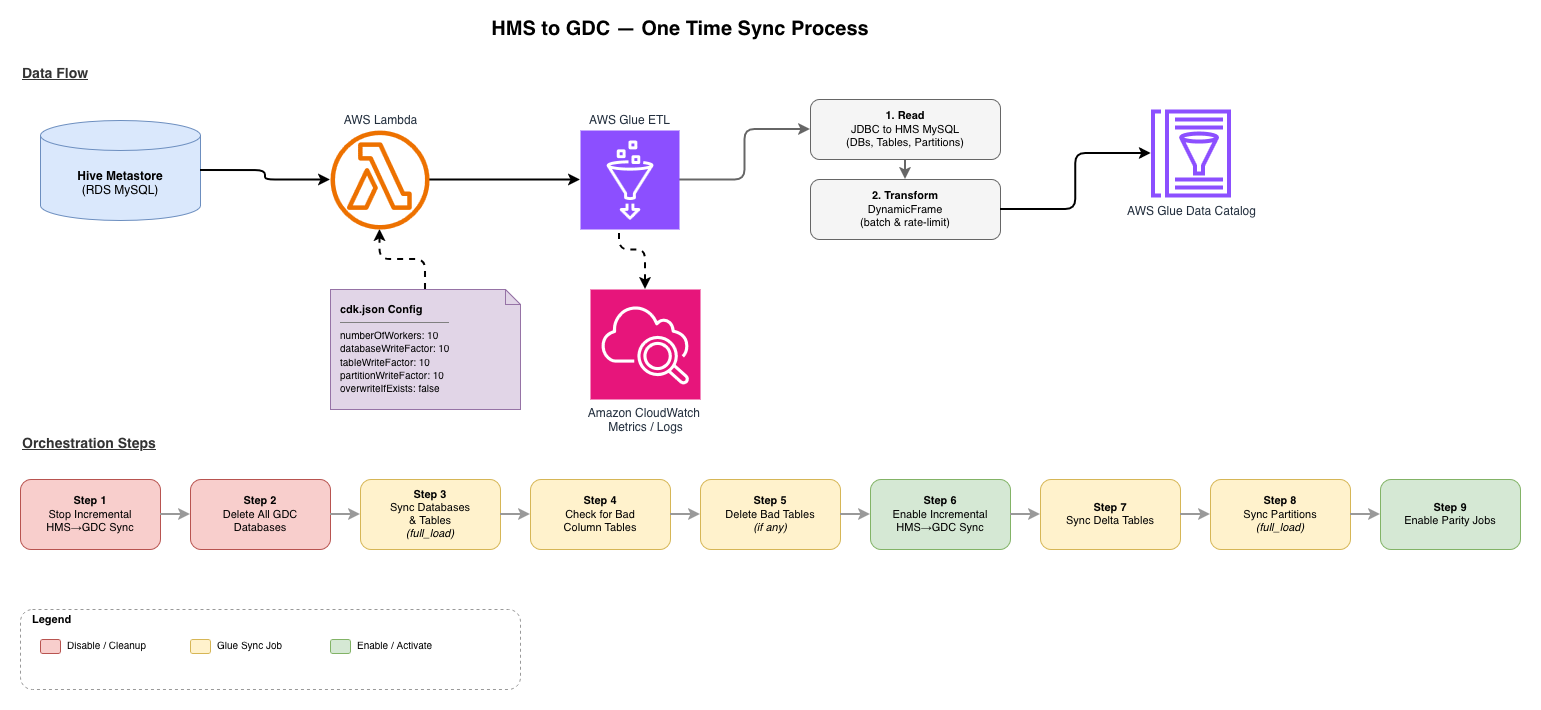
Figure 2: One-time migration of metadata from Hive Metastore to AWS Glue Data Catalog
An AWS Lambda function starts the AWS Glue ETL job. The job settings, such as the number of workers and the database, table, and partition write factors, come from a cdk.json configuration file. The job reads databases, tables, and partitions from the HMS MySQL database over JDBC. It transforms them into DynamicFrames with batching and rate limiting, and writes them to the AWS Glue Data Catalog. Amazon CloudWatch captures job metrics and logs. The lower half of the diagram shows nine orchestration steps: stopping the incremental sync, cleaning up GDC, running full and delta syncs, and turning on the parity jobs.
Customization options
The utility should work as-is for most cases, but Intuit customized the script to speed up the one-time migration process while making sure that GDC didn’t throttle requests.
Loading behavior
Set catalog.overwriteIfExists to false during your runs.
This is a good approach for use cases with a large number of tables because it skips overwriting a table that already exists.
Rate limiting
One way to control the rate and reduce the amount of data sent to GDC is to change the value of catalog.ratePerDPUSecond in the code. This parameter adjusts the rate at which changes are written to GDC, and you can configure it as shown in the preceding code sample. The following formula shows how RatePerSecond is calculated and how catalog.ratePerDPUSecond influences it.
Worked example
With the defaults (catalog.ratePerDPUSecond = 10, DefaultExecutorsPerDPU = 2), each data processing unit (DPU) submits five calls/sec. At that rate, a 200-DPU job submits approximately 500 calls/sec (100 x 10 / 2) when the DataFrame is well partitioned. Lower catalog.ratePerDPUSecond or the DPU count until throttling stops. Internally, these writes call BatchCreatePartitions, which batches partition creation and keeps API volume down.
Handling API limits
In GDC, there are limits for each API call and if you exceed the limits you will be throttled. One approach to handling API limits is to batch the database, table, and partition loads and send the batched data during each batch.
In addition to batching, you should also implement an exponential backoff and retry strategy, as described in the post Managing and monitoring API throttling in your workloads.
2. Incremental load for bidirectional sync
The second step involved creating a two-way synchronization between HMS and GDC. This synchronization made sure that any changes made to tables in HMS were reflected in GDC, and vice versa. To maintain consistency, incremental data loads were necessary between the two systems. The process synced metadata changes by capturing updates in HMS and GDC and applying them to the other system. This kept both catalogs synchronized. A key rule was to designate one catalog as the definitive source of truth for each table to avoid conflicts. This was done using the DynamoDB arbitration table as described earlier.
HMS to GDC
The following diagram shows the ongoing incremental sync from HMS to GDC.
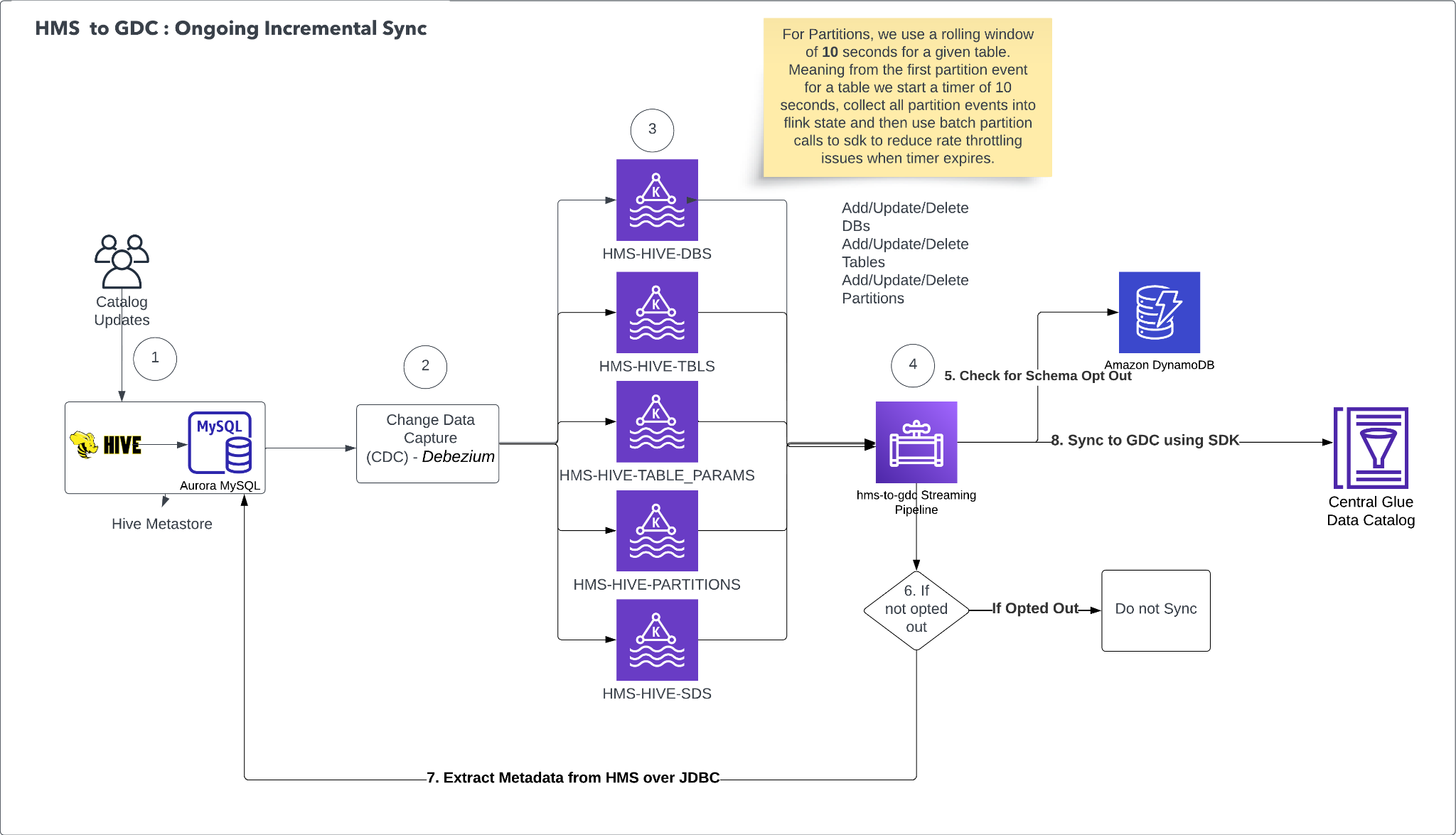
Figure 3: Ongoing incremental sync from Hive Metastore to AWS Glue Data Catalog
The ongoing incremental sync from HMS to GDC is powered by an event-driven architecture that propagates metadata changes in near real time. Catalog updates to the source HMS can affect databases, tables, table parameters, or partitions. A Debezium connector continuously monitors the underlying MySQL instance for any INSERT, UPDATE, or DELETE operations through Change Data Capture (CDC). This approach removes the need for polling or application-level hooks.
Captured changes are routed into dedicated Kafka topics based on the type of metadata object affected. HMS-HIVE-DBS receives database-level changes, HMS-HIVE-TBLS receives table-level changes, and HMS-HIVE-TABLE_PARAMS receives table parameter modifications. HMS-HIVE-PARTITIONS receives partition changes, and HMS-HIVE-SDS receives partition or table location change events. This separation allows each object type to be processed, scaled, and retried independently. For partitions specifically, a 10-second rolling window is applied per table. When the first partition event arrives for a given table, a 10-second timer begins, and all subsequent partition events for that table are collected. When the timer expires, all accumulated events are submitted as a single batch call to the SDK, which significantly reduces API throttling for tables with high partition churn.
Before any change is synced to GDC, the system performs a schema opt-out check against an Amazon DynamoDB table. This lookup determines whether the affected database or table has been explicitly excluded from synchronization, giving individual teams governance over what metadata flows into the central catalog. If the schema is opted out, the change is dropped and no sync occurs. If it isn’t opted out, the system proceeds to apply the metadata operation (create, update, or delete) to the central GDC through the AWS Glue SDK.
Sometimes additional metadata context is needed to fully resolve a change, for example, to construct a complete table definition when processing a partition update. In these cases, the system falls back to extracting metadata directly from HMS over a JDBC connection to the source Aurora MySQL database. This makes sure that GDC always receives complete and consistent metadata, even when the CDC event alone doesn’t carry all required fields.
The overall design achieves low-latency metadata propagation without placing read pressure on the source HMS. Together, the batching strategy, queue-based decoupling, and opt-out mechanism provide a scalable, governed, and throttle-resilient sync pipeline.
GDC to HMS
The following diagram shows the ongoing incremental sync from GDC to HMS.
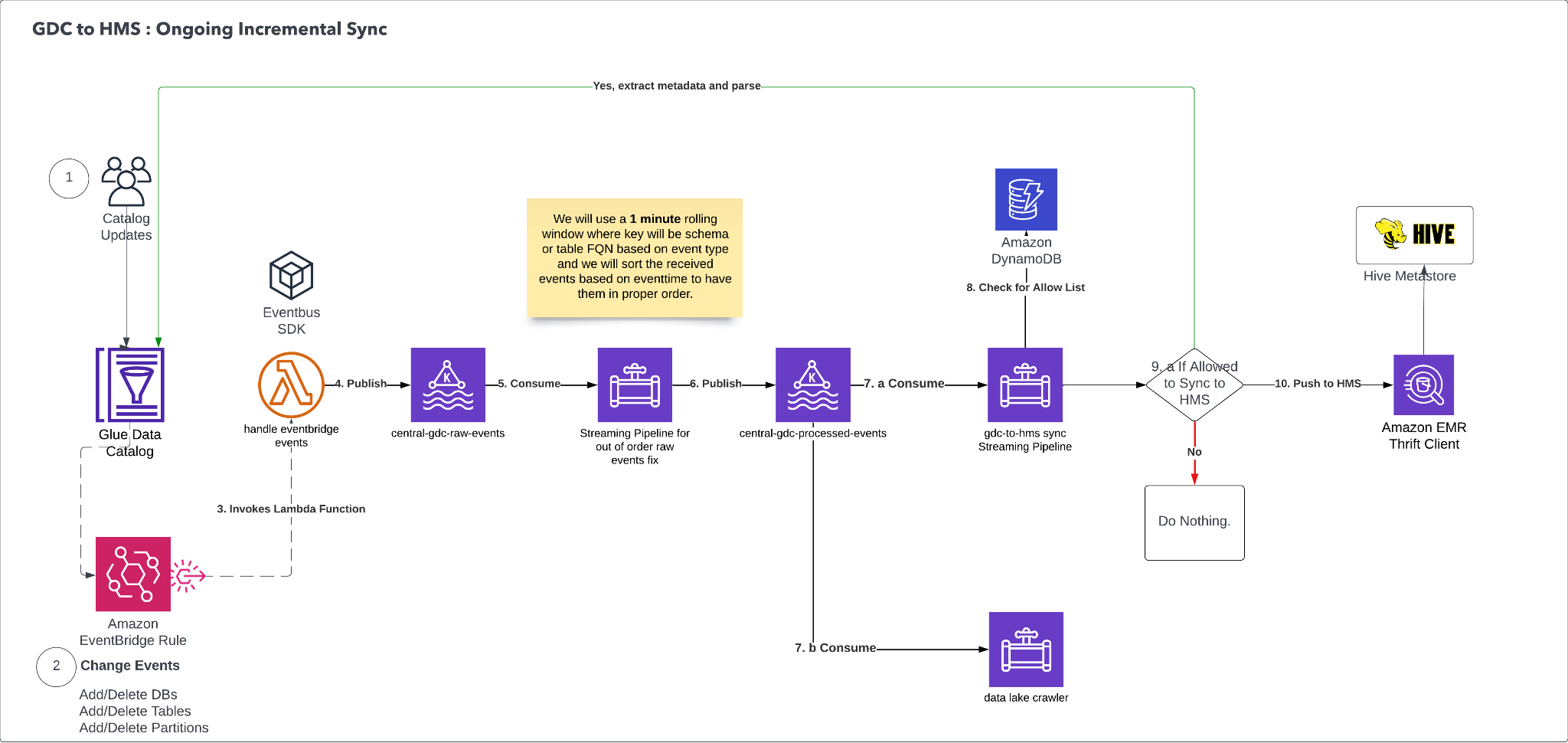
Figure 4: Ongoing incremental sync from AWS Glue Data Catalog to Hive Metastore
The reverse sync from GDC to HMS follows an event-driven architecture. It captures metadata changes made in the AWS Glue Data Catalog and propagates them back to HMS to maintain bidirectional consistency.
When databases, tables, or partitions are added to or deleted from GDC, Amazon EventBridge detects the change through an EventBridge rule. This rule is configured to match specific change events (adding or deleting databases, tables, or partitions) and triggers an AWS Lambda function (handle-eventbridge-events) to begin processing the event.
The Lambda function publishes the raw events to an Amazon Managed Streaming for Apache Kafka (Amazon MSK) topic called central-gdc-raw-events. A downstream Apache Flink consumer, the Streaming Pipeline for Out of Order Raw Events, reads from this topic and applies event ordering logic. Because events might arrive out of sequence, this pipeline uses a one-minute rolling window to buffer events by schema or table. It then sorts the buffered events by their event timestamp and re-publishes them in the correct order to a second Amazon MSK topic called central-gdc-ordered-events.
At this point, the flow splits into two parallel consumption paths.
- The first path is consumed by another Apache Flink consumer, the
gdc-to-hms-syncpipeline, which is responsible for determining whether a given schema or table is allowed to sync. It performs a lookup against an Amazon DynamoDB table to check an allow list. If the entity is permitted for synchronization, the pipeline proceeds to push the metadata change to HMS using Amazon Athena as the execution engine. If the entity isn’t on the allow list, the pipeline takes no action and the event is dropped. - The second consumption path is consumed by a Data Lake crawler which updates the Data Lake control plane metadata inventory database.
The content of each ordered event is used as a trigger to get the latest metadata from GDC. That metadata is then synced to HMS by using the Thrift SDK and a Thrift client running on an Amazon EMR cluster.
The overall design reflects changes made in GDC reliably and consistently back into HMS. The event ordering pipeline applies operations in the correct sequence, regardless of delivery order. The allowlist mechanism in DynamoDB provides governance, because teams control which schemas participate in the reverse sync. Amazon Athena handles the final push to HMS by using its native integration with both GDC and Hive-compatible data stores.
3. Parity tool
When doing a migration through a bidirectional sync approach, a mechanism to do a parity check between the two systems is important to track any drift in the two catalogs. A parity tool was built to make sure the two catalogs are always in sync and to catch any discrepancies.
The following diagram shows the four stages of the parity tool pipeline: data extraction, data storage, comparison, and results.
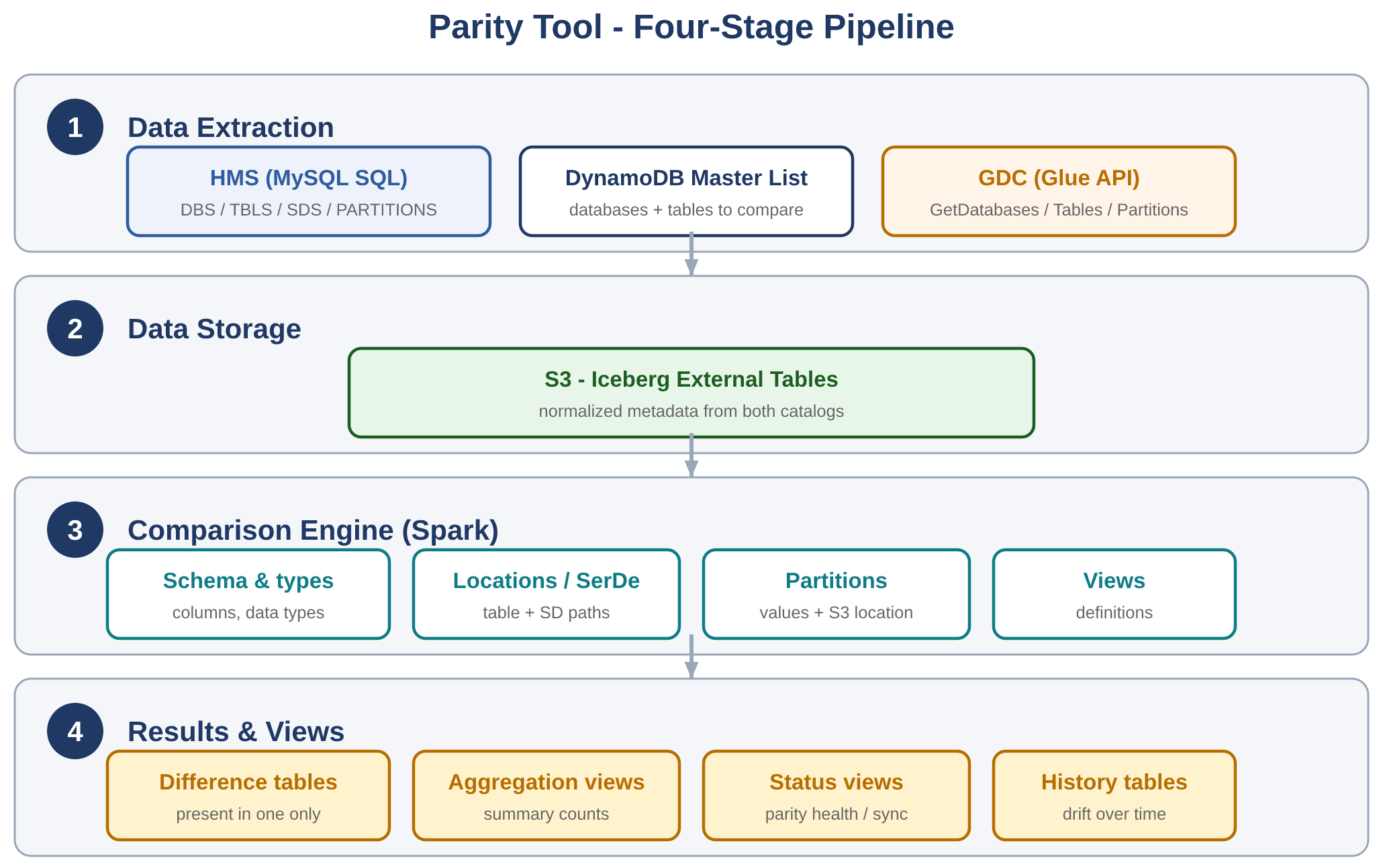
Figure 5: Four-stage parity tool pipeline that compares the two catalogs
The parity tool uses AWS Glue jobs and Spark processing to efficiently compare catalog metadata:
- Data extraction:
- Primary list: Reads from DynamoDB table to determine which databases and tables to compare.
- HMS: Connects to HMS MySQL database to extract metadata for tables in the primary list.
- GDC: Uses AWS Glue API to extract metadata for tables in the primary list.
- Data storage:
- S3 output: Extracted data from both catalogs is written to S3 in Iceberg table format.
- Iceberg tables: External Iceberg tables are created, allowing for efficient querying and comparison using Spark.
- Comparison engine:
- Spark jobs analyzed the Iceberg tables to identify differences in:
- Databases exist in both catalogs.
- Tables exist in both databases.
- Table structures including columns and data types.
- Table locations and SerDe paths.
- Partition information including values and S3 location.
- View definitions.
- Spark jobs analyzed the Iceberg tables to identify differences in:
- Results and views:
- Difference tables are created showing objects present in one catalog but not the other.
- Aggregation views provide summary counts.
- Status views show parity health and sync status.
- History tables track changes over time.
4. Ad hoc migration
An ad hoc migration process was built to perform ad hoc migrations for specific databases, tables, or partitions. This makes sure that if there is a discrepancy identified by the parity tool, it can be mitigated without having to run a full sync process. The ad hoc migration is an enhancement to the utility used for one-time sync where it can take the database name, table name, and partition information as input. Depending on the input provided, it will sync the respective objects.
GDC table requirements
- S3 location: The location for the table data must be in S3. Only databases with an S3 location, or databases with one or more tables with an S3 location, will be included in the migration.
- S3 location name length: The S3 location name can be up to 701 characters.
- Table type: Only the HMS table types
MANAGED_TABLE,EXTERNAL_TABLE, andVIRTUAL_VIEWare being imported to GDC. - Non-blank column names: Every column must have a name.
- Column name length: Column names can be up to 255 characters. HMS allows 256.
- Column name characters: Column names must not include the following characters:
?,\n, and\\. - Column type name length: Column type names can be up to 131,072 characters (2^17).
Conclusion
Migrating metadata from HMS to GDC is a complex process, but it can enhance your data management capabilities. Intuit’s migration shows that moving from HMS to GDC requires careful planning and execution. It also shows that the benefits of a modern, cloud-native catalog service make the move a worthwhile investment for organizations that want to scale their data operations efficiently and securely. After migrating to GDC, Intuit is focusing on implementing strong access controls using row-level, column-level, and cell-level controls in AWS Lake Formation. Because Intuit is building complex solutions and applications, this level of fine-grained access control is critical. Getting its catalog migrated to GDC was an important step in this journey.
To plan your own migration, see the AWS Glue Data Catalog documentation and the AWS Glue Hive metastore migration utility on GitHub. For fine-grained access control, see the AWS Lake Formation documentation.